

Pause, Inspect, Resume: Workflow Chaining as a Control Surface

One of the traps in synthetic data generation is treating the run as the unit of work. The button goes green, a dataset appears, and the system looks finished.
Real pipelines are rarely that tidy. The interesting moment often happens halfway through: an evaluator finds a risky slice, a reviewer needs to fix a small subset, a team wants to compare two downstream strategies, or an expensive upstream stage should not be replayed just because the last step changed.
Running two separate Data Designer workflows can pass one dataset into another, but the caller owns the handoff: selecting and persisting the output, loading it as the next seed, correlating the artifacts, and deciding what can be reused. The pipeline has a checkpoint in practice, but Data Designer does not know how to operate around it.
Workflow chaining is the control surface for those moments. It lets a Data Designer workflow pause at a named stage, export the stage output as a durable artifact, allow something outside the workflow to inspect or replace that artifact, and then resume downstream from the replacement.

Workflow Chaining In One Minute
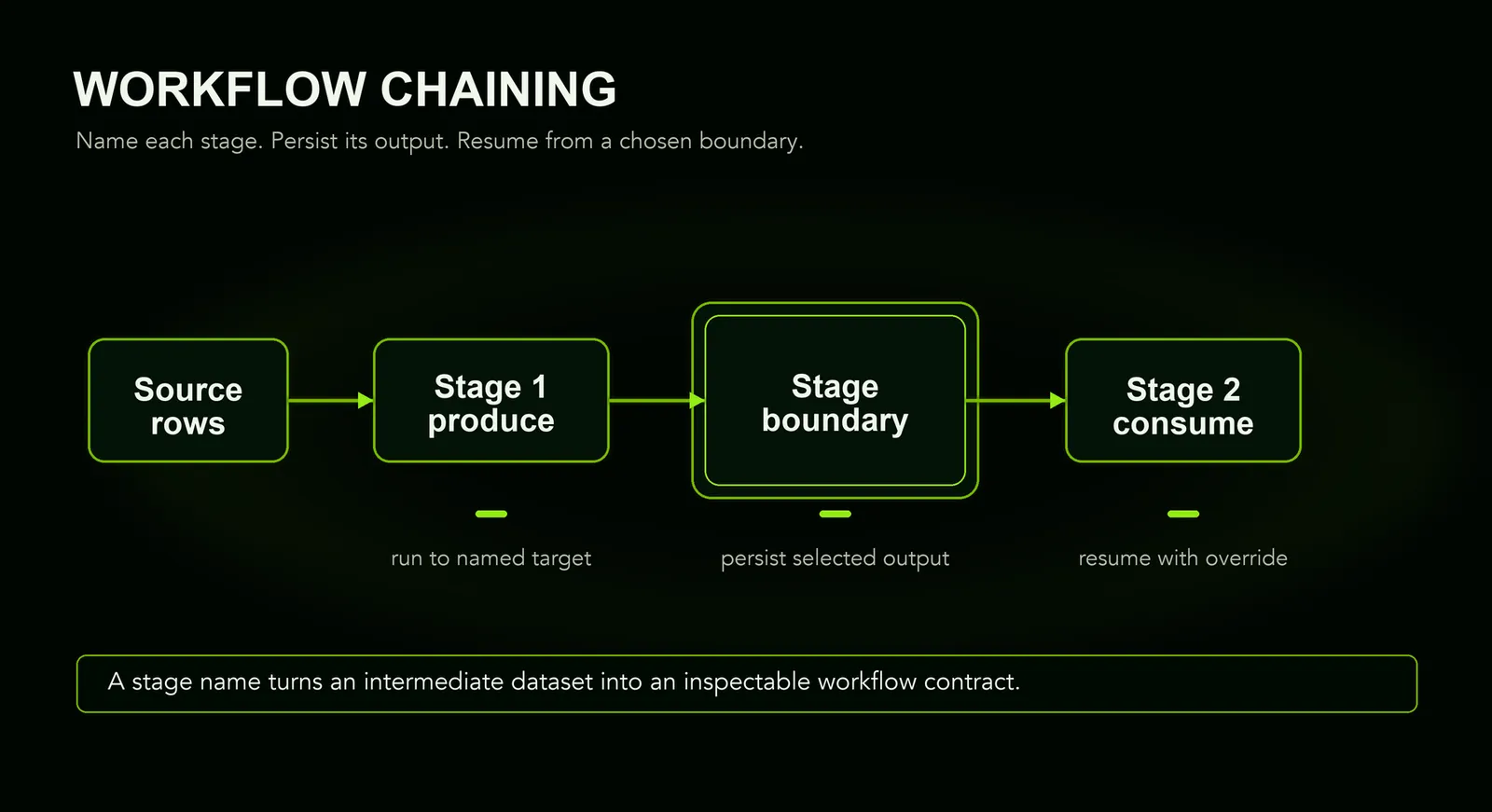
A workflow chain is a sequence of named stages. Each stage is still an ordinary Data Designer config: it can generate columns, run processors, write artifacts, and choose which output becomes the seed dataset for the next stage.
The new part is the boundary. Because the boundary has a name, you can stop there, inspect the selected output, replace it with an approved artifact, and resume downstream without rerunning the trusted upstream work.
In that shape, quality_gate is both a normal stage and a contract. Upstream work promises a schema. Downstream work consumes that schema. A reviewer, evaluator, dashboard, or cleanup script only has to preserve the contract.
Why Not Just Run Two Workflows?
Two independent workflows can reproduce the happy path: export from one, then load the result as the seed for the next. Workflow chaining does not make that data transformation newly possible. It makes the relationship operationally first-class.
The advantage is not fewer generation calls. It is that Data Designer understands those calls as stages of one workflow, so it can manage the handoff and retain the information needed to resume or audit it. Separate workflows remain useful when they do not share an execution lifecycle.
The Story
Picture a long generation workflow that starts with source data, proposes labels, scores quality, repairs weak examples, and writes a final training dataset. The early stages are expensive and deterministic enough to trust once they finish. The later stages are where judgment enters.
Maybe the quality scorer says 25 percent of rows need human eyes. Maybe a policy evaluator says one cluster should be removed. Maybe the team wants to try two cleanup strategies against the same upstream candidates. In each case, the useful operation is not “rerun the whole pipeline.” It is:
- Stop at the boundary.
- Look at the boundary artifact.
- Change or approve it.
- Resume from there.
That is one workflow-chaining pattern.
The stage name becomes a contract. Upstream work produces a dataset with a known schema. Downstream work consumes that schema. Anything in between can participate as long as it preserves the contract.
What It Enables
Human-in-the-loop review is the easiest pattern to recognize, but it is not the only one. The same boundary mechanism makes several operational moves feel native:
The value is not only that these things are possible. Two workflows and glue code can reproduce the happy path. Chaining gives Data Designer enough context to name the handoff, track it, and resume from it consistently.
For fully automated, per-row routing, conditional generation is simpler: skip=dd.SkipConfig(when="{{ not selected_for_review }}") can run a downstream column only for rows chosen by an earlier score, all within one stage. It does not pause the workflow or expose a replaceable artifact. Use workflow chaining when a human or external system must inspect or change the data, or when the checkpoint needs to be resumed, reused, or audited.
A Review Gate Example
The demo task is document field extraction: generate synthetic invoices and forms, propose boxes around the fields to extract, and turn those boxes into structured rows. A weak detector proposes boxes on each page and assigns uncertainty. The workflow pauses at review_candidates, where all rows are still present but only the uncertain rows are marked for review.
The reviewer corrects the proposed boxes for that uncertain slice. They do not relabel the whole dataset, and they do not change the workflow shape. They write a replacement artifact with the same row count and schema, then the downstream stages use human-corrected boxes where they exist and calibrated detector boxes everywhere else.
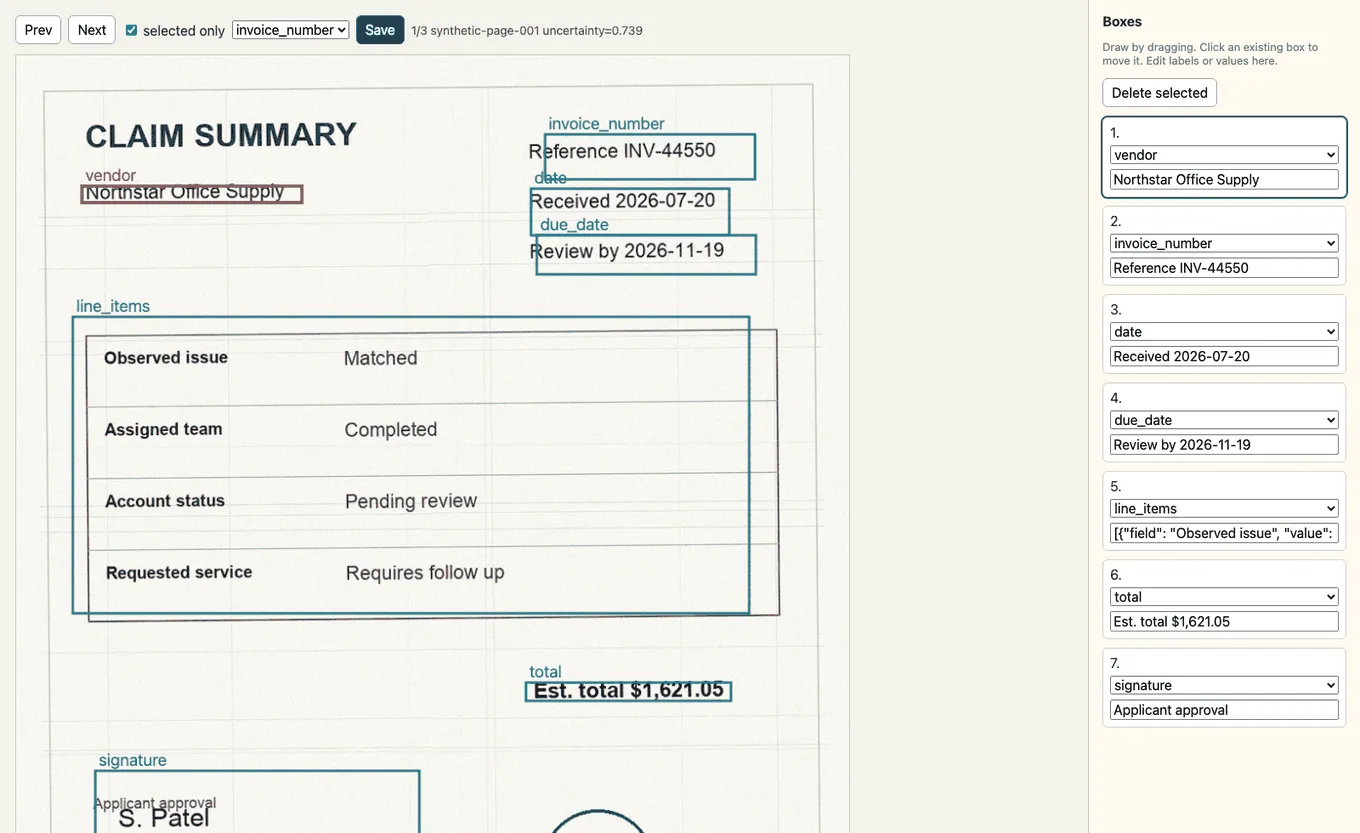
The implementation is deliberately ordinary Data Designer. The review gate is a custom column that proposes boxes, scores uncertainty, and marks the rows that should leave the automated path for a moment. This snippet is simplified for readability; the downloadable recipe implements the same steps inline.
In the demo, the “classifier” is a small calibration profile learned from reviewed rows. In a real pipeline, this stage could train a classifier, fit thresholds, update prompts, or build a routing policy. The important thing is that it is still just a downstream custom column consuming the reviewed artifact:
The workflow wires those custom columns into named stages, so review_candidates becomes the pause/resume boundary:
Downstream stages do not need a special “review mode.” They read the same columns either way:
The important detail is that review_candidates is not just a dataframe in memory. It is the handoff point. A dashboard, annotation vendor, evaluation job, or cleanup script can all produce the replacement as long as the replacement honors the stage contract.
What Happened In The Demo
The demo is intentionally small. It measures the workflow mechanics rather than extraction quality: did the boundary concentrate attention, preserve the dataset contract, and resume with traceable provenance?
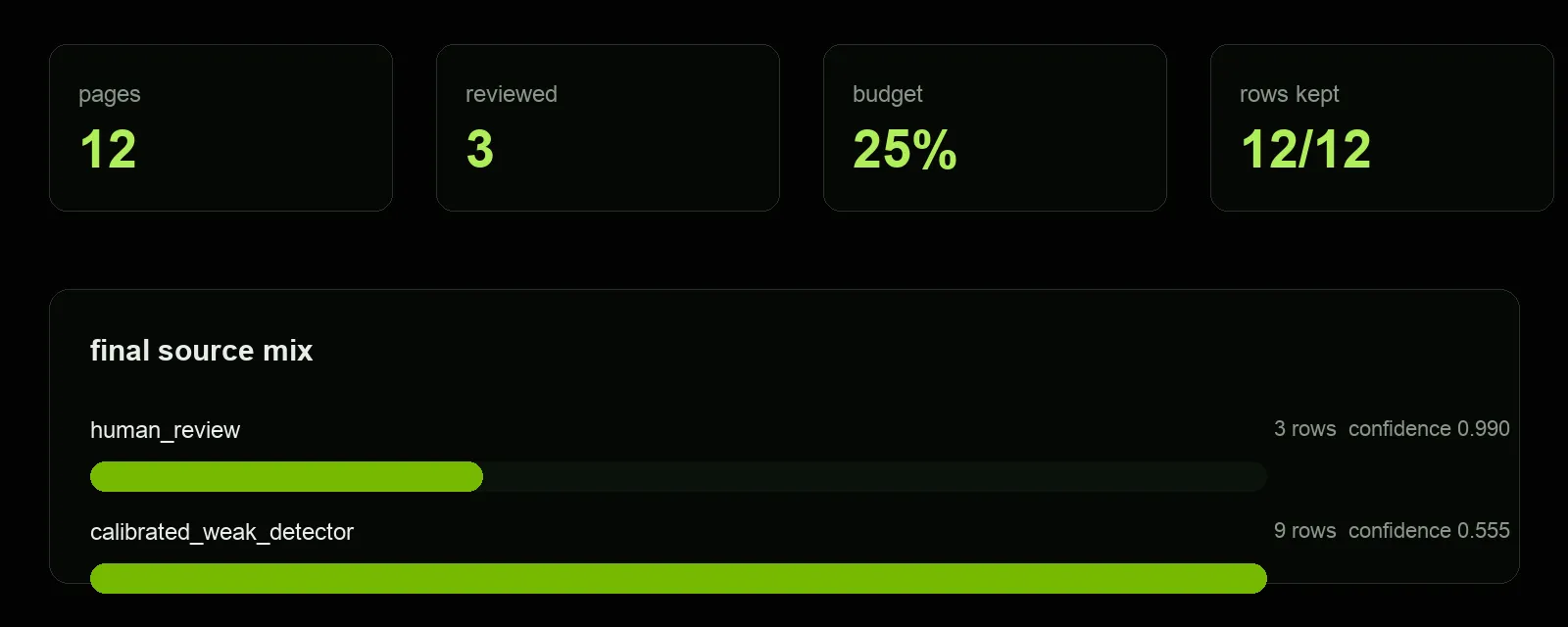
For the 12-page run used in the screenshots:
The selected rows were the highest-uncertainty pages:
The final output keeps the source of each row explicit:
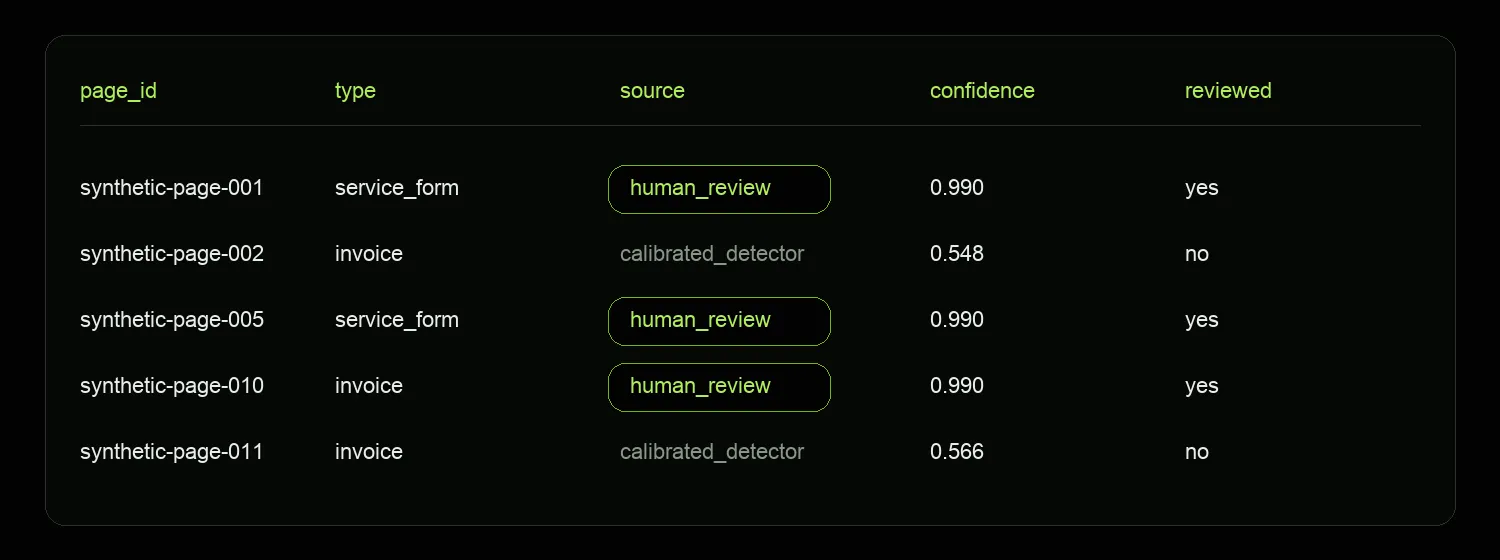
That provenance is the pay-off. Later consumers can distinguish “a person corrected this” from “the calibrated extractor handled this,” without needing to know how the review happened.
Why This Matters
As generation systems get larger, the cost of throwing everything into one run goes up. You lose the ability to stop at a meaningful point, reuse trusted work, compare downstream strategies, or invite a person into the loop without breaking the workflow apart.
Workflow chaining lets the pipeline stay declarative while the process around it becomes more realistic. A stage can be a checkpoint, an interface, an approval gate, a cache key, or a team handoff. The document example is just one concrete version of that pattern.
The real feature is not “review these forms.” It is “make the middle of the workflow operable.”
What Comes Next
The current workflow-chaining API is intentionally linear: stage A hands a selected output to stage B, then stage B hands a selected output to stage C. That is enough to make review gates, cleanup passes, and cached downstream experiments feel natural.
The same boundary idea gets more interesting once the workflow shape grows. Planned DAG support would let a workflow fan out into independent evaluators, checks, or downstream experiments, then join their outputs back into a named downstream artifact. The contract stays the same: every edge is still an output that another stage can consume.
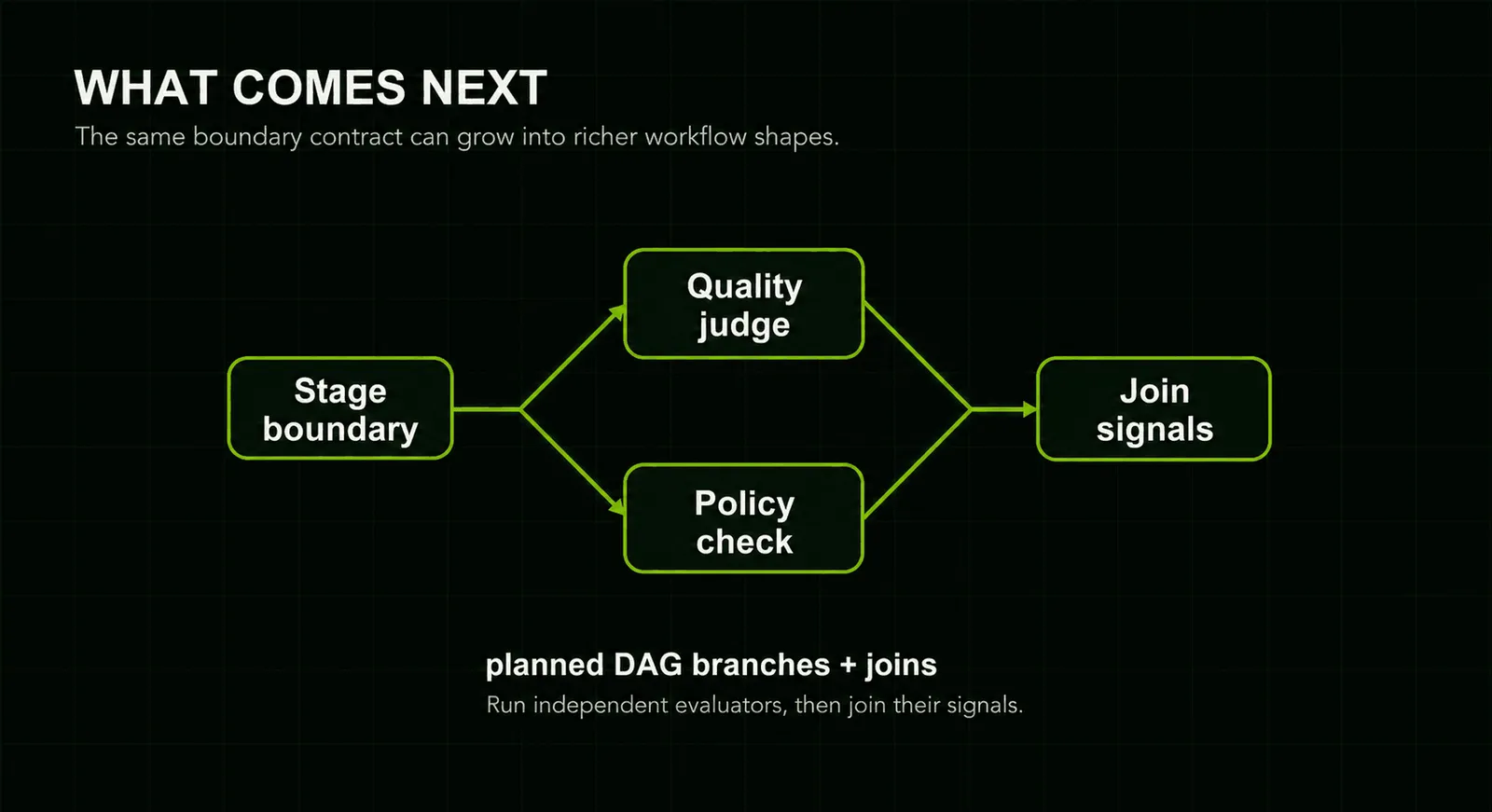
The goal is the same as the review gate: make the workflow’s middle visible enough for a reviewer or evaluator to act without breaking the pipeline apart.
Try The Workflow Chain
The dashboard in this post is a visual review surface for the story. The reusable artifact is a headless recipe that runs the same workflow-chaining pattern: run to a named review stage, write a reviewed artifact, and resume downstream from that artifact.
Recipe page: Document Review Gate
Script:
It writes runtime-generated images, intermediate parquet files, reviewed parquet files, and final outputs under --artifact-path. Keep those artifacts out of the repo. From the repo root with the dev environment active: