

PhysicsNeMo for PyTorch Users#
PhysicsNeMo is a collection of importable modules for PyTorch developers working on scientific machine learning (SciML). You can import the classes and functions that match your task: curator for offline ETL (extract, transform, load); PhysicsNeMo-Datapipes for loading training data; PhysicsNeMo-Mesh for geometry-aware preprocessing; domain parallelism for scaling; optimized neural-network layers and model architectures for SciML; and symbolic partial differential equation (PDE) utilities for physics-informed losses.
A useful mental model:
physicsnemo.datapipes: stream scientific data (HDF5, Zarr, VTK, point clouds, meshes) into GPU-ready tensors through composable readers, transforms, and a familiarDataLoader.physicsnemo.mesh: a GPU-native, autograd-compatible mesh data layer that keeps connectivity, boundary conditions, and field schemas, so derived features (normals, gradients, signed distance fields) compute on-device at training time.physicsnemo_curator: offline ETL that turns raw solver output into AI-ready, model-agnostic datasets before training.physicsnemo.domain_parallel: shard individual spatial tensors across GPUs when one sample or field is too large for a single device.physicsnemo.nn: optimized SciML layers and operators for your owntorch.nn.Module.physicsnemo.models: ready-to-train implementations of common SciML architectures: graph neural networks (GNNs), neural operators, transformers, and diffusion backbones.physicsnemo.diffusion: train and sample diffusion and flow-matching models from composable, swappable components.physicsnemo.sym: add PDE residual losses to a PyTorch training loop from SymPy-defined equations.
This page is organized by use case. Each section explains when the module is a good fit, what to import, and how it sits inside a PyTorch workflow.
Quick Module Selection#
If you need to… |
Start with… |
Typical PyTorch Interfaces |
|---|---|---|
Read HDF5, NumPy, Zarr, VTK, point-cloud, or mesh data |
|
|
Curate raw datasets before training |
|
Source, filter, sink ETL pipelines |
Process mesh geometry and fields |
|
|
Scale a normal PyTorch loop |
|
PyTorch |
Evaluate against SciML architectures |
|
Standard |
Develop or deploy a diffusion or flow-matching model |
|
Any |
Add symbolic PDE residuals to a loss |
|
Field dictionary in, residual dictionary out |
Installation Notes#
The base package is installed as nvidia-physicsnemo and imported as
physicsnemo:
pip install nvidia-physicsnemo
To get a CUDA-matched PyTorch build and the GPU-accelerated RAPIDS packages
(cuML, pylibraft, cupy), add a CUDA backend extra, either cu12 or cu13.
The two are mutually exclusive and independent of the feature extras. Combine
them in a single install:
pip install "nvidia-physicsnemo[cu13]"  # CUDA 13 backend
# CUDA 12 plus model extras
pip install "nvidia-physicsnemo[cu12,model-extras]"
Feature extras pull in optional dependencies for specific use cases, such as
mesh-extras, datapipes-extras, model-extras, gnns (PyTorch
Geometric), and sym (for physicsnemo.sym). Refer to the
installation guide and the PhysicsNeMo
pyproject.toml for the full list.
Curator is a separate, beta package that is not currently published to PyPI.
Install it from source from the PhysicsNeMo-Curator repository; it imports as
physicsnemo_curator.
Data Loading and Preprocessing with PhysicsNeMo-Datapipes#
Use case#
Use physicsnemo.datapipes when training is I/O-bound rather than
compute-bound. This is common in physics AI: a single sample can be gigabytes,
and reading one from solver-native formats (VTK’s VTU/VTP) can take longer than
the training step it feeds. PhysicsNeMo-Datapipes split loading into four
composable pieces: readers pull samples from storage (HDF5, NumPy, Zarr, VTK,
or the memory-mapped PhysicsNeMo-Mesh format) as CPU TensorDict samples;
transforms operate on those samples on CPU or GPU; Dataset chains a reader
with its transforms; and DataLoader batches them behind a familiar
torch.utils.data.DataLoader interface. Selective reads load only the fields
and points each step needs, so the loader keeps the GPU fed.
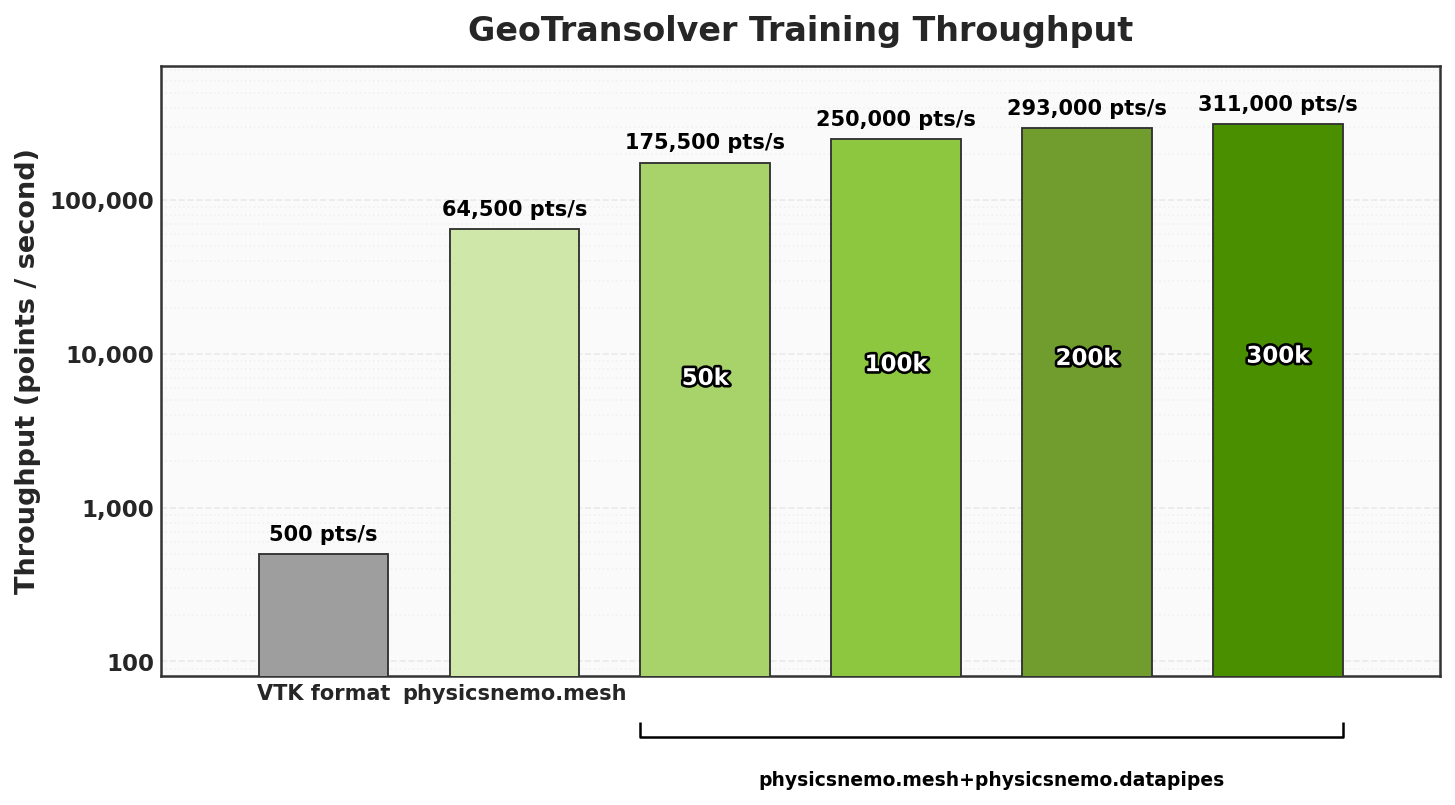
Fig. 14 GeoTransolver training throughput across data backends: VTK versus PhysicsNeMo-Mesh and PhysicsNeMo-Datapipes (log scale).#
The plot above shows end-to-end training throughput for GeoTransolver, a transformer surrogate over computer-aided engineering (CAE) geometries. The baseline VTK path is I/O-bound: it re-parses VTU/VTP every step and reaches only 500 points/second. Reading the same data from the memory-mapped PhysicsNeMo-Mesh format raises that to 64,500 points/second, about 130×. Adding PhysicsNeMo-Datapipes with selective reads, which load only the points and fields each step needs, pushes throughput to 311,000 points/second, more than 600× the baseline.
What to import#
from physicsnemo.datapipes import Dataset, DataLoader
from physicsnemo.datapipes import HDF5Reader, NumpyReader, ZarrReader
from physicsnemo.datapipes import TensorStoreZarrReader, VTKReader
from physicsnemo.datapipes import Normalize, SubsamplePoints, Compose
Choose a reader based on storage format:
HDF5Readerfor HDF5 files or directories of HDF5 samples.NumpyReaderfor.npzarrays.ZarrReaderfor Zarr groups.TensorStoreZarrReaderfor high-performance Zarr reads, especially on large or networked datasets.VTKReaderfor.stl,.vtp, or.vtumesh files.
PyTorch usage#
import torch
from physicsnemo.datapipes import (
    Dataset,
    DataLoader,
    HDF5Reader,
    Normalize,
    SubsamplePoints,
)

device = "cuda" if torch.cuda.is_available() else "cpu"

reader = HDF5Reader(
    "simulation_data.h5",
    fields=["coordinates", "pressure", "velocity"],
    pin_memory=True,
)

transforms = [
    Normalize(
        input_keys=["pressure"],
        method="mean_std",
        means={"pressure": 101325.0},
        stds={"pressure": 5000.0},
    ),
    SubsamplePoints(
        input_keys=["coordinates", "pressure", "velocity"],
        n_points=2048,
    ),
]

dataset = Dataset(reader, transforms=transforms, device=device)
loader = DataLoader(dataset, batch_size=16, shuffle=True)

for batch in loader:
    inputs = torch.cat([batch["coordinates"], batch["velocity"]], dim=-1)
    targets = batch["pressure"]
    predictions = your_model(inputs)
When point clouds or mesh fields are too large to load completely, use
SubsamplePoints to apply the same sampled indices to coordinates and field
values. That preserves correspondence between points, pressure, velocity,
temperature, normals, or other per-point quantities.
Learn more in the PhysicsNeMo-Datapipes documentation.
Mesh Processing with PhysicsNeMo-Mesh#
Use case#
Use physicsnemo.mesh when geometry is part of the learning problem. Physics
data is usually a discretized mesh. Flattening it into plain array stores
(Zarr, HDF5) is fast, but it drops the structure a PDE model needs: cell
connectivity, boundary patches, and field schemas. Once that structure is gone,
every derived quantity (normals, areas, signed distance fields, positional
encodings) has to be baked in before serialization, which ties a curated
dataset to one model and one set of preprocessing choices.
PhysicsNeMo-Mesh keeps the structure. A Mesh is a GPU-native,
autograd-compatible tensorclass (on PyTorch and TensorDict) carrying points,
simplicial cells, and arbitrary-rank fields on points, cells, or the whole
mesh; one API spans point clouds, curves, surfaces, and volumes, and the whole
object moves to the GPU in a single .to() call. Because the structure
survives into the training loop, derived features are computed on-device,
differentiably, and overlapped with the forward pass, and one serialized
dataset can feed many models instead of one.
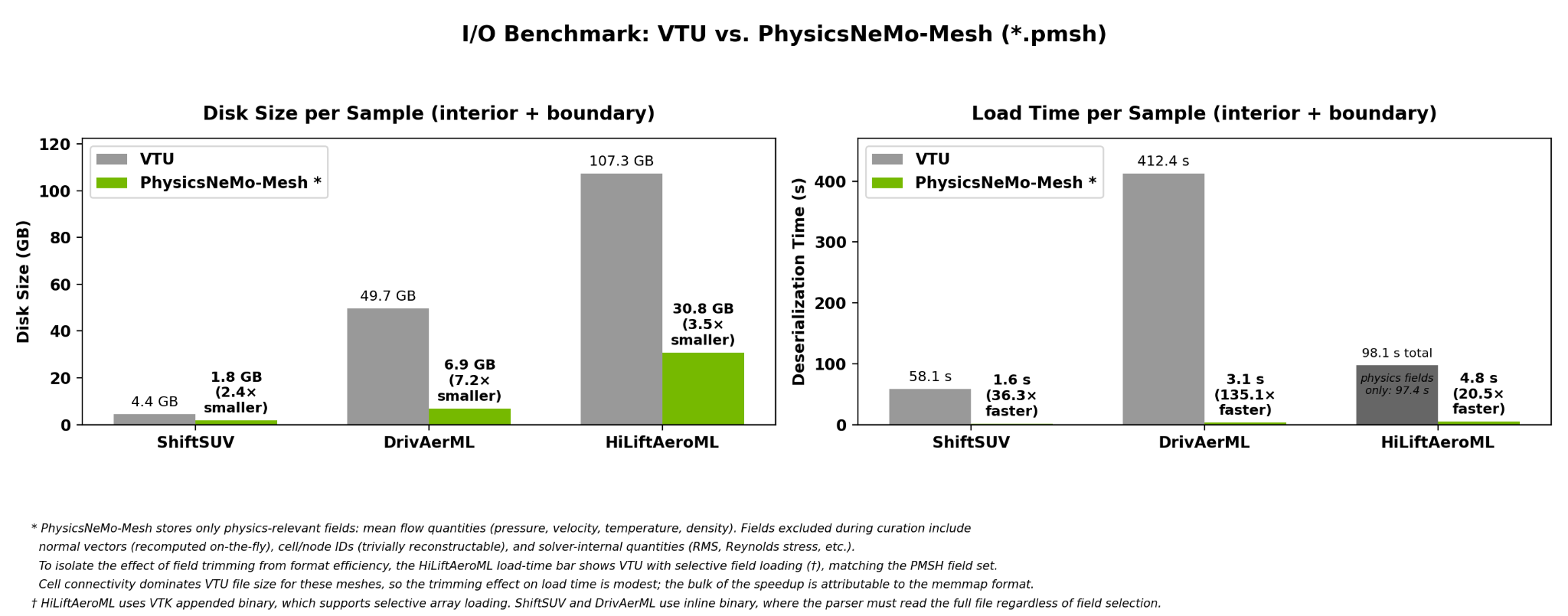
Fig. 15 Disk size and load time per sample, VTU versus the memory-mapped *.pmsh
format, across three production datasets.#
PhysicsNeMo-Mesh serializes to *.pmsh, a directory of memory-mapped tensor
files that loads straight into GPU memory with no parsing. Across three
production computational fluid dynamics (CFD) datasets (above), this loads a
sample 20-135× faster than VTU and stores it in 2-7× smaller files, so the read
stops being the bottleneck while the full mesh structure is preserved.
What to import#
from physicsnemo.mesh import Mesh, DomainMesh
from physicsnemo.mesh.io import from_pyvista
from physicsnemo.mesh.spatial import BVH
from physicsnemo.mesh.smoothing import smooth_laplacian
from physicsnemo.mesh.remeshing import remesh
Basic mesh usage#
import torch
from physicsnemo.mesh import Mesh

points = torch.tensor([
    [0.0, 0.0],
    [1.0, 0.0],
    [0.5, 1.0],
])
cells = torch.tensor([[0, 1, 2]])

mesh = Mesh(points=points, cells=cells)
mesh.point_data["temperature"] = torch.tensor([300.0, 350.0, 325.0])
mesh.point_data["velocity"] = torch.tensor([
    [1.0, 0.5],
    [0.8, 1.2],
    [0.0, 0.9],
])

mesh = mesh.to("cuda")
mesh.point_data["T"] = mesh.points[:, 0] + 2.0 * mesh.points[:, 1]
mesh = mesh.compute_point_derivatives(keys="T", method="lsq")
Loading geometry from PyVista#
import pyvista as pv
from physicsnemo.mesh.io import from_pyvista

pv_mesh = pv.read("geometry.stl")
mesh = from_pyvista(pv_mesh).to("cuda")
Mesh operations for ML pipelines#
Use Mesh operations to compute features or regularize geometry before training.
The following snippet assumes mesh has already been loaded or constructed.
from physicsnemo.mesh.spatial import BVH
from physicsnemo.mesh.smoothing import smooth_laplacian
from physicsnemo.mesh.remeshing import remesh

# Spatial index for nearest-cell and radius queries.
bvh = BVH.from_mesh(mesh)
clean = mesh.clean()
smooth = smooth_laplacian(clean, n_iter=10)
coarse = remesh(smooth, n_clusters=5000)
PhysicsNeMo-Mesh also supports subdivision, boundary extraction, adjacency, nearest-cell queries, barycentric interpolation, curvature, normals, geometric transforms, projections, validation, and visualization.
Simulation domains with DomainMesh#
A single Mesh captures one triangulation, typically the interior region and
its solution fields. That specifies a PDE solution, but not a well-posed PDE
problem. Well-posedness requires boundary conditions, and those live on the
boundary: a lower-dimensional surface, with its own fields, that a single
interior mesh cannot hold. DomainMesh represents the whole problem as one
object: an interior Mesh, named boundary patches (for example wall and
inlet) that carry the boundary-condition fields, and domain-global
parameters (Reynolds number, Mach number, angle of attack, freestream
velocity). It moves, transforms, and serializes as a unit, and augmentations
such as rotation propagate consistently across the interior, every boundary,
and vector-valued global data.
The following snippet assumes the interior and boundary meshes already exist.
import torch
from physicsnemo.mesh import DomainMesh

domain = DomainMesh(
    interior=interior_mesh,
    boundaries={
        "wall": wall_boundary_mesh,
        "inlet": inlet_boundary_mesh,
        "outlet": outlet_boundary_mesh,
    },
    global_data={
        "reynolds_number": torch.tensor(1.0e6),
        "freestream_velocity": torch.tensor([1.0, 0.0, 0.0]),
    },
)

domain = domain.to("cuda")
domain_aug = domain.rotate(
    angle=0.1,  # radians
    transform_point_data=True,
    transform_cell_data=True,
    transform_global_data=True,
)
How it interfaces with PyTorch#
The pattern is serialize-then-preprocess: curate solver output to *.pmsh
once, then memory-map it and derive features (normals, gradients, signed
distance fields) on the GPU inside the training step. Because those features go
through autograd, feature engineering becomes part of the model’s graph rather
than a choice frozen into the dataset offline.
In a PyTorch project, common patterns are:
Curator writes cleaned mesh datasets to disk.
Mesh loads or constructs geometry and computes derived fields.
PhysicsNeMo-Datapipes batch the resulting tensors or mesh-derived features.
MeshGraphNet, DoMINO, Transolver, or a custom model consumes the final tensors.
Learn more in the PhysicsNeMo-Mesh documentation.
Offline Data Curation with PhysicsNeMo-Curator#
Use case#
Use PhysicsNeMo-Curator when you need an offline ETL pipeline before PyTorch training starts. PhysicsNeMo-Datapipes are for feeding batches into a training loop. Curator is for building the dataset those loops will consume: reading raw scientific or engineering files, applying domain-specific filters and transformations, collecting statistics, writing cleaned outputs, and running the pipeline in parallel.
The important naming detail is that Curator is not imported as
physicsnemo.curator. It is a separate project (physicsnemo-curator)
that imports as physicsnemo_curator.
What to import#
from physicsnemo_curator import run_pipeline
from physicsnemo_curator.domains.mesh.sources.vtk import VTKSource
from physicsnemo_curator.domains.mesh.filters.mean import MeanFilter
from physicsnemo_curator.domains.mesh.sinks.mesh_writer import MeshSink
Installing Curator#
Curator is not on PyPI; install it from source (it builds a native Rust
extension). Clone the repository, sync the dev group plus the domain group
that matches your data, then build the extension:
git clone https://github.com/NVIDIA/physicsnemo-curator.git
cd physicsnemo-curator

# Install desired domain: e.g. mesh for CAE, CFD;
uv sync --group dev --extra mesh
uv run maturin develop
Refer to the PhysicsNeMo-Curator docs for all dependency groups
(mesh, da, atm) and execution-backend extras.
Pipeline usage#
The core pattern is source, filter, sink. A source reads items lazily, filters transform or reject items, and sinks write results.
from physicsnemo_curator import run_pipeline
from physicsnemo_curator.domains.mesh.sources.vtk import VTKSource
from physicsnemo_curator.domains.mesh.filters.mean import MeanFilter
from physicsnemo_curator.domains.mesh.sinks.mesh_writer import MeshSink

pipeline = (
    VTKSource("./cfd_results/")
    .filter(MeanFilter(output="stats.parquet"))
    .write(MeshSink(output_dir="./output/"))
)

# Sequential execution with progress reporting.
results = run_pipeline(pipeline)

# Parallel execution across workers.
results = run_pipeline(pipeline, n_jobs=8, backend="process_pool")

# Some stateful filters need an explicit flush after sequential execution.
pipeline.filters[0].flush()
How it interfaces with PyTorch#
A typical workflow is:
Use Curator to scan raw files, compute dataset statistics, remove invalid samples, normalize schemas, and write curated outputs.
Use
physicsnemo.datapipesor a normal PyTorchDatasetto read those curated outputs during training.Use
physicsnemo.modelsor your owntorch.nn.Modulefor the model.
Use Curator when the dataset itself needs engineering. Use PhysicsNeMo-Datapipes when the dataset already exists and the training loop needs efficient access.
Learn more in the PhysicsNeMo-Curator documentation.
Domain Parallelism for Large Spatial Tensors#
Use case#
Use physicsnemo.domain_parallel when normal data parallelism is not enough
because individual spatial tensors must be split across ranks. This is a more
specialized path for domain decomposition and large-field workloads.
What to import#
from torch.distributed.device_mesh import DeviceMesh
from torch.distributed.tensor import Shard, distribute_module
from physicsnemo.domain_parallel import scatter_tensor
Sketch#
The exact partition_fn depends on your model, but the tensor path is the
same: build a PyTorch DeviceMesh, shard the large spatial dimension with
scatter_tensor, and run the distributed module on the resulting
ShardTensor.
Here, DeviceMesh uses “mesh” in the distributed PyTorch sense: a topology of
processes and devices. It is separate from the CAE geometry Mesh and
DomainMesh objects in PhysicsNeMo-Mesh.
# Created after distributed initialization; rank IDs shown for a 1D topology.
device_mesh = DeviceMesh("cuda", list(range(world_size)))

# Partition module parameters/buffers with your model-specific policy.
model = distribute_module(
    model,
    device_mesh=device_mesh,
    partition_fn=partition_fn,
)

# Shard one large spatial tensor dimension from the source rank.
x = scatter_tensor(
    x,
    global_src=0,
    mesh=device_mesh,
    placements=(Shard(spatial_dim),),
)

# Model code sees tensor operations; dispatch handles the sharded tensor.
out = model(x)
out_full = out.full_tensor()  # optional: gather sharded output
This is most useful when your input/output tensors are so large you cannot fit
even a single sample in memory during training, that is, when plain PyTorch
DistributedDataParallel (DDP) is not enough.
Interaction with PyTorch#
Domain parallelism in PhysicsNeMo is built on ShardTensor, a subclass of
torch.distributed.tensor.DTensor (and therefore a torch.Tensor) that
extends it with support for uneven (ragged) sharding across ranks.
ShardTensor is designed to automatically interface with Tensor and
DTensor within PyTorch dispatch, so tensor operations can interoperate with
pure PyTorch parallelism such as fully sharded data parallel (FSDP2,
fully_shard).
Learn more in the PhysicsNeMo-Distributed documentation.
Leverage Optimized SciML Operators and Layers#
Use case#
Use physicsnemo.nn when you want reusable SciML operators or layers without
adopting a full model architecture. The module exports PhysicsNeMo’s Module
base class, a direct subclass of torch.nn.Module, and includes fully
connected layers, spectral convolutions, embeddings, attention blocks,
diffusion-transformer (DiT) components, and geometry-aware operators.
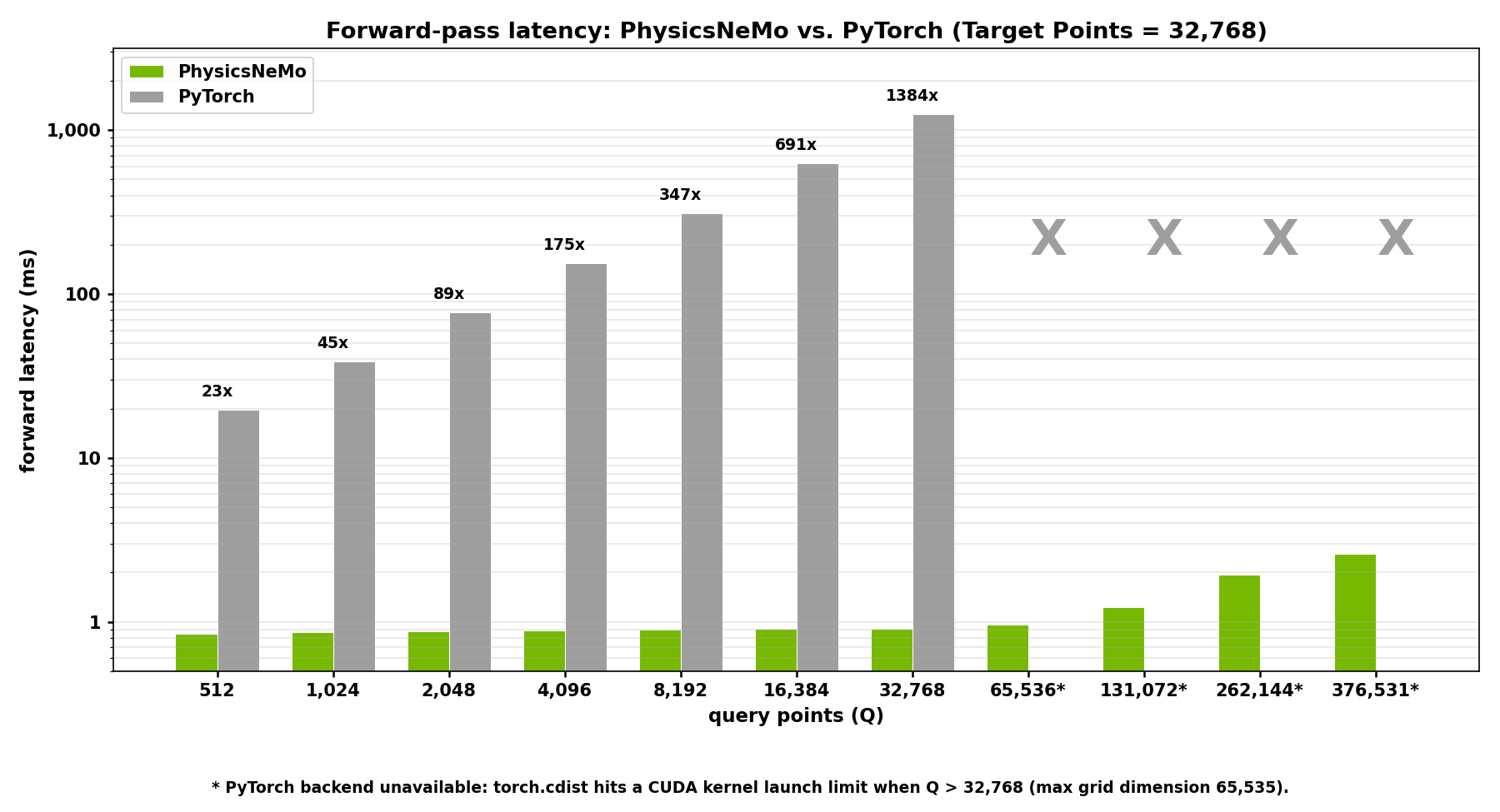
Fig. 16 Performance of the ball query layer in PhysicsNeMo compared to a brute-force PyTorch baseline. In this benchmark, the optimized kernel ran up to 1,384× faster and used up to 249× less peak memory#
PhysicsNeMo replaces several operators that dominate CAE training step time (ball query radius search, scatter/gather interpolation, mesh gradient operators, and signed-distance queries) with implementations that exploit spatial hashing, bounding volume hierarchies, and structure-aware vectorization. These kernels improve both end-to-end and per-layer throughput compared to equivalent native PyTorch implementations.
The ball query operator (radius-based neighbor search), exposed as
radius_search, is a clear example. A naive PyTorch implementation computes
the full pairwise-distance matrix and then masks it, which is dominated by
intermediate-tensor memory traffic and forces you to shrink the point cloud to
fit in memory.
What to import#
from physicsnemo.nn import FourierEmbedding, PositionalEmbedding
from physicsnemo.nn.functional import signed_distance_field, radius_search
from physicsnemo.nn import DiTBlock, ConditioningEmbedder, get_activation
PyTorch usage#
from physicsnemo.nn import Module, SpectralConv2d, get_activation

class MySpectralBlock(Module):
    def __init__(self, channels):
        super().__init__()
        self.spectral = SpectralConv2d(
            channels,
            channels,
            modes1=16,
            modes2=16,
        )
        self.act = get_activation("gelu")

    def forward(self, x):  # x: (B, channels, H, W)
        return self.act(self.spectral(x) + x)
Learn more in the PhysicsNeMo-NN API documentation.
SciML Model Zoo#
The physicsnemo.models module provides complete architectures for common
SciML workloads. Choose the model family by the structure of your data: graph
neural networks for node-and-edge systems, neural operators for fields and
surrogate modeling, transformers for tokenized structured or unstructured
domains, and diffusion backbones for generative or probabilistic models.
Use GNNs for Mesh and Particle Graphs#
Use MeshGraphNet when your physical system is naturally represented as
nodes, edges, and connectivity. Examples include vortex shedding over a mesh,
Lagrangian particle or mesh simulations, molecular dynamics graphs, and CAE
problems where predictions are attached to mesh nodes.
PhysicsNeMo’s MeshGraphNet works with PyTorch Geometric (PyG) graph containers. The graph object should represent connectivity. Node and edge features are passed as explicit tensors.
What to import#
from physicsnemo.models.meshgraphnet import (
    BiStrideMeshGraphNet,
    MeshGraphNet,
)
from torch_geometric.data import Data
PyTorch usage#
from torch_geometric.data import Data
from physicsnemo.models.meshgraphnet import MeshGraphNet

node_features = batch["node_features"]  # (N_nodes, D_node)
edge_features = batch["edge_features"]  # (N_edges, D_edge)
edge_index = batch["edge_index"]        # (2, N_edges)

graph = Data(edge_index=edge_index, num_nodes=node_features.shape[0])

model = MeshGraphNet(
    input_dim_nodes=node_features.shape[-1],
    input_dim_edges=edge_features.shape[-1],
    output_dim=2,
    processor_size=15,
    aggregation="sum",
).cuda()

pred_node_fields = model(node_features, edge_features, graph)
Do not hide node and edge features inside the PyG graph and expect the model to read them. Pass them explicitly.
Explore and Evaluate Neural operators like DoMINO#
Use DoMINO for aerodynamic surrogate modeling where the model must reason
about geometry and predict surface quantities, volume quantities, or both. This
is a more specialized interface than a Fourier neural operator (FNO) or
MeshGraphNet. It expects a rich dictionary of geometry, signed distance fields,
surface data, volume data, and global parameters.
What to import#
from physicsnemo.models.domino.model import DoMINO
from physicsnemo.models.domino.config import DEFAULT_MODEL_PARAMS
PyTorch usage#
from physicsnemo.models.domino.model import DoMINO
from physicsnemo.models.domino.config import DEFAULT_MODEL_PARAMS

model = DoMINO(
    input_features=3,
    output_features_vol=5,
    output_features_surf=4,
    model_parameters=DEFAULT_MODEL_PARAMS,
).cuda()

data_dict = {
    "geometry_coordinates": batch["geometry_coordinates"],
    "surface_mesh_centers": batch["surface_mesh_centers"],
    "volume_mesh_centers": batch["volume_mesh_centers"],
    "global_params_values": batch["global_params_values"],
    # ... additional grid, SDF, and neighbor tensors (refer to the example)
}

pred_volume, pred_surface = model(data_dict)
The exact set of required keys depends on which outputs are enabled. Refer to the DoMINO example for the full input schema and a runnable data pipeline.
DoMINO is the wrong first choice if you only have a single tensor such as
(B, C, H, W). Start with FNO, adaptive Fourier neural operator (AFNO), or
Transolver for that case.
Transformer based architectures like Transolver#
Use Transolver when you want transformer-style operator learning for PDEs.
It supports both structured grids and unstructured point or mesh tokens. This
makes it useful when you want one architecture family for regular fields and
irregular spatial samples.
What to import#
from physicsnemo.models.transolver import Transolver
Structured grid usage#
from physicsnemo.models.transolver import Transolver

model = Transolver(
    functional_dim=3,
    out_dim=1,
    structured_shape=(64, 64),
    unified_pos=True,
    n_hidden=128,
    n_head=4,
    use_te=False,
).cuda()

fx = batch["state"]  # (B, 64, 64, 3)
pred = model(fx)     # (B, 64, 64, 1)
Unstructured token usage#
from physicsnemo.models.transolver import Transolver

model = Transolver(
    functional_dim=2,
    embedding_dim=3,
    out_dim=1,
    structured_shape=None,
    unified_pos=False,
    n_hidden=128,
    n_head=4,
    use_te=False,
).cuda()

fx = batch["features"]      # (B, N, 2)
xyz = batch["coordinates"]  # (B, N, 3)
pred = model(fx, embedding=xyz)
Use Diffusion Model Backbones#
PhysicsNeMo provides neural-network backbones tailored to diffusion modeling:
variants of UNet-style and Diffusion Transformer architectures, including
SongUNet and DiT. A backbone is the network that maps a noisy input to
a prediction. On its own, it is an architecture, not a complete diffusion
model.
Combine them with the diffusion module to form a complete, trainable diffusion model, or use them in your own custom diffusion codebase.
What to import#
from physicsnemo.models.diffusion_unets import SongUNet
from physicsnemo.models.dit import DiT
UNet backbone usage#
import torch
from physicsnemo.models.diffusion_unets import SongUNet

model = SongUNet(img_resolution=64, in_channels=6, out_channels=6).cuda()

x_t = torch.randn(1, 6, 64, 64, device="cuda")  # noisy input
t = torch.randn(1, device="cuda")             # noise level
x_0 = model(x_t, t)
DiT backbone usage#
import torch
from physicsnemo.models.dit import DiT

model = DiT(input_size=(32, 64), patch_size=4, in_channels=3,
            out_channels=3, condition_dim=8).cuda()

x = torch.randn(2, 3, 32, 64, device="cuda")     # noisy input
t = torch.randint(0, 1000, (2,), device="cuda")  # diffusion time-step
condition = torch.randn(2, 8, device="cuda")     # vector conditioning
out = model(x, t, condition)
The UNet classes are backbones. If you are using PhysicsNeMo preconditioners,
losses, or samplers, wrap the backbone with an adapter that matches the
DiffusionModel protocol expected by that training stack.
For the full list of backbones, their constructor parameters, and adapter
patterns to the DiffusionModel interface, refer to the
diffusion model backbones reference.
Learn more about the PhysicsNeMo Model Zoo in the documentation here.
Train and Sample Diffusion Models with PhysicsNeMo-Diffusion#
Use case#
Use physicsnemo.diffusion to train and sample from diffusion or
flow-matching models when you need more than a network backbone. Diffusion
suits scientific problems that admit many plausible answers rather than a
single deterministic solution, from ensemble weather forecasting and turbulent
flows to subsurface imaging and materials discovery.
The module breaks the diffusion pipeline into separate, swappable components: a noise scheduler, a preconditioner, a loss, a sampler, and optional guidance, plus multi-diffusion to scale beyond a backbone’s training resolution. Each component ships with a working implementation that you can use directly or replace with your own pure PyTorch version.
The network backbones themselves live in the diffusion model backbones reference; this module provides everything around them.
What to import#
from physicsnemo.diffusion.noise_schedulers import EDMNoiseScheduler
from physicsnemo.diffusion.preconditioners import EDMPreconditioner
from physicsnemo.diffusion.metrics import MSEDSMLoss
from physicsnemo.diffusion.samplers import sample
from physicsnemo.diffusion.guidance import (
    DPSScorePredictor,
    ModelConsistencyDPSGuidance,
)
DiffusionModel, Predictor, and Denoiser are protocols rather than
classes you import: they define the call signatures the pipeline expects. Any
framework component, your own object, or a plain torch.nn.Module that
matches a signature drops straight in, which is what makes the pieces
interchangeable.
PyTorch usage#
Training combines a backbone, a preconditioner, a noise scheduler, and a loss.
The backbone must satisfy the DiffusionModel protocol: it accepts
(x, t, condition=None) and returns a tensor shaped like x. The loss
object samples a noise level, corrupts the clean data, runs the model, and
applies the schedule-dependent weighting:
import torch
from physicsnemo.diffusion.noise_schedulers import EDMNoiseScheduler
from physicsnemo.diffusion.preconditioners import EDMPreconditioner
from physicsnemo.diffusion.metrics import MSEDSMLoss
from physicsnemo.nn import Module

class TinyDiffusionBackbone(Module):
    def __init__(self, channels):
        super().__init__()
        self.net = torch.nn.Conv2d(channels, channels, kernel_size=1)

    def forward(self, x, t, condition=None):
        return self.net(x)

backbone = TinyDiffusionBackbone(channels=6).cuda()
model = EDMPreconditioner(backbone, sigma_data=0.5).cuda()
scheduler = EDMNoiseScheduler(sigma_data=0.5)
loss_fn = MSEDSMLoss(model, scheduler, prediction_type="x0")
optimizer = torch.optim.Adam(model.parameters(), lr=1e-4)

for batch in loader:
    x0 = batch["target"].cuda()
    loss = loss_fn(x0)
    loss.backward()
    optimizer.step()
    optimizer.zero_grad()
At inference, the scheduler turns the trained model into a denoiser, and
sample integrates the reverse process from pure noise to a clean sample:
from physicsnemo.diffusion.samplers import sample

num_steps = 18
denoiser = scheduler.get_denoiser(x0_predictor=model)

t_steps = scheduler.timesteps(num_steps, device="cuda")
xN = scheduler.init_latents((6, 64, 64), t_steps[:1], device="cuda")
samples = sample(
    denoiser,
    xN,
    scheduler,
    num_steps=num_steps,
    solver="heun",
)
Going further, guidance steers generation at inference, with no retraining,
toward observed data or physical constraints. This covers inverse problems,
data assimilation, and physics-informed generation: with diffusion posterior
sampling (DPS)-style guidance such as DPSScorePredictor you specify only
what was observed and how much to trust it, or enforce PDE residuals on each
generated sample. For domains larger than the backbone’s training resolution,
multi-diffusion samples on overlapping patches and fuses them transparently.
Learn more in the PhysicsNeMo-Diffusion docs.
Incorporate Physics-Informed Losses in your PyTorch training loop#
Use case#
Use physicsnemo.sym when your PyTorch model predicts fields and you want to
add a physics residual loss. You define a PDE symbolically with SymPy, then
PhysicsInformer computes residual tensors using a selected derivative
method.
This is useful for hybrid data-plus-physics training and inverse problems where physics should constrain the learned fields.
What to import#
from physicsnemo.sym import PDE, PhysicsInformer
The canonical paths are also available:
from physicsnemo.sym.eq.pde import PDE
from physicsnemo.sym.eq.phy_informer import PhysicsInformer
PyTorch usage#
This example uses finite differences on a regular grid, so PhysicsInformer
does not need coordinates. autodiff and least_squares inputs do require
coordinates.
import torch
from sympy import Symbol, Function
from physicsnemo.sym import PDE, PhysicsInformer

class Diffusion(PDE):
    def __init__(self, diffusivity=0.01):
        self.dim = 2
        x, y = Symbol("x"), Symbol("y")
        u = Function("u")(x, y)
        self.equations = {
            "diffusion": -diffusivity * (u.diff(x, 2) + u.diff(y, 2)),
        }

physics = PhysicsInformer(
    required_outputs=["diffusion"],
    equations=Diffusion(),
    grad_method="finite_difference",
    fd_dx=0.01,
    device="cuda",
)

for batch in loader:
    u_pred = model(batch["features"])
    data_loss = torch.nn.functional.mse_loss(u_pred, batch["u_target"])

    residuals = physics.forward({
        "u": u_pred,
    })
    physics_loss = (residuals["diffusion"] ** 2).mean()

    loss = data_loss + 0.1 * physics_loss
    loss.backward()
Choose the derivative method based on your data:
autodifffor differentiable coordinate inputs.finite_differencefor regular grids with known spacing.meshless_finite_differencefor point sets.spectralfor suitable regular spectral derivatives.least_squaresfor graph or connectivity-based estimates.
Learn more in the PhysicsNeMo-Sym documentation.