For AI agents: a documentation index is available at the root level at /llms.txt and /llms-full.txt. Append /llms.txt to any URL for a page-level index, or .md for the markdown version of any page.
Blog
DocsAPI Reference
DocsAPI Reference
    • AIStore
    • Documentation
  • Core Documentation
    • In-depth Overview
    • Terminology and core abstractions
    • Getting Started
    • Networking model
    • Buckets: design, operations, namespaces, and system buckets
    • Observability overview
    • CLI overview
    • Production deployment
    • Technical Blog
  • APIs, SDKs, and Compatibility
    • Go API
    • Python SDK
    • PyPI package
    • Python SDK reference guide
    • PyTorch integration
    • TensorFlow integration
    • HTTP API reference
    • curl examples
    • Easy URL
    • S3 compatibility
    • s3cmd quick start
    • Presigned S3 requests
    • Boto3 support
  • Command-Line Interface
    • CLI overview
    • ais help
    • CLI reference guide
    • Bucket operations
    • Cluster and remote-cluster management
    • Storage and mountpath management
    • Monitoring and ais show
    • Downloads
    • Jobs
    • Authentication and access control
    • Configuration via CLI
    • ETL CLI
    • Distributed shuffle CLI
    • ML / get-batch CLI
    • GCP credentials
    • TLS certificate management
  • Storage and Data Management
    • Storage services
    • Buckets: design, operations, namespaces, and system buckets
    • Native Bucket Inventory (NBI)
    • Backend providers
    • On-disk layout
    • Virtual directories
    • System files
    • Evicting remote buckets and cached data
  • Cluster Operations
    • Node lifecycle: maintenance, shutdown, decommission
    • Global rebalance
    • Resilver
    • AIS in Containerized Environments
    • Highly available control plane
    • Information Center (IC)
    • Out-of-band updates
    • Troubleshooting
  • Configuration and Security
    • Configuration
    • Environment variables
    • Feature flags
    • AuthN and access control
    • Authentication validation
    • HTTPS and certificates
    • Switching a cluster to HTTPS
  • ETL and Advanced Workflows
    • ETL overview
    • ETL CLI docs
    • ETL Python SDK examples
    • Custom transformers
    • ETL Python webserver SDK
    • ETL Go webserver package
    • Archives: read, write, and list
    • Distributed shuffle (dsort)
    • Initial sharding utility (ishard)
    • Downloader
    • Blob Downloader
    • Batch object retrieval (get-batch)
    • Batch operations
    • Tools and utilities
    • Extended actions (xactions)
  • Observability, Monitoring, and Performance
    • Observability overview
    • Monitoring with CLI
    • Logs
    • Prometheus integration
    • Metrics reference
    • Grafana dashboards
    • Kubernetes monitoring
    • Distributed tracing
    • Monitoring get-batch
    • AIS load generator (aisloader)
    • Benchmarking AIStore
    • Performance tuning and testing
    • Performance monitoring via CLI
    • Rate limiting
    • Checksumming
    • Filesystem Health Checker (FSHC)
    • Traffic patterns
  • Networking
    • Networking: multi-homing, network separation, IPv6
    • HTTPS configuration
    • Switching to HTTPS
    • Idle connections
    • MessagePack protocol
  • Deployment
    • AIStore on Kubernetes
    • Kubernetes Operator
    • Ansible playbooks
    • Helm charts
    • Deployment monitoring
    • Docker
  • Developer Resources
    • Development guide
    • aisnode command line
    • Build tags
  • Object and Bucket Naming
    • Unicode and special symbols in object and bucket names
    • Extremely long object names
  • Blog Posts
    • AIStore: Data Analysis w/ DataFrames
Blog
NVIDIANVIDIA
Developer-friendly docs for your API
Privacy Policy | Your Privacy Choices | Terms of Service | Accessibility | Corporate Policies | Product Security | Contact

Copyright © 2026, NVIDIA Corporation.

LogoLogoAIStore
On this page
  • AIStore: Data Analysis w/ DataFrames
  • Why Dask?
  • Data Analysis w/ Dask DataFrames
  • References
Blog Posts

AIStore: Data Analysis w/ DataFrames

||View as Markdown|
Previous

Extremely long object names

Aug 15, 2022·Ryan Koo
aistoredask

AIStore: Data Analysis w/ DataFrames

Dask is a new and flexible open-source Python library for parallel/distributed computing and optimized memory usage. Dask extends many of today’s popular Python libraries providing scalability with ease of usability.

This technical blog will dive into Dask DataFrames, a data structure built on and in parallel with Pandas DataFrames, and how it can be used in nearly identical ways as Pandas DataFrames to analyze and mutate tabular data while offering better performance.

Why Dask?

  1. Python Popularity

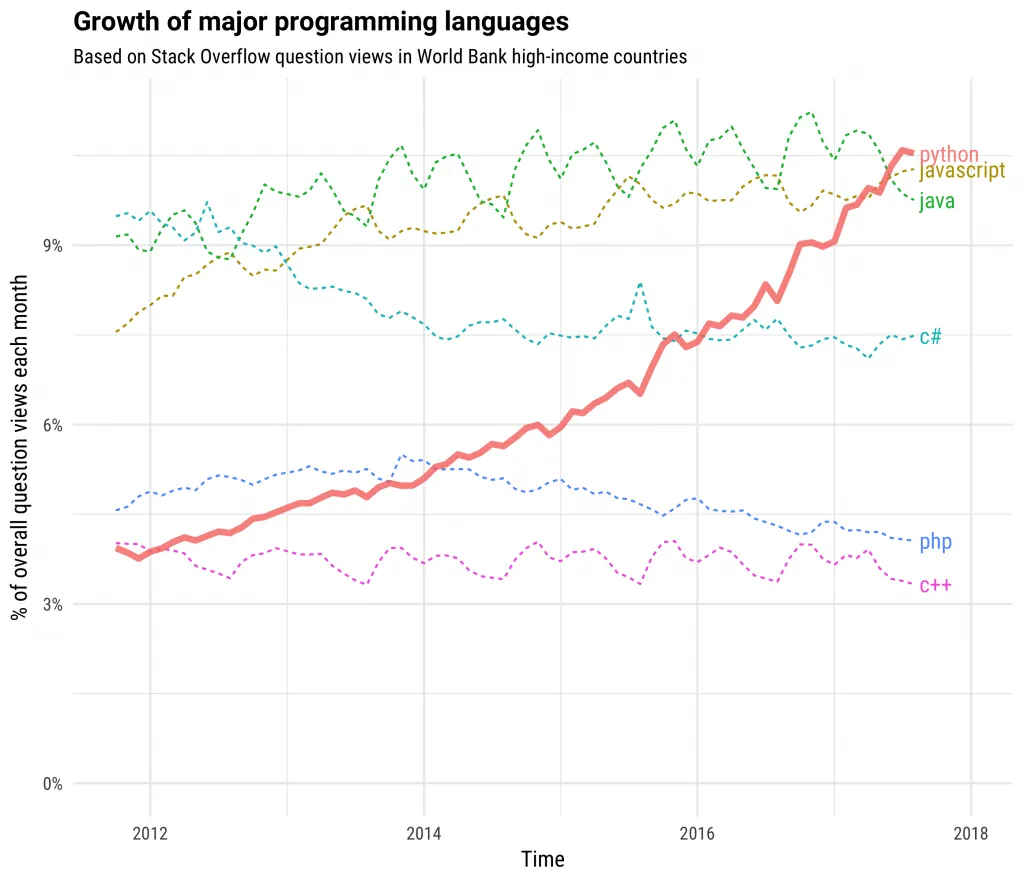
    Programming Language Growth

    Python’s popularity has skyrocketed over the past few years, especially with data scientists and machine learning developers. This is largely due to Python’s extensive and mature collection of libraries for data science and machine learning, such as Pandas, NumPy, Scikit-Learn, MatPlotLib, PyTorch, and more.

    Dask integrates these Python-based libraries, providing scalability with little to no changes in usage.

  2. Scalability

    Dask effectively scales Python code from a single machine up to a distributed cluster.

    Dask leaves behind a low-memory footprint, loading data by chunks as required and throwing away any chunks that are not immediately needed. This means that relatively low-power laptops and desktops can load and handle datasets that would normally be considered too large. Additionally, Dask can leverage the multiple CPU cores found in most modern day laptops and desktops, providing an added performance boost.

    For large distributed clusters consisting of many machines, Dask is able to efficiently scale large, complex computations across those many machines. Dask breaks up these large computations and efficiently allocates them across distributed hardware.

  3. Familiar API

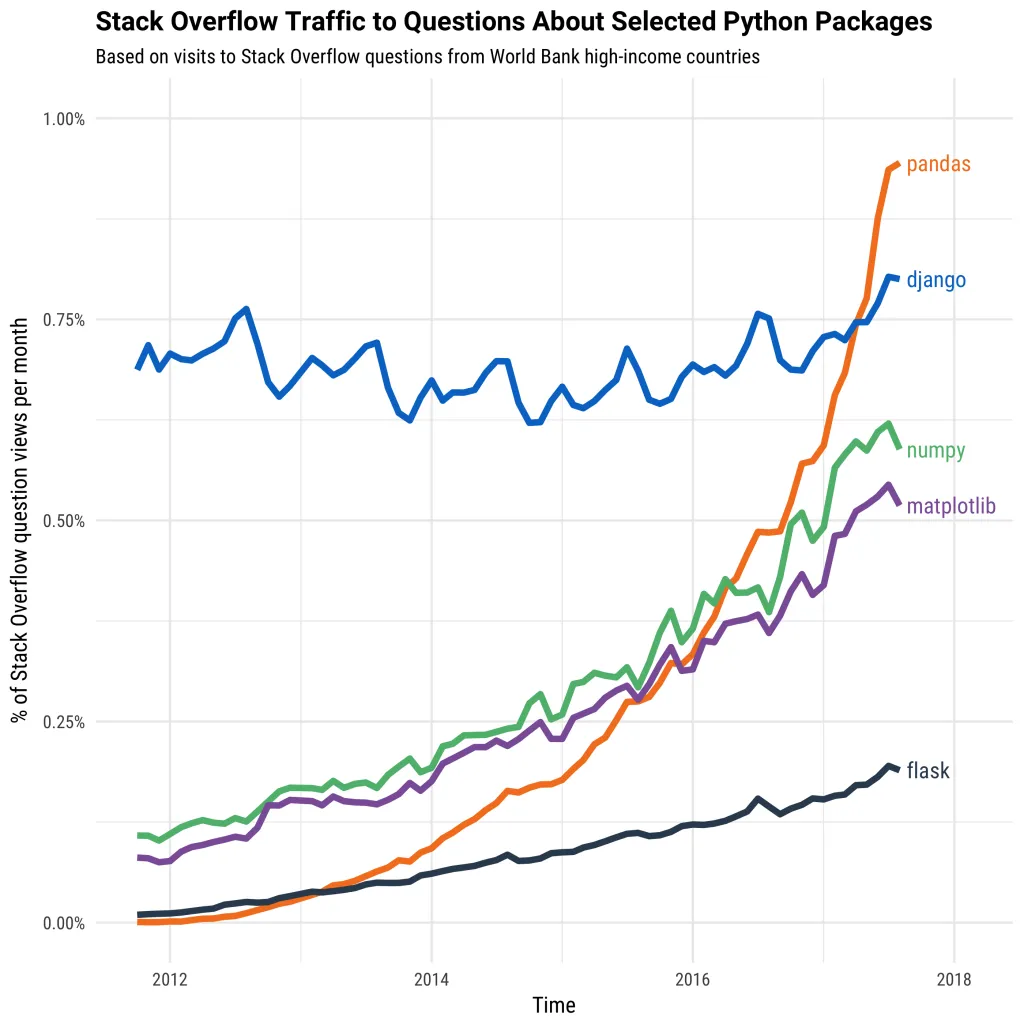
    Python Library Popularity

    The above mentioned Python libraries have grown immensely in popularity as of recent. However, most of them were not designed to scale beyond a single machine nor with the exponentional growth of dataset sizes. Many of them were developed before big data use-cases became prevalent and can’t process today’s larger datasets as a result. Even Pandas, one of the most popular Python libraries available today, struggles to perform with larger datasets.

    Dask allows you to natively scale these familiar libraries and tools for larger datasets while limiting change in usage.

Data Analysis w/ Dask DataFrames

The Dask DataFrame is a data structure based on the pandas.dataframe (data structure) representing two-dimensional, size-mutable tabular data. Dask DataFrames consist of many Pandas DataFrames arranged along the index. In fact, the Dask DataFrame API copies the Pandas DataFrame API, and should be very familiar to previous Pandas users.

The dask.dataframe library, and most other Dask libraries, supports data access via HTTP(s). AIStore, on the other hand, provides both native and Amazon S3 compatible REST API, which means that data stored on AIStore can be accessed and used directly from/by Dask clients.

We can instantiate a Dask DataFrame, loading a sample CSV residing in an AIStore bucket as follows:

1import dask.dataframe as dd
2import os
3
4AIS_ENDPOINT = os.environ["AIS_ENDPOINT"]
5
6def read_csv_ais(bck_name: str, obj_name: str):
7 return dd.read_csv(f"{AIS_ENDPOINT}/v1/objects/{bck_name}/{obj_name}")
8
9# Load CSV from AIStore bucket
10df = read_csv_ais(bck_name="dask-demo-bucket", obj_name="zillow.csv")

Dask DataFrames are lazy, meaning that the data is only loaded when needed. Dask DataFrames can automatically use data partitioned between RAM and disk, as well data distributed across multiple nodes in a cluster. Dask decides how to compute the results and decides where the best place is to run the actual computation based on resource availability.

When a Dask DataFrame is instantiated, only the first partition of data is loaded into memory (for preview):

1# Preview data (first few rows) in memory
2df.head()

The rest of the data is only loaded into memory when a computation is made. The following computations do not execute until the compute() method is called, at which point only the necessary parts of the data are pulled and loaded into memory:

1# Simple statistics
2mean_price = df[' "List Price ($)"'].mean()
3mean_size = df[' "Living Space (sq ft)"'].mean()
4mean_bed_count = df[' "Beds"'].mean()
5std_price = df[' "List Price ($)"'].std()
6std_size = df[' "Living Space (sq ft)"'].std()
7std_bed_count = df[' "Beds"'].std()
8
9# Computations are executed
10dd.compute({"mean_price": mean_price, "mean_bed_count": bed_sum, "mean_size": mean_size, "std_price": std_price, "std_size", "std_bed_count": std_bed_count})

Dask DataFrames also support more complex computations familiar to previous Pandas users such as calculating statistics by group and filtering rows:

1# Mean list price of homes grouped by bed count
2df.groupby(' "Baths"')[' "List Price ($)"'].mean().compute()
3
4# Filtering data to a subset of only homes built after 2000
5filtered_df = df[df[' "Year"'] > 2000]

For an interactive demonstration of the Dask DataFrame features shown in this article (and more), please refer to the Dask AIStore Demo (Jupyter Notebook).

References

  • Dask API
  • Pandas API
  • AIStore Python SDK