For AI agents: a documentation index is available at the root level at /llms.txt and /llms-full.txt. Append /llms.txt to any URL for a page-level index, or .md for the markdown version of any page.
Blog
DocsAPI Reference
DocsAPI Reference
    • AIStore
    • Documentation
  • Core Documentation
    • In-depth Overview
    • Terminology and core abstractions
    • Getting Started
    • Networking model
    • Buckets: design, operations, namespaces, and system buckets
    • Observability overview
    • CLI overview
    • Production deployment
    • Technical Blog
  • APIs, SDKs, and Compatibility
    • Go API
    • Python SDK
    • PyPI package
    • Python SDK reference guide
    • PyTorch integration
    • TensorFlow integration
    • HTTP API reference
    • curl examples
    • Easy URL
    • S3 compatibility
    • s3cmd quick start
    • Presigned S3 requests
    • Boto3 support
  • Command-Line Interface
    • CLI overview
    • ais help
    • CLI reference guide
    • Bucket operations
    • Cluster and remote-cluster management
    • Storage and mountpath management
    • Monitoring and ais show
    • Downloads
    • Jobs
    • Authentication and access control
    • Configuration via CLI
    • ETL CLI
    • Distributed shuffle CLI
    • ML / get-batch CLI
    • GCP credentials
    • TLS certificate management
  • Storage and Data Management
    • Storage services
    • Buckets: design, operations, namespaces, and system buckets
    • Native Bucket Inventory (NBI)
    • Backend providers
    • On-disk layout
    • Virtual directories
    • System files
    • Evicting remote buckets and cached data
  • Cluster Operations
    • Node lifecycle: maintenance, shutdown, decommission
    • Global rebalance
    • Resilver
    • AIS in Containerized Environments
    • Highly available control plane
    • Information Center (IC)
    • Out-of-band updates
    • Troubleshooting
  • Configuration and Security
    • Configuration
    • Environment variables
    • Feature flags
    • AuthN and access control
    • Authentication validation
    • HTTPS and certificates
    • Switching a cluster to HTTPS
  • ETL and Advanced Workflows
    • ETL overview
    • ETL CLI docs
    • ETL Python SDK examples
    • Custom transformers
    • ETL Python webserver SDK
    • ETL Go webserver package
    • Archives: read, write, and list
    • Distributed shuffle (dsort)
    • Initial sharding utility (ishard)
    • Downloader
    • Blob Downloader
    • Batch object retrieval (get-batch)
    • Batch operations
    • Tools and utilities
    • Extended actions (xactions)
  • Observability, Monitoring, and Performance
    • Observability overview
    • Monitoring with CLI
    • Logs
    • Prometheus integration
    • Metrics reference
    • Grafana dashboards
    • Kubernetes monitoring
    • Distributed tracing
    • Monitoring get-batch
    • AIS load generator (aisloader)
    • Benchmarking AIStore
    • Performance tuning and testing
    • Performance monitoring via CLI
    • Rate limiting
    • Checksumming
    • Filesystem Health Checker (FSHC)
    • Traffic patterns
  • Networking
    • Networking: multi-homing, network separation, IPv6
    • HTTPS configuration
    • Switching to HTTPS
    • Idle connections
    • MessagePack protocol
  • Deployment
    • AIStore on Kubernetes
    • Kubernetes Operator
    • Ansible playbooks
    • Helm charts
    • Deployment monitoring
    • Docker
  • Developer Resources
    • Development guide
    • aisnode command line
    • Build tags
  • Object and Bucket Naming
    • Unicode and special symbols in object and bucket names
    • Extremely long object names
  • Blog Posts
    • GetBatch API: faster data retrieval for ML workloads
Blog
NVIDIANVIDIA
Developer-friendly docs for your API
Privacy Policy | Your Privacy Choices | Terms of Service | Accessibility | Corporate Policies | Product Security | Contact

Copyright © 2026, NVIDIA Corporation.

LogoLogoAIStore
Blog Posts

GetBatch API: faster data retrieval for ML workloads

||View as Markdown|
Oct 06, 2025·Abhishek Gaikwad
aistoremllhotsebenchmarkoptimizationenhancements

ML training and inference typically operate on batches of samples or data items. To simplify such workflows, AIStore 4.0 introduces the GetBatch API.

The API returns a single ordered archive - TAR by default - containing the requested objects and/or sharded files.

A given GetBatch may specify any number of items and span any number of buckets.

From the caller’s perspective, each request behaves like a regular synchronous GET, but you can read multiple batches in parallel.

Inputs may mix plain objects with any of the four supported shard formats (.tar, .tgz/.tar.gz, .tar.lz4, .zip), and outputs can use the same formats (default: TAR).

Ordering is strict: ask for data items named A, B, C - and the resulting batch will contain A, then B, then C.

Items A, B, C, etc. can reference plain objects or sharded files, stored locally or in remote cloud buckets.

Two delivery modes are available. The streaming path starts sending as the resulting payload is assembled. The multipart path returns two parts: a small JSON header (apc.MossOut) with per-item status and sizes, followed by the archive payload.

Get-Batch provides the largest gains for small-to-medium object sizes, where it effectively amortizes TCP and connection-setup overheads across multiple requests. For larger objects, overall performance improvement tapers off because the data transfer time dominates total latency, making the per-request network overhead negligible in comparison.
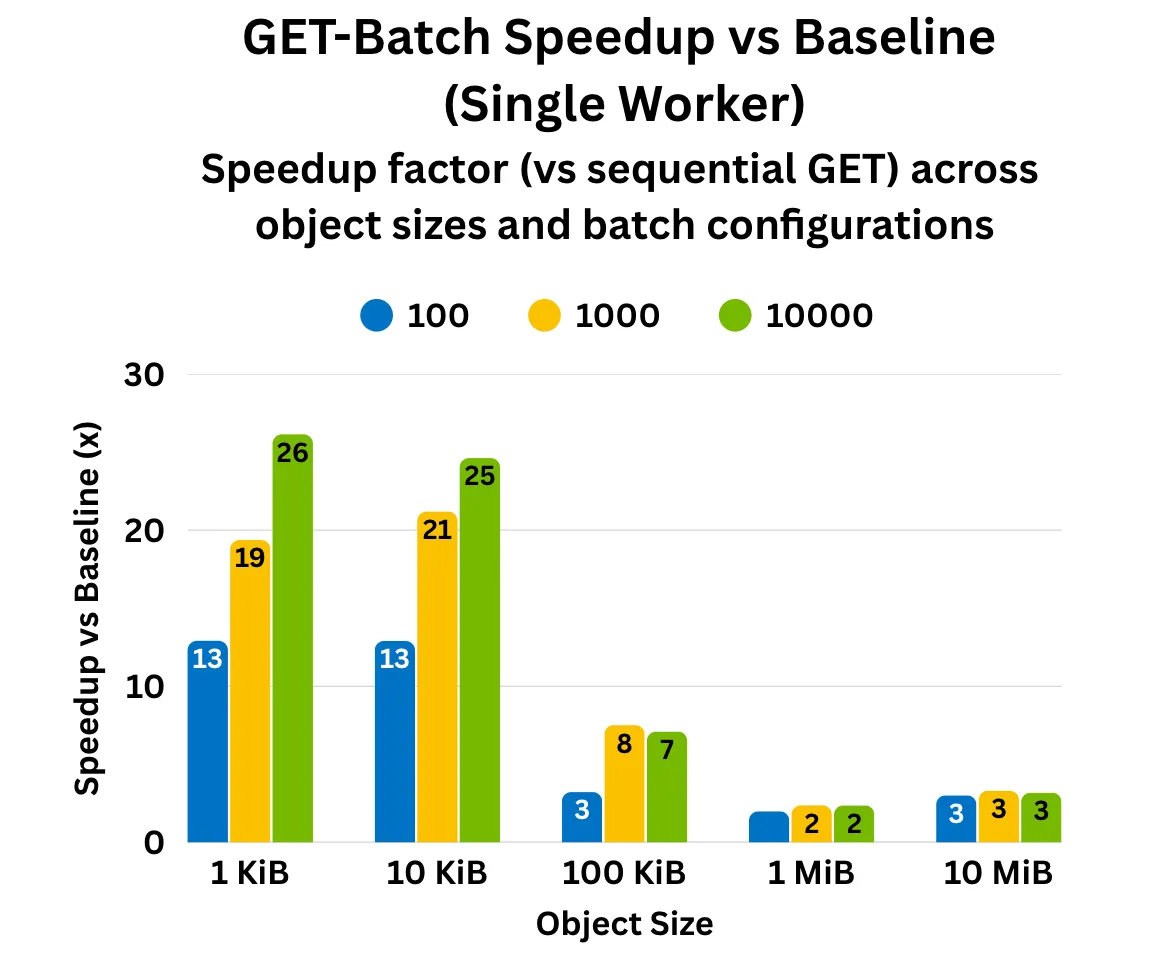
GetBatch: single-worker speed-up

Fig. 1. Up to 25x single-worker speed-up in early benchmarks.

The graph plots speed-up factor (Y-axis) against object size (X-axis), showing how batch size (100, 1K, 10K objects per batch) and object size affect performance. Each test used 10k objects on a 3-node AIStore cluster (48 CPUs, 187 GiB RAM, 10×9.1 TiB disks per node). The gains come from reducing per-request TCP overhead and parallelizing object fetches.

PS. Cluster-wide multi-worker benchmarks are in progress and will be shared soon.

Previous

Extremely long object names