For AI agents: a documentation index is available at the root level at /llms.txt and /llms-full.txt. Append /llms.txt to any URL for a page-level index, or .md for the markdown version of any page.
Blog
DocsAPI Reference
DocsAPI Reference
    • AIStore
    • Documentation
  • Core Documentation
    • In-depth Overview
    • Terminology and core abstractions
    • Getting Started
    • Networking model
    • Buckets: design, operations, namespaces, and system buckets
    • Observability overview
    • CLI overview
    • Production deployment
    • Technical Blog
  • APIs, SDKs, and Compatibility
    • Go API
    • Python SDK
    • PyPI package
    • Python SDK reference guide
    • PyTorch integration
    • TensorFlow integration
    • HTTP API reference
    • curl examples
    • Easy URL
    • S3 compatibility
    • s3cmd quick start
    • Presigned S3 requests
    • Boto3 support
  • Command-Line Interface
    • CLI overview
    • ais help
    • CLI reference guide
    • Bucket operations
    • Cluster and remote-cluster management
    • Storage and mountpath management
    • Monitoring and ais show
    • Downloads
    • Jobs
    • Authentication and access control
    • Configuration via CLI
    • ETL CLI
    • Distributed shuffle CLI
    • ML / get-batch CLI
    • GCP credentials
    • TLS certificate management
  • Storage and Data Management
    • Storage services
    • Buckets: design, operations, namespaces, and system buckets
    • Native Bucket Inventory (NBI)
    • Backend providers
    • On-disk layout
    • Virtual directories
    • System files
    • Evicting remote buckets and cached data
  • Cluster Operations
    • Node lifecycle: maintenance, shutdown, decommission
    • Global rebalance
    • Resilver
    • AIS in Containerized Environments
    • Highly available control plane
    • Information Center (IC)
    • Out-of-band updates
    • Troubleshooting
  • Configuration and Security
    • Configuration
    • Environment variables
    • Feature flags
    • AuthN and access control
    • Authentication validation
    • HTTPS and certificates
    • Switching a cluster to HTTPS
  • ETL and Advanced Workflows
    • ETL overview
    • ETL CLI docs
    • ETL Python SDK examples
    • Custom transformers
    • ETL Python webserver SDK
    • ETL Go webserver package
    • Archives: read, write, and list
    • Distributed shuffle (dsort)
    • Initial sharding utility (ishard)
    • Downloader
    • Blob Downloader
    • Batch object retrieval (get-batch)
    • Batch operations
    • Tools and utilities
    • Extended actions (xactions)
  • Observability, Monitoring, and Performance
    • Observability overview
    • Monitoring with CLI
    • Logs
    • Prometheus integration
    • Metrics reference
    • Grafana dashboards
    • Kubernetes monitoring
    • Distributed tracing
    • Monitoring get-batch
    • AIS load generator (aisloader)
    • Benchmarking AIStore
    • Performance tuning and testing
    • Performance monitoring via CLI
    • Rate limiting
    • Checksumming
    • Filesystem Health Checker (FSHC)
    • Traffic patterns
  • Networking
    • Networking: multi-homing, network separation, IPv6
    • HTTPS configuration
    • Switching to HTTPS
    • Idle connections
    • MessagePack protocol
  • Deployment
    • AIStore on Kubernetes
    • Kubernetes Operator
    • Ansible playbooks
    • Helm charts
    • Deployment monitoring
    • Docker
  • Developer Resources
    • Development guide
    • aisnode command line
    • Build tags
  • Object and Bucket Naming
    • Unicode and special symbols in object and bucket names
    • Extremely long object names
  • Blog Posts
    • Native Bucket Inventory: Up to 17x Faster Remote Bucket Listing
Blog
NVIDIANVIDIA
Developer-friendly docs for your API
Privacy Policy | Your Privacy Choices | Terms of Service | Accessibility | Corporate Policies | Product Security | Contact

Copyright © 2026, NVIDIA Corporation.

LogoLogoAIStore
On this page
  • Table of Contents
  • Motivation
  • Workflow
  • Creation
  • Listing
  • Usage
  • Python SDK
  • CLI
  • Benchmark
  • Current Limitations
  • When to Use NBI (and When Not To)
  • Conclusion
  • References
Blog Posts

Native Bucket Inventory: Up to 17x Faster Remote Bucket Listing

||View as Markdown|
Previous

Extremely long object names

Apr 06, 2026·Tony Chen, Abhishek Gaikwad
aistorenbibenchmarkoptimization

AIStore 4.3 introduces Native Bucket Inventory (NBI), a new mechanism for accelerating large remote-bucket listings by turning a repeatedly expensive operation into a local, reusable metadata path. Instead of traversing a remote bucket on every ais ls, AIS can precompute the bucket inventory once, persist it as compact binary chunks in the cluster, and answer subsequent listing requests directly from that local snapshot.

In our benchmarks, NBI delivers roughly 15x to 17x speedup for repeated listing of an s3:// bucket with 3.2 million objects, highlighting how effective a precomputed local snapshot can be for large datasets. In this post, we walk through the design of NBI, the internal create and list workflows, the benchmark results, and how to use it from the AIStore Python SDK and CLI.

Table of Contents

  • Motivation
  • Workflow
  • Usage
  • Benchmark
  • Current Limitations
  • When to Use NBI (and When Not To)
  • Conclusion
  • References

Motivation

Remote bucket listing becomes expensive when the bucket is both large and repeatedly accessed. A full listing requires AIS to retrieve and assemble a large volume of object metadata from the backend before it can return a complete result to the client. When that bucket is relatively stable and listed again and again, the system ends up redoing essentially the same work each time, even though the contents change very little between requests.

The core issue is that the object metadata returned by listing is often reusable, but the system keeps rebuilding it from scratch. The larger the bucket, the more bandwidth, latency, and backend API work AIS must spend to reconstruct information it has effectively already seen.

NBI addresses that mismatch by treating the bucket listing results as cacheable metadata. Instead of rebuilding the full listing on every request, AIS captures it once, stores it locally in a compact form, and reuses that snapshot for subsequent listings.

While our benchmarks use S3, NBI is backend-agnostic and works identically with any remote backend — AWS S3, Google Cloud Storage, Azure Blob, OCI Object Storage, and remote AIS clusters.

Workflow

NBI runs in two phases: creation and listing.

Creation

When the user requests inventory creation, the proxy distributes the job to all targets. Each target independently walks the remote backend, but only keeps the entries whose names hash to that target. The entries are sorted, grouped into chunks of ~20K names each, encoded as compressed msgpack, and written to the AIS system bucket ais://.sys-inventory. The resulting object path follows the pattern {provider}/@#/{bucket}/inv-{uuid}.

Listing

When a list request carries the inventory flag, the proxy broadcasts to all targets instead of sending the request to the remote backend. Each target reads its local inventory chunks, binary-searches for the continuation token, and returns a page of entries. The proxy merges per-target pages to assemble a globally sorted result. No S3 calls are made.

Usage

Python SDK

1from aistore import Client
2
3client = Client("http://ais-endpoint:51080")
4bck = client.bucket("my-bucket", provider="s3")
5
6# Create the inventory (one time)
7job_id = bck.create_inventory(name="trainset-v1", prefix="images/")
8client.job(job_id).wait()
9
10# List via inventory — no S3 calls made
11page = bck.list_objects(inventory_name="trainset-v1", prefix="images/train/")
12for entry in page.entries:
13 print(entry.name)
14
15# Clean up when no longer needed
16bck.destroy_inventory(name="trainset-v1")

CLI

1# Create inventory
2$ ais nbi create s3://my-bucket
3
4# Monitor creation
5$ ais show job create-inventory
6
7# Show inventory metadata
8$ ais nbi show s3://my-bucket
9
10# List via inventory
11$ ais ls s3://my-bucket --inventory
12$ ais ls s3://my-bucket --inventory --prefix images/train/
13
14# Destroy inventory
15$ ais nbi rm s3://my-bucket

Benchmark

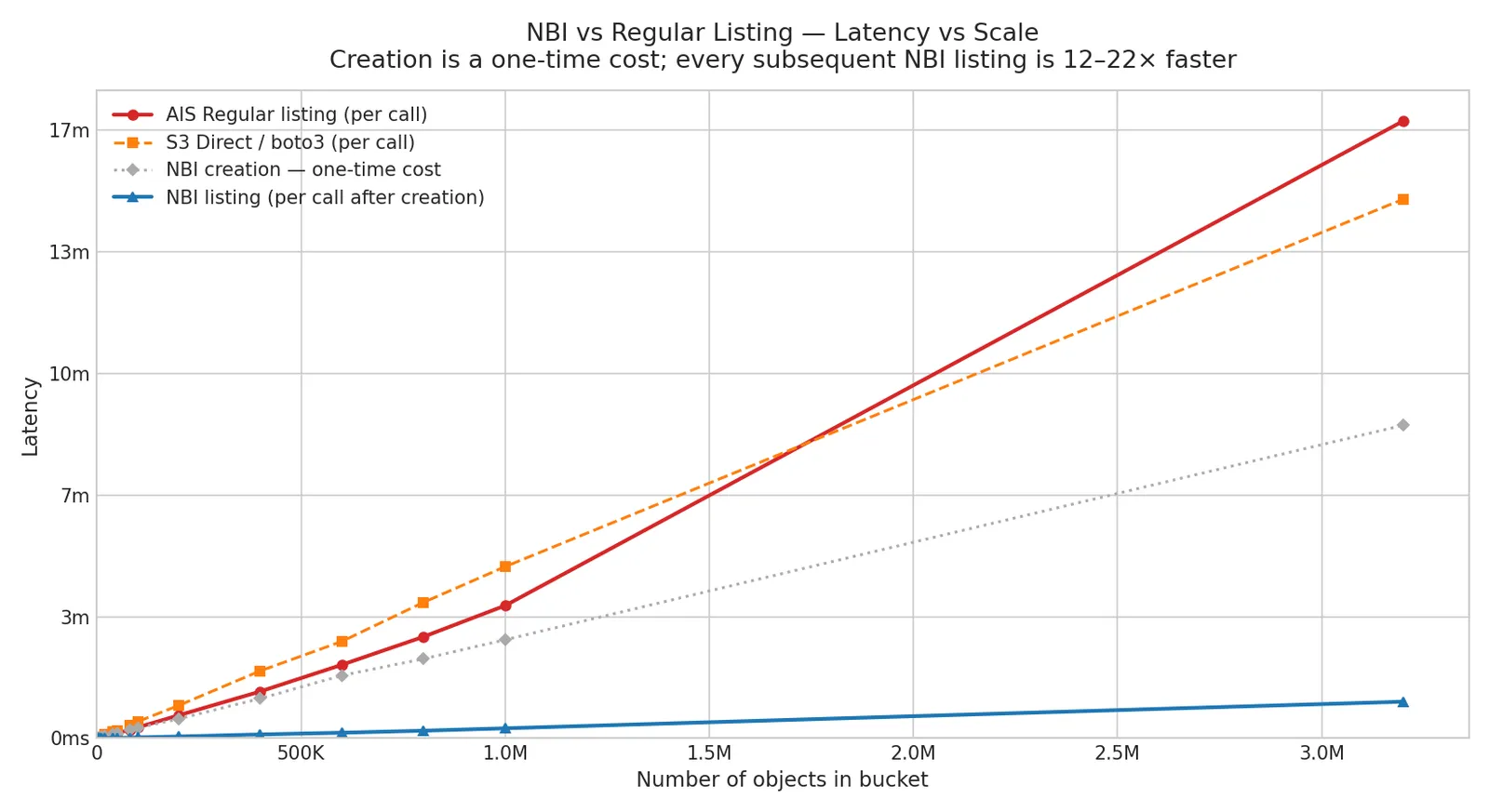
We measured listing latency across 15 scale points from 1K to 3.2M objects in an s3:// bucket, with 3 runs per point. The chart below shows p50 latency for AIS regular listing, S3 direct (boto3), NBI creation (one-time), and NBI listing.
NBI benchmark result

==========================================================================================================================
NBI latency-vs-scale (3 runs each)
==========================================================================================================================
Objects Creation Regular NBI S3 Direct Speedup
p50 sd p50 sd p50 sd (R/N)
--------------------------------------------------------------------------
1K 449ms 405ms 144ms 21ms 2ms 676ms 2.9s 19.0x
2K 616ms 596ms 21ms 34ms 4ms 480ms 251ms 17.6x
5K 811ms 1.2s 161ms 51ms 33ms 1.4s 186ms 22.4x
10K 1.8s 1.9s 177ms 147ms 35ms 2.7s 165ms 12.6x
20K 3.5s 3.4s 106ms 248ms 20ms 6.2s 154ms 13.8x
40K 7.2s 7.2s 358ms 550ms 95ms 10.8s 278ms 13.2x
50K 8.6s 8.8s 689ms 631ms 30ms 12.9s 242ms 13.9x
80K 13.9s 13.8s 1.1s 1.0s 22ms 21.4s 995ms 13.2x
100K 17.0s 17.9s 387ms 1.4s 45ms 27.3s 822ms 12.6x
200K 31.8s 37.6s 2.1s 2.9s 225ms 53.8s 6.6s 13.1x
400K 1m 5s 1m 16s 364ms 6.3s 698ms 1m 50s 4.8s 12.3x
600K 1m 43s 2m 0s 1.8s 9.1s 276ms 2m 39s 3.5s 13.3x
800K 2m 10s 2m 46s 2.2s 12.5s 939ms 3m 43s 901ms 13.4x
1M 2m 42s 3m 38s 920ms 16.4s 213ms 4m 42s 10.7s 13.3x
3.2M 8m 34s 16m 55s 4.3s 1m 0s 2.8s 14m 46s 23.1s 16.9x
==========================================================================================================================

NBI listing latency still increases with object count because it scans locally stored inventory data, but its absolute latency remains far lower than regular listing. On the chart, the NBI curve appears almost flat compared to a regular AIS list or a direct S3 list. The speedup remains consistent across the entire 1K-3.2M range, reaching up to 16.9x at 3.2M objects.

Current Limitations

NBI is experimental in AIStore 4.3, and the current implementation keeps inventory management intentionally simple. At the moment, AIStore supports only one inventory per bucket, so concurrent inventories for the same bucket are not supported. Inventories are created manually via CLI or SDK and remain static until they are recreated or removed; if an inventory already exists and you want a new one, you can recreate it with --force, or simply remove it first with ais nbi rm and then create it again.

The current creation path is also optimized for correctness and simplicity rather than minimum backend work. During inventory creation, all targets walk the remote bucket in parallel and each keeps only its own portion of the results. Automatic refresh and more efficient creation strategies are planned for future releases.

Note: NBI replaces the older S3-specific --s3-inventory path, which depended on provider-generated CSV/Parquet inventory files. The new implementation is AIS-native, backend-agnostic, and does not require external tooling.

When to Use NBI (and When Not To)

Good fit:

  • Large remote buckets (100K+ objects) that are listed repeatedly
  • Training pipelines that enumerate a dataset before each epoch
  • Data audits or dashboards that scan bucket contents periodically
  • Any workflow where the bucket is relatively stable between listings

Not a good fit:

  • Small buckets — creation cost exceeds the listing savings
  • Rapidly changing buckets — the snapshot goes stale quickly, and frequent recreation negates the benefit
  • ais:// buckets — metadata is already local (to each listing target), so NBI provides no speedup
  • One-off listings — if you only list a bucket once, the creation overhead is pure cost

Conclusion

NBI delivers 15x better listing performance for large remote buckets, with measured speedups reaching 14-22x across the range we tested. That makes it a practical solution for repeated listing of multi-million-object s3://, gs://, and other remote buckets where rebuilding the full result from the backend on every request is too slow and too expensive.

References

  • NBI documentation
  • NBI benchmark script