For AI agents: a documentation index is available at the root level at /llms.txt and /llms-full.txt. Append /llms.txt to any URL for a page-level index, or .md for the markdown version of any page.
Blog
DocsAPI Reference
DocsAPI Reference
    • AIStore
    • Documentation
  • Core Documentation
    • In-depth Overview
    • Terminology and core abstractions
    • Getting Started
    • Networking model
    • Buckets: design, operations, namespaces, and system buckets
    • Observability overview
    • CLI overview
    • Production deployment
    • Technical Blog
  • APIs, SDKs, and Compatibility
    • Go API
    • Python SDK
    • PyPI package
    • Python SDK reference guide
    • PyTorch integration
    • TensorFlow integration
    • HTTP API reference
    • curl examples
    • Easy URL
    • S3 compatibility
    • s3cmd quick start
    • Presigned S3 requests
    • Boto3 support
  • Command-Line Interface
    • CLI overview
    • ais help
    • CLI reference guide
    • Bucket operations
    • Cluster and remote-cluster management
    • Storage and mountpath management
    • Monitoring and ais show
    • Downloads
    • Jobs
    • Authentication and access control
    • Configuration via CLI
    • ETL CLI
    • Distributed shuffle CLI
    • ML / get-batch CLI
    • GCP credentials
    • TLS certificate management
  • Storage and Data Management
    • Storage services
    • Buckets: design, operations, namespaces, and system buckets
    • Native Bucket Inventory (NBI)
    • Backend providers
    • On-disk layout
    • Virtual directories
    • System files
    • Evicting remote buckets and cached data
  • Cluster Operations
    • Node lifecycle: maintenance, shutdown, decommission
    • Global rebalance
    • Resilver
    • AIS in Containerized Environments
    • Highly available control plane
    • Information Center (IC)
    • Out-of-band updates
    • Troubleshooting
  • Configuration and Security
    • Configuration
    • Environment variables
    • Feature flags
    • AuthN and access control
    • Authentication validation
    • HTTPS and certificates
    • Switching a cluster to HTTPS
  • ETL and Advanced Workflows
    • ETL overview
    • ETL CLI docs
    • ETL Python SDK examples
    • Custom transformers
    • ETL Python webserver SDK
    • ETL Go webserver package
    • Archives: read, write, and list
    • Distributed shuffle (dsort)
    • Initial sharding utility (ishard)
    • Downloader
    • Blob Downloader
    • Batch object retrieval (get-batch)
    • Batch operations
    • Tools and utilities
    • Extended actions (xactions)
  • Observability, Monitoring, and Performance
    • Observability overview
    • Monitoring with CLI
    • Logs
    • Prometheus integration
    • Metrics reference
    • Grafana dashboards
    • Kubernetes monitoring
    • Distributed tracing
    • Monitoring get-batch
    • AIS load generator (aisloader)
    • Benchmarking AIStore
    • Performance tuning and testing
    • Performance monitoring via CLI
    • Rate limiting
    • Checksumming
    • Filesystem Health Checker (FSHC)
    • Traffic patterns
  • Networking
    • Networking: multi-homing, network separation, IPv6
    • HTTPS configuration
    • Switching to HTTPS
    • Idle connections
    • MessagePack protocol
  • Deployment
    • AIStore on Kubernetes
    • Kubernetes Operator
    • Ansible playbooks
    • Helm charts
    • Deployment monitoring
    • Docker
  • Developer Resources
    • Development guide
    • aisnode command line
    • Build tags
  • Object and Bucket Naming
    • Unicode and special symbols in object and bucket names
    • Extremely long object names
  • Blog Posts
    • Promoting local and shared files
Blog
NVIDIANVIDIA
Developer-friendly docs for your API
Privacy Policy | Your Privacy Choices | Terms of Service | Accessibility | Corporate Policies | Product Security | Contact

Copyright © 2026, NVIDIA Corporation.

LogoLogoAIStore
Blog Posts

Promoting local and shared files

||View as Markdown|
Previous

Extremely long object names

Mar 17, 2022·Alex Aizman
aistore

When it comes to working with files, the first question often is how? How to easily and quickly move or copy existing file datasets into AIS clusters? There are, in fact, several distinct ways to handle existing datasets. But if those are files, we do recommend to maybe take a look at promote.

Introduced in v3.0 to exclusively handle local files and directories, promote over time has become the preferred method. Any file source is supported, local or remote, shared or not.

Here’s a quick and commented CLI illustration:

1# assume, we have files:
2$ ls /mnt/share/abc
31000.test 1001.test 1002.test ... 9999.test
4
5# promote them all into ais bucket (named ais-bucket), with simultaneous renaming abc/ => xyz/
6$ ais object promote /mnt/share/abc ais://ais-bucket/xyz
7promoted "/mnt/share/abc" => ais://ais-bucket, xaction ID "L5pptahI8"
8
9# the result:
10$ ais ls ais://ais-bucket
11NAME SIZE
12xyz/1000.test 123k
13xyz/1001.test 456k
14...
15xyz/9999.test 789k

But if we want to, for instance:

  • promote recursively to an s3 bucket - with nested subdirectories but without renaming the destination base, and
  • delete sources upon (promoting) success, and
  • overwrite destination objects (if exist), and finally
  • prevent auto-detecting file share

then we can do something like this:

1$ ais object promote /mnt/share/abc s3://s3-bucket -r --delete-src --overwrite-dst --not-file-share

--not-file-share translates as follows: each target to act autonomously, skipping auto-detection and promoting the entire file source as “seen” by this target.

Historically, AIS promote is reminiscent of what’s usually called server-side copy - a time-honored technique to engage sources and destinations directly, thus avoiding network roundtrips and client-side bottlenecks.

AIS, of course, takes it to a different level by distributing the work between clustered nodes that act independently and in parallel:
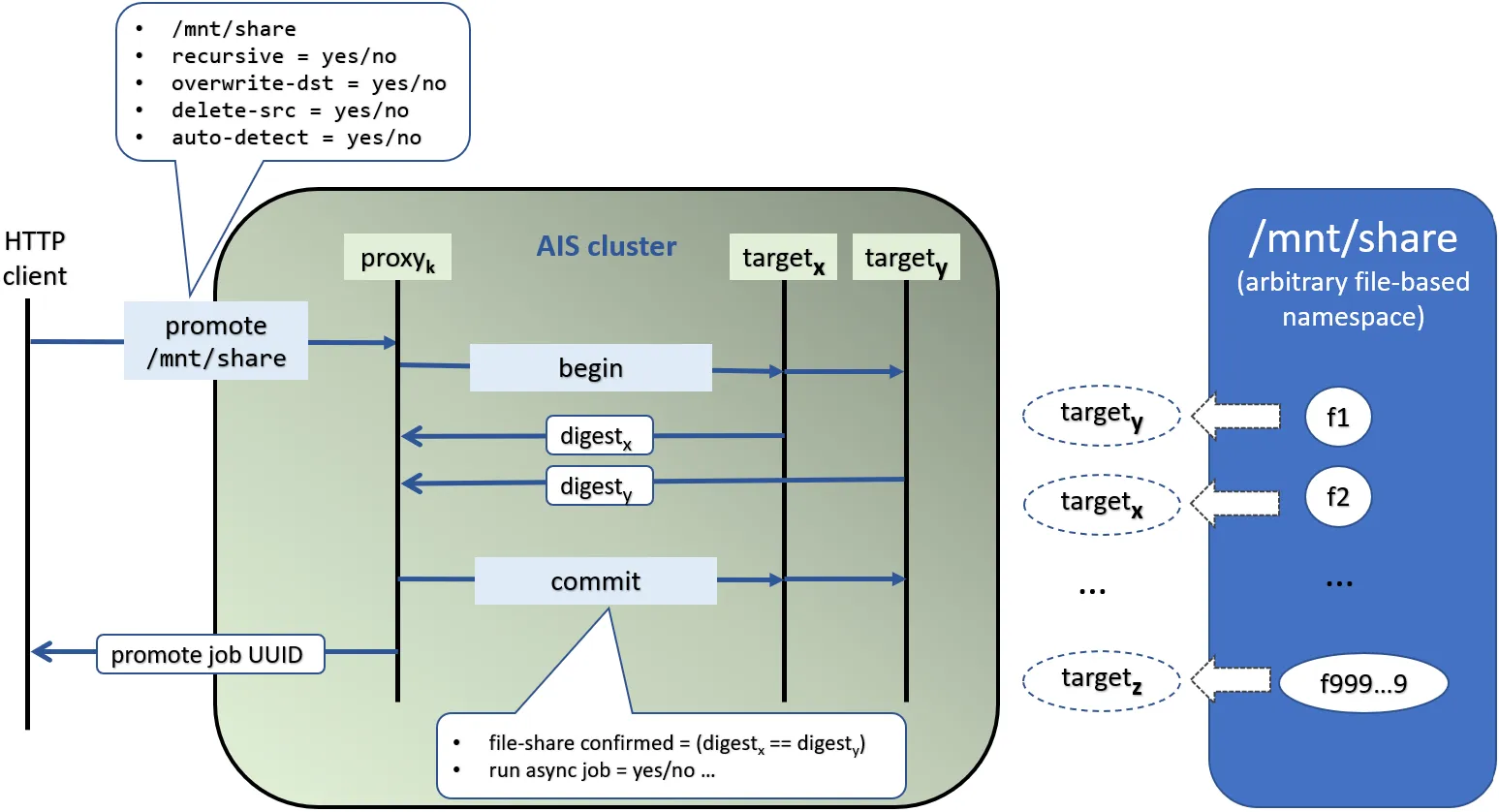
Promote file share

Here we have a client promoting NFS or SMB share called mnt/share.

The client can use CLI (as shown above), HTTP, or directly call native API via api.Promote. Either way:

  1. Given correct HTTP address, the request finds the designated AIS cluster (shown as a green/gray bubble) and the AIS gateway (aka “proxy”) with that address.

  2. AIS proxy then initiates a 2-phase transaction where the begin phase performs a range of validations to make sure that storage targets are ready to execute.

  3. In particular, unless auto-detection is disabled, each target computes a digest of all sorted filenames under mnt/share. For example, target-x would compute digest-x, target-y - digest-y, and so on.

  4. This concludes the begin phase, after which the cluster, and each target individually, start committing - i.e, reading files from mnt/share and writing them locally as objects.

Further details are indicated on the line diagram above. The one nuance that’s maybe worth reiterating is that each target handles those, and only those, files that map to itself, location-wise.