

AIStore Python SDK: Maintaining Resilient Connectivity During Lifecycle Events
In distributed systems, maintaining seamless connectivity during lifecycle events is a key challenge. If the cluster’s state changes while read operations are in progress, transient errors might occur. To overcome these brief disruptions, we need an effective, intelligent retry mechanism.
Consider a simple GET request in AIStore: the GET request reaches the proxy (gateway), and the proxy redirects it to the appropriate target (storage node). However, if that node is restarting, the request fails. Standard Python retries (e.g., urllib3.Retry) are not effective here because they repeatedly retry the same unresponsive node. This underscores the need for an intelligent mechanism that understands these kinds of errors and retries based on such transient failures.
Effective Retry Strategies
By default, urllib3.Retry only handles retries at the target level after redirection, which isn’t always sufficient for AIStore’s architecture. To address transient errors, we introduced a new exception class, AISRetryableError, along with a more comprehensive retry approach.
This approach separates retry logic into two parts:
-
HTTP-level retries with
urllib3.Retry
These are triggered for specific HTTP status codes (e.g.,500,502, and504). -
Network-level retries with
tenacity
These handle the entire request (proxy → redirect → target) whenever network issues (e.g., timeouts, connection errors) orAISRetryableErroroccur.
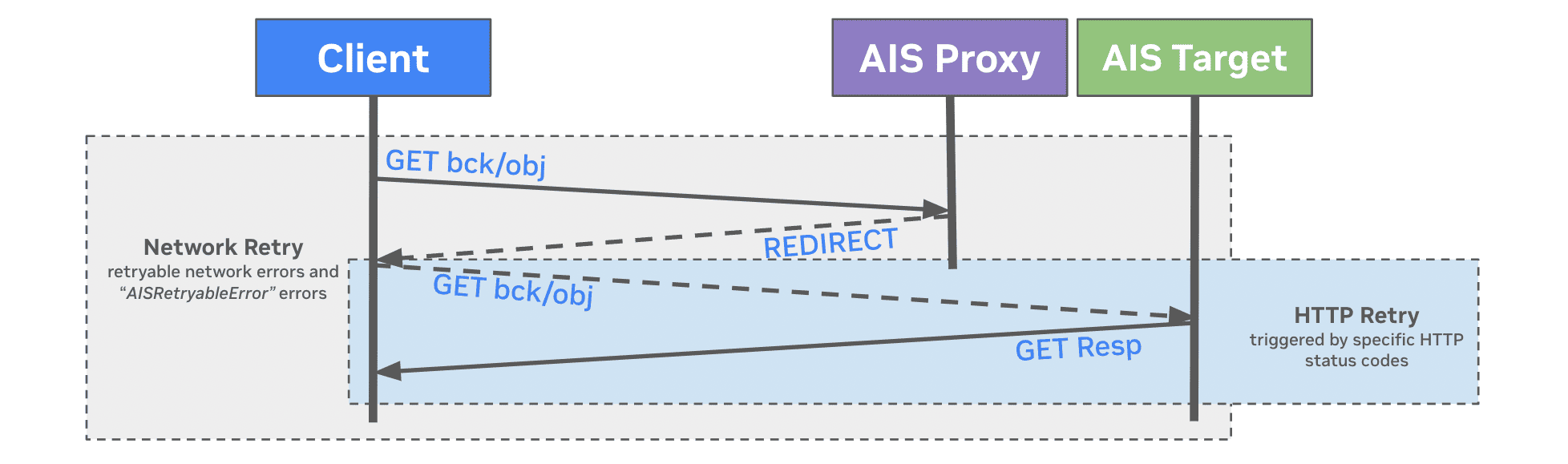
Both configurations are bundled into a RetryConfig class in the AIStore Python SDK (version 1.13.0). This ensures robust handling of temporary failures at both HTTP and network levels:
Note:
- The default retry strategy continues for up to 60 seconds after the first failure. This works well for stable environments (e.g., training jobs) but may be reduced for faster feedback in other setups.
- We’ve also introduced a default timeout of
(3, 20)(connect timeout = 3s, read timeout = 20s) in the AIStore Python Client. For operations involving cold reads or slow backends, you may wish to increase these values.- For large objects, consider using the Object-file API and enabling
Streaming-Cold-GET. For example:
ais bucket props set $BUCKET features Streaming-Cold-GET
This allows data to stream immediately without waiting for the entire object to be stored on AIStore.
Bucket-Specific Challenges and Considerations
-
Buckets without a Remote Backend (
ais://)
When buckets are configured without redundancy features such as n-way mirroring or erasure coding, aGETrequest can fail if the target node that holds the object is temporarily unavailable. Although the cluster map will eventually exclude the unresponsive node, the proxy may redirect to another node that does not have the requested object. This underscores the need for data redundancy to maintain high availability. -
Buckets with a Remote Backend (
s3://,gcp://, etc.)
The remote backend acts as a centralized “source of truth,” enabling more flexible recovery. When a target node is down and removed from the cluster map, the AIStore proxy selects a new target—the target where the requested object is expected to be located based on the updated cluster map. If that node does not have the object, it retrieves it from the remote backend and stores it in-cluster according to the bucket policies and configured data redundancy. Once the original target recovers, aglobal rebalanceredistributes objects across the cluster as required.
Addressing Common Failures with Enhanced Retry Strategy
There are many ways a request can fail. Below are some common issues and how our new retry strategy helps overcome these transient errors:
1. Cluster Changes and Instability (Solved by Proxy-Level Retries)
Proxy-level retries send requests back through the proxy, rather than continuing to use a failing target node. This approach leverages the updated cluster map (which may take time to propagate or fully synchronize), ensuring unreachable nodes are excluded and requests are redirected to healthy targets. Common scenarios include:
- Node Failure: When a node goes down (e.g., due to hardware or network issues, Kubernetes related issues, disk failures, or misconfigurations), the cluster map eventually excludes it. With proxy-level retries, a
GETis rerouted to a different, healthy node. - Cluster Upgrades: During Kubernetes rollouts, each upgraded target restarts, causing frequent cluster map updates. This can cause temporary routing issues and request failures. Thanks to network-level retries, your request is retried in its entirety, taking into account the newly updated cluster map.
- Maintenance and Shutdown: Nodes undergoing maintenance rebalance their data elsewhere. Delays in map updates can cause brief misrouting and failures, which are resolved by retrying the entire request after a short interval.
2. Unique Retryable Errors (Solved by Custom Exceptions)
Certain temporary errors—like missing objects during rebalance—are flagged as AISRetryableError, prompting a custom retry pathway in tenacity:
- Misplaced Objects (404 Errors): During rebalance, some objects can appear missing (
ErrObjNotFound). This triggersAISRetryableError, prompting a retry rather than failing outright. After rebalancing is complete, the object is found on the correct node. - Conflicts (409 Errors): When multiple threads simultaneously request the same object from a remote backend, an
ErrGETConflict(409) can occur. Retrying the request after a short backoff resolves the conflict.
Wrap-Up
AIStore’s new RetryConfig class handles both HTTP and network-level errors, helping your requests gracefully recover from node restarts, rebalancing, and other cluster changes. While the defaults work well for NVIDIA’s training workloads, you can customize timeouts, retry intervals, and backoff strategies to fit your environment. Ultimately, this ensures more resilient, uninterrupted operations even amid dynamic cluster states.