

Accelerating AI Workloads with AIStore and PyTorch
Accelerating AI Workloads with AIStore and PyTorch
As AI workloads are becoming increasingly demanding, our models need more and more data to train.[1] These massive datasets can overwhelm filesystems, both local and network-based, which can hurt data loading performance.[2] With that in mind, our end goal is to make data loading super-fast and easy-to-use for data scientists and researchers.
AIStore is a linearly scalable storage solution designed for AI applications, with a focus on efficient dataset loading. By integrating AIStore with PyTorch, a popular machine learning library, we can create datasets that are scalable, high-performance, and user-friendly.
In this blog, we describe why we should be using PyTorch datasets and DataLoader and how we can use them with AIStore. Finally, we compare data loading performance with and without our AIStore/PyTorch integration.
Table of contents
- Why Datasets and DataLoader Matter
- Using AIStore with PyTorch
- Creating Custom Datasets
- Managing Data Across Sources with Prefixes
- WebDataset and AISShardReader
- Dynamic Batching
- Benchmarks
- Next Steps
- Conclusion
- References
Why Datasets and DataLoader matter
PyTorch standardizes data loading by introducing the Dataset\IterableDataset and DataLoader abstractions. Dataset stores data in a map-based style with item based indexing allowing for loading specific data samples. IterableDataset is ideal for loading large batches of data sequentially which otherwise would not fit in memory. These datasets abstract away the storage side component with easy to use APIs, allowing data scientists to ignore file specifics entirely and focus on the data itself.
DataLoader (torch.utils.data.DataLoader) takes a Dataset\IterableDataset and wraps it an iterable providing several useful features along the way. The most useful feature is multiprocessing. Python multi-threading is limited by the Global Interpreter Lock (GIL).[3] This is useful to prevent race conditions across threads of course, but limits python processes to only running on a single CPU core. PyTorch works around this limitation by instead running multiple processes across what it calls workers.[4] Even though each process still has its own GIL, we can load data simultaneously across processes as long as we ensure each worker loads distinct data. And the amazing thing is that all we have to do to enable this functionality is to set the num_workers parameter of the DataLoader—no need to change any existing training code.
Furthermore, the PyTorch DataLoader supports other useful features such as:
- Batching: Loading multiple samples at once, potentially speeding up training.
- Shuffling: Shuffling data each epoch to avoid overfitting.
- Sampling: Using custom heuristics for sampling batches from the dataset.
- Collating: Combining samples into batches efficiently.
Using AIStore with PyTorch
AIStore can serve as the storage backend for training data, whether from the cloud or local storage. The full dataset can be retrieved from the cloud into a multi-node AIStore cluster. In AIStore, we have gateways (not shown) and storage nodes called targets. All user data is equally distributed across these targets.
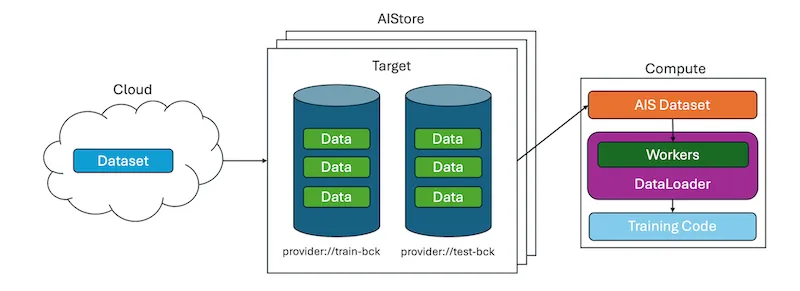
Loading this data into a (potentially multi-node) compute environment is straightforward with the AIStore/PyTorch integration. Here’s how to set it up:
Furthermore, we can use our datasets with the DataLoader,
which automatically provides several useful features for training.
What’s going on here in the code? First, the user declares a dataset that can read from a given bucket(*) and passes this dataset to PyTorch DataLoader. Since the DataLoader can take advantage of multiprocessing and workers, samples can be fetched in parallel from our dataset which are then yielded by the DataLoader to the training code.

(*) Initially, the bucket in question may not necessarily be present inside the AIS cluster. Or, it may exist but be empty or half-empty in comparison with the corresponding Cloud bucket (we call it the Cloud backend). Or, the AIS bucket may be out of sync with its Cloud backend, which may have been updated out of band. Each specific scenario is handled by AIStore automatically, behind the scenes.
The integration extends PyTorch’s Dataset, Sampler, and IterableDataset classes to natively support AIStore. These datasets load data directly from AIStore’s Bucket or ObjectGroup, which are AISSources. ObjectGroup is a collection of objects from the same bucket: an easy way to group objects in buckets.
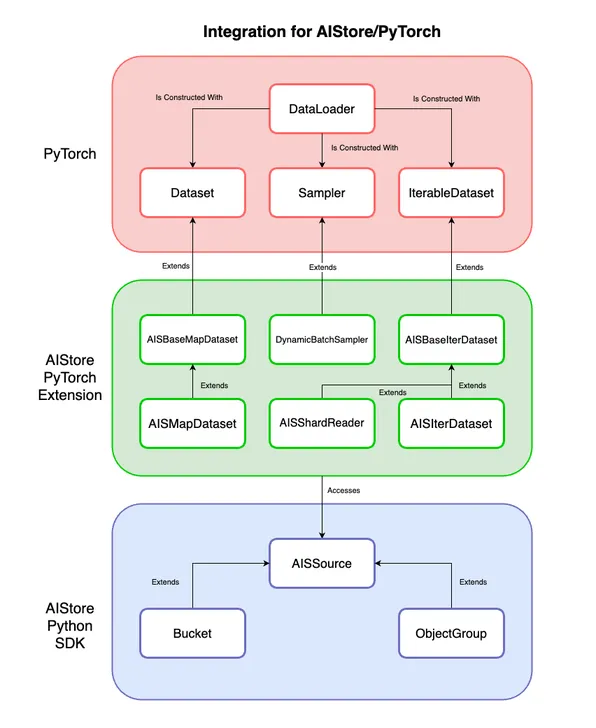
So AISIterDataset provides IterableDataset functionality with the ability to load objects from AIStore. Likewise, AISMapDataset provides Dataset functionality. And in the context of existing model training code, all you have to do is replace your existing datasets with the code above to immediately start using AIStore with PyTorch.
Creating custom datasets
Some datasets have specific data formats. To handle them, extend AISBaseMapDataset or AISBaseIterDataset to create a custom dataset class. The base classes handle the AIStore object loading bit (call the super().__init__() constructor), so only the data format handling needs to be implemented in the __getitem__() or __iter__() methods. Here’s an example for a custom CIFAR-10 dataset which stores data in pickle files[5]:
See our notebook example for a full end-to-end training example with a custom dataset.
Managing data across sources with prefixes
We might not always want to use all of the data from a Bucket or ObjectGroup. For example, when training from a dataset, we might want to split our data into training and validation sets. It doesn’t make sense for us to have to split the original data into two buckets every time we want to change our split. See how the CIFAR-10 data is structured below.
That’s where the prefix_map argument comes in. We can provide a mapping between each AISSource and a list of object names (prefixes) to our dataset to only include certain objects. If prefix_map is not provided, then the dataset will load every object from the source.
In the case of CIFAR-10, we don’t want to load any metadata or html files. Additionally, we want to load training data and test data separately. We can use prefix_map to load exactly what we want.
WebDataset and AISShardReader
The WebDataset format stores samples within tar files, with each sample’s files sharing a basename. This format improves I/O performance by storing files sequentially. AIStore shards are tar files that follow the WebDataset convention. AIStore can shard datasets using the ishard utility. An example of how shards are stored is shown below.
AISShardReader is an performant iterable-style dataset that can read shards directly from AIStore. It returns a tuple with the sample basename and a dictionary of file contents. This dictionary is keyed by file extension (e.g “png”) and has values containing the contents of the associated file.
Dynamic Batching
The core idea behind dynamic batching is that rather than yield a fixed batch_size number of samples per batch, we can determine a heuristic that determines how many samples should be yielded in a batch. To accomplish this, create a custom sampler by extending PyTorch’s Sampler, such as our DynamicBatchSampler.
In our DynamicBatchSampler implementation, we use the total data size of samples in the batch as our heuristic based on the provided max-batch-size:
- We use a non-preemptive algorithm to fill the batch as much as possible while iterating through data samples.
- The batches that are returned are not guaranteed to be optimally filled
Our sampler ensures that batches are roughly close to being equal to the max-batch-size. Additionally, the sampler supports other useful features such as shuffling, dropping the last batch if incomplete (based on a saturation factor), and allowing singular batches containing one oversized sample. We wrote this because for large datasets, batch size can be limited by memory availability as we cannot fit every sample in memory concurrently. If training samples vary dramatically in size, then a static batch size may not be making the best use of memory.
To try this implementation, all you have to do is add a couple of lines of code. Note that this feature only supports map-style datasets extended from AISBaseMapDataset.
Running the sampler with max_batch_size=4_000_000 on 10 objects of 1MB each produces the following batches:
Changing the max batch size to 3MB gives us 4 batches:
This implementation is a first pass at our dynamic batching efforts. There are other useful heuristics, such as time slices to return partial batches or anticipated sequence shapes of the data. But different machine learning problems such as image generation, large language models, audio models, etc may need varying heuristics.
Benchmarks
We conducted benchmarks on a virtual machine with the following configuration:
- OS: Ubuntu 22.04.1 LTS
- Kernel: Linux 5.15.0-46-generic
- Architecture: x86-64
- CPU: Intel(R) Xeon(R) Platinum 8160 CPU @ 2.10GHz
- Cores: 16
- Memory: 32 GB
Note that this machine was also running a local AIStore playground deployed with the following script:
We compared the performance of loading one million 1KB objects using different methods. The basic method involves sending HTTP GET requests to AIStore’s REST API. We then measured the performance of AISIterDataset with and without multiprocessing. Finally, we evaluated performance when sharding the same data into tar files and loading with AISShardReader.
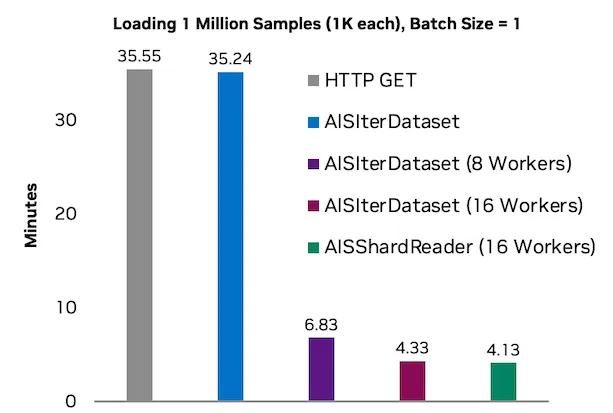
Note that the raw HTTP benchmark is effectively single-threaded as the requests library in python is not thread-safe across a single request session.

When we use any of our datasets with a PyTorch DataLoader and workers, we use multiprocessing to effectively take advantage of multiple cores with respectable utilization.

The performance gains from increasing the number of workers are observably linear initially. However, data loading may eventually be bottlenecked by memory bandwidth, network bandwidth, or CPU thread limitations. Different hardware may perform better or worse with a certain number of workers, so it is essential to balance the number of workers with your hardware capabilities.
We also benchmarked DynamicBatchSampler to ensure that the performance overhead scales linearly with the number of objects being loaded. Here is the performance with a max_batch_size of 50kb.
As we can see, the time to sample increases linearly with the number of objects, meaning that our implementation is scalable.
Next Steps
We are looking into further expanding our benchmarks with more testing on how different batch sizes, sample sizes, sample distributions, and workers all scale with AIStore.
We are also considering creating a system for user-defined heuristics—essentially a general customizable sampler. More research is needed to determine how we can handle user-defined batching logic, as different machine learning tasks can have varying data formats within their datasets.
Conclusion
We want data loading to be as fast as possible so we can focus on model training. By using our AIStore/PyTorch integration, we observe an 8x improvement in data loading performance on our testing machine. A more powerful system, such as a multi-node compute cluster in a data center, is likely to see an even greater performance boost as AIStore can be easily scaled out with every added node and every attached disk.
Furthermore, we want data loading to be quick and easy for data scientists to use. The integration is compatible with existing PyTorch training code, meaning that you can get training using data from AIStore with just a few lines of code. All you have to do is replace your existing datasets with AIS datasets to immediately start using AIStore with PyTorch!
References
- Trends in Training Dataset Sizes
- Efficient PyTorch I/O library for Large Datasets, Many Files, Many GPUs
- Global Interpreter Lock
- Multi-Process Data Loading
- Pickle Files
- AIStore GitHub
- PyTorch GitHub
- AIStore Blog
- WebDataset Website
- WebDataset Hugging Face
- Training CIFAR-10 with AIStore Notebook
- Training ResNet50 with AIStore Notebook