


2.4. Writing Tile Kernels#
CUDA Tile provides a different approach to writing GPU kernel code than the single instruction multiple thread (SIMT) model covered in the previous chapters. Tile programming allows programmers to express parallelism differently and leaves the lowest level of parallelism to the compiler and built-in operations. By doing so, tile provides a simpler way to access recent performance features of NVIDIA GPUs such as the tensor memory accelerator (TMA) unit and the tensor cores.
CUDA Tile programming is available in Python through the cuTile Python package
cuda.tile.CUDA Tile C++ is available in the CUDA Toolkit from version 13.3 onward.
The application code surrounding a tile kernel for tasks like allocating device memory, transferring data between host and device, and sequencing kernel launches is identical to what the preceding chapters described for SIMT kernels. A tile kernel operates on global memory allocated with the standard CUDA APIs, and its results are copied back to the host in the same way. The only thing that changes is what the programmer writes code inside the kernel itself.
In a SIMT kernel, the programmer thinks in terms of individual threads: computing a global thread index, loading the thread’s elements, performing operations on them, and storing the results. In a tile kernel, the programmer thinks at the level of an entire block: loading a tile of many elements, performing an operation on the whole tile, and storing the result. The compiler takes responsibility for mapping tile operations to the hardware threads of each block, a concern that the SIMT programmer handles explicitly.
This chapter focuses exclusively on that difference: how to write the kernel entry point and the tile operations within it. Every pattern is demonstrated in both CuTile Python (cuda.tile) and CUDA Tile C++ (cuda::tiles), which share a common compiler backend (CUDA Tile IR) and therefore share the same execution semantics.
By convention the tile API is aliased to ct in both languages.
import cuda.tile as ctin Pythonnamespace ct = cuda::tilesin C++
In Python, the tile API lives in the module cuda.tiles which is imported as shown above.
In C++, the tile API lives in the cuda::tiles namespace, which is exposed by the cuda_tile.h header.
#include "cuda_tile.h"
namespace ct = cuda::tiles;
The ct. / ct:: prefix in the snippets below refers to the tile API in whichever language you’re reading.
2.4.1. Kernel and Function Declarations#
A tile kernel is the GPU entry point, it executes once per block in the launch grid. A tile function is callable from a tile kernel or another tile function, but is not itself an entry point. As with SIMT kernels, tile kernels cannot be called directly from host code; they must be launched.
In CUDA Tile C++:
__tile_global__is the tile analog of__global__and marks a tile kernel entry point__tile__is the tile analog of__device__and indicates a function that should be compiled for the GPU and be callable from other__tile__or__tile_global__functions.
Array and scalar parameters are passed the same way as in SIMT kernels. Tile code and SIMT code can coexist: a single .cu file can define both __tile_global__ and __global__ kernels, and a single host program can launch both.
Note
Currently, __tile__ functions cannot be called from __global__ or __device__ functions. Similarly, __device__ functions cannot be called from __tile_global__ or __tile__ functions. This limitation may be lifted in future versions of CUDA.
In cuTile Python:
The
@ct.kerneldecorator marks a function as a tile kernel entry pointThe
@ct.functiondecorator marks a function callable from a tile kernel or another tile function.
In practice, any function called from a kernel is automatically compiled as tile code, so the @ct.function decorator is optional. Array parameters accept any device-resident array that exposes DLPack or the CUDA Array Interface. For example, PyTorch tensors and CuPy arrays. Scalar parameters are passed directly.
#include "cuda_tile.h"

// Tile kernel entry point. Cannot be called directly; must be launched.
__tile_global__ void my_kernel(float* a, float* b, float* c) {
    ...
}

// Tile function. Callable from tile kernels and tile functions.
__tile__ float helper(float x, float y) {
    return x + y;
}
import cuda.tile as ct

# Tile kernel entry point. Cannot be called directly; must be launched.
@ct.kernel
def my_kernel(a, b, c):
    ...

# Tile function. Callable from tile kernels and tile functions.
# @ct.function is optional, any function called from tile code
# is automatically compiled as tile code.
@ct.function
def helper(x, y):
    return x + y
2.4.2. Launching Kernels#
A tile kernel is launched on a grid of tile blocks, just as a SIMT kernel is launched on a grid of thread blocks. The programmer specifies the grid shape, up to three dimensions. From the programmer’s perspective, each tile block is executed by a single logical thread. Parallelism within the block is managed by the compiler.
In C++, tile kernels reuse the familiar triple-chevron launch syntax from SIMT. The first chevron argument is the grid shape (number of tile blocks). The second is the per-block thread count from SIMT; for tile kernels the compiler determines the thread count internally, and the second argument must be 1. A tile kernel is also an ordinary CUDA kernel, so it can be launched through the runtime’s existing APIs cudaLaunchKernel and cudaLaunchKernelEx with the same grid, 1 configuration. This is useful when integrating tile kernels into a codebase that already drives launches through those APIs.
In Python, ct.launch takes four positional arguments: a CUDA stream, a grid tuple specifying the number of tile blocks in each dimension, the kernel object, and a tuple of kernel arguments.
my_kernel<<<dim3(num_blocks_x, num_blocks_y), 1>>>(a, b, c); // second arg must be 1
import torch

stream = torch.cuda.current_stream()     # CUDA stream object
grid = (num_blocks_x, num_blocks_y, 1)   # tile-block grid (x, y, z)
ct.launch(stream, grid, my_kernel, (a, b, c))
2.4.2.1. Grid-Sizing Pattern#
A common pattern is to launch enough blocks to cover a full array, including a final block which potentially exceeds the size of the array in one or more dimensions.
int num_blocks = (N + tile_size - 1) / tile_size;   // ceil division -> covers partial tail
kernel<<<num_blocks, 1>>>(in, out, N);
import math

grid = (math.ceil(N / TILE),)   # ceil division -> covers partial tail
ct.launch(stream, grid, my_kernel, (arr_in, arr_out, TILE))
Handling the case where the size of an array is not perfectly divisible by the size of tiles is discussed in the subsections of Section 2.4.6.
2.4.3. Querying Block Position#
Each block needs to know where it sits in the grid so it can determine which portion of the data to process. In SIMT, the programmer combines blockIdx and threadIdx to compute a global thread index. In tile code, only the block index is needed. The compiler handles all thread-level indexing within the block.
In C++, ct::bid() returns a uint3 containing the block index in all three dimensions. ct::num_blocks() returns a dim3 with the total number of blocks in each dimension (as determined by the kernel launch parameters). Individual components are accessed via .x, .y, .z.
In Python, ct.bid(axis) returns the current block’s index along the given axis (0, 1, or 2) as an int32 scalar. ct.num_blocks(axis) returns the total number of blocks along that axis – useful for bounds checks and loop counts.
#include "cuda_tile.h"

__tile_global__ void my_kernel(float* a, float* b, float* c) {
    namespace ct = cuda::tiles;
    int bid_x = ct::bid().x;          // block index along .x
    int bid_y = ct::bid().y;          // block index along .y
    int num_x = ct::num_blocks().x;   // total blocks along .x
}
@ct.kernel
def my_kernel(a, b, c):
    bid_x = ct.bid(0)          # block index along axis 0
    bid_y = ct.bid(1)          # block index along axis 1
    num_x = ct.num_blocks(0)   # total blocks along axis 0
2.4.4. Creating Tiles#
With the block’s identity established, the next question is what tile kernels actually operate on. That’s the tile: a fixed-size, multidimensional array of scalar elements whose shape and element type are known at compile time. Each dimension of a tile must be a power of two. Tiles have value semantics. This means copying a tile copies its elements and the two copies are fully independent. Despite this, copies are cheap because the compiler controls how tiles are represented internally in hardware. The programmer does not allocate or free memory for tiles.
In practice, tiles are created either by loading data from arrays (Tile-Space Loads and Stores) or by using factory functions that produce tiles filled with a specified pattern.
In C++, the tile type is explicit: ct::tile<T, ct::shape<dims...>>, where T is the element type and ct::shape<dims...> encodes the dimensions as template arguments (the integer values are the compile-time sizes along each axis). For example, ct::tile<float, ct::shape<8>> is a 1-D tile of 8 floats, and ct::tile<float, ct::shape<4, 4>> is a 4×4 float tile. Because the shape is part of the type, it is always known at compile time.
Factory functions take the full tile type (Tile below) as a template parameter:
ct::zeros<Tile>()andct::ones<Tile>()- tiles filled with zeros or ones.ct::full<Tile>(val)- tile where every element has valueval.ct::iota<Tile>()- tile containing(0, 1, ..., N-1), whereNis the tile’s size.
C++ examples throughout this chapter use a using alias (e.g., using f32x4x4 = ct::tile<float, ct::shape<4, 4>>) to keep tile types readable at the call site.
In Python, both the shape tuple and the dtype arguments to a tile factory are compile-time values. Python literals (like (64, 64) and ct.float32) satisfy this naturally. They can also be supplied using Constant-annotated kernel parameters as shown below in Python Constant[T]. The resulting tile exposes .shape, .dtype, and .ndim properties that reflect its compile-time attributes.
The factory functions are:
ct.zeros(shape, dtype)andct.ones(shape, dtype)- tiles filled with zeros or ones.ct.full(shape, fill_value, dtype)- tile with an arbitrary constant value.ct.arange(size, dtype=...)- 1-D tile containing[0, 1, ..., size-1].
#include "cuda_tile.h"

__tile__ void factories() {
    namespace ct = cuda::tiles;

    using i32x8   = ct::tile<int,   ct::shape<8>>;      // 1-D: 8 ints
    using f32x4x4 = ct::tile<float, ct::shape<4, 4>>;   // 2-D: 4x4 floats

    auto z      = ct::zeros<f32x4x4>();       // all zeros
    auto o      = ct::ones<f32x4x4>();        // all ones
    auto filled = ct::full<f32x4x4>(3.14f);   // all 3.14
    auto seq    = ct::iota<i32x8>();          // {0, 1, 2, 3, 4, 5, 6, 7}
}
import cuda.tile as ct

@ct.function
def factories():
    zeros  = ct.zeros((64, 64), dtype=ct.float32)            # 64x64 tile of 0.0
    ones   = ct.ones((128,), dtype=ct.float16)               # 128-element tile of 1.0
    filled = ct.full((32, 32), 3.14, dtype=ct.float32)       # 32x32 tile of 3.14
    seq    = ct.arange(8, dtype=ct.int32)                    # [0, 1, 2, 3, 4, 5, 6, 7]
2.4.5. Compile-Time Constants#
The tile compiler generates specialized machine code for each combination of tile shapes, data types, and other structural parameters. Values that influence the generated code must therefore be known at compile time. That is, the shape and data type of the tile must be known at compile time. Creating Tiles used literals to specify tile shapes and data types: ct.zeros((64, 64), dtype=ct.float32) and ct::tile<int, ct::shape<8>>.
The shape can also be passed through the kernel interface as compile-time-known values, as shown in the following sections.
2.4.5.1. Python Constant[T]#
The ct.Constant[T] type hint on a kernel parameter marks it as constant-embedded. This means that every use of that parameter inside the kernel behaves as if the literal value were written in its place. The type argument is optional, ct.Constant without a type argument embeds a constant of any type. ct.Constant is most commonly used on integers, ct.Constant[int], on parameters that drive tile shapes and loop bounds.
import cuda.tile as ct

@ct.kernel
def my_kernel(TILE: ct.Constant[int]):
    # TILE is constant-embedded: wherever TILE appears, the compiler sees its
    # literal value (e.g., 128) and generates specialized code. Here TILE drives
    # the shape of a factory-built tile.
    zeros = ct.zeros((TILE,), dtype=ct.float32)
2.4.5.2. C++ integral_constant and _ic Literals#
In CUDA Tile C++, compile-time values are expressed through ct::integral_constant, a type whose numeric value is encoded in the type itself. The _ic literals from the ct::literals namespace provide a concise shorthand: 0_ic produces a ct::integral_constant<0> value.
APIs that take compile-time values accept both the non-type template parameter (NTTP) form and the _ic literal form. For example, ct::cat concatenates two tiles along a given dimension, and that dimension must be known at compile time. The two lines below call ct::cat with the same compile-time axis; they differ only in where the compile-time value is written:
#include "cuda_tile.h"

__tile__ void concat_demo() {
    namespace ct = cuda::tiles;
    using namespace ct::literals;

    using T = ct::tile<int, ct::shape<4, 8>>;
    T lhs = ct::full<T>(0);
    T rhs = ct::full<T>(1);

    auto a = ct::cat<0>(lhs, rhs);     // NTTP form
    auto b = ct::cat(lhs, rhs, 0_ic);  // _ic form
}
There is one other place where _ic literals routinely appear. Each of ct::extents and ct::shape has an NTTP form (for example, ct::extents<std::uint32_t, 4, 8>) and a brace form. Unlike the NTTP form, the brace form accepts runtime values, so it is the form you reach for when one or more dimensions are only known at launch: _ic literals for the compile-time dims, plain variables for the runtime ones. Tile-space APIs like ct::tensor_span and ct::partition_view (covered in Tile-Space Loads and Stores) use this form to wrap such arrays:
auto shape2d = ct::extents{8_ic, length}; // 8 is compile-time; length is runtime
_ic literals are the uniform shorthand for a compile-time value wherever a value-form API argument calls for one, such as a ct::cat dimension or an extents or shape component.
2.4.6. Loading and Storing Tiles#
As Section 1.2.2.3.1 first introduced, there are two key memory objects in the CUDA tile programming model: tiles and arrays. An array is a multidimensional container of elements in global memory visible to all blocks of a tile kernel. A tile is also a multidimensional container of elements, but is local to a single block of CUDA tile code. A tile is often a subset of elements of an array. This section discusses loading from arrays into tiles so they can be used in tile kernels, and storing tiles back to arrays.
Two methods of loading and storing tiles are covered in subsequent sections
Tile-Space Loads and Stores covers loads and stores using tile-space indices that use view objects which prescribe predictable patterns for how the elements of the array map to tiles
Gather and Scatter covers loads and stores which use a tile of indices or pointers to indicate the element of an array which is the source or target of a tile element when loaded or stored, respectively
Performance note: Tile-space loads can be lowered by the compiler to the Tensor Memory Accelerator (TMA) on supported hardware, which is significantly faster than per-element gather. (For the C++ side, see also C++ Performance Tips.)
The programmer must decide what value out-of-bounds elements take on a load. Out-of-bounds writes are silently discarded by default in Python, and in C++ when the masked variants are used.
2.4.6.1. Tile-Space Loads and Stores#
With tile-space loads, a view object is created which specifies how an array is partitioned into a grid of tile-sized regions. This mapping is called the tile-space, and a tile kernel can load or stores one region at a time using a tile-space index.
Central to the idea of tile-space loads is the tiled view of an array, which specifies how the elements of the array are mapped to tiles of a specified size. The tiled view shown in Figure 19 is a partition view, which is a tile-space with non-overlapping tiles of the specified size with no gaps between tiles.
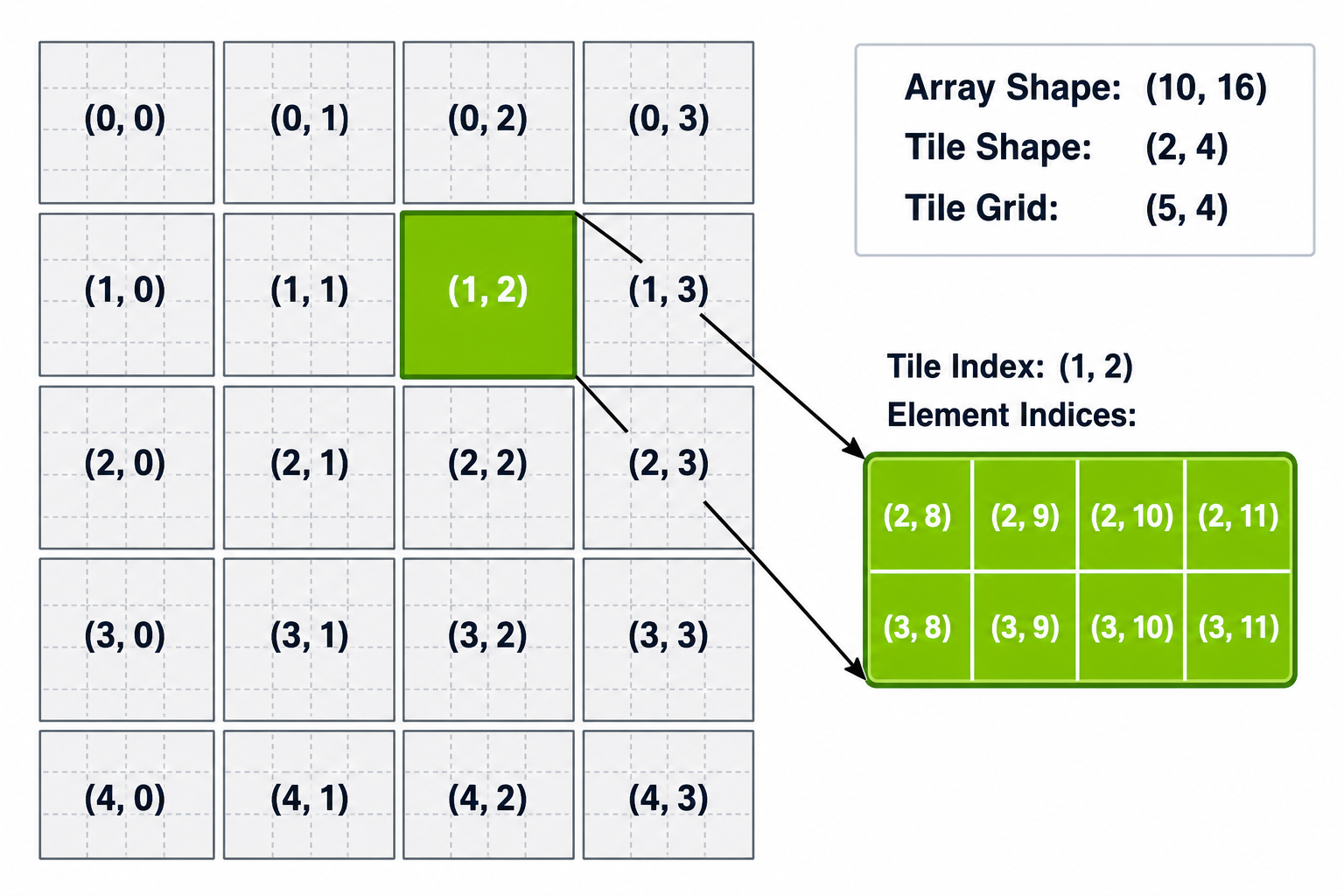
Figure 19 Tile-space indexing for a partition view. A two-dimensional array of shape (10, 16) is partitioned for tiles of shape (2, 4), producing a tile grid of shape (5, 4). Each cell shows its tile-space index (i, j). The highlighted region at tile-space index (1, 2) covers element indices (2, 8) through (3, 11).#
When the array dimensions are not perfectly divisible into tiles, tiles which cross the array boundary in one or more dimension will be partially filled. The programmer can specify behavior when loading these tiles, which will be introduced in Section 2.4.6.1.3.
A partition view is one of several tile-spaces that can be defined over an array. Two others are available in both languages:
Chunks of a fixed shape separated by a stride, so chunks may leave gaps between them or overlap. C++ spells this
ct::strided_view; Python passes atraversal_stepsargument toArray.tiled_view.Chunks selected along one dimension by a tile of element indices, for the irregular access patterns introduced in Gather and Scatter. C++ spells this
ct::gather_scatter_view; Python usesct.load_advanced_indexingandct.store_advanced_indexing.
Partition views are the only tile-space this chapter demonstrates, and are what Array.tiled_view produces by default. For the others, see the API reference for each language (CUDA Tile C++ API Reference, cuTile Python tiled views and advanced indexing).
2.4.6.1.1. Partition View Loads and Stores#
The structured tile-space load is the preferred way to move data between global memory and tiles. The kernel must first build a view object that defines the tile-space, then load or store one tile at a time by its tile-space index.
In C++, a partition view is constructed in two steps:
ct::tensor_span- pairs a raw pointer with act::extents, giving the pointer multidimensional structure.ct::partition_view- divides the span into a grid of fixed-size tiles and exposes.load(idx...)/.store(tile, idx...)methods that operate in tile-space coordinates.
In Python, Array.tiled_view(tile_shape) returns a TiledView that partitions the array into tiles of the given shape. The view exposes .load(index) / .store(index, tile) methods that take a tile-space index, mirroring C++ partition_view directly.
Note
The C++ example code in this chapter annotates pointer arguments with __restrict__ and calls ct::assume_aligned(ptr, 16_ic) near the top of the kernel body. These are important performance annotations covered further in Section 2.4.12. The _ic suffix on numeric literals (e.g., 128_ic, 8_ic) marks them as compile-time constants, as introduced in Compile-Time Constants.
__tile_global__ void vec_add(float* __restrict__ a, float* __restrict__ b, float* __restrict__ out) {
    namespace ct = cuda::tiles;
    using namespace ct::literals;

    a   = ct::assume_aligned(a,   16_ic);
    b   = ct::assume_aligned(b,   16_ic);
    out = ct::assume_aligned(out, 16_ic);

    // Step 1: attach a shape to each raw pointer. 128_ic marks 128 as a compile-time constant.
    auto aSpan = ct::tensor_span{a,   ct::extents{128_ic}};
    auto bSpan = ct::tensor_span{b,   ct::extents{128_ic}};
    auto oSpan = ct::tensor_span{out, ct::extents{128_ic}};

    // Step 2: partition each span into a tile space of fixed 8-element tiles.
    auto aView = ct::partition_view{aSpan, ct::shape{8_ic}};
    auto bView = ct::partition_view{bSpan, ct::shape{8_ic}};
    auto oView = ct::partition_view{oSpan, ct::shape{8_ic}};

    int  bx    = ct::bid().x;             // this block's tile-space index along .x
    auto aTile = aView.load(bx);          // pick the bx-th tile of a
    auto bTile = bView.load(bx);
    oView.store(aTile + bTile, bx);       // write the tile back at the bx-th position of out
}
@ct.kernel
def vec_add(a, b, c, TILE: ct.Constant[int]):
    a_view = a.tiled_view((TILE,))
    b_view = b.tiled_view((TILE,))
    c_view = c.tiled_view((TILE,))

    bid = ct.bid(0)
    a_tile = a_view.load((bid,))
    b_tile = b_view.load((bid,))
    c_view.store((bid,), a_tile + b_tile)
2.4.6.1.2. Python One-Call Load and Store#
Python additionally offers a one-call form that takes the tile shape inline on each load and store, without an explicit view object. ct.load(array, index, shape) reads a tile of the given shape at the given tile-space index. ct.store(array, index, tile) is the corresponding write.
Both ct.load/ct.store and Array.tiled_view express the same tile-space access pattern. The difference is where the tile shape lives. With Array.tiled_view, the tile shape is bound once to a view object. With ct.load/ct.store, the tile shape is supplied inline on each call. Using tiled_view is preferred when the same partitioning is reused across multiple loads and stores. Use ct.load/ct.store when a single one-off load is more concise.
@ct.kernel
def vec_add(a, b, c, TILE: ct.Constant[int]):
    bid = ct.bid(0)                                    # this block's tile-space index along axis 0
    a_tile = ct.load(a, index=(bid,), shape=(TILE,))   # (index, shape) = pick the bid-th TILE-sized region of a
    b_tile = ct.load(b, index=(bid,), shape=(TILE,))
    ct.store(c, index=(bid,), tile=a_tile + b_tile)    # write the tile back to the bid-th region of c
2.4.6.1.3. Tile-Space Boundary Handling#
In C++, partition_view provides unmasked and masked variants:
.load(idx...)/.store(tile, idx...)assumes the tile is fully in-bounds. Partially out-of-bounds access is undefined behavior..load_masked(idx...)/.store_masked(tile, idx...)handles partial edge tiles safely..load_masked()fills out-of-bounds positions with zero by default; alternative padding modes (such as NaN for float tiles) can be selected..store_masked()silently discards out-of-bounds writes.
Using the unmasked load and store variant is preferred when the array is perfectly divisible by the tile size. When boundary conditions must be handled, the masked variant can be used even for tiles which are fully populated.
This is also the first C++ example in the guide in which an array dimension is a runtime value. ct::extents{N} accepts a runtime dimension and ct::extents supports any mix of compile-time (_ic) and runtime values, so the span and partition view can wrap arrays whose size is known only at kernel launch.
In Python, ct.load accepts a padding_mode parameter that controls what value out-of-bounds elements receive. Two commonly used modes are:
PaddingMode.UNDETERMINED(the default) - out-of-bounds element values are left to the implementation. The tile is still bounds-checked, so the load never reads memory outside the array; only the value an out-of-bounds lane receives is unspecified. This is appropriate when out-of-bounds lanes are never read.PaddingMode.ZERO- out-of-bounds elements are filled with zero.
For stores, ct.store needs no padding_mode parameter: by default it bounds-checks the tile against the array and silently discards writes to out-of-bounds positions. The same rules apply to tiled_view, which fixes its padding_mode at view creation.
ct.load and ct.store also accept check_bounds, which defaults to True. Where padding_mode decides what an out-of-bounds lane contains, check_bounds decides whether the boundary is tested at all: with check_bounds=False, an access that reaches past the array is undefined behavior, reading or overwriting adjacent memory. It is the Python counterpart of the unmasked C++ .load() / .store() above, and carries the same guidance. TiledView.load and TiledView.store take the same keyword.
__tile_global__ void edge_safe(float* __restrict__ in, float* __restrict__ out, int N) {
    namespace ct = cuda::tiles;
    using namespace ct::literals;

    in  = ct::assume_aligned(in,  16_ic);
    out = ct::assume_aligned(out, 16_ic);

    // ct::extents{N} uses a runtime dimension; 128_ic stays compile-time.
    auto inView  = ct::partition_view{ct::tensor_span{in,  ct::extents{N}}, ct::shape{128_ic}};
    auto outView = ct::partition_view{ct::tensor_span{out, ct::extents{N}}, ct::shape{128_ic}};

    int  bx   = ct::bid().x;
    auto tile = inView.load_masked(bx);    // masked load: OOB lanes default to 0
    outView.store_masked(tile, bx);        // masked store: OOB writes silently discarded
}
@ct.kernel
def edge_safe(arr_in, arr_out, TILE: ct.Constant[int]):
    bid = ct.bid(0)
    tile = ct.load(arr_in, index=(bid,), shape=(TILE,),
                   padding_mode=ct.PaddingMode.ZERO)   # OOB lanes of a partial edge tile become 0
    ct.store(arr_out, index=(bid,), tile=tile)         # OOB writes are silently discarded
Inside the C++ kernel, .load_masked() and .store_masked() handle the partial edge tile. Inside the Python kernel, PaddingMode.ZERO on the load ensures the partial edge tile is zero-padded, and ct.store, with its default bounds checking, silently discards writes beyond the array boundary. For the complete set of padding modes, masking options, and padding values, see the API reference for each language (CUDA Tile C++ view padding, cuTile Python padding modes).
Loading from or storing to a tile that lies entirely outside the array is undefined. The boundary handling discussed here only applies to tiles that are partially out-of-bounds in one or more dimension.
2.4.6.2. Gather and Scatter#
The tile-space loads in Tile-Space Loads and Stores used a partition view, which defines a regular, block-aligned partitioning of the array. When the access pattern is irregular or data-dependent such as a lookup table or a permutation, for example, gather and scatter operations allow a tile to be loaded from and stored to non-uniform and non-contiguous elements of an array. .. by arbitrary index or address.
Gather and scatter operations look slightly different in C++ and Python:
Python uses integer index tiles passed to
ct.gather()/ct.scatter(), with built-in bounds checking.C++ uses tiles of pointers passed to
ct::load()/ct::store(), with masked variantsct::load_masked()andct::store_masked()that accept a boolean mask tile to handle tiles at array boundaries.
In C++, gather and scatter work by forming a tile of pointers, one pointer per element, and passing the pointer tile to ct::load() or ct::store(). Arithmetic between a scalar pointer and an integer tile is performed element-wise, producing a tile of pointers. This is the standard idiom for constructing gather/scatter index tiles in C++.
In Python, ct.gather loads the element at each index in the index tile. Bounds checking is on by default: out-of-bounds indices return a padding value (zero by default, configurable via padding_value=), and can be disabled with check_bounds=False. ct.scatter stores one value per index; out-of-bounds writes are silently discarded, and check_bounds=False applies here too.
__tile_global__ void vec_add_gather(int* __restrict__ a, int* __restrict__ b, int* __restrict__ out) {
    namespace ct = cuda::tiles;
    using namespace ct::literals;
    using i32x8 = ct::tile<int, ct::shape<8>>;

    a   = ct::assume_aligned(a,   16_ic);
    b   = ct::assume_aligned(b,   16_ic);
    out = ct::assume_aligned(out, 16_ic);

    int bx       = ct::bid().x;
    auto offsets = 8 * bx + ct::iota<i32x8>();   // element-level offsets, one per lane

    // scalar pointer + int tile = tile of pointers (one pointer per offset).
    auto aPtrs = a + offsets;
    auto bPtrs = b + offsets;

    auto aTile = ct::load(aPtrs);                // gather: one load per pointer
    auto bTile = ct::load(bPtrs);
    ct::store(out + offsets, aTile + bTile);     // scatter: one store per pointer
}
@ct.kernel
def vec_add_gather(a, b, c, TILE: ct.Constant[int]):
    bid = ct.bid(0)
    indices = bid * TILE + ct.arange(TILE, dtype=ct.int32)   # one element index per lane

    a_tile = ct.gather(a, indices)                           # load a[indices[i]] per lane
    b_tile = ct.gather(b, indices)
    ct.scatter(c, indices, a_tile + b_tile)                  # store one value per index into c
2.4.6.2.1. Gather and Scatter Boundary Handling#
Boundary handling for the gather/scatter operations introduced in Gather and Scatter follows different rules.
In Python, ct.gather and ct.scatter are bounds-safe by default. Out-of-bounds reads return a padding value (zero by default), and out-of-bounds writes are silently dropped. Bounds checking can be disabled when you can prove every index is in range; doing so makes out-of-bounds access undefined behavior. See the API reference for the optional mask and padding-value knobs (CUDA Tile C++ load operations, cuTile Python load/store operations).
In C++, bounds checking is not automatic. The programmer constructs a boolean mask (e.g., by comparing offsets against the array length) and passes it to ct::load_masked or ct::store_masked:
__tile_global__ void gather_safe(int* __restrict__ arr, int* __restrict__ out, int N) {
    namespace ct = cuda::tiles;
    using namespace ct::literals;
    using i32x8 = ct::tile<int, ct::shape<8>>;

    arr = ct::assume_aligned(arr, 16_ic);
    out = ct::assume_aligned(out, 16_ic);

    int bx       = ct::bid().x;
    auto offsets = 8 * bx + ct::iota<i32x8>();   // element-level offsets, one per lane
    auto mask    = offsets < N;                  // boolean tile: true where the offset is in-bounds

    auto ptrs = arr + offsets;                   // tile of pointers, one per offset
    auto tile = ct::load_masked(ptrs, mask, 0);  // masked lanes get the pad value 0
    ct::store_masked(out + offsets, tile, mask); // masked lanes are skipped on the store
}
2.4.7. Control Flow#
From the programmer’s perspective, a tile kernel follows a single control flow path per block. Scalar values in conditions and loop bounds drive the control flow, while tile operations within the body are distributed across hardware threads by the compiler.
Not every control-flow construct is supported. For example, returning from inside a loop is not allowed in tile code. See the API reference for each language (CUDA Tile C++ general principles, cuTile Python control flow) for the full list of restrictions.
2.4.7.1. Loops#
A common pattern is to iterate over tiles from an array, processing each in turn.
In C++, ct::irange is a forward range representing an increasing sequence of integers from a lower bound up to but excluding an upper bound, separated by an optional step. Using ct::irange provides the compiler with structured information about the iteration bounds, which may be used to better optimize the generated code. For the optimization to apply, the loop variable must be bound through a range-for expression over ct::irange.
In Python, the built-in range(), for, while, and nested loops are all supported in tile code.
The step argument must be strictly positive; negative-step ranges are not supported.
The following single-block kernels sum all tiles of a 1D array:
__tile_global__ void tile_sum(float* __restrict__ arr, float* __restrict__ out, int num_tiles) {
    namespace ct = cuda::tiles;
    using namespace ct::literals;
    using f32x8 = ct::tile<float, ct::shape<8>>;

    arr = ct::assume_aligned(arr, 16_ic);
    out = ct::assume_aligned(out, 16_ic);

    auto inView  = ct::partition_view{ct::tensor_span{arr, ct::extents{8 * num_tiles}},
                                      ct::shape{8_ic}};
    auto outView = ct::partition_view{ct::tensor_span{out, ct::extents{8_ic}},
                                      ct::shape{8_ic}};

    auto acc = ct::full<f32x8>(0.0f);
    // range-for over ct::irange gives the compiler structured iteration bounds.
    for (auto k : ct::irange(0, num_tiles)) {
        auto tile = inView.load(k);
        acc = acc + tile;                               // accumulate the k-th tile into acc
    }
    outView.store(acc, 0);                              // write the final result as the 0-th tile of out
}
@ct.kernel
def tile_sum(arr, out, TILE: ct.Constant[int], N_TILES: ct.Constant[int]):
    # Intended grid: (1,) -- a single block sums all tiles of arr.
    acc = ct.zeros((TILE,), dtype=ct.float32)
    for k in range(N_TILES):                            # range() works natively in tile code
        tile = ct.load(arr, index=(k,), shape=(TILE,))
        acc = acc + tile                                # accumulate the k-th tile into acc
    ct.store(out, index=(0,), tile=acc)                 # write the final result as the 0-th tile of out
2.4.7.2. Conditionals#
Standard if/else conditionals work normally. Because each block follows a single control flow path, the considerations for branch divergence within a warp do not apply to tile kernels.
__tile_global__ void conditional_load(float* __restrict__ arr, float* __restrict__ out, int N) {
    namespace ct = cuda::tiles;
    using namespace ct::literals;
    using f32x8 = ct::tile<float, ct::shape<8>>;

    arr = ct::assume_aligned(arr, 16_ic);
    out = ct::assume_aligned(out, 16_ic);

    auto inView  = ct::partition_view{ct::tensor_span{arr, ct::extents{N}}, ct::shape{8_ic}};
    auto outView = ct::partition_view{ct::tensor_span{out, ct::extents{N}}, ct::shape{8_ic}};

    int bx   = ct::bid().x;
    int nb_x = ct::num_blocks().x;

    auto tile = ct::full<f32x8>(0.0f);    // default for the last-block branch
    // Scalar condition -> one control-flow path per block; no divergence to reason about.
    if (bx < nb_x - 1) {
        tile = inView.load(bx);           // all blocks except the last
    }
    outView.store_masked(tile, bx);       // masked to handle a potentially partial final tile
}
@ct.kernel
def conditional_load(arr, out, TILE: ct.Constant[int]):
    bid = ct.bid(0)
    # Scalar condition -> one control-flow path per block; no divergence to reason about.
    if bid < ct.num_blocks(0) - 1:
        tile = ct.load(arr, index=(bid,), shape=(TILE,))    # all blocks except the last
    else:
        tile = ct.zeros((TILE,), dtype=ct.float32)          # last block: emit zeros
    ct.store(out, index=(bid,), tile=tile)
2.4.8. Element-wise Arithmetic and Broadcasting#
Tiles support standard element-wise arithmetic. When two operands have compatible but different shapes, the smaller is broadcast to match before the operation is performed.
2.4.8.1. Broadcasting#
Broadcasting follows NumPy semantics: scalars are duplicated across the tile, singleton dimensions (length 1) are stretched to match the corresponding dimension of the other operand, and a lower-rank operand is aligned to the trailing dimensions of the higher-rank operand by treating the missing leading dimensions as singletons. If two corresponding dimensions are both non-singleton and unequal, the operation is ill-formed.
The example below exercises both singleton stretching and rank promotion in a single addition: a rank-2 tile of shape 8x2 is rank-promoted to 1x8x2, then broadcast with a rank-3 tile of shape 4x1x2 to the common shape 4x8x2.
auto x = ct::iota<ct::tile<int, ct::shape<8, 2>>>();      // 8x2   (rank 2)
auto y = ct::iota<ct::tile<int, ct::shape<4, 1, 2>>>();   // 4x1x2 (rank 3)
auto z = x + y;                                           // x promoted to 1x8x2, then broadcasts to 4x8x2
x = ct.full((8, 2),    3, dtype=ct.int32)   # 8x2   (rank 2)
y = ct.full((4, 1, 2), 5, dtype=ct.int32)   # 4x1x2 (rank 3)
z = x + y                                    # x promoted to 1x8x2, then broadcasts to 4x8x2
2.4.8.2. Arithmetic Operators#
All supported arithmetic operators apply element-wise to tiles and produce a new tile of the broadcast shape. A scalar combined with a tile is broadcast across every element. When operand types differ, the type that preserves more information is favored:
Tile combined with tile: the result is a tile of the type with the greater precision or range. For example:
int + floatyieldsfloatint16 + int32yieldsint32
Scalar combined with tile: when the scalar’s type is exactly representable in the tile’s element type (e.g., the integer literal
2combined with aninttile, or2.0fcombined with afloattile), the operation proceeds in the tile’s element type. When the scalar would have to narrow to fit the tile’s element type (e.g., the literal2.5combined with aninttile), the two languages differ:Python promotes the result to a type that can hold both
C++ rejects the expression as ill-formed
The snippets below illustrate the divergent scalar-tile case:
using i32x8 = ct::tile<int, ct::shape<8>>;
i32x8 x = ct::full<i32x8>(3);

x + 2;       // OK - int literal matches int tile element type
x + 2.5;     // ill-formed - 2.5 would narrow to int
x = ct.full((8,), 3, dtype=ct.int32)

x + 2          # int32 - int literal matches int32 tile dtype
x + 2.5        # float32 - result promoted to hold both
In practice, write scalar literals in the tile’s element type when you can and convert explicitly when you want a different precision. The same rules apply inside a kernel when the operands are loaded tiles:
__tile_global__ void elementwise(float* __restrict__ a, float* __restrict__ b, float* __restrict__ out, int N) {
    namespace ct = cuda::tiles;
    using namespace ct::literals;

    a   = ct::assume_aligned(a,   16_ic);
    b   = ct::assume_aligned(b,   16_ic);
    out = ct::assume_aligned(out, 16_ic);

    auto aView = ct::partition_view{ct::tensor_span{a,   ct::extents{N}}, ct::shape{8_ic}};
    auto bView = ct::partition_view{ct::tensor_span{b,   ct::extents{N}}, ct::shape{8_ic}};
    auto cView = ct::partition_view{ct::tensor_span{out, ct::extents{N}}, ct::shape{8_ic}};

    int  bx = ct::bid().x;
    auto x  = aView.load(bx);
    auto y  = bView.load(bx);
    // 2.0f matches the float tiles' element type, so no narrowing conversion is required.
    // The scalar is broadcast across every element; + then runs elementwise.
    auto z  = 2.0f * x + y;
    cView.store(z, bx);
}
@ct.kernel
def elementwise(a, b, c, TILE: ct.Constant[int]):
    bid = ct.bid(0)
    x = ct.load(a, index=(bid,), shape=(TILE,))
    y = ct.load(b, index=(bid,), shape=(TILE,))
    # 2.0 is a loosely typed float constant; with float tiles, the result stays float.
    # Scalars are broadcast across every element of the tile, then + runs elementwise.
    z = 2.0 * x + y
    ct.store(c, index=(bid,), tile=z)
When you need explicit control over rounding mode or subnormal handling, mathematical functions that expose those choices explicitly are provided by the CUDA Tile APIs, both for element-wise arithmetic (for example, ct.add, ct::add) and for transcendentals (for example, exp and tanh).
2.4.9. Tile Primitives#
Factory functions (Creating Tiles), loads and stores (Tile-Space Loads and Stores), and element-wise arithmetic (Element-wise Arithmetic and Broadcasting) are all tile primitives, that is, operations that are part of the language. The programmer writes them at tile granularity and the compiler maps them to hardware, including tensor cores where available. This section covers other primitives that are available in CUDA tile.
2.4.9.1. Matrix Multiply#
Matrix multiplication of two tiles is a fundamental operation to implementing a matrix multiplication between two arrays. CUDA Tile provides two forms of matrix multiplication between tiles: a pure matrix multiply (matmul), a @ b, and a matrix multiply-accumulate (mma), a @ b + acc. In mma, the accumulator carries partial products from one K-tile to the next. This is helpful in the inner loop of a tiled matrix multiplication. Both matmul and mma support 2D matrix multiplication and 3D batched multiplies as well as mixing the data type (precision) of operands and accumulator. The rank and element type constraints are documented in the API reference for the operations (CUDA Tile C++ matrix multiplication, cuTile Python matmul).
A common pattern, used in the kernels below, is to accumulate in FP32 regardless of input precision and cast to the output element type on store. In Python this is ct.mma(a, b, acc) with an FP32-typed acc. In C++ it is ct::mma(a, b, acc) with an explicit FP32 accumulator type. The K-loop iterates ceil(K / tk) times so the right edge of A and the bottom edge of B are covered; partial K-tiles are zero-padded on load (PaddingMode.ZERO in Python, .load_masked() in C++), and partial M/N edge tiles on the C side are handled by store-side OOB-discard (ct.store in Python, .store_masked() in C++).
__tile_global__ void gemm(const __half* __restrict__ A, const __half* __restrict__ B, float* __restrict__ C,
                          std::size_t M, std::size_t K, std::size_t N) {
    namespace ct = cuda::tiles;
    using namespace ct::literals;
    using f32_acc = ct::tile<float, ct::shape<32, 32>>;

    A = ct::assume_aligned(A, 16_ic);
    B = ct::assume_aligned(B, 16_ic);
    C = ct::assume_aligned(C, 16_ic);

    constexpr auto tm = 32_ic;
    constexpr auto tn = 32_ic;
    constexpr auto tk = 16_ic;

    auto aView = ct::partition_view{ct::tensor_span{A, ct::extents{M, K}}, ct::shape{tm, tk}};
    auto bView = ct::partition_view{ct::tensor_span{B, ct::extents{K, N}}, ct::shape{tk, tn}};
    auto cView = ct::partition_view{ct::tensor_span{C, ct::extents{M, N}}, ct::shape{tm, tn}};

    auto [bx, by, bz] = ct::bid();
    auto acc = ct::full<f32_acc>(0.0f);                 // FP32 accumulator

    std::size_t num_k = (K + tk - 1) / tk;
    for (auto k : ct::irange(std::size_t{0}, num_k)) {
        acc = ct::mma(aView.load_masked(bx, k),         // zero-pad partial K-tile
                      bView.load_masked(k, by),
                      acc);                             // acc += a @ b
    }
    cView.store_masked(acc, bx, by);                    // drop OOB edge lanes
}
@ct.kernel
def gemm(A, B, C,
         tm: ct.Constant[int], tn: ct.Constant[int], tk: ct.Constant[int]):
    bx, by = ct.bid(0), ct.bid(1)
    num_k  = ct.num_tiles(A, axis=1, shape=(tm, tk))    # number of K-tiles

    acc = ct.full((tm, tn), 0, dtype=ct.float32)        # FP32 accumulator
    for k in range(num_k):
        a = ct.load(A, index=(bx, k), shape=(tm, tk),
                    padding_mode=ct.PaddingMode.ZERO)   # zero-pad partial K-tile
        b = ct.load(B, index=(k, by), shape=(tk, tn),
                    padding_mode=ct.PaddingMode.ZERO)
        acc = ct.mma(a, b, acc)                         # acc += a @ b

    ct.store(C, index=(bx, by), tile=acc.astype(C.dtype))  # cast + store
2.4.9.2. Reductions and Scans#
Reductions are a tool for collapsing a tile into a scalar or a row of scalars. Computing the denominator of a softmax, the mean and variance of a layer norm, or the max in attention scoring all involve reduction operations.
The one point worth internalizing up front is the shape of the result. Python drops the reduced axis by default (pass keepdims=True to keep it as length 1); C++ always keeps it, preserving the rank of the tile. The two snippets below both reduce a 2x4 tile along axis 1; the output shape is the visible difference.
using namespace ct::literals;
using i32x2x4 = ct::tile<int, ct::shape<2, 4>>;

auto x = ct::iota<i32x2x4>();                         // [[0,1,2,3],[4,5,6,7]]
auto row_sums = ct::sum(x, 1_ic);                     // shape (2, 1) - axis kept
// row_sums == [[6], [22]]
x   = ct.arange(8, dtype=ct.int32).reshape((2, 4))    # [[0,1,2,3],[4,5,6,7]]
s   = ct.sum(x, axis=1)                               # shape (2,)    - axis dropped
s_k = ct.sum(x, axis=1, keepdims=True)                # shape (2, 1)  - axis kept
# s == [6, 22];  s_k == [[6], [22]]
Scans are the running counterpart, producing a cumulative result along an axis. For example, prefix-sum (cumsum) produces an output equal in dimension to the input, where the value at a given index is the sum of all the elements up to and including that index along a specified axis. See the API reference for the full set available in each language (CUDA Tile C++ reductions and scans, cuTile Python reductions and scans).
2.4.9.3. Transpose and Permutation#
Two related primitives reorder the axes of a tile without touching its data: transpose swaps the first two axes, and permute does an arbitrary reordering. They show up wherever a tile’s logical layout has to change between operation such as materializing the transpose of a matmul operand, swapping rows and columns in an attention block, or lining up axes before a broadcast.
In Python, ct.transpose(x) on a rank-2 tile swaps its two axes; on higher-rank tiles it takes explicit axis0 / axis1 arguments. ct.permute(x, axes) takes a tuple of axis indices. In C++, ct::transpose(x) interchanges the first two dimensions (trailing dimensions are preserved), and ct::permute(x, map) takes a ct::dimension_map describing the new order.
using namespace ct::literals;
using t2d = ct::tile<int, ct::shape<2, 4>>;
using t3d = ct::tile<int, ct::shape<2, 2, 2>>;

auto tx = ct::iota<t2d>();
auto ty = ct::transpose(tx);                                     // shape (4, 2)

auto tz = ct::iota<t3d>();
auto tw = ct::permute(tz, ct::dimension_map{2_ic, 0_ic, 1_ic});  // axes (0,1,2) -> (2,0,1)
tx = ct.arange(8, dtype=ct.int32).reshape((2, 4))
ty = ct.transpose(tx)                                            # shape (4, 2)

tz = ct.arange(8, dtype=ct.int32).reshape((2, 2, 2))
tw = ct.permute(tz, (2, 0, 1))                                   # axes (0,1,2) -> (2,0,1)
2.4.9.4. Element-wise Selection#
Element-wise selection is the tile form of a conditional: given a boolean tile and two operand tiles, each output element is picked from one or the other based on the corresponding boolean. The condition is broadcast to the operand shape; the operand types have to be compatible (see the API reference for the exact rules in each language: CUDA Tile C++ select, cuTile Python selection). Python spells it ct.where(cond, x, y); C++ spells it ct::select(cond, lhs, rhs).
using namespace ct::literals;
auto cond = ct::iota<ct::tile<int, ct::shape<4>>>() < 2;   // {T, T, F, F}
auto t    = ct::full<ct::tile<float, ct::shape<4>>>( 1.0f);
auto f    = ct::full<ct::tile<float, ct::shape<4>>>(-1.0f);
auto r    = ct::select(cond, t, f);                        // {1, 1, -1, -1}
cond    = ct.arange(4, dtype=ct.int32) < 2                 # [T, T, F, F]
x_true  = ct.full((4,),  1.0, dtype=ct.float32)
x_false = ct.full((4,), -1.0, dtype=ct.float32)
result  = ct.where(cond, x_true, x_false)                  # [1, 1, -1, -1]
2.4.9.5. Mathematical Functions#
Common element-wise math operations are available in tile code as functions in the ct namespace:
add,sub,multruediv,floordiv,cdivmodpowexp,exp2,log,log2sqrt,rsqrtsin,cos,tansinh,cosh,tanhminimum,maximumnegativefloor,ceil
Each function applies its operation element-wise on input tile(s) and returns a tile of the same shape. These operations also work on scalars within tile code.
For exact details and full lists of supported element-wise operations, refer to the API references:
2.4.10. Atomic Memory Operations#
There are two situations where use of memory atomics is needed in tile code:
In cross-block contention, each block produces a partial result and uses an atomic operation to merge it with the partial results of other blocks in a global memory location.
In intra-block contention, multiple elements of a tile are written to the same location in memory.
An atomic on a tile performs one atomic update per element of the tile. The per-element operation is atomic, but the whole call is not. The order of the per-element atomic operations is unspecified.
In Python, atomics address the target by indices into the array, using the same convention as ct.gather and ct.scatter. Optional parameters control bounds checking, memory order, and thread scope. The defaults (bounds checking on, ACQ_REL, device scope) let the ordinary call pass only the array, the indices, and the update. A TiledView also exposes the reduction-style atomics as instance methods, named with an atomic_store_ prefix (for example, TiledView.atomic_store_add(index, update)); these address the target by a tile-space index, do not return a value, and lower to an atomic reduction in PTX. When the prior value is not needed, the TiledView form is preferred for better performance.
In C++, atomics take a pointer and a corresponding value: a raw pointer and scalar for a single location, or a tile of pointers and tile of values. The memory order is a compile-time type tag at the call site such as ct::memory_order_relaxed_t{}. The thread scope is a type tag of the same form and defaults to system-wide visibility when omitted.
ct::partition_view and ct::strided_view additionally expose the reduction atomics (atomic_add, atomic_sub, atomic_and, atomic_or, atomic_xor, atomic_max, and atomic_min) as member functions. These address the target by a tile-space index rather than by pointer, and take the value tile first and the index last, as .store() does. Unlike the free functions, which return the value(s) previously in memory, they return nothing. As in Python, prefer them when the prior value is not needed: the member form lowers to a hardware reduction, whereas a tile of pointers lowers to one atomic operation per element. ct::gather_scatter_view does not provide them.
2.4.10.1. Cross-block Contention#
In the code example below, cross-block contention occurs because different blocks are writing to the same memory location, out. Without atomic operations, blocks running in parallel would lead to an incorrect answer. In this example, device thread scope is used (ct::thread_scope_device_t{} in C++, thread scope defaults to device-wide scope in Python) because the result of the memory operation must be visible to all blocks running on the device. The Python kernel uses TiledView.atomic_store_add because each block’s partial sum is accumulated into out[0] and immediately discarded.
__tile_global__ void block_sum(int* __restrict__ arr, int* __restrict__ out, std::size_t N) {
    namespace ct = cuda::tiles;
    using namespace ct::literals;
    constexpr auto TILE = 16_ic;

    arr = ct::assume_aligned(arr, 16_ic);
    out = ct::assume_aligned(out, 16_ic);

    auto aView = ct::partition_view{ct::tensor_span{arr, ct::extents{N}},
                                    ct::shape{TILE}};
    int bid = ct::bid().x;
    auto tile    = aView.load_masked(bid);        // partial final tile -> OOB lanes default to 0
    auto partial = ct::sum(tile, 0_ic);           // reduce to a 1-element tile

    ct::atomic_add(out, (int)partial,             // accumulate the scalar into out[0]
                   ct::memory_order_relaxed_t{},  // single-location accumulator -> relaxed suffices
                   ct::thread_scope_device_t{});  // visible across the device
}
@ct.kernel
def block_sum(arr, out, TILE: ct.Constant[int]):
    bid = ct.bid(0)
    # partial final tile -> OOB lanes default to 0
    tile    = ct.load(arr, index=(bid,), shape=(TILE,),
                      padding_mode=ct.PaddingMode.ZERO)
    partial = ct.sum(tile)                               # reduce to a scalar
    out.tiled_view((1,)).atomic_store_add((0,), partial)  # atomically accumulate into out[0]
2.4.10.2. Intra-block Contention#
In the code fragment below, intra-block contention occurs because all values of a tile are atomically added to a single location in memory.
In this example, each element in the ptrs tile points to the same location in memory, slot. Each element of the tile created by ct::iota<i32x16>() is atomically added to the value stored in that memory location. The order in which multiple atomic operations from a tile to a single memory address are carried out is unspecified. The block thread scope ct::thread_scope_block_t{} is used to specify that the result of the atomic operations need only be visible within this thread block.
using i32x16 = ct::tile<int, ct::shape<16>>;

int* slot = /* pointer to the contended location */;

// 16 lanes all aim at the same address. Add is commutative, so the
// unspecified ordering doesn't affect this sum; block scope suffices
// since contention stays within one block.
auto ptrs = ct::full<ct::tile<int*, ct::shape<16>>>(slot);
ct::atomic_add(ptrs, ct::iota<i32x16>(),
            ct::memory_order_relaxed_t{},
            ct::thread_scope_block_t{});
Note
This is shown for illustrative purposes only. To sum a tile into a scalar within a block, the tile reduction operation shown in Section 2.4.9.2 is the preferred method.
2.4.10.3. Supported Atomic Operations#
Tile code supports a variety of atomic memory operations which differ in how the value being written is combined with the value that exists in memory:
atomic_and- performs element-wise atomic bitwise AND between the passed value(s) and the value(s) in memoryatomic_or- performs element-wise atomic bitwise OR between the passed value(s) and the value(s) in memoryatomic_xor- performs element-wise atomic bitwise XOR between the passed value(s) and the value(s) in memoryatomic_max- performs element-wise comparison between the passed value(s) and the value(s) in memory and stores the larger value into memoryatomic_min- performs element-wise comparison between the passed value(s) and the value(s) in memory and stores the smaller value into memoryatomic_add- adds the passed value(s) to the value(s) in memory and stores the result into memoryatomic_sub(C++ only) - subtracts the passed value(s) from the value(s) in memory and stores the result into memoryatomic_xchg- writes the passed value(s) to memory and returns the value(s) that were in memory before the writeatomic_cas(atomic_compare_exchangein C++) - performs element-wise comparison between the value(s) in memory and expected value(s) passed as arguments. If they match, the value in memory is replaced with the desired value(s)
For complete documentation on all supported atomic memory operations, refer to the memory operations sections of the CUDA Tile C++ API Reference or cuTile Python API Reference.
2.4.11. Optimization Hints#
An optimization hint is metadata attached to a source construct (a tile kernel function, a load/store call site, and so on) that guides the compiler’s code generation. Hints do not change the semantics of the program: a kernel compiles and runs identically with or without them, so they can be added, removed, or tuned freely without affecting correctness. The compiler may also ignore any hint.
Hints share two general properties:
Hints are per-construct. A hint applies to the specific kernel function or the specific call expression it is attached to, not to the surrounding code.
Hints can be specified per architecture. Each hint may be set to a different value for different GPU architectures, or to a single value that applies to every target.
The two languages expose hints differently:
C++ uses a C++ attribute that you place on the relevant declaration or statement.
Python uses keyword arguments on the kernel decorator and on individual memory-operation call sites.
The set of hint kinds, what each hint actually controls, is shared between the two languages and is documented in Hint Kinds.
2.4.11.1. C++ – the cutile::hint Attribute#
In C++, hints are expressed with the C++ attribute cutile::hint:
[[ cutile::hint(arch, kind1=value1, kind2=value2, ...) ]]
The first argument is the target architecture, encoded as an integer using the same convention as the __CUDA_ARCH__ macro (for example, 900 for sm_90 and 1000 for sm_100). The special value 0 denotes an architecture-agnostic hint that applies to every target architecture. Each remaining argument is a kind=value pair that specifies a hint kind and its value.
A cutile::hint attribute applies to the construct it precedes:
For tile kernel functions, place the attribute on the function declaration.
For memory operations such as
ct::load,ct::store, andct::partition_viewloads/stores, place it on the expression-statement containing the call.
Other placements have limitations; see the CUDA Tile C++ hint specification for the full set of rules.
The kernel below illustrates both placements: a kernel-level hint that sets a different num_cta_in_cga for sm_90 and sm_100, and an expression-statement hint that marks a particular load as bandwidth-heavy.
[[ cutile::hint(900,  num_cta_in_cga=4),    // sm_90:  prefer 4 CTAs per cluster
   cutile::hint(1000, num_cta_in_cga=8) ]]  // sm_100: prefer 8 CTAs per cluster
__tile_global__ void optimization_hints(float* __restrict__ in,
                                        float* __restrict__ out) {
    namespace ct = cuda::tiles;
    using namespace ct::literals;

    in  = ct::assume_aligned(in,  16_ic);
    out = ct::assume_aligned(out, 16_ic);

    auto inSpan  = ct::tensor_span{in,  ct::extents{128_ic}};
    auto outSpan = ct::tensor_span{out, ct::extents{128_ic}};
    auto inView  = ct::partition_view{inSpan,  ct::shape{8_ic}};
    auto outView = ct::partition_view{outSpan, ct::shape{8_ic}};

    int bx = ct::bid().x;

    // Expression-statement hint: tag this particular load as bandwidth-heavy.
    ct::tile<float, ct::shape<8>> tile;
    [[ cutile::hint(0, latency=8) ]]
    tile = inView.load(bx);

    outView.store(tile, bx);
}
When several hints of the same kind apply to the same construct, an architecture-specific hint overrides an architecture-agnostic one.
2.4.11.2. Python – Decorator Arguments and Call-Site Keywords#
Python exposes hints in two ways:
Kernel-level hints are keyword arguments to the
@ct.kernel(...)decorator. A compiled kernel object also has a.replace_hints(**hints)method that returns a new kernel with overridden hints; the new kernel has its own JIT cache, which makesreplace_hintsthe natural building block for autotuning loops.Per-call hints are keyword arguments on memory-operation call sites:
ct.load/ct.store,TiledView.load/TiledView.store, andct.gather/ct.scatter.
For per-architecture values, wrap the value in cuda.tile.ByTarget(*, default=..., sm_XXX=..., sm_YYY=...). Architecture keys must be strings of the form "sm_<major><minor>" (for example, "sm_100" or "sm_120"). A plain (non-ByTarget) value applies to every target – it is the Python equivalent of the C++ architecture-agnostic hint with arch=0.
The kernel below is the direct Python counterpart of the C++ example above: ByTarget carries the kernel-level hint, the latency=8 keyword carries the per-call hint, and replace_hints produces a re-tuned kernel without editing the source.
@ct.kernel(num_ctas=ByTarget(sm_90=4, sm_100=8))
def optimization_hints(in_, out, TILE: ct.Constant[int]):
    bid = ct.bid(0)

    # Per-call hint: this particular load is bandwidth-heavy.
    tile = ct.load(in_, index=(bid,), shape=(TILE,), latency=8)

    ct.store(out, index=(bid,), tile=tile)


# Autotuning: produce a new kernel with overridden hints without editing the
# source. The new kernel has its own JIT cache.
tuned_kernel = optimization_hints.replace_hints(num_ctas=8)
2.4.11.3. Hint Kinds#
The following hints are shared between the two languages. Within each hint, the C++ name and Python name entries are different spellings of the same underlying hint; everything else is the same: where the hint applies, its values, its meaning.
2.4.11.3.1. CTAs per cluster#
C++ name:
num_cta_in_cga(kernel attribute).Python name:
num_ctas(@ct.kerneldecorator argument).Allowed values:
1,2,4,8,16. Onsm_80, only1is applicable.Meaning: the number of cooperative thread arrays (CTAs) that the compiler should prefer per cooperative group array (CGA) when launching the kernel.
2.4.11.3.2. Occupancy#
C++ name:
occupancy(kernel attribute).Python name:
occupancy(@ct.kerneldecorator argument).Allowed values: any integer in the inclusive range
[1, 32].Meaning: the target number of active CTAs per streaming multiprocessor (SM). The compiler treats the value as a recommendation and will try to honor it during code generation.
2.4.11.3.3. Memory access latency#
C++ name:
latency(attribute on the expression-statement containing the call).Python name:
latency(keyword argument on the call site).Applies to: tile-space loads and stores (
ct::partition_viewin C++;Array.tiled_viewandct.load/ct.storein Python) as well as gather/scatter (ct::load/ct::storewith pointer tiles in C++;ct.gather/ct.scatterin Python).Allowed values: any integer in the inclusive range
[1, 10], where1indicates light DRAM traffic and10indicates heavy traffic. Larger values typically cause the compiler to schedule a larger prefetch depth.
2.4.11.3.4. Allow TMA#
C++ name:
allow_tma(attribute on the expression-statement containing the call).Python name:
allow_tma(keyword argument on the call site).Applies to: tile-space loads and stores only (
ct::partition_viewin C++;Array.tiled_viewandct.load/ct.storein Python). Gather and scatter operations do not accept this hint.Allowed values:
true/false(C++) orTrue/False(Python). TMA is allowed by default; setting the hint tofalse/Falseinstructs the compiler not to lower this particular load or store to TMA on hardware that supports it.
2.4.12. C++ Performance Tips#
The C++ kernels in this guide all use the same handful of annotations and idioms. This section explains what they do and why they matter.
2.4.12.1. Use __restrict__ Pointers for Arrays in Memory#
The __restrict__ keyword tells the compiler that the region of memory accessed through a pointer will only be accessed through that pointer for the life of the pointer. See Section 5.4.1.4.
In tile C++, using arrays in memory which adhere to these conditions and labeling the pointers to them with the __restrict__ keyword is essential for good memory-operation performance.
To see why, consider an element-wise copy which uses arrays whose pointers are not __restrict__:
__tile_global__ void tile_elementwise_copy(float* out, float const* in) {
    namespace ct = cuda::tiles;

    using f32x64 = ct::tile<float, ct::shape<64>>;
    using i32x64 = ct::tile<int, ct::shape<64>>;

    auto inPtrs  = in  + 64 * ct::bid().x + ct::iota<i32x64>();
    auto outPtrs = out + 64 * ct::bid().x + ct::iota<i32x64>();

    auto data = ct::load(inPtrs);   // (1)
    ct::store(outPtrs, data);       // (2)
}
How the compiler parallelizes tile operations can generally be ignored in CUDA Tile programs. However, we will consider it here to understand why using non-overlapping arrays enables the compiler to generate better-performing code.
Consider how the compiler will parallelize the load and store tile operations. If the input and output arrays do not overlap, the load can be parallelized into a set of independent memory read operations. Similarly, the store can be parallelized into multiple memory write operations, each of which depends only on the load operations for the data element(s) it writes.
If, however, the input and output arrays may overlap, then the compiler must ensure that all memory load operations for the entire tile have completed prior to issuing any of the memory store operations to ensure correct program semantics. Otherwise, a store operations could execute and overwrite an element before it has been read in a load operation, resulting in incorrect program execution. This limits the compiler’s ability to interleave reads and writes, since all reads must complete before any writes can be issued.
In short, when the compiler cannot guarantee non-overlapping arrays, it must generate more conservative code. This is why using non-overlapping arrays and informing the compiler of this using the __restrict__ keyword on their pointers helps achieve best performance.
Labeling a pointer with __restrict__ when the memory region can be accessed by another pointer will result in undefined behavior.
2.4.12.2. Mark Array Pointers as 16-Byte Aligned#
Mark pointers to arrays as 16-byte aligned with ct::assume_aligned:
__tile_global__ void foo(float* __restrict__ in) {
    namespace ct = cuda::tiles;
    using namespace ct::literals;

    in = ct::assume_aligned(in, 16_ic);

    ct::tensor_span t{in, ct::extents{256_ic, 256_ic}};
    ct::partition_view{t, ct::shape{4_ic, 4_ic}};

    // ...
}
This alignment guarantee is necessary for ct::partition_view to use the Tensor Memory Accelerator (TMA). You must provide 16-byte-aligned pointers at runtime when using this technique, or behavior is undefined.
Pointers returned by CUDA memory allocators such as cudaMalloc are guaranteed to be at least 16-byte aligned.
2.4.12.3. Prefer ct::partition_view for Memory Access#
Prefer ct::partition_view over the gather and scatter forms ct::load and ct::store for structured memory access. The view-based form can be lowered to the Tensor Memory Accelerator (TMA) on supported hardware, which is significantly faster than per-element gather. See Gather and Scatter for the gather/scatter context.
2.4.12.4. Use ct::irange for Bounded Loops#
Use ct::irange instead of a plain for loop when iterating over a fixed range. The structured form lets the compiler apply optimizations such as pipelining and vectorization that aren’t available when the loop bounds and step are opaque integer expressions (see Control Flow):
for (auto idx : ct::irange(lowerBound, upperBound, step)) {
    // ...
}