


Isaac Sim Action Graphs#
The ROS 2 Action Graphs that drive the SIL scene in Isaac Sim. In Isaac Sim 6.0 these graphs are built at run time by Python builders (one module per graph under closed-loop-testing/isaac-sim/sil/scripts/action_graphs/) instead of being baked into the scene USD. Each builder is idempotent, reads its shape from robots.yaml / cameras.yaml, and creates a graph at a predictable /World/<Name>Graph path so operators can find it in the Stage panel.
Note
Adding a robot or camera is a config change, not a code change — add a block to robots.yaml / cameras.yaml and the matching graph is built for it on the next run.
At load time, forklift_common.strip_baked_scene_graphs() deletes any residual baked graphs (e.g. /World/ActionGraph, ROS_Forklift_Control_Graph) so the Python builders are the single source of truth and no logic runs twice.
Graphs at a glance#
Graph |
USD path |
Builder module |
Purpose |
|---|---|---|---|
Clock |
|
|
Publishes |
RTSP cameras |
|
|
One h264 RTSP stream per camera in |
Forklift control |
|
|
|
Forklift odometry |
|
|
|
Safety indicator |
|
|
|
Regression Testing Reporter ground truth |
|
|
Opt-in ( |
The per-robot graphs (control, odometry, safety) are built once per robot in robots.yaml — the <name> in the path is the robot’s name (e.g. forklift_b_ControlGraph). Each block carries an enabled flag, so any graph can be turned off without removing its config.
Build order#
The builders fire from run_actor_sdg.py after setup_simulation() and before timeline.play():
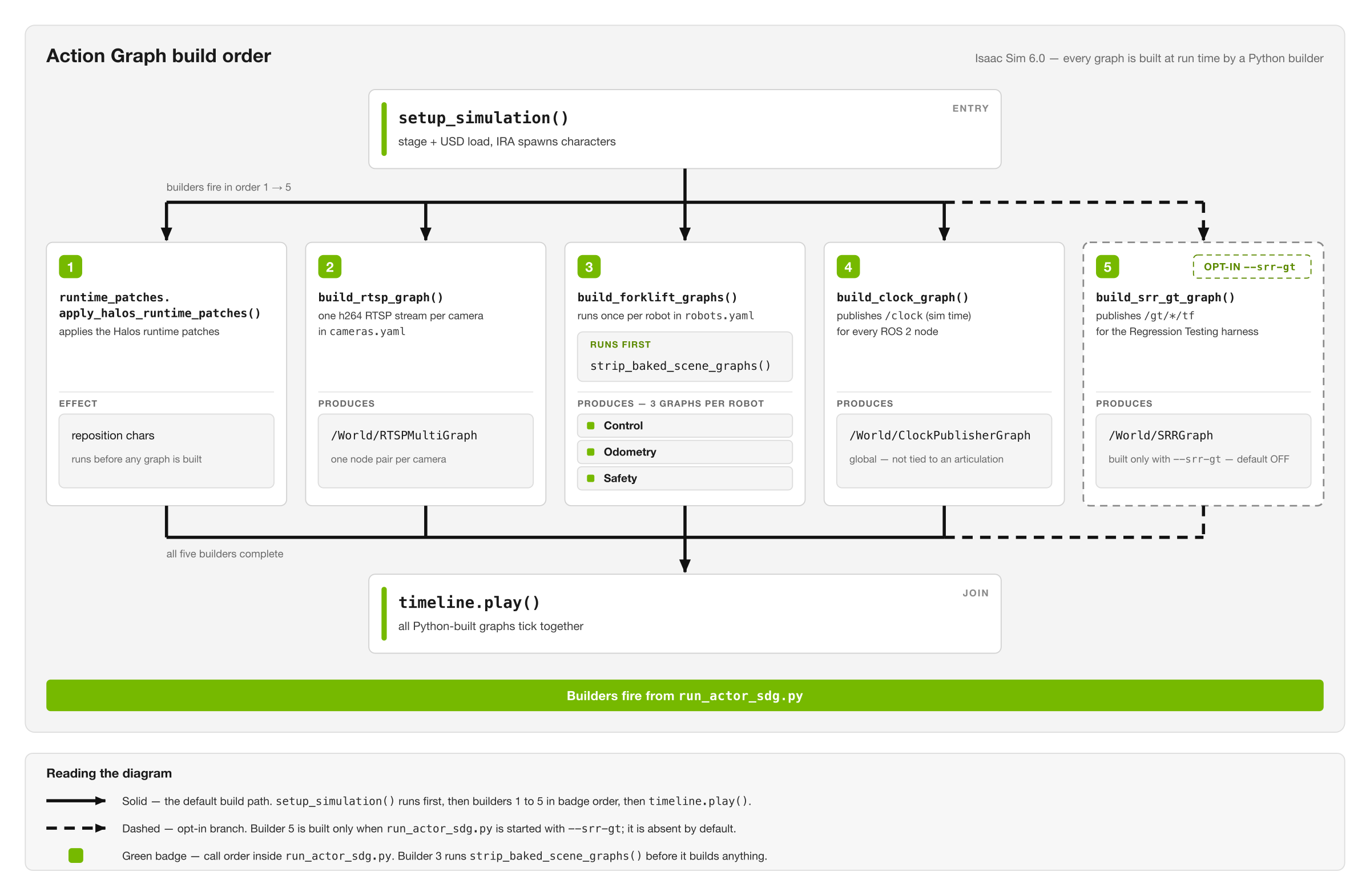
The five builders in call order, what each one produces, and the one that is built only with --srr-gt.#
Clock Publisher Graph#
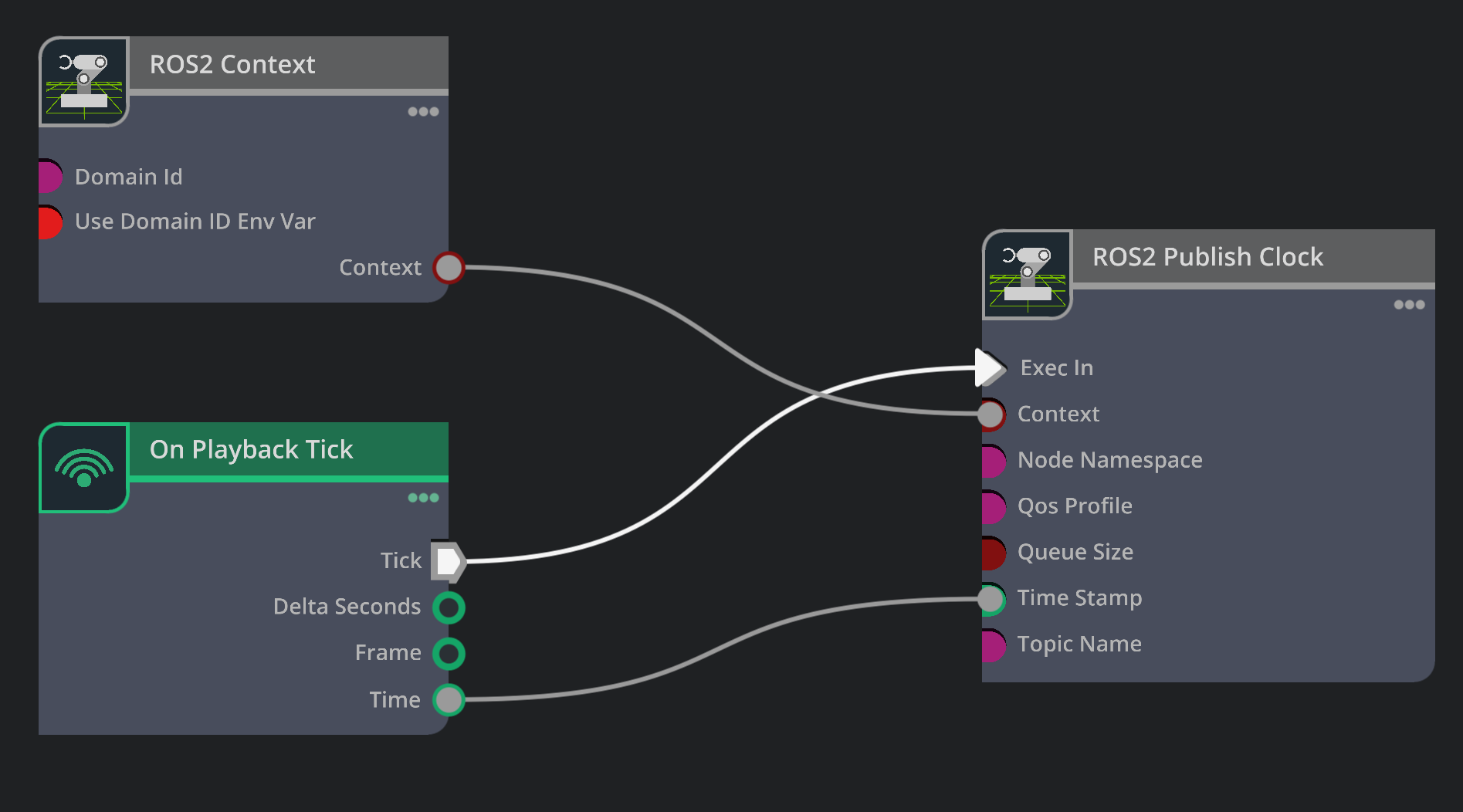
/World/ClockPublisherGraph — On Playback Tick + ROS2 Context drive ROS2 Publish Clock (tick → exec-in, time → time-stamp).#
Publishes simulation time to /clock so every ROS 2 node in the stack shares the sim clock instead of wall-clock time. It is global (not tied to any articulation), so it lives in its own builder.
OnPlaybackTick ─> ROS2PublishClock (/clock)
ROS2Context ────┘
Config — the top-level clock: block of robots.yaml:
clock:
  enabled: true
  clock_topic: clock   # ROS2PublishClock.topicName
RTSP Multi-Camera Graph#
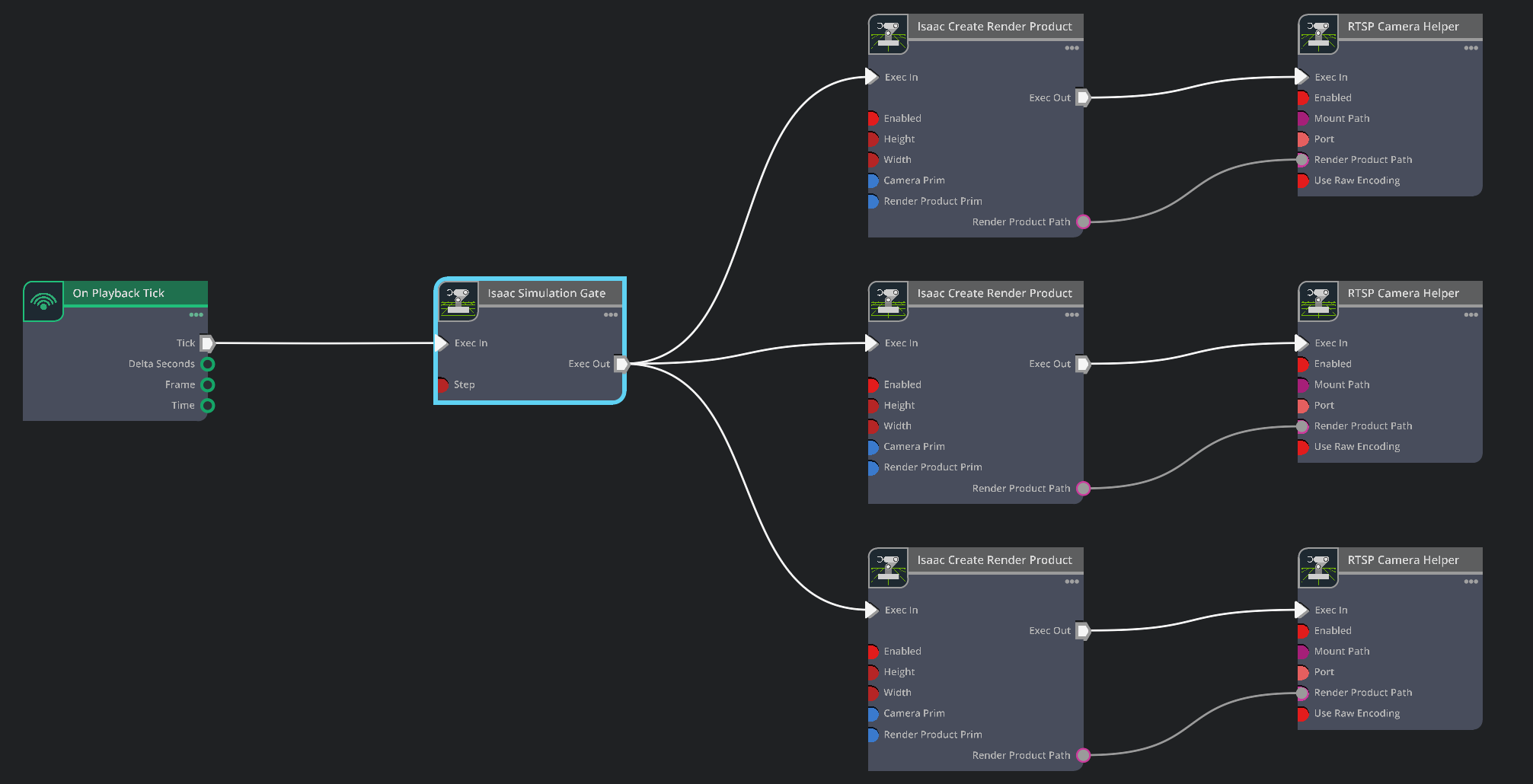
/World/RTSPMultiGraph — On Playback Tick → Isaac Simulation Gate fans out to one Isaac Create Render Product → RTSP Camera Helper pair per camera (three cameras shown).#
Builds one shared OnPlaybackTick plus a pair of nodes (IsaacCreateRenderProduct + RTSPCameraHelper) for each camera in cameras.yaml. After Play, each camera self-hosts an in-process RTSP server on its own port and streams NVENC h264 (default 1920×1080) with per-frame SEI metadata.
OnPlaybackTick ─> IsaacSimulationGate ─┬─> RP_Camera    ─> RTSP_Camera    (port 8554 /camera)
                                       ├─> RP_Camera_01 ─> RTSP_Camera_01 (port 8555 /camera_01)
                                       └─> RP_Camera_02 ─> RTSP_Camera_02 (port 8556 /camera_02)
The IsaacSimulationGate (rate divider) throttles the render-loop tick down to the sim/BT rate; without it the encoder duplicates frames on the wire and the downstream DeepStream/VST pipeline backlogs.
Config — the cameras: list in cameras.yaml (name, camera_prim, port, mount_path; optional spawn: block to create the camera prim at run time). The stream URL is rtsp://${HOST_IP}:<port><mount_path>.
Forklift Control Graph#
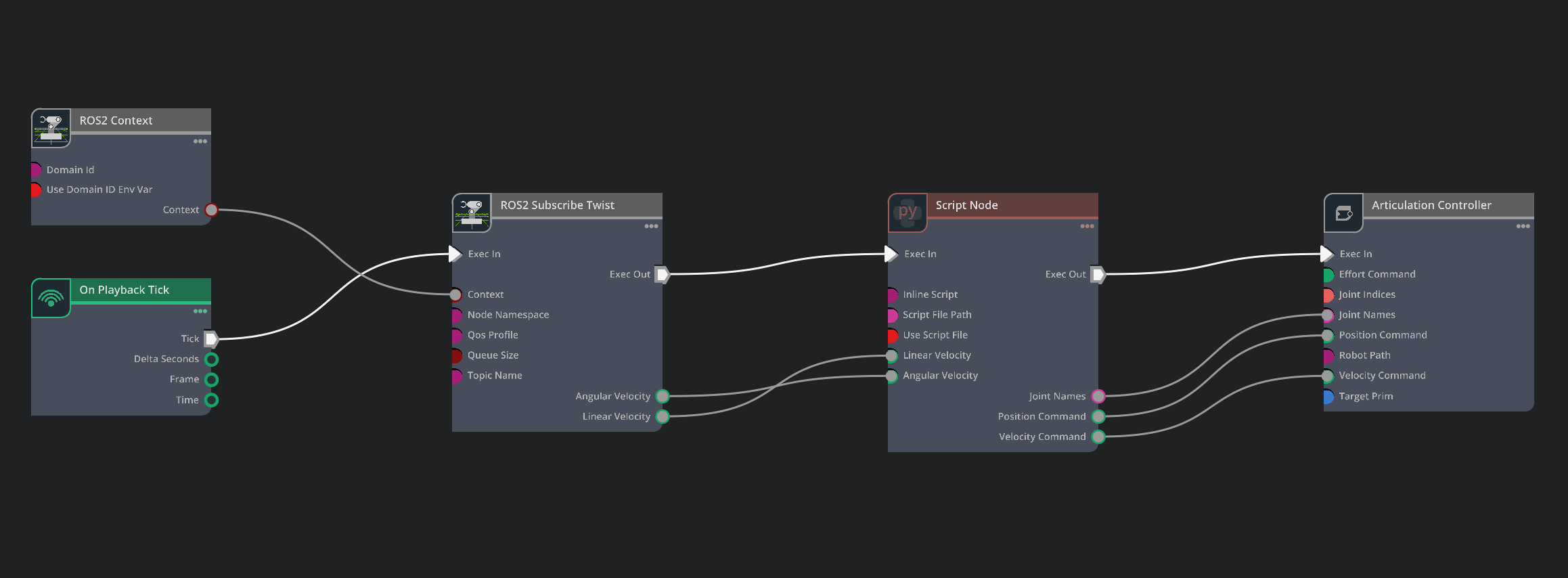
/World/forklift_b_ControlGraph — ROS2 Subscribe Twist (cmd_vel) → SwivelIK Script Node → Articulation Controller.#
Turns velocity commands into forklift joint commands. It subscribes to ``cmd_vel`` (geometry_msgs/Twist, published by the forklift-controller service) and maps it through a single swivel-drive IK ScriptNode to the IsaacArticulationController.
OnPlaybackTick ─> ROS2SubscribeTwist (cmd_vel) ─> SwivelIK (ScriptNode) ─> ArticulationController
ROS2Context ────────────────────────────────────┘                          (targetPrim = robot)
Note
Where does the motion come from? The control graph is reactive — it only converts whatever cmd_vel it receives. The route itself is authored outside Isaac Sim: the forklift-controller service follows a waypoint / segment path and publishes cmd_vel. See Forklift Controller for how it follows that path, and the Forklift Waypoint Generator for authoring curved routes.
SwivelIK ScriptNode#
The IK math from the old baked ROS_Forklift_Control_Graph plus the downstream divide-by-wheel-radius and construct-array plumbing are folded into one ScriptNode (same math, far fewer fragile node-to-node connections). Build-time constants are prepended by the builder from the robots.yaml control: block.
# Prepended by the builder from robots.yaml control:
#   DRIVE_JOINT, SWIVEL_JOINT, WHEELBASE, WHEEL_RADIUS, MAX_STEER,
#   FLIP_LINEAR_X, FLIP_ANGULAR_Z
import math

MIN_COS = 1e-3
MIN_SPEED = 1e-4

def compute(db):
    lin = db.inputs.linearVelocity
    ang = db.inputs.angularVelocity

    # Vehicle-frame vs ROS-frame sign flips (control.reverse_logic.*).
    linear_x = -lin[0] if FLIP_LINEAR_X else lin[0]
    angular_z = -ang[2] if FLIP_ANGULAR_Z else ang[2]

    heading_speed = max(abs(linear_x), MIN_SPEED)
    steer = math.atan2(angular_z * WHEELBASE, heading_speed)
    steer = max(min(steer, MAX_STEER), -MAX_STEER)

    if linear_x < 0.0:                     # reverse
        steer = 0.0 if abs(angular_z) < MIN_SPEED else -steer
        drive = -heading_speed / max(math.cos(steer), MIN_COS)
    else:
        drive = heading_speed / max(math.cos(steer), MIN_COS)

    wheel_ang = drive / WHEEL_RADIUS       # m/s -> rad/s

    db.outputs.jointNames = [DRIVE_JOINT, SWIVEL_JOINT]
    db.outputs.positionCommand = [0.0, steer]      # swivel = steering angle
    db.outputs.velocityCommand = [wheel_ang, 0.0]  # drive  = wheel angular vel
    return True
The controller applies two joints: a velocity-controlled drive wheel and a position-controlled swivel (steer) wheel.
Forklift parameters#
Defined per robot in robots.yaml control: (defaults shown):
Parameter |
Value |
Usage |
|---|---|---|
|
1.49 m |
Steering kinematics ( |
|
0.15 m |
Convert drive m/s → wheel rad/s |
|
45° |
Steering-angle clamp |
|
|
Velocity command |
|
|
Position command (steering) |
|
|
Negate |
Forklift Odometry Graph#
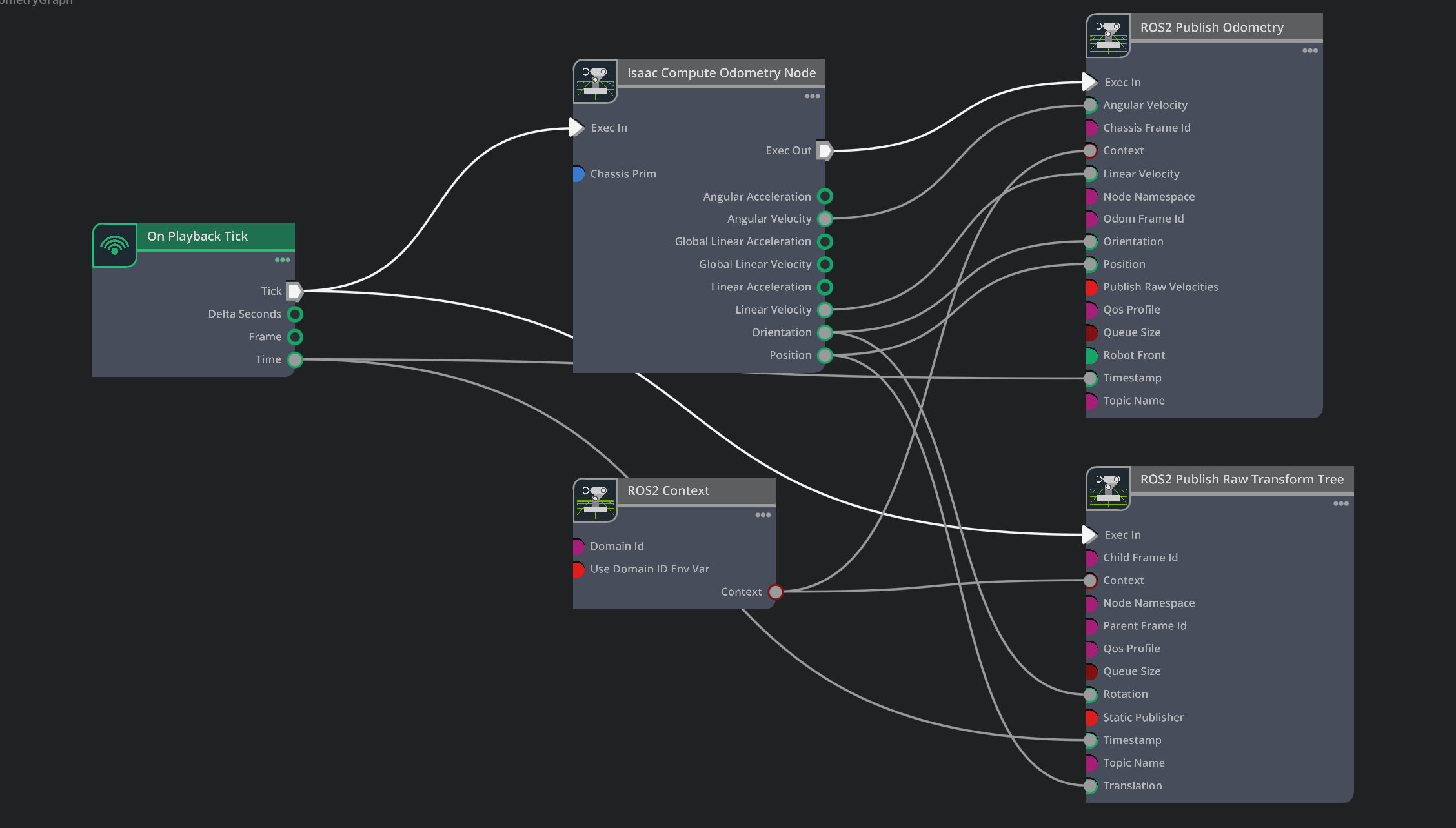
/World/forklift_b_OdometryGraph — Isaac Compute Odometry → ROS2 Publish Odometry (/odom) + ROS2 Publish Raw Transform Tree (TF).#
Publishes the forklift’s odometry — where the robot thinks it is and how fast it is moving. IsaacComputeOdometry reads the chassis prim’s motion in the simulation and outputs position, orientation, and linear/angular velocity; two publishers then put that on the ROS 2 graph:
ROS2PublishOdometry→/odom(nav_msgs/Odometry)ROS2PublishRawTransformTree→ theodom→ base TF
OnPlaybackTick ─> IsaacComputeOdometry ─┬─> ROS2PublishOdometry     (/odom)
ROS2Context ────────────────────────────┼─> ROS2PublishRawTransformTree (TF)
                                         └─ (chassisPrim = robot articulation)
Why it matters: downstream ROS 2 consumers (rviz, the forklift-controller’s closed-loop feedback, TF lookups) need a continuous pose + velocity estimate to know where the forklift is over time. Because this odometry is computed directly from the articulation transform in sim, it is clean pose feedback for the control loop — distinct from the Regression Testing Reporter ground truth on /gt/* (below), which exists to score perception against a known reference.
Config — the robots.yaml odometry: block:
odometry:
  enabled: true
  odom_topic: odom              # ROS2PublishOdometry.topicName
  tf_topic: tf                  # ROS2PublishRawTransformTree.topicName
  robot_front: [-1.0, 0.0, 0.0] # which body axis points "forward"
robot_front tells IsaacComputeOdometry which local axis is the robot’s forward direction (the forklift asset’s forward is -X), so reported heading and velocity match the actual travel direction.
Safety Indicator Graph#
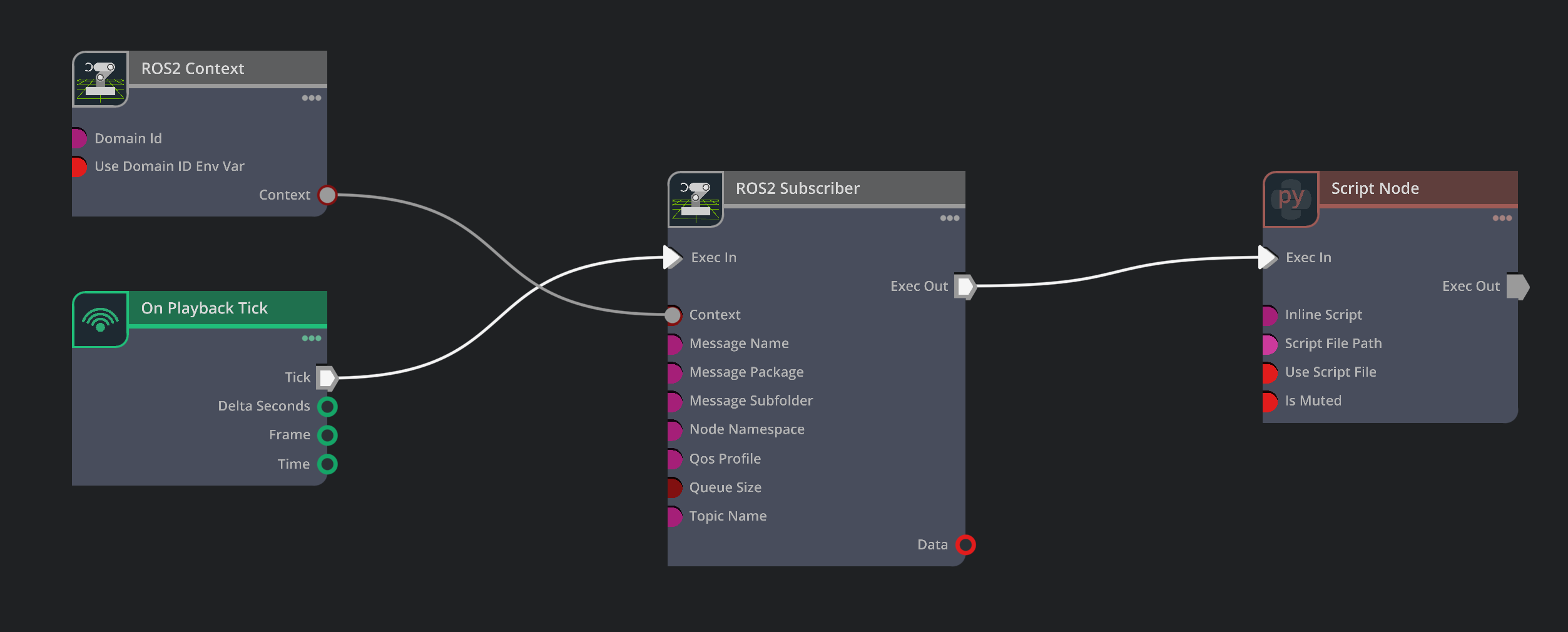
/World/forklift_b_SafetyGraph — ROS2 Subscriber (/safety/is_muted) → indicator Script Node that recolors the disk mesh.#
Subscribes to /safety/is_muted (std_msgs/Bool) and recolors the forklift’s indicator disk each tick — green when safety is muted (loading allowed), red/orange when the alarm is active.
OnPlaybackTick ─> ROS2Subscriber (/safety/is_muted) ─> Indicator (ScriptNode)
ROS2Context ────────────────────────────────────────┘
Indicator ScriptNode#
# INDICATOR_PRIM and SUB_DATA_ATTR are prepended by the builder.
from pxr import UsdGeom, Gf
import omni.graph.core as og
import omni.usd

def compute(db):
    # Poll the subscriber output each tick. ROS2Subscriber creates
    # outputs:data dynamically, and a USD-authored connection to that
    # dynamic attribute is not reliably bound by OmniGraph (the input
    # would stay False forever). Reading the value directly sidesteps it.
    try:
        is_muted = bool(og.Controller.get(og.Controller.attribute(SUB_DATA_ATTR)))
    except Exception:
        is_muted = bool(db.inputs.is_muted)

    stage = omni.usd.get_context().get_stage()
    disk_prim = stage.GetPrimAtPath(INDICATOR_PRIM)
    if disk_prim.IsValid():
        mesh = UsdGeom.Mesh(disk_prim)
        color_attr = mesh.GetDisplayColorAttr()
        if is_muted:
            color_attr.Set([Gf.Vec3f(0.0, 1.0, 0.0)])   # GREEN  - muted
        else:
            color_attr.Set([Gf.Vec3f(1.0, 0.3, 0.0)])   # ORANGE - alarm
    return True
Indicator states:
is_muted = true→ GREEN(0.0, 1.0, 0.0)is_muted = false→ ORANGE(1.0, 0.3, 0.0)
Config — the robots.yaml safety_indicator: block (muted_topic, indicator_prim; the disk defaults to <articulation_prim>/body/body/safety_indicator).
Important
Difference from the VST overlay: this indicator is a 3D mesh in the simulation scene, visible to the cameras as part of the environment. It is separate from the VST/VIOS overlay (proximity bubble, Standard/Efficient Mode text) that VIOS renders on top of the video stream in the VST UI. The VST overlay is configured in VIOS config files and provides feedback in the monitoring interface; this indicator represents a simulated physical alarm light on the forklift.
Regression Testing Reporter Ground-Truth Graph (opt-in)#
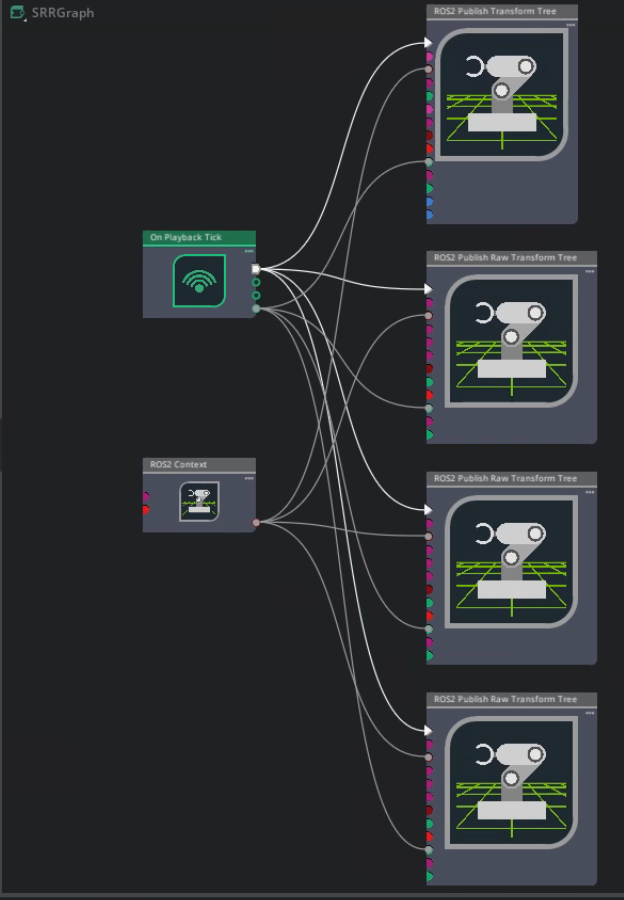
/World/SRRGraph — On Playback Tick + ROS2 Context drive four ROS2 Publish (Raw) Transform Tree nodes publishing /gt/*/tf.#
Built only when run_actor_sdg.py is started with --srr-gt (default OFF). It publishes true poses on /gt/*/tf for the Regression Testing Reporter harness to score perception against:
the forklift via
ROS2PublishTransformTree→/gt/forklift/tfeach pedestrian via
ROS2PublishRawTransformTree→/gt/character_<i>/tf, fed each frame from the character’s live Fabric world transform (the IRA-spawned characters walk in Fabric only, so the USD-authored transform stays frozen at the spawn pose).
On a normal Halos run the flag is absent and this module is never imported, so there is zero effect on the default pipeline. For how the ground truth is consumed, see Architecture.
Limitations#
No lift control#
The graphs control drive and steering only; the forks stay at a fixed height.
Customize for a new scene#
Because shape lives in YAML, most changes are config-only:
New robot — add a block to
robots.yaml(name+articulation_prim+ thecontrol/odometry/safety_indicatorsub-blocks you need). No code change.New camera — add an entry to
cameras.yamlwith a uniqueport.Different forklift model — update
wheelbase/wheel_radius/drive_joint/swivel_jointin thecontrol:block.Relocated indicator mesh — set
safety_indicator.indicator_prim.Turn a graph off — set
enabled: falseon that block.
See also#
Isaac Sim Configuration — scene, cameras, and motion authoring
Forklift Controller — the service that publishes
cmd_veland consumes/odomForklift Waypoint Generator — author curved forklift routes
Architecture — how
/gt/*ground truth is scored