

SIL — 2D Perception#
Deploy Halos SIL for Software-in-Loop testing.
Note
Halos SIL requires VSS Warehouse 3.2.1 as its perception backend. Deploy VSS Warehouse first using the official VSS Warehouse Blueprint - 2D Vision AI Profile documentation before proceeding with Halos SIL deployment.
Prerequisites#
See Prerequisites for hardware and software requirements.
Deploy with Halos Deployment Skill (recommended)#
For an automated bring-up with a coding agent (Claude Code, Codex, Cursor, and similar), use the hoisa-deploy-profile skill — it replaces Steps 1–6 below with a single agent prompt. See Agentic Deployment.
Manual instructions below remain supported and are required if you are not using a coding agent.
Step 1: Download Packages#
Clone the Halos Outside-In Safety repository (ships the compose files, profiles, configs, and scripts in-tree), then download the SIL data tarball from NGC:
# Clone the Halos Outside-In Safety repo
git clone https://github.com/NVIDIA/halos-outside-in-safety.git
cd halos-outside-in-safety

# Download SIL data
ngc registry resource download-version \
  "nvidia/halos-outside-in/sample-sil-data:v1.3.0"

tar -xvf sample-sil-data_v*/halos-outside-in-sil-data.tar.gz \
  --directory=/home/$USER/ # change me
Output:
halos-outside-in-safety/- Cloned repo (compose files, profiles, configs, scripts)sil-data/- Isaac Sim scenes and configs
Step 2: Deploy VSS Warehouse#
Deploy VSS Warehouse 3.2.1 following the official VSS Warehouse Blueprint - 2D Vision AI Profile documentation. Apply the overrides below before docker compose up — if perception builds its TensorRT engine with the wrong config, a rebuild costs another 15-20 min.
Note
<wh_ops> below is the VSS warehouse-operations directory, <vss_repo>/deploy/docker/industry-profiles/warehouse-operations/. Edit the override files there in place, but do not run docker compose from <wh_ops>/ — its compose.yml is only an app fragment and pulls in no infrastructure (Kafka, Redis, sdr-controller). Deploy from <vss_repo>/deploy/docker/ with --env-file industry-profiles/warehouse-operations/.env.
2.1 .env Overrides#
Set these in <wh_ops>/.env. Only VLM_MODE already carries the value below; the
defaults select a different profile, dataset, and stream count, so the rest have to be
changed. BP_PROFILE is the one that matters most — the default bp_wh brings up no
Kafka, and the Safety Core then receives no events while every container still looks
healthy.
HOST_IP='<HOST_IP>'                                             # get with: hostname -I | awk '{print $1}'
BP_PROFILE=bp_wh_kafka                                          # default: bp_wh; Kafka is required for the Safety Core
LLM_MODE=none                                                   # default: local; not needed for SIL
VLM_MODE=none                                                   # already the default
SAMPLE_VIDEO_DATASET="warehouse-loading-dock-3cams-synthetic"   # default: nv-warehouse-4cams
NUM_STREAMS=3                                                   # default: 4; matches 3 Isaac Sim cameras
2.2 DeepStream Config#
File: <wh_ops>/warehouse-2d-app/deepstream/configs/ds-main-config.txt
Disable SEI extraction in [source-list] (the app config ships it enabled):
[source-list]
# extract-sei-type5-data=1
# sei-uuid=NVDS_CUSTOMMETA
Set the timing keys in [streammux]:
[streammux]
attach-sys-ts-as-ntp=1       # timestamp each frame with host (wall-clock) arrival time
# extract-sei-sim-time=1     # SEI off — do not use Isaac SEI sim-time as the timestamp
# drop-backward-sei=1        # moot with SEI extraction off
Isaac Sim 6.0 RTSP does embed SEI, but the Safety Core does not consume sim time — using it as the frame timestamp makes the Safety Core drop every event as STALE. System timestamps keep decisions flowing. Without these changes the perception pipeline also reports low FPS and bounding boxes flicker on VST.
2.3 Perception Model Config#
Nothing to change. 2D runs the RT-DETR R50 model that ships with warehouse-2d-app, and the shipped warehouse-loading-dock-3cams-synthetic calibration is used as-is. (3D is different — it needs the R101 Sparse4D model plus a config.yaml; see SIL — 3D Perception.)
2.4 VST Config#
File: <wh_ops>/warehouse-2d-app/vst/configs/vst_config.json
Warning
Several copies of vst_config.json exist in the deploy tree. Edit the one the VST container actually mounts.
"rtsp_streaming_over_tcp": true,
"use_sensor_ntp_time": false,
"bbox_tolerance_ms": 100
rtsp_streaming_over_tcp: true— ingest Isaac’s self-hosted RTSP over TCP. UDP ingest hits a silent RTP-delivery stall on Isaac Sim 6.0 (see Isaac Sim Streaming, 6477478).use_sensor_ntp_time: false— pair withattach-sys-ts-as-ntp=1above so VST and DeepStream agree on wall-clock arrival time.bbox_tolerance_ms: 100— widen the metadata-to-frame match window (default0) to reduce bbox flicker on VST.
This file also carries a halo_safety_* block. Leave halo_safety_udp_port at its shipped -1 for the sil profile — SIL drives the safety indicator through the comm-layer / ROS 2 path, not the VST overlay. Only the base profile sets it to 12345.
2.5 Wait for the TensorRT Engine#
Start VSS Warehouse. First startup takes 15-20 min to build the TensorRT engine. Poll vss-rtvi-cv until all 3 cameras report a non-zero FPS:
docker logs vss-rtvi-cv 2>&1 | grep -E 'Active sources|PERF' -A3 | tail -6
Warning
Do not use docker logs -f here — it follows the stream and never returns.
Expected output when ready:
Active sources : 3
**PERF:
15.00000 (14.99911)     source_id : 2 stream_name Camera_02
15.00000 (14.99919)     source_id : 1 stream_name Camera_01
15.00000 (15.00077)     source_id : 0 stream_name Camera
All 3 sources must report non-zero FPS. A source stuck at 0.00000 isn’t arriving — Isaac Sim is not streaming yet, the RTSP URL is wrong, or the engine is still building.
Then confirm the Safety Core event seam has data:
docker exec kafka kafka-console-consumer \
  --bootstrap-server localhost:9092 \
  --topic mdx-events --max-messages 1 --timeout-ms 30000
Important
Do not proceed to Halos SIL until both signals fire: 3 cameras at FPS > 0, and mdx-events has data.
Step 3: Configure Halos SIL Environment#
nano deployments/profiles/sil.env
Required settings:
MDX_SAMPLE_APPS_DIR="/path/to/halos-outside-in-safety"  # this repo checkout root
MDX_DATA_DIR="/path/to/sil-data"                        # the extracted sil-data dir from Step 1
HOST_IP='<HOST_IP>'                                      # same value as the VSS Warehouse .env
ISAAC_GPU_DEVICE=0                                       # Use GPU 1 if available, else 0
ROS_DOMAIN_ID=0                                          # MUST be unique per host (0-232); see Troubleshooting
DOCKER_GID=999                                           # run: getent group docker | cut -d: -f3
PSF_IMAGE and ISAAC_SIM_IMAGE are pre-set in sil.env — leave them.
Step 4: Deploy Halos SIL#
cd deployments
../closed-loop-testing/scripts/setup.sh sil              # Create required directories and set permissions
../closed-loop-testing/scripts/cleanup_all_datalog.sh sil # Clean previous data logs
docker compose --env-file profiles/sil.env up -d --build
Services started: safety-core, comm-layer, isaac-sim, forklift-controller.
Step 5: Run Test Scenario#
docker exec -d isaac-sim bash -lc 'cd /isaac-sim/sil/scripts && \
  ./run_sdg.sh -c /isaac-sim/sil/configs/default_config_ros.yaml \
  --start --headless --enable-vst \
  --cameras-config /isaac-sim/sil/configs/cameras.yaml'
For script usage details and additional options, see Execution Script.
What happens:
Loads warehouse scene (20×20m)
Spawns forklift and 3 digital humans from USD
Initializes ROS2 Action Graph for forklift
Runs forklift playback sequence
Starts RTSP streaming — Isaac 6.0 self-hosts one RTSP server per camera (
8554/camera,8555/camera_01,8556/camera_02). See RTSP Multi-Camera Graph for the graph that builds them.Registers 3 cameras with VST (
--enable-vstdeletes existing sensors, then adds the Isaac cameras once the render is warm)
Startup time:
First run: 10–15 min — Isaac Sim loads its cache and compiles render shaders, then starts the simulation and brings up RTSP streaming.
Subsequent runs: 5–10 min — cache and shaders are already compiled.
Simulation: runs until you stop it.
--startstreams continuously rather than for a fixed frame count.
Step 6: Monitor Safety Commands#
The log paths below use MDX_DATA_DIR from your sil.env. From the deployments/ directory, load it into your shell first (re-run it in each terminal you monitor from):
set -a; source profiles/sil.env; set +a
Monitor OPC server log:
tail -f $MDX_DATA_DIR/comm-layer/opc_server.log
Expected output:
INFO:udp_receiver.safety_receiver:Received: Seq#0 | HEARTBEAT | 💓 Heartbeat | ts=2026-04-29T13:33:28.055302+00:00
INFO:udp_receiver.safety_receiver:Received: Seq#3 | MUTE (ALLOW OPERATION) | 🟢 Safety muted - Loading allowed | ts=2026-04-29T13:33:38.946800+00:00
INFO:udp_receiver.safety_receiver:Received: Seq#9 | UNMUTE (PREVENT OPERATION) | 🟡 Safety active + Alarm on | ts=2026-04-29T13:34:06.987138+00:00
🟢 MUTE (ALLOW OPERATION): Forklift in trailer, no humans detected (allow loading)
🟡 UNMUTE (PREVENT OPERATION): Human detected or forklift exiting (alarm active)
💓 HEARTBEAT: Periodic keep-alive (every 5s) — confirms PSF→comm-layer link is healthy
Monitor PSF:
tail -f $MDX_DATA_DIR/psf-log/pss.log
Expected output:
2026-04-29T13:33:38.770555+00:00 host nv_mdx_client[59]:  Timestamp: 2026-04-29 13:33:38:770421 Endpoint: NVPSB_PSS_SOURCE Data: Safety event reported: EVENT_0 (rule: Forklift tripwire OUT)
2026-04-29T13:34:06.823078+00:00 host nv_mdx_client[59]:  Timestamp: 2026-04-29 13:34:06:822968 Endpoint: NVPSB_PSS_SOURCE Data: Safety event reported: EVENT_1 (rule: Forklift tripwire IN)
2026-04-29T13:34:06.986286+00:00 host NVPSB_PSD_CLIENT[34]:  Timestamp: 2026-04-29 13:34:06:986216 Endpoint: NVPSB_PSD_CLIENT  Data: PSD-Gateway: received DecisionRequest id=1 with 1 events
EVENT_0 / EVENT_1: Tripwire crossings reported by perception (forklift OUT/IN trailer).
DecisionRequest: PSF decision-maker invoked — produces the corresponding MUTE/UNMUTE command on the OPC log above.
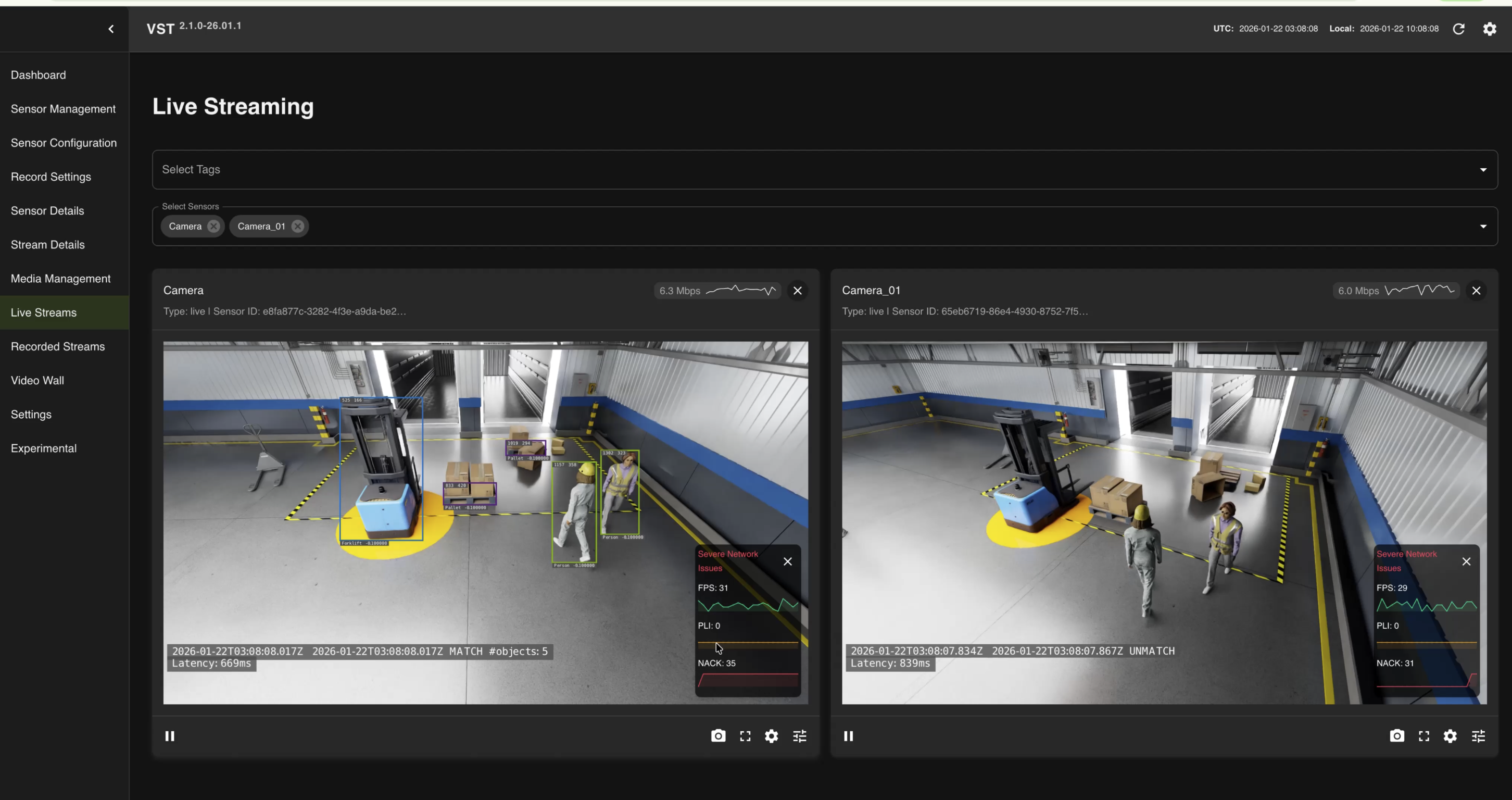
Step 7: View Camera Streams#
VST UI — http://<HOST_IP>:30888/vst/
# Open in browser
http://<HOST_IP>:30888/vst/
View live camera streams from Isaac Sim.
Cleanup and Restart#
Restart the Scenario (Live Stack)#
--start runs the scenario until it is stopped. To relaunch the Isaac scenario on an already-running stack, use the wrapper — it pauses VST stream processing for the boot window (so the fresh RTSP mounts don’t hit the cold-start “no caps” race), then resumes it once the streams are live:
bash closed-loop-testing/scripts/restart_isaac.sh # reuses the running driver's own args
Expect the mounts to warm in ~1–2 min (cached shaders), VST to resume, and DeepStream back at 3/3 cameras ~30 s later.
Reset to a Fresh Deployment#
When a stack misbehaves in ways a restart doesn’t fix, return it to the clean first-bring-up state without paying the TensorRT/shader rebuild. Stop the scenario and the Halos stack, tear down VSS’s VST postgres volume (selectively — do not down -v, which also removes the TensorRT engine volume), redeploy VSS, then clear Redis before relaunching:
docker exec redis redis-cli FLUSHALL
docker restart sdr-controller
docker restart vss-rtvi-cv
Keep the TensorRT engine volume and the isaac-cache/ shader dirs — rebuilding them costs 10–20 min.
Full Cleanup#
# Stop Halos SIL
cd deployments
docker compose --env-file profiles/sil.env down
bash ../closed-loop-testing/scripts/cleanup_all_datalog.sh sil
docker volume prune -f

# Stop VSS Warehouse (refer to VSS Warehouse docs for full cleanup)
# https://docs.nvidia.com/vss/3.2.1/warehouse-docs/Quickstart-Guide.html#teardown-the-deployment
Warning
docker volume prune -f removes every dangling volume on the host, not only this
stack’s. With the stack down that includes the perception TensorRT engine cache, which
costs a 15 to 20 minute rebuild on the next start, and the VST sensor database. Skip it
unless you want that reset, or remove the specific volumes instead.
Troubleshooting#
Safety Core (PSF) Cannot Connect to Kafka#
Warehouse (Kafka) must be running before Halos SIL. Check status:
# Check Warehouse running
docker ps | grep kafka
If Kafka is not running, redeploy VSS Warehouse following Step 2: Deploy VSS Warehouse.
STALE Events in Safety Core (PSF)#
Increase timeWindowSize in nvpss.conf (e.g., 900ms → 1200ms) to resolve STALE events in SIL.:
nano closed-loop-testing/safety-core/configs/nvpss.conf
# Increase: timeWindowSize=1200
cd deployments && docker compose --env-file profiles/sil.env restart safety-core
Safety Indicator Flickering (Multi-Machine)#
If multiple SIL systems run on the same network, each must use a unique ROS_DOMAIN_ID (0-232) in deployments/profiles/sil.env. Without this, ROS2 nodes from different machines publish to the same /safety/is_muted topic, causing cross-machine interference and safety indicator flickering.
# In deployments/profiles/sil.env — assign a unique number per machine
ROS_DOMAIN_ID=42
Restart Halos SIL after changing. Verify with:
docker exec comm-layer bash -c \
  "source /opt/ros/jazzy/setup.bash && ros2 topic info /safety/is_muted -v"
Should show Publisher count: 1.
Known Issues#
Four upstream Isaac Sim and VST issues affect the stream path on Isaac Sim 6.0, with workarounds for each. They are not specific to 2D — see Isaac Sim Streaming.
Next Steps#
SIL Architecture — System architecture and data flow
Isaac Sim Configuration — Isaac Sim configuration
Isaac Sim Action Graphs — Forklift control details
Quick Start Guide — Once SIL is healthy, run the Regression Testing Reporter to score the safety decision