


Architecture#
How the Regression Testing Reporter records the closed loop and turns it into a graded report. Read Overview first for the what and why.
Data flow (one scenario)#
The Regression Testing Reporter runs three things in lockstep — Isaac Sim (ground truth + camera streams), the VSS + Safety Core stack (the decision), and the Regression Testing Reporter service (the recorder + scorer):
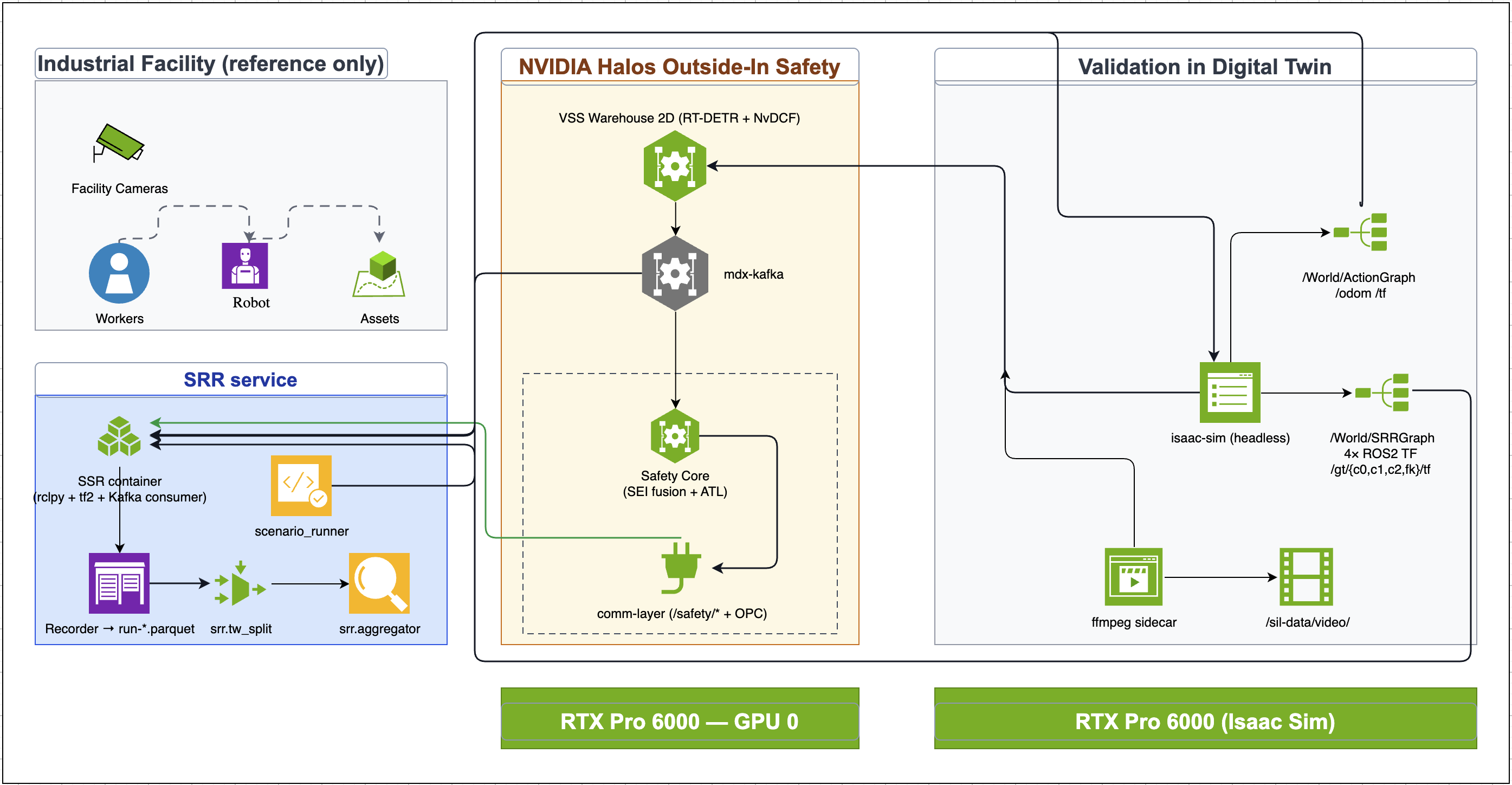
The Regression Testing Reporter service (left) records ground truth and the Safety Core decision; the Halos Outside-In Safety stack (centre) produces the MUTE / UNMUTE decision; the digital twin (right) drives the scene and publishes ground truth. Each column is a host / GPU.#
Isaac Sim publishes true poses on
/gt/*(the reference, via the/World/SRRGraphROS 2 TF publishers — see Regression Testing Reporter Ground-Truth Graph (opt-in)) and hosts the three RTSP camera streams the perception stack consumes.VSS turns those streams into Kafka events (
mdx-*); the Safety Core (PSF: SEI fusion + ATL) turns events into the MUTE / UNMUTE decision on/safety/*.The Regression Testing Reporter service (rclpy + tf2 + Kafka consumers) records both the ground truth and the decision into a single 30 Hz
parquetlog, thentw_splitandaggregatorsplit and score it.
In short: Regression Testing Reporter compares what the Safety Core decided (mute/unmute) against what ground truth said it should decide, and scores the perception feeding that decision.
Note
The diagram labels perception as “VSS Warehouse 2D (RT-DETR + NvDCF)”. With the 3D profile, SIL deployments run VSS Warehouse 3.2.1 with Sparse4D 3D detections (mdx-bev / mdx-behavior), which is what enables the Phase 2 perception scores. A 2D-only feed still works and gives the Phase 1 safety-decision scores only.
Pipeline stages#
A run advances through these stages per scenario:
Restart — both the Halos and Regression Testing Reporter compose stacks are restarted for a fresh Safety Core state (counter drift otherwise carries across runs).
Scene start — Isaac Sim loads the warehouse scene with
--srr-gt, which builds the/gt/*ground-truth publishers at run time (see Regression Testing Reporter Ground-Truth Graph (opt-in)).Warm-up — a short settle so the first clip isn’t a cold-start outlier.
Record —
/srr/record truestarts the 30 Hz capture;/srr/record falsestops it. One recording → onerun-*.parquet.Split —
tw_splitcuts the recording into per-clip segments at each forklift trailer-tripwire crossing.Aggregate — the aggregator scores each clip (Phase 1 + Phase 2) and renders
summary.md,failures.json, and per-clipscn_*.md.Video pull — per-clip review MP4s are pulled from VST.
Clip semantics#
Each time the forklift’s x-coordinate crosses the trailer tripwire (TW_X, default 9.574) is a scene boundary. Consecutive boundaries delimit one clip (~40 s each). Roughly: a 5-minute recording → ~7 clips, 10 min → ~15, 20 min → ~30. The hazard (forklift entering/leaving the dock while people are near) forms around these crossings, which is why the Regression Testing Reporter centers clips on them.
Two scoring layers#
Every recording is scored on two independent layers:
Layer |
What it scores |
|---|---|
Phase 1 — the safety decision |
Ground-truth-expected MUTE vs the actual Safety Core |
Phase 2 — perception quality |
Ground-truth TF vs the |
Phase 2 depends on the 3D pipeline (Sparse4D → mdx-bev + mdx-behavior) flowing. A 2D-only feed (only mdx-events) gives Phase 1 only — the Phase 2 section is simply omitted, which is expected, not a failure. See Interpreting the Report for what every metric means.
Recording schema#
The recorder samples at 30 Hz (SAMPLE_HZ = 30). Enabling the 3D pipeline adds five nullable columns to the parquet, so a Phase-1-only deploy still records cleanly:
Parquet column |
Purpose |
|---|---|
|
Sparse4D 3D detections ( |
|
Tracker state — Phase 2 tracking-loss / id-switch scoring. |
|
|
|
Frame id + create time for the 3D detections. |
Setting the BEV_TOPIC or BEHAVIOR_TOPIC env to an empty string disables that consumer. Ground-truth, Safety Core state, and ba_events_json (ROI/TW) are always recorded (Phase 1).
Host and network layout#
Isaac Sim — digital twin, ground-truth publishers, and the three RTSP camera sources.
VSS + Safety Core — perception (
vss-rtvi-cv), behavior analytics (vss-behavior-analytics), Kafka, and the Safety Core decision-maker.Regression Testing Reporter service — a container that joins the host network so it can reach ROS 2 (
/gt/*and/safety/*) and Kafka (mdx-*) directly.
All coordinates and zones come from the VSS calibration.json:
Constant |
Source / default |
|---|---|
|
|
|
|
|
|
|
|
Fixture integration#
The Regression Testing Reporter’s scenario fixtures (behavior trees + navmesh) must reach the isaac-sim container before Isaac launches. The default approach is a one-time sync (Pattern A): sync_to_halos.sh copies the canonical regression-reporter/scenarios/ fixtures (behavior trees + navmesh, plus the Script-Editor utilities and the default_config_ros.yaml template) into the Isaac SIL config tree. A planned follow-up (Pattern B) bind-mounts the scenarios/ dir into the container so edits appear without copying, so Pattern A is the default until it lands. The regression-reporter/scenarios/ copy is always canonical — edit there, then re-sync.
The sync command itself lives in the runbook — see Quick Start Guide Step 4 — and Test Scenarios for the fixtures themselves.
Orchestration: manual vs skill#
The manual runner (scripts/run_multi.sh) executes every stage in sequence. The hoisa-generate-regression-report skill drives the same stages but inserts a readiness check between each phase boundary (instead of fixed sleeps) and prints a demo-friendly log. Its reference docs map to the pipeline stages:
Skill phase |
What it covers |
|---|---|
|
Select scenarios + durations; confirm compose is deployed. |
|
Per-scenario launch: compose restart, scene start, |
|
Live recording monitor — forklift tripwire-crossing detection. |
|
Post-recording: |
|
Cross-run rollup → top-level |
|
What every metric means + the FAIL-clip drill-down workflow. |
Note
The manual run_multi.sh always restarts both the Halos and Regression Testing Reporter compose stacks between scenarios, and the skill does the same. This cross-scenario isolation is required — Safety Core counter drift carries across runs and corrupts the next scenario’s results.
Next steps#
Test Scenarios — the pre-built test cases and how to regenerate them.
Interpreting the Report — how to read the graded report.
Debug Viewer — root-cause analysis for failing clips.