


Isaac Sim Configuration#
Configuration files controlling Isaac Sim simulation behavior. Halos SIL runs on Isaac Sim 6.0 (nvcr.io/nvidia/isaac-sim:6.0.0) with Replicator Agent (IRA) 1.6.0.
Important
IRA 1.x (Isaac Sim 6.0) is not config-compatible with IRA 0.x (Isaac Sim 5.1 and earlier). A 0.x config will not load. The three changes that matter most here: global.simulation_length (frames) became top-level simulation_duration (seconds); flat character/sensor blocks became named groups; and character behavior moved from text command files to JSON behavior trees. See the official IRA migration guide.
Configuration Files#
Located in /isaac-sim/sil/configs/:
default_config_ros.yaml— IRA scene, characters, cameras, writercameras.yaml— camera prims, RTSP ports, and VST registrationrobots.yaml— forklift control / odometry / safety-indicator and/clockAction Graphsinspect_loop.bt.json,gather_bend_loop.bt.json,pickup_loop.bt.json— per-group character behavior trees
Note
default_command.txt and default_robot_command.txt are the IRA 0.x omni.anim.people command files. Nothing in the 6.0 pipeline reads them — they are kept only for reference against older recordings.
default_config_ros.yaml#
Main simulation configuration:
isaacsim.replicator.agent:
  version: 1.6.0
  seed: 42
  simulation_duration: 20.0
  environment:
    base_stage_asset_path: /isaac-sim/sil/scenes/indicator_warehouse_20x20_layout_overflow_test.usd
  character:
    groups:
      inspect_workers:
        num: 1
        asset_path: Isaac/People/Characters/
        behavior_tree: /isaac-sim/sil/configs/inspect_loop.bt.json
      gather_workers:
        num: 1
        asset_path: Isaac/People/Characters/
        behavior_tree: /isaac-sim/sil/configs/gather_bend_loop.bt.json
      pickup_workers:
        num: 1
        asset_path: Isaac/People/Characters/
        behavior_tree: /isaac-sim/sil/configs/pickup_loop.bt.json
    motion_library_path: Isaac/People/MotionLibrary/HumanMotionLibrary.usd
  sensor:
    groups:
      ceiling_cameras:
        num: 3
        aim_at_targets:
          height_range: [2.0, 3.0]
          look_down_angle_range: [0.0, 60.0]
          focal_length_range: [10.0, 15.0]
          distance_range: [6.5, 14.5]
  replicator:
    writers:
      IRABasicWriter:
        output_dir: ''
        rgb: false
        bounding_box_2d_tight: false
        # ... every other annotator also false ...
        start_frame: 0
        end_frame: 1800
        sensor_prim_list:
        - /World/Cameras/ceiling_cameras
Key Parameters#
Parameter |
Default |
Description |
|---|---|---|
|
1.6.0 |
IRA config schema version. Must be 1.x on Isaac Sim 6.0. |
|
42 |
Random seed for reproducible scenarios (top-level in 1.x, was |
|
20.0 |
Run length in seconds, not frames. IRA ticks the timeline at 30 Hz. |
|
USD file path |
Warehouse scene to load (was |
|
1 |
Digital humans in that group — 3 groups × 1 = 3 characters total |
|
JSON path |
Behavior tree driving the group (replaces the 0.x |
|
|
Character USD directory, resolved against the asset root |
|
|
Shared human motion library, resolved against the asset root |
|
3 |
Cameras IRA places, using the |
|
all annotators off |
Kept only to satisfy IRA’s writer requirement — see below |
Note
The writer no longer produces the camera streams. On IRA 0.x this file set writer: RTSPWriter and RTSP came out of the replicator writer. On 6.0 the streams come from the RTSP multi-camera Action Graph built from cameras.yaml, so every IRABasicWriter annotator is switched off and nothing is written to disk.
Note
Every camera is driven from a single OnPlaybackTick, routed through an IsaacSimulationGate rate divider before the render products. Its step input sets how many render-loop ticks are skipped between frames; at the shipped step: 1 every tick produces a frame, and the effective rate is whatever the render loop sustains. Raise step if the encoder starts duplicating frames on the wire and the DeepStream/VST pipeline backlogs.
cameras.yaml#
Camera registration configuration for VST:
cameras:
  - name: Camera
    camera_prim: /World/Cameras/Camera
    port: 8554
    mount_path: /camera
    spawn:
      position: [0.5953581163925358, -15.33611879594478, 3.199676475989638]
      rotation_yxz_deg: [51.569855, 0.0, -92.38173]
      focal_length: 8.0
      horizontal_aperture: 20.955
      vertical_aperture: 15.2908

  - name: Camera_01
    camera_prim: /World/Cameras/Camera_01
    port: 8555
    mount_path: /camera_01
    # spawn: ...

  - name: Camera_02
    camera_prim: /World/Cameras/Camera_02
    port: 8556
    mount_path: /camera_02
    # spawn: ...

rtsp:
  host: ${HOST_IP}
Camera registration:
name: Camera identifier in VSTcamera_prim: USD prim path of the camera in the stageport: TCP port of the in-process RTSP server — unique per cameramount_path: URL suffix (must start with/)spawn: Optional. When present,camera_loader.pycreates the Camera prim atcamera_primfrom these values at scene init, and the baked camera must be removed from the scene USD. Omit it to use a baked camera prim.Full URL:
rtsp://${HOST_IP}:${port}${mount_path}
When Isaac Sim starts with --enable-vst, cameras automatically register with VST using these definitions.
Warning
Two fields from the Isaac Sim 5.1 schema must not appear: per-camera rtsp_path (the RTSPWriter_World_Cameras_*_rgb string) and the top-level rtsp.port of the old external broker. vst_sensor_manager.py rejects a config that still carries them.
robots.yaml#
Drives the forklift Action Graph builders. One block per robot — adding a robot means adding a block here, with no code change. See Isaac Sim Action Graphs for what each builder produces.
robots:
  - name: forklift_b
    articulation_prim: /World/forklift_b
    control:
      enabled: true
      cmd_vel_topic: cmd_vel
      drive_joint: back_wheel_drive       # velocity-controlled
      swivel_joint: back_wheel_swivel     # position-controlled steer
      wheelbase: 1.49
      wheel_radius: 0.15
      max_steer_deg: 45.0
      reverse_logic:
        flip_linear_x: true
        flip_angular_z: true
    odometry:
      enabled: true
      odom_topic: odom
      tf_topic: tf
      robot_front: [-1.0, 0.0, 0.0]
    safety_indicator:
      enabled: true
      muted_topic: /safety/is_muted
      indicator_prim: /World/forklift_b/body/body/safety_indicator

clock:
  enabled: true
  clock_topic: clock
The reverse_logic flags exist because the forklift asset’s vehicle frame is opposite the ROS twist convention on both axes. Set them to false for a robot whose asset already matches ROS.
Forklift Motion#
Forklift motion is driven by the forklift-controller service, not by a node inside the Action Graph. The controller reads a waypoint file and publishes cmd_vel (geometry_msgs/Twist); the Forklift Control Action Graph only converts that cmd_vel into wheel commands.
Author routes with the Forklift Waypoint Generator below. For the controller’s ROS interface, route-following behavior, and the FORKLIFT_* environment variables, see Forklift Controller.
Note
sil/playback/segments.json (a list of duration / linear_x / angular_z steps) is left over from the pre-6.0 pipeline, where a playback script node inside the Action Graph read it directly. Nothing in the current codebase loads it.
Common Adjustments#
Change Simulation Length#
simulation_duration is in seconds:
isaacsim.replicator.agent:
  simulation_duration: 300.0   # 5 minutes
Test Without Humans#
Set num: 0 on every character group, or delete the groups:
character:
  groups:
    inspect_workers:
      num: 0
    gather_workers:
      num: 0
    pickup_workers:
      num: 0
Change Character Behavior#
Point a group at a different behavior tree. Trees are authored with omni.behavior.tree.ui and reference the omni.behavior.tree.core and omni.anim.behavior.tree node libraries — see the IRA configuration guide.
character:
  groups:
    inspect_workers:
      num: 1
      behavior_tree: /isaac-sim/sil/configs/my_loop.bt.json
Forklift Waypoint Generator#
For curved, multi-segment forklift routes, author waypoints visually with the Forklift Waypoint Generator web tool (tools/waypoint-generator/). The tool overlays the warehouse floor plan (Top.png) and exports a JSON path that the SIL forklift controller consumes directly.
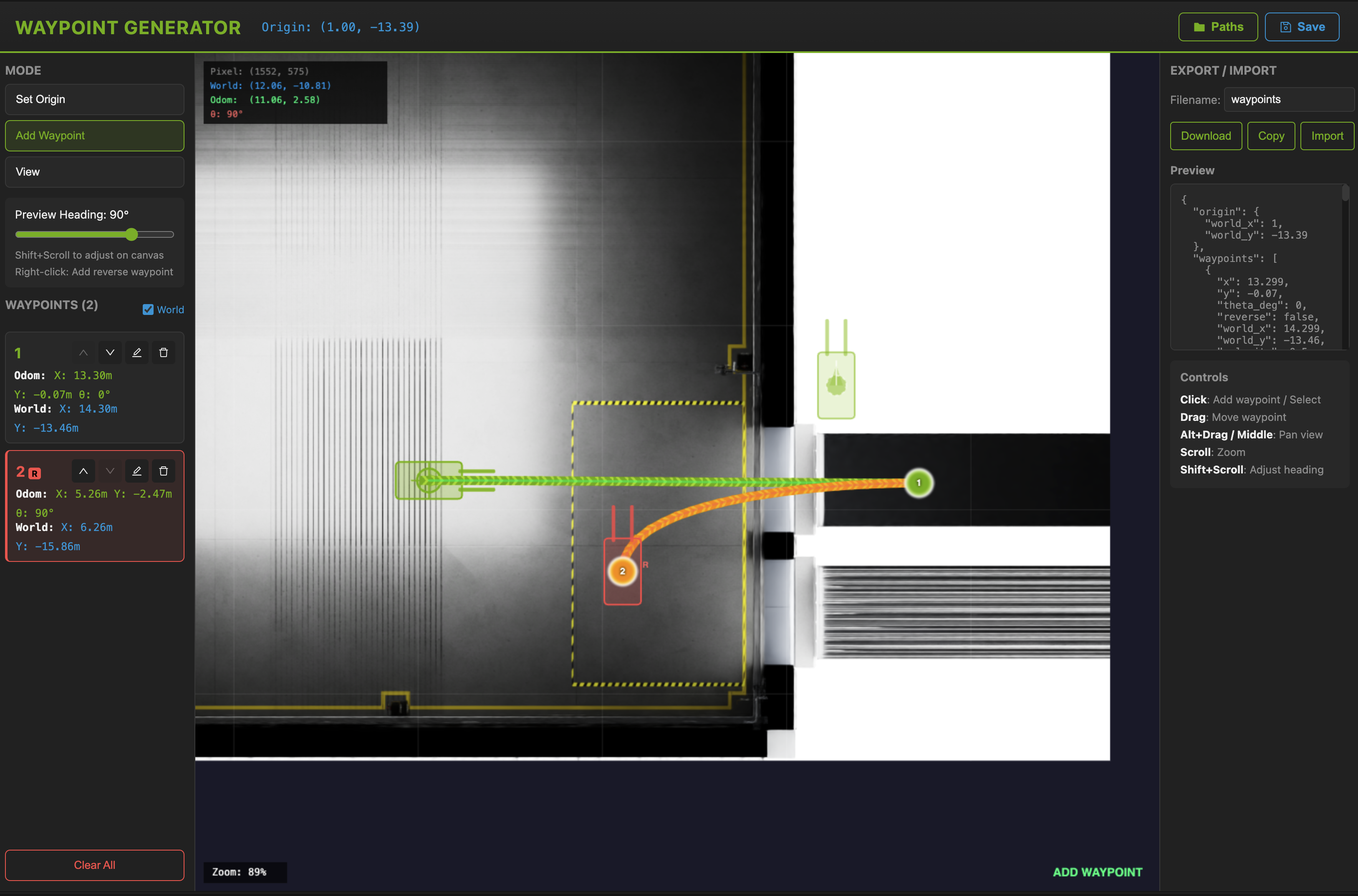
A two-waypoint route. Left: mode selector and the waypoint list, each entry showing its odom and world coordinates. Right: the exported JSON, updated as you edit. The readout above the canvas tracks the cursor in pixel, world and odom coordinates at once, and the arrow on each marker is its heading.#
Launch#
Requires Node.js 20.19+ or 22.12+ (Vite 7 requirement).
cd tools/waypoint-generator
npm install
npm run dev
# open http://localhost:5173
Coordinate Systems#
Pixel — image coordinates (
Top.pngis 1920×1080)World — Isaac Sim global coordinates (metres)
Odom — relative to the origin point
Export Format#
The exported JSON is the input format of the SIL forklift controller:
{
  "origin": {"world_x": 1.0, "world_y": -13.39},
  "waypoints": [
    {"x": 12.44, "y": -0.01, "theta_deg": 0, "reverse": false,
     "world_x": 13.44, "world_y": -13.40, "velocity": 0.5, "note": "Waypoint 1"}
  ],
  "poses": [{"x": 1.0, "y": -13.39, "theta": 0.0}],
  "segments": [{"from_waypoint": 0, "to_waypoint": 1, "reverse": false, "pose_count": 21}]
}
origin— robot start in world coordinateswaypoints— user-defined points with odom (x,y) and world coordinatesposes— interpolated points for the smooth curved path (consumed by the controller)segments— per-pair segment info, including thereverseflag
Using the Path in SIL#
closed-loop-testing/forklift-controller/robot_controller.py loads the file via --path <file>.json. The simplest route into the deployment is to replace the default closed-loop-testing/forklift-controller/waypoints/waypoints.json with the export; to keep it elsewhere, see the FORKLIFT_WAYPOINTS_DIR and FORKLIFT_WAYPOINT_FILE pair in Forklift Controller.
Calibration for New Scenes#
The bundled public/Top.png and calibration match the closed-loop-testing loading-dock scene:
Scale factor: 49.51 pixels/metre
Default forklift start:
(1.0, -13.39)in world coordinates
To target a different scene, replace public/Top.png and update src/config/calibration.json with that scene’s calibration, then set defaultForkliftStart from the forklift prim’s transform in Isaac Sim.
Execution Script#
Isaac Sim scenarios are executed using run_sdg.sh, a thin wrapper that locates Isaac Sim’s python.sh and runs run_actor_sdg.py. You can call either one.
Command Line Parameters#
Parameter |
Description |
|---|---|
|
Path to the IRA config file (required) |
|
Automatically start data generation (no manual UI start needed) |
|
Set the scene up but do not start generation |
|
Run without a GUI window (for automated testing) |
|
Register the cameras as VST sensors |
|
Path to |
|
Path to |
|
Build the ground-truth |
|
Viewport resolution (default 1920×1080) |
|
Sim-time seconds the timeline must advance under Play before VST registration (default 1.0) |
|
Wall-clock ceiling before VST registers best-effort even if the render never warms (default 1200) |
|
Save the USD scene after generation |
|
Enable debug output |
The build steps are all on by default and can be switched off individually for debugging: --no-rtsp (RTSP graph), --no-forklift (control, odometry, safety indicator), --no-clock (/clock publisher), --no-camera-spawn (dynamic camera prim spawn), --no-runtime-patches.
Example execution:
docker exec -d isaac-sim bash -lc 'cd /isaac-sim/sil/scripts && \
  ./run_sdg.sh -c /isaac-sim/sil/configs/default_config_ros.yaml \
  --start --headless --enable-vst \
  --cameras-config /isaac-sim/sil/configs/cameras.yaml \
  --robots-config /isaac-sim/sil/configs/robots.yaml'
VST Integration:
--enable-vstregisters cameras with VST automaticallyReads camera definitions from
cameras.yamlConstructs RTSP URLs:
rtsp://${HOST_IP}:${port}${mount_path}Requires the
HOST_IPandVST_BASE_URLenvironment variablesRegistration waits for the render to warm, which avoids the cold-bind
has no capsfailure (see Isaac Sim Streaming, 6478845)
Example with UI:
Allow X11 connections:
xhost +local:
Stop all SIL docker compose containers, then run cleanup and setup:
cd deployments
../closed-loop-testing/scripts/cleanup_all_datalog.sh sil
../closed-loop-testing/scripts/setup.sh sil
Start SIL docker compose:
docker compose --env-file profiles/sil.env up -d --build
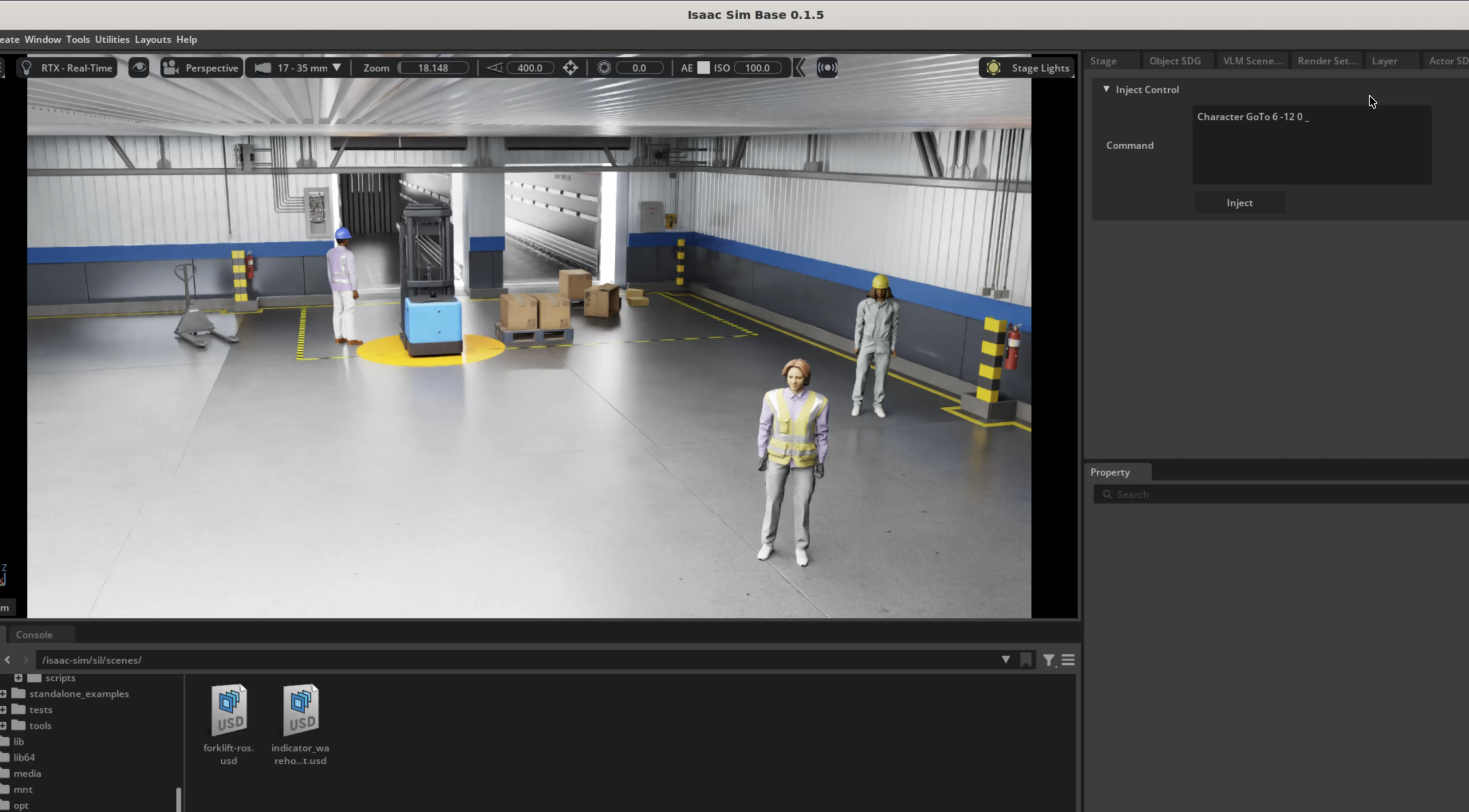
Then start Isaac Sim with UI:
docker exec -it isaac-sim bash -lc 'cd /isaac-sim/sil/scripts && \
  ./run_sdg.sh -c /isaac-sim/sil/configs/default_config_ros.yaml \
  --start --enable-vst \
  --cameras-config /isaac-sim/sil/configs/cameras.yaml \
  --robots-config /isaac-sim/sil/configs/robots.yaml'
Warning
Run headless for anything repeated. On a GeForce card the windowed UI leaks NVENC encode sessions across timeline stop/play and dies after roughly three replays (see Isaac Sim Streaming, 6478175).
Tip
For the full IRA schema — character and robot groups, behavior trees, camera placement strategies, and writer options — see the IRA Configuration File Guide and the Actor Simulation tutorial.
Next Steps#
Isaac Sim Action Graphs - Action Graph details
Forklift Controller - The service that drives the forklift along a route
SIL Architecture - System architecture
SIL — 2D Perception - Deployment guide