

Video Embedding Generation
Overview
The Real-Time Embedding microservice (RTVI-Embed, container image vss-rt-embed) is a FastAPI-based REST API service
that provides video and text embedding generation capabilities. It supports video/image files,
live RTSP streams, and text inputs, enabling real-time analysis and batch processing of visual media content.
All REST endpoints use the /v1 prefix. The service listens on port 8000 inside the
container; map it to a host port by setting the required BACKEND_PORT variable.
Key Features
- Video Embeddings: Generate embeddings from video files with configurable chunk duration and overlap
- Image Embeddings: Process single or multiple images for embedding generation
- Live Stream Support: Real-time embedding generation from RTSP camera streams
- Text Embeddings: Generate embeddings from text inputs
- Streaming Responses: Server-Sent Events (SSE) for real-time streaming output
- Kafka Integration: Kafka messages containing generated embeddings for video input
- Redis Integration: Error messages on Redis channel
- Batch Operations: Bulk upload and deletion of live streams
- Health Monitoring: Comprehensive health check endpoints (liveness, readiness, startup)
- Metrics: Prometheus-format metrics for monitoring and observability
- OpenTelemetry Integration: Distributed tracing and metrics collection
Architecture
The diagram below shows the DeepStream Accelerated Pipeline architecture of the microservice.
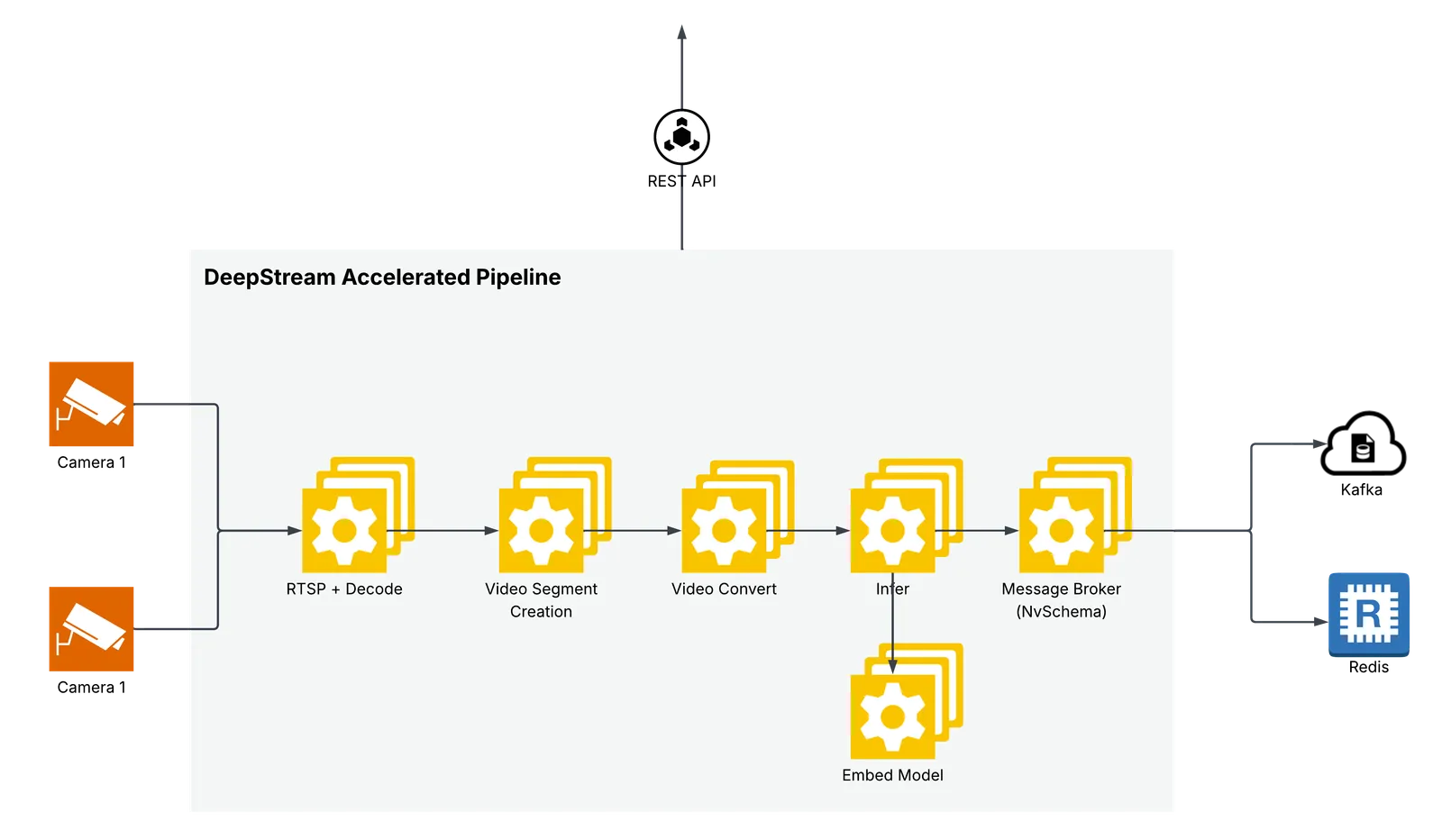
DeepStream Pipeline
The microservice uses the DeepStream SDK to process video and image files. For video input, the video is segmented into chunks as per requested chunk duration, overlap. For each video chunk,the microservice uniformly samples frames and generates embeddings for the sampled frames. The number of frames sampled is determined by the model configuration (8 in case of Cosmos-Embed1).
For image input, the microservice generates embeddings for the list of images provided in the request. For less than 8 images, the microservice pads the images to 8 images.
For text input, the text is tokenized and embeddings are generated for the tokenized text. The model pads or truncates the input text tokens to 128 tokens.
Supported Models
The microservice supports the Cosmos-Embed1 model, a joint video-text embedder. It supports both video and text input for embedding generation.
To fine-tune Cosmos-Embed1 with NVIDIA TAO and integrate custom checkpoints, see Model customization overview and Cosmos-Embed1 (video embedding).
Supported Inputs
API Reference
For the endpoint catalog and links to the runtime Swagger UI and OpenAPI JSON, see the Real-Time Embedding API Reference.
The API is organized into the following categories:
- Embeddings: Generate video, image, live-stream, and text embeddings
- Files: Upload and manage video/image files
- Live Stream: Add, list, and manage RTSP live streams
- Stream: RTVI-CV and SDR/VIOS-compatible stream add, remove, and list APIs
- Models: List available embedding models
- Health Check: Service health and readiness probes
- Metrics: Prometheus metrics endpoint
- Metadata: Service metadata and version information
- NIM Compatible: Version and manifest endpoints for interoperability
All endpoints are prefixed with /v1. For a Docker Compose deployment, the API
is available at http://<host>:<BACKEND_PORT>.
Deployment
Prerequisites
Validated GPUs:
The Real-Time Embedding Microservice has been validated and tested on the following NVIDIA GPUs:
- NVIDIA H100
- NVIDIA GB300
- NVIDIA RTX PRO 6000 Blackwell
- NVIDIA L40S
- NVIDIA DGX Spark
- NVIDIA IGX Thor
- NVIDIA AGX Thor
Software:
- OS: Ubuntu 24.04 (x86); DGX OS 7.6.0 (DGX Station GB300); DGX OS 7.5.0 (DGX Spark); IGX-SW 2.0 Production/LTS (IGX Thor); JetPack 7.2 (Jetson Linux/L4T r39.2) for Jetson AGX Thor; public JetPack 7.2.2 release for Jetson AGX Orin
- Docker: Version 28.3.3+ and earlier than 29.5.0
- Docker Compose: Version 2.39.1+
- NVIDIA Driver: 595.58.03 (x86 and DGX Station GB300); 580.173.02 (DGX Spark); 580.00, bundled with IGX-SW 2.0 (IGX Thor); 595.78 (Jetson AGX Thor and AGX Orin)
- NVIDIA Container Toolkit: Latest version
NGC container registry:
Generate an API key at https://ngc.nvidia.com (Setup → API Keys), then authenticate Docker before pulling images:
Quick Start
To deploy the RTVI-Embed microservice, clone the video-search-and-summarization repository and change into the Docker directory:
Then follow these sections on this page:
- Prerequisites (NGC container registry)
- Environment Variables
- Sample docker-compose.yml file
- Deployment Commands
- Kafka Integration
Docker Compose
The microservice can be deployed using Docker Compose.
The deployment is defined in the docker-compose.yml file.
Environment Variables
Create a .env file with the following variables and update the values as per your requirements.
See Environment Variables Reference for the complete list.
Use RTVI_IMAGE with the current compose.yaml.
Sample docker-compose.yml file
For the current deployment stack, use the checked-in compose file directly:
services/rtvi/rt-embed/docker/compose.yaml.
It defines the single-image rtvi-server service together with the Kafka and
Redis services used by the default message and error buses.
Platform-specific images:
-
For DGX Spark / ARM SBSA, set
RTVI_IMAGEto the SBSA image tag: -
For Jetson Thor, the default image is a multiarch image that supports ARM64.
Deployment Commands
Standalone Helm Chart Deployment
Use the standalone Helm chart when running only RTVI-Embed on Kubernetes. The
chart is in deploy/helm/services/rtvi/charts/rtvi-embed in the
video-search-and-summarization repository. In the standalone profile
(overrides_rtvi_embed.yaml), Kafka and Redis are not required
(kafkaEnabled: false, waitForKafka.enabled: false).
-
Clone the repository and change into the chart directory:
-
Create the namespace and secrets:
-
Install the chart with the standalone override:
The override wires
hfTokenSecret.name=hf-token-secretandhfTokenSecret.key=HF_TOKEN; adjust these if you use different secret names. First startup can take several minutes while the Cosmos-Embed1 model downloads and the Triton model repository is built. -
Expose the API for local testing:
The API is available at http://localhost:8000/docs.
Configuration
Environment Variables Reference
Core Configuration
Hugging Face Token Configuration
Model Configuration
Storage and Caching
Feature Toggles
RTSP Streaming
OpenTelemetry / Monitoring
When ENABLE_OTEL_MONITORING is true, RTVI-Embed exports Prometheus-format
metrics and OpenTelemetry traces (request latencies, embedding throughput, GPU
utilization, and error rates).
Kafka Configuration
Redis Error Messages Configuration
Advanced Performance
Kafka Integration
When you deploy with the compose file (services/rtvi/rt-embed/docker/compose.yaml), Kafka and Redis containers are started automatically and rtvi-server depends on them. The compose defaults are MESSAGE_BUS=kafka and KAFKA_BOOTSTRAP_SERVERS=kafka:9092. Set MESSAGE_BUS= (empty) and ERROR_BUS= (empty) in .env only when you intentionally run without those dependencies.
RTVI-Embed sends Kafka messages containing generated embeddings for video input.
The messages are sent to the mdx-embed topic.
The microservice sends the Kafka messages as Protobuf messages with the nv.VisionLLM message type.
Please refer to the Protobuf-Schema documentation for more details on the Kafka message schema.
Note: Kafka messages are not sent for the text embeddings.
Kafka Topics
The microservice publishes to the following Kafka topic:
- VisionLLM Messages (default:
mdx-embed): Contains VisionLLM protobuf messages with embedding results for video input
Configuration:
Kafka integration is controlled by the following environment variables:
- MESSAGE_BUS: Generated-output bus type; set to
kafkato publish embedding messages or leave empty to disable publishing. Default:kafka - KAFKA_BOOTSTRAP_SERVERS: Comma-separated list of Kafka broker
addresses (e.g.,
localhost:9092orkafka:9092for Docker) - MESSAGE_BUS_TOPIC: Topic for VisionLLM messages. Default:
mdx-embed - ERROR_MESSAGE_TOPIC: Topic for error messages (or Redis channel when Redis is enabled). Default:
mdx-embed-errors
Message Format
VisionLLM Embedding Messages
VisionLLM embedding messages contain video embedding results and are serialized as
Protocol Buffer messages using the VisionLLM message type.
Message Header:
- message_type:
"vision_llm" - key:
{request_id}:{chunk_idx}- Used for Kafka partitioning and ordering
Message Structure:
See the protobuf schema documentation for complete VisionLLM message
structure. Key fields include:
-
version: Model version identifier
-
timestamp: Start timestamp (protobuf Timestamp)
-
end: End timestamp (protobuf Timestamp)
-
startFrameId: Start frame identifier
-
endFrameId: End frame identifier
-
sensor: Sensor information including:
id: Sensor/stream identifiertype: “Camera” for live streams, “Video” for filesdescription: Asset descriptioninfo: Additional metadata (path, assetDir, url, videoFps)
-
frames: Array of Frame messages with frame-level information:
id: Frame identifiertimestamp: Frame timestampinfo: Frame metadata
-
llm: LLM information containing:
-
info: Model metadata (modelId, modelApiType, modelOwnedBy) -
queries: Array of query objects with:id: Query identifierparams: Query parameters (chunkIdx, streamId, requestId, startNtp, endNtp)prompts: Input prompts (if provided)response: Empty string for embedding-only requests
-
visionEmbeddings: Array of Embedding messages with:vector: Float array containing the embedding vector
-
-
info: Additional metadata map including:
requestId: Request IDchunkIdx: Chunk indexstreamId: Stream/asset identifierframeCount: Number of frames processedinputTokens: Number of input tokens (if available)outputTokens: Number of output tokens (if available)decodeLatencyMs: Video decode latency in millisecondsvlmLatencyMs: Inference latency in millisecondschunkLatencyMs: Total chunk processing latency in millisecondsqueueTimeS: Time spent in queue in secondsprocessingLatencyS: Total processing latency in seconds
Example Message Flow:
Redis Error Messages
Error messages can be sent to Redis instead of Kafka. To use Redis for error
messages, set the following environment variables in your .env file:
Note: If Redis authentication is required, set the REDIS_PASSWORD environment variable.
Redis Error Message Format Details:
Each error message published to the Redis channel is a JSON object containing:
-
streamId: The unique identifier of the stream where the error occurred (string) -
timestamp: ISO 8601 formatted timestamp with milliseconds indicating when the error occurred (format:YYYY-MM-DDTHH:MM:SS.sssZ) -
type: The error severity level. Common values:"functional": Default error type for operational errors (default)"critical": Critical errors that prevent service initialization or operation
-
source: The hostname or service name of the pod/container that generated the error (e.g., the pod’s hostname or"rtvi-embed"if hostname is unavailable) -
event: A detailed description of the error event, including any relevant error messages or context (string)
Example Redis Error Messages:
Critical error during service initialization:
Functional error during stream processing:
Subscribers to the Redis channel can consume these error messages in real-time for monitoring, logging, or alerting purposes.
Usage Examples
Required Packages for Usage Examples
The Python examples require the following packages. Install with:
- requests – HTTP client for all examples
- sseclient-py – Server-Sent Events client (required only for streaming examples)
List available models
Video File Embeddings Example
Live Stream Example
The following example demonstrates generating embeddings from a live RTSP stream:
RTVI-CV and SDR-Compatible Stream API
In addition to the /v1/streams/* endpoints, the RTVI Embed service exposes a
single-stream API for interoperability with RTVI-CV and SDR/VIOS pipelines.
It accepts both the RTVI-CV key/value envelope and the SDR/VIOS
camera_status_change event envelope.
Supported add routes:
POST /v1/stream/addPOST /v1/camera/addPUT /v1/camera/streamingPOST /api/v1/camera/addPUT /api/v1/camera/streaming
Supported remove routes:
POST /v1/stream/removePOST /v1/camera/removeDELETE /v1/camera/removePOST /api/v1/camera/removeDELETE /api/v1/camera/remove
Supported add change values are camera_add, add, and
camera_streaming. Supported remove values are camera_remove and remove.
When metadata.model is present, embedding starts automatically.
For SDR/VIOS file sensors, event.camera_url can be file://..., http://...,
https://..., or an absolute path. Absolute paths are normalized to file://....
If event.metadata.file_start_time is provided, RT-Embed uses it as the file
asset creation time. A camera_add event without camera_url only registers
the camera and returns status: "added" with an empty asset_id; send a later
camera_streaming event with a URL to create the stream asset.
Single Decode Multiple Inference
Single Decode Multiple Inference enables RTVI-CV to decode each live RTSP stream once and share the decoded frames with multiple downstream inference microservices, such as RTVI-Embed and RTVI-VLM.
Use decoded-frame IPC when RTVI-CV should own the live RTSP connection and
decode each stream once, then publish decoded frames through nvunixfd Unix
sockets for downstream inference services such as RTVI Embed and RTVI VLM. In
this mode, RT-Embed does not create a separate RTSP/NVDEC pipeline; it reads
frames from the compatible RTVI-CV producer socket for the same camera_id.
Enable the Embed consumer in .env:
The producer and consumer must run on the same host and GPU, share the producer
socket directory, and receive matching stream events with the same camera_id.
Compose mounts RTVI_IPC_SOCKET_HOST_DIR at the fixed container path
/run/rtvi-ipc. RT-Embed always resolves sockets as
/run/rtvi-ipc/nvds_ipc_<identity>.sock (the socket directory and filename
convention are fixed, not configurable), where <identity> is the stream’s
camera_id, falling back to its sensor/stream id and then a generated UUID.
So camera camera-1 resolves to /run/rtvi-ipc/nvds_ipc_camera-1.sock inside
RT-Embed and to /tmp/nvds_ipc_camera-1.sock on the host.
Setup steps:
- Start RTVI-CV with
[source-attr-all] ipc-frame-copy=1so it creates thenvds_ipc_<camera_id>.sockproducer socket. - Start RTVI Embed with
RTVI_IPC_FRAME_COPY=trueand the producer’s socket directory set asRTVI_IPC_SOCKET_HOST_DIR(Compose mounts it at the fixed/run/rtvi-ipcpath, where Embed expectsnvds_ipc_<camera_id>.sock). - Send the same SDR/VIOS
camera_status_changeevent to RTVI-CV and RTVI Embed, using the samecamera_idand RTSPcamera_url. - Include
event.metadata.model,chunk_duration, and optionalchunk_overlap_durationin the Embed request when embedding should start automatically. - Send the matching
camera_removeevent to both services when the stream is removed.
Constraints:
- Applies only to live RTSP video.
- RTVI-CV and RTVI Embed must use a compatible
gst-nvunixfdplugin and the fixednvds_ipc_<identity>.socksocket naming convention. - The socket directory and socket must be readable by the RT-Embed container
user, UID/GID
1001. Prefer matching ownership or a restricted group-writable directory over world-writable permissions. - IPC camera, sensor, and stream IDs must be non-empty and contain only ASCII
letters, digits,
.,_, and-; standard UUIDs are valid. - Audio capture is not supported through the RT-Embed IPC frame-copy path.
- SEI timestamp propagation requires a source stream with SEI metadata and a
SEI-aware
libgstnvunixfd.soin both producer and consumer images.
Remote CE1 NIM Endpoint
By default, RT-Embed runs the Cosmos-Embed1 (CE1) model locally on the GPU. To
generate embeddings from a remote CE1 NIM endpoint instead of local inference,
set REMOTE_EMBED_ENDPOINT in your .env file. When it is set, startup switches
to the CE1 NIM backend and RT-Embed sends embedding requests to that endpoint
instead of loading the local Cosmos-Embed1 model. Use the host-level base URL
without a path suffix; the CE1 client appends /v1/embeddings when it calls the
endpoint.
See the Environment Variables Reference for
the full description and defaults of each REMOTE_EMBED_ENDPOINT* variable.
When REMOTE_EMBED_ENDPOINT is set, RT-Embed does not load the local model, so
GPU memory for embedding inference is not required on the RT-Embed host (a GPU is
still used for video decoding). Leave REMOTE_EMBED_ENDPOINT unset to run the
default local Cosmos-Embed1 model.
Text Embeddings Example
The following example demonstrates generating embeddings from text input:
Customization
Customizing the Model
The Real-Time Embedding Microservice can be configured to run with different variants of the Cosmos-Embed1 model or custom models.
Model Variant Selection
The microservice can be configured to run with variants of the Cosmos-Embed1 model by setting the MODEL_PATH environment variable. Three source schemes are supported:
HuggingFace (git: scheme) — downloads from HuggingFace Hub on first startup:
Supported Cosmos-Embed1 variants include:
git:https://huggingface.co/nvidia/Cosmos-Embed1-448p(default)git:https://huggingface.co/nvidia/Cosmos-Embed1-448p-anomaly-detection(default for search workflow)git:https://huggingface.co/nvidia/Cosmos-Embed1-336pgit:https://huggingface.co/nvidia/Cosmos-Embed1-224p
For private HuggingFace repositories, set the HF_TOKEN environment variable to a token with READ permissions.
NGC (ngc: scheme) — downloads from the NGC model registry on first startup:
Generate an NGC API key at https://ngc.nvidia.com under Org → API Keys. The model is downloaded once and cached in NGC_MODEL_CACHE (default: /opt/nvidia/rtvi/.rtvi/ngc_model_cache/).
Local path — points directly to a pre-downloaded model directory:
Use the /v1/models API to get the name of the model once the server is up.
Batch Size Configuration
The inference batch size can be tuned for optimal performance using the VLM_BATCH_SIZE environment variable.
Example:
If not specified, the microservice automatically calculates an appropriate batch size based on available GPU memory.
Custom Model Implementation
To run a custom model, set the MODEL_PATH, MODEL_IMPLEMENTATION_PATH, and MODEL_REPOSITORY_SCRIPT_PATH environment variables
to point to your custom model code directory, model implementation code directory, and model repository script respectively.
MODEL_PATH is the local model path shared with the container or a Hugging Face/NGC model repository URL.
MODEL_IMPLEMENTATION_PATH is the path to the custom model implementation code directory that contains the custom model inference code and is shared with the container.
MODEL_REPOSITORY_SCRIPT_PATH is the path to the custom model repository script that contains the custom model repository creation code.
If the model is a variant of the Cosmos-Embed1 model, set the MODEL_PATH environment variable to appropriate custom model repository.
The MODEL_IMPLEMENTATION_PATH and MODEL_REPOSITORY_SCRIPT_PATH are set to the default values.
Using a model other than Cosmos-Embed1
To run a model that is not a Cosmos-Embed1 variant, provide your own model
implementation and point MODEL_IMPLEMENTATION_PATH at it. Use the
Cosmos-Embed1 reference implementation as a template for your own model. The
source is available in the
video-search-and-summarization
repository at
services/rtvi/rt-embed/src/models/custom/samples/cosmos-embed1 (the base
class it subclasses is at
services/rtvi/rt-embed/src/models/base_vlm_model.py). The same files are
also bundled in the container at the default MODEL_IMPLEMENTATION_PATH
(/opt/nvidia/rtvi/rtvi/models/custom/samples/cosmos-embed1).
-
Review the reference implementation, in particular
inference.pyand theBaseVlmModelbase class. Either read them in the repository or inspect the copies on a running container: -
Copy the sample directory to a host location, then update the inference code in
inference.py(model loading, preprocessing, and the inference calls) to run your model. Keep the interface the same — your model class must still subclassBaseVlmModel(frommodels.base_vlm_model) and implement the same methods that the referenceCosmosEmbedModelprovides, so the microservice can load and call it without changes: *_initialize_model(self, **kwargs)— load the model and processor. *_shutdown_model(self)— release GPU memory and stop any server.model_name(property) — the model name surfaced by/v1/models.generate(self, query, chunks, video_frames=None, video_frames_times=None, generation_config=None, **kwargs)— run inference over the video/text chunks and return a list ofVlmModelOutputobjects, one per chunk, with theembeddingsfield populated.can_enqueue_requests(self)— whether the model accepts concurrent requests.get_model_info(model_path, vlm_model_type="")andget_input_config(model_path, vlm_model_type="")(static methods) — return the model identity tuple and theInputConfig(frame count, resolution) for your model.
Only the body of these methods (how your model is loaded and how inference is run) should change; the method names, signatures, and return types must match the base class. The reference implementation supports both an optimized Triton path and a PyTorch fallback (selected by the
DISABLE_OPTIMIZATIONenvironment variable) — implement whichever your model needs. -
If your model needs a different Triton model repository layout, update the repository creation script (
create_triton_model_repo.pyin the same sample directory) accordingly and pointMODEL_REPOSITORY_SCRIPT_PATHat it. If you only use the PyTorch path (DISABLE_OPTIMIZATION=true), the Triton repository script is not required. -
Mount your implementation (and the model weights) into the container and set the environment variables to point at them:
After the service starts, use the /v1/models API to confirm your model is
loaded and to retrieve its model name for embedding requests.
Troubleshooting
Common Issues
File Upload Fails
- Check file size limits
- Verify media type matches content
- Ensure filename uses valid characters
Embeddings Generation Timeout
- Increase timeout settings
- Reduce chunk duration
- Check GPU availability
Live Stream Connection Fails
- Verify RTSP URL is accessible
- Check authentication credentials
- Confirm network connectivity
Service Not Ready
- Wait for startup completion
- Check GPU availability
- Review service logs
Error: Hugging Face API rate limit exceeded
- Check Hugging Face token configuration
- Ensure token has READ permissions and is added to the environment variable
HF_TOKEN
Internal Server Error
- Check model configuration
- Ensure model is available
- Check GPU availability
- Check network connectivity
- Check service logs
- Delete the triton model repository and restart the service to avoid engine build issues
Duplicate live-stream / camera IDs rejected with HTTP 409
In 3.2.0, adding a stream with a camera_id (RTVI-CV API) or streamId
that is already registered returns HTTP 409 (DuplicateCameraId /
DuplicateStreamId). In 3.1.0 the existing registration was silently
overwritten. Handle the 409 error by removing the prior stream first
or surface the 409 to the caller.
Error Response Format
All errors return a consistent JSON format:
Common Error Codes
400 - Bad Request
InvalidParameters: Request parameters are invalidBadParameters: Parameter values are incorrectInvalidFile: File format or content is invalid
401 - Unauthorized
- Authentication required
409 - Conflict
- Resource is in use or conflict exists
422 - Unprocessable Entity
InvalidParameters: Request validation failed
429 - Rate Limit Exceeded
- Too many requests
500 - Internal Server Error
InternalServerError: Unexpected server errorTextEmbeddingsError: Text embedding generation failed
503 - Service Unavailable
- Service is not ready or unhealthy
Glossary
Asset A file or live stream managed by the AssetManager
Chunk A segment of video/audio processed as a single unit
Embedding A vector representation of visual or textual content
NTP Timestamp Network Time Protocol timestamp in ISO8601 format
PTS Presentation Timestamp — time offset in nanoseconds from file start
RTSP Real-Time Streaming Protocol for live video streams
SSE Server-Sent Events — HTTP protocol for streaming data to clients
UUID Universally Unique Identifier (36 characters with hyphens)