

Sparse4D (3D multi-camera)
Model Card
Sparse4D is an advanced 3D Multi-Camera Detection and Tracking Network. We specifically adapt Sparse4D for indoor environments such as warehouses with static camera setups. It generates precise 3D bounding boxes and tracking IDs for a diverse set of objects across multiple camera views. The included model in the Perception Microservice is pre-trained on the MTMC Tracking 2025 subset from the Nvidia PhysicalAI-SmartSpaces dataset. The v2.3 and v3.0 models predict seven warehouse-centric classes, in class-ID order: Person, Fourier_GR1_T2_Humanoid, Agility_Digit_Humanoid, Nova_Carter, Transporter, Forklift, and Pallet_Truck. The v2.3 per-class evaluation tables report six evaluated classes, not the full model output taxonomy. The latest releases are v2.3, a stable model tuned for general and synthetic warehouse data (available in ResNet50 and ResNet101 backbones), and v3.0, which is better adapted to real-world datasets (ResNet50 backbone only). ResNet50 is the default backbone for VSS 3.3 (lower latency, smaller footprint); choose the ResNet101 v2.3 checkpoint when accuracy headroom matters more than throughput.
The Sparse4D model cards on NGC (sparse4d_rn50 and sparse4d_rn101) expand on data formats and evaluation methodology. The remainder of this page covers TAO fine-tuning (BEV grouping, dataset conversion, training, evaluation, inference, and export).
Use the model card’s Input and Raw ONNX/TensorRT outputs sections for the tensor interface of the matching model release. Raw engine outputs are not the decoded boxes_3d / scores_3d dictionaries. The released models use 900 queries and a separate 600-instance temporal cache; the TAO tracking decoder selects the top 300 current queries by classification confidence, with fewer detections possible after threshold filtering. See the model compatibility checklist before swapping models or reusing an engine.
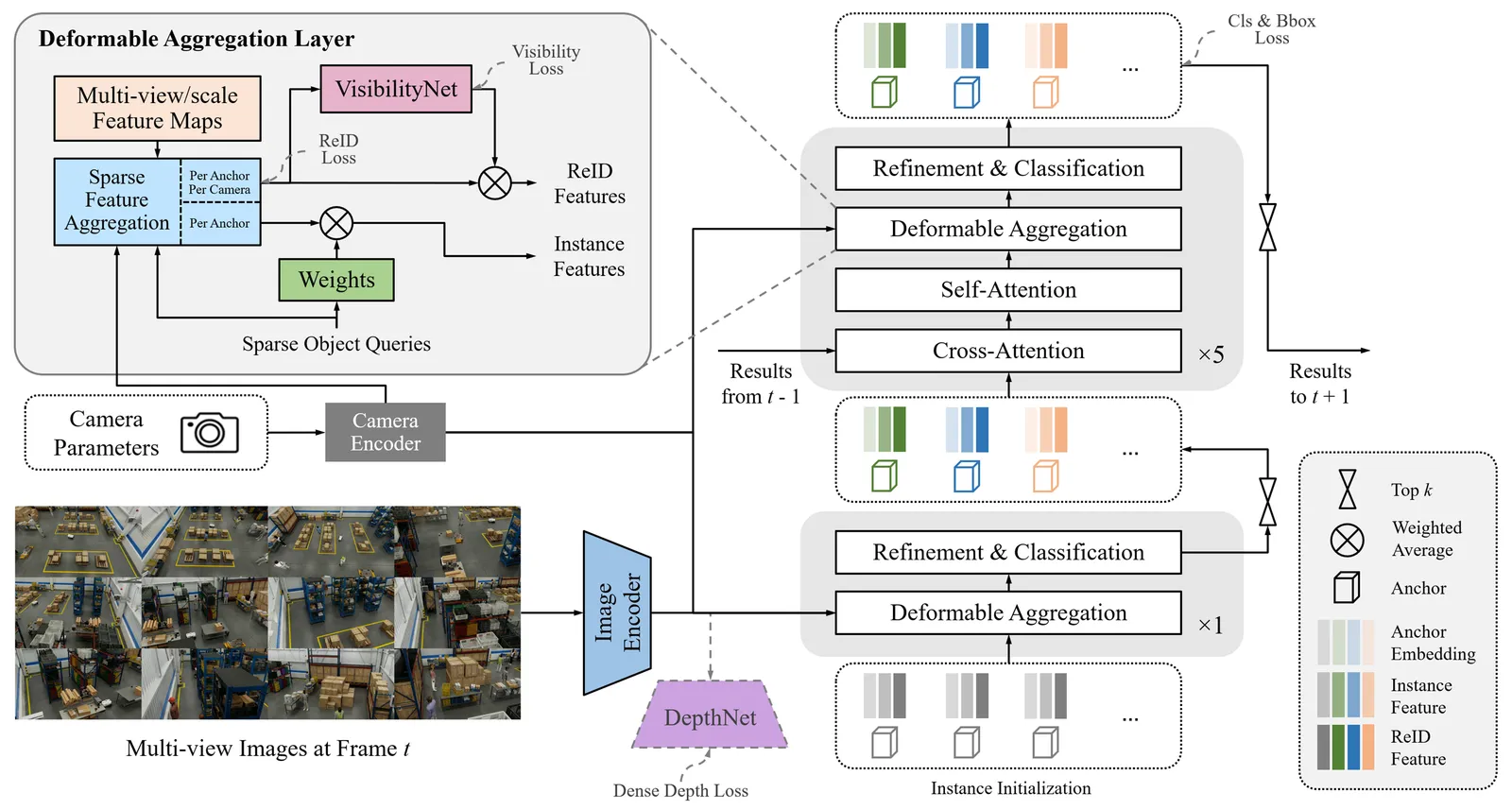
Inference using Perception Microservice
Detailed information can be found in the 3D Multi-Camera Detection and Tracking (Sparse4D) page.
Model versions
The VSS 3.3 Sparse4D model cards list v2.3 and v3.0 as the latest trainable and deployable releases:
For new VSS 3.3 work, start from trainable_v2.3 (or deployable_v2.3) for general and synthetic-data deployments, or trainable_v3.0 (deployable_v3.0) when targeting real-world data; use an older version only to reproduce a prior benchmark. The ResNet50 backbone is the default for VSS 3.3 (lower latency, smaller footprint, built on top of an RT-DETR R50 pre-training initialization); pick the ResNet101 backbone (available for v2.3) when accuracy headroom matters more than throughput.
The Warehouse Operations Docker Compose profile selects ResNet50 v2.3 for DATASET_TYPE=synthetic and v3.0 for DATASET_TYPE=real; see the dataset-specific model paths. This selection does not apply to every deployment entry point: the standalone detection/tracking helper in skills/deployment/vss-deploy-detection-tracking-2d/assets/deploy-defaults.yml remains pinned to deployable_v2.2 and its v2.2 companion paths. Use the Warehouse Operations profile for the v2.3/v3.0 flow documented here; the standalone helper does not select these releases automatically.
Real-Time Inference Throughput & Latency
Inference runs through the DeepStream pipeline on TensorRT with mixed precision (FP16+FP32). The TensorRT columns capture model-only latency; the DeepStream columns are the sustainable stream counts once the DeepStream microservice’s instance-bank pre-/post-processing overhead is accounted for — i.e. the camera count whose model latency fits within roughly 70% of the frame budget. The table summarizes how many cameras each GPU (ResNet50 backbone) supports at 30, 15, and 10 FPS. Values are the conservative minimum across the v2.3 and v3.0 releases, which are latency-equivalent. Numbers in bold are measured TensorRT values. A value of 200 reflects the tested sweep ceiling and may be higher in practice.
Datacenter GPUs
Embedded GPUs
KPI
The key performance indicator is Higher Order Tracking Accuracy (HOTA) per-class and the average HOTA obtained across all classes. We utilize the HOTA evaluation methodology to assess multi-object tracking accuracy.
Higher Order Tracking Accuracy (HOTA) is a metric that balances detection accuracy and association accuracy into a single unified score. It decomposes tracking performance into Detection Accuracy (DetA), which measures how well objects are localized, and Association Accuracy (AssA), which measures how well detections are linked over time into consistent tracks. HOTA is computed as the geometric mean of DetA and AssA, averaged over a range of localization thresholds. This provides a balanced, holistic measure of tracking quality that captures both spatial accuracy and temporal consistency.
The following scores are for v2.3 models trained on the MTMC Tracking 2025 subset. The evaluation set and training set are disjoint. The averages cover the six evaluated classes shown in the tables; Pallet_Truck is an output class but is not included in these reported averages.
ResNet50 backbone (v2.3)
ResNet101 backbone (v2.3)
Results highlighted in the above tables are for the latest v2.3 models on the test set of the MTMC Tracking 2025 dataset. The v3.0 checkpoint is evaluated on real-world scenes; refer to the sparse4d_rn50 and sparse4d_rn101 model cards for those results and more details.
Fine-tuning using NVIDIA TAO Toolkit
Hardware & Software Requirements
Please refer to the Requirements section of the TAO Toolkit Quick Start Guide for more details.
Dataset Requirements
The Sparse4D model can be fine-tuned on existing MTMC Tracking 2025 scenes, your own synthetic dataset generated with Isaac Sim, or real-world imagery. For real-world data without 3D annotations, use the 2D-to-3D geometric distillation workflow to combine 2D supervision with 3D-labeled training data. Please refer to the Simulation and Synthetic Data Generation page for more details on synthetic data generation.
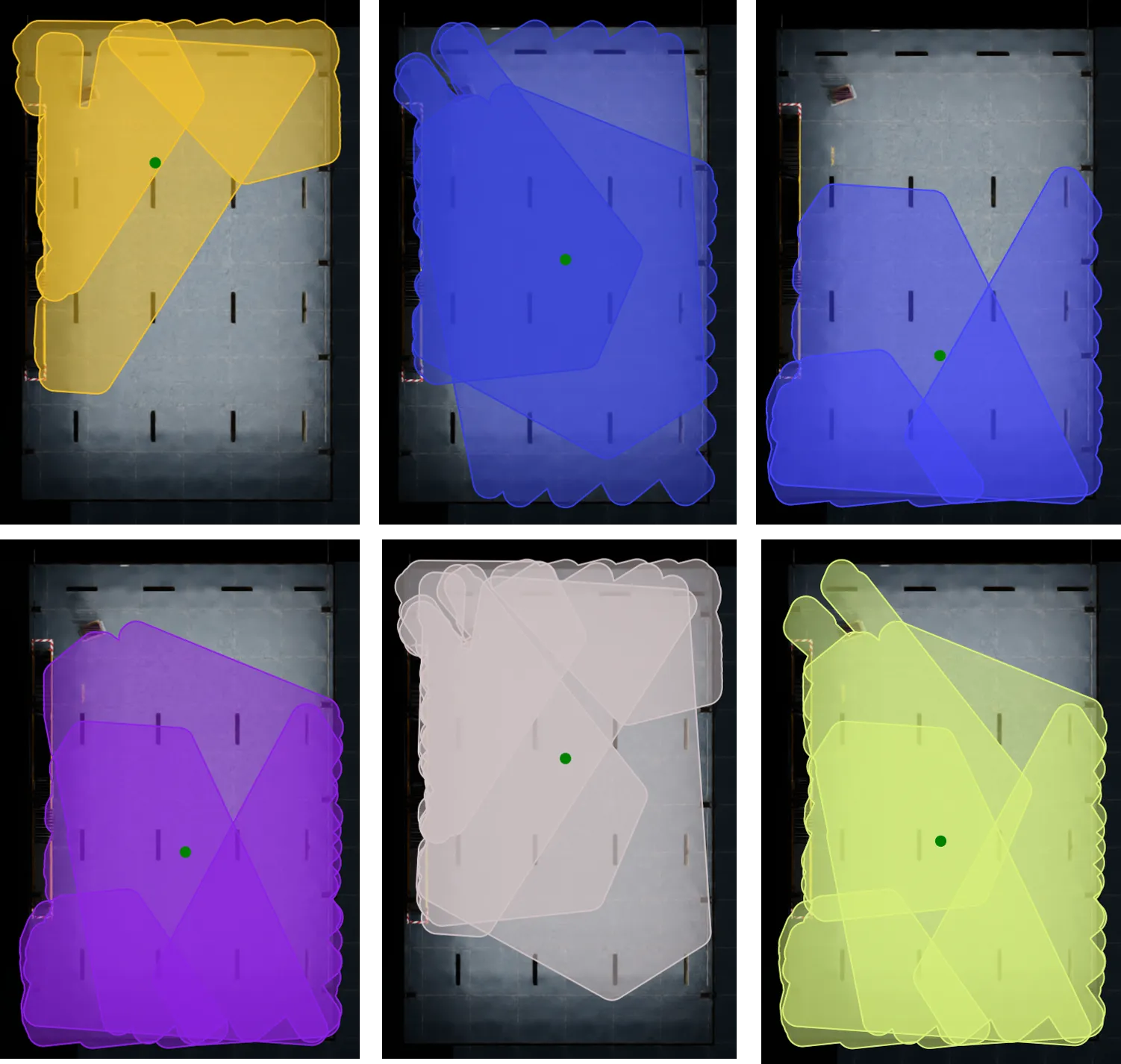
Performing 3D Multi-Camera Detection & Tracking in large regions such as warehouses with high-density cameras becomes computationally expensive. Therefore, we divide a region into a collection of groups called Bird’s Eye View (BEV) groups. Each Bird’s Eye View (BEV) group can contain multiple cameras, and these BEV groups may overlap with one another. Sparse4D is trained on such BEV groups. The below image represents a top down view of a single scene with multiple BEV groups. Each unique color represents a BEV group highlighting its camera coverage in the entire scene.
Requirements for the supervised multi-camera 3D workflow:
-
Number of Cameras in Scene
- Refer to the camera placement guide for details based on scene size
-
Number of RGB Frames
- Minimum: 9,000 frames per camera (5 minutes @ 30 FPS)
-
Number of Depth Map Frames
- Optional but recommended for better model convergence
- Should match the number of RGB frames if included
-
Number of BEV Groups (Bird’s Eye View)
- We recommend a minimum of 3 BEV groups for a scene with 12 cameras in total.
- The TAO Fine-tuning notebook will help generate randomized BEV groups based on the raw calibration data obtained from the SDG step.
-
Number of Cameras per BEV Group
- Range: 4-12 cameras per group
-
Annotations
- Ground Truth 3D & 2D bounding boxes in OV coordinates
-
Calibration Data
- Single calibration file containing all camera parameters (intrinsic & extrinsic)
Refer to Dataset Post-Processing for the file format of the files listed above. An example dataset can be found in the Warehouse_014 scene from the MTMC Tracking 2025 dataset.
2D-to-3D Geometric Distillation for Real-World Datasets
2D-to-3D geometric distillation lets Sparse4D learn from calibrated multi-camera real-world images with 2D annotations or detector pseudo-labels, reducing the need to collect full 3D ground truth. The term 2D-to-3D describes the direction of supervision: 2D targets supervise the 3D model. During training, 3D-to-2D projection maps Sparse4D’s predicted 3D boxes into camera images, where they can be compared with the 2D targets. Sparse4D still predicts 3D boxes and tracking IDs.
For the complete TAO configuration and artifact-preparation procedure, refer to the TAO 2D-to-3D geometric distillation guide.
A projected 3D cuboid encloses all eight corners and can be larger than the object’s tight image-space box. The released geometry-only loose-to-tight (LTT) MLP corrects this difference toward tight, amodal 2D boxes. During Sparse4D fine-tuning, the MLP is frozen and its predicted correction factors are detached; gradients flow through the corrected box projection into Sparse4D. Per-camera matching then compares these boxes with real-world 2D detections, such as offline RT-DETR predictions, to supervise box geometry and classification.
Use a TAO PyTorch build that includes model.head.loose_to_tight. The data preparation commands below also require a TAO Data Services build with annotations sparse4d_prepare and annotations convert support for aicity.load_annotations=false; use the shipped preparation spec. Native artifact preparation commands are documented in the TAO PyTorch tools guide. Check the specs shipped with your build; the optional LTT training losses are disabled by default.
Choose the supervision route
Keep 3D-labeled data in the training mix to retain metric geometry supervision.
Download the released LTT checkpoint
For the released seven-class warehouse taxonomy listed below, reuse _loose_to_tight_mlp.pth from the Sparse4D ResNet-50 trainable_v3.0 bundle on NGC. With the NGC CLI, download just the LTT file:
This writes /data/sparse4d_rn50_vtrainable_v3.0/_loose_to_tight_mlp.pth, including the leading underscore in the filename. Make that path visible inside the TAO training environment and use it for model.head.loose_to_tight.mlp_ckpt, as shown below. Keep the checkpoint’s ordered class taxonomy unchanged and validate its corrections on the target data. Continue with teacher-cache preparation and mixed-training data preparation below.
This workflow supports only the released checkpoint’s seven classes in their original order. Custom taxonomies require a matching LTT checkpoint and are outside this guide; changing class names in the configuration does not adapt the released weights.
Retain the external LTT file for fine-tuning and resume: the frozen MLP is excluded from Sparse4D model checkpoints. Standard evaluation, inference, and export do not require it.
Prepare the training data
- Prepare 2D supervision. Use
operation=ltt_2dgtfor visible-2D sidecars on 3D-labeled scenes. For calibrated real scenes, run the 2D teacher offline, then useoperation=rtdetr_2dto convert its per-camera KITTIlabels.tar.gzarchives to<scene>__rtdetr2d.npz. This operation converts detections; it does not run RT-DETR. Before building the mixed split, create matching image/calibration info PKLs with the calibrated real-scene conversion command below. - Build the mixed training split. List the converted 3D-labeled and calibrated real info PKLs once each. Mark genuinely unlabeled 3D samples with
gt_boxes=None, rather than treating them as annotated empty scenes. Runoperation=lazy_indexafter finalizing this split if usingdataset.lazy_load: true.
Use the same ordered taxonomy for data preparation class_names, training dataset.classes, the LTT checkpoint, and all caches. For the released seven-class warehouse models, the training names are person, gr1_t2, agility_digit, nova_carter, transporter, forklift, and pallet_truck. Map teacher labels explicitly to this taxonomy; a matching class count alone is insufficient. Camera names, source frame IDs, image dimensions, and coordinate conventions must agree between the info PKLs and their caches.
Prepare calibrated real-scene inputs
Use annotations convert in TAO Data Services with the unlabeled-scene spec. Copy the spec to /specs/aicity2ovpkl_unlabeled.yaml and set its ordered aicity.class_config.CLASS_LIST to match your model and teacher caches. This requires a build that exposes aicity.load_annotations and aicity.fps.
Arrange each scene as /data/real/train/<scene>/calibration.json plus <camera>/rgb/000000000.jpg, 000000001.jpg, and so on. NVSchema calibration must provide camera intrinsics and world-to-camera poses with IDs matching the image directories. The rgb_00000.jpg image naming convention also works. Use synchronized, constant-rate frames, contiguous from zero, and provide the actual capture rate:
The spec sets aicity.load_annotations=false, keeps the world frame without recentering, and uses all calibrated cameras as one group per scene. It writes /data/real_infos/train/<scene>_infos_train.pkl with synchronized image paths, camera geometry, sequence/frame identifiers, timestamps in seconds, and gt_boxes=None. Ground truth and depth files are not required, and anchor initialization is skipped. Reuse the pretrained model’s anchors and keep image paths visible at the same location inside the training environment.
Each PKL stores frame records in infos. Each record retains token,
scene_name, timestamp, cams, and gt_boxes=None for unlabeled frames.
The cams mapping is keyed by camera ID; each camera entry retains its
data_path. Preserve these field names and conventions:
sensor2world_transform is a legacy field name. The loader uses this matrix
directly with the camera intrinsics to project 3D points; it does not invert
it. If BEV-group recentering is enabled, the matrix must instead map the
corresponding group-local 3D coordinates into the camera frame.
For HDF5 image arrays, set aicity.rgb_format=h5 and provide <camera>.h5 files with HWC arrays at rgb/rgb_00000.jpg, rgb/rgb_00001.jpg, and so on. Set dataset.use_h5_file_for_rgb: true for these inputs during training.
The converter rejects empty, gapped, or unequal camera sequences. Synchronize irregular or dropped-frame inputs before conversion and run the 2D teacher on those same frames. Inspect projections and cache joins before training; keep calibration consistent with image dimensions and the metric world frame.
The existing camera-grouping options can generate multiple BEV groups. Use one info PKL per group, with camera names and source frame IDs matching the teacher cache. For example, a PKL scene named RealWarehouse+bev0 uses /data/rtdetr/RealWarehouse__rtdetr2d.npz: the loader strips the BEV-group suffix when locating the cache. Include each PKL once in /data/mixed_train_split.txt alongside the 3D-labeled PKLs, then run operation=lazy_index using the final split.
Configure mixed 3D and real-world training
Merge the following settings into a complete Sparse4D experiment spec for your checkpoint. Replace the paths and RealWarehouse with your real scene-name substring. Retain the matching backbone, anchors, class order, and model input size from the base spec.
real_block_prob: 0.5 is an example starting point for the proportion of 2D-route blocks, not an accuracy recommendation. Distributed co-training requires sync_route: true and a positive scene_switch_iters; each batch must have homogeneous 2D/3D supervision. rtdetr_2d_mark_real: true makes any scene with a teacher cache use the 2D-only route, so keep those caches separate from scenes intended for full 3D supervision.
Run the regular sparse4d train -e /specs/experiment_spec.yaml command inside the TAO PyTorch environment. This workflow uses the training task; there is no separate Sparse4D distill task. Refer to the TAO Sparse4D documentation for the standard training, evaluation, and export workflow.
Validate and deploy
Inspect projected boxes on real images before a long run. Verify that expected labeled frames join their caches and that loss_box_2d_pseudo_* and loss_cls_pseudo_* contribute on calibrated real batches. Missing cache joins skip pseudo supervision and must not be interpreted as successfully processed empty detections.
Compare the original checkpoint and the adapted checkpoint on held-out, 3D-labeled real scenes, and retain a synthetic validation set to check for regressions. Report detection and tracking metrics separately; a lower 2D loss alone does not establish better metric 3D accuracy or tracking.
RT-DETR pseudo-label generation and the LTT MLP are training components. Standard Sparse4D evaluation, inference, and export do not require the external LTT checkpoint. Export the adapted Sparse4D model and follow the model compatibility requirements when deploying it. The deployed multi-camera 3D pipeline still needs real camera calibration.
Camera Grouping for Model Fine-tuning
For Sparse4D fine-tuning, cameras need to be organized into BEV groups with overlapping fields of view. Unlike camera clustering (used for deployment, where each camera belongs to exactly one cluster), camera grouping for training allows cameras to appear in multiple groups to maximize training data coverage.
Use create_camera_groups.py to create camera groups with duplication support based on overlapping FOV:
We use the spatialai_data_utils library to create camera groups:
The camera grouping tools are shipped with the full spatialai-data-utils package in the VSS repository.
Navigate to the spatialai-data-utils camera grouping tools
Use --help to list all available arguments.
Key options:
--auto: Auto mode — set--cameras_per_groupto [1, 2, …, min(n_sensors,--max_sensors_per_group)], creating groups for every size (recommended for training). Overrides--cameras_per_group.--n_groups: Number of groups to create per size (default: 1).--cameras_per_group: Number of cameras per group (required unless--autois used). Single value: all groups have that size. Multiple values: creates n_groups for EACH size (total = n_groups × count).--max_sensors_per_group: Maximum sensors per group (default: 18). In auto mode, caps the largest generated group size.--output: Output path for the grouped calibration file.--output_suffix: Suffix for output files (default: “grouped”).--map_file: Path to map image for visualization (uses black background if not provided).--start_camera_index: Starting camera index for seeding the first group (default: 0).--min_overlap_threshold: Minimum FOV overlap (0-1) for group membership (default: 0.2).--max_distance_threshold: Maximum centroid distance in meters for membership (default: inf).--prefer_existing_fov: Use existing FOV polygons instead of calculating from frustum.--max_camera_distance: Maximum distance in meters for frustum calculation (default: 30.0).--height_range: Height range (min, max) in meters for ground plane intersection (default: 1.0 3.0).--image_size: Image dimensions (width, height) in pixels for frustum calculation (default: 1920 1080).--dilation: Buffer distance in meters for group bounding boxes (default: 8.0).--visualize: Generate visualization of camera groups.--vis_no_camera_id_labels: Disable drawing camera IDs on the visualization.--vis_combined: Generate a single combined image instead of separate images per group.
For deployment and inference use cases where cameras should be partitioned into non-overlapping clusters, refer to the Camera Clustering section in the 3D Vision AI Profile documentation.
Expected time for finetuning
The expected data requirements and time to fine-tune the Sparse4D model on a single scene of the MTMC Tracking 2025 dataset are as follows:
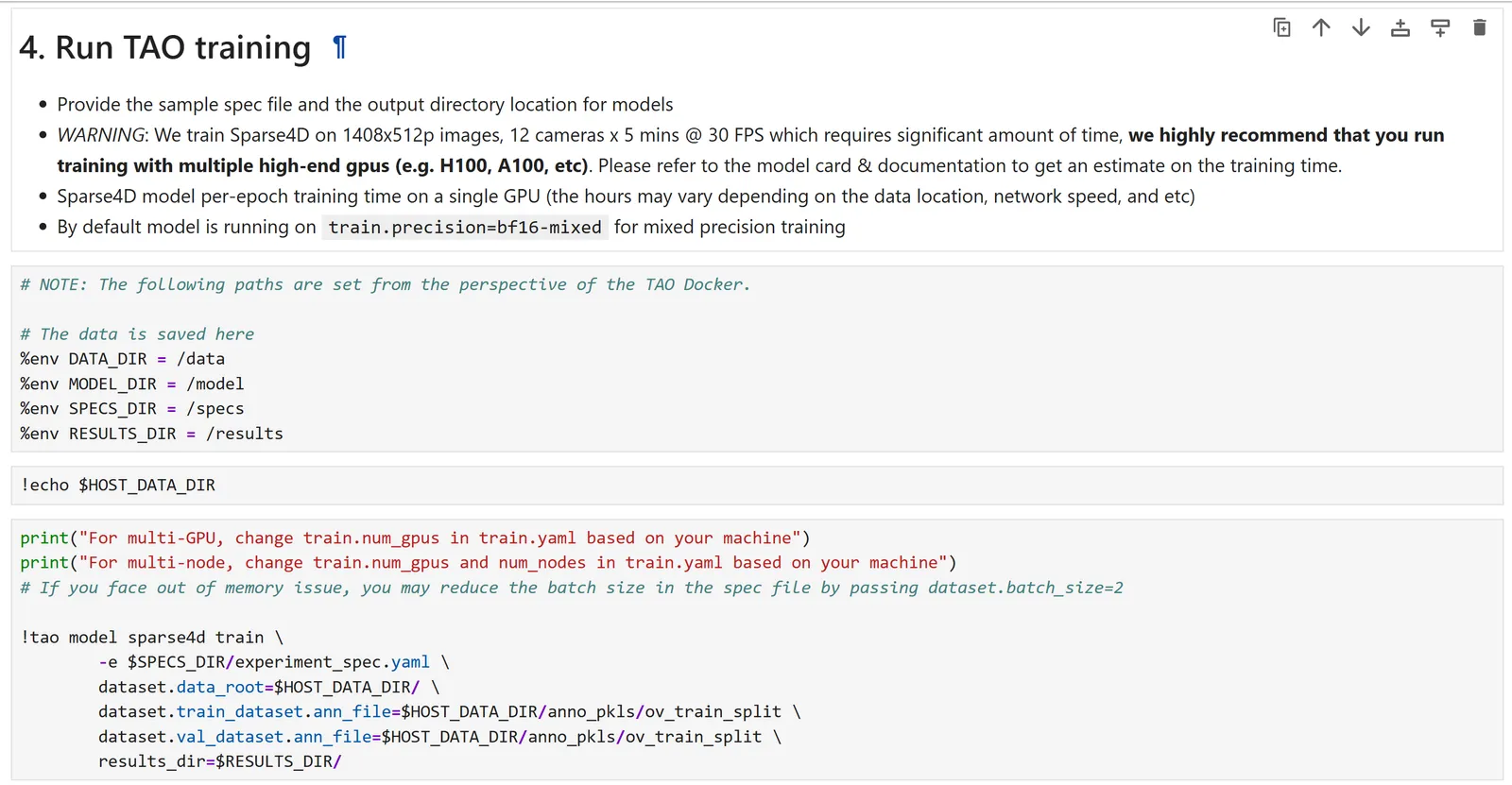
We recommend a multi-gpu training setup for faster training.
TAO Fine-tuning via Notebook Walkthrough & Configuration Changes
Sparse4D can be fine-tuned via the TAO containers and the TAO CLI Notebook.
The documentation provided below accompanies the cells in the TAO fine-tuning notebook and offers guidance on how to execute them. TAO Sparse4D supports the following tasks via the Jupyter notebook:
- dataset
convert - model
train - model
evaluate - model
inference - model
export
An experiment specification file (also known as a configuration file) is used for fine-tuning the model. It consists of several main components:
datasetmodeltrainevaluateinferenceexportvisualize
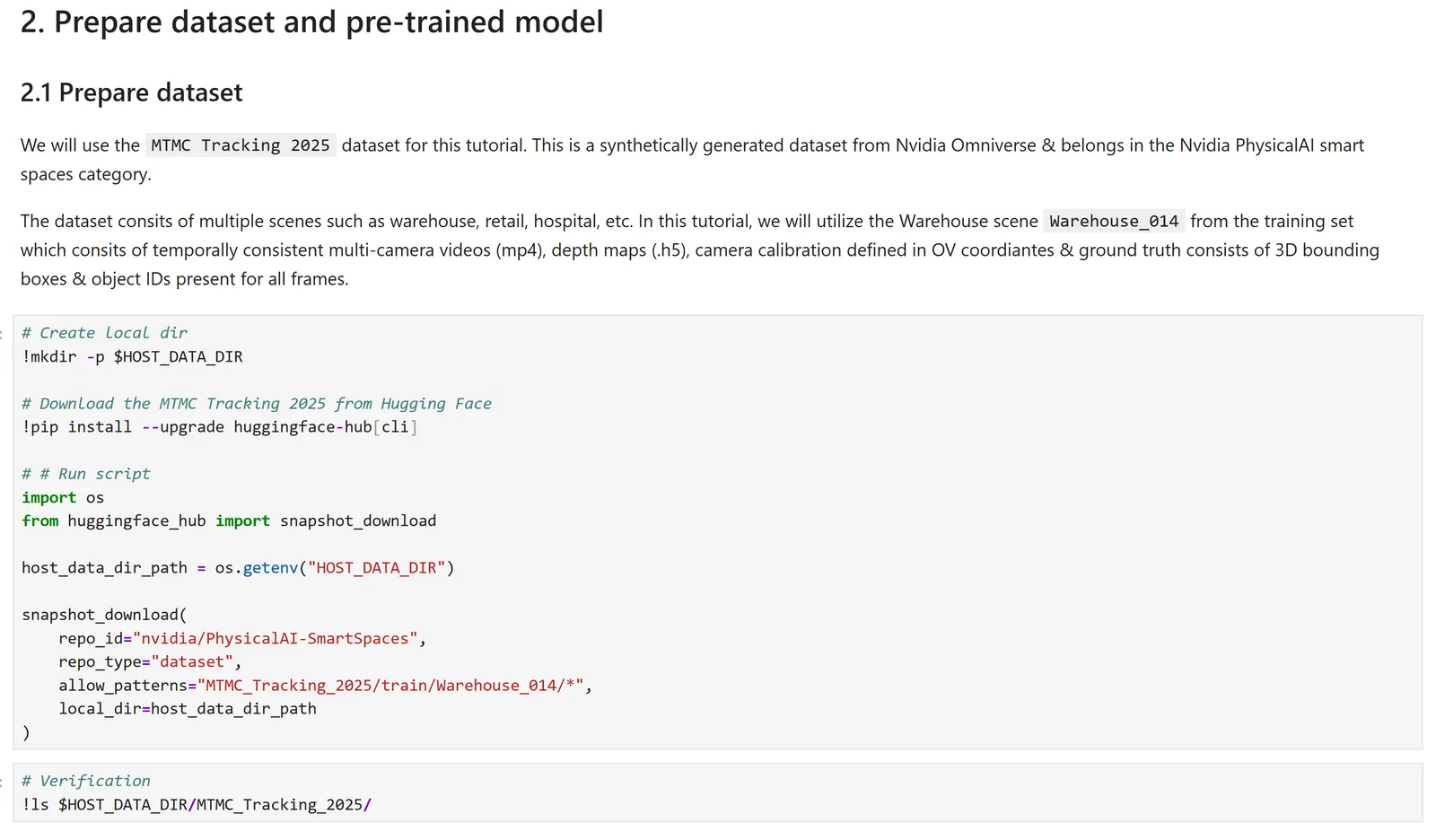
The notebook utilizes the Warehouse_014 scene from the MTMC Tracking 2025 dataset for training.
The following is an example spec file for training a Sparse4D model on one scene of the MTMC Tracking 2025 dataset. For field-level detail, use the TAO Sparse4D configuration documentation that matches your TAO Toolkit release.
Dataset Preparation
The data obtained from HuggingFace is stored in AICity format. We need to convert the AICity format to the OVPKL format required for model training. TAO Data Service can be used to convert the AICity format to the OVPKL format required for model training. The following configuration file can be used to convert the AICity format to the OVPKL format.
Once the configurations are modified, launch dataset conversion by running the following command:
Launch Model Fine-tuning
Below are the important configurations that need to be updated to launch training:
Once the configurations are modified, launch training by running the following command:
Evaluate the fine-tuned model
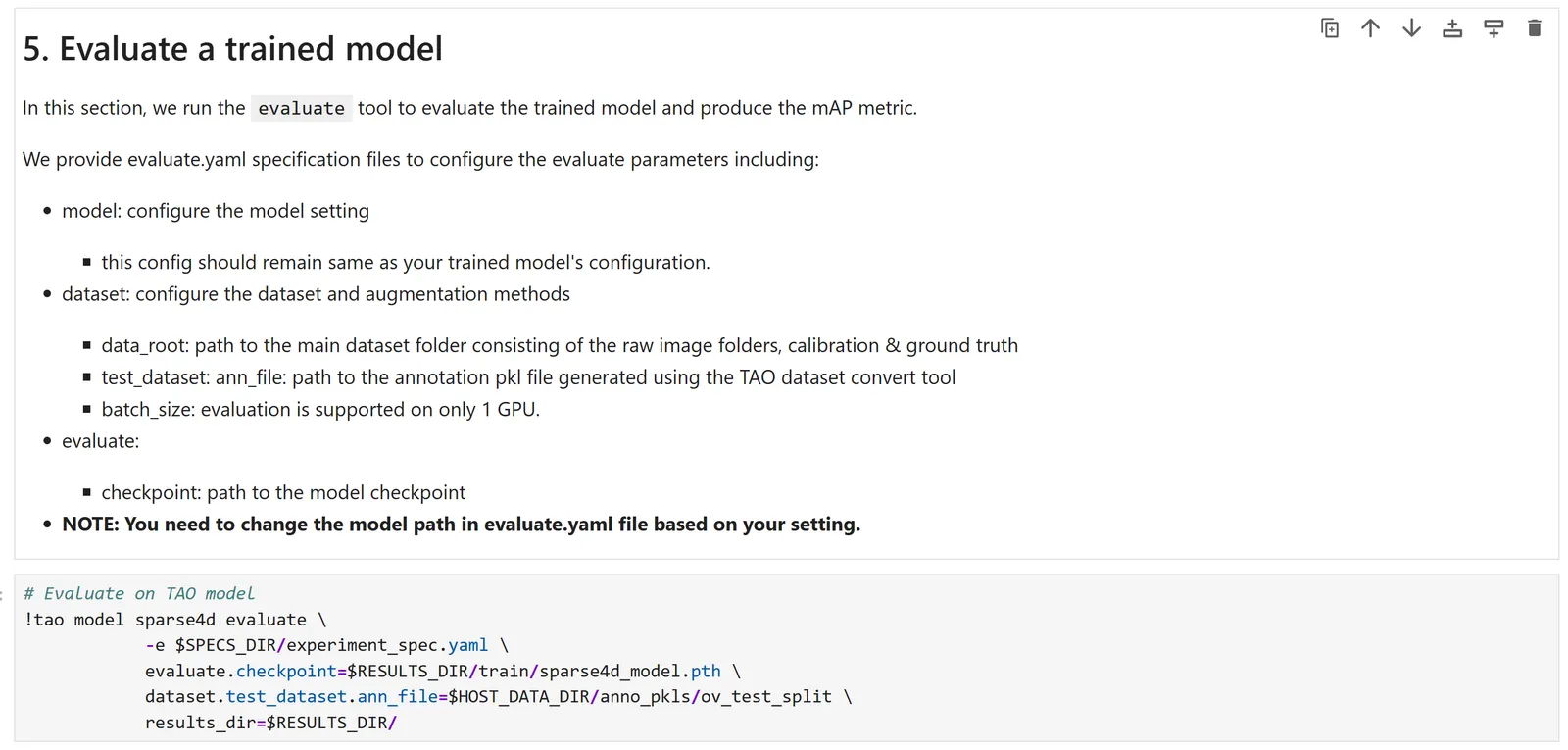
The fine-tuned model’s tracking accuracy can be evaluated using the Higher Order Tracking Accuracy (HOTA) metric, decomposed as Detection Accuracy (DetA), Association Accuracy (AssA), and Localization Accuracy (LocA). Please refer to the KPI section above for more details on the metric definition and how to interpret per-class scores.
Below are the important configurations that need to be updated to launch evaluation:
Run Inference on the fine-tuned model using TAO
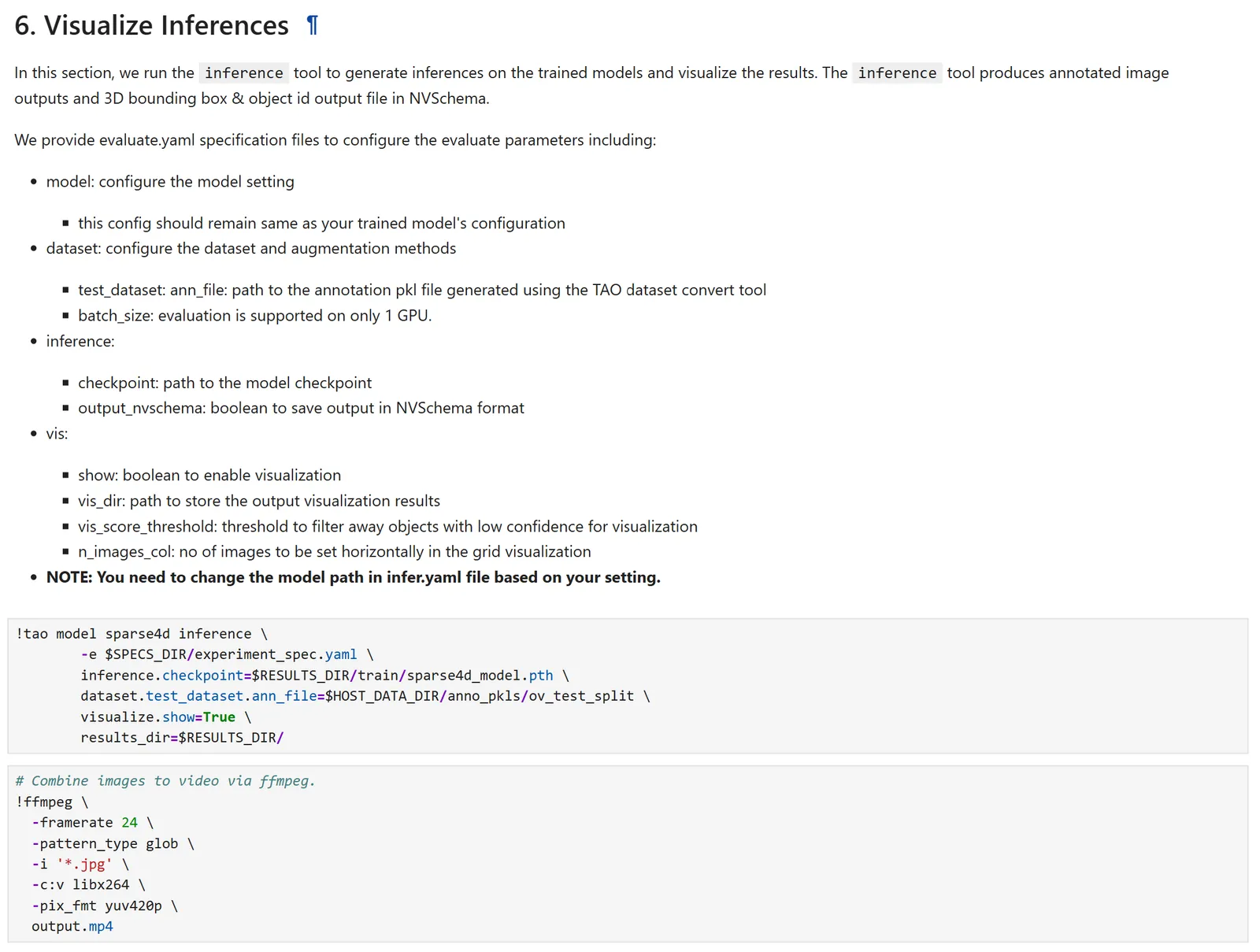
The fine-tuned model’s output can be inspected by running inference and visualizing the 3D bounding boxes and their tracking IDs. Below are the important configurations that need to be updated to launch inference:
Once the configurations are modified, launch inference by running the following command:
Export the fine-tuned model
Below are the important configurations that need to be updated to launch export:
Once the configurations are modified, launch export by running the following command:

Using the fine-tuned model in the Perception Microservice
Once the model is fine-tuned and exported to ONNX format, it can be used in the Perception Microservice. Refer to the Integrating a Sparse4D Model Checkpoint section for more details.