

Video-Analytics-MCP Server
Overview
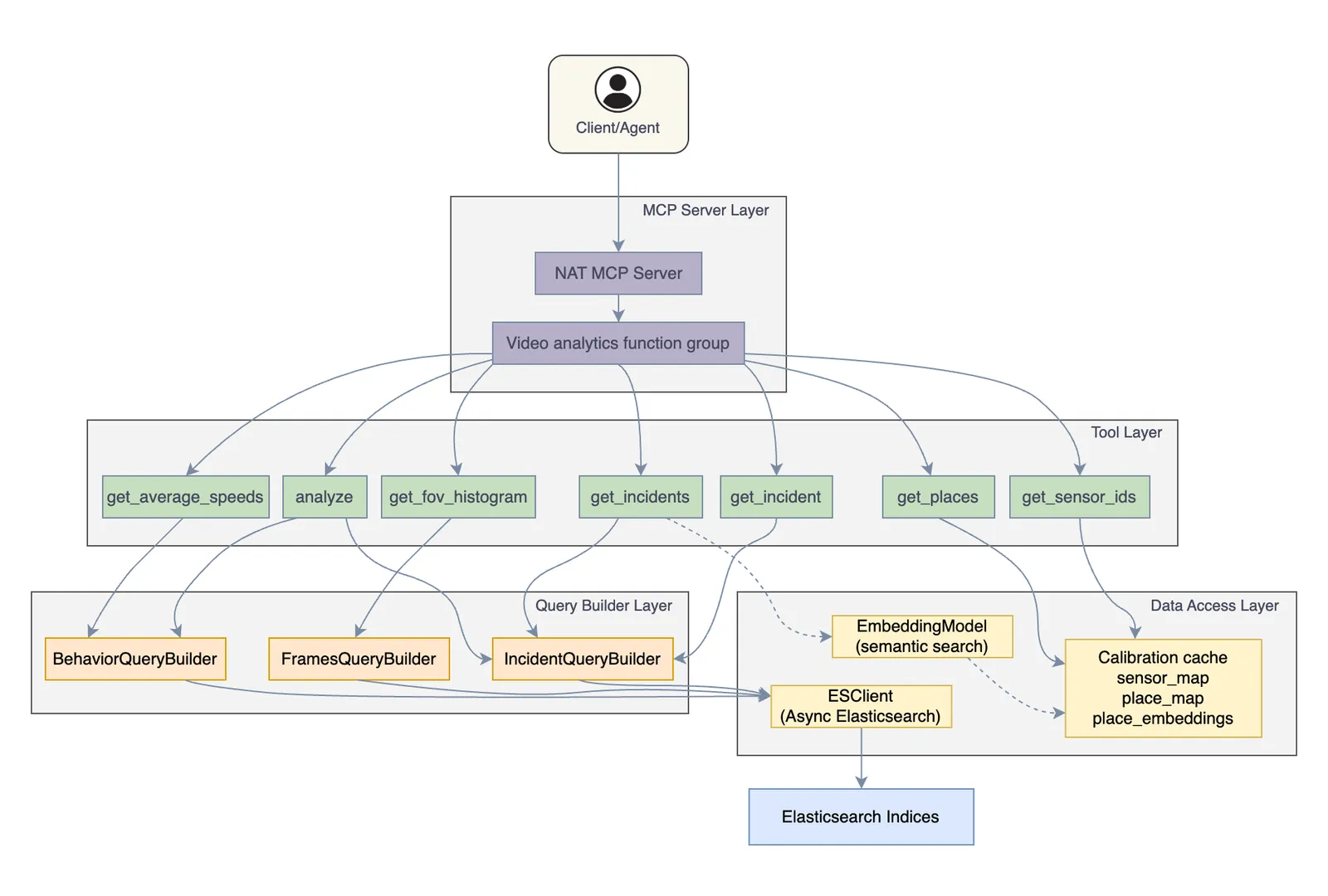
The Video Analytics MCP Server exposes video analytics capabilities through the Model Context Protocol (MCP). It enables AI agents to query and analyze video analytics data stored in Elasticsearch, including incident records, object detection metrics, and sensor metadata.
Key features include:
- Semantic place search using sentence-transformer embeddings
- VLM (Vision Language Model) verification for incidents
- Optional: Active sensor filtering using VST sensor list tool
The server is implemented as a NAT (NVIDIA Agent Toolkit) function group and uses the NAT library to serve its tools via the MCP protocol. For more information about NAT, see NVIDIA Agent Toolkit Documentation.
Prerequisites
System Requirements
- Python 3.13 or 3.14
- NVIDIA Agent Toolkit installed. See NAT Installation.
External Dependencies
- Elasticsearch 7.x or 8.x containing video analytics data
- Optional: VST (Video Sensor Tool) for active sensor filtering
- Optional: Sentence-transformers model for semantic place search
Required Elasticsearch Indices
All indices can be prefixed using the index_prefix configuration option (e.g., mdx-incidents-*).
Configuration
Configuration File
The VA-MCP Server is configured via a YAML file:
A dummy workflow is required by NAT to start the MCP server.
Configuration Parameters
Environment Variables
The configuration file supports environment variable substitution using ${VAR_NAME} syntax.
Example:
Quick Start
After setting up dependencies, configuration, and environment variables, start the server:
The server starts on http://localhost:9901/mcp by default.
Custom Host and Port
Transport Type
For more NAT MCP commands, see NAT MCP Documentation.
Connecting a Client
The MCP server’s tools are accessible using an agent’s standard tool-calling interface.
Example NAT Agent Configuration
For more on NAT workflows, see NAT Workflow Documentation.
Available Tools
get_incident
Retrieve a specific incident by ID.
Parameters
get_incidents
Query incidents with optional filtering.
Parameters
get_sensor_ids
Get available sensor IDs.
Parameters: place (optional) - filter by place name
Returns: List of sensor IDs
get_places
Get hierarchical place map.
Returns:
get_fov_histogram
Get object counts over time in field of view.
Parameters
Returns:
get_average_speeds
Get average speed per direction.
Parameters: source, source_type, start_time, end_time
Returns:
analyze
Perform statistical analysis on video analytics data.
Parameters
Analysis Types:
max_min_incidents- Min/max overlapping incidentsaverage_speed- Average speeds per directionavg_num_people- Average people countavg_num_vehicles- Average vehicle count
Source Type Options
Several tools accept source and source_type parameters to specify the data source.
Sensor (source_type: "sensor"): Queries by exact sensor ID match.
Place (source_type: "place"): Queries by place name using wildcard matching with optional semantic search.
For a specific intersection:
When wildcard matching returns no results, the server automatically falls back to semantic search (if enabled) to find places with similar names.
When using source, source_type must also be provided. Both parameters must be provided together or both omitted.
NAT CLI Commands
Inspect available tools using NAT CLI:
List Tools
Tool Details
Call a Tool
Help
For more NAT MCP commands, see NAT MCP Client Documentation.