Getting Started with NVIDIA TAO Toolkit#
TAO Toolkit is now agent-based. Its models, data transforms, platforms, and workflows are exposed through the TAO Skill Bank, a plugin you install into your coding agent (such as Claude Code, Codex, and so on). After installation, you can describe what you want in plain English, and the agent discovers, plans, and executes TAO workloads on your behalf using the TAO Execution SDK.
You do not learn a CLI. You do not write spec YAML by hand. You ask, the agent proposes, you confirm, and the job runs on your chosen compute backend.
Prerequisites#
Before you drive the agent, it helps to know a little about what you are asking it to do. None of this is strictly mandatory. The agent will tell you what is missing if you start without much context; however, you will reach a first successful run faster if you have a sense of:
The model categories relevant to your problem: image classification, object detection, instance or semantic segmentation, change detection, pose estimation, OCR, and so on.
The basics of hyperparameter search and AutoML, if you plan to use the
tao-run-automlworkflow.The dataset format expected by the model you choose matters. The agent reads the model’s SKILL.md and will confirm the format requirements, but it helps to know roughly what the model wants, such as COCO JSON, KITTI, or image pairs with a CSV manifest. That can shorten a lot of back-and-forth.
The compute environment you have access to: local Docker, a remote SSH- reachable Docker host, SLURM, Kubernetes, or NVIDIA Brev.
Hardware requirements:
An NVIDIA GPU with Compute Capability 7.0 or newer (Volta or later); 16 GB VRAM minimum, 24 GB or more recommended for foundation-model fine-tuning.
NVIDIA driver from the 580 branch or newer; CUDA Toolkit 13.0; Docker 24+; NVIDIA Container Toolkit 1.19.0 or newer.
A Linux host (Ubuntu 22.04 or 24.04) or a remote Docker daemon reachable using
DOCKER_HOST. macOS hosts can run the agent itself but cannot run GPU containers locally. Use a remote Docker host or one of the managed backends (Brev, SLURM, Kubernetes).
If anything in this list is unfamiliar, do not stall on it. Install the plugin and ask the agent. It will surface missing prerequisites as it plans the job.
1. Install the TAO Skill Bank Plugin#
The TAO Skill Bank ships as a marketplace plugin. Pick the runtime you use.
Claude Code#
In a Claude Code session, run these two slash commands at the prompt:
/plugin marketplace add https://github.com/NVIDIA-TAO/tao-skill-bank.git#7.2.0
/plugin install tao-skills@tao-skill-bank
The tao-skills plugin bundles every published TAO skill, such as models, data,
platform, and application workflows including the Data Enhanced Fine-tuning (DEFT)
workflow family. There is no longer a separate DEFT plugin. To learn what the DEFT
loops do and which one fits your problem, refer to
Data Enhanced Fine-tuning (DEFT).
Note
Slash commands are typed by you at the Claude Code prompt; the agent itself cannot type slash commands. This is the only step where the install lives in your hands.
Codex CLI#
Codex is a terminal-based coding agent from OpenAI. If you have not installed it yet, refer to the Codex CLI installation instructions. With Codex installed, add the TAO skill bank:
codex plugin marketplace add https://github.com/NVIDIA-TAO/tao-skill-bank.git --ref 7.2.0
codex                    # opens the TUI
/plugins                 # select TAO Skill Bank → Install plugin
Codex caches the plugin at
~/.codex/plugins/cache/tao-skill-bank/tao-skill-bank/<version>/.
Note
Installing from a downloaded archive. If you have the skill bank as a
local .zip rather than a Git ref, extract it and point the marketplace
at the absolute path:
unzip ~/Downloads/tao-skill-bank-7.2.0.zip -d ~/tao-skill-bank
codex plugin marketplace add ~/tao-skill-bank
codex
/plugins                 # select TAO Skill Bank → Install plugin
NemoClaw#
NemoClaw hosts a persistent agent inside an NVIDIA OpenShell sandbox that you reach over chat (terminal UI, Telegram, or Slack) — useful for kicking off TAO jobs and checking back later. Because the sandbox has no Docker, TAO runs on the host GPU through a small host-side MCP server: the agent calls typed tools over the OpenShell bridge and never handles Docker, the GPU, or credentials.
Prerequisites:
A NemoClaw sandbox already onboarded with the OpenClaw agent, tested with Claude Opus 4.8 as the agent brain. Install NemoClaw by following the NemoClaw documentation. All agent-side configuration lives in the sandbox’s
openclaw.json, so an OpenClaw-based sandbox is required.The host logged into NGC:
docker login nvcr.io.
Setup: From the integrations/nemoclaw bundle in the TAO Skill Bank, run
one command on the host:
./setup-tao-nemoclaw.sh <sandbox-name>
This starts the MCP server, installs the TAO skills into the sandbox, and wires
and verifies the connection. Connect to the agent
(nemoclaw <sandbox> connect, then openclaw tui) and confirm it with a
simple first prompt:
“What do you know about TAO?”
From there, describe a TAO task in plain English — for example, “Train a DINO object detector on my dataset.”
Note
This path runs GPU workloads with local Docker on the host. Refer to the
bundle’s README for the tool reference, security model, and scope.
2. Activate the Plugin in Your Current Session#
In Claude Code, the plugin is registered but not yet active after
/plugin install. Run:
/reload-plugins
This makes the skills, slash commands, and hooks visible to the agent without
exiting the session. /reload-plugins prints counts of what it loaded. Confirm
the tao-skills entry shows skills loaded.
Note
Codex auto-activates the plugin the next time you launch codex;
there is no Codex equivalent of /reload-plugins to run.
3. Export the Environment Variables You Need#
The TAO Execution SDK reads credentials and platform identifiers from the shell environment of the process that calls it, which is the agent process. This means the variables must be exported before you start (or restart) your agent, in the same shell.
Variables by Category#
Always required:
Variable |
What it is |
|---|---|
|
NVIDIA NGC API key from ngc.nvidia.com. Used by every backend to pull TAO container images from |
|
HuggingFace user access token from huggingface.co/settings/tokens. Required for gated models (Cosmos-RL, Cosmos-Embed, Visual ChangeNet, VILA, HuggingFace fine-tune). |
One set per backend, export only the rows for the backend you intend to use:
Backend |
Variables |
|---|---|
NVIDIA Brev |
|
SLURM cluster |
|
Kubernetes |
Configured using your |
Remote Docker |
|
Local Docker |
None ( |
Optional, by feature:
Variable |
When you need it |
|---|---|
|
Any workflow with |
|
Non-AWS S3 (MinIO, Cloudflare R2, …) |
|
Default output destination + AWS-style region |
|
AutoML tracking, HuggingFace fine-tune |
|
AutoML algorithms |
|
Data skills that call a VLM: image-grounding, referring-expression, video-reasoning-annotation |
Note
For the Remote Docker backend, the agent runs docker --host "$DOCKER_HOST" info
as a preflight check to verify the remote daemon is reachable before
dispatching any job.
Note
Each platform skill (platform/<backend>/SKILL.md) has a Preflight section
that lists the exact variables it expects. The agent reads this when you
pick a backend and tells you what’s missing. You don’t need to memorize
the table.
How to Export Them#
The mechanic is always the same three-step sequence:
Exit your agent. From a running Claude Code session:
/exitor Ctrl-D.Export the variables in the same shell. Replace each
<...>placeholder with your actual value:# Always export NGC_KEY="<ngc-api-key>" export HF_TOKEN="<hf-token>" # Pick the block for your backend export BREV_API_TOKEN="<brev-api-token>" # — or — export SLURM_USER="<cluster-username>" export SLURM_HOSTNAME="<login-host>[,<failover-login-host>]" export SSH_KEY_PATH="$HOME/.ssh/id_ed25519" # — or — Remote Docker host (SSH-tunnelled or TCP) export DOCKER_HOST="ssh://user@remote-gpu-host" # — or — export DOCKER_HOST="tcp://remote-gpu-host:2376" export DOCKER_TLS_VERIFY=1 export DOCKER_CERT_PATH="$HOME/.docker/certs/remote-gpu-host" # — or — Local Docker (no env var needed; the default) # Optional, by feature export ACCESS_KEY="<s3-access-key>" export SECRET_KEY="<s3-secret-key>" export WANDB_API_KEY="<wandb-api-key>"
Restart the agent in the same shell. For Claude Code, resume your previous conversation in place:
claude --resume
Secrets are never written to a file: not .env, shell rc files, or notebook cells. Files leak (backups, sync clients, version control,
screen-shares, log scrapers). The shell environment goes away when the shell
exits, which is what you want. New shells do not inherit exports from other
shells. If you open a fresh terminal later, rerun the export commands
there too before starting another agent.
Note
The skill bank’s bundled README and AGENTS.md describe a .env
convention because some users come from containerised-CI workflows where a
.env is the natural input. The previous guidance is the recommended
user-facing path: export variables in the shell that launches the agent.
If you do choose a .env for convenience, ensure it is gitignored
and never committed.
4. Verify Everything Is Wired Up#
Inside the restarted agent session, ask:
“Confirm the TAO Skill Bank is installed and tell me which platform SDKs you can dispatch to right now.”
The agent should respond with the version of the tao-skills plugin and the
list of backends whose environment variables it can see (for example, “SLURM: not
configured; Brev: not configured; Local Docker: available; HF_TOKEN: present;
NGC_KEY: present”). If any required variable is missing for the backend you
intend to use, the agent will tell you what’s missing. Fix it using the
exit → export → restart cycle above.
Note
This verification is an echo-style presence check, not an inference or
API call. The agent confirms that a variable is set in its inherited shell
environment; it does not call HuggingFace, NGC, Brev, or any cloud
endpoint to validate the value. HF_TOKEN: present only means the
variable is non-empty. It does not guarantee the token has access to
a specific gated repository. Token validity is exercised the first time a
model skill pulls the gated checkpoint, which is when an invalid or
under-permissioned token surfaces as a download failure.
You can also ask the agent which blockers it can resolve for you before you submit a real job:
“What blockers can the skill bank handle for me?”
The agent enumerates the readiness checks each skill performs (NGC docker
login, GPU visibility, kubeconfig resolution, S3 endpoint reachability,
dataset URI existence, container image pull, and similar preflight gates),
and reports which of them it can fix automatically rather than those that require manual action from you.
Lightweight Exploration Prompts#
These prompts do not submit any job; they only ask the agent to enumerate or describe what the skill bank can do. Useful for getting your bearings:
“What networks are supported for object detection?”
“What networks are supported for semantic segmentation?”
“List every TAO model, data skill, and application workflow you can run.”
“What can the
tao-train-visual-changenetmodel skill do, and what does its training input look like?”“Which platform skills do I have credentials for right now?”
If an answer mentions a skill, action, or kwarg you want to inspect
yourself, ask the agent to cat the matching SKILL.md file out of the
plugin cache.
5. Initial Prompts to Get Started#
You drive the agent in natural language. Be concrete about the dataset URI, the metric you care about, and the compute backend you want to use. The agent will ask if you leave any of those open, but volunteering them up front shortens the back-and-forth.
Visual ChangeNet Inference#
If you want to see the agent in action without committing to a full training run, the Visual ChangeNet model skill is the smallest end-to-end loop in the bank. It is also the model that drives the DEFT automated optical inspection loop in the following example, so exercising it standalone is a good warmup.
What Visual ChangeNet does. It compares an input image against a golden reference image and either:
Classify: emits a binary PASS / NO_PASS label per pair (siamese-style architecture with a shared C-RADIO ViT backbone and a learnable difference module). Use for AOI defect detection on PCB-style inputs.
Segment: emits a binary change mask over the pair (ViT-Large NVDINOv2 backbone). Use when you need pixel-level localisation of the defect, not just an image-level verdict.
Inputs. The model ingests image pairs through a 4-column CSV with one
row per pair: input_path,golden_path,label,object_name. The
input_path / golden_path columns are paths relative to your
images_dir root; label is the ground-truth class (used only at
training and evaluation time); object_name groups related parts. For
inference-only runs, you can omit label.
Outputs. Classify writes per-pair predictions and confidences;
Segment writes binary change masks alongside the inputs. Both write a
metrics summary to the run’s results_dir.
Sample inference prompts:
“Run
tao-train-visual-changenetclassify inference on the pairs listed in/tmp/aoi/eval.csv. Images are under/tmp/aoi/images/. Write results to/tmp/vcn-out/. Run on the local Docker daemon.”“Run
tao-train-visual-changenetsegment inference on the image pair/tmp/sample/input.pngand/tmp/sample/golden.png. Write the change mask to/tmp/vcn-out/.”
This exercises the same dispatch path as a full training job on your
local Docker daemon (tao-run-on-local-docker), with no managed
compute required. Refer to
models/tao-train-visual-changenet/SKILL.md in the plugin cache for
the full set of spec keys, the classify/segment dataset-format details,
and additional example prompts.
Also refer to Visual ChangeNet documentation.
Run a DEFT AOI Improvement Loop (PCB inspection)#
This walkthrough exercises one of the DEFT reference workflows, DEFT for Automated Optical Inspection. TAO 7.2.0 also documents DEFT for Object Detection, which grows a Grounding DINO training set by mining a source pool. For the loop anatomy, the metric contract, and the state and resume model that both workflows share, refer to Data Enhanced Fine-tuning (DEFT).
“Run the DEFT loop on my workspace at
~/workspace/(replace with your own PCB inspection dataset) with the KPI and train dataset there. KPI target: FAR < 10% at Recall = 100%, generate 20 SDG images per iteration, train epoch 20, and cap iterations at 1 for the first smoke test.”
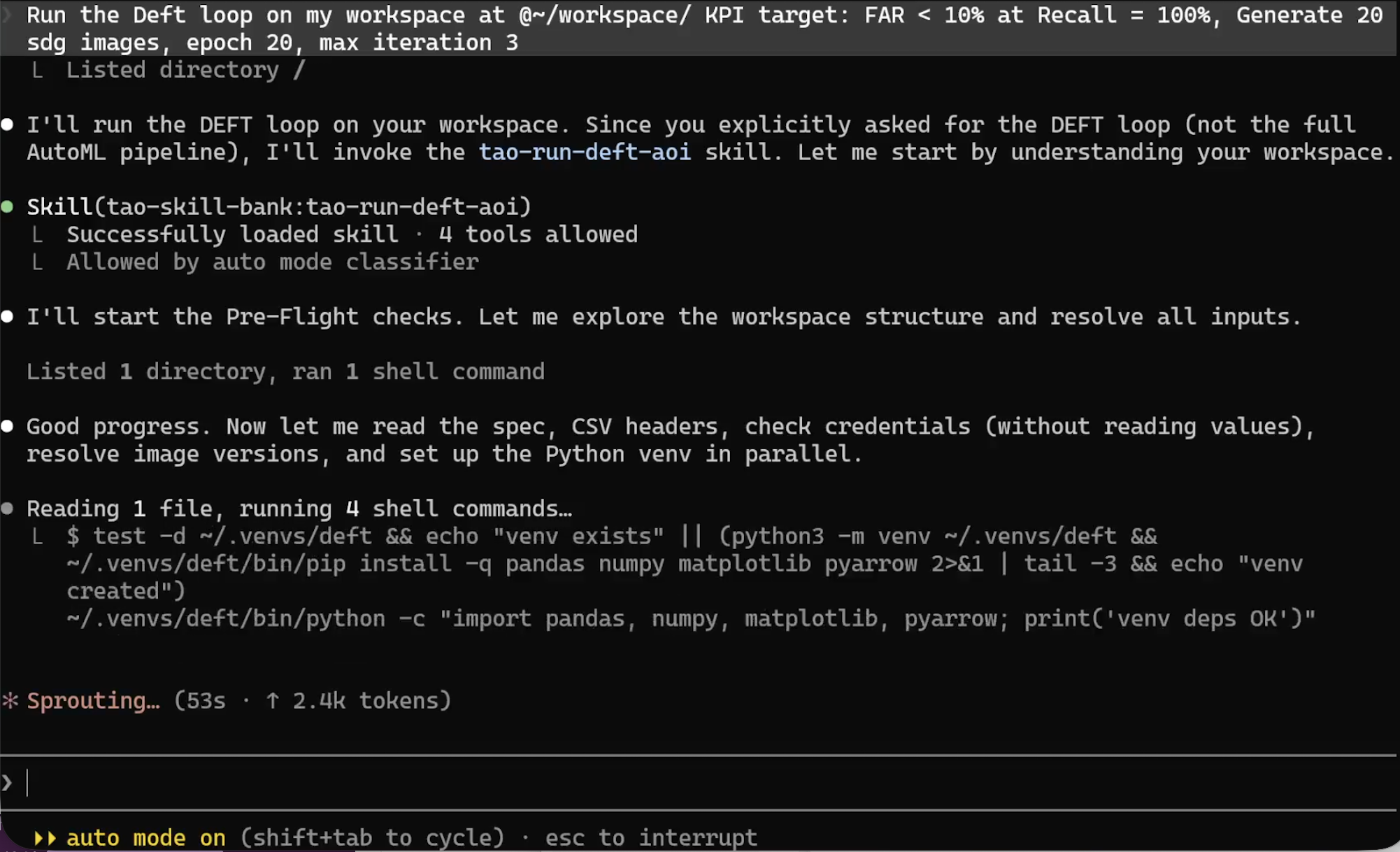
The agent loads the tao-run-deft-aoi skill, confirms auto mode, and begins
pre-flight checks to resolve workspace inputs.
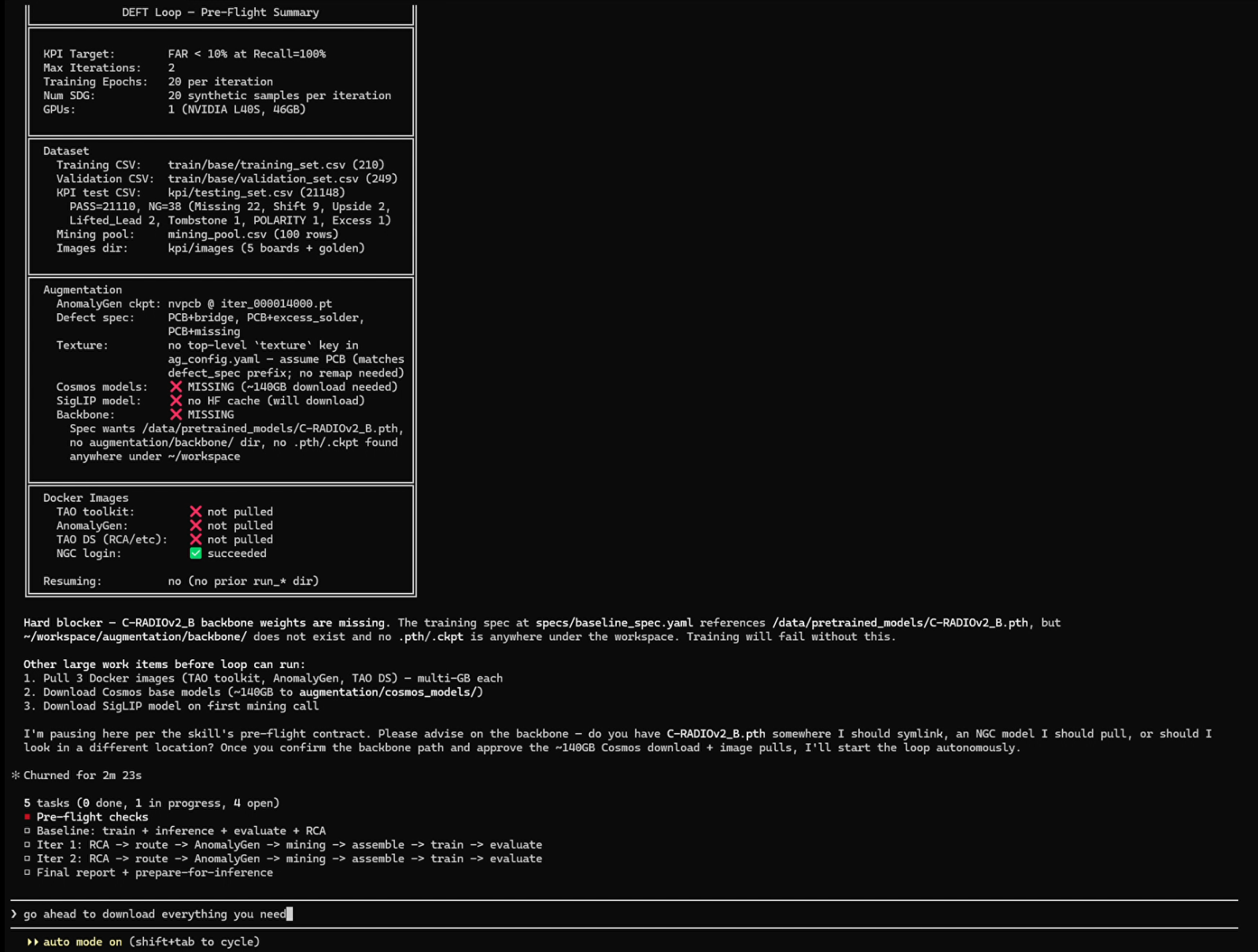
During the pre-flight stage, the agent resolves the training dataset, KPI CSV, augmentation configuration, container image, and Python virtual environment before submitting any jobs.
What the agent does:
Reads the
tao-run-deft-aoiapplication skill to plan the Evaluate → RCA → SDG → Mine → Retrain → Gate loop.Reads the
tao-train-visual-changenetmodel skill for spec defaults and thetao-run-on-local-dockerplatform skill for dispatch conventions.Asks you for anything still missing (for example, eval dataset URI, node group name, max iterations, image override if any).
Shows you the planned
sdk.create_job(...)for the first iteration and waits for your confirmation before submitting.Iterates until your KPI gate is met or the iteration cap is reached.
For the full data layout, the metric contract, and the loop outputs, refer to DEFT for Automated Optical Inspection. For deeper background on the model this loop trains, refer to Visual ChangeNet documentation.
Train a Model on Your Own Dataset#
“Fine-tune DINO object detection on the
detection-datasets/coco_2017_valHugging Face dataset (val split is fine for a smoke test, no auth required). Use 4 GPUs on the local Docker daemon. Cap training at 1 epoch so I can see end-to-end results within ~30 minutes.”
What the agent does:
Reads
applications/tao-train-single-step/SKILL.mdfor the single-step train → eval → (optional export) flow.Reads
models/tao-train-dino/SKILL.mdfor DINO-specific spec keys (number of classes, monitoring metric, default checkpoint).Asks you for
num_classesand any per-network spec keys it can’t infer.Shows you the resolved container image and the planned
sdk.create_job(...)call, including theinputs={...}mapping from container paths to your dataset URI.Submits the training job on confirmation; monitors status and surfaces logs and failure analysis on demand.
See also: DINO model documentation.
Hyperparameter Optimization with AutoML#
“Run TAO AutoML on visual-changenet using the
bayesianalgorithm with 3 trials and 1 epoch per trial (smoke test, ~15 minutes). Dataset isdetection-datasets/coco_2017_val. Track in WandB under projectpcb-aoi-hpo. Run on local Docker.”
What the agent does:
Reads
applications/tao-run-automl/SKILL.mdand confirmsAutoMLRunneris the right entry point.Asks for the metric to optimize, the search space (or accepts a defaults-derived one), and the algorithm-specific kwargs.
Verifies
WANDB_API_KEYis exported (andNVIDIA_API_KEYtoo, if you pick thellm,hybrid, orautoresearchalgorithm).Launches the AutoMLRunner pointing at your chosen platform SDK; reports trial-by-trial progress.
For deeper background, refer to AutoML documentation.
Where to Go from Here#
TAO Skill Bank source of truth: the
applications/,models/,data/,platform/, andskills/directories of the skill bank repository (installed by the plugin under~/.claude/plugins/cache/tao-skill-bank/tao-skill-bank/<version>/). EverySKILL.mdis a contract the agent reads when planning a workload, feel free to open one yourself if you want to know exactly what the agent is consulting.Plugin maintenance: to pick up new skill versions, run
/plugin marketplace update tao-skill-bankthen/reload-plugins.List what’s available: ask the agent “List every TAO model, data skill, and application workflow you can run.” It will enumerate the skill bank for you.
If the agent ever proposes a command that references an API, kwarg, or
endpoint you can’t find in any SKILL.md, stop and ask it to cite the file
it read. The skill bank is the source of truth. Anything outside it is a
hallucination.