

2D Grounding#
The 2D Grounding pipelines use a vision-language model (VLM) to annotate images with referring expressions and the bounding boxes that ground them. A referring expression is a short phrase that identifies one object in an image, such as “the red car on the left.” These pipelines target vision-language grounding datasets, where each annotation pairs a natural-language phrase with the image region that it describes.
The Auto-Label service provides two complementary 2D Grounding pipelines:
image_groundingstarts from an image and a caption, extracts the referring expressions contained in the caption, and grounds each expression to a bounding box.image_referring_expressionstarts from an image and its bounding boxes, generates a referring expression for each region, and verifies that each expression grounds back to the correct box.
Both pipelines write a single annotations.jsonl file in a shared schema, so you can
mix their outputs in the same dataset. Select a pipeline through the autolabel_type
field, then configure the matching image_grounding or image_referring_expression
block.
Quickstart with a TAO Skill#
The quickest way to run either pipeline is through its TAO skill, which an agent runs for
you. The skill collects the input files and the vision-language model endpoint, including
Gemini, NVIDIA NIM, a self-hosted TAO inference microservice, and vLLM, then runs the
pipeline end to end. Use the data/tao-generate-image-grounding skill for the image
grounding pipeline and the data/tao-generate-referring-expressions skill for the image
referring expression pipeline. For example:
“Run the
data/tao-generate-image-groundingskill oncaptions.jsonlwith images under/data/images, using Gemini, and write the grounded annotations to/data/out.”
Refer to data/tao-generate-image-grounding/SKILL.md and
data/tao-generate-referring-expressions/SKILL.md for the supported endpoints, workflow
steps, and specification keys. The rest of this page describes the configuration and the
command-line path for when you need finer control.
VLM Backend Configuration#
Both pipelines call a vision-language model through the vlm block. You choose the
backend with the vlm.backend field and then populate the matching sub-block. The
backend field accepts gemini for the Google Gemini API or openai for any
OpenAI-compatible endpoint.
Parameter |
Datatype |
Description |
|---|---|---|
|
string |
VLM backend to use; valid options are |
|
collection |
Google Gemini API configuration; refer to the Gemini table below |
|
collection |
OpenAI-compatible endpoint configuration; refer to the OpenAI table below |
The gemini sub-block configures the Google Gemini backend.
Parameter |
Datatype |
Description |
|---|---|---|
|
string |
Google Gemini API key; if empty, the pipeline reads the
|
|
string |
Gemini model name. Default: |
|
string |
Media resolution for image input; set |
|
float |
Sampling temperature; lower values produce more deterministic output. Default: 0.3 |
|
int |
Maximum number of tokens in the model response. Default: 8192 |
|
int |
Request timeout in seconds. Default: 120 |
The openai sub-block configures any endpoint that exposes an OpenAI-compatible API.
Parameter |
Datatype |
Description |
|---|---|---|
|
string |
API key for the OpenAI-compatible endpoint. Default: empty |
|
string |
Base URL of the OpenAI-compatible endpoint. Default: empty |
|
string |
Model name to request from the endpoint. Default: empty |
|
float |
Sampling temperature; lower values produce more deterministic output. Default: 0.7 |
|
int |
Maximum number of tokens in the model response. Default: 4096 |
|
int |
Request timeout in seconds. Default: 60 |
Image Grounding#
The image_grounding pipeline turns image-caption pairs into grounded referring
expressions. It is the right choice when you already have captions for your images and
want bounding boxes for the phrases inside those captions.
Data Input for Image Grounding#
The pipeline reads an input JSONL file with one JSON object per line. Each object must
contain an image_path and a caption field. The width, height, and
image_id fields are optional; the pipeline fills them in when they are missing.
Configuring the Specification File for Image Grounding#
Set autolabel_type to image_grounding and populate the image_grounding block.
The block contains the shared vlm configuration described in
VLM Backend Configuration, plus the workflow and
data blocks described here.
The workflow block controls pipeline execution.
Parameter |
Datatype |
Description |
|---|---|---|
|
list |
Pipeline steps to run; |
|
int |
Maximum number of concurrent workers for per-sample API calls. Default: 4 |
|
bool |
Whether to ignore cached step outputs and reprocess from scratch.
Default: |
The data block specifies the input file.
Parameter |
Datatype |
Description |
|---|---|---|
|
string |
Path to the input JSONL file with |
|
string |
Optional prefix used to resolve relative |
How the Image Grounding Pipeline Works#
The image grounding pipeline chains two vision-language model steps, as the following figure shows.

Two-step image grounding pipeline#
The pipeline runs the two steps in sequence and enriches one annotation record per image as it goes:
Step 0, expression extraction: The VLM reads each image and its caption and extracts the referring expressions that the caption contains.
Step 1, phrase grounding: The VLM grounds each extracted expression to one or more bounding boxes in the image.
After the final step, the pipeline copies the enriched records to annotations.jsonl
in results_dir.
Image Referring Expression#
The image_referring_expression pipeline generates referring expressions for images
that already have bounding boxes. It is the right choice when you have detection labels
and want natural-language descriptions that ground back to each box.
Data Input for Image Referring Expression#
The pipeline reads images from a directory and their bounding boxes from matching
KITTI-format label files. You can also resume a run by supplying a previously generated
annotations file through input_annotations_jsonl.
Configuring the Specification File for Image Referring Expression#
Set autolabel_type to image_referring_expression and populate the
image_referring_expression block. The block contains the shared vlm configuration
described in VLM Backend Configuration, plus the
workflow and data blocks described here.
The workflow block controls pipeline execution.
Parameter |
Datatype |
Description |
|---|---|---|
|
list |
Pipeline steps to run; |
|
int |
Maximum number of concurrent workers for per-image API calls within each step. Default: 4 |
|
bool |
Whether to ignore cached step outputs and reprocess from scratch.
Default: |
|
string |
Output format to write; |
The data block specifies the input images and labels.
Parameter |
Datatype |
Description |
|---|---|---|
|
string |
Directory that contains the input images ( |
|
string |
Directory that contains the KITTI-format bounding box labels |
|
string |
Optional unified annotations file used to seed the pipeline when resuming or running on precomputed regions. Default: empty |
How the Image Referring Expression Pipeline Works#
The image referring expression pipeline runs the region and caption steps in parallel, then merges them before an optional verification pass, as the following figure shows.
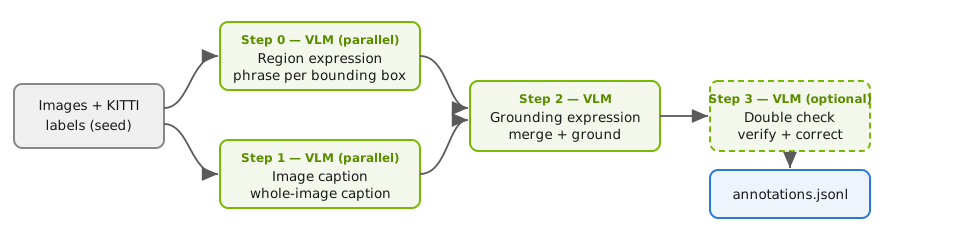
Image referring expression pipeline, with steps 0 and 1 running in parallel#
The pipeline seeds one annotation record per image from the image directory and the KITTI labels, then runs the following steps:
Step 0, region expression, and step 1, image caption: The VLM describes each bounding box region with a candidate expression in step 0, and writes a caption for the whole image in step 1. The pipeline runs these two steps in parallel, because both depend only on the seed records.
Step 2, grounding expression: The pipeline merges the region descriptions and the image caption, then calls the VLM to produce the final grounded expressions.
Step 3, double check: The VLM verifies each expression against its region and updates the expression in place when it does not match.
After the final step, the pipeline writes annotations.jsonl to results_dir in the
format selected by workflow.output_format.
Output Schema#
Both pipelines converge on the same unified schema, so downstream tools can consume their
outputs interchangeably. The pipeline writes one JSON object per image to
annotations.jsonl, with these fields:
image_id,image_path,width, andheightidentify the image.captionandcleaned_captionhold the original and normalized captions.regionslists the bounding boxes, each with abbox, atype, acolor, and adescription.expressionslists the referring expressions, each with anexpression_id, the expressiontext, the groundedinstances(bounding boxes with scores), and averifiedflag.sourcerecords which pipeline produced the record, andpipeline_stepsrecords which steps ran.
When output_format is legacy or both, the image referring expression pipeline
also writes per-image text files that match the original 2D Data Engine layout, so
existing downstream consumers continue to work without changes.
Running 2D Grounding#
Both pipelines run through the generate task. The following example runs the image
grounding pipeline:
export GOOGLE_API_KEY=<your-api-key>
auto_label generate \
    -e /path/to/image_grounding.yaml \
    results_dir=/path/to/results
The following example shows a complete specification file for the image grounding pipeline:
results_dir: /path/to/results
autolabel_type: "image_grounding"

image_grounding:
  vlm:
    backend: "gemini"
    gemini:
      api_key: ""                       # Set the GOOGLE_API_KEY environment variable or fill this in
      model: "gemini-3.1-flash-lite-preview"
      media_resolution: "MEDIA_RESOLUTION_HIGH"
      temperature: 0.3
      max_output_tokens: 8192
      timeout: 120
  workflow:
    steps: ["0", "1"]
    max_workers: 4
    force_reprocess: false
  data:
    input_jsonl: /path/to/input.jsonl   # One object per line with image_path and caption
    image_root: ""                      # Optional prefix for relative image_path values
To run the image referring expression pipeline, set autolabel_type to
image_referring_expression, replace the image_grounding block with an
image_referring_expression block, and point data.image_dir and
data.kitti_label_dir at your images and labels.
Note
Both pipelines call a hosted vision-language model. Set the GOOGLE_API_KEY
environment variable, or the API key for your OpenAI-compatible endpoint, before you
run the generate task.