

Targeted Mode Matching (TMM)#
The tmm command is the second stage of the data mining pipeline. It
performs targeted mode matching: given the embeddings of a large source pool and a small
target set, it runs a GPU-accelerated k-nearest-neighbor (k-NN) search that retrieves, for
each target query, the top-N most similar source images. The result is a deduplicated list of
source images that best match the concept described by your targets.
The tmm command currently supports the following subtask:
nearest_neighbors— Find the top-N nearest source images for each target query.
Source and Target#
Targeted mode matching is built around two roles:
Source — the large pool of candidate images you want to mine from. TMM fits its k-NN index on the source embeddings.
Target — the small set of example images that describe what you are looking for. Each target image is used as a query against the source index.
For every target, TMM returns the topn closest source images. All returned source images
are collected, deduplicated, and written out as the mined set.
Data Input for Targeted Mode Matching#
TMM operates directly on embedding parquets — a source parquet (the pool to mine from)
and a target parquet (the query set). These are commonly produced by the
embedding stage, but that stage is optional: because tmm
works purely on embedding vectors, you can supply parquets generated by any embedding
model or pipeline and run targeted mode matching as a standalone step.
Each parquet must follow this schema:
Column |
Type |
Description |
|---|---|---|
|
string |
Required. Identifies each item. Mined results are reported as
the |
|
list of float (fixed len) |
Required. The embedding vector for each item; every row must
share the same dimensionality. The column name is configurable
via |
|
string |
Optional. Enables same-class filtering when |
Note
TMM does not require the TAO embedding command. Any source of embeddings works —
for example, embeddings you already have, a Cosmos Embed export, or your own CLIP/SigLIP
pipeline — as long as the source and target parquets follow the schema above. The only
requirement is that both parquets are embedded with the same model: mixing models
places the vectors in different spaces and yields meaningless neighbors. This makes tmm
(nearest_neighbors) usable as a standalone mining step on embeddings from any pipeline.
Creating an Experiment Specification File for Targeted Mode Matching#
The following is an example specification file for mining the five nearest source images per target using cosine distance and same-class filtering.
source_parquet: /path/to/source_embeddings.parquet
target_parquet: /path/to/target_embeddings.parquet
output_parquet: /path/to/mined.parquet
topn: 5
knn_metric: cosine
source_embed_column_name: embedding
target_embed_column_name: embedding
filter_by_label: "true"
distance_threshold: -1.0
Parameter |
Datatype |
Default |
Supported Values |
Description |
|---|---|---|---|---|
|
string |
– |
The path to the source embeddings parquet (the pool to mine from). Required. |
|
|
string |
– |
The path to the target embeddings parquet (the query set). Required. |
|
|
string |
– |
The path to save the mined-filepaths parquet. Required. |
|
|
int |
5 |
>0 |
The number of nearest source images to retrieve per target query. |
|
string |
euclidean |
euclidean, cosine, manhattan |
The distance metric used for the k-NN search. |
|
string |
embedding |
The name of the embedding column in the source parquet. |
|
|
string |
embedding |
The name of the embedding column in the target parquet. |
|
|
string |
“false” |
“true”, “false” |
When |
|
float |
-1.0 |
The maximum allowed distance for a source-target pair. Disabled when negative (use |
How Targeted Mode Matching Works#
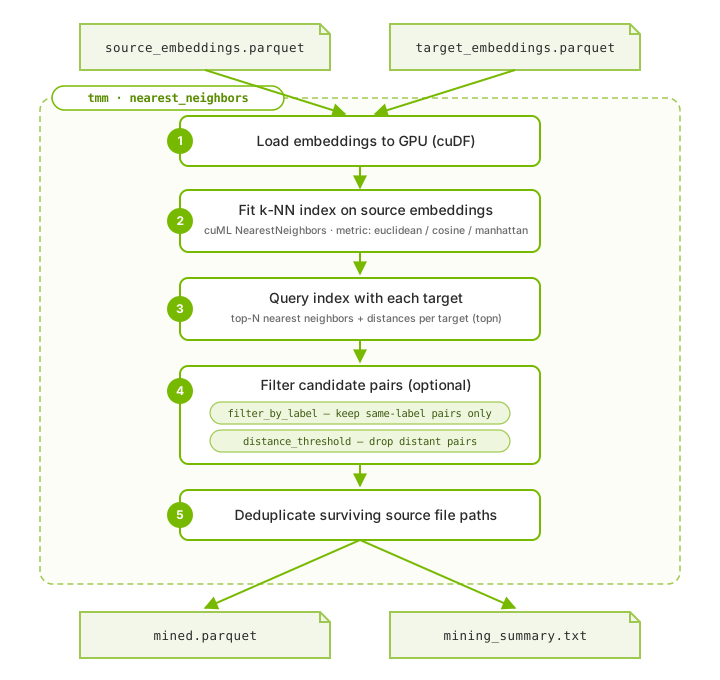
Inside the tmm (nearest_neighbors) block: the source and target embeddings are
loaded to the GPU, a k-NN index is fit on the source, each target is queried for its
top-N neighbors, optional filters are applied, and the deduplicated matches are written out.#
TMM loads the source and target embeddings onto the GPU using RAPIDS cuDF.
It fits a cuML
NearestNeighborsindex on the source embeddings using the configuredknn_metric.It queries the index with every target embedding, retrieving the
topnnearest source neighbors (and their distances) for each target.It applies the optional label and distance filters to the retrieved pairs.
It collects the surviving source file paths, removes duplicates, and writes the unique mined set to
output_parquet.
Filtering Matches#
TMM provides two optional filters that are applied to the retrieved neighbor pairs:
Label filtering (filter_by_label). When set to "true" and both the source and
target parquets contain a label column, any matched pair whose source label differs from
the target label is dropped. This keeps only same-class matches — useful when expanding a
specific class.
Note
If filter_by_label is "true" but the label column is missing from the source
or target parquet, label filtering is skipped and a warning is logged. The mined output
will then include cross-label pairs, so confirm both parquets carry a label column
when you rely on this filter.
Distance filtering (distance_threshold). When set to a non-negative value, any matched
pair whose distance exceeds the threshold is dropped, keeping only sufficiently similar
matches. A negative value (-1.0) disables the filter.
Note
The distance threshold is interpreted in the units of the chosen knn_metric. For
cosine, distances range from 0 to 2, so a threshold above 2.0 has no effect and a
warning is logged.
Outputs#
TMM writes two artifacts:
output_parquet— a parquet with a singlefilepathcolumn listing the unique mined source images (each target’stopncandidates, pooled across all targets, deduplicated, with filtered pairs removed).mining_summary.txt— a plaintext run summary written next tooutput_parquet. It reports the number of target queries, matches per query (topn), total candidate pairs, the effect of any label and distance filtering, duplicates removed, and unique items saved.
Running the Targeted Mode Matching Tool#
Run the command inside the TAO Data Services (tao_ds) container on a CUDA-capable GPU. To
generate a default specification file that you can edit:
tmm default_specs
To run targeted mode matching from your specification file:
tmm nearest_neighbors -e /path/to/nearest_neighbors.yaml
You can override individual fields on the command line using Hydra syntax, for example:
tmm nearest_neighbors -e /path/to/nearest_neighbors.yaml topn=10 knn_metric=cosine
End-to-End Example#
The following shows the full data mining pipeline: embed the source and
target pools, then mine. Run all commands inside the tao_ds container.
# 1. Embed the large source pool.
embedding image_embeddings -e embed_source.yaml \
  input_parquet=/data/source_images.parquet \
  output_parquet=/data/source_embeddings.parquet

# 2. Embed the small target (query) set with the same model.
embedding image_embeddings -e embed_target.yaml \
  input_parquet=/data/target_images.parquet \
  output_parquet=/data/target_embeddings.parquet

# 3. Mine the source pool for the top-5 matches per target, same-class only.
tmm nearest_neighbors -e mine.yaml \
  source_parquet=/data/source_embeddings.parquet \
  target_parquet=/data/target_embeddings.parquet \
  output_parquet=/data/mined.parquet \
  topn=5 filter_by_label="true"
The resulting /data/mined.parquet holds the unique list of mined source images, and
/data/mining_summary.txt summarizes the run. Feed the mined file paths back into
labeling, augmentation, or training to close your data-curation loop.