

Video Reasoning Annotation#
The Video Reasoning Annotation pipeline generates reasoning-style annotations for a
collection of videos. Instead of bounding boxes or masks, it produces question-answer
pairs with reasoning traces that describe what happens in each video, why it happens, and
when. The pipeline targets video question-answering and video reasoning datasets, and it
emits its output in the tao-vl-reason-v1.0 format, a schema defined by the Dataset
Annotation Format Toolkit (DAFT).
The pipeline drives two model backends. A vision-language model (VLM) handles the steps that read video frames, such as filtering, captioning, and highlight extraction. A language model (LLM) handles the text-only steps, such as description synthesis and question-answer generation. You configure the two backends independently, so you can pair a video-capable model with a separate text model.
Quickstart with a TAO Skill#
The quickest way to run this pipeline is through the
data/tao-generate-video-reasoning-annotations skill, which an agent runs for you. The
skill collects the video source, the target
domain, and the vision-language and language model endpoints, including Gemini, NVIDIA
NIM, a self-hosted TAO inference microservice, and vLLM, then runs the full pipeline. For
example:
“Run the
data/tao-generate-video-reasoning-annotationsskill on the videos under/data/videos, using Gemini, and write the question-answer dataset to/data/out.”
Refer to data/tao-generate-video-reasoning-annotations/SKILL.md for the supported endpoints,
workflow steps, and specification keys. The rest of this page describes the configuration
and the command-line path for when you need finer control.
Data Input for Video Reasoning Annotation#
The pipeline reads videos from a directory, from a list of JSONL files, or from both. You
must provide at least one of data.video_root or data.input_jsonl_files; when you
provide both, the pipeline merges the two video lists.
When you use input_jsonl_files, each file holds one JSON object per line with a
video_path field (the video key is also accepted):
{"video_path": "/absolute/path/to/video.mp4"}
Additional fields are allowed. When you set data.filter_field, the pipeline includes
only the entries whose named boolean field is true.
Backend Configuration#
The pipeline reads two backend blocks: vlm for the video steps and llm for the
text steps. Both blocks share the same structure as the 2D Grounding pipelines: a
backend field that selects gemini or openai, and matching gemini and
openai sub-blocks. For the full field reference, refer to
VLM Backend Configuration.
The default backend for both blocks is gemini with the
gemini-3.1-flash-lite-preview model. The vlm block defaults its
media_resolution to MEDIA_RESOLUTION_LOW, which keeps video token usage low; raise
it when you need finer visual detail.
Workflow Configuration#
The workflow block controls which steps run, how the pipeline classifies each video,
and how it chunks and samples long videos.
Parameter |
Datatype |
Description |
|---|---|---|
|
list |
Pipeline steps to run, in order. Default: |
|
string |
Pipeline mode; |
|
int |
Maximum number of concurrent workers for video processing. Default: 4 |
|
int |
Maximum video length, in seconds, that the pipeline processes. Default: 300 |
|
list |
Candidate chunk durations, in seconds, that the pipeline chooses from when splitting a video. Default: 5, 10, 15, 20, and 30 |
|
int |
Maximum number of chunks per video. Default: 10 |
|
float |
Seconds to include before the anomaly timestamp in a highlight clip. Default: 3.0 |
|
float |
Seconds to include after the anomaly timestamp in a highlight clip. Default: 3.0 |
|
int |
Duration, in seconds, above which the pipeline samples a video as frames instead of passing it whole. Default: 60 |
|
float |
Frame sampling rate for long videos, in frames per second. Default: 0.5 |
|
int |
Maximum number of frames to sample from a long video. Default: 60 |
|
list |
Question-answer task types to generate; refer to the list below |
By default, the pipeline generates eight question-answer task types: mcq (multiple
choice), bcq (binary choice), open_qa (open-ended), causal_linkage,
temporal_localization, temporal_event_desc, scene_description, and
event_summary. Trim the qa_types list to generate a subset.
Output Configuration#
The following top-level fields of the video_reasoning_annotation block control the
output metadata and let you override the prompt templates.
Parameter |
Datatype |
Description |
|---|---|---|
|
string |
License string written to |
|
string |
Extra text appended to the per-task description in the output metadata; useful for naming the dataset or its source. Default: empty |
|
string |
Optional Python module path that supplies custom prompt templates. Default: empty |
How the Pipeline Works#
The pipeline moves a video through a sequence of vision-language and language model steps, as the following figure shows.
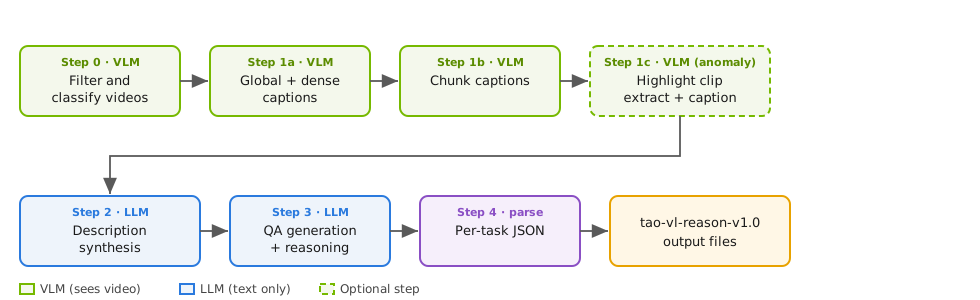
Video reasoning annotation pipeline, from video filtering through per-task output#
The pipeline runs its steps in order and writes the per-step output under results_dir:
Step 0, filtering and classification: The VLM checks whether each video is suitable for analysis. In
automode, it also classifies whether the video contains an anomaly or normal activity.Step 1a, captioning: The VLM generates global and dense captions for the video.
Step 1b, chunking: The pipeline splits the video into chunks and captions each chunk.
Step 1c, highlight: The pipeline extracts and captions the anomaly moment as a highlight clip.
Step 2, description synthesis: The LLM combines the captions into structured descriptions.
Step 3, question-answer generation: The LLM generates the configured question-answer task types, each with a reasoning trace.
Step 4, output parsing: The pipeline parses the question-answer output and writes one
tao-vl-reason-v1.0JSON file per task type understep_4_output.
In auto mode, the pipeline always runs step 0 so that it can classify each video, and
it runs step 1c after step 1b so that it can capture any anomaly highlight.
Output Schema#
Step 4 writes one JSON file per task type, each in the tao-vl-reason-v1.0 envelope:
{
  "format": "tao-vl-reason-v1.0",
  "metadata": {
    "type": "annotation",
    "task": "<task>",
    "date": "...",
    "description": "...",
    "license": "..."
  },
  "media_root": "<video_root>",
  "items": [
    {"video_id": "...", "question": "...", "answer": "...", "reasoning": "..."}
  ]
}
The metadata block records the task type, the generation date, the description (with
any description_extra text appended), and the license string. Each entry in
items holds the source video_id, the generated question and answer, and
the reasoning trace. Because tao-vl-reason-v1.0 is a DAFT schema, you can validate
or convert the output with the nvidia-tao-daft toolkit.
Running Video Reasoning Annotation#
The pipeline runs through the generate task:
export GOOGLE_API_KEY=<your-api-key>
auto_label generate \
    -e /path/to/video_reasoning_annotation.yaml \
    results_dir=/path/to/results
The following example shows a complete specification file:
results_dir: /path/to/results
autolabel_type: "video_reasoning_annotation"

video_reasoning_annotation:
  vlm:
    backend: "gemini"
    gemini:
      api_key: ""                       # Set the GOOGLE_API_KEY environment variable or fill this in
      model: "gemini-3.1-flash-lite-preview"
      media_resolution: "MEDIA_RESOLUTION_LOW"
      temperature: 0.3
      max_output_tokens: 8192
      timeout: 120
  llm:
    backend: "gemini"
    gemini:
      api_key: ""
      model: "gemini-3.1-flash-lite-preview"
      temperature: 0.3
      max_output_tokens: 8192
      timeout: 120
  workflow:
    steps: ["0", "1a", "1b", "1c", "2", "3", "4"]
    mode: "auto"
    max_workers: 4
    max_video_length_sec: 300
    chunk_duration_options: [5, 10, 15, 20, 30]
    max_chunks: 10
    qa_types: ["mcq", "bcq", "open_qa", "causal_linkage", "temporal_localization", "temporal_event_desc", "scene_description", "event_summary"]
  data:
    video_root: /path/to/videos        # Provide video_root, input_jsonl_files, or both
    input_jsonl_files: []
    filter_field: null
  license: ""
  description_extra: ""
  prompts_module: ""
Note
The pipeline calls hosted vision-language and language models. Set the
GOOGLE_API_KEY environment variable, or the API key for your OpenAI-compatible
endpoint, before you run the generate task.