

Grounding DINO#
The Grounding DINO pipeline generates bounding box annotations for a directory of images from a list of category names or noun chunks. It runs an open-vocabulary Grounding DINO detector iteratively, lowering the confidence threshold on each pass so that it recovers objects that the previous pass missed. Use this pipeline when you have unlabeled images and a vocabulary of target classes but no existing bounding boxes.
Data Input for Grounding DINO#
The pipeline reads images from one or more directories and grounds either a list of
class names or a set of noun chunks stored in a JSONL file. You provide the target
vocabulary through the dataset configuration block described in the next section.
Configuring the Specification File for Grounding DINO#
You select this pipeline by setting autolabel_type to grounding_dino and
populating the grounding_dino configuration block. The following table describes the
fields of that block.
Parameter |
Datatype |
Description |
|---|---|---|
|
collection |
Grounding DINO model architecture configuration |
|
collection |
Training configuration consumed when loading the model |
|
collection |
Input data configuration; refer to the dataset table below |
|
string |
Path to the Grounding DINO model checkpoint |
|
string |
Directory in which to write the generated annotations |
|
list |
List of per-iteration thresholds; each entry sets a
|
|
bool |
Whether to render the predicted bounding boxes for inspection.
Default: |
The dataset block specifies where the input images live and which vocabulary to
ground.
Parameter |
Datatype |
Description |
|---|---|---|
|
string |
Root directory that contains the inference images |
|
list |
List of class names to ground in each image |
|
string |
Path to a JSONL file that stores the noun chunks to ground |
|
collection |
Grounding DINO augmentation configuration applied to input images |
How the Iterative Labeling Process Works#
Grounding DINO auto-labels a dataset by repeating a detect-and-refine loop, lowering the confidence threshold on each pass until it meets a termination criterion.
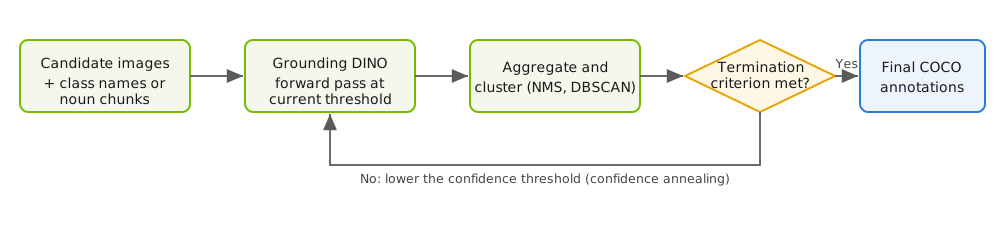
Iterative auto-labeling loop for the Grounding DINO pipeline#
The pipeline auto-labels an image dataset over one or more iterations:
Grounding DINO runs a single forward pass over the candidate images and generates bounding box annotations for the list of grounded noun chunks or class names.
The pipeline aggregates the labels from the current iteration with the labels from the previous iteration. Aggregation clusters similar annotations through a method such as non-maximum suppression (NMS) or DBSCAN.
The pipeline terminates the iterative process when it meets a predefined criterion, such as the following:
The current iteration number crosses the upper bound on the maximum number of iterations.
Every class in the input list of noun chunks and class names has a corresponding label, and no new labels were added across iterations.
If the termination condition is not met, the pipeline retriggers another forward pass through the open-vocabulary model, this time at a lower confidence threshold. A confidence-annealing scheduler controls the rate at which the threshold decreases, using stepwise annealing, exponential decay, or cosine annealing.
Running Grounding DINO#
Grounding DINO runs through the generate task. The following example labels a
directory of images for a closed set of classes:
auto_label generate \
    -e /path/to/text2box.yaml \
    results_dir=/path/to/results
The following example shows a complete specification file:
results_dir: /path/to/results
gpu_ids: [0]
batch_size: 4
num_workers: 8
autolabel_type: "grounding_dino"

grounding_dino:
  model:
    backbone: swin_base_384_22k
  dataset:
    image_dir: /path/to/images
    # noun_chunk_path: /path/to/noun_chunks.jsonl   # For open-vocabulary grounding
    class_names: ["person", "car"]                  # For closed-set detection
  checkpoint: /path/to/grounding_dino.pth
  visualize: True
  iteration_scheduler:
    - conf_threshold: 0.5
      nms_threshold: 0.0
    - conf_threshold: 0.4
      nms_threshold: 0.0
Set dataset.class_names for closed-set detection, or set dataset.noun_chunk_path
to a JSONL file of noun chunks for open-vocabulary grounding. Add an entry to
iteration_scheduler for each refinement pass; the example runs two passes at
decreasing confidence thresholds.