

DEFT for DINOv3 Self-Supervised Learning#
Data Enhanced Fine-tuning (DEFT) for DINOv3 self-supervised learning (SSL) improves a DINOv3 backbone by adding images from a large unlabeled source pool to its training set. The workflow is a loop. In each round, it scores the current model on your target images, selects the targets where the model is weakest, finds similar images in the source pool, adds them to the training set, and trains a new candidate model. The next round scores that candidate.
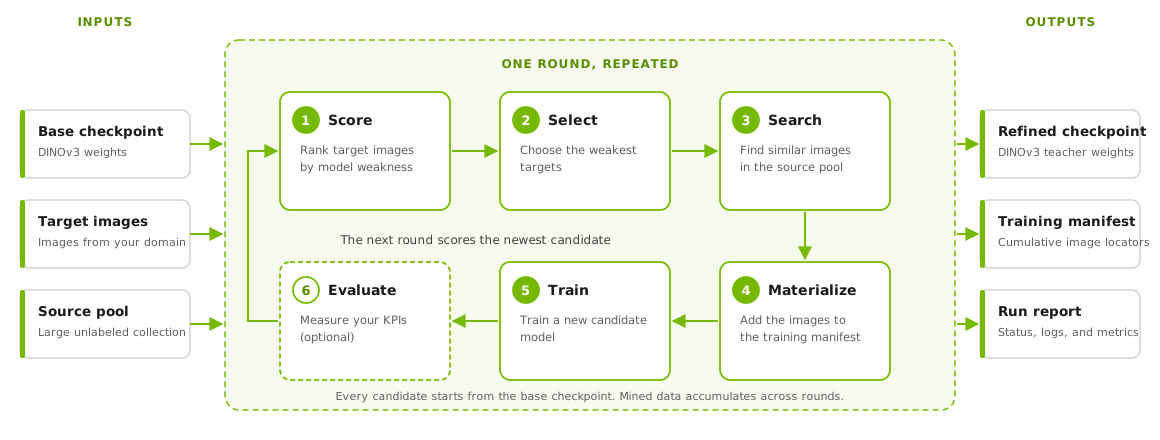
The DINOv3 SSL DEFT loop#
The workflow provides the following capabilities:
Training is self-supervised, so the images that you add need no labels.
Target selection works with or without labels. The
grit-scorestrategy needs none. Themulti-task-round-robinstrategy uses weakness scores that your adapter computes from labeled data. An optional evaluator measures your key performance indicators (KPIs) after each round.Runs are resumable. The workflow saves its state on disk, and you can check status, read logs, cancel, or resume a run that stopped.
Training manifests store image locators, so TAO reads images from their original location and makes no copies. Each run records the checkpoint, datasets, and embedding store that it used.
Getting Started#
Ask your agent to run the workflow. If you want to run it manually, read on from Choosing a Strategy.
The agent loads the tao-run-dinov3-ssl-deft skill from the TAO Skill Bank and asks which
strategy to use. It prepares the embeddings, registers the source store, writes the target
contract and the configuration, and runs the workflow. You do not run any command yourself. To
install the skills, refer to
Getting Started with NVIDIA TAO Toolkit.
You provide the following items:
The source image list and the target image list
The DINOv3 base checkpoint and the DINOv3 training specification
For
multi-task-round-robin, your scoring adapter. TAO does not ship one.For evaluation, your evaluator and a benchmark
For a held-out benchmark, its identity file
A TAO Data Services 7.3.0 or later image, one or more NVIDIA GPUs, and a shared filesystem
Your approval of the run summary
For definitions, refer to Terminology. For the format of each file, refer to Input Files.
Before the agent starts a run, it shows a summary with the following items:
The loop: the strategy, the maximum number of rounds, and the stop conditions
The data: the target and source versions, the row and shard counts, and the storage space
The sampling: the per-round budget, the task quotas, the neighbors for each target, and the similarity thresholds
The training: the passes for each round, the resolution, the resources, and the base checkpoint
The caches and outputs: what TAO reads and what it writes
The monitoring: how often the agent reports progress
After you approve, the agent runs the workflow. It reports each stage and round, the mining yield, your KPIs, any retries or failures, and the stop reason. Prompts such as the following start the workflow:
“Run the DINOv3 SSL DEFT workflow with GRIT scoring on my unlabeled images”
“Improve my DINOv3 backbone on segmentation and retrieval with weighted multi-task mining”
“Resume my DINOv3 DEFT run”
To read the results of a run, refer to Stopping and Outputs. For the skill definition, refer to the DINOv3 SSL DEFT skill.
Choosing a Strategy#
The workflow ranks your target images by weakness. The strategy that you choose decides how it computes that ranking. The choice depends on whether you have labeled data to measure a KPI for each task.
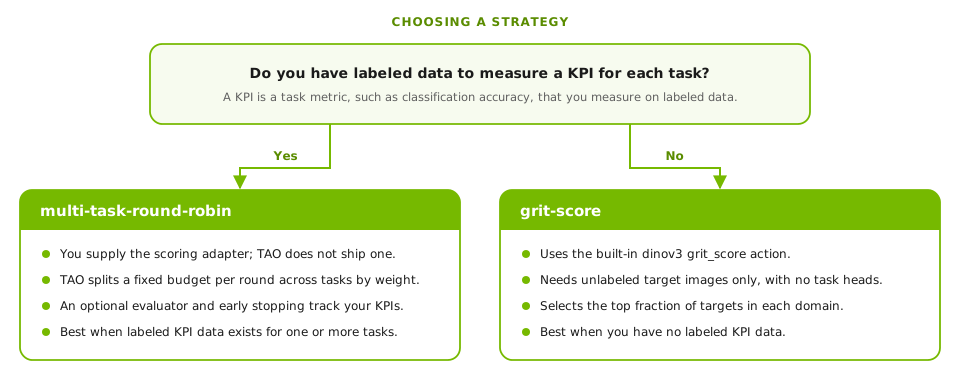
Choosing between the two strategies#
The following table compares the two strategies.
Item |
|
|
|---|---|---|
Use when |
You have labeled data to measure KPIs for one or more tasks. |
You have no labeled KPI data. |
Weakness score |
Your scoring adapter computes a weakness score for each image and task from your task heads. A larger score means a weaker image. TAO does not ship a scoring adapter. |
The built-in |
Selection |
TAO ranks images within each task and picks one image per task in turn until the per-round budget is used. Weights change the share of each task. |
TAO selects the top fraction of query images in each domain. The default fraction is 0.10. |
Labels |
Needed for your task heads and for the optional evaluator. |
Not needed. |
Both strategies can use an optional evaluator. GRIT ranks images within one domain by how
unstable the checkpoint features are for them. For the GRIT method, refer to
How GRIT Scoring Works. For the scoring adapter that
multi-task-round-robin needs, refer to
Custom Scoring and Evaluation.
Terminology#
The following table defines the terms that this page uses.
Term |
Meaning |
|---|---|
Round |
One pass through the stages of the loop. |
Target images |
The images where you want the model to improve. The workflow scores them to find the weak ones. |
Source pool |
A large collection of images that the workflow searches for images similar to the selected targets. The images need no labels. |
Domain |
A value in the |
Query and reference images |
The two roles of target images in |
Weakness score |
A number for each image. A larger value means that the model handles the image less well. |
GRIT score |
The weakness score that |
KPI |
A task metric that you measure on labeled data, such as classification accuracy. |
Scoring adapter |
Your command that writes a weakness score for each image and task. Only
|
Evaluator |
Your optional command that measures KPIs on a benchmark after each round. |
Benchmark |
The labeled set that the evaluator uses. A held-out benchmark shares no sample ID, acquisition unit, or declared content hash with your targets, the parent history, or the mined images. |
Candidate |
The model that a round trains. |
Base checkpoint |
The DINOv3 checkpoint that every candidate starts from. |
Fixed encoder |
The model that produces the embeddings for similarity search, such as CLIP or SigLIP. It is separate from the DINOv3 model that you improve and does not change during the run. |
Embedding store |
The source embeddings, registered as Parquet shards that the workflow can verify. |
Training manifest |
A Parquet file that lists the images that the model trains on. It grows each round. |
Running from the Command Line#
Use this section if you run the workflow yourself. The agent does these steps for you. Run
every command in the tao_ds container. Every workflow command has the form
python -m nvidia_tao_ds.mining.dinov3.workflow <command>.
Prerequisites#
The workflow needs the following items:
A TAO Data Services (
tao_ds) 7.3.0 or later image. Earlier images do not contain the DINOv3 SSL DEFT modules. The image includes TAO PyTorch and TAO Core, so you install nothing on the host and nothing at startup.One or more NVIDIA GPUs with CUDA. Pin
CUDA_VISIBLE_DEVICESto the GPUs that you allocate.A writable node-local scratch directory in
TAO_LOCAL_SCRATCH. GRIT scoring writes its feature files there, and the first score stage fails without it. In Docker, mount the directory and pass-e TAO_LOCAL_SCRATCH=<container path>.A shared filesystem that you mount into the container. It holds every input and the run directory. The filesystem must support POSIX file locks, atomic renames, and
fsync, including on directories. Do not use CIFS withnobrlor NFS without working cross-client locks.A DINOv3 base checkpoint and a DINOv3 training specification. Refer to DINOv3.
Target images and a source image pool.
A fixed encoder to embed both image sets. The
embeddingcommand supports CLIP and SigLIP. Stage the model and processor snapshot locally.
Note
The workflow runs inside one allocated container with execution.backend: local. TAO
does not ship a Slurm, Kubernetes, or multi-node runner for this workflow.
Check the container before you start:
python -m nvidia_tao_ds.mining.dinov3.workflow preflight --gpu
The command imports the TAO modules that the workflow uses, checks TensorBoard logging, and
runs a mixed-precision CUDA test on the GPU. It does not check your data. Its output reports
"contracts": {"benchmark_isolation": 1}. If you declare a held-out benchmark, stop unless
the value is 1 or higher: an earlier image accepts the benchmark identity file but does not
screen the source pool.
Input Files#
The workflow reads the following files. All paths must be visible inside the container. You provide the image lists, the base checkpoint, the training specification, and any benchmark files. The embedding preparation steps create the registered source store and the target embedding contract.
File |
Configuration field |
Description |
|---|---|---|
Target manifest |
|
A Parquet file with the images to score and their embeddings. |
Registered source store |
|
The |
Target embedding contract |
|
The |
Source payload contract |
|
The JSON file that binds image locations to dataset versions. |
Parent training manifest |
|
A Parquet manifest of images that an earlier model already trained on. This file is optional. The workflow never selects these images again. |
Base checkpoint |
|
The DINOv3 checkpoint that every candidate starts from. |
Training specification |
|
A DINOv3 training specification YAML file. The workflow copies it for each round and sets the manifest, checkpoint, and pass count. |
Benchmark manifest |
|
The benchmark that your evaluator reads. TAO does not read its contents. |
Benchmark identity file |
|
A Parquet file that lists the held-out images by |
Image List Columns#
The source Parquet file and the target Parquet file use the following columns.
Column |
Used in |
Description |
|---|---|---|
|
Source, target |
A unique identifier for the image. It must be unique across both files. |
|
Source, target |
The absolute path of the image file. Each path must be unique. |
|
Source, target |
The image location. It must match |
|
Source, target |
The storage type. Use |
|
Source, target |
The fixed-encoder vector for the image. The |
|
Target |
The task name. For |
|
Target |
|
Acquisition unit column |
Source, target |
The capture group of the image, such as a session or a device. The column name comes
from |
|
Source, target |
The SHA-256 hash of the image bytes. Required only when the benchmark identity file declares it. |
For grit-score, each domain needs more reference images than settling_k (50 by
default) and more query images than the largest value in view_ks (32 by default). The
input_size setting must be 512. The validate and plan commands check these limits.
For multi-task-round-robin, your scoring adapter must write one score for every
(sample_id, task) pair in the target manifest.
No TAO producer writes a per-row content_sha256: register-store hashes each shard, not
each image. If your embedding job does not write this column, isolation matches IDs and
acquisition units only, and it does not find a held-out image that someone copied under a new
ID and unit.
Preparing the Embeddings#
Mining finds similar images by comparing embeddings from a fixed encoder. This encoder is separate from the DINOv3 model that you improve. Use the same encoder snapshot for the source pool and the targets, and keep the embeddings unchanged across rounds. Do not regenerate them from a DINOv3 checkpoint.
The embedding command of TAO Data Services produces CLIP and SigLIP embeddings, and the
steps below use it. The workflow contracts do not restrict the encoder, but TAO ships only
the CLIP and SigLIP producers. To use another encoder, such as C-RADIO, produce and check the
embeddings yourself. Write them as Parquet files with the same columns, and declare the
encoder in the register-store and write-target-contract options. The workflow checks
that the source and the targets declare the same encoder and embedding size.
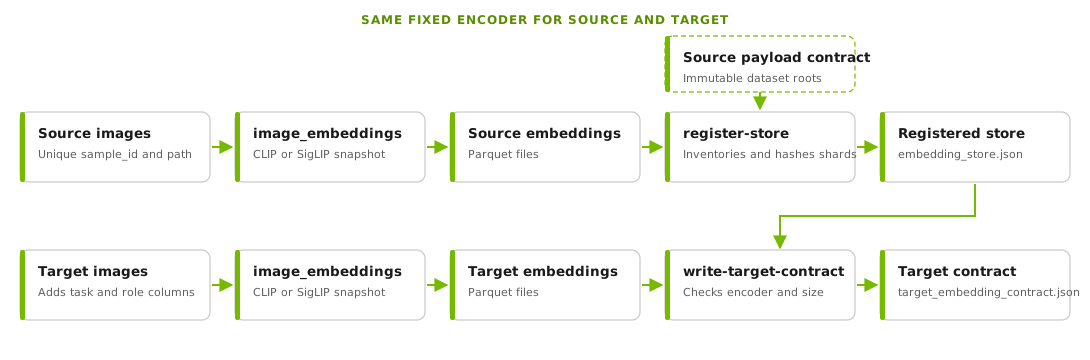
Preparing the source store and the target contract#
To prepare the embeddings, complete the following steps.
Create two Parquet files, one for the source images and one for the target images. Both files need the columns in Image List Columns, except for
embedding, which the next step adds.Embed each Parquet file with the same model snapshot, using the
embeddingcommand. Create a specification file for the source images.input_parquet: /deft/data/source-input.parquet output_parquet: /deft/data/source-embeddings/part-0.parquet model: CLIP model_path: /deft/models/fixed-clip batch_size: 64
Run the command, then repeat it with a second specification file for the target images. Write the target embeddings to
/deft/data/target-embeddings.parquet. Setmodel: SigLIPto use SigLIP. Themodel_pathdirectory must contain both the model and the processor. For all options, refer to Embedding Generation.embedding image_embeddings -e /deft/specs/source_embeddings.yaml embedding image_embeddings -e /deft/specs/target_embeddings.yaml
Write the source payload contract, a JSON file that binds image locations to immutable, versioned dataset roots.
{
  "schema_version": "1.0",
  "immutability": "immutable",
  "datasets": [
    {
      "dataset_id": "my-source-pool",
      "version": "snapshot-12345",
      "root_uri": "file:///deft/data/source-pool-v12345"
    }
  ]
}
Use a snapshot, object version, or archive-set digest as the version.
Register the source embeddings as a store. The
--store-rootoption names the directory that holds the source embedding Parquet files. TAO inventories and hashes the shards without copying them, and rejects any image location outside the contracted roots.python -m nvidia_tao_ds.mining.dinov3.internal.refinement register-store \ --store-root /deft/data/source-embeddings \ --output-dir /deft/data/mining-registered \ --encoder-name CLIP \ --encoder-checkpoint-digest sha256:<digest> \ --input-resolution 224 \ --normalization clip-default \ --source-payload-contract /deft/data/source_payload_contract.json
Write the target embedding contract. Use the same encoder values that you used to embed the targets.
python -m nvidia_tao_ds.mining.dinov3.internal.refinement write-target-contract \
  --targets /deft/data/target-embeddings.parquet \
  --source-store-manifest /deft/data/mining-registered/embedding_store.json \
  --output-dir /deft/data/target-contract \
  --encoder-name CLIP \
  --encoder-checkpoint-digest sha256:<digest> \
  --input-resolution 224 \
  --normalization clip-default
The values for --encoder-name, --encoder-checkpoint-digest, --input-resolution, and
--normalization are your declarations of the encoder that you used. TAO cannot recover
them from the vectors. Matching vector sizes do not show that two encoders are the same. Use
the real values for your snapshot, and use a new output directory each time.
Note
The image_embeddings command reads individual image files. If your images are in tar or
zip archives, create a file view of them before this step.
Running the Workflow#
After the embeddings are ready, complete the following steps.
Generate a starter configuration from a recipe. The recipe names are
grit-scoreandmulti-task-round-robin. The command refuses to overwrite an existing file. Formulti-task-round-robin, it also prints a note that you must supply a scoring adapter.python -m nvidia_tao_ds.mining.dinov3.workflow init \ --recipe grit-score --output /deft/run.yaml
Edit
/deft/run.yaml. Set your paths and resources. Refer to Configuration.Validate the configuration, check the allocation, and review the plan. The
validatecommand checks that every path exists and that the targets meet the scoring limits. With the configuration file,preflightalso checks the scratch directory, the GPU count, and GPU FAISS for each stage. Theplancommand lists the stages and, formulti-task-round-robin, the number of targets for each task. Do not approve a run until all three commands succeed.python -m nvidia_tao_ds.mining.dinov3.workflow validate /deft/run.yaml python -m nvidia_tao_ds.mining.dinov3.workflow preflight /deft/run.yaml --gpu python -m nvidia_tao_ds.mining.dinov3.workflow plan /deft/run.yaml
Start the run.
python -m nvidia_tao_ds.mining.dinov3.workflow run /deft/run.yaml
Managing a Run#
The following commands manage a run.
Command |
Description |
|---|---|
|
Prints the run state as JSON, including the client job ID of any active job. |
|
Prints the log of one job. Read the job ID from |
|
Prints the path of |
|
Continues a failed or interrupted run. The argument is the configuration file. If an input changed after the run started, the command names the changed fields and stops. |
|
Cancels a run. Cancellation is final, and you cannot resume a canceled run. After a
cancellation, |
|
Adopts a training result into a new run directory. Use it only for a continuation run. |
The status, logs, report, and cancel commands read input.yaml from the run
directory. Pass --config to use a different configuration file.
Follow these rules when you run the workflow:
Do not edit
state.jsonor any lock file.If you change the resolved configuration, start a new run directory. The workflow rejects a changed configuration on resume.
Do not delete a lock file to force recovery.
If the controller process ends while child processes still run,
statusreports the job state asUNKNOWN, and TAO does not stop or restart those processes. Stop only the processes that you have verified, then resume.Sending
SIGTERMto the controller records a cancellation.
Loop Stages#
Each round runs the stages in the following table in order. The search_candidates stage
runs only when you use approximate nearest neighbor (ANN) search.
Stage |
What it does |
|---|---|
|
Scores every target image with the current checkpoint. The |
|
Selects the weakest targets. After TAO selects a target in
|
|
Retrieves candidate source images from an ANN index. TAO skips this stage for exact search. |
|
Finds source images that are similar to each selected target. Refer to Search. |
|
Appends the new images to the cumulative training manifest. |
|
Runs |
|
Runs your optional evaluator on the new checkpoint. Refer to Evaluation and Early Stopping. |
Mined data accumulates from round to round. Every candidate starts from
model.base_checkpoint. The next round scores the newest candidate to choose its targets.
If you configure an evaluator, the workflow also evaluates the base checkpoint before round one. This baseline is round 0 in the report.
How GRIT Scoring Works#
GRIT scoring finds the images where the model features are least settled. It looks at how much the features of an image change as the image passes through the network and as the image changes slightly. An image with features that stay consistent is stable. An image with features that shift is a good candidate for more training data. GRIT needs no labels and no task heads. It uses the model features only.
For each query image, TAO measures four signals. The signals form two channels, and each channel has two signals.
Signal |
Channel |
What it measures |
|---|---|---|
Global depth settling |
Global |
How much the nearest reference images of the image change between the earlier probe layers and the final layer. |
Global view instability |
Global |
How much the nearest query images of the image change across three views: the full image and two 90% crops. |
Dense depth settling |
Dense |
How much the similarity among the patches of the image changes between the third probe layer and the final layer. |
Dense view retrieval |
Dense |
How well TAO can match the patches of each crop back to the same place in the full image. TAO averages the worst 20% of the matches. |
The dinov3 grit_score action works in the following steps:
TAO resizes each image to 512 × 512 pixels and creates two 90% crops, one from the top-left corner and one from the bottom-right corner.
TAO runs the backbone and keeps the features at four depths. For a ViT-B backbone, these are blocks 3, 6, 9, and 12. Other backbone sizes use the blocks at 25%, 50%, 75%, and 100% of their depth.
TAO computes the four signals for every query image. It finds neighbors among the reference images and among the query images of the same domain.
Within each domain, TAO converts every signal into a rank between 0 and 1. It combines the two ranks of each channel into one value by taking their geometric mean.
TAO ranks the value of each channel again within the domain. The GRIT score is the larger of the two channel ranks. A score close to 1 means that the image is among the least stable in its domain.
The select_targets stage then picks the images with the highest scores in each domain. For
each domain, it takes the top fraction of query images that grit.target_fraction sets. The
default is 10%.
The GRIT score is a relative rank with no units, so compare scores only between images in the same domain. If you configure an evaluator, it measures your KPIs after each round and does not affect which targets TAO selects.
Search#
The search stage finds source images that are similar to each selected target. It uses the fixed-encoder embeddings.
TAO applies two separate thresholds. The relevance threshold starts at min_similarity.
If the search cannot fill the budget, it lowers the threshold by similarity_step until it
reaches hard_min_similarity. It accepts a partly filled result and does not go below that
floor. The duplicate threshold rejects any image that is nearly identical to its target or to
an image that the search already accepted. The search never relaxes this threshold.
TAO also excludes every image in the parent manifest and the cumulative manifest, and it
selects each source image at most once in a round. The search_summary.json file in the
search directory of each round records every threshold that the search tried and the
number of rejections.
The actions.search.backend field selects one of the following search modes:
exact: Scans every embedding shard. This is the default. Use it for small and medium pools, and to confirm results from other modes.audited_ann: Searches a persistent ANN index, then reranks the candidates with exact cosine scores. Use it for large pools. The index is a one-time build for the corpus.custom: Runs your own search command throughactions.search.command.
The audited_ann mode needs the following items:
data.source_store_manifestanddata.source_identity_auditactions.search.dense_store_manifest,actions.search.ann_index_manifest, andactions.search.ann_audit_manifestactions.search.n_probesandactions.search.ann_candidates, which must match a recall audit that you committed for the indexactions.search.candidate.commandandactions.search.rerank.command
The ann_candidates value must be at least top_k_per_target times
candidate_multiplier. Build the dense store and the index with the dense-init,
dense-write, dense-finalize, and build-ann-index commands, and create the recall
audit with audit-ann-recall. All of them belong to
nvidia_tao_ds.mining.dinov3.internal.refinement. The index build is experimental. It
needs a CUDA-compatible cuVS library, which the exact mode does not need, and
TAO_DINOV3_EXPERIMENTAL_ANN=1.
Evaluation and Early Stopping#
An evaluator measures your KPIs on each new checkpoint. It is optional for both strategies.
Set actions.evaluate.command to your evaluation command to turn it on. The workflow then
evaluates the base checkpoint as round 0 and every candidate after it.
The evaluator receives the checkpoint, the benchmark manifest, and an output directory. It must write the following files there:
metrics.jsonevaluation_commit.json, which binds the checkpoint, the evaluation scope, the metrics file, and the benchmark_SUCCESS, which containssha256:followed by the SHA-256 hash ofevaluation_commit.json
The metrics.json file lists one entry for each metric. Every entry needs task,
name, value, higher_is_better, and sample_count. The value must be a
finite number, and sample_count must be a positive integer. The task and name
pair must be unique. The file must also carry evaluation_scope with the value of
actions.evaluate.scope. Every round must report the same metrics with the same
directions and sample counts.
{
  "schema_version": "1.0",
  "evaluation_scope": "sealed_benchmark",
  "metrics": [
    {"task": "classification", "name": "macro_f1", "value": 0.812,
     "higher_is_better": true, "sample_count": 5000}
  ]
}
For the full commit format, refer to the DINOv3 SSL DEFT adapter contracts.
The actions.evaluate.scope field sets how TAO treats the benchmark:
sealed_benchmark: The default. The benchmark is held out. Providedata.benchmark_acquisition_units. Refer to Held-Out Benchmark Isolation.diagnostic_replay: The benchmark can overlap with your targets. Treat the results as feedback on the run, not as held-out evidence.
Held-Out Benchmark Isolation#
Whenever you declare a held-out benchmark, provide data.benchmark_acquisition_units, even
with evaluation turned off. The file is a Parquet table with sample_id, the acquisition unit
column, and an optional content_sha256 column. The data.acquisition_unit_column field
names the unit column and defaults to acquisition_unit_id. Without a held-out benchmark,
omit both data.benchmark_manifest and data.benchmark_acquisition_units.
An image matches the benchmark when any declared identity matches. TAO compares IDs and units exactly, after it removes surrounding spaces, and compares hashes without regard to case. The targets, the parent history, every source shard, and every training manifest must carry each identity that the file declares.
TAO enforces isolation at the following points:
validaterejects targets or parent history that match the benchmark.The search excludes matching source images.
materializerejects a training manifest that contains a benchmark image before it publishes the manifest.The controller checks cached, resumed, and adopted training inputs again.
Isolation trusts the identities that you declare. It does not compute hashes, find near-duplicate images, or check the data that trained the base checkpoint.
To stop a run when your KPIs stop improving, add workflow.early_stopping:
workflow:
  early_stopping:
    patience: 2
    min_delta: 0.002
    metrics:
      - {task: classification, name: macro_f1, weight: 1.0}
      - {task: retrieval, name: recall_at_1, weight: 1.0}
TAO combines the listed metrics into one weighted mean. It converts each metric so that a
higher value is always better. The run stops after patience rounds (default two) without
a meaningful improvement. The min_delta field (default zero) sets the smallest gain that
counts.
The run delivers the checkpoint with the best score, and round 0 counts as a candidate. The
delivered checkpoint can therefore be the base checkpoint. Without early_stopping,
final_model.json names the checkpoint of the last round that trained. If a round stops
before training, selected_round names the round before it, or 0 for the base checkpoint.
The report shows the raw values and the gain over round 0.
Stopping#
A run ends with one of the following stop reasons, which final_model.json and status
record.
Stop reason |
Meaning |
|---|---|
|
The run completed |
|
Your evaluation metrics did not improve for |
|
Selection returned no targets, for example because TAO excluded all remaining targets. |
|
The search found images, but none of them were new to the training manifest. |
|
The search returned no images because no eligible source images remain. |
|
The search returned no images, and a complete exact search showed that no more images
exist at or above |
|
The search returned no images, and it did not show that the pool is exhausted. This
happens with ANN and custom search, and with an exact search that cannot show it. The
pool might contain more matches. Run |
The search reasons apply only when a search returns no images at all. A search that returns fewer images than the budget lets the loop continue.
Outputs#
The output.run_dir directory holds everything that the run produces. TAO reads your images
and embeddings without changing them and creates no copies or symbolic links.
Path |
Description |
|---|---|
|
The configuration that you supplied. |
|
The resolved configuration, which stays the same during a run. |
|
The workflow and component versions. |
|
The fingerprints of the checkpoint, targets, source datasets, encoder, and shards. |
|
The current state of the run. |
|
An append-only history of every stage. |
|
The request, record, and log of each job. |
|
One directory for each round, with one subdirectory for each stage. The |
|
The targets that TAO no longer selects. |
|
The result of the run. It names the |
|
A summary that the controller regenerates after each round and when the run stops, fails, or ends by cancellation. |
The training manifest is a Parquet file of unique image locators. Each row names a file, or an
archive and a member. For multi-task-round-robin with policy: balanced, the
materialize directory also holds balanced_training_manifest.parquet. Training reads
this file. It repeats the images of smaller task groups so that every group gets equal
exposure. Parent-history images have no task, so they appear one time. The cumulative manifest
stays unique, so repeated rows never affect later selection.
TAO creates every output file with the permissions of your umask, so a platform that collects the run directory as another user can read it.
Configuration#
The configuration file is YAML. The following example shows the grit-score recipe without
comments.
schema_version: "1.0"

workflow:
  strategy: grit_score
  initialization: base_checkpoint
  max_rounds: 10
  persistent_target_rounds: 3

model:
  base_checkpoint: /deft/models/base_dinov3_checkpoint.pth

data:
  target_manifest: /deft/data/target-embeddings.parquet
  previous_training_manifest: /deft/data/parent_training_manifest.parquet
  source_payload_contract: /deft/data/source_payload_contract.json
  source_store_manifest: /deft/data/mining-registered/embedding_store.json
  target_embedding_contract: /deft/data/target-contract/target_embedding_contract.json

grit:
  target_fraction: 0.10

mining:
  top_k_per_target: 32
  min_similarity: 0.80
  hard_min_similarity: 0.74
  similarity_step: 0.02
  duplicate_similarity: 0.995
  candidate_multiplier: 10
  parent_history_policy: exclude

training:
  base_spec: /deft/specs/train_dinov3.yaml
  passes_per_round: 12
  lr_scaling_rule: preserve_base_spec
  checkpoint_policy: base_checkpoint_each_round

actions:
  score:
    command: [dinov3, grit_score, -e, "{score_config}"]
    settings:
      batch_size: 12
      workers: 8
      device: cuda
      amp: true
      neighbor_backend: torch_exact
      neighbor_device: cuda
      work_dir: $TAO_LOCAL_SCRATCH/dinov3-grit
    execution_mode: runner
    resources:
      gpus: 1
      local_scratch: {path_environment: TAO_LOCAL_SCRATCH}
  data:
    command: [python, -m, nvidia_tao_ds.mining.dinov3.internal.refinement]
  search:
    command: []
  train:
    command: [dinov3, train, -e, "{training_spec}"]
    execution_mode: runner
    resources: {nodes: 1, gpus_per_node: 1}
  evaluate:
    command: []

execution:
  backend: local
  poll_seconds: 10
  capabilities: {}

output:
  run_dir: /deft/results
The multi-task-round-robin recipe differs in the following ways:
workflow.strategyismulti_task_round_robin.A
multi_tasksection replaces thegritsection.actions.score.commandis your scoring adapter. TAO does not ship one, so the image cannot run this recipe without your adapter. The recipe names the placeholders/path/to/customer_score_adapterand/path/to/customer_heads.yaml. Every command that loads the configuration rejects any/path/to/value inactions.scoreuntil you replace it.The recipe declares
data.benchmark_manifest,data.benchmark_acquisition_units, anddata.acquisition_unit_column. Isolation applies even with evaluation turned off, so supply a real identity file, or remove both benchmark fields if you have no held-out benchmark.A commented
training.node_scalingblock is available.
The following example shows the multi_task section:
multi_task:
  policy: balanced
  tasks: [classification, retrieval, segmentation]
  targets_per_round: 2400
  task_weights: {classification: 1.0, retrieval: 1.0, segmentation: 2.0}
The targets_per_round value fixes the number of targets in each round. TAO divides it
among the tasks in proportion to task_weights. A task that you do not list has a weight of
1.0, and every task receives at least one target. With task_weights of 1, 1, and 2, a
budget of 2,400 gives 600, 600, and 1,200 targets.
Workflow Settings#
The workflow section controls the loop.
Field |
Default |
Description |
|---|---|---|
|
Required |
|
|
|
|
|
10 |
The maximum number of rounds. |
|
1 |
The first round to run. A value above 1 requires a |
|
3 |
The number of consecutive rounds after which TAO stops selecting a target. |
|
None |
Stops the run when your evaluation metrics stop improving. Requires an evaluator. Refer to Evaluation and Early Stopping. |
Strategy Settings#
Each strategy has its own section.
Field |
Default |
Description |
|---|---|---|
|
0.10 |
The share of query images that TAO selects in each domain. TAO selects the ceiling of the number of query images times this value. It must be greater than 0 and at most 1. |
|
Required |
The list of task names. Each name must be unique. |
|
|
|
|
800 per task |
The total number of targets in each round. Do not set it together with the legacy
|
|
1.0 per task |
The relative share of each task in the budget. Weights must be positive. Use them only
with |
Model and Data Settings#
The model and data sections name the checkpoint and the input files.
Field |
Default |
Description |
|---|---|---|
|
Required |
The checkpoint that every candidate starts from. |
|
None |
The checkpoint to score in the first round of a continuation run. |
|
Required |
The target manifest. |
|
Required |
The source payload contract JSON file. |
|
None |
The registered store. Set exactly one of this field and |
|
None |
A list of source embedding Parquet files to use instead of a registered store. |
|
None |
Required when you set |
|
|
|
|
None |
Images that an earlier model already trained on. |
|
None |
Required for |
|
None |
The benchmark that your evaluator reads. |
|
None |
The benchmark identity file. Refer to Held-Out Benchmark Isolation. |
|
|
The name of the acquisition unit column. Set it only with
|
Mining Settings#
The mining section controls how TAO finds source images for each selected target.
Field |
Default |
Description |
|---|---|---|
|
32 |
The number of source images to retrieve for each target. |
|
0.80 |
The starting cosine similarity that a source image must reach to count as relevant. |
|
|
The lowest similarity that the search accepts. The recipe sets 0.74. |
|
0.02 |
The amount by which the search lowers the similarity threshold when it cannot fill the budget. |
|
1.0 |
The similarity above which TAO rejects an image as a near copy of a target or of an
image that it already accepted. The recipe sets 0.995. The value must be greater than
|
|
10 |
TAO retrieves a candidate pool of |
|
|
The only supported value. TAO never selects images in the parent manifest or in the cumulative manifest again. |
The thresholds must satisfy hard_min_similarity <= min_similarity < duplicate_similarity <= 1.
Training Settings#
The training section sets how each round trains its candidate.
Field |
Default |
Description |
|---|---|---|
|
Required |
The DINOv3 training specification that each round copies. DEFT rejects a specification
with |
|
12 |
The number of passes over the training manifest in each round. One pass is one DINOv3 epoch. |
|
|
The only supported value. The learning rate, warmup, and decay stay as in the base specification. |
|
|
The only supported value. Every candidate starts from |
|
None |
Chooses the number of nodes for each round from the size of the manifest. Any value above one node needs a multi-node runner, which TAO does not ship for this workflow. |
Each round restarts from the original checkpoint, so its optimizer step starts at zero. The
controller calculates the steps in a round as
ceil(ceil(rows / world_size) / batch_size) * passes_per_round and records the result as
total_optimizer_steps in training_contract.json. A round can end before its learning
rate leaves warm-up. For example, the shipped ViT-B specification has a warm-up of 10,000
steps. When a learning-rate warm-up or the last-layer freeze covers all steps of a round, the
controller writes a stage: train, status: schedule_warning event to
<run_dir>/events.jsonl. The controller does not change the schedule. Before you run,
calculate the steps from the expected row count. If necessary, decrease the warm-up and freeze
steps in training.base_spec.
Action Settings#
The actions section sets the command, resources, and options of each stage.
Field |
Default |
Description |
|---|---|---|
|
|
The scoring command. Required for |
|
|
Options for |
|
|
The resources that the stage needs. GRIT scoring uses one GPU and a node-local scratch
directory set through |
|
Required |
|
|
|
The training allocation. The recipe uses one node and one GPU. |
|
|
|
|
|
Your evaluation command. Leave it empty to skip evaluation. |
|
|
|
|
|
|
With neighbor_backend: torch_exact, GRIT scoring uses the PyTorch that the image already
contains. The auto and faiss_exact backends on a CUDA device need GPU FAISS in the
image and execution.capabilities.gpu_faiss: true. An explicit backend never falls back to
a different one.
Execution Settings#
The execution and output sections set where the stages run and where the run writes
its results.
Field |
Default |
Description |
|---|---|---|
|
|
Use |
|
3 |
The number of attempts for each stage. |
|
10 |
External backend only. How often the controller checks a running stage. The |
|
30 |
External backend only. The time limit for each call to the runner. |
|
None |
Environment variables that the controller passes to each stage. |
|
Required |
The run directory. It must be the durable results directory of your platform. |
Pin CUDA_VISIBLE_DEVICES to the GPUs that you allocate. Each GPU stage must request
exactly the number of GPUs that are visible.
Custom Scoring and Evaluation#
The multi-task-round-robin strategy needs a scoring adapter that you provide. TAO does
not ship one, because the weakness score depends on your task heads and labels. An adapter is
a command that the workflow calls. The command template can use {checkpoint},
{target_manifest}, {output_dir}, {round}, and any key of
actions.score.parameters. The adapter must write the following files:
task_scores.parquet, with one row for each (sample_id,task) pair in the target manifest and the columnssample_id,task,weakness_score, andembeddingscore_commit.json_SUCCESS
The embedding column must match the target manifest exactly. A larger weakness_score
always means a weaker image.
You can also supply your own evaluator. List every file that a custom adapter or evaluator
needs in actions.score.implementation_files or actions.evaluate.implementation_files,
so that TAO can lock the code that the run approves. Do not list files for the built-in
dinov3 grit_score and dinov3 train actions.
For the exact file formats and the commit and seal files, refer to the DINOv3 SSL DEFT task scoring contract.