

Overview
NVIDIA Run:ai is a Kubernetes-native platform for efficient GPU resource management and AI workload orchestration. It runs on your own infrastructure: the hardware, Kubernetes cluster, and network that you own and operate. NVIDIA Run:ai delivers the software that manages and orchestrates the GPUs; you provide everything it sits on.
This page explains the platform components, the installation lifecycle, and what to understand before installing - deployment models, shared responsibility, installation options, and installation paths.
Note
To prepare your environment and install NVIDIA Run:ai, go to the Next Steps.
Platform Components
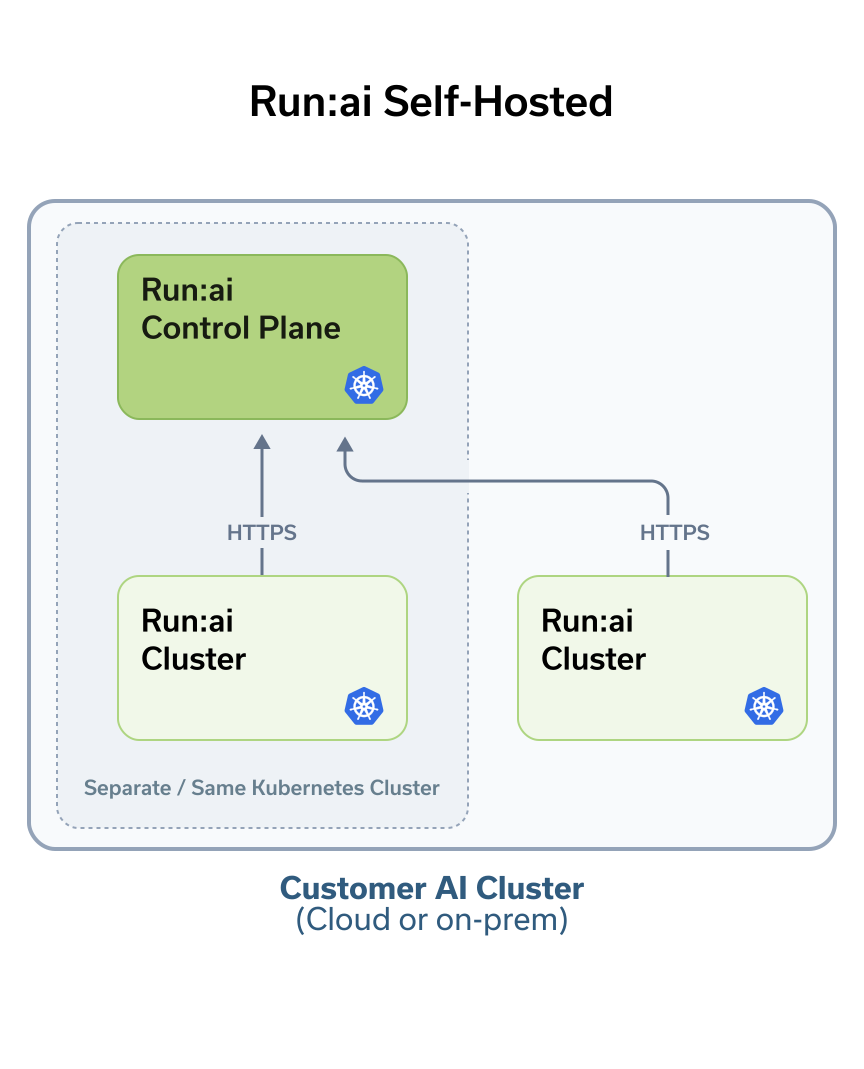
NVIDIA Run:ai is made up of two components, both installed on a Kubernetes cluster. See Architecture and Components for a deeper look at how they fit together:
- NVIDIA Run:ai control plane - Provides centralized resource management, handles workload submission, and delivers cluster monitoring and analytics. The control plane is the management layer; it connects to one or more NVIDIA Run:ai clusters and gives administrators and users a single place to operate across them.
- NVIDIA Run:ai cluster - Set of cluster services that provide enhanced scheduling and workload management on each Kubernetes cluster where workloads run. The cluster component extends Kubernetes native scheduling with Run:ai’s GPU-aware capabilities.
Every installation includes at least one NVIDIA Run:ai control plane and one NVIDIA Run:ai cluster. In a typical deployment, both are installed on the same Kubernetes cluster. As your environment grows, you can connect additional NVIDIA Run:ai clusters to the same control plane. See Deployment Model.
Installation Lifecycle
Setting up NVIDIA Run:ai follows a three-phase lifecycle that reflects the natural progression from planning through ongoing operations.
Day 0: Planning
Day 0 covers the planning and preparation before installing NVIDIA Run:ai on your Kubernetes cluster.
- Choose your deployment model - same-cluster or multi-cluster
- Meet infrastructure requirements - hardware, OS, Kubernetes distribution, storage, and permissions
- Set up networking - load balancer, ingress controller, FQDNs, DNS, and TLS certificates
- Review third-party services deployed as part of the installation, such as Keycloak and PostgreSQL
- Review prerequisites required for your environment, such as the GPU Operator and Prometheus
- Enable external access for administrators and users to reach the NVIDIA Run:ai control plane and clusters
Day 1: Setup
Day 1 gets NVIDIA Run:ai running on your Kubernetes cluster and covers the infrastructure configuration that makes it production-ready for your environment. Which configurations apply depends on your environment and workload needs. Configuration is performed after installation and is typically done once, though it may be revisited as your environment evolves.
- Install NVIDIA Run:ai using the path that fits your environment - Guided Installation, Manual Helm, or Base Command Manager
- Assign node roles and configure advanced NVIDIA Run:ai cluster and control plane settings
- Configure Kubernetes cluster authentication through the NVIDIA Run:ai identity provider
- Configure networking for external access, service mesh, and container access
- Apply security hardening to your cluster
- Set up shared storage
- Connect third-party integrations
Day 2: Operations
Day 2 covers the ongoing operational tasks that keep NVIDIA Run:ai healthy and your clusters running smoothly.
- View and manage your clusters
- Tune NVIDIA Run:ai system services for scale, high availability, and resource right-sizing as your environment grows
- Perform node maintenance and restore from backup when needed
- Monitor GPU and workload metrics, collect logs, and review event history
Upgrades
Upgrades are a lifecycle event that can occur at any phase and are not bound to a specific day. To upgrade NVIDIA Run:ai, see Upgrade.
Understanding the Installation
Deployment Model
The NVIDIA Run:ai control plane and NVIDIA Run:ai clusters can be deployed across your Kubernetes environment in one of two models. The two components can run either on the same Kubernetes cluster or on separate Kubernetes clusters; in both cases, network connectivity between them is required. See Deployment Model for more details.
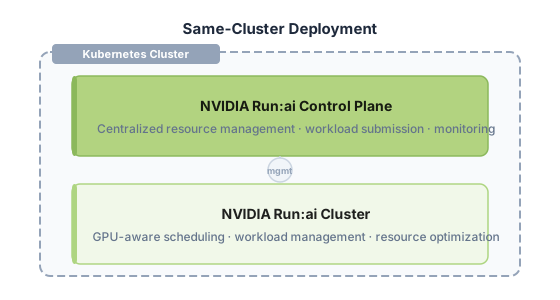
- Same-cluster deployment - The NVIDIA Run:ai control plane and the first NVIDIA Run:ai cluster are installed on the same Kubernetes cluster. This is the most common deployment model. Infrastructure such as the load balancer, ingress controller, and DNS can be shared between the two components.
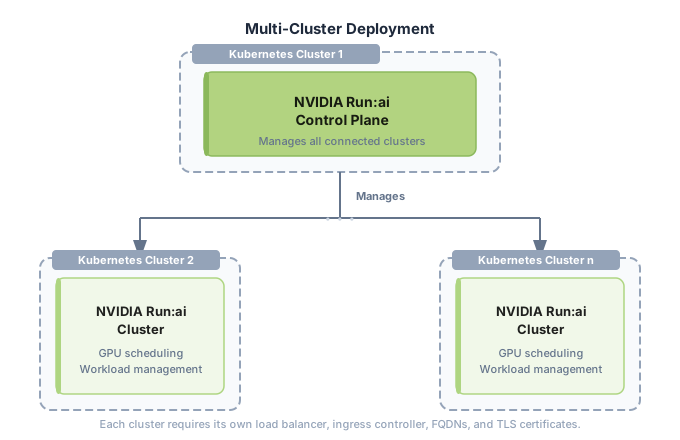
- Multi-cluster deployment - The NVIDIA Run:ai control plane runs on a dedicated Kubernetes cluster, while one or more NVIDIA Run:ai clusters run on separate Kubernetes clusters. Each NVIDIA Run:ai cluster requires its own load balancer, ingress controller, FQDNs, and TLS certificates.
Shared Responsibility
NVIDIA Run:ai operates under a shared responsibility model. NVIDIA provides and manages the NVIDIA Run:ai software, while you provide and operate the underlying infrastructure. This distinction defines which components you prepare and operate, and which are delivered and maintained as part of the NVIDIA Run:ai platform.
Since you own the infrastructure, you can apply OS and Kubernetes security patches and hardening independently, without coordinating with NVIDIA, provided the environment stays within the support matrix and the permissions, connectivity, and configuration that NVIDIA Run:ai requires remain intact.
Note
When using the recommended guided installer, several prerequisites that you own in this table are set up for you. When installing manually via Helm, all items that you own must be in place before the Helm charts are applied. Third-party services are the exception: they are deployed by the NVIDIA Run:ai Helm charts in both installation paths and do not need to be installed beforehand.
Installation Options
NVIDIA Run:ai is an open source platform, with the NVIDIA Run:ai Support-Entitled Release available as a supported version of the same platform. Both share the same installation model and support connected and air-gapped environments. NVIDIA Run:ai Support-Entitled requires an NGC API key to pull platform images and Helm charts.
Connected and Air-Gapped Environments
NVIDIA Run:ai can be deployed in either a connected or air-gapped environment, regardless of type. Both use the same installation paths and tooling.
Kubernetes and OpenShift
NVIDIA Run:ai runs on both Kubernetes and OpenShift, and the installation model is the same for both. Where they differ is in how certain infrastructure pieces work: OpenShift routes traffic through its built-in router rather than an ingress controller, installs operators such as the GPU Operator through OLM rather than Helm, and manages TLS at the router level rather than through Kubernetes secrets. These differences are handled within each installation guide, and the overall flow remains the same.
Gov-Ready
Gov-ready is an NVIDIA standard that makes sure NVIDIA software complies with the federal and governmental security and compliance requirements that regulated customers must meet. NVIDIA Run:ai, including its dependencies, supports Gov-ready deployments. For the standards and regulations it covers, refer to Government-Ready AI Software.
Gov-ready software helps you to:
- Reduce the effort of securing an open-source technology stack against continuous security vulnerabilities.
- Adopt AI with software that is vetted against demanding regulatory frameworks.
- Run commercially supported, production-ready software in regulated environments.
All NVIDIA Run:ai images, including the open-source images, are Gov-ready. The vulnerability remediation SLA and support for Gov-ready issues apply to NVIDIA Run:ai Support-Entitled Release customers. Open-source users can use the Gov-ready images, but they do not receive the SLA.
For the images and Helm values, refer to Gov-Ready Third-Party Services. For the ordered steps, refer to Gov-Ready Installation.
Installation Paths
NVIDIA Run:ai supports three installation paths. Choose based on your tooling, environment, and the balance you want between installation convenience and fine-grained control over configuration values.
Artifact Sources
Understanding where installation artifacts come from helps you plan network access and registry credentials.
-
NVIDIA Run:ai platform images and Helm charts are published to NVIDIA NGC. Open Source installations access them without credentials. NVIDIA Run:ai Support-Entitled installations require an NGC API key.
-
Third-party service images (PostgreSQL, Keycloak, and others) are pulled from their official upstream registries on Docker Hub, Quay, and the Kubernetes registry (
registry.k8s.io) for Open Source and NVIDIA Run:ai Support-Entitled installations.
What an Installation Includes
An NVIDIA Run:ai installation relies on several categories of software and infrastructure. Some components are installed and managed by NVIDIA Run:ai, while others are prerequisites that you provide or optional components that enable specific platform capabilities. For a detailed breakdown of ownership responsibilities, see Shared Responsibility.
-
Infrastructure you provide - The hardware, operating system, Kubernetes distribution, networking, and storage that host NVIDIA Run:ai. These components must be in place before installation begins. See System Requirements.
-
Third-party services - A set of supporting services deployed as part of the installation, including Keycloak for authentication and identity management, PostgreSQL as the centralized database, Traefik as the API gateway, NATS for asynchronous communication, and others. See Third-Party Services.
-
Prerequisites - Components that NVIDIA Run:ai requires: GPU Operator (provisions and manages GPUs on worker nodes) and Prometheus (required for metrics collection and monitoring). The Network Operator is required only if you are using Multi-Node NVLink (MNNVL) workloads. See Prerequisites and Features.
-
Feature-specific components - Components required only for specific NVIDIA Run:ai workload types, such as distributed training or inference. When using the guided installer, these components can be enabled in the configuration file and installed alongside NVIDIA Run:ai. See Prerequisites and Features.
Next Steps
BCM installations
If you are deploying NVIDIA Run:ai through NVIDIA Base Command Manager (BCM), do not follow the steps below. BCM manages its own prerequisites, support matrix, and installation process. Refer directly to the BCM installation instructions for your supported release.
- Check the Support Matrix to know which Kubernetes/OpenShift versions, operating system, GPU and other operators, and third-party service versions NVIDIA Run:ai supports - this determines what to prepare and install in your environment.
- Complete System Requirements to plan your deployment model and prepare your infrastructure, networking, and more, before installation begins.
- Install using the path that fits your environment:
- Guided Installation - Recommended for most installations.
- Manual Helm - For organizations managing releases through their own tooling.
- For a Gov-ready environment, follow Gov-Ready Installation alongside the path you choose.