

Accelerating Workloads with Network Topology-Aware Scheduling
Topology-aware scheduling in NVIDIA Run:ai optimizes the placement of workloads across data center nodes by leveraging knowledge of the underlying network topology. In modern AI/ML clusters, communication between the different pods of a distributed workload can be a significant performance bottleneck. By scheduling workload pods on nodes that are “closer” to each other in the network (e.g., same rack, block, NVLink domain), NVIDIA Run:ai reduces communication overhead and improves workload efficiency.
Kubernetes represents hierarchical network structures, such as racks, blocks, or NVLink domains, using node labels. These labels describe where each node resides in the cluster’s network topology. The NVIDIA Run:ai Scheduler uses this topology information to keep workloads on nodes that minimize latency and maximize bandwidth availability.
Note
For guidance on using topology-aware scheduling with GB200 and Multi-Node NVLink (MNNVL) systems, see Using GB200 and Multi-Node NVLink Domains.
Benefits of Network Topology-Aware Scheduling
- Improved performance for distributed workloads - Reduces inter-node communication latency by scheduling pods on nodes closer to each other.
- Optimized GPU utilization - Keeps workloads within NVLink/NVL72 domains where possible, leveraging high-bandwidth interconnects.
- Multi-level topology - Supports multi-level topology definitions (e.g., rack → block → node), giving administrators fine-grained control. The NVIDIA Run:ai Scheduler considers all levels when placing workloads. If scheduling cannot occur at a lower level, it automatically moves up the hierarchy, attempting placement layer by layer in order.
- Seamless distributed workload experience - Topology-aware scheduling for distributed workloads is applied automatically once an administrator has configured the network topology. This ensures performance gains without requiring any additional user configuration.
Topology Labels in Kubernetes
Topology-aware scheduling relies on Kubernetes node labels that describe each node’s location in the topology. These labels are applied at the Kubernetes level and are managed outside of NVIDIA Run:ai.
How labels are created depends on the environment and user setup. Users may apply labels manually or use topology discovery tools such as Topograph. In cloud environments, labels are often applied automatically by the cloud provider. When NVIDIA NetQ is used in on-prem environments, Topograph can integrate with NetQ to obtain network topology and real-time network telemetry data and derive the appropriate labels based on the physical network layout. See the NVIDIA NetQ User Guide for more details.
Once the labels are in place, administrators only need to specify the label keys (as described below) that represent the topology which the NVIDIA Run:ai Scheduler should reference when making placement decisions.
Configuring Network Topology
When creating or editing a cluster, administrators assign a network topology that represents the connectivity of nodes within the cluster. This topology is defined through Kubernetes node label keys. See Managing network topologies for more details.
These labels must match those configured on the cluster nodes and are used by the NVIDIA Run:ai Scheduler to guide workload placement decisions. The order of labels defines the hierarchy:
- The first label represents the farthest point in the network (for example, a region).
- The last label represents the closest switch or node (for example, a hostname or rack).
Example:
After creating a topology, the administrator must associate it with the relevant node pool(s).
- If you are using the default node pool (that is, no additional node pools are defined), attach the topology to the default node pool.
- If different node pools have different topologies, each node pool must be linked to its corresponding topology.
- If the entire cluster shares the same topology, link the same topology to all node pools.
Workload and Segment Based Topology Placement
NVIDIA Run:ai supports topology-aware scheduling at two scopes, which can be applied independently or together on the same workload:
- Workload-based (default) - The entire distributed workload is placed as a single group, so all of its pods are subject to the same topology constraints. See Workload-Based Topology Placement.
- Segment-based - Worker pods are divided into fixed-size groups, and each group is independently co-located within the same topology level. This is useful for workloads where groups of workers communicate more frequently within the group than across groups - for example, tensor-parallel training jobs where intra-group communication benefits from tight locality. See Segment-Based Topology Placement.
The two scopes are not mutually exclusive. A common pattern is to combine them: a broader workload-based constraint keeps the entire workload within one topology level (for example, a zone), while a tighter segment-based constraint co-locates each segment within a more specific level (for example, a rack) inside that zone. See Combining Workload-Based and Segment-Based Placement.
Topology Constraints Visibility
The topology name, applied topology constraints, and actual topology placement, whether applied automatically by NVIDIA Run:ai or defined manually, are exposed through the Workloads API for native and supported workload types. For native workloads, this information is also visible in the workload Details view in the UI.
Note
This visibility applies to workload-based placement only. Segment-based constraints and per-segment actual placement are not currently exposed through the API or UI.
- Topology name - The name of the topology applied to the workload.
- Topology levels - Each configured topology level with its constraint type (Required or Preferred) and the level at which pods were actually placed. When the constraint is met, pods are placed according to the topology, ensuring optimal pod-to-pod communication and performance. When a Preferred constraint is not met, pods may be placed farther apart than preferred, which can impact communication latency and performance.
- Actual placement - The topology label level and value where the workload pods were actually placed (for example,
network.topology.nvidia.com/zone (us-central)). Actual placement is reported even when no topology constraints were applied to the workload, so you can always see where pods landed in the network hierarchy. For multi-component workloads such as Dynamo over Grove, the Workloads API also returns the actual placement per workload element, so you can verify where each element’s pods were placed.
Pod Affinity vs. Topology-Aware Scheduling
The following example demonstrates the difference between pod affinity and topology-aware scheduling when placing distributed workloads across two GB200 racks:
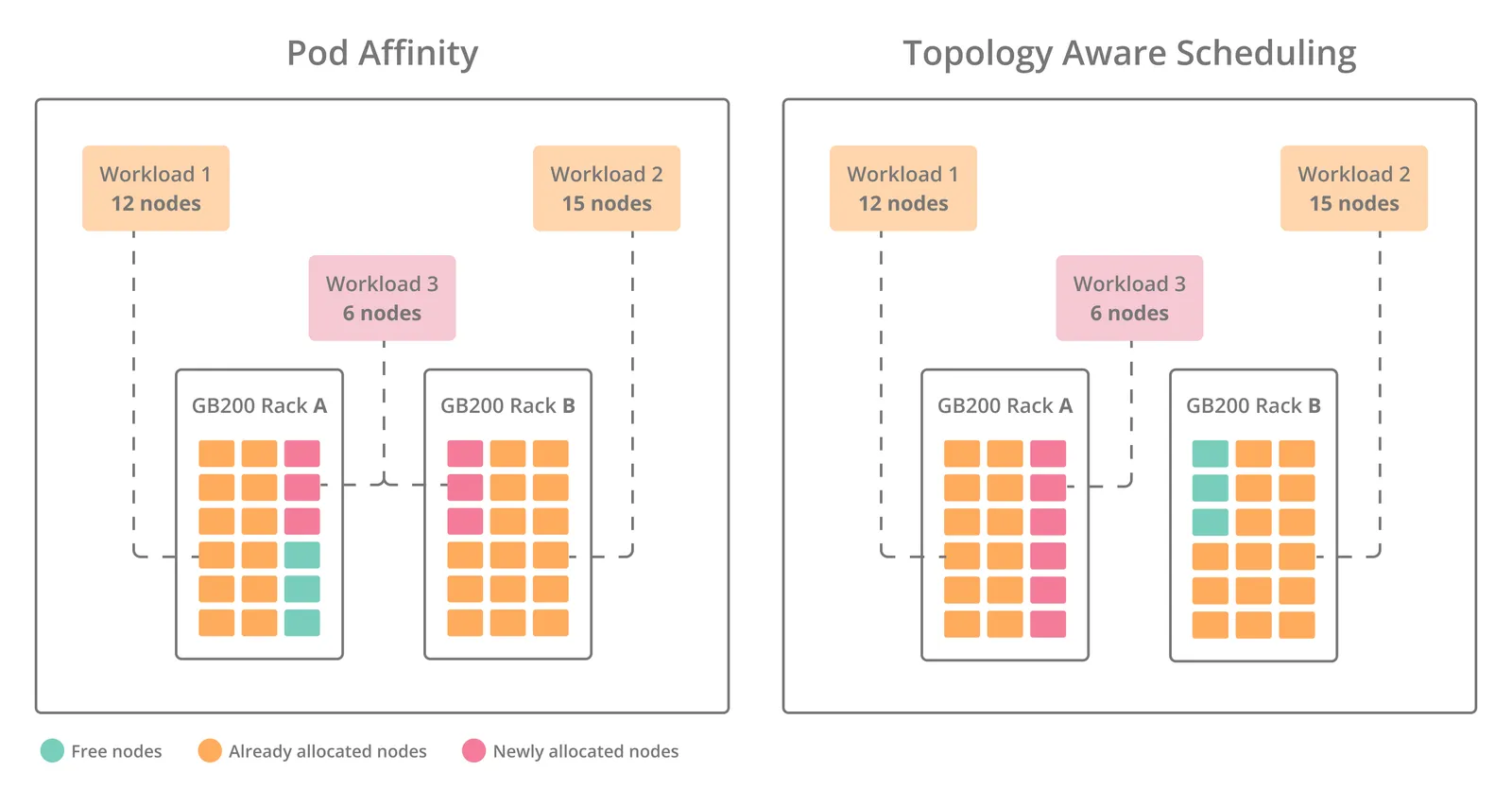
In the example, two workloads (Workload 1 requiring 12 nodes and Workload 2 requiring 15 nodes) are already running. A third workload that requires 6 nodes is submitted:
- With pod affinity, the Scheduler places pods one by one, only checking for “closeness” to existing pods without awareness of the entire workload compared to the available nodes. As a result, the workload is split across Rack A and Rack B, introducing unnecessary cross-rack communication overhead.
- In contrast, topology-aware scheduling evaluates the full node requirement in advance and uses knowledge of the hierarchy (rack, block, NVLink domains) to allocate resources. This ensures all 6 nodes are placed together in Rack A, minimizing latency and maximizing bandwidth efficiency. By avoiding fragmentation and cross-rack placement, topology-aware scheduling improves workload performance and overall cluster utilization compared to pod affinity.
Using API
To view the available actions, go to the Network Topologies API reference.
Known Limitations
- If a topology is detached from a node pool, workloads that are already running will continue using it, as long as the topology still exists.
- If a topology is completely deleted while workloads are still using it:
- Running workloads will continue unaffected.
- Suspended workloads that are later resumed, or workloads not yet bound to a node, will become unschedulable and remain in Pending.
- Submitting a workload to multiple node pools that each have different topologies is not supported. Workloads submitted through NVIDIA Run:ai will fail, while external workloads may either remain pending or run if the topology matches at least one node pool.