

Sparse4D#
Model Card#
Sparse4D is an advanced 3D Multi-Camera Detection and Tracking Network. We specifically adapt Sparse4D for indoor environments such as warehouses with static camera setups. It generates precise 3D bounding boxes and tracking IDs for a diverse set of objects across multiple camera views. The included model in the Perception Microservice is pre-trained on the MTMC Tracking 2025 subset from the Nvidia PhysicalAI-SmartSpaces dataset.
TAO Sparse4D Model Card can be found here.
The model card provides a comprehensive deep dive into the following topics:
Model Overview
Model Architecture - Inputs & Outputs
Training, Testing & Evaluation Datasets - Data Formats
Accuracy of pre-trained models & KPIs
Real-time FPS/Throughput of the model on a single GPU
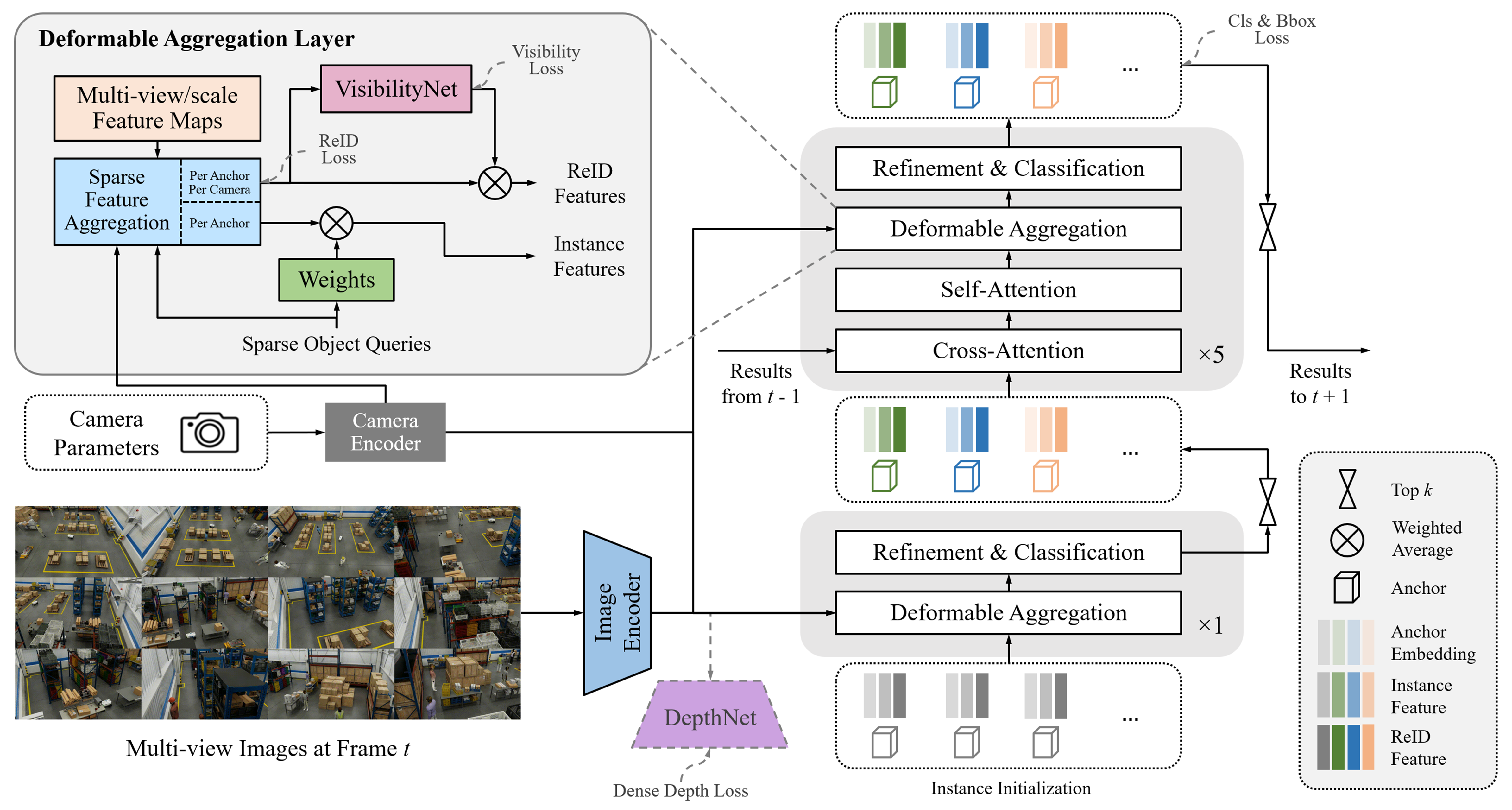
Inference using Perception Microservice#
Detailed information can be found in the 3D Multi Camera Detection and Tracking (Sparse4D) page.
Fine-tuning using NVIDIA TAO Toolkit#
Hardware & Software Requirements#
Please refer to the Requirements section of the TAO Toolkit Quick Start Guide for more details.
Dataset Requirements#
The Sparse4D model can be fine-tuned on existing MTMC Tracking 2025 scenes or your own dataset obtained by setting up a Digital Twin and generating synthetic data via Isaac Sim. Please refer to the Simulation and Synthetic Data Generation page for more details on the latter.
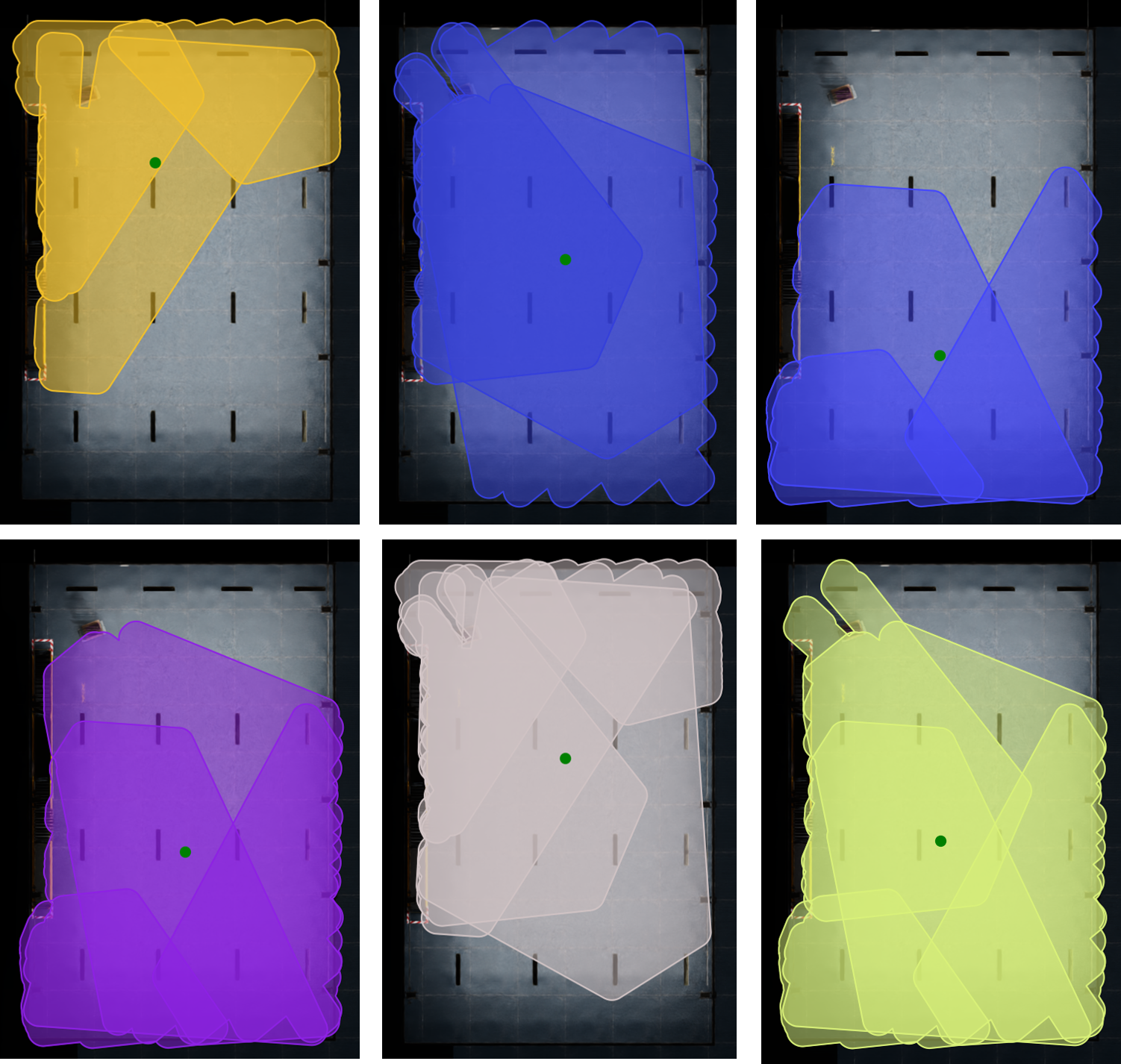
Performing 3D Multi-Camera Detection & Tracking in large regions such as warehouses with high-density cameras becomes computationally expensive. Therefore, we divide a region into a collection of groups called Bird’s Eye View (BEV) groups. Each Bird’s Eye View (BEV) group can contain multiple cameras, and these BEV groups may overlap with one another. Sparse4D is trained on such BEV groups. The below image represents a top down view of a single scene with multiple BEV groups. Each unique color represents a BEV group highlighting its camera coverage in the entire scene.
For fine-tuning on one scene, the data requirements are as follows:
Minimum Requirements:
Number of Cameras in Scene
Refer to the camera placement guide for details based on scene size
Number of RGB Frames
Minimum: 9,000 frames per camera (5 minutes @ 30 FPS)
Number of Depth Map Frames
Optional but recommended for better model convergence
Should match the number of RGB frames if included
Number of BEV Groups (Bird’s Eye View)
We recommend a minimum of 3 BEV groups for a scene with 12 cameras in total.
The TAO Fine-tuning notebook will help generate randomized BEV groups based on the raw calibration data obtained from the SDG step.
Number of Cameras per BEV Group
Range: 4-12 cameras per group
Annotations
Ground Truth 3D & 2D bounding boxes in OV coordinates
Calibration Data
Single calibration file containing all camera parameters (intrinsic & extrinsic)
Information related to the file format for the above files can be found here. An example dataset can be found in the Warehouse_014 scene from the MTMC Tracking 2025 dataset.
Camera Grouping for Model Fine-tuning#
For Sparse4D fine-tuning, cameras need to be organized into BEV groups with overlapping fields of view. Unlike camera clustering (used for deployment, where each camera belongs to exactly one cluster), camera grouping for training allows cameras to appear in multiple groups to maximize training data coverage.
Use create_camera_groups.py to create camera groups with duplication support based on overlapping FOV:
We use the spatialai_data_utils library to create camera groups:
pip install spatialai_data_utils==1.1.0 --extra-index-url=https://edge.urm.nvidia.com/artifactory/api/pypi/sw-metropolis-pypi/simple
cd $MDX_SAMPLE_APPS_DIR/deploy-warehouse-compose/modules/bev_group_utils/
# Basic usage: 5 groups with 8 cameras each
python create_camera_groups.py data/scene --n_groups 5 --cameras_per_group 8

# Multiple size types: 2 groups × 3 sizes = 6 total groups
# (2 groups with 5 cameras, 2 groups with 8 cameras, 2 groups with 6 cameras)
python create_camera_groups.py data/scene --n_groups 2 --cameras_per_group 5 8 6

# With visualization (generates separate images per group by default)
python create_camera_groups.py data/scene --n_groups 5 --cameras_per_group 8 --visualize

# Custom overlap threshold for stricter FOV requirements
python create_camera_groups.py data/scene --n_groups 5 --cameras_per_group 8 \
    --min_overlap_threshold 0.3 --visualize

# Use existing FOV polygons from calibration instead of frustum calculation
python create_camera_groups.py data/scene --n_groups 5 --cameras_per_group 8 \
    --prefer_existing_fov
Use --help to list all available arguments.
Key options:
--n_groups: Number of groups to create (required).--cameras_per_group: Number of cameras per group (required). Single value: all groups have that size. Multiple values: creates n_groups for EACH size (total = n_groups × count).--output: Output path for the grouped calibration file.--output_suffix: Suffix for output files (default: “grouped”).--map_file: Path to map image for visualization (uses black background if not provided).--start_camera_index: Starting camera index for seeding the first group (default: 0).--min_overlap_threshold: Minimum FOV overlap (0-1) for group membership (default: 0.2).--max_distance_threshold: Maximum centroid distance in meters for membership (default: inf).--prefer_existing_fov: Use existing FOV polygons instead of calculating from frustum.--max_camera_distance: Maximum distance in meters for frustum calculation (default: 30.0).--height_range: Height range (min, max) in meters for ground plane intersection (default: 1.0 3.0).--image_size: Image dimensions (width, height) in pixels for frustum calculation (default: 1920 1080).--dilation: Buffer distance in meters for group bounding boxes (default: 8.0).--visualize: Generate visualization of camera groups.--vis_no_camera_id_labels: Disable drawing camera IDs on the visualization.--vis_combined: Generate a single combined image instead of separate images per group.
Note
For deployment and inference use cases where cameras should be partitioned into non-overlapping clusters, refer to the Camera Clustering section in the 3D Vision AI Profile documentation.
Expected time for finetuning#
The expected data requirements and time to fine-tune the Sparse4D model on a single scene of the MTMC Tracking 2025 dataset are as follows:
Backbone Type |
GPU Type |
Image Size |
No. of BEV groups |
No. of cameras in each BEV group |
No. of frames in each camera |
Total No. of Epochs |
Total Training Time |
|---|---|---|---|---|---|---|---|
Resnet101 |
8 x Nvidia H100 - 80GB SXM |
3x540x960 |
3 (Minimum BEV groups) |
4-12 |
9000 (5 mins @ 30 FPS) |
5 |
10 hours |
We recommend a multi-gpu training setup for faster training.
TAO Fine-tuning via Notebook Walkthrough & Configuration Changes#
Sparse4D can be fine-tuned via the TAO containers and the TAO CLI Notebook. The notebook resources will be released in the next update of TAO Toolkit.
The documentation provided below accompanies the cells in the TAO fine-tuning notebook and offers guidance on how to execute them. TAO Sparse4D supports the following tasks via the Jupyter notebook:
dataset
convertmodel
trainmodel
evaluatemodel
inferencemodel
export
An experiment specification file (also known as a configuration file) is used for fine-tuning the model. It consists of several main components:
datasetmodeltrainevaluateinferenceexportvisualize
The notebook utilizes the Warehouse_014 scene from the MTMC Tracking 2025 dataset for training.
The following is an example spec file for training a Sparse4D model on one scene of the MTMC Tracking 2025 dataset. A detailed explanation of the spec file can be found in the TAO Sparse4D TAO Config Documentation which will be released soon.
results_dir: /results

train:
  num_gpus: 1
  gpu_ids:
  - 0
  num_nodes: 1
  seed: 1234
  cudnn:
    benchmark: false
    deterministic: true
  num_epochs: 10
  checkpoint_interval: 0.5
  validation_interval: 0.5
  resume_training_checkpoint_path: null
  results_dir: null
  pretrained_model_path: null
  optim:
    type: adamw
    lr: 5.0e-05
    weight_decay: 0.001
    momentum: 0.9
    paramwise_cfg:
      custom_keys:
        img_backbone:
          lr_mult: 0.2
    grad_clip:
      max_norm: 25
      norm_type: 2
    lr_scheduler:
      policy: cosine
      warmup: linear
      warmup_iters: 500
      warmup_ratio: 0.333333
      min_lr_ratio: 0.001

model:
  type: sparse4d
  embed_dims: 256
  use_grid_mask: true
  use_deformable_func: true
  input_shape:
  - 960
  - 540
  backbone:
    type: resnet_101
  neck:
    type: FPN
    num_outs: 4
    start_level: 0
    out_channels: 256
    in_channels:
    - 256
    - 512
    - 1024
    - 2048
    add_extra_convs: on_output
    relu_before_extra_convs: true
  depth_branch:
    type: dense_depth
    embed_dims: 256
    num_depth_layers: 3
    loss_weight: 0.2
  head:
    type: sparse4d
    num_output: 300
    cls_threshold_to_reg: 0.05
    decouple_attn: true
    return_feature: true
    use_reid_sampling: false
    embed_dims: 256
    reid_dims: 0
    num_groups: 8
    num_decoder: 6
    num_single_frame_decoder: 1
    drop_out: 0.1
    temporal: true
    with_quality_estimation: true
    operation_order:
    - deformable
    - ffn
    - norm
    - refine
    - temp_gnn
    - gnn
    - norm
    - deformable
    - ffn
    - norm
    - refine
    - temp_gnn
    - gnn
    - norm
    - deformable
    - ffn
    - norm
    - refine
    - temp_gnn
    - gnn
    - norm
    - deformable
    - ffn
    - norm
    - refine
    - temp_gnn
    - gnn
    - norm
    - deformable
    - ffn
    - norm
    - refine
    - temp_gnn
    - gnn
    - norm
    - deformable
    - ffn
    - norm
    - refine
    visibility_net:
      type: visibility_net
      embedding_dim: 256
      hidden_channels: 32
    instance_bank:
      num_anchor: 900
      anchor: ''
      num_temp_instances: 600
      confidence_decay: 0.8
      feat_grad: false
      default_time_interval: 0.033333
      embed_dims: 256
      use_temporal_align: false
      grid_size: null
    anchor_encoder:
      type: SparseBox3DEncoder
      vel_dims: 3
      embed_dims:
      - 128
      - 32
      - 32
      - 64
      mode: cat
      output_fc: false
      in_loops: 1
      out_loops: 4
      pos_embed_only: false
    sampler:
      num_dn_groups: 5
      num_temp_dn_groups: 3
      dn_noise_scale:
      - 2.0
      - 2.0
      - 2.0
      - 0.5
      - 0.5
      - 0.5
      - 0.5
      - 0.5
      - 0.5
      - 0.5
      - 0.5
      max_dn_gt: 128
      add_neg_dn: true
      cls_weight: 2.0
      box_weight: 0.25
      reg_weights:
      - 2.0
      - 2.0
      - 2.0
      - 0.5
      - 0.5
      - 0.5
      - 0.0
      - 0.0
      - 0.0
      - 0.0
      - 0.0
      use_temporal_align: false
      gt_assign_threshold: 0.5
    reg_weights:
    - 2.0
    - 2.0
    - 2.0
    - 1.0
    - 1.0
    - 1.0
    - 1.0
    - 1.0
    - 1.0
    - 1.0
    - 1.0
    loss:
      cls:
        type: focal
        use_sigmoid: true
        gamma: 2.0
        alpha: 0.25
        loss_weight: 2.0
      reg:
        type: sparse_box_3d
        box_weight: 0.25
        cls_allow_reverse: []
      id:
        type: cross_entropy_label_smooth
        num_ids: 70
    bnneck:
      type: bnneck
      feat_dim: 256
      num_ids: 70
    deformable_model:
      embed_dims: 256
      num_groups: 8
      num_levels: 4
      attn_drop: 0.15
      use_deformable_func: true
      use_camera_embed: true
      residual_mode: cat
      num_cams: 6
      max_num_cams: 20
      proj_drop: 0.0
      kps_generator:
        embed_dims: 256
        num_learnable_pts: 6
        fix_scale:
        - - 0
          - 0
          - 0
        - - 0.45
          - 0
          - 0
        - - -0.45
          - 0
          - 0
        - - 0
          - 0.45
          - 0
        - - 0
          - -0.45
          - 0
        - - 0
          - 0
          - 0.45
        - - 0
          - 0
          - -0.45
    refine_layer:
      type: sparse_box_3d_refinement_module
      embed_dims: 256
      refine_yaw: true
      with_quality_estimation: true
    valid_vel_weight: -1.0
    graph_model:
      type: MultiheadAttention
      embed_dims: 512
      num_heads: 8
      batch_first: true
      dropout: 0.1
    temp_graph_model:
      type: MultiheadAttention
      embed_dims: 512
      num_heads: 8
      batch_first: true
      dropout: 0.1
    decoder:
      type: SparseBox3DDecoder
      score_threshold: 0.05
    norm_layer:
      type: LN
      normalized_shape: 256
    ffn:
      type: AsymmetricFFN
      in_channels: 512
      pre_norm:
        type: LN
        normalized_shape: 256
      embed_dims: 256
      feedforward_channels: 1024
      num_fcs: 2
      ffn_drop: 0.1
      act_cfg:
        type: ReLU
        inplace: true
  use_temporal_align: false

inference:
  num_gpus: 1
  gpu_ids:
  - 0
  num_nodes: 1
  checkpoint: ???
  trt_engine: null
  results_dir: null
  jsonfile_prefix: sparse4d_pred
  output_nvschema: true
  tracking:
    enabled: true
    threshold: 0.2

evaluate:
  num_gpus: 1
  gpu_ids:
  - 0
  num_nodes: 1
  checkpoint: ${results_dir}/train/sparse4d_model_latest.pth
  trt_engine: null
  results_dir: null
  metrics:
  - detection
  tracking:
    enabled: true
    threshold: 0.2

export:
  results_dir: null
  gpu_id: 0
  checkpoint: ???
  onnx_file: ???
  on_cpu: false
  input_channel: 3
  input_width: 960
  input_height: 544
  opset_version: 17
  batch_size: -1
  verbose: false
  format: onnx

visualize:
  show: true
  vis_dir: ./vis
  vis_score_threshold: 0.25
  n_images_col: 6 # Update this based on the number of cameras in the scene
  viz_down_sample: 3
Dataset Preparation#
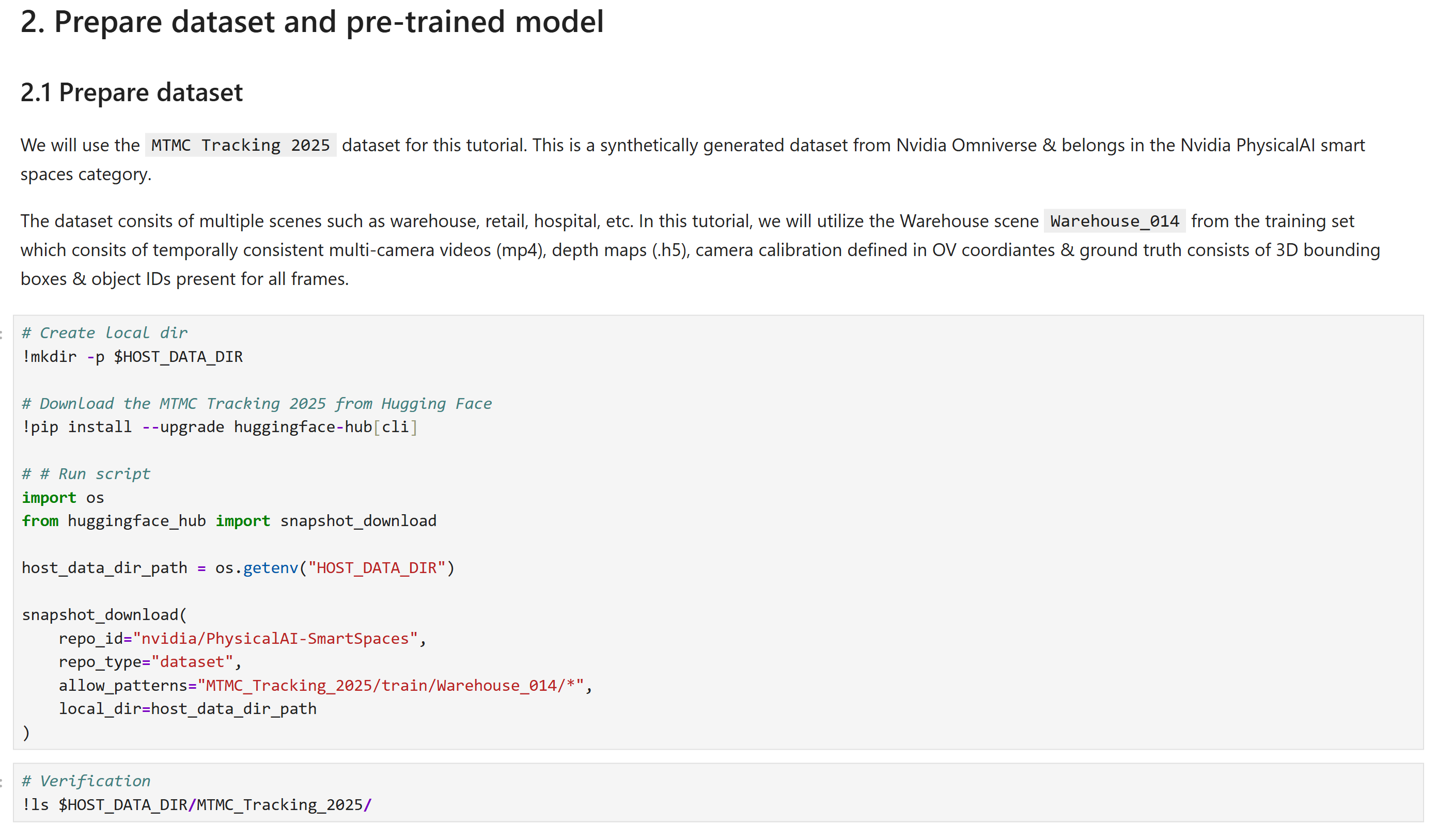
The data obtained from HuggingFace is stored in AICity format. We need to convert the AICity format to the OVPKL format required for model training. TAO Data Service can be used to convert the AICity format to the OVPKL format required for model training. The following configuration file can be used to convert the AICity format to the OVPKL format.
data:
  input_format: "AICity"
  output_format: "OVPKL"
aicity:
  root: ??? # path to your dataset root directory
  version: "2025"
  split: "train"
  class_config:
    CLASS_LIST:
      - "Person"
      - "FourierGR1T2"
      - "AgilityDigit"
      - "Transporter"
    SUB_CLASS_DICT: {}
    MAP_CLASS_NAMES:
      "Person": "Person"
      "FourierGR1T2": "FourierGR1T2"
      "AgilityDigit": "AgilityDigit"
      "Transporter": "Transporter"
    ATTRIBUTE_DICT:
      "Person": "person.moving"
      "FourierGR1T2": "fourier_gr1_t2.moving"
      "AgilityDigit": "agility_digit.moving"
      "Transporter": "transporter.moving"
    CLASS_RANGE_DICT:
      "Person": 40
      "FourierGR1T2": 40
      "AgilityDigit": 40
      "Transporter": 40
  recentering: true
  rgb_format: "mp4" # For datasets obtained from HuggingFace, RGB images are stored in "mp4" format. For SDG generated dataset, RGB images are stored in "h5" format.
  depth_format: "h5" # Depth maps are stored in "h5" both for HuggingFace & SDG generated datasets.
  camera_grouping_mode: "train"
  num_frames: -1
  anchor_init_config:
    output_file_name: "anchor_init_kmeans900.npy"
results_dir: ??? # Path to where you want to store the data
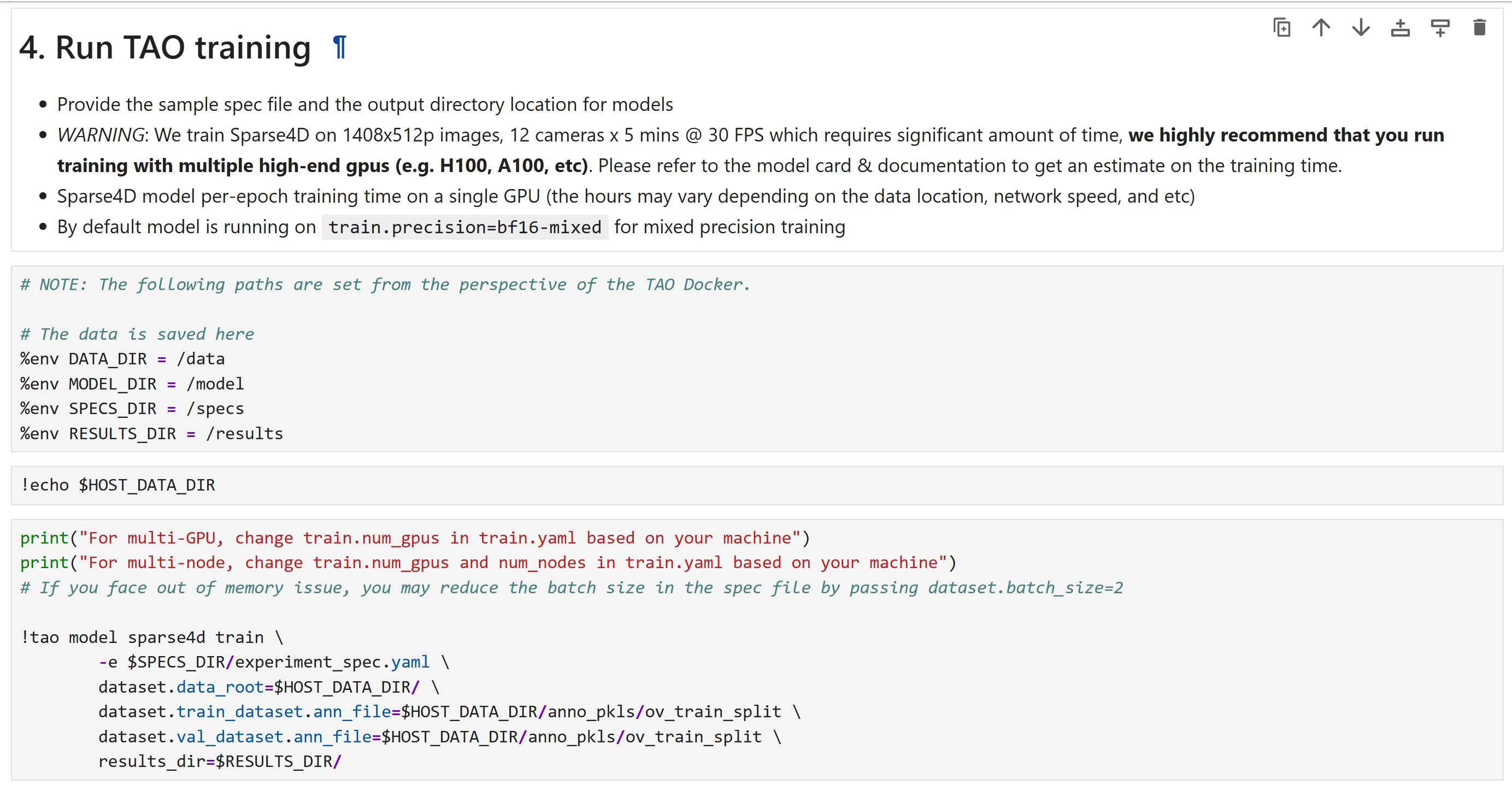
Once the configurations are modified, launch dataset conversion by running the following command:
Launch Model Fine-tuning#
Below are the important configurations that need to be updated to launch training:
dataset:
  use_h5_file: true
  num_frames: 9000
  batch_size: 4 # Depending on your GPU memory
  num_bev_groups: 3 # Depending on your scene size
  num_workers: 4 # Depending on your CPU memory
  num_ids: 70 # Depending on your dataset
  classes: [ # Update this based on your dataset
    "person",
    "gr1_t2",
    "agility_digit",
    "nova_carter",
  ]
  data_root: ??? # Update this based on your dataset root directory
  train_dataset:
    ann_file: ??? # Update this based on your training dataset annotations file/folder.
  val_dataset:
    ann_file: ??? # Update this based on your validation dataset annotations file/folder.
  test_dataset:
    ann_file: ??? # Update this based on your test dataset annotations file/folder.
model:
  head:
    instance_bank:
      anchor: ??? # Update this to the anchor file generated by the TAO Fine-tuning notebook.
train:
  num_epochs: 5 # Update this based on your dataset size. 5 epochs is recommended for fine-tuning on a single scene.
  num_nodes: 1 # Update this based on your GPU count
  num_gpus: 1 # Update this based on your GPU count
  validation_interval: 1 # Update this based on your dataset size
  checkpoint_interval: 1 # Update this based on your dataset size
  pretrained_model_path: ??? # Update this to the pretrained model path if you are fine-tuning on a pretrained model.
  optim:
    lr: 0.0001 # Update this based on your dataset size
    paramwise_cfg:
      custom_keys:
        img_backbone:
          lr_mult: 0.25
Once the configurations are modified, launch training by running the following command:
Evaluate the fine-tuned model#
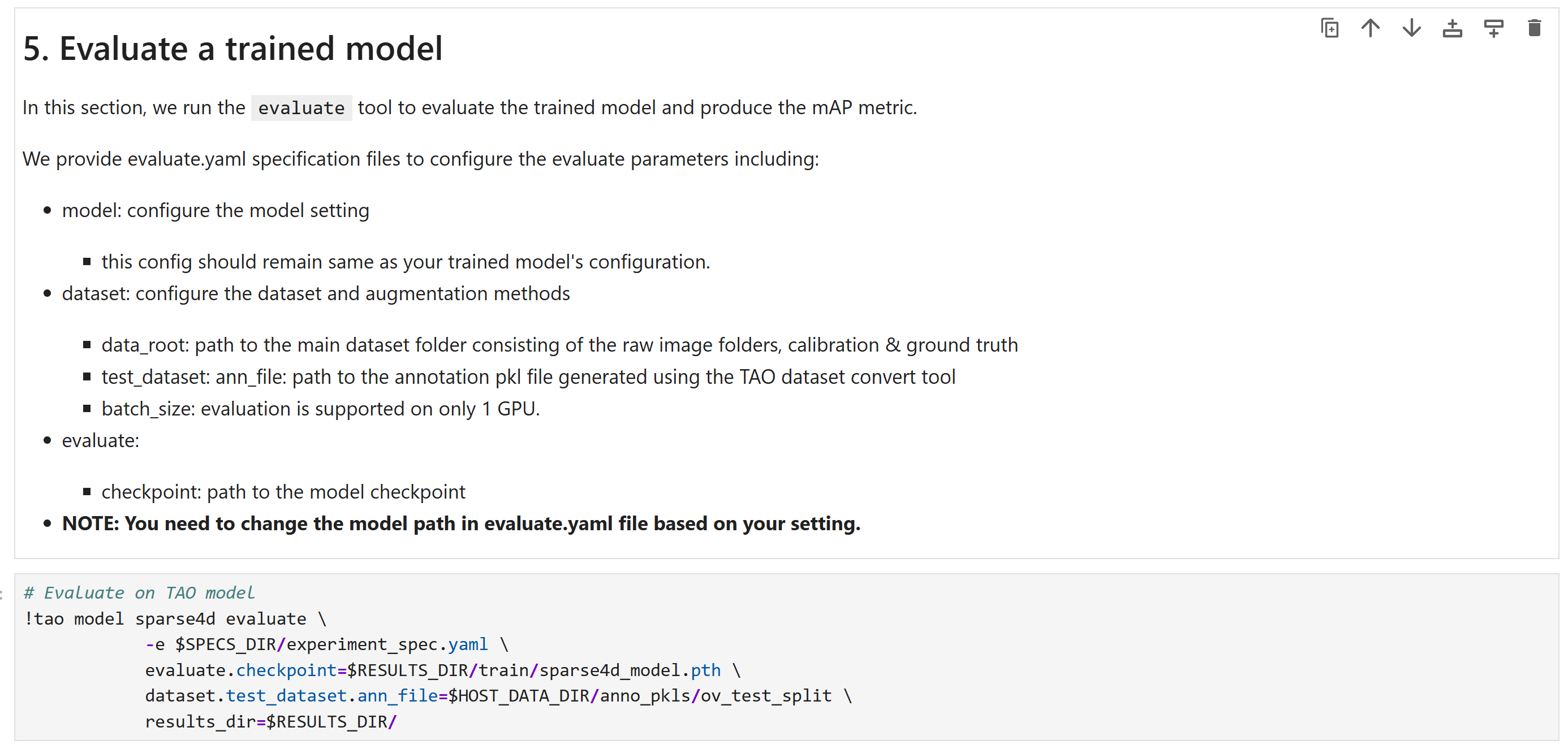
The fine-tuned model’s accuracy can be evaluated using the Average Precision (AP) & Mean Average Precision (mAP) metrics. Please refer to the Model Card for more details on the description of the metrics and how to interpret them.
Below are the important configurations that need to be updated to launch evaluation:
evaluate:
  checkpoint: ${results_dir}/train/sparse4d_model_latest.pth # Update this based on your fine-tuned model path
dataset:
  test_dataset:
    ann_file: ??? # Update this based on your test dataset annotations file/folder.
Run Inference on the fine-tuned model using TAO#
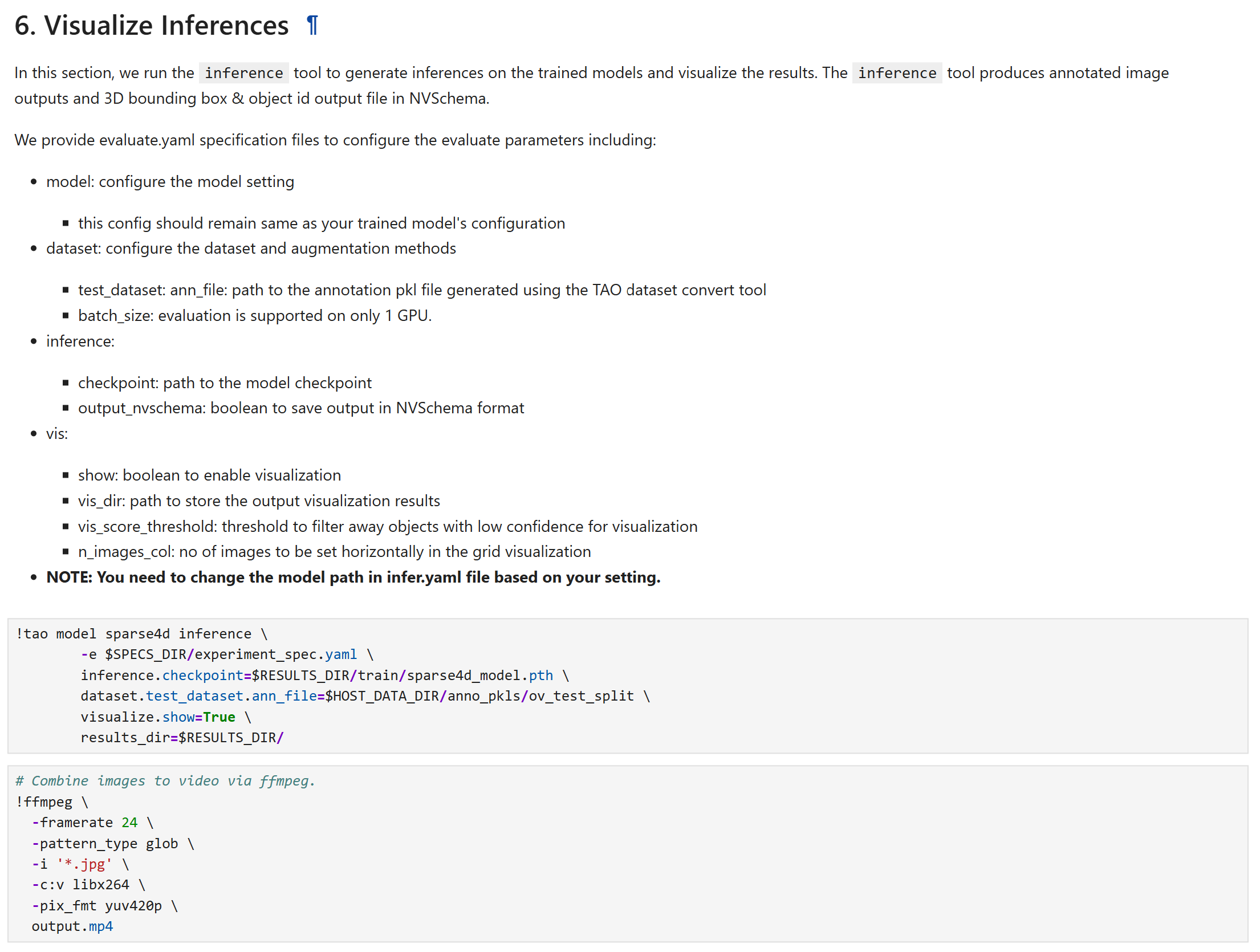
The fine-tuned model’s output can be inspected by running inference and visualizing the 3D bounding boxes and their tracking IDs. Below are the important configurations that need to be updated to launch inference:
inference:
  checkpoint: ??? # Update this based on your fine-tuned model path
dataset:
  test_dataset:
    ann_file: ??? # Update this based on your test dataset annotations file/folder.
visualize:
  show: true
  vis_dir: ./vis
  vis_score_threshold: 0.25
  n_images_col: 6 # Update this based on the number of cameras in the scene
  viz_down_sample: 3
Once the configurations are modified, launch inference by running the following command:
Export the fine-tuned model#
Below are the important configurations that need to be updated to launch export:
export:
  results_dir: ??? # Update this based on your results directory
  checkpoint: ??? # Update this based on your fine-tuned model path
  onnx_file: ??? # Update this based on your desired model name
Once the configurations are modified, launch export by running the following command:

Using the fine-tuned model in the Perception Microservice#
Once the model is fine-tuned and exported to ONNX format, it can be used in the Perception Microservice. Refer to the Integrating a Sparse4D Model Checkpoint section in 3D Multi Camera Detection and Tracking (Sparse4D) for more details.
Real-Time Inference Throughput & Latency#
Inference runs through the DeepStream pipeline on TensorRT with mixed precision (FP16+FP32). The TensorRT columns capture model-only latency, while the DeepStream columns add the instance-bank pre- and post-processing overhead. The table summarizes how many cameras each GPU supports at 30, 15, and 10 FPS for the v2.0 model.
GPU |
TensorRT @30 FPS |
DeepStream @30 FPS |
TensorRT @15 FPS |
DeepStream @15 FPS |
TensorRT @10 FPS |
DeepStream @10 FPS |
|---|---|---|---|---|---|---|
1x DGX Spark |
3 |
2 |
7 |
5 |
11 |
8 |
1x RTX PRO 6000 (Server) |
18 |
13 |
38 |
29 |
59 |
45 |
1x RTX PRO 6000 (Workstation) |
20 |
15 |
40 |
30 |
60 |
46 |
1x Jetson AGX Thor - T5000 |
4 |
3 |
9 |
6 |
14 |
10 |
1x B200 |
56 |
43 |
>64 |
>49 |
>64 |
>49 |
1x GB200 |
64 |
49 |
>64 |
>49 |
>64 |
>49 |
1 x H100 SXM HBM3 - 80GB |
18 |
13 |
22 |
16 |
35 |
26 |
1 x H200 |
18 |
13 |
29 |
22 |
46 |
35 |
1 x RTX 6000 ADA |
9 |
6 |
18 |
13 |
27 |
20 |
1 x A100-SXM4-80GB |
12 |
9 |
27 |
20 |
42 |
32 |
1 x L4 - 24GB |
3 |
2 |
7 |
5 |
10 |
7 |
1 x L40S - 48GB |
10 |
7 |
20 |
15 |
31 |
23 |
KPI#
The key performance indicators are average precision (AP) per-class and the mean average precision (mAP) obtained across all classes. We utilize the NuScenes based 3D detection evaluation technique to evaluate model accuracy.
Average Precision (AP): is a metric which quantifies a detector’s ability to trade off precision and recall for a single object category at a given center‐distance threshold by computing the normalized area under its precision–recall curve.
Mean Average Precision (mAP) is derived from these AP values by averaging over all target object classes and a set of predefined center‐distance thresholds (0.5, 1, 2, and 4 m). This yields a single scalar that reflects both classification and geospatial localization accuracy. mAP thus serves as a rigorous, holistic metric for comparing 3D detection performance.
The following scores are for models trained on MTMC Tracking 2025 subset. The evaluation set and training set is disjoint.
Object Class |
AP |
|---|---|
Person |
0.958 |
Fourier_GR1_T2_Humanoid |
0.862 |
Agility_Digit_Humanoid |
0.944 |
Nova_Carter |
0.821 |
Transporter |
0.989 |
Forklift |
0.891 |
Results highlighted in the above table are for the latest model on the test set of the MTMC Tracking 2025 dataset. Please refer to the Model Card for more details.