

Known Limitations#
This section aligns with PRD and current release constraints, providing transparency about known limitations.
Perception#
Truncated Bounding Box#
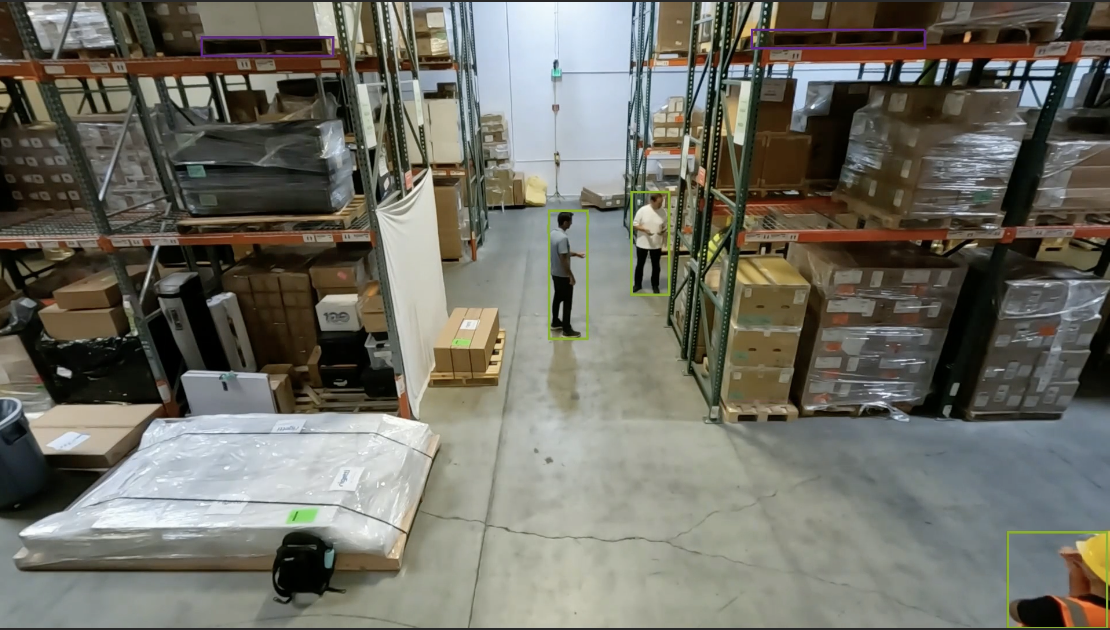
In the 2D Blueprint, if an object is partially visible due to occlusion or being outside the camera’s field of view, the detected bounding box from the perception model can be truncated. The midpoint on the lower edge of the bounding box is used to approximate the object’s location, which is then used for various downstream analytics computations such as proximity detection. If the bounding box is truncated, the accuracy of location-related analytics can be impacted.
For example, in the image below, the person on the right has a truncated bounding box because they are partially outside the camera’s field of view. This can affect the accuracy of proximity detection between the two individuals.
More advanced techniques will be included in future releases to address similar issues.
False Object Detections in MV3DT#
Multiple bounding boxes (BBOX) for the same object may be observed when running the MV3DT Vision AI Profile.
VLM Verification of Incidents#
When a person is inside a forklift, it may be classified as a proximity incident. This false positive will be addressed in a future release.
Agents#
Known issues with the Agents are listed below.
Video clips analyzed by VLM should be 5-300 seconds for optimal results
Report generated by VLM may contain inaccurate timestamps sometimes.
On H100 and RTX PRO 6000 Blackwell, only the default NIMs (LLM and VLM) have been tested to run on shared GPUs. On L40S, shared GPU mode is not supported. Use Dedicated GPUs or Remote NIMs for other models.
On L4, RTX 6000 ADA, IGX-THOR and DGX-SPARK local NIMs are not supported. Use Remote NIMs for all models.
Alert Verification#
While running the Warehouse Blueprint 2D Vision AI Profile with Agents, you may sometimes see the following error in mdx-vlm-incidents:
VLM analysis error: cannot access local variable 'response_content' where it is not associated with a value
This can occur when there is a connectivity issue with the VLM service.
Using Real Cameras in 3D Blueprint#
The 3D Warehouse Blueprint is provided and tested with synthetic cameras. Benefit of using synthetic cameras is that the calibration related parameters are fully accurate and easily provided via Simulation-Based Calibration documentation. Potentially the 3D Blueprint can be used with real cameras but it has not been thoroughly tested and currently there is no tooling provided to acquire camera parameters required for 3D use. For users who have deep understanding and knowledge in camera calibration, you can refer to the manual calibration guide documentation in VSS Next to get the parameters required for 3D use from real cameras.
Camera Calibration with AutoMagicCalib (AMC)#
The following are known limitations when using the AutoMagicCalib Microservice with AutoMagicCalib.
Floor Map and Scale Factor Requirement#
AMC currently requires the user to provide a floor map and a proper scaleFactor.
AMC uses these inputs to scale the global coordinate system to meters.
Behavior analytics assumes the global coordinate system is
in meters and computes distance-related properties, such as proximity violation, based on it.
If the scaleFactor is not provided or is improper with respect to the floor map,
the computed distance-related properties can be affected.
In future releases, AMC will remove the requirement to provide both a floor map and scaleFactor.
Calibration is based on detected persons#
AMC detects person movements from input videos and performs camera calibration based on them. The video should have people moving into various locations in camera view for AMC to work best. Currently AMC only supports person as the target and it will not work on video without enough person movements. Support for general object tracking will be added in future releases.
Global Tripwire and ROI for 3D Blueprint#
VSS warehouse blueprint 3D profile needs global tripwire / ROI to generate related events.
AMC currently supports per sensor tripwire / ROI only.
To make the AMC output calibration file compatible with 3D blueprint,
the user can first define the tripwire / ROI for one particular sensor then in the output calibration file
manually move the tripwire/ROI from under sensors section to top level of the calibration file.
Image mode calibration#
VSS warehouse blueprint has mainly been used for use cases where the locations of objects are tracked and analyzed in a global coordinate system.
It supports all functionalities in image pixel coordinate as well, which we call image mode.
AMC currently does not support image mode. For image mode, there is no camera parameters needed (intrinsics, extrinsics, homography, etc.) since there is no coordinate transformation involved.
The tripwires and ROIs need to be defined in pixel coordinates. Since AMC does not support image mode at the moment, the user needs to manually find the pixel coordinates for the defined tripwires and ROIs.
It can be done by using image editing software or tools like Paint, IrfanView, etc.
In addition, the user needs to set "calibrationType": "image" instead of "calibrationType": "cartesian" in the calibration file.
Below is an example of the calibration file for image mode:
{
    "version": "1.0",
    "osmURL": "",
    "calibrationType": "image",
    "sensors": [
    {
            "id": "Camera_01",
            "type": "camera",
            "imageCoordinates": [],
            "globalCoordinates": [],
            "coordinates": {
            "x": 0,
            "y": 0
            },
            "origin": {
            "lat": 0,
            "lng": 0
            },
            "geoLocation": {
            "lat": 0,
            "lng": 0
            },
            "scaleFactor": 1,
            "attributes": [
            {
                    "name": "fps",
                    "value": "0.0"
            },
            {
                    "name": "depth",
                    "value": ""
            },
            {
                    "name": "fieldOfView",
                    "value": ""
            },
            {
                    "name": "direction",
                    "value": ""
            },
            {
                    "name": "source",
                    "value": "vst"
            },
            {
                    "name": "frameWidth",
                    "value": "1920"
            },
            {
                    "name": "frameHeight",
                    "value": "1080"
            }
            ],
            "rois": [
            {
                    "id": "roi-id-1",
                    "roiCoordinates": [
                    {
                            "x": 4.87747667,
                            "y": 18.9756077
                    },
                    {
                            "x": 4.87747667,
                            "y": 11.2385153
                    },
                    {
                            "x": 9.57440535,
                            "y": 11.2385153
                    },
                    {
                            "x": 9.57440535,
                            "y": 18.9756077
                    }
                    ],
                    "restrictedObjectTypes":["Person"],
                    "confinedObjectTypes": ["Forklift"]
            }
            ],
            "place": [],
            "tripwires": [
            {
                    "id": "tripwire-id-1",
                    "wire": {
                    "p1": {
                            "x": 943,
                            "y": 606.0
                    },
                    "p2": {
                            "x": 1403.0,
                            "y": 309.0
                    }
                    },
                    "direction": {
                    "p1": {
                            "x": 1040.0,
                            "y": 395
                    },
                    "p2": {
                            "x": 1282.0,
                            "y": 566.0
                    }
                    }
            }
            ]
    }
    ]
    }
Brev Launchable#
The following limitations apply when running the Warehouse Blueprint via the Brev Launchable:
VST video playback — Live and recorded video playback in VST does not work well through a Brev secure link. VST streams use WebRTC media over UDP (RTP), which is not carried by a TCP-only secure link.
2D with Agent profile — Video replay in the agent UI does not work well on Brev. Remote LLM calls can also fail intermittently. In addition, alert verification for near-miss violations may not function correctly in this environment.
Local LLM — Local LLM deployment has not been tested or verified on Brev. Use a remote LLM when running the 2D with Agent profile.
Auto-calibration profiles — The auto-calibration profiles (
bp_wh_auto_caliband related) have not been tested or verified in the Brev Launchable environment.