

Video-Analytics-MCP Server#
Overview#
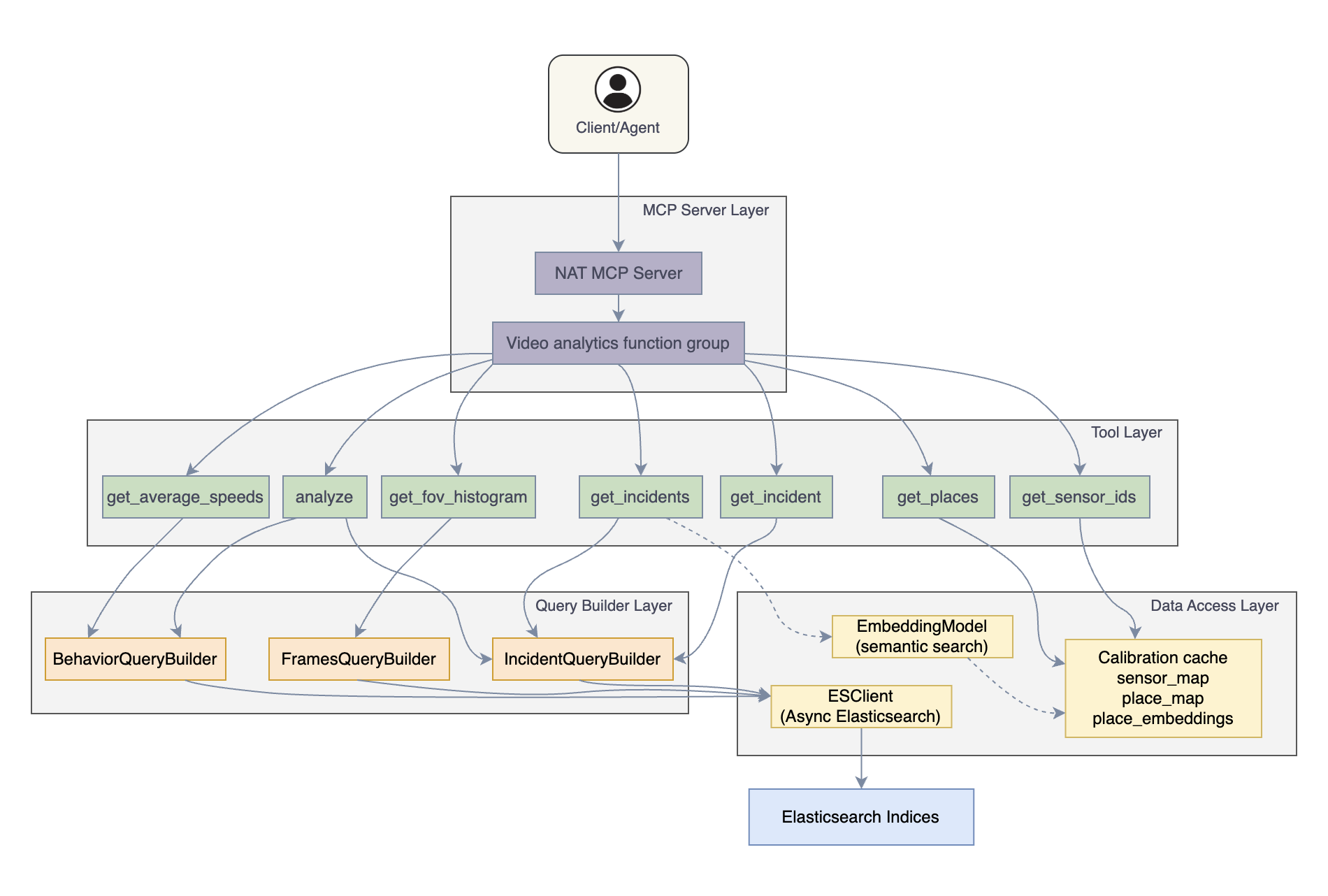
The Video Analytics MCP Server exposes video analytics capabilities through the Model Context Protocol (MCP). It enables AI agents to query and analyze video analytics data stored in Elasticsearch, including incident records, object detection metrics, and sensor metadata.
Key features include:
Semantic place search using sentence-transformer embeddings
VLM (Vision Language Model) verification for incidents
Optional: Active sensor filtering using VST sensor list tool
The server is implemented as a NAT (NVIDIA Agent Toolkit) function group and uses the NAT library to serve its tools via the MCP protocol. For more information about NAT, see NVIDIA Agent Toolkit Documentation.
Prerequisites#
System Requirements
Python 3.10 or higher
NVIDIA Agent Toolkit installed. See NAT Installation.
External Dependencies
Elasticsearch 7.x or 8.x containing video analytics data
Optional: VST (Video Sensor Tool) for active sensor filtering
Optional: Sentence-transformers model for semantic place search
Required Elasticsearch Indices
Index Pattern |
Description |
Key Fields |
|---|---|---|
incidents-* |
Incidents data |
sensorId, timestamp, end, place, category, type, info |
vlm-incidents-* |
VLM-verified incidents |
Same as incidents, info.verdict |
behavior-* |
Object behavior metrics |
speed, direction, distance, timeInterval, sensor.id, place |
frames-* |
Frame data |
sensorId, timestamp, fov (nested: type, count) |
calibration-* |
Sensor and configuration metadata |
calibration.sensors with id, place |
Note
All indices can be prefixed using the index_prefix configuration option (e.g., mdx-incidents-*).
Configuration#
Configuration File#
The VA-MCP Server is configured via a YAML file:
functions:
  vst_sensor_list:
    _type: vst.sensor_list
    vst_internal_url: "http://${HOST_IP}:30888"

function_groups:
  video_analytics:
    _type: video_analytics
    es_url: "http://${HOST_IP}:${VSS_ES_PORT}"
    index_prefix: "mdx-"
    vlm_verified: false
    vst_sensor_list_tool: vst_sensor_list
    embedding_model_name: "sentence-transformers/all-MiniLM-L6-v2"
    include:
      - get_incident
      - get_incidents
      - get_sensor_ids
      - get_places
      - get_fov_histogram
      - get_average_speeds
      - analyze

llms:
  nim_llm:
    _type: nim
    model_name: meta/llama-3.1-70b-instruct
    temperature: 0.0
    max_tokens: 1024

# Dummy workflow required to start MCP server
workflow:
  _type: react_agent
  tool_names: [video_analytics]
  llm_name: nim_llm
  verbose: true
  parse_agent_response_max_retries: 3
Note
A dummy workflow is required by NAT to start the MCP server.
Configuration Parameters
Parameter |
Type |
Required |
Default |
Description |
|---|---|---|---|---|
_type |
string |
Yes |
Must be |
|
es_url |
string |
Yes |
Elasticsearch connection URL |
|
index_prefix |
string |
No |
Prefix for all Elasticsearch indices (e.g. |
|
vlm_verified |
boolean |
No |
false |
When true, queries VLM-verified incidents index |
embedding_model_name |
string |
No |
sentence-transformers/all-MiniLM-L6-v2 |
Model for semantic place search. Set to null to disable |
vst_sensor_list_tool |
string |
No |
null |
Reference to VST sensor list function for active sensor filtering |
include |
list |
No |
All tools |
List of tools to expose |
Environment Variables#
The configuration file supports environment variable substitution using ${VAR_NAME} syntax.
Variable |
Description |
|---|---|
HOST_IP |
Host IP for Elasticsearch |
VSS_ES_PORT |
Elasticsearch port |
Example:
export HOST_IP=10.63.144.174
export VSS_ES_PORT=9200
Quick Start#
After setting up dependencies, configuration, and environment variables, start the server:
nat mcp serve --config_file <path/to/config_file>
The server starts on http://localhost:9901/mcp by default.
Custom Host and Port
nat mcp serve --config_file <path/to/config_file> \
  --host 0.0.0.0 \
  --port 9901 \
  --name "<server-name>"
Transport Type
nat mcp serve --config_file <path/to/config_file> --transport sse
For more NAT MCP commands, see NAT MCP Documentation.
Connecting a Client#
The MCP server’s tools are accessible using an agent’s standard tool-calling interface.
Example NAT Agent Configuration
function_groups:
  video_analytics_mcp:
    _type: mcp_client
    server:
      transport: streamable-http
      url: "http://localhost:9901/mcp"

llms:
  nim_llm:
    _type: nim
    model_name: meta/llama-3.1-70b-instruct
    temperature: 0.0
    max_tokens: 1024

workflow:
  _type: react_agent
  tool_names: [video_analytics_mcp]
  llm_name: nim_llm
  verbose: true
  max_retries: 3
For more on NAT workflows, see NAT Workflow Documentation.
Available Tools#
Tool |
Description |
|---|---|
get_incident |
Retrieve a specific incident by incident ID |
get_incidents |
Query incidents with filtering by sensor, place, time range, and VLM verdict |
get_sensor_ids |
Get list of available sensor IDs, optionally filtered by place |
get_places |
Get hierarchical map of all available places (city → intersections) |
get_fov_histogram |
Get field-of-view occupancy histogram showing object counts over time |
get_average_speeds |
Get average speed metrics grouped by direction |
analyze |
Perform statistical analysis: max_min_incidents, average_speed, avg_num_people, avg_num_vehicles |
get_incident#
Retrieve a specific incident by ID.
Parameters
Parameter |
Type |
Description |
|---|---|---|
id |
string |
Incident ID |
includes |
list |
Optional: |
get_incidents#
Query incidents with optional filtering.
Parameters
Parameter |
Type |
Description |
|---|---|---|
source |
string |
Sensor ID or place name |
source_type |
string |
|
start_time |
string |
ISO format: |
end_time |
string |
ISO format: |
max_count |
int |
Maximum results (default: 10) |
includes |
list |
Optional fields: |
vlm_verdict |
string |
Filter by VLM verdict (requires |
get_sensor_ids#
Get available sensor IDs.
Parameters: place (optional) - filter by place name
Returns: List of sensor IDs
get_places#
Get hierarchical place map.
Returns:
{"CityName": ["Intersection1", "Intersection2"]}
get_fov_histogram#
Get object counts over time in field of view.
Parameters
Parameter |
Type |
Description |
|---|---|---|
source |
string |
Sensor ID or place name |
source_type |
string |
|
start_time |
string |
ISO format: |
end_time |
string |
ISO format: |
object_type |
string |
Optional filter: |
bucket_count |
int |
Number of time buckets (default: 10) |
Returns:
{
  "bucketSizeInSec": 180,
  "histogram": [
    {
      "start": "2025-01-12T11:20:10.000Z",
      "end": "2025-01-12T11:23:10.000Z",
      "objects": [
        {"type": "Person", "averageCount": 5}
      ]
    }
  ]
}
get_average_speeds#
Get average speed per direction.
Parameters: source, source_type, start_time, end_time
Returns:
{"metrics": [{"direction": "North", "averageSpeed": "25 mph"}]}
analyze#
Perform statistical analysis on video analytics data.
Parameters
Parameter |
Type |
Description |
|---|---|---|
source |
string |
Sensor ID or place name |
source_type |
string |
|
start_time |
string |
ISO format: |
end_time |
string |
ISO format: |
analysis_type |
string |
One of: |
Analysis Types:
max_min_incidents- Min/max overlapping incidentsaverage_speed- Average speeds per directionavg_num_people- Average people countavg_num_vehicles- Average vehicle count
Source Type Options#
Several tools accept source and source_type parameters to specify the data source.
Sensor (source_type: "sensor"): Queries by exact sensor ID match.
source: "Camera-001"
source_type: "sensor"
Place (source_type: "place"): Queries by place name using wildcard matching with optional semantic search.
# Match all incidents in a city
source: "Montague"
source_type: "place"

# Match a specific intersection
source: "Lafayette_Agnew"
source_type: "place"
When wildcard matching returns no results, the server automatically falls back to semantic search (if enabled) to find places with similar names.
Note
When using source, source_type must also be provided. Both parameters must be provided together or both omitted.
NAT CLI Commands#
Inspect available tools using NAT CLI:
List Tools
nat mcp client tool list --url <mcp-url>
Tool Details
nat mcp client tool list --tool <tool_name> --url <mcp-url>
Call a Tool
nat mcp client tool call --tool <tool_name> --url <mcp-url> --json-args '<json args>'
Help
nat mcp --help
For more NAT MCP commands, see NAT MCP Client Documentation.