

Blueprint Configurator#
The Blueprint Configurator is a unified configuration management service that provides two main components:
Component |
Purpose |
|---|---|
Profile Configuration Manager |
Automatically adjusts application settings based on hardware profiles (GPU type) and deployment modes (2D/3D) |
Sensor Configuration Manager |
Manages camera/sensor configurations, calibration data, and sensor mappings for blueprints |
Profile Configuration Manager#
Overview#
The Profile Configuration Manager automatically adjusts application settings based on hardware profiles (GPU type) and deployment modes (2D/3D).
Important
To enable the Profile Configuration Manager, you must set:
ENABLE_PROFILE_CONFIGURATOR=true
By default, the Profile Configurator is disabled (ENABLE_PROFILE_CONFIGURATOR=false).
When enabled, it runs before the API server starts and adjusts configuration files based on your GPU hardware profile.
Architecture:
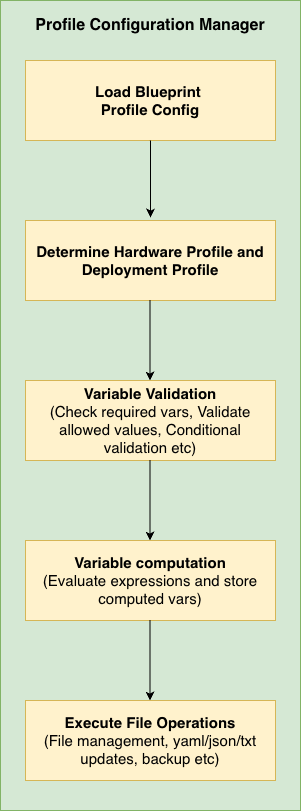
Profile Configuration Manager Architecture#
Key Features:
Detects your GPU type (H100, L40S, L4, RTXA6000, RTXA6000ADA, RTXPRO6000BW, IGX-THOR, DGX-SPARK, etc.)
Adjusts settings based on 2D or 3D deployment mode
Updates YAML, JSON, and text configuration files
Validates that your environment is configured correctly
When you need it:
Deploying to different GPU hardware
Switching between 2D and 3D modes
Ensuring configurations match hardware capabilities
Execution Flow:
Load Environment Variables - Read
HARDWARE_PROFILE,MODE, etc.Select Profile - Match hardware profile to config (H100, L4, L40S, RTXA6000, IGX-THOR, DGX-SPARK, etc.)
Execute Prerequisites - Run pre-processing operations (e.g., count files)
Validate Environment - Check env vars have valid values
Compute Variables - Calculate
final_stream_count, timeouts, etc.Execute File Operations - Update YAML, JSON, text files
Quick Start#
Minimal working example - Copy this and modify for your GPU:
# blueprint_config.yml

# Shared rules for ALL GPUs
commons:
  variables:
    2d:
      - final_stream_count: "min(${NUM_STREAMS}, ${max_streams_supported})"
    3d:
      - final_stream_count: "min(${NUM_STREAMS}, ${max_streams_supported})"
  file_operations:
    2d:
      - operation_type: "yaml_update"
        target_file: "${DS_CONFIG_DIR}/config.yaml"
        updates:
          num_sensors: ${final_stream_count}
    3d:
      - operation_type: "yaml_update"
        target_file: "${DS_CONFIG_DIR}/config.yaml"
        updates:
          num_sensors: ${final_stream_count}

# GPU-specific settings
H100:
  2d:
    max_streams_supported: 26
  3d:
    max_streams_supported: 12

L4:
  2d:
    max_streams_supported: 4
  3d:
    max_streams_supported: 2   # L4 is less powerful in 3D mode
What happens:
User sets
HARDWARE_PROFILE=L4andMODE=3dandNUM_STREAMS=8Configurator looks up L4’s 3D limit:
max_streams_supported=2Computes:
final_stream_count = min(8, 2) = 2Updates
config.yamlwithnum_sensors: 2
That’s it! The L4 GPU won’t be overloaded because the system automatically capped the streams.
Core Concepts#
Two-Part Structure: Commons + Profiles#
Section |
Purpose |
Analogy |
|---|---|---|
|
Shared rules for ALL GPUs |
Company-wide policies |
|
GPU-specific overrides/limits |
Department-specific rules |
How they work together:
commons:
  variables:
    3d:
      - final_stream_count: "min(${NUM_STREAMS}, ${max_streams_supported})"
      # ↑ This formula works for ANY GPU

H100:
  3d:
    max_streams_supported: 12   # H100's limit
    # Uses commons formula → final_stream_count = min(NUM_STREAMS, 12)

L4:
  3d:
    max_streams_supported: 2   # L4's limit
    # Uses commons formula → final_stream_count = min(NUM_STREAMS, 2)
The same formula produces different results based on each GPU’s capabilities.
2D vs 3D Modes#
Every configuration has separate rules for 2D and 3D deployment modes:
Mode |
Use Case |
Resource Usage |
|---|---|---|
|
2D Warehouse Blueprint (tracking, detection) |
Lower GPU load → more streams |
|
3D Warehouse Blueprint (depth, positioning) |
Higher GPU load → fewer streams |
Example: An L4 GPU might support 4 streams in 2D mode but only 2 in 3D mode.
Inheritance Model#
By default, Hardware profiles inherit from commons and can add their own rules:
Key point: Profile-specific settings are APPENDED to commons, not replaced (unless you explicitly disable inheritance).
Required Environment Variables#
The following environment variables must be set to use the Profile Configuration Manager:
Variable |
Default |
Possible Values |
Description |
|---|---|---|---|
|
|
|
Must be set to
true to activate the Profile Configurator.true: Run profile configurator before starting API server, adjusts config files based on detected GPU
false: Skip profile configuration entirely (default)
|
|
|
|
GPU type/model to use for configuration. Must match a profile defined in the config file.
To deploy on other hardware, add that hardware as a new profile in
blueprint_config.yml and define the config updates (e.g. max_streams_supported, file_operations) required for it. |
|
|
|
Deployment mode for Warehouse Blueprint.
2d: 2D Warehouse Blueprint (tracking, detection) - typically allows more streams
3d: 3D Warehouse Blueprint (depth, positioning) - typically allows fewer streams
|
|
(user-defined) |
Positive integer |
Desired number of video streams. Will be capped to |
Optional Environment Variables#
Variable |
Default |
Possible Values |
Description |
|---|---|---|---|
|
|
Valid file path |
Path to the hardware profile configuration YAML file containing GPU profiles and commons |
|
|
|
Logging verbosity level.
DEBUG: Detailed diagnostic information including variable substitutions
INFO: General operational messages
WARN: Warning messages for potential issues
ERROR: Error messages only
|
|
|
Valid file path |
Marker file path indicating profile configuration completed successfully.
Used by
/readyz endpoint for Kubernetes readiness checks.Created when profile configuration finishes successfully.
|
Configuration Reference#
Config File Schema#
Full Schema#
The blueprint_config.yml file has this structure:
commons:
  prerequisites:              # Runs BEFORE variables (optional)
    2d:
      - operation_type: "file_management"
        # ... operations that generate variables
    3d:
      - operation_type: "file_management"
  variable_validation:
    2d:
      - variable: "VAR_NAME"
        allowed_values: ["value1", "value2"]
    3d:
      - variable: "VAR_NAME"
        allowed_patterns: ["pattern*"]
  variables:
    2d:
      - variable_name: "expression"
    3d:
      - variable_name: "expression"
  file_operations:
    2d:
      - operation_type: "..."
        backup: true|false    # Optional, default: true
    3d:
      - operation_type: "..."

HARDWARE_PROFILE:
  2d:
    max_streams_supported: <integer>
    use_commons:
      variable_validation: true|false|2d|3d
      variables: true|false|2d|3d
      file_operations: true|false|2d|3d
    variable_validation:
      - variable: "VAR_NAME"
    variables:
      - variable_name: "expression"
    file_operations:
      - operation_type: "..."
  3d:
    # Same structure as 2d
Field Reference#
max_streams_supported
L4:
  2d:
    max_streams_supported: 4
  3d:
    max_streams_supported: 2
This value becomes available as ${max_streams_supported} in variable expressions.
To add a new hardware profile (e.g. a new GPU), add a profile block with max_streams_supported for each mode; the profile automatically inherits all commons rules unless use_commons is set to false.
Note
Refer to RT-DETR Real-Time Performance for 2D profile, 2D profile with Agents, and Sparse4D Real-Time Performance for 3D profile for more details on the max streams supported for a particular GPU. If GPU is not found in list, then increase the streams gradually to find the optimal number of streams that can be used.
Hardware Profiles Reference#
The following hardware profiles are defined in blueprint_config.yml. Names and max_streams_supported values must match the config file.
Profile |
2D max streams |
3D max streams |
Notes |
|---|---|---|---|
|
26 |
12 |
Stream limits only; inherits commons. |
|
12 |
7 |
Stream limits only; inherits commons. |
|
4 |
2 |
Stream limits only; inherits commons. |
|
4 |
2 |
Stream limits only; inherits commons. |
|
8 |
7 |
Stream limits only; inherits commons. |
|
16 |
14 |
Stream limits only; inherits commons. |
|
7 |
6 |
2D: extra file_operations (ds-main-config.txt, ds-main-redis-config.txt: drop-on-latency, msg-conv-msg2p-lib, compute-hw, low-latency-mode; ds-nvdcf-accuracy-tracker-config.yml).
3D: extra file_operations (ds-main-config.txt, ds-main-redis-config.txt: batched-push-timeout 67000, low-latency-mode; config.yaml: interval 1; vst_config_kafka.json, vst_config_redis.json: overlay.enable_overlay_skip_frame true).
|
|
7 |
6 |
2D: extra file_operations (ds-main-config.txt, ds-main-redis-config.txt: msg-conv-msg2p-lib).
3D: extra file_operations (ds-main-config.txt, ds-main-redis-config.txt: batched-push-timeout 67000; config.yaml: interval 1; vst_config_kafka.json, vst_config_redis.json: overlay.enable_overlay_skip_frame true).
When
HARDWARE_PROFILE=DGX-SPARK, image tags (e.g. PERCEPTION_TAG, VST_*_IMAGE_TAG, NVSTREAMER_IMAGE_TAG) must contain sbsa. |
use_commons
true for all)use_commons:
variable_validation: true|false|"2d"|"3d"
variables: true|false|"2d"|"3d"
file_operations: true|false|"2d"|"3d"
Values:
true(default): Use commons for current mode (2d or 3d)false: Don’t use commons, only profile-specific"2d"or"3d": Use commons from specified mode regardless of current mode
variables
variables:
  - timeout_multiplier: "2"
  - adjusted_timeout: "${timeout_multiplier} * 25000"
Variables are evaluated top-to-bottom, so later ones can reference earlier ones.
file_operations
See Operation Types Reference for details.
prerequisites
Prerequisites are useful when you need to dynamically generate variables based on file system state. For example, counting video files before deciding stream limits.
commons:
  prerequisites:
    2d:
      - operation_type: "file_management"
        target_directories:
          - "${MDX_DATA_DIR}/videos/warehouse-2d-app"
        file_management:
          action: "file_count"
          parameters:
            pattern: "*.mp4"
          output_variable: "available_video_count"
  variables:
    2d:
      # Now we can use the count from prerequisites
      - final_stream_count: "min(${NUM_STREAMS}, ${available_video_count})"
Execution order: Prerequisites → Validation → Variables → File Operations
Operation Types Reference#
Choose the operation type by file format:
File Type |
Operation |
Typical use |
|---|---|---|
|
|
Kubernetes configs, application settings |
|
|
VST configs, API settings |
|
|
DeepStream configs, INI-style files |
(any) |
|
Keep only N files in a directory, or count files (prerequisites) |
Common Options (All Operations)#
All file operations support these options:
backup - Automatic file backup
true- operation_type: "yaml_update"
target_file: "${DS_CONFIG_DIR}/config.yaml"
backup: true # Creates: config.backup_20240115_143022.yaml
updates:
# ...
- operation_type: "json_update"
target_file: "${VST_CONFIG_DIR}/settings.json"
backup: false # No backup created (use with caution!)
updates:
# ...
Backup filename format: {original_name}.backup_{YYYYMMDD_HHMMSS}{extension}
1. yaml_update#
Updates values in YAML files while preserving structure.
- operation_type: "yaml_update"
  target_file: "${DS_CONFIG_DIR}/config.yaml"
  backup: true    # Optional, default: true
  updates:
    num_sensors: ${final_stream_count}
    enable_debug: false
    nested.config.batch_size: 4   # Dot notation for nested keys
Before:
num_sensors: 1
enable_debug: true
nested:
  config:
    batch_size: 1
After:
num_sensors: 4
enable_debug: false
nested:
  config:
    batch_size: 4
2. text_config_update#
Updates key-value pairs in text files (.txt, .conf, .cfg).
- operation_type: "text_config_update"
  target_file: "${DS_CONFIG_DIR}/ds-main-config.txt"
  backup: true    # Optional, default: true
  updates:
    num-source-bins: "0"
    max-batch-size: "${final_stream_count}"
    batched-push-timeout: "50000"
Supported formats: key=value, key: value, key value
3. json_update#
Updates values in JSON files with nested object support.
- operation_type: "json_update"
  target_file: "${VST_CONFIG_DIR}/vst-config.json"
  backup: true    # Optional, default: true
  updates:
    data.nv_streamer_sync_file_count: ${final_stream_count}
    overlay.enable_overlay_skip_frame: true
Before:
{
  "data": {
    "nv_streamer_sync_file_count": 1
  },
  "overlay": {
    "enable_overlay_skip_frame": false
  }
}
After:
{
  "data": {
    "nv_streamer_sync_file_count": 4
  },
  "overlay": {
    "enable_overlay_skip_frame": true
  }
}
4. file_management#
Manages files in directories. Supports two actions: keep_count and file_count.
Action: keep_count - Keep only N files, remove the rest
- operation_type: "file_management"
  target_directories:
    - "${MDX_DATA_DIR}/videos/warehouse-2d-app"
  file_management:
    action: "keep_count"
    parameters:
      count: ${final_stream_count}
      pattern: "*.mp4"
Use case: If you can only process 4 streams, keep only 4 sample video files:
Before: 10 video files
After (count=4): 4 video files (first 4 alphabetically kept, rest removed)
Action: file_count - Count files and store result in a variable
- operation_type: "file_management"
  target_directories:
    - "${MDX_DATA_DIR}/videos/warehouse-2d-app"
    - "${MDX_DATA_DIR}/videos/warehouse-3d-app"
  file_management:
    action: "file_count"
    parameters:
      pattern: "*.mp4"
    output_variable: "total_video_count"
Use case: Dynamically determine how many video files are available, then use that count in variable calculations.
Parameters:
Parameter |
Required |
Description |
|---|---|---|
|
Yes |
|
|
For keep_count |
Number of files to keep |
|
No |
Glob pattern (default: |
|
For file_count |
Variable name to store the count result |
Note: file_count is typically used in the prerequisites section so the count is available for variable calculations
Variable System Reference#
Declaration Syntax#
Variables are declared as a list of single-key dictionaries:
variables:
  - final_stream_count: "min(${NUM_STREAMS}, ${max_streams_supported})"
  - batch_size: "max(1, ${final_stream_count})"
  - timeout: "${batch_size} * 10000"
Evaluation order: Top to bottom. Later variables can reference earlier ones.
Environment Variable Substitution#
Use ${VAR_NAME} to reference environment variables:
variables:
  - stream_count: "${NUM_STREAMS}"              # Direct reference
  - config_path: "${DS_CONFIG_DIR}/configs"     # Concatenation
  - limited: "min(${NUM_STREAMS}, 4)"           # In expressions
Supported Functions#
Function |
Description |
Example |
|---|---|---|
|
Returns minimum value |
|
|
Returns maximum value |
|
|
Absolute value |
|
|
Round to nearest integer |
|
|
Convert to integer |
|
|
Convert to float |
|
Supported Operators#
Operator |
Description |
Example |
|---|---|---|
|
Addition |
|
|
Subtraction |
|
|
Multiplication |
|
|
Division |
|
|
Floor division |
|
|
Modulo |
|
|
Exponentiation |
|
Conditional Expressions (If-Else)#
Python-style ternary expressions:
variables:
  - batch_size: "4 if ${num_cameras} > 10 else 2"
Syntax: value_if_true if condition else value_if_false
Comparison operators: >, <, >=, <=, ==, !=
Logical operators: and, or, not
Examples:
# Simple condition
- quality_mode: "high if ${gpu_memory} >= 16 else standard"

# Multiple conditions (AND)
- enable_hq: "true if ${gpu_memory} >= 16 and ${num_cameras} < 20 else false"

# Multiple conditions (OR)
- use_fallback: "true if ${mode} == 'legacy' or ${compatibility} == 'true' else false"

# Nested (if-elif-else)
- quality: "high if ${batch_size} >= 4 else medium if ${batch_size} >= 2 else low"
Validation Reference#
Basic Validation#
allowed_values - Exact match against a list:
- variable: NIM
  allowed_values: ["none", "local", "remote"]
  error_message: "NIM must be one of: none, local, remote"
allowed_patterns - Wildcard match (* = any characters, ? = single character):
- variable: COMPOSE_PROFILES
  allowed_patterns:
    - "bp_wh_kafka*"
    - "bp_wh_redis*"
disallowed_values - Block specific values:
- variable: MODE
  disallowed_values: ["deprecated", "legacy", "test"]
disallowed_patterns - Block values matching patterns:
- variable: CONFIG_PATH
  disallowed_patterns:
    - "/tmp/*"
    - "*/test/*"
regex - Regular expression match:
- variable: STREAM_ID
  regex: "^stream_[0-9]{3}$"
  error_message: "STREAM_ID must be in format stream_XXX (3 digits)"
Validation Options#
required - Skip validation if variable is not set:
- variable: OPTIONAL_VAR
  required: false
  allowed_values: ["a", "b"]
error_message - Custom error message:
- variable: NIM
  allowed_values: ["none", "local", "remote"]
  error_message: "NIM configuration error: Check your environment settings."
Conditional Validation#
Apply validation only when a condition is met:
- variable: API_KEY
  condition:
    variable: ENV
    equals: "production"
  regex: "^[A-Za-z0-9]{32}$"
  error_message: "Production API_KEY must be 32 alphanumeric characters"
Condition operators:
Operator |
Description |
Example |
|---|---|---|
|
Exact match |
|
|
Not equal |
|
|
In list |
|
|
Not in list |
|
|
Wildcard match |
|
|
Regex match |
|
|
Variable exists |
|
Advanced Validation#
Compound conditions (AND/OR):
# AND - all conditions must be true
- variable: COMPOSE_PROFILES
  condition:
    and:
      - variable: MODE
        equals: "2d"
      - variable: STREAM_TYPE
        equals: "kafka"
  allowed_patterns:
    - "bp_wh_kafka_2d*"

# OR - at least one condition must be true
- variable: CONFIG_PATH
  condition:
    or:
      - variable: ENV
        equals: "production"
      - variable: ENV
        equals: "staging"
  disallowed_patterns:
    - "/tmp/*"
Trigger-based validation (when_equals + validate_conditions):
Use this to validate OTHER variables when THIS variable has a specific value:
# When dataset is "nv-warehouse-4cams", validate that MODE=2d and NUM_STREAMS=4
- variable: SAMPLE_VIDEO_DATASET
  when_equals: "nv-warehouse-4cams"
  validate_conditions:
    and:
      - variable: MODE
        equals: "2d"
      - variable: NUM_STREAMS
        equals: "4"
  error_message: "Dataset nv-warehouse-4cams requires MODE=2d and NUM_STREAMS=4"
Logic:
IF
SAMPLE_VIDEO_DATASET="nv-warehouse-4cams"→ check the conditionsIF
SAMPLE_VIDEO_DATASETis anything else → skip this validation
Comparison: condition vs when_equals:
Pattern |
Use Case |
Logic |
|---|---|---|
|
Validate THIS variable when OTHER conditions met |
IF (conditions) THEN validate this variable |
|
Validate OTHER variables when THIS has specific value |
IF (this = value) THEN validate other variables |
Examples & Best Practices#
Complete Examples#
Example 1: Minimal Profile (Most Common)#
Just specify stream limits; inherit everything else:
H100:
  2d:
    max_streams_supported: 26
  3d:
    max_streams_supported: 12
“I’m an H100. I can handle 26 streams in 2D and 12 in 3D. Use all standard rules from commons.”
Example 2: Profile with Extra Operations#
Inherit commons but add GPU-specific operations:
IGX-THOR:
  2d:
    max_streams_supported: 7
    file_operations:
      - operation_type: "text_config_update"
        target_file: "${DS_CONFIG_DIR}/ds-main-config.txt"
        updates:
          drop-on-latency: "1"
          msg-conv-msg2p-lib: /opt/nvidia/deepstream/deepstream/lib/libnvds_msgconv.so
          compute-hw: "2"
          low-latency-mode: "0"
      # ... ds-main-redis-config.txt, ds-nvdcf-accuracy-tracker-config.yml
  3d:
    max_streams_supported: 6
    file_operations:
      # These APPEND to commons.file_operations.3d
      - operation_type: "text_config_update"
        target_file: "${DS_CONFIG_DIR}/ds-main-config.txt"
        updates:
          batched-push-timeout: "67000"
          low-latency-mode: "0"
      - operation_type: "yaml_update"
        target_file: "${DS_CONFIG_DIR}/config.yaml"
        backup: true
        updates:
          interval: "1"
      - operation_type: "json_update"
        target_file: "${MDX_SAMPLE_APPS_DIR}/vst/3d/vst/configs/vst_config_kafka.json"
        updates:
          overlay.enable_overlay_skip_frame: true
      - operation_type: "json_update"
        target_file: "${MDX_SAMPLE_APPS_DIR}/vst/3d/vst/configs/vst_config_redis.json"
        updates:
          overlay.enable_overlay_skip_frame: true
“I’m an IGX-THOR. Use commons rules, BUT add extra config changes for 2D (DeepStream/VPI) and 3D (timeouts, VST overlay).”
Execution order:
Commons file operations run first
IGX-THOR specific operations run after
Example 3: Profile with Custom Variables#
Add calculated variables for a less powerful GPU:
L4:
  3d:
    max_streams_supported: 2
    variables:
      # Appended to commons variables
      - timeout_multiplier: "2"
      - adjusted_timeout: "${timeout_multiplier} * 25000"
    file_operations:
      - operation_type: "text_config_update"
        target_file: "${DS_CONFIG_DIR}/ds-main-config.txt"
        updates:
          batched-push-timeout: "${adjusted_timeout}"
“I’m an L4 (slower GPU). I need 2× longer timeouts.”
Example 4: Complete Override#
Completely custom behavior, ignoring commons:
EXPERIMENTAL_GPU:
  2d:
    max_streams_supported: 8
    use_commons:
      variables: false
      file_operations: false
    variables:
      - custom_count: "min(${NUM_STREAMS}, 8)"
      - custom_batch: "${custom_count} * 2"
    file_operations:
      - operation_type: "yaml_update"
        target_file: "${DS_CONFIG_DIR}/experimental.yaml"
        updates:
          streams: ${custom_count}
          batch_size: ${custom_batch}
“I’m experimental hardware. Ignore all commons; I define everything myself.”
Example 5: Using Prerequisites and File Count#
Dynamic configuration based on available files:
commons:
  prerequisites:
    2d:
      # Count how many video files are available
      - operation_type: "file_management"
        target_directories:
          - "${MDX_DATA_DIR}/videos/warehouse-2d-app"
        file_management:
          action: "file_count"
          parameters:
            pattern: "*.mp4"
          output_variable: "available_video_count"
    3d:
      - operation_type: "file_management"
        target_directories:
          - "${MDX_DATA_DIR}/videos/warehouse-3d-app"
        file_management:
          action: "file_count"
          parameters:
            pattern: "*.mp4"
          output_variable: "available_video_count"

  variables:
    2d:
      # Can't use more streams than we have videos
      - final_stream_count: "min(${NUM_STREAMS}, ${available_video_count}, ${max_streams_supported})"
    3d:
      - final_stream_count: "min(${NUM_STREAMS}, ${available_video_count}, ${max_streams_supported})"

  file_operations:
    2d:
      - operation_type: "yaml_update"
        target_file: "${DS_CONFIG_DIR}/config.yaml"
        backup: true    # Keep backup before modifying
        updates:
          num_sensors: ${final_stream_count}

H100:
  2d:
    max_streams_supported: 26
  3d:
    max_streams_supported: 12
“Count available videos first, then limit streams to the minimum of: user request, available videos, and GPU capacity.”
Example 6: Full Configuration File#
A complete blueprint_config.yml showing all features:
# Shared rules for all GPUs
commons:
  variable_validation:
    2d:
      - variable: NIM
        required: false
        allowed_values: ["none", "local", "remote"]
        error_message: "NIM must be: none, local, or remote"
    3d:
      - variable: NIM
        required: false
        allowed_values: ["none", "local", "remote"]

  variables:
    2d:
      - final_stream_count: "min(${NUM_STREAMS}, ${max_streams_supported})"
      - batch_size: "4 if ${final_stream_count} > 10 else 2"
    3d:
      - final_stream_count: "min(${NUM_STREAMS}, ${max_streams_supported})"
      - batch_size: "2 if ${final_stream_count} > 6 else 1"

  file_operations:
    2d:
      - operation_type: "yaml_update"
        target_file: "${DS_CONFIG_DIR}/config.yaml"
        updates:
          num_sensors: ${final_stream_count}
          batch_size: ${batch_size}
      - operation_type: "file_management"
        target_directories:
          - "${MDX_DATA_DIR}/videos/warehouse-2d-app"
        file_management:
          action: "keep_count"
          parameters:
            count: ${final_stream_count}
            pattern: "*.mp4"
    3d:
      - operation_type: "yaml_update"
        target_file: "${DS_CONFIG_DIR}/config.yaml"
        updates:
          num_sensors: ${final_stream_count}
          batch_size: ${batch_size}

# Hardware profiles
H100:
  2d:
    max_streams_supported: 26
  3d:
    max_streams_supported: 12

L40S:
  2d:
    max_streams_supported: 12
  3d:
    max_streams_supported: 7

L4:
  2d:
    max_streams_supported: 4
  3d:
    max_streams_supported: 2
    variables:
      - timeout_multiplier: "2"
      - adjusted_timeout: "${timeout_multiplier} * 25000"
    file_operations:
      - operation_type: "text_config_update"
        target_file: "${DS_CONFIG_DIR}/ds-main-config.txt"
        updates:
          batched-push-timeout: "${adjusted_timeout}"

RTXA6000:
  2d:
    max_streams_supported: 4
  3d:
    max_streams_supported: 2

RTXA6000ADA:
  2d:
    max_streams_supported: 8
  3d:
    max_streams_supported: 7

RTXPRO6000BW:
  2d:
    max_streams_supported: 16
  3d:
    max_streams_supported: 14

IGX-THOR:
  2d:
    max_streams_supported: 7
    file_operations:
      - operation_type: "text_config_update"
        target_file: "${DS_CONFIG_DIR}/ds-main-config.txt"
        updates:
          drop-on-latency: "1"
          msg-conv-msg2p-lib: /opt/nvidia/deepstream/deepstream/lib/libnvds_msgconv.so
          compute-hw: "2"
          low-latency-mode: "0"
      - operation_type: "text_config_update"
        target_file: "${DS_CONFIG_DIR}/ds-main-redis-config.txt"
        updates:
          drop-on-latency: "1"
          msg-conv-msg2p-lib: /opt/nvidia/deepstream/deepstream/lib/libnvds_msgconv.so
          compute-hw: "2"
          low-latency-mode: "0"
      - operation_type: "yaml_update"
        target_file: "${DS_CONFIG_DIR}/ds-nvdcf-accuracy-tracker-config.yml"
        backup: true
        updates:
          TargetManagement.maxTargetsPerStream: 50
          VisualTracker.visualTrackerType: 2
          VisualTracker.vpiBackend4DcfTracker: 2
  3d:
    max_streams_supported: 6
    file_operations:
      - operation_type: "text_config_update"
        target_file: "${DS_CONFIG_DIR}/ds-main-config.txt"
        updates:
          batched-push-timeout: "67000"
          low-latency-mode: "0"
      - operation_type: "text_config_update"
        target_file: "${DS_CONFIG_DIR}/ds-main-redis-config.txt"
        updates:
          batched-push-timeout: "67000"
          low-latency-mode: "0"
      - operation_type: "yaml_update"
        target_file: "${DS_CONFIG_DIR}/config.yaml"
        backup: true
        updates:
          interval: "1"
      - operation_type: "json_update"
        target_file: "${MDX_SAMPLE_APPS_DIR}/vst/3d/vst/configs/vst_config_kafka.json"
        updates:
          overlay.enable_overlay_skip_frame: true
      - operation_type: "json_update"
        target_file: "${MDX_SAMPLE_APPS_DIR}/vst/3d/vst/configs/vst_config_redis.json"
        updates:
          overlay.enable_overlay_skip_frame: true

DGX-SPARK:
  2d:
    max_streams_supported: 7
    file_operations:
      - operation_type: "text_config_update"
        target_file: "${DS_CONFIG_DIR}/ds-main-config.txt"
        updates:
          msg-conv-msg2p-lib: /opt/nvidia/deepstream/deepstream/lib/libnvds_msgconv.so
      - operation_type: "text_config_update"
        target_file: "${DS_CONFIG_DIR}/ds-main-redis-config.txt"
        updates:
          msg-conv-msg2p-lib: /opt/nvidia/deepstream/deepstream/lib/libnvds_msgconv.so
  3d:
    max_streams_supported: 6
    file_operations:
      - operation_type: "text_config_update"
        target_file: "${DS_CONFIG_DIR}/ds-main-config.txt"
        updates:
          batched-push-timeout: "67000"
      - operation_type: "text_config_update"
        target_file: "${DS_CONFIG_DIR}/ds-main-redis-config.txt"
        updates:
          batched-push-timeout: "67000"
      - operation_type: "yaml_update"
        target_file: "${DS_CONFIG_DIR}/config.yaml"
        backup: true
        updates:
          interval: "1"
      - operation_type: "json_update"
        target_file: "${MDX_SAMPLE_APPS_DIR}/vst/3d/vst/configs/vst_config_kafka.json"
        updates:
          overlay.enable_overlay_skip_frame: true
      - operation_type: "json_update"
        target_file: "${MDX_SAMPLE_APPS_DIR}/vst/3d/vst/configs/vst_config_redis.json"
        updates:
          overlay.enable_overlay_skip_frame: true
Adding a New Hardware Profile#
To deploy the blueprint on hardware profile that is not in the predefined list (H100, L40S, L4, etc.), add a new profile in blueprint_config.yml and set HARDWARE_PROFILE to that name at deploy time.
Steps:
Add a profile block in
blueprint_config.ymlunder the hardware profiles section. Use a clear, unique name (e.g.MY-GPU,CUSTOM-EDGE) that you will set inHARDWARE_PROFILE.Define stream limits for each mode. At minimum, set
max_streams_supportedfor2dand3d. The configurator will inherit all commons rules (variables, file_operations, validation) unless you override them.Optional: Add profile-specific
variablesorfile_operationsif this hardware needs different timeouts, config keys, or file updates than the commons.Optional: If the new profile name must be accepted by validation, add it to the
HARDWARE_PROFILEallowed_valuesin thecommons.variable_validationsection for both2dand3d.
Minimal new hardware (stream limits only):
# In blueprint_config.yml - add alongside H100, L4, etc.
MY-GPU:
  2d:
    max_streams_supported: 6
  3d:
    max_streams_supported: 4
Then set HARDWARE_PROFILE=MY-GPU when deploying. Commons will apply; stream count will be capped to 6 (2D) or 4 (3D).
New hardware with custom config updates:
CUSTOM-EDGE:
  2d:
    max_streams_supported: 4
  3d:
    max_streams_supported: 3
    variables:
      - timeout_multiplier: "2"
      - adjusted_timeout: "${timeout_multiplier} * 25000"
    file_operations:
      - operation_type: "text_config_update"
        target_file: "${DS_CONFIG_DIR}/ds-main-config.txt"
        updates:
          batched-push-timeout: "${adjusted_timeout}"
      - operation_type: "text_config_update"
        target_file: "${DS_CONFIG_DIR}/ds-main-redis-config.txt"
        updates:
          batched-push-timeout: "${adjusted_timeout}"
Here the profile inherits commons and adds longer timeouts and extra file updates for 3D mode. Ensure CUSTOM-EDGE is added to allowed_values for HARDWARE_PROFILE in commons.variable_validation if you use validation.
Best Practices#
Use Commons for Shared Logic
Put common calculations and operations in the commons section. Most profiles should only specify
max_streams_supported.Keep Profiles Simple
A minimal profile is better:
H100:
  2d:
    max_streams_supported: 26
  3d:
    max_streams_supported: 12
Use Variables for Computed Values
Don’t hardcode values that depend on hardware:
# Good - adapts to hardware
num_sensors: ${final_stream_count}

# Bad - hardcoded
num_sensors: 4
Validate Early
Use variable validation to catch errors before they cause runtime failures.
Use Meaningful Names
Choose descriptive variable names:
# Good
- final_stream_count: "min(${NUM_STREAMS}, ${max_streams_supported})"

# Bad
- x: "min(${NUM_STREAMS}, ${max_streams_supported})"
Keep Conditionals Simple
Prefer simple conditions over deeply nested ternaries:
# Good - readable
- quality: "high if ${streams} <= 4 else standard"

# Avoid - hard to read
- quality: "ultra if ${a} > 10 else high if ${b} > 5 and ${c} < 3 else medium if ${d} else low"
Document Custom Configurations
Add comments explaining why profile-specific overrides are needed:
L4:
  3d:
    max_streams_supported: 2
    variables:
      # L4 needs longer timeouts due to slower processing
      - timeout_multiplier: "2"
Test All Modes
Ensure your config works for both 2d and 3d modes on each hardware profile.
Troubleshooting#
Common Errors#
“Variable not found” or empty value
ERROR - Variable ${final_stream_count} not found
Causes:
Variable name typo
Variable defined after it’s used (evaluation order matters)
Variable defined in different mode section
Fix: Check spelling and ensure variables are defined before use:
variables:
  - final_stream_count: "..."   # Define first
  - batch_size: "${final_stream_count}"   # Then use
“Validation failed”
ERROR - Validation failed: NIM must be one of: none, local, remote
Cause: Environment variable has invalid value.
Fix: Check your environment variable:
echo $NIM # Should be: none, local, or remote
“File not found” or “Permission denied”
ERROR - Cannot update file: /opt/configs/config.yaml
Causes:
Path doesn’t exist
Environment variable in path is not set
Permission issues
Fix: Verify the path and environment variables:
echo $DS_CONFIG_DIR   # Check the variable is set
ls -la $DS_CONFIG_DIR/config.yaml   # Check file exists
“Profile not found, using default”
WARNING - Profile 'UNKNOWN_GPU' not found, using default
Cause: HARDWARE_PROFILE doesn’t match any defined profile.
Fix: Check your profile name matches exactly (case-sensitive):
echo $HARDWARE_PROFILE # Should match: H100, L40S, L4, RTXA6000, RTXA6000ADA, RTXPRO6000BW, IGX-THOR, DGX-SPARK
“Variable from file_count not available”
ERROR - Variable ${available_video_count} not found
Cause: The file_count operation is in file_operations instead of prerequisites.
Fix: Move file_count to prerequisites so it runs before variable processing:
commons:
  prerequisites:           # ← Correct location
    2d:
      - operation_type: "file_management"
        file_management:
          action: "file_count"
          output_variable: "available_video_count"

  variables:
    2d:
      - final_count: "${available_video_count}"   # Now available
“Backup file not created”
Causes:
backup: falseis explicitly setPermission issues in the target directory
Target file doesn’t exist (nothing to backup)
Fix: Check your operation has backup: true (or omit it, since true is the default):
- operation_type: "yaml_update"
  target_file: "${DS_CONFIG_DIR}/config.yaml"
  backup: true    # Explicit, or just remove this line
  updates:
    # ...
Debugging Tips#
Check environment variables first:
echo "HARDWARE_PROFILE=$HARDWARE_PROFILE"
echo "MODE=$MODE"
echo "NUM_STREAMS=$NUM_STREAMS"
Use simple profiles to isolate issues:
DEBUG_GPU:
  2d:
    max_streams_supported: 4
  3d:
    max_streams_supported: 4
Check variable evaluation order:
Variables are processed top-to-bottom. A variable can only reference variables defined above it.
Verify file paths exist:
Before running the configurator, check that target files exist at the expected paths.
Review the execution flow:
Remember: Prerequisites → Validation → Variables → File Operations
If prerequisites fail, nothing else runs
If validation fails, variables and file operations won’t run
Variables from
file_countare only available if defined inprerequisites
Sensor Configuration Manager#
Overview#
The Sensor Configuration Manager handles camera/sensor configurations for blueprint deployments. It runs as a background service alongside the Profile Configurator.
What it does:
Fetches sensor information from various sources (Sensor Bridge, NVStreamer, or file)
Fetches calibration data from various sources (API, upload, or file mount)
Creates sensor mappings with RTSP URLs, groups, and regions
Registers sensors with VMS
Publishes sensor configuration events to message brokers (Kafka/Redis)
Architecture:
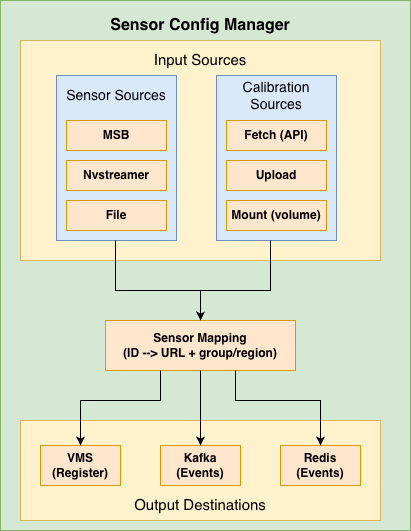
Sensor Configuration Manager Architecture#
Core Concepts#
Sensor Information Sources#
The manager can fetch sensor information from three sources:
Source |
Environment Variable |
Description |
|---|---|---|
|
|
Metropolis Sensor Bridge - fetches RTSP URLs from sensor bridge service |
|
|
NVStreamer - fetches streams from NVIDIA streaming service with validation |
|
|
JSON file - reads sensor definitions from a mounted file |
Calibration Modes#
Calibration data contains camera parameters (intrinsic/extrinsic) needed for warehouse blueprint.
Mode |
Environment Variable |
Description |
|---|---|---|
|
|
Periodically fetches calibration from an API endpoint (default) |
|
|
Accepts calibration data via POST to |
|
|
Reads calibration from a volume-mounted file |
Sensor Mapping#
The sensor mapping connects:
Sensor ID/Name - Unique identifier for the camera
RTSP URL - Stream URL for the camera
Group ID - Logical grouping of cameras
Region - Physical location/area
Example mapping:
{
  "sensors": {
    "camera-01": {
      "name": "camera-01",
      "url": "rtsp://<IP_address:port>/stream1",
      "group_id": "entrance-group",
      "region": "building-A"
    },
    "camera-02": {
      "name": "camera-02",
      "url": "rtsp://<IP_address:port>/stream1",
      "group_id": "parking-group",
      "region": "building-B"
    }
  }
}
Configuration Reference#
This section provides a comprehensive reference for all environment variables used by the Sensor Configuration Manager.
General Settings#
Variable |
Default |
Possible Values |
Description |
|---|---|---|---|
|
|
|
Logging verbosity level.
DEBUG: Detailed diagnostic information
INFO: General operational messages
WARN: Warning messages for potential issues
ERROR: Error messages only
|
|
|
Any valid port number |
HTTP port for the Flask API server |
|
|
|
Deployment mode for Warehouse Blueprint.
2d: 2D Warehouse Blueprint (tracking, detection) - lower GPU load
3d: 3D Warehouse Blueprint (depth, positioning) - higher GPU load
|
Calibration Settings#
Variable |
Default |
Possible Values |
Description |
|---|---|---|---|
|
|
|
Master switch for calibration processing.
true: Enable calibration data processing and sensor mapping
false: Disable calibration endpoints and processing
|
|
|
|
How calibration data is obtained.
fetch: Calls API endpoint on startup, retries every
GET_CALIBRATION_DELAY seconds until successful, saves fetched data locally for persistenceupload: Accepts data via POST to
/calibration endpointmount: Reads from volume-mounted file at
CALIBRATION_FILE_PATH on startup |
|
(empty) |
Valid HTTP/HTTPS URL |
API endpoint URL for fetching calibration data.
Required when
CALIBRATION_MODE=fetchExample:
http://config-service:8080/api/calibration |
|
|
Positive integer (seconds) |
Timeout in seconds for calibration API requests |
|
|
Positive integer (seconds) |
Delay between calibration fetch retry attempts.
Used when API is unavailable or file not found (upload mode)
|
|
|
Valid directory path |
Directory path where calibration files are stored |
|
|
Valid filename |
Name of the calibration JSON file |
|
|
|
Validate that all sensors exist in calibration file.
true: Exit with error if any sensor not found in calibration
false: Continue with warning for missing sensors
|
Uploading Calibration Data (upload mode):
curl -X POST http://localhost:5000/calibration \
  -H "Content-Type: application/json" \
  -d @calibration.json
Mount Mode Volume Example:
-v /host/path/calibration.json:/usr/src/app/calibration_store/calibration.json
Sensor Source Settings#
Variable |
Default |
Possible Values |
Description |
|---|---|---|---|
|
|
|
Source for sensor/camera information.
msb: Metropolis Sensor Bridge - fetches RTSP URLs from sensor bridge service
nvstreamer: NVStreamer - fetches streams from NVIDIA streaming service with validation
file: JSON file - reads sensor definitions from mounted JSON file
|
|
|
Valid HTTP URL |
HTTP endpoint for Metropolis Sensor Bridge.
Used when
SENSOR_INFO_SOURCE=msb |
|
(empty) |
Hostname or IP |
Override hostname/IP in RTSP URLs from sensor bridge.
Useful when sensor bridge returns internal IPs that need translation
|
|
|
Valid file path |
Path to sensors JSON file.
Used when
SENSOR_INFO_SOURCE=file |
Sensor File Format (for file mode):
{
  "sensors": [
    {
      "camera_name": "camera-01",
      "rtsp_url": "rtsp://<IP_address:port>/stream1",
      "group_id": "entrance-group",
      "region": "building-A"
    },
    {
      "camera_name": "camera-02",
      "rtsp_url": "rtsp://<IP_address:port>/stream1"
    }
  ]
}
Required fields: camera_name, rtsp_url
Optional fields: group_id, region (can also be obtained from calibration data)
NVStreamer Settings#
Variable |
Default |
Possible Values |
Description |
|---|---|---|---|
|
|
Valid HTTP URL |
NVStreamer API endpoint for listing available streams.
Used when
SENSOR_INFO_SOURCE=nvstreamer |
|
|
Valid HTTP URL |
NVStreamer API endpoint for checking stream status.
Used to validate streams are online before adding
|
|
|
Positive integer (seconds) |
Timeout for NVStreamer streams endpoint requests |
|
|
Positive integer |
Maximum number of retry attempts for stream validation.
Each stream is validated to be online before adding to mapping
|
|
|
Positive integer (seconds) |
Delay between stream validation retry attempts |
VMS Integration Settings#
Variable |
Default |
Possible Values |
Description |
|---|---|---|---|
|
|
|
Enable automatic sensor registration with VMS.
true: Register each sensor with VMS via API call
false: Skip VMS registration
|
|
|
Valid HTTP URL |
VMS API endpoint for sensor registration.
Sensors are registered with name, URL, and tags (region|group_id)
|
Sensor Registration Details:
Each sensor is registered with the VMS containing:
Sensor name: Unique identifier for the camera
RTSP URL: Stream URL for the camera
Tags: Combined region and group_id in format
region|group_id
Message Broker Settings#
Common Settings:
Variable |
Default |
Possible Values |
Description |
|---|---|---|---|
|
|
|
Type of message broker for publishing sensor events.
kafka: Use Apache Kafka for event streaming
redis: Use Redis Streams for event streaming
|
|
|
|
Enable sending sensor configuration events to message broker.
true: Publish sensor config events after mapping is created
false: Skip message broker publishing
|
Kafka Settings:
Variable |
Default |
Possible Values |
Description |
|---|---|---|---|
|
(empty) |
Comma-separated host:port list |
Kafka bootstrap servers.
Required when
MESSAGE_BROKER_TYPE=kafkaExample:
kafka:9092 or kafka1:9092,kafka2:9092 |
|
(empty) |
Valid Kafka topic name |
Kafka topic for publishing sensor configuration events.
Example:
sensor.config |
|
|
String |
Kafka message key for sensor configuration messages |
|
|
String |
Field name for sensor/camera ID in message payload.
Used in both Kafka and Redis message formats
|
|
|
String |
Field name for event data in message payload.
Used in both Kafka and Redis message formats
|
Redis Settings:
Variable |
Default |
Possible Values |
Description |
|---|---|---|---|
|
|
Hostname or IP |
Redis server hostname or IP address |
|
|
Valid port number |
Redis server port |
|
|
0-15 |
Redis database number.
Redis supports databases 0-15 by default
|
|
|
String |
Redis stream name for publishing sensor configuration events.
Example:
sensor.config |
|
|
String |
Field name/key used in Redis stream messages |
Redis Duplicator Settings:
Variable |
Default |
Possible Values |
Description |
|---|---|---|---|
|
|
|
Enable Redis event duplication thread.
true: Read events from source topic and duplicate to CV and PN26 topics
false: Disable event duplication
|
|
|
String |
Source Redis stream to read events from.
Events from this stream are duplicated to target topics
|
|
|
String |
Target Redis stream for CV (Computer Vision) events.
Camera names get
CV_SUFFIX appended |
|
|
String |
Target Redis stream for PN26 events.
Camera names get
PN_SUFFIX appended |
How Redis Duplicator Works:
Reads events from the source stream (e.g.,
vst.event)For CV target topic: appends
CV_SUFFIXto camera names (e.g.,camera-01→camera-01-cv)For PN26 target topic: appends
PN_SUFFIXto camera names (or uses original if empty)Publishes modified events to both target streams simultaneously
Naming/Suffix Settings#
Variable |
Default |
Possible Values |
Description |
|---|---|---|---|
|
|
String |
Suffix appended to camera names for CV (Computer Vision) pipeline.
Example:
camera-01 becomes camera-01-cv |
|
(empty) |
String |
Suffix appended to camera names for PN26 pipeline.
Empty by default (no suffix added)
|
Redis Config Message Metadata Settings#
Variable |
Default |
Possible Values |
Description |
|---|---|---|---|
|
|
String |
Topic prefix included in Redis config message metadata.
Used by downstream services for topic naming
|
|
|
Positive integer |
Topic partition count included in Redis config message metadata.
Used by downstream services for partitioning
|
BEV Settings#
Variable |
Default |
Possible Values |
Description |
|---|---|---|---|
|
|
|
Enable automatic BEV center recomputation.
true: Recompute BEV group centers from calibration (only in 3D mode)
false: Use existing BEV centers from calibration file
|
Examples#
Example 1: Upload Mode with Redis#
Gets sensor/RTSP URLs from the Metropolis Sensor Bridge (MSB) and accepts calibration via POST to /calibration (upload mode).
Publishes sensor configuration events to Redis; use when you have an external sensor bridge and want to upload calibration manually.
docker run -d \
  --name blueprint-configurator \
  -p 5000:5000 \
  -e CALIBRATION_MODE=upload \
  -e SENSOR_INFO_SOURCE=msb \
  -e SENSOR_BRIDGE_HTTP_ENDPOINT=http://sensor-bridge:8000/mtmc/urls \
  -e MESSAGE_BROKER_TYPE=redis \
  -e WDM_REDIS_HOST=redis \
  -e WDM_REDIS_PORT=6379 \
  -e WDM_REDIS_STREAM_NAME=sensor.config \
  blueprint-configurator

# Upload calibration data
curl -X POST http://localhost:5000/calibration \
  -H "Content-Type: application/json" \
  -d @calibration.json
Example 2: NVStreamer Source with VMS#
Reads the stream list from NVStreamer (streams and status endpoints), builds sensor mapping from calibration (mount mode), and optionally recomputes BEV centers in 3D mode.
Registers each sensor with the VMS via VST_CAMERA_ADD_ENDPOINT and sends config to SDR; matches warehouse blueprint deployments (e.g. bp-configurator-2d / bp-configurator-3d).
docker run -d \
  --name blueprint-configurator \
  -p 5000:5000 \
  -e CALIBRATION_MODE=mount \
  -e SENSOR_INFO_SOURCE=nvstreamer \
  -e NVSTREAMER_STREAMS_ENDPOINT=http://localhost:31000/api/v1/sensor/streams \
  -e NVSTREAMER_SENSOR_STATUS_ENDPOINT=http://localhost:31000/api/v1/sensor/status \
  -e CALL_SENSOR_ADD_API=true \
  -e VST_CAMERA_ADD_ENDPOINT=http://localhost:30888/vst/api/v1/sensor/add \
  -v /opt/calibration:/usr/src/app/calibration_store \
  blueprint-configurator
Example 3: File-based Sensors#
Uses a static sensor list from a JSON file at SENSOR_FILE_PATH and calibration from a mounted volume (mount mode).
Publishes sensor configuration events to Kafka; for environments where sensor metadata is file-driven rather than from MSB or NVStreamer.
docker run -d \
  --name blueprint-configurator \
  -p 5000:5000 \
  -e CALIBRATION_MODE=mount \
  -e SENSOR_INFO_SOURCE=file \
  -e SENSOR_FILE_PATH=/usr/src/app/calibration_store/sensors.json \
  -e MESSAGE_BROKER_TYPE=kafka \
  -e WDM_KFK_BOOTSTRAP_URL=kafka:9092 \
  -e WDM_KFK_TOPIC=sensor.config \
  -v /opt/config:/usr/src/app/calibration_store \
  blueprint-configurator
Example 4: Docker Compose (Complete)#
Runs the full blueprint configurator: profile configurator (GPU/mode), NVStreamer as sensor source, calibration from a mount, VMS registration, and Kafka for sensor events. Single compose file with all integration points (profile config, sensor mapping, SDR, VST add API, message broker) for a complete deployment.
version: '3.8'

services:
  blueprint-configurator:
    image: blueprint-configurator:latest
    ports:
      - "5001:5001"
    environment:
      # Profile Configurator
      ENABLE_PROFILE_CONFIGURATOR: "true"
      HARDWARE_PROFILE: "L4"
      MODE: "3d"

      # Calibration
      CALIBRATION_MODE: "mount"
      CALIBRATION_DIR_MOUNT_PATH: /opt/data
      CALIBRATION_FILE_NAME: calibration.json

      # Sensor Source
      SENSOR_INFO_SOURCE: "nvstreamer"
      NVSTREAMER_STREAMS_ENDPOINT: "http://localhost:31000/api/v1/sensor/streams"
      NVSTREAMER_SENSOR_STATUS_ENDPOINT: "http://localhost:31000/api/v1/sensor/status"

      # VMS Integration
      CALL_SENSOR_ADD_API: "true"
      VST_CAMERA_ADD_ENDPOINT: "http://localhost:30888/vst/api/v1/sensor/add"

      # Message Broker
      MESSAGE_BROKER_TYPE: "kafka"
      WDM_KFK_BOOTSTRAP_URL: "localhost:9092"
      WDM_KFK_TOPIC: "mdx-notification"

      # Application Configuration
      PORT: "5001"

    volumes:
      - ./config:/app/config
      - ./calibration:/usr/src/app/calibration_store
    depends_on:
      - kafka
      - nvstreamer
      - sdr
      - vms
Troubleshooting#
Sensor Manager Issues#
“Calibration file not found”
ERROR - Calibration file not found at /usr/src/app/calibration_store/calibration.json
Causes:
Calibration file doesn’t exist at the specified path
Volume mount is incorrect
API endpoint is unreachable (fetch mode)
Fix:
# Check the file exists
ls -la /usr/src/app/calibration_store/

# For fetch mode, verify API endpoint
curl http://config-api:8080/calibration
“Sensor mapping not created yet”
ERROR - Sensor mapping not created yet. Please wait till valid calibration file is added.
Cause: Calibration data hasn’t been received/processed yet.
Fix: Wait for calibration to be fetched, or upload it manually:
curl -X POST http://localhost:5000/calibration \
  -H "Content-Type: application/json" \
  -d @calibration.json
“Sensor not found in calibration file”
WARNING - camera-01 from sensor bridge output is not present in calibration file
Cause: Sensor exists in MSB/NVStreamer but not in calibration data.
Fix: Ensure calibration file includes all sensors, or set CHECK_SENSOR_IN_CALIBRATION_FILE=false.
“Error connecting to Kafka/Redis”
ERROR - Error sending message via kafka: NoBrokersAvailable
Causes:
Kafka/Redis server is not running
Incorrect host/port configuration
Network connectivity issues
Fix:
# Test Kafka connectivity
nc -zv kafka 9092

# Test Redis connectivity
redis-cli -h redis ping
API Reference#
The Blueprint Configurator exposes the following REST API endpoints:
Calibration Endpoints#
POST /calibration#
Upload calibration data (upload mode) or receive warning (fetch mode).
Request:
curl -X POST http://localhost:5000/calibration \
  -H "Content-Type: application/json" \
  -d '{
    "sensors": [...],
    "calibrationType": "intrinsic_extrinsic",
    "calibration_data": {...}
  }'
Response (Upload Mode - Success):
{
  "status": "success",
  "message": "Calibration File added"
}
Response (Fetch Mode - Warning):
{
  "status": "warning",
  "message": "Calibration mode is set to 'fetch'. Data will be fetched from http://api.example.com/calibration. Upload ignored."
}
Status Codes:
200 OK- Success or warning400 Bad Request- Invalid calibration data503 Service Unavailable- Calibration process disabled
GET /download#
Download the current calibration file.
Request:
curl -O http://localhost:5000/download
Response: Binary file download (calibration.json)
Status Codes:
200 OK- File downloaded404 Not Found- No calibration file available500 Internal Server Error- Error sending file503 Service Unavailable- Calibration process disabled
Sensor Endpoints#
GET /cameras#
Get list of all configured sensor/camera information.
Request:
curl http://localhost:5000/cameras
Response:
[
  "camera-001|entrance-group|rtsp://<IP_address:port>/stream1",
  "camera-002|parking-group|rtsp://<IP_address:port>/stream1"
]
Status Codes:
200 OK- Success503 Service Unavailable- Sensor mapping not created yet500 Internal Server Error- Error retrieving sensor list
GET /groups#
Get list of all sensor group names.
Request:
curl http://localhost:5000/groups
Response:
[
  "building-A|entrance-group",
  "building-B|parking-group"
]
Status Codes:
200 OK- Success503 Service Unavailable- Sensor mapping not created yet or calibration disabled500 Internal Server Error- Error retrieving group list
Health Endpoints#
GET /healthz#
Liveness probe - checks if the service is running.
Request:
curl http://localhost:5000/healthz
Response:
{
  "status": "healthy"
}
Status Codes:
200 OK- Service is healthy
GET /readyz#
Readiness probe - checks if the service is ready to handle requests.
Request:
curl http://localhost:5000/readyz
Response (Ready):
{
  "status": "ready",
  "message": "Profile configuration completed successfully"
}
Response (Not Ready):
{
  "status": "not_ready",
  "message": "Profile configuration is pending or failed"
}
Status Codes:
200 OK- Service is ready503 Service Unavailable- Service is not ready (profile configuration pending/failed)
Note: If ENABLE_PROFILE_CONFIGURATOR=false, this endpoint always returns ready.
API Usage Examples#
Check Service Health#
# Liveness check
curl http://localhost:5000/healthz

# Readiness check (waits for profile config)
curl http://localhost:5000/readyz
Upload and Verify Calibration#
# Upload calibration
curl -X POST http://localhost:5000/calibration \
  -H "Content-Type: application/json" \
  -d @calibration.json

# Verify by downloading
curl -O http://localhost:5000/download

# Check cameras are registered
curl http://localhost:5000/cameras
Kubernetes Probes Configuration#
livenessProbe:
  httpGet:
    path: /healthz
    port: 5000
  initialDelaySeconds: 30
  periodSeconds: 30

readinessProbe:
  httpGet:
    path: /readyz
    port: 5000
  initialDelaySeconds: 10
  periodSeconds: 10