

Intro to Calibration
Table of Contents
1. Introduction
Calibration closes the gap between a clean simulation and a measured real-world site. It uses field measurements from one campaign to tune the scene model, so later simulations of that same environment start from behaviour that has already been anchored to reality instead of relying only on default assumptions.
Under the hood, the electromagnetic (EM) engine — ray tracing plus EM field computation (see the EM physics primer) — stays fixed as the forward model; calibration adjusts its inputs (chiefly the materials, and optionally other set-up quantities such as antenna orientations and beams — see Calibration targets) until the engine’s predictions match the measurements.
Calibration is always done from an environment and for that same environment.
This tie to a single scene is fundamental: the materials describe the exact place that was measured and hold only within that same geometry, so the same scenario is required throughout — materials calibrated in one place cannot be applied to another.
End to end, calibration is a four-step loop; the rest of the guide refers back to these steps:
- Measurement campaign — the actual, real-world field measurements must be
provided as input; the tool never synthesizes them, so calibration is only as
good as the real data supplied:
- GPS Exchange Format (GPX) trace of the User Equipment (UE) positions
- A power-level trace per Radio Unit (RU)–UE link — not a single number, but a series of power values sampled along the UE trajectory (one CSV file per link)
- Aligned simulation in AODT — reproduce the campaign synthetically:
- Match the real scenario on map and georeferencing
- Ensure frequency settings, RU locations, and UE locations are accurately set
- See Simulation setup
- Calibration — combine the rays exported in the simulation with the measurements from step 1:
- The main outputs are the material categories of the campaign environment: calibrated building-material outputs and, when vegetation is present and hit by rays, calibrated vegetation-material outputs
- See Calibration and Training
- Post-processing simulations — reuse the recovered
calibrated building-material outputs
and calibrated vegetation-material outputs:
- Generalize any other simulation in that same environment
- See Post-processing
Calibration is a model-based inverse problem, not a black-box curve fit. The physics EM engine stays fixed as the forward model: it traces rays through the scene, applies material-dependent reflection, transmission, diffraction, and scattering effects, and predicts the received power at each link. Calibration runs that relationship backwards:
Disclaimer: calibration is in an early alpha version and has not yet been tested extensively enough to guarantee results. Treat every output as experimental and validate it against held-out measurements before relying on it.
The main practical boundaries are maintained in Calibration limitations, including data knowledge, generalization, and recoverability limits.
Simple calibration file bundle
Use this bundle as a quick lookup for the files a calibration campaign needs.
The paths are intentionally general-purpose: replace path/to/campaign/ with the
folder or object-store prefix used by the run.
Files needed:
- one GPX trace excerpt of the UE route — to learn more, see §2.1 UEs
- two Reference Signal Received Power (RSRP) measurement CSV excerpts under
measurements/— to learn more, see §3.2 Power measurements - no map files in the bundle; the scene and optional vegetation are referenced by location
campaign/
sim.yml
cal.yml
The db:, gis:, and sim: blocks are the same as in sim.yml above and
are omitted here. Only the calibration-specific cal: block is shown.
gpx/route_10.gpx
For more information about the GPX trace and UE setup, see §2.1 UEs.
measurements/ru1_ue1_rsrp.csv
For more information about power measurements, see §3.2 Power measurements.
measurements/ru2_ue1_rsrp.csv
For more information about power measurements, see §3.2 Power measurements.
2. Simulation setup
Goal. Before calibration starts, reproduce the measurement campaign inside AODT so the traced rays and real measurements describe the same links. Match the configuration that determines:
- map georeferencing
- link geometry (§2.1 UE placement and §2.2 RU placement)
- antenna setup
- scene RF interactions
- frequency settings
This setup belongs to the simulation that precedes calibration. The fields here become the fixed context for the following calibration pass, which relies on the rays, links, and frequency samples produced by that previous simulation. This connects directly to Calibration targets and §4 Outputs.
How this section is organized. Each category below uses the same layout:
- Configuration snippet — YAML fields that the following calibration step will rely on for that category.
- Using existing campaign data — if campaign data is already available (GPX traces, mounting angles, antenna patterns, site coordinates, and so on) and do not need the full background, map the user’s inputs onto the snippet fields wherever possible. The more accurate the values supplied here, the less ambiguity the following calibration step has to resolve.
- Limitations — hard constraints and common mistakes for that category.
For each target, §3.3 Calibration targets summarizes which quantities are optimized and which remain fixed.
Categories covered: §2.1 UEs, §2.2 RUs, §2.3 Scenario, §2.4 Frequency. For the material-category flow, the key setup checks are scene RF interactions and frequency settings.
2.1 UEs
In this section, a UE calibration target means a UE from the measured campaign that can be part of one or more targeted RU-UE links. The same UE can appear in multiple targeted links, for example when several RUs measured the same UE route. The following calibration step uses measurements on those links to compare the EM prediction against the campaign data. From that UE, calibration can later recover the device orientation along the route — its tilt, its azimuth, and the panel roll — while the GPX position is always kept exactly as measured (full detail in §3.3 UEs). The fields below are the setup inputs that feed that step.
Configuration snippet
Calibration-relevant UE and linked panel settings:
This snippet only identifies the UE setup values used by the UE calibration target.
The full trained / not-trained split is described in §3.3 UEs.
Using existing campaign data
- Panel link —
aerial_ue_panel_typeselects whichPanelsblock describes the UE antenna (3→ panel id3); the value must match anidunderPanels. - Roll emits a new panel — learning the UE panel roll writes a new per-UE panel rather than editing the base block (see §3.3 UEs).
- GPX trajectory — set
gpx.srcto the recorded route file. Each<trkpt>supplies lat, lon, and elevation for one sample:
- Per-time-index UE angles must be supplied through GPX — when per-sample UE
orientation is known, provide it on each
<trkpt>in the<extensions>block (the same format written by calibration output — see §4 UE GPX output). Section §3.3 UEs explains how these GPX values relate to the trained UE terms. Values that can be supplied per time index:ue_tilt— the tilt for that sampleue_azimuth— the azimuth for that sample
- Antenna pattern — to set up UE antenna types on the panel selected by
aerial_ue_panel_type, use one of:- Custom pattern — supply a custom pattern file path; see
Panel.create_panel_from_file. - Built-in pattern — select a built-in pattern constant; see
Panel.create_panel.
- Custom pattern — supply a custom pattern file path; see
- Panel geometry — keep the UE panel as a single element:
num_loc_antenna_horz: 1num_loc_antenna_vert: 1- roll angles — supply as starting values if known.
Limitations
UE setup constraints are consolidated under Calibration limitations → Simulation before calibration → UEs.
2.2 RUs
In this section, an RU calibration target means an RU from the measured campaign that belongs to a targeted RU-UE link. The current calibration ingestion supports one UE only, so the same RU cannot appear in multiple RU-UE links. The following calibration step uses measurements on that link to compare the EM prediction against the campaign data. From that RU, calibration can later recover its mounting orientation and panel roll, while the RU position and height should already match the campaign as closely as possible. The fields below are the setup inputs that anchor every traced link.
Configuration snippet
Calibration-relevant RU and linked panel settings:
Using existing campaign data
Calibration reuses the same panel inputs as any AODT custom panel — no calibration-specific antenna file format. Map the site data directly:
-
Panel link —
aerial_gnb_panel_typeselects whichPanelsblock describes the RU antenna (4→ panel id4); the value must match anidunderPanels. -
Roll is the learnable part — the roll angles on that block (
antenna_roll_angle_first_polz_degree/antenna_roll_angle_second_polz_degree) are what calibration trains. -
A new panel is emitted, not edited in place — the input panel is only the base; when RU orientation is calibrated, the recovered roll is written as a new panel for that RU, identical to the input but with rotated roll (see §3.3 RUs and §4 Calibrated simulation configuration).
-
Single-polarized, two roll angles —
dual_polarized: falseis kept on both input and output, but the estimate is computed under the hood as a combination of two polarizations, so two roll angles appear even though the panel is single-polarized. -
3D location — place the RU with one of the supported position inputs:
- Georeferenced latitude/longitude — same as the
Config API
Position.georef(lat, lon, alt)path; the YAML loader acceptslat/lonunderposition.pos. - Cartesian coordinates — set
position.posas(x, y, z)on the georeferenced map.
- Georeferenced latitude/longitude — same as the
Config API
-
Antenna height — set
aerial_gnb_height(meters). The traced antenna reference is notposition.pos.zalone. The effective antenna z uses:meters_per_unit— map-specific scale factor (default0.01; see EM solver API)z— RUposition.pos.zaerial_gnb_height— RU antenna height in meters
The final z coordinate is:
Example: with
meters_per_unit: 0.01,z: 3275, andaerial_gnb_height: 1.5, the final z coordinate is3275 + (1.5 / 0.01) / 2 = 3350. -
Mounting angles — set the best available survey or installation values:
aerial_gnb_mech_azimuthaerial_gnb_mech_tilt
-
Antenna pattern — to set up RU antenna types on the panel selected by
aerial_gnb_panel_type, use one of:- Custom pattern — supply a custom pattern file path; see
Panel.create_panel_from_file. - Built-in pattern — select a built-in pattern constant; see
Panel.create_panel.
- Custom pattern — supply a custom pattern file path; see
Panel geometry uses two stages — this separates ray tracing from the EM/beam computation. The simulation that exports ray paths uses a single-element RU panel: with one element the ray launch/arrival point sits exactly at the panel phase center, so the traced geometry and the later beam array factor share the same origin. Beam calibration then uses a separate multi-element panel in the calibration/follow-up config; that array defines the beamforming degrees of freedom (the array factor) and is reflected in the §4 Outputs.
If the simulation panel is not single-element, the per-element launch points are offset from the panel center, the beam array factor applied during calibration is misaligned with the traced geometry, and the resulting beam predictions are not guaranteed. Conversely, a single-element panel in calibration has no array factor at all, so no beams can be recovered — beam calibration is only possible on the multi-element array.
See §3.3 RUsBeams for how to size the calibration array.
Limitations
RU setup constraints are consolidated under Calibration limitations → Simulation before calibration → RUs.
2.3 Scenario
The scene geometry only participates in propagation once its RF behaviour is switched on. These switches decide which paths the ray tracer can generate — and therefore which interactions calibration can later attribute to a material.
Configuration snippet
Limitations
Scene RF-interaction constraints are consolidated under Calibration limitations → Simulation before calibration → Materials and scenario; the GIS / vegetation-setup constraints are under Calibration limitations → Simulation before calibration → Vegetation materials.
Choosing AerialRFdS (scattering element area ds). ds is the area
each facade is tiled into; one scattered ray launches per element (see
Surface diffuse scattering).
- Large
ds— fewer surface elements and lower ray cost, but sparse scattering hits can leave weak or vanishing gradients during training. - Small
ds— finer scattering coverage and stronger calibration signal, but it burns the ray budget.
2.4 DU frequency settings
Calibration is narrowband by design: one campaign constrains materials at a single center frequency. Cross-frequency generalization requires repeating the campaign at another center frequency (see Introduction); the material terms affected by this narrowband assumption are summarized under §3.3 Materials calibration target.
Configuration snippet
Select the DU FFT size to match how the campaign was measured:
Set the carrier on each RU to match the campaign:
Using existing campaign data
Map the measurement setup directly:
- Know the campaign type — set
aerial_du_fft_sizefrom the measurement modality:- Out-of-band single-tone — use
aerial_du_fft_size: 1for one frequency sample per ray. - In-band RSRP — use
aerial_du_fft_size: 512so power is assessed over the 20 lowest PRBs from the narrowband CFR.
- Out-of-band single-tone — use
- Carrier frequency — set
aerial_gnb_carrier_freqon each RU to the center frequency used when the power CSVs were collected.
Limitations
Frequency-setting constraints are consolidated under Calibration limitations → Simulation before calibration → General.
2.5 Unsupported or ignored settings
Some simulation features are useful in other AODT workflows but should not be treated as calibration inputs.
Unsupported / ignored-setting constraints are consolidated under Calibration limitations → Simulation before calibration → General.
3. Calibration
Simulation setup produced the first required input for the following calibration run: the aligned AODT simulation with its traced rays. Calibration also requires the per-link power measurements from the real campaign (§3.2 Power measurements).
This section is the run that combines the imported rays from the previous simulation with those measurements and solves the inverse problem — holding the observed power fixed and recovering the materials that best explain it (see the inverse arrow in Introduction).
A run is driven by a single calibration config with two halves: a db: block
that imports the prior simulation (3.1)
and a cal: block that defines the job (3.4),
which is then optimized during training.
3.1 Importing from the previous simulation
Calibration does not re-trace the scene. The geometry is fixed and only the
materials are unknown, so the rays exported by the aligned AODT
simulation are read back as the geometric backbone of the
forward model. The db:
block points the run at that simulation’s database:
sim_idselects the prior simulation to import — this is the import.opt_in_tablespulls the traced quantities calibration consumes: the per-pathraypaths(withraypaths: first), and thecfrs/cirsderived from them.
There is only one traced realization per path for each RU–UE link, paired with that link’s measurements in 3.4.
The imported simulation must be the aligned one. Calibration recovers materials for the exact geometry it imports. If the rays come from a scene that does not match the real campaign (map, georeferencing, RU/UE positions, frequency), the recovered materials are meaningless (see Introduction).
3.2 Power measurements
Accurate signal or per-path knowledge is impractical to collect at larger scale: it usually requires experts and specialized equipment, and does not align with the in-band, widely available, simple measurements most deployments can actually capture. For this reason, the choice uses power as the reference quantity for calibration.
Each measurement is a simple CSV, one file per RU–UE link and one PCI per file.
Do not place multiple Power_PCI_<n> columns in the same measurement file. The
columns matter more than the row count:
time— sample (time-step) index along the campaignPower_PCI_<n>— measured power level (RSRP, dBm) for the Physical Cell Identity (PCI)nbeam_idx_PCI_<n>— optional index of the active beam for PCInat that sample; omit it when the campaign has no beams
Measurements are attached to the calibration config per link — one CSV per RU–UE pair. That wiring is covered in §3.4 Measurements — per-link inputs under the calibration run.
Checks before calibration:
- Make sure all measurement files match the same file format (same columns and layout).
- Keep exactly one
Power_PCI_<n>column, and optionally its matchingbeam_idx_PCI_<n>column, per file. - In the absence of beams, calibration cannot estimate any beam.
- Every
nanor invalid power level is skipped.
Power-measurement constraints are consolidated under Calibration limitations → Calibration process → Power measurements and training.
3.3 Calibration targets
cal.targets is a set of per-quantity switches. Only the targets set to true
are trained and become the unknowns that receive gradient updates during
training; everything left false is held fixed at the values
imported from the simulation database. Each enabled target maps to an artifact in
§4 Outputs.
Each target below includes a trained / locked summary, then detailed terms and limitations. This template shows every target turned on; disable any target that should stay fixed for a specific run.
Materials
Recovers the electromagnetic properties of buildings and surfaces.
Starting from the scene’s material database, the optimizer refines each surface’s properties through differentiable EM field computation (the ray
geometry stays fixed; only the field interactions are differentiated), then writes
them to materials_calibrated.json. Enable it when
matching the reflective environment is the priority.
The detailed role of each term is:
Trained terms:
-
a (
relative permittivity coefficient) — sets the carrier-frequency value of for reflection and transmission: -
c (
conductivity coefficient) — sets the carrier-frequency value of , the lossy part of the complex permittivity: -
slab thickness (
thickness) — wall thickness used by the finite-wall slab reflection / transmission model. -
S (
scattering coefficient) — fraction of energy redirected into surface diffuse scattering. -
k_x (
cross-polarization ratio) — how much scattered power couples into the orthogonal polarization.
Not trained terms:
- b (
permittivity frequency exponent) — the exponent in the equation. - d (
conductivity frequency exponent) — the exponent in the equation; this is different from slab thickness. - (
forward-lobe width exponent) — how sharply scattered power concentrates around the specular direction. - (
back-lobe width exponent) — width of the backward, back-scatter lobe. - (
forward/back lobe weight) — balances the forward and backward lobes. - (
surface roughness) — roughness stays at its database value because the diffuse term is adjusted through the scattering coefficient.
Calibration is narrowband at the carrier frequency, so it adjusts the carrier-frequency material coefficients rather than learning the full frequency law for each material.
Material-recovery constraints are consolidated under Calibration limitations → Calibration process → Building / surface material recovery.
Vegetation Materials
Recovers the propagation properties of vegetation, kept separate from hard surfaces so that trees never distort the building materials.
Calibration defines one new vegetation material per tree, and the current interaction model uses the trunk contribution only; foliage is not part of propagation for now. Enable it for campaigns with significant vegetation — the scene must actually contain trees and rays must hit them, otherwise this target is skipped.
Calibrated properties. Each trained term drives the current trunk-only vegetation attenuation or the isotropic diffuse-scattering model described in the EM physics primer:
For the attenuation part, the EM physics primer describes the ITU-R P.833-10 vegetation loss term:
where f is the frequency in MHz, d is the vegetation depth in meters, and
is the elevation angle in degrees. The fitted vegetation terms are:
- A (
ITU-R P.833-10 A) — main vegetation-loss coefficient controlling the vegetation attenuation scale. - B (
ITU-R P.833-10 B) — frequency exponent paired withA. - C (
ITU-R P.833-10 C) — distance / depth exponent for vegetation penetration. - E (
ITU-R P.833-10 E) — secondary coefficient for attenuation shaping. - G (
ITU-R P.833-10 G) — secondary exponent paired withE. - S_v (
scattering_power_factor) — scale for how much vegetation-interaction power is redirected into diffuse scattering. - k_x (
k_xpol_veg) — cross-/co-polarized power ratio for vegetation scattering.
Vegetation-material-recovery constraints are consolidated under Calibration limitations → Calibration process → Vegetation material recovery.
UE calibration target
Recovers the orientation of each UE along its trajectory — its tilt, its azimuth, and the panel roll.
The UE position is not changed — only the device pointing at each waypoint. The learned corrections sit on top of the GPX-derived orientation so the predicted power matches the measurements, while a temporal-smoothness penalty keeps the tilt and azimuth trajectories physically plausible. Enable it when the orientation in the GPX traces is uncertain; the final learned offsets are written back into the per-UE GPX files (see §2.1 UE setup and §4 UE GPX output).
-
Tilt — the recovered tilt is:
is initialized from the static mechanical tilt in the config and is trainable as the route-level average, while is the learned per-time-index offset.
-
Azimuth — the recovered azimuth is:
comes from the trajectory orientation (direction of travel) and is not learned, while is the learned per-time-index offset. The GPX output stores the final learned offsets, not a replacement trajectory.
-
Roll — is a single scalar on the linked panel, not a per-time-index quantity; learning it emits a new panel for the UE.
UE-orientation-recovery constraints are consolidated under Calibration limitations → Calibration process → UE orientation.
RU calibration target
Recovers the rigid mechanical orientation of each Radio Unit panel (, , ) as a bounded correction on top of the orientation supplied in the config — it does not discover the orientation from scratch. Because RU antennas are highly directional, even a few degrees of mounting error shifts the whole power footprint, so this correction is applied before the UE angles and beams. Enable it when RU mounting or aiming is uncertain, and keep the seed orientation as accurate as possible: if the true angle falls outside the correction window, calibration cannot reach it and everything downstream silently compensates.
The recovered RU terms are applied as follows:
- and are corrections to the values already placed in the simulation.
- is handled separately: changing it defines a new panel for that specific RU.
RU-orientation-recovery constraints are consolidated under Calibration limitations → Calibration process → RU orientation.
RU beams calibration target
Recovers the RU beam codebook, not the rigid panel orientation. RUs estimates
the physical mounting angles of the panel; RUsBeams estimates the phases and
weights that produce beamforming on that panel. The optimizer learns a bank of
candidate beam solutions and assigns each physical beam index to one of them,
fitting the beam shapes against the measured per-beam power. Enable it to
calibrate beamforming; this requires the measurements to carry the active
beam_idx per sample (see §3.2 Power measurements).
Sizing the calibration array. Beams live in the calibration stage, not the
1 × 1 feeding simulation: the codebook is recovered for the multi-element
array defined in the calibration config, so that array must be large enough
to represent the intended beams. A 1 × 1 calibration panel has no array
factor and therefore produces no beams at all — a multi-element array is
mandatory to recover any codebook. Above that floor, with L antenna elements the
array can resolve up to L orthogonal spatial frequencies (3 elements → 3
orthogonal directions); under-sizing the array — e.g. a 2 × 1 panel for 5
distinct beams — is very unlikely to produce a meaningful codebook. This choice is
crucial for correctness.
Beam-calibration constraints are consolidated under Calibration limitations → Calibration process → RU beams.
3.4 Defining the calibration run
The cal: block ties the run together — the targets to
solve for, over which samples (timeline),
against which measurements (measurements), and
where results are written (cal.output.folder_key).
cal.output.folder_key sets the root directory all artifacts are written under
(see §4 Outputs). This folder lives in the same S3 bucket where the
original simulation saved its results:
Timeline - sample selection by index
cal.timeline chooses the samples from the campaign that are used for calibration.
The samples are indexed over a range of sample indices. A sample index is the
position of a sample in the campaign. With N samples the valid indices are the
integers 0 … N-1. Here N is the number of campaign samples. The campaign must
include N GPX trajectory points and N measurement rows per link (see below).
Index is not time. Indices are positions in the campaign, not absolute times. They are unrelated to AODT’s scenario time parameters, time interval and time duration.
start— first sample index used, inclusive (non-negative integer)step— stride between sample indices,1uses every sample (positive integer)end— last sample index used, inclusive (integer,start ≤ end ≤ N-1)
start: 0, step: 1, end: 9 selects the first 10 samples regardless of how much
scenario time (in seconds) they span.
Drag the sliders below — the range bar and the cal.timeline YAML update together
(shown on a short illustrative campaign; real campaigns can have hundreds of samples):
cal:
  timeline:
    start: 0
    step: 2
    end: 23
Each index corresponds to one campaign realization, one GPX sample and its matching measurement row (see §2.1 UEs). Because the rows are paired by index, their counts must match: if the power rows and GPX points disagree, calibration stops (see the one-to-one rule in §2.1 UEs); toggle simulate misaligned counts above to see that case. Use the range to restrict calibration to a stable portion of the trajectory or to subsample a long campaign for faster runs.
Measurements — per-link inputs
cal.measurements attaches the real field data per link — one entry per
RU–UE pair, each pointing at that link’s CSV (the file format is described in
§3.2 Power measurements). There is only one traced
realization per path for a link, and each link’s measurements are paired with
the rays imported in 3.1:
ru_id/ue_id— identify the RU–UE link the file belongs tomeasurement_file— path to that link’s measurement CSV
All measurement files in a run must share the same column layout; nan or
invalid power levels are skipped.
3.5 Training
With the rays imported and the job defined, training runs the inverse arrow as a gradient-based loop:
- The forward model propagates the imported rays through the EM engine using the current material estimates and predicts the power at each link.
- A loss compares those predictions against the measured power (plus physics-informed regularization, e.g. the ITU-R P.2040 constraint that keeps recovered materials physically plausible).
- Backpropagation updates the active unknowns (the enabled
cal.targets); fixed quantities are left at their database values.
The loop repeats for a hardcoded number of epochs while the predictions are
optimized to match the measurements. On completion the recovered quantities and the run’s checkpoints
are written under cal.output.folder_key — see §4 Outputs.
Understanding the loss
Training searches for the calibrated values that make the predicted power match the measured power as closely as possible, while staying physically sensible:
- — the quantities being calibrated (the enabled
cal.targets). - — predicted power from the EM engine for the current estimate.
- — the real campaign power.
- — a generic discrepancy between measured and predicted power (for example, mean squared error).
- Power is compared centered (average level removed), so training matches the shape of the power along the route, not an absolute level.
- — regularization that keeps the solution realistic.
The quantity being minimized is the loss: a lower loss means the calibrated scene explains the measured campaign better. It is the training score, not a guarantee — a low loss on the selected samples does not by itself prove the result will generalize (see the disclaimer in Introduction).
What the regularization encodes
- Material priors — stay close to known, physically plausible material values.
- Codebook characteristics — keep recovered beams well-formed.
- Temporal smoothness — nearby time steps should have similar azimuth and tilt.
- L2 penalty — keep corrections small to avoid basic overfitting.
Limitations
Training constraints and open questions are consolidated under Calibration limitations → Calibration process → Power measurements and training.
4. Outputs
A calibration run writes all of its artifacts under a single root directory,
named by cal.output.folder_key in the calibration config. Which artifacts are
produced is controlled by the per-quantity switches under cal.targets
(see Defining the calibration run): only the
targets set to true are calibrated and written. The sections below describe the
artifact each target produces. Some targets also require supporting ray
interactions; for example, §4 Vegetation material outputs
are turned off automatically if the imported rays contain no vegetation hits.
Output folder tree
cal.output.folder_key
Calibrated/
Assets/
Materials/
materials_calibrated.json— calibrated building-material definitionsassociation.json— maps scene objects to those materials
Vegetation/
veg_materials_calibrated.json— calibrated vegetation-material definitionsassociation.json— maps scene objects to those vegetation materials
UEs_gpx/
One §4 UE GPX output .gpx trajectory per calibrated UE.
Codebooks/
A single calibrated beam codebook (e.g. §4 RU beams output RU_1_codebook.csv).
sim_config_calibrated.yml— §4 Calibrated simulation configuration used for follow-up runs; RU orientation outputs fromcal.targets.RUsare written here
Calibrated building-material outputs
The primary calibration product: the recovered electromagnetic properties of the
scene’s buildings and surfaces. Enabled by cal.targets.Materials and written to
Calibrated/Assets/Materials/:
These two files feed the follow-up run through the sim.Materials.calibration
block of the §4 Calibrated simulation configuration
(definition ← materials_calibrated.json, assignment ← association.json):
materials_calibrated.json + association.json
Vegetation material outputs
The vegetation counterpart of the building materials, calibrated separately so
that trunk attenuation and scattering are not absorbed into the hard-surface
materials. Enabled by cal.targets.VegMaterials and written to
Calibrated/Assets/Vegetation/ (veg_materials_calibrated.json,
association.json).
These feed the follow-up run through the sim.VegetationMaterials.calibration
block of the §4 Calibrated simulation configuration:
veg_materials_calibrated.json + association.json
Calibrated RU outputs
Calibrated radio-unit set-up recovered during the run, enabled by
cal.targets.RUs. There is no separate Calibrated/RUs/ folder in this flow:
the recovered rigid RU panel angles are written into
§4 Calibrated simulation configuration.
When cal.targets.RUs: true, calibration creates one new panel per calibrated
RU and reassigns that RU to the new panel id through aerial_gnb_panel_type.
The recovered / orientation feeds the follow-up run through sim.RUs.update;
the calibrated panel roll is carried by the newly assigned panel:
Calibrated UE outputs
The calibrated UE orientation. Enabled by cal.targets.UEs and written to
Calibrated/UEs_gpx/ as one .gpx file per calibrated UE — the GPX positions
are unchanged; what is recovered is the per-sample pointing offset.
How the recovered angles are composed:
- Tilt output — starts from the mechanical
tilt
aerial_ue_mech_tiltin the config and is trainable as the static, per-route average; the final offset is stored in the.gpx. - Azimuth output + trajectory-derived — there is no
mechanical azimuth term; the final offset is stored in the
.gpxand the base comes from the trajectory orientation. - Roll output — emitted as a new panel: every time UE orientation is
learned, calibration writes one new panel definition per calibrated UE and
reassigns that UE to the new panel id through
aerial_ue_panel_type.
The result feeds the follow-up run through the sim.UEs block of the
§4 Calibrated simulation configuration. The update
attributes below are a template carried from setup — not the training result;
the trained and final per-sample offsets /
live in the calibrated .gpx that gpx.src points to. The panel id is
the new per-UE calibrated panel assignment:
ue_1_trajectory.gpx
Calibrated RU beam outputs
The calibrated beam codebook for the radio units. Enabled by
cal.targets.RUsBeams and written to Calibrated/Codebooks/ as a single
codebook (e.g. RU_1_codebook.csv). This output is produced whenever
cal.targets.RUsBeams: true, alongside any other enabled targets.
This codebook exists only because calibration ran on the multi-element array
defined in the calibration config — not on the 1 × 1 simulation panel that
exported the ray paths. The single-element simulation panel keeps the traced
geometry at the panel phase center; the multi-element calibration array supplies
the array factor that the beams are recovered from (see §2.2 RUs and
§3.3 RUsBeams).
RU_1_codebook.csv
Calibrated simulation configuration
The root output folder also includes sim_config_calibrated.yml. This is the
§4 Calibrated simulation configuration: the post-calibration simulation
configuration that points the follow-up run at the recovered materials,
vegetation materials, UE trajectory, RU orientation, and antenna panel settings.
Panel definitions are preserved first, then calibration appends one emitted panel
per calibrated UE and one emitted panel per calibrated RU. In the simple bundle
above, the input config starts with panels 1 and 2; with one calibrated UE
and two calibrated RUs, the final panel ids are ordered as:
The corresponding sim.UEs.update and sim.RUs.update entries point each object
to its emitted panel through aerial_ue_panel_type and aerial_gnb_panel_type.
Example focused sim_config_calibrated.yml excerpt, gathering the per-section
pieces shown above into the single configuration the follow-up run consumes,
using the simple bundle’s one-UE / two-RU shape:
sim_config_calibrated.yml
5. Post-processing
Post-processing is the next stage after calibration. It reuses the §4 Outputs in a new post-calibration simulation of the same environment. This simulation is different from the first aligned simulation in §2 Simulation setup: the first simulation produces the rays used by calibration, while the post-calibration simulation consumes the calibrated outputs and produces the predicted power used for comparison.
5.1 Reproducing the predicted-vs-measured curve overlap
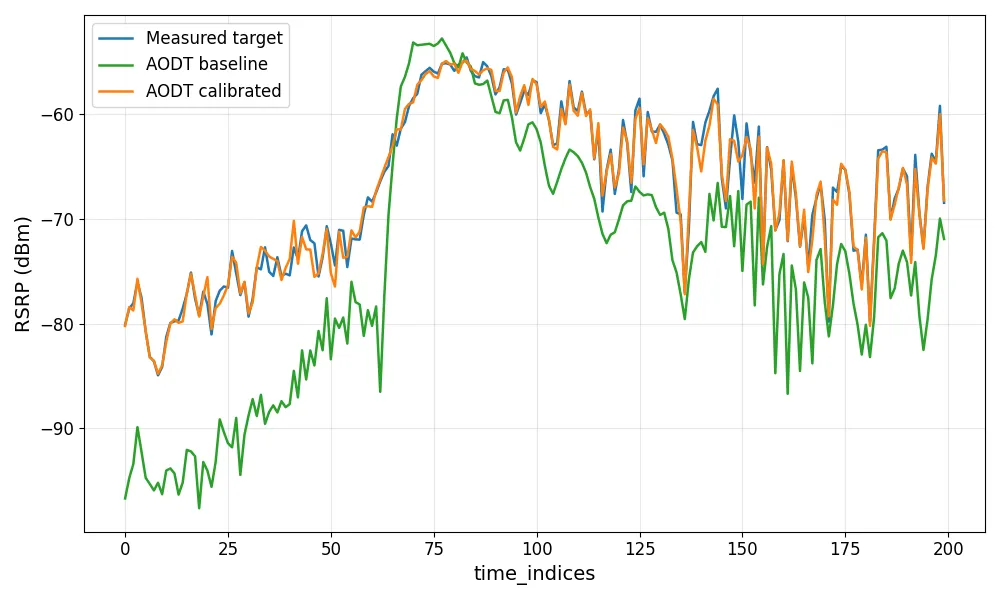
The calibration comparison curve in §3.5 Training overlays the measured power against the predicted power along the UE route. It is produced in this post-processing stage by running the post-calibration simulation with the calibration outputs applied, then comparing the result against the original field measurements; a good calibration makes the two curves overlap.
How post-processing works
At a high level the stage takes the calibration outputs and field measurements as input, then runs four steps — fetch the beamforming artifacts, run a simulation from the §4 Calibrated simulation configuration, apply beamforming to the simulation results, and plot the predicted power against the measurements:
The rest of this section details the input and each step.
Input
Everything the stage starts from lives in the calibration output location (S3/MinIO):
- the beam codebook
RU_*_codebook.csv— the per-RU beam weights, present only when beam training was enabled (shown below); - the measurement traces — one RSRP (Reference Signal Received Power) CSV per RU–UE link, plus the optional per-link beam CSVs when beams are involved;
- the §4 Calibrated simulation configuration
sim_config_calibrated.yml— points a follow-up simulation at the recovered materials, vegetation, UE trajectory, RU orientation, and panels.
Running that follow-up simulation (step 2 below) produces the channel data (Iceberg/Parquet) carrying the CFR (Channel Frequency Response) that beamforming (step 3) consumes.
The codebook is the same artifact described in §4 RU beams output:
RU_1_codebook.csv
Workflow
Each step is a block with its own input and output.
1 · Fetching — pull the beamforming artifacts from their store.
After fetching, the output folder is organized like this:
2 · Run simulation — run the post-calibration simulation with
§4 Calibrated simulation configuration,
the fetched sim_config_calibrated.yml file. This is the simulation immediately
after calibration, not the initial simulation from §2 Simulation setup.
Point it at fresh output locations so it does not overwrite the baseline
simulation database. This regenerates the channel data for the calibrated scene
and produces the predicted power.
3 · Apply beamforming — beamform the channel data from step 2 using the
fetched codebook from step 1. When no codebook exists (RUsBeams was not true),
a single antenna element is used as a baseline.
The output beamformed_rsrp.json holds the predicted RSRP per RU → UE → beam, as
a time array and the matching power values in dBm:
beamformed_rsrp.json
4 · Plotting — overlay the curves; the degree of overlap is the visual check on the calibration result.