

Release Notes
Explore new AODT capabilities, improvements, and changes by release.
Version 1.5.1
AODT 1.5.1 expands platform support, improves EM Solver performance, and makes EM calibration more accurate and more robust.
Notable highlights in this release include:
-
Expanded platform support. This release adds support for ARM platforms, as well as NVIDIA Blackwell GPUs. Both the simulation worker and AODT Viewer can now run on NVIDIA DGX Spark.
-
EM calibration.
- Raypaths and antenna patterns. Beams and custom antenna patterns use less GPU memory, and material lookups are validated before use.
- UE and RU angles. Recovered orientations are now correct when the measurements cover only part of the time axis; time steps with no estimated angle are no longer averaged in.
-
EM Solver
- Fixed surface normals for interactions with instanced geometries (dynamic scatterers and vegetation). Because the normals were exported in object space, scattering off vehicles, as well as transmission and scattering through vegetation, could return
NaNamplitudes, which invalidated the CFR and blocked RSRP import. Normals are now exported in world space, and the EM solver produces finite, correct amplitudes. - Fixed fast mode. Fast mode (
rt_cfg.fast_mode), introduced in AODT 1.5.0, had bugs that caused Doppler and MIMO steering to be incorrect or missing when the flag was set toTrue; both are now correct.
- Fixed surface normals for interactions with instanced geometries (dynamic scatterers and vegetation). Because the normals were exported in object space, scattering off vehicles, as well as transmission and scattering through vegetation, could return
Version 1.5.0
AODT 1.5.0 adds major improvements for simulation automation, EM Solver performance, EM calibration, and mobility modeling, and introduces a new CesiumJS-based UI.
Notable highlights in this release include:
-
Cloud-native, headless-first architecture. AODT 1.5.0 formalizes the headless simulation workflow with a gRPC server/client architecture. You can define scenarios with the AODT client and YAML configuration, run simulations programmatically, access channel data in memory from your application, or inspect exported results from S3-compatible storage and cataloged Parquet tables.
-
Fast EM mode. Fast EM mode accelerates EM solver execution for workflows that need quicker turnaround. When enabled, it applies two approximations: (i) plane-wave approximation for MIMO antenna panels, where the channel coefficients between each Tx/Rx antenna pair are derived from the panel-center path using steering vectors, assuming a single wavefront direction across the array; and (ii) Doppler phase-shift approximation for 14-symbol slot simulations, where per-symbol ray tracing for symbols 2-14 is replaced by a phase rotation applied to the slot’s first symbol response. These approximations reduce the computation time at the cost of accuracy for electrically large arrays, near-field scenarios, or rapidly time-varying channels.
-
Higher EM ray emission capacity. AODT now supports up to 40 million rays per radio unit (RU) over simulation areas of up to 25 square kilometers on an NVIDIA L40S GPU, enabling higher-fidelity EM simulations at city scale.
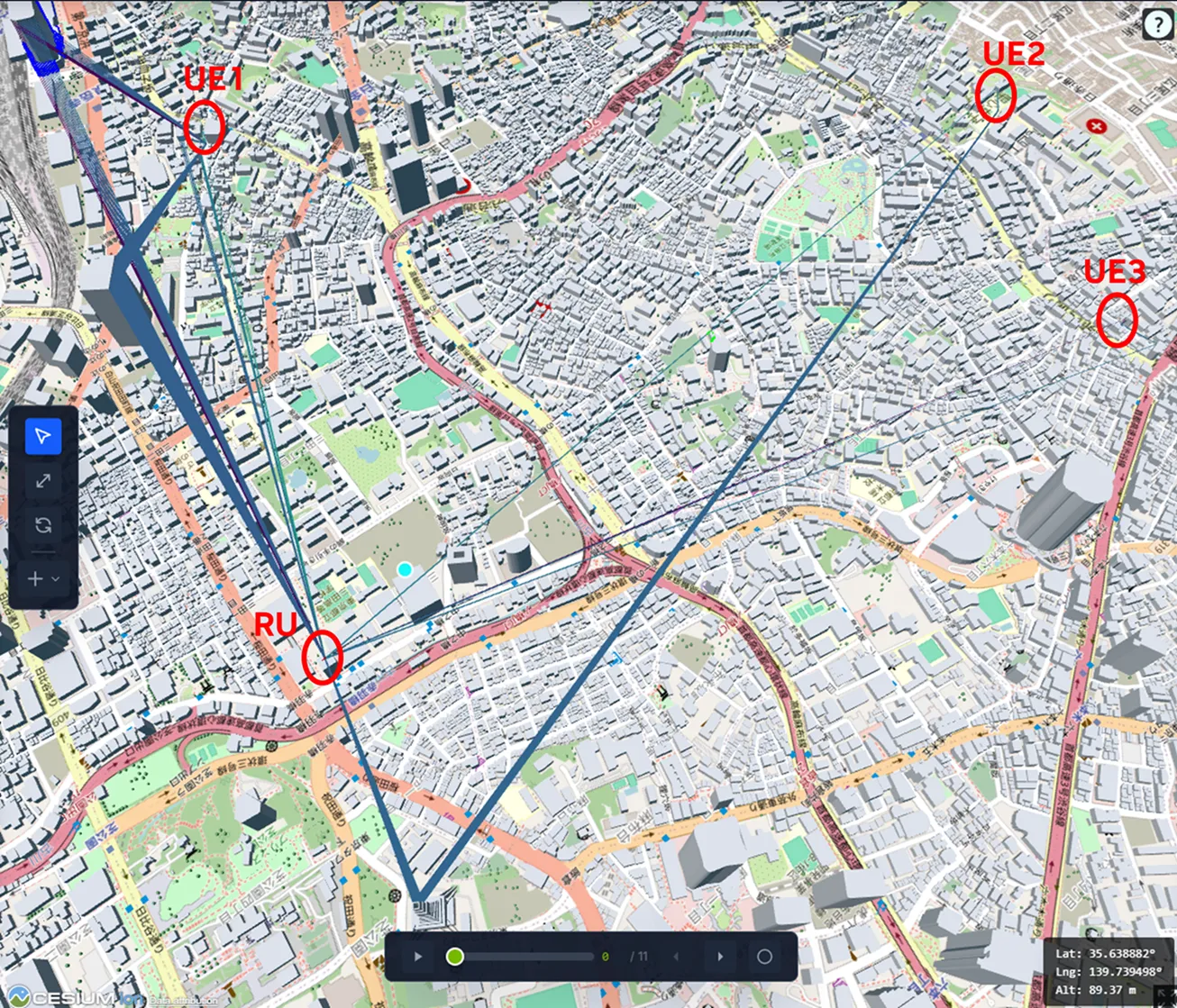 | 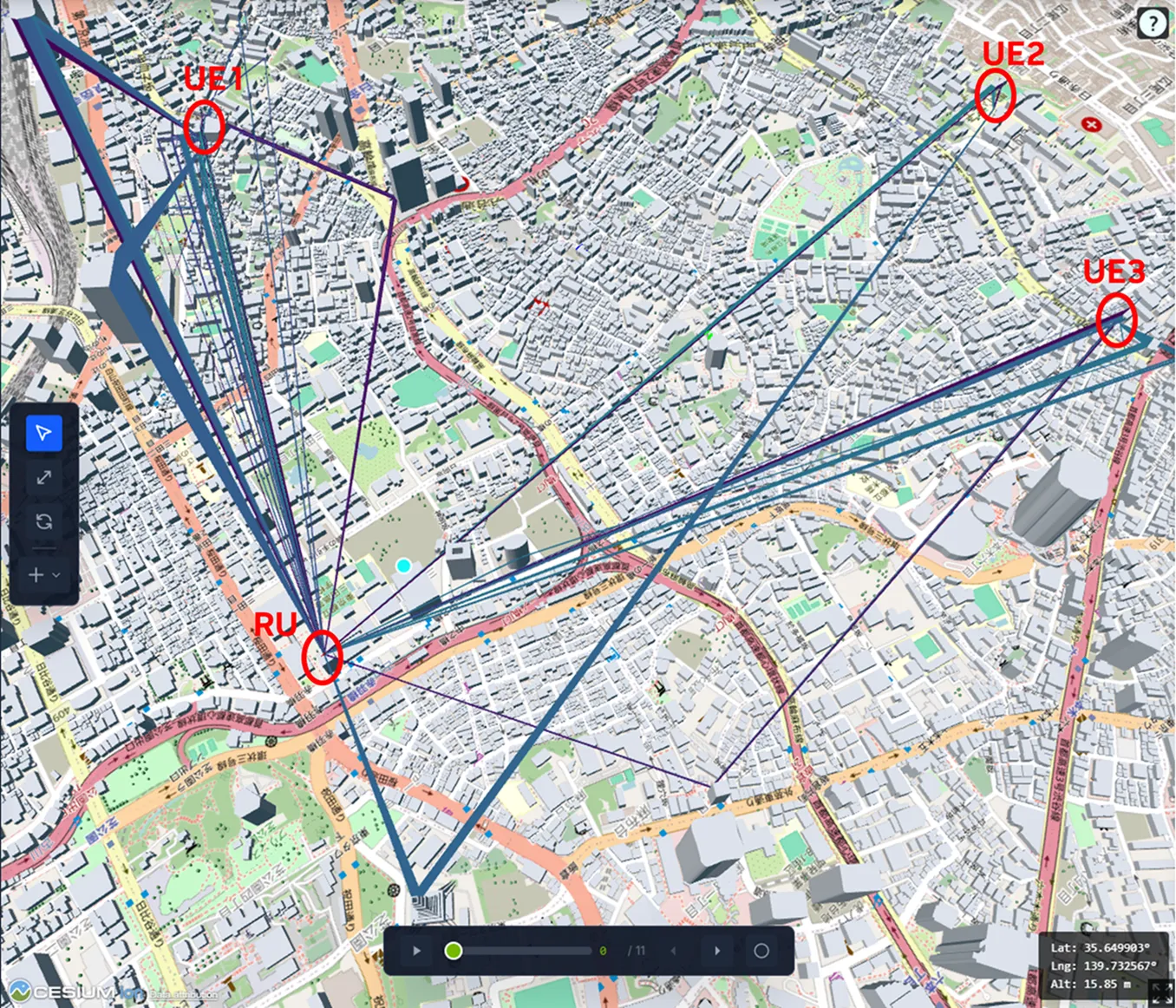 |
|---|---|
| 1 million rays per RU | 40 million rays per RU |
-
EM calibration. Calibration helps align the AODT physical digital twin more closely with reality. Users can run real-world measurement campaigns with relatively simple instrumentation, then use those measurements to calibrate the EM propagation engine and improve prediction accuracy within a scene. The EM calibration workflow enables:
- Calibrated building and surface material outputs
- Calibrated vegetation material outputs
- RU orientation recovery for post-calibration simulations
- UE orientation recovery along measured routes
- RU beam-codebook recovery (Experimental)
-
CesiumJS-based UI. The AODT UI has been rewritten with CesiumJS for a lighter, more responsive 3D geospatial experience. The scene generation pipeline and tooling have been updated accordingly as well, enabling users to generate 3D Tiles and quantized mesh map formats by default. This expanded Cesium support enables higher-performance, larger, and more detailed geospatial datasets, and more dynamic visualizations.
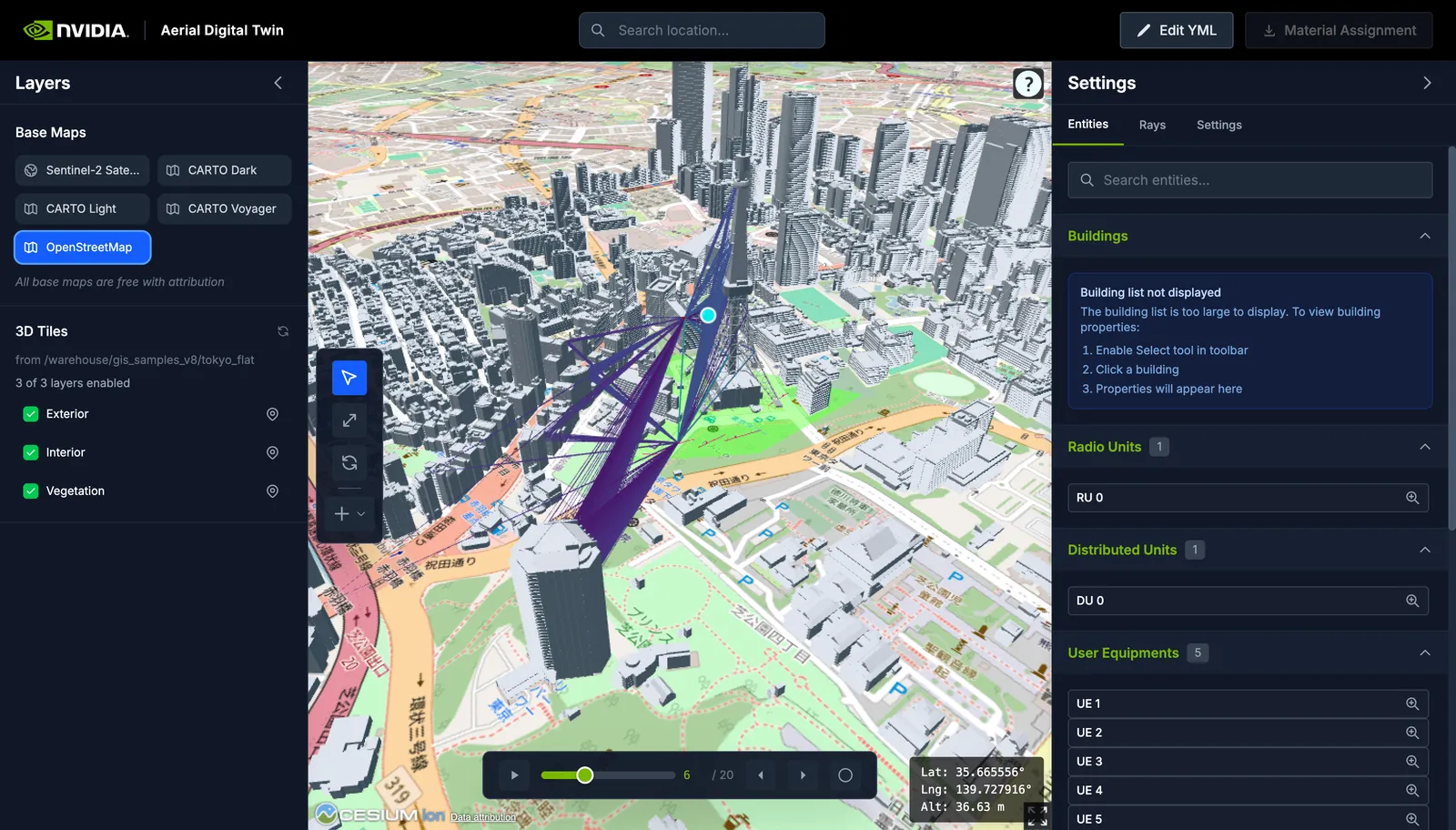
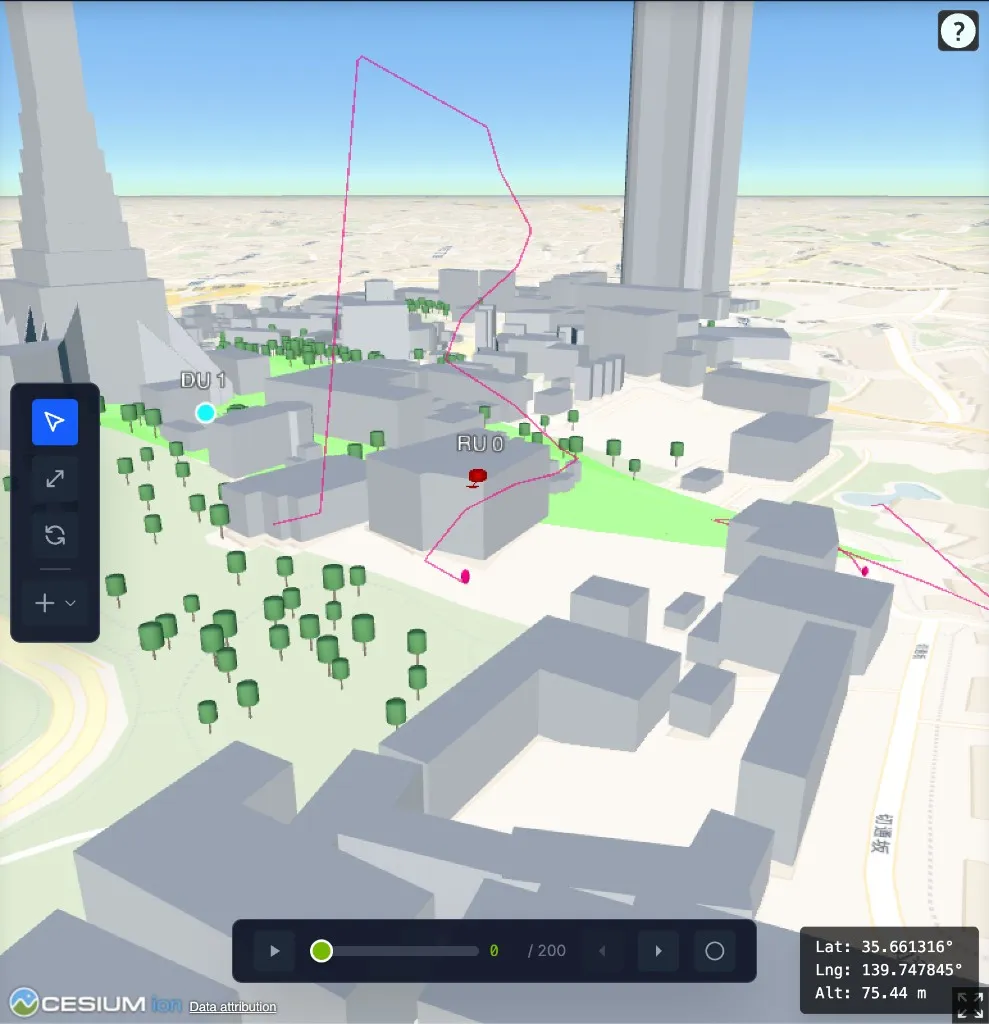
- 3D manual UEs. Manual UE waypoints can now use 3D coordinates, enabling UAV mobility and other altitude-aware mobility scenarios.
- Configurable terrain sources. Users can now select the terrain source
used during scene generation via the
ground_sourceparameter, with support for Terrarium and SRTM. Terrarium provides access to higher-resolution global elevation data than was previously available.
Previous Releases
Version 1.4
AODT 1.4 adds vegetation, the possibility of introducing digital terrain models for OSM and CityGML scenes, and a gRPC-based client/server architecture to easily integrate AODT in your simulator.
-
Vegetation: vegetation can now be added to the 3D scenes, and the EM solver is capable of characterizing diffuse scattering and transmission losses due to the canopies of the deployed vegetation.
-
Digital Terrain Model: all scenes can now be complemented with a high-quality digital terrain model.
-
S3 bucket as a target disk for Clickhouse: when deploying on AWS, the Clickhouse server can be configured to use an S3 bucket as disk.
-
gRPC-based client/server mode: you can finally integrate AODT into your simulator! Through a convenient gRPC client / server architecture, any tool chain in C++, Python (or MATLAB through mex using the C++ code) can be powered by AODT and its high-accuracy physical digital twin.
Version 1.3
AODT 1.3 introduces a suite of powerful features and enhancements designed to enhance simulation realism, functionality, and user experience. Significant features include georeferencing, GPX-based UE mobility, dynamic scattering, headless mode, and support for AWS cloud. Below is a detailed overview of the key features included in this release.
-
Geo-referencing: All points in any scene are now fully georeferenced. That is, every position in the map has a precise longitude and latitude value, which can be accessed both manually through the graphical user interface and procedurally from the physical digital twin.
-
GPX-based UE mobility: thanks to georeferencing, UEs can now be added to the simulation from GPX files, thus allowing the simulation of drive tests in the field or measurement campaigns.
-
Vehicular Mobility for Scatterers: this feature enables the vehicular mobility of scatterers on roads by integrating with SUMO (Simulation of Urban MObility).
-
Dynamic Scattering: This feature adds the impact of moving vehicles (reflectors) to the radio environment. Based on the previous feature, this allows us to create more realistic temporal evolutions of the wireless channels.
-
Headless Mode: release 1.3.0 extends the headless mode introduced in Release 1.2 and adds the capability to run simulations without a pre-existing database. In conjunction with the georeferencing feature, it enables running simulations without requiring any interaction with the graphical user interface.
-
Support for AWS-based deployments: release 1.3.0 can be installed on AWS in addition to Azure.
-
EM and GIS workers now use accelerated Python: the physical digital twin and the scene importer now use accelerated Python, enhancing programmability and ease of use.
-
NATS replacing OV Connect as message broker: NATS is now used as the default lightweight and open-source message broker for the Aerial Omniverse Digital Twin.
Known Issues
- Failed to initialize NVML: Unknown Error: The worker may lose connection to the GPU if running idle for a long time. If this happens, restart the worker.
- Behavioral mobility for both UEs and vehicles through SUMO remains experimental for release 1.3.0, with some known drawbacks:
- SUMO might not be able to generate the desired number of UEs or vehicles when enabled. This can be mitigated using a large spawn zone or by opting for the original mobility model.
- No more than 50 vehicles can be added to the scene, regardless of its size.
Version 1.2
The AODT 1.2 release provides several new features and enhancements, including single GPU support, outdoor-to-indoor propagation model, 64TRx and MU-MIMO, and QoS with different Block-Error-Rate (BLER) settings. Below is a detailed overview of the key features included in this release.
Refer to the (AODT 1.2 Release Note slides) for more information.
- Single-GPU operation: Reduces the hardware requirement for AODT simulation and provides a more cost-optimized solution.
- GIS Import: Provides the ability to import Geographic Information System (GIS) data, with new features in the following areas:
- Procedural Inter-Floor and Intra-Floor Mobility: Introduces advanced procedural algorithms to model mobility between floors (inter-floor) and within a floor (intra-floor). This feature improves the reach of simulations by accurately representing user movements in multi-story buildings.
- Python Pipeline: Allows users to script and automate workflows for GIS import.
- EM Solver: The EM Solver has been enhanced and benchmarked. The EM Solver has the following new features:
- Enable/Disable Diffraction: Users can now enable or disable diffraction in their simulations, allowing for more precise control over the simulations in terms of use cases and scenarios.
- Indoor/Outdoor-to-Indoor: Enhances the modeling of wireless communication from outdoor cell sites to indoor UEs. This feature is particularly useful for simulations involving users inside a building served by outdoor cells and expands the number of use cases supported by the AODT.
- Fix Missing Diffractions: Issues related to missing diffractions have been addressed.
- User Interface: Enhancements to the user interface (UI) include the following:
- DB Replay and Selection of DB Content: Users can replay offline the results stored during a simulation for further analysis. Users can also select specific content from the database for replay and analysis. The database (DB) replay feature is applicable for both indoor and outdoor simulations. The EM worker will automatically detach from the UI once the database replay is confirmed, preventing it from overwriting the existing database. Users may reattach the worker if they wish to overwrite or duplicate the database.
- Indoor Visualization: Enhances the ability to visualize indoor UEs.
- Deploy RU on Walls: Users can now deploy Radio Units (RUs) on walls of a building, not only on the roof.
- Disallow Edits Before Worker Attachment: Ensures data integrity and prevents unintentional changes to simulations.
- UE Mobility: This release provides several enhancements to User Equipment (UE) mobility.
- Manually defined UE mobility: Waypoint azimuth offset, waypoint speeds, and waypoint pauses can now be manually edited after procedural generation.
- UE Generation with Tunable Indoor/Outdoor UE Ratio: The ratio of indoor to outdoor UEs can now be manually tuned, whereas previous releases used only outdoor UEs. For example, the ratio can be tuned to the typical commercial values of 80% indoor to 20% outdoor.
- AI/ML: This release provides examples for the following AI-driven features:
- Example of PUSCH Channel Estimation Inference with AODT RAN Simulation: An example of Demodulation Reference Signal (DMRS) channel estimation inference demonstrates the integration of AI with AODT Radio Access Network (RAN) simulation capabilities.
- Example of SRS Channel Estimation Inference with AODT RAN Simulation: An example of Sounding Reference Signal (SRS) channel estimation inference demonstrates the integration of AI with AODT Radio Access Network (RAN) simulation capabilities.
- RAN: This release includes several enhancements to the Radio Access Network (RAN) simulation features. In particular, the support for Multi-User Multiple Input Multiple Output (MU-MIMO) in both downlink (DL) and uplink (UL) slots.
- Support 64 Antennas at RU: The ability to support up to 64 antennas at the Radio Units (RUs) expands the scope and scale of RAN simulations.
- Different Target BLERs: Different target Block Error Rates (BLERs) can be set for different UEs. The BLERs are used to guide adaptive modulation and coding schemes. This provides more granular control over RAN simulations, allowing for diverse and tailored performance analyses.
- RX FT Dump: The Receiver (RX) Frequency Time (FT) grid dump feature allows users to more easily capture data.
Version 1.1
Features for AODT 1.1 Release (1.1 Release Note slides):
-
User Interface
- DUs and DU-RU association
- manual and automatic based on shortest distance
- Updated to NVIDIA Omniverse KIT 106.0.1
- Added IndeX rendering engine for higher frame rates in presence of large number of rays
- Import from CSV and FFD files for custom antenna patterns
- Import and export of antenna panels to CSV file
- RU telemetry
- throughput and MCS statistics
- DUs and DU-RU association
-
Scene Importer
- Support for OpenStreetMap, with NYC sample map
- Job execution from the graphical interface
- Semantic material associations for LOD3+
- Mobility mesh with configurable triangle sizes
- General CityGML import improvements
-
Mobility model
- Straighter paths for user-defined UE mobility routes
-
EM Solver
- Directional diffuse scattering models
- Support for user-defined and per-element custom antenna patterns*
- Calculation of active element patterns for halfwave dipoles
- Configurable UE reception sphere radius
- EM interaction types added to raypaths table in SQL DB
*For custom antenna patterns, the ranges of thetas and phis need to follow the standard conventions: for thetas and for phis.
-
RAN
- SRS transmission for UEs
- SRS channel estimation for DUs
- SRS-based beamforming for DUs
-
AI
- Example of AI-based PUSCH channel estimation in RAN simulation
-
General
- Support for SM86
- Runtime check for CUDA compute capability in aodt_sim
Version 1.0
- Initial Release