

Results and Data
AODT simulation outputs are written as structured data products that can be queried or inspected after a run. Batched simulation results are stored as S3 Parquet tables and can be queried from the catalog. RAN waveform dumps are optional H5 files for inspecting received I/Q samples.
Use this section to understand what files and tables are produced, where to find them, and how to interpret their fields.
Storage and Catalog
Exported simulation outputs are written as Parquet files in S3-compatible storage and registered in an Iceberg catalog. The S3-compatible store contains the data files, while the catalog stores table metadata, including table names, schemas, snapshots, and the locations of the Parquet files.
In the default local deployment, MinIO provides S3-compatible storage and Nessie
provides the Iceberg REST catalog at http://nessie:19120/iceberg. In AWS
deployments, Amazon S3 provides storage and AWS Glue provides the catalog.
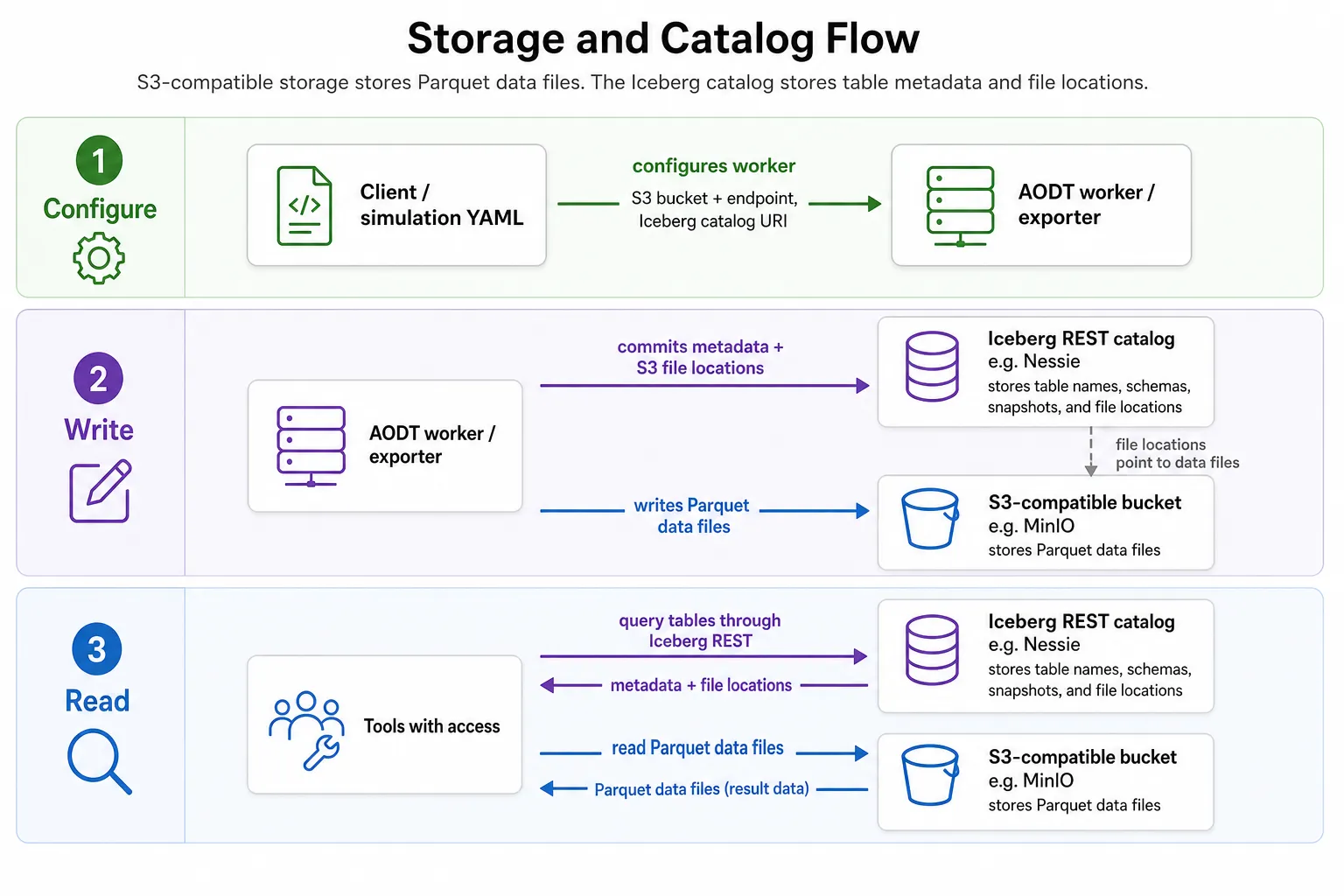
The scripts in client/examples/example_query_tables.py and
client/examples/example_drop_database.py show example code for querying
the catalog and tables, and how to drop test data when it is no longer needed. You can adapt the table-querying code for your
own analysis or post-processing workflows.
Related Workflows
- Use Batched Mode to produce complete catalog-queryable result tables for all time steps.
- Use Interactive Mode when your application needs selected results during a run.