


Introduction to SIPL#
The SIPL is NVIDIA’s modular, extensible framework for camera and image sensor integration, image processing, and control, which supports continuous streaming of image data from camera sensors.
SIPL provides a unified API and driver model for a wide range of camera hardware. On Jetson Linux (L4T), SIPL supports GMSL and CoE camera systems, including sensors based on the Holoscan Sensor Bridge (HSB). The same core pipeline, Query/Control APIs, and UDDF driver model apply across supported transports.
SIPL is designed for high reliability, safety, and ease of integration in Jetson embedded platforms and is released as a public SDK package for the Jetson AGX Thor Developer Kit.
GMSL (Gigabit Multimedia Serial Link) is the predominant camera connectivity technology for automotive and robotics platforms. GMSL carries full-resolution video over a single coaxial or shielded twisted-pair cable with bidirectional control signaling on the same wire, and is widely used to integrate multiple high-resolution cameras into Jetson-based vision systems.
For more details on GMSL architecture in the SIPL framework, refer to GMSL Architecture Overview.
For more details on CoE architecture in the SIPL framework, refer to Camera-over-Ethernet Overview.
For more details on HSB, refer to Holoscan Sensor Bridge.
SIPL Architecture Overview#
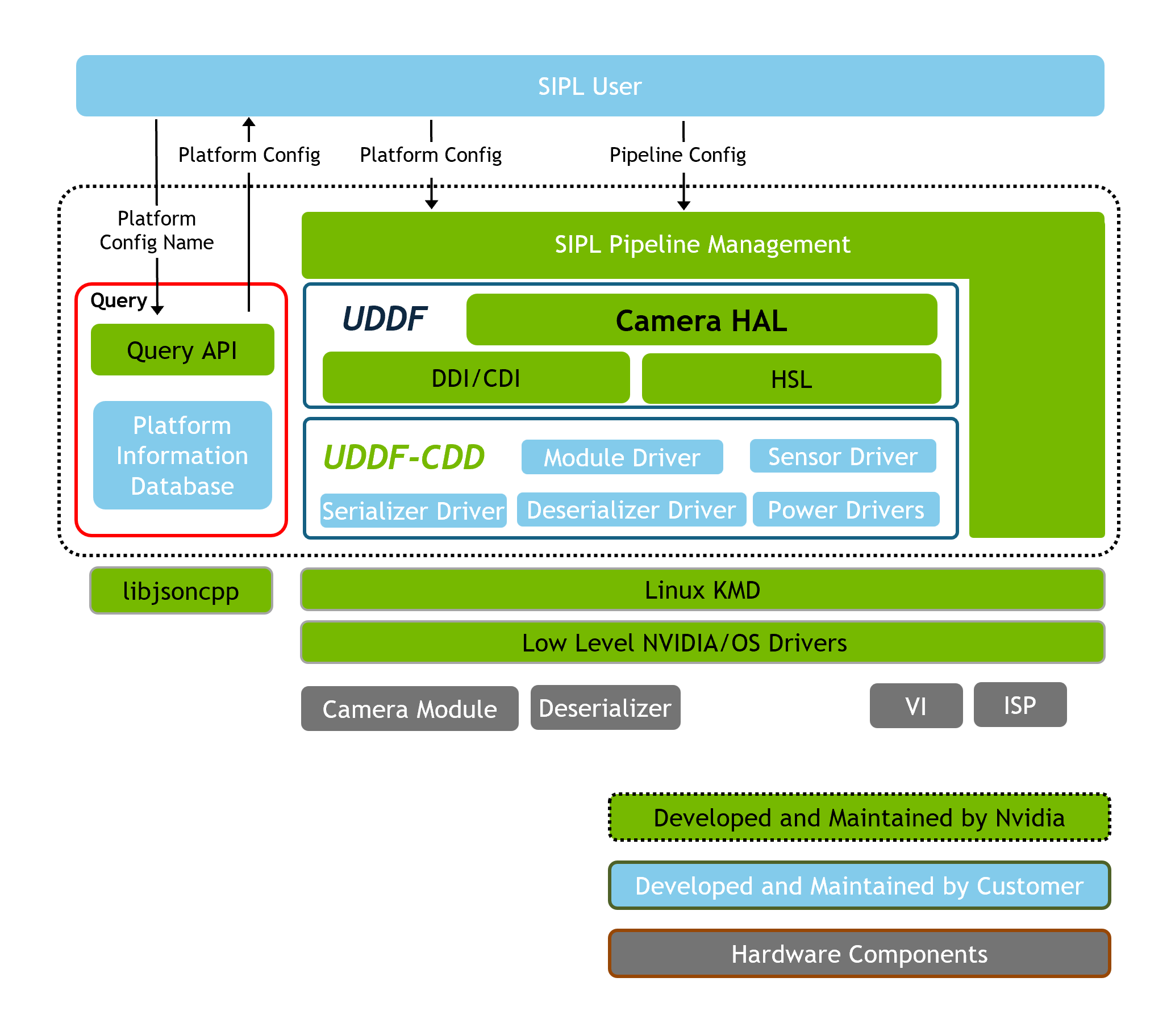
Overview of the SIPL GMSL framework architecture.#
The preceding diagram illustrates the GMSL path on Jetson: a deserializer on the SoC side connects to one or more remote camera modules over GMSL links, each module containing a serializer and at least one image sensor (and optionally an EEPROM, PMIC, or IMU). The deserializer drives video into the SoC via MIPI CSI-2 (NVCSI); the same SIPL core (transport abstraction, UDDF, ISP) is shared with CoE, which uses MGBE and Ethernet instead of CSI/serializer links. For the full GMSL stack diagram, driver types, and boot flow, see GMSL Architecture Overview.
For more details on SIPL application development, refer to SIPL Camera Application Developer Guide.
For more details on Unified Device Driver Framework (UDDF) driver development, refer to Guide to Writing UDDF Drivers.
SIPL Core also connects to Query API and Control API.
Key Directories (Public Headers and Samples)#
Sample code for SIPL application and UDDF driver development is available in the SIPL package, which can be compiled and deployed on a Jetson device as needed.
Refer to the following directories:
sipl/include/           # Main SIPL public API headers
sipl/samples/           # SIPL samples (applications)
sipl/uddf/samples/      # UDDF samples (drivers)
sipl/uddf/include/uddf/ # UDDF public headers (ddi, cdi, helpers)
Key Components of SIPL Framework#
A brief overview of key components of SIPL framework:
JSON Configuration
Camera sensor and transport configuration is described in JSON files.
For GMSL, these files define deserializer, serializer, sensor, and power-control component names, CSI port, PHY mode, I2C addresses, link enable masks, and module-to-link assignments. For CoE, the files instead define camera MAC and IP addresses, HSB IDs, and Ethernet transport parameters.
For more details, see SIPL Query JSON Guide.
SIPL Application Structure
SIPL applications use SIPL Query and Control APIs to configure and control camera sensors.
The
sipl/samples/directory contains SIPL application samples.
Camera Sensor Driver Structure
Sensor drivers are implemented as UDDF shared libraries.
All hardware access is performed via Hardware Sequence Language (HSL) sequences and hololink drivers.
Sensor drivers are discovered and loaded dynamically by UDDF and CameraHAL.
The
sipl/uddf/samples/directory contains UDDF sensor driver samples.
Key Interfaces and Classes
SIPL interfaces:
INvSIPLCamera,INvSIPLCameraQuery,INvSIPLClient, and so on. (Seesipl/include/).UDDF interfaces for sensor drivers:
IDriver,IHardwareAccess,ICameraSensorControl, and so on. (Seesipl/uddf/include/uddf/).
Key Structures
ModuleConfig,TransportConfig,PlatformCfg,SensorSystemConfig, and so on. (Defined in thenvsipl::sensorconfignamespace; seesipl/include/NvSIPLCameraTypes.hpp).UDDF:
DeviceTable,SensorAttributes, and so on. (Seesipl/uddf/include/uddf/).
SIPL Use Cases#
Industrial and robotics vision systems.
Smart city and surveillance camera networks, with continuous streaming support.
High-speed, high-reliability image capture pipelines.
Rapid prototyping and validation of new camera modules.
Flexible support for any type of camera transports using Camera HW abstraction layer (for future development).
Safety, reliability, and certification (for future development).
Benefits and Limitations Compared to Previous Camera Software Architecture#
Benefits
Modular, extensible driver model (UDDF).
Hardware abstraction via UDDF and HSL for safety and portability.
JSON-based configuration for easy deployment.
Designed for safety, reliability, and certification (for future development).
Better CPU utilization and resource optimization with lower latency for image processing (for future development).
Better support for multi-camera streaming systems and multi-camera (such as daisy-chain ,star and stereo) topologies.
Unified, abstracted API for supported cameras with HSB interface.
Limitations
Requires C++17 toolchain and modern build system.
Some advanced features might require vendor-specific driver extensions.
Hardware support is limited to platforms with SIPL integration.
Per frame control similar to Argus is not supported.
UDDF#
UDDF is NVIDIA’s standardized driver framework for camera and multimedia devices.
Provides a clear separation between driver logic (DDI) and hardware access (CDI).
Enables third-party and vendor driver development with minimal dependencies.
Supports dynamic driver discovery, loading, and management.
All hardware access is performed via HSL, ensuring safety and abstraction.
HSL#
HSL is a domain-specific language for describing hardware access sequences (such as I2C and GPIO).
Used by UDDF drivers to interact with hardware in a safe, abstracted way.
HSL sequences can be static (precompiled) or dynamic (built at runtime).
PyHSL is the Python-based source language for authoring HSL sequences.
HSL enables safety certification and portability by minimizing driver code complexity.
For more details, see the following documentation:
Configuration Using SIPL Query and JSON Database#
SIPL supports a database-driven configuration model (JSON) to describe cameras, modules, and transports.
Applications can load and validate configurations at runtime via the SIPL Query API, or construct equivalent configurations programmatically.
SIPL Query decouples camera configuration from application code.
JSON files define all camera, transport, and module settings, based on the sensor configuration.
The SIPL Query API loads, validates, and provides these settings to SIPL Core at runtime to initialize the camera pipeline.
Alternatively, a SIPL application can take JSON files as input to configure the camera and transport settings.
For more details, see SIPL Query JSON Guide.
Example JSON fragments for a GMSL camera:
{
  "platformTransportSettings": [
     {
         "name": "jetson-thor",
         "description": "Thor - Jetson AGX Devkit (Thor, 1 external DeSer)",
         "boardIdPrefix": "Jetson Thor",
         "enableMasks": ["0x1111"],
         "transportSettings": [
             {
                 "name": "transportSettings_jetson-thor_AB",
                 "type": "GMSL",
                 "description": "GMSL transport settings for CSI-AB (Thor - External DeSer)",
                 "csiPort": "csi-ab",
                 "deserInfo": {
                     "name": "Max96712GmslDeserializer",
                     "i2cAddress": "0x29"
                 },
                 "powerControlInfo": {
                     "deserializerInfo": {
                         "name": "TegraDeserPowerDriver",
                         "gpioPinIndex": 2097154
                     },
                     "moduleInfo": {
                         "name": "",
                         "i2cAddress": "0x27"
                     }
                 },
                 "i2cDevice": 9,
                 "desI2CPort": 0,
                 "phyMode": "dphy",
                 "groupInitProg": true
             }
         ]
     }
  ]
  "cameraConfigs": [
     {
         "name": "R0SIM623S5RU1197NB3",
         "type": "GMSL",
         "description": "Smart Lead IMX623 RGGB GMSL Camera - 1920x1536 30FPS",
         "serInfo": {
             "name": "MAX96717F",
             "i2cAddress": "0x40"
         },
         "linkMode": "LINK_MODE_GMSL2_3GBPS",
         "fsyncMode": "external",
         "mipiSettings": {
             "cphyRate": 2500000,
             "phyMode": "cphy"
         },
         "sensorInfo": [{
             "name": "IMX623",
             "description": "Sony IMX623 RGGB Sensor for Smart Lead GMSL module",
             "i2cAddress": "0x1A",
             "numContext": 1,
             "virtualChannels": [
                 {
                     "cfa": "rggb",
                     "embeddedTopLines": 1,
                     "embeddedBottomLines": 22,
                     "inputFormat": "raw12rj",
                     "width": 1920,
                     "height": 1536,
                     "fps": 30.0,
                     "isEmbeddedDataTypeEnabled": false
                 }
             ]
         }],
         "eepromInfo": {
             "name": "GT24C64D",
             "i2cAddress": "0x54"
         }
     }
   ]
}
Public API Quick Start#
The following snippets show a typical flow using SIPL APIs to query configuration and initialize a pipeline. The API details should be referenced from the installed SIPL package. For more details, see the README.md files in the SIPL package.
Example code snippet:
#include "NvSIPLCameraQuery.hpp"
#include "NvSIPLCamera.hpp"

int main() {
    // 1) Query and load configuration (JSON database)
    std::unique_ptr query = INvSIPLCameraQuery::GetInstance();
    SIPLStatus status = query->ParseDatabase();
    if (status != NVSIPL_STATUS_OK) { return -1; }

    // Retrieve camera device/transport info as needed
    const CameraDeviceInfoList* deviceList = query->GetDeviceInfoList();
    for (const auto& mod : deviceList->gmslModuleList) {
        std::cout << "GMSL module: " << mod.name << std::endl;
    }
    for (const auto& mod : deviceList->coeModuleList) {
        std::cout << "CoE module: " << mod.name << std::endl;
    }

    // ... select desired modules/transports and assemble a SensorSystemConfig ...

    // 2) Initialize camera pipeline
    std::unique_ptr<INvSIPLCamera> camera = INvSIPLCamera::GetInstance();
    nvsipl::sensorconfig::SensorSystemConfig sysConfig{}; // Fill from query results or manual config
    camera->SetPlatformCfg(sysConfig);

    status = camera->Init();
    if (status != NVSIPL_STATUS_OK) { return -2; }

    status = camera->Start();
    if (status != NVSIPL_STATUS_OK) { return -3; }

    // 3) Capture loop (simplified)
    // Use SIPL APIs to acquire frames and process them

    // 4) Shutdown
    camera->Stop();
    camera->Deinit();
    return 0;
}
Troubleshooting and Diagnostics#
Validate your JSON configuration using SIPL Query before deployment.
Ensure all required drivers are installed and referenced in the Camera config, as applicable.
Check logs for configuration or driver errors.
Use error handling APIs to retrieve detailed diagnostics.
Common issues:
Incorrect CSI port (
csiPort) or PHY mode (phyMode) in JSON.Deserializer, serializer, or sensor
namedoes not match theDriverInfo.nameexported by the UDDF driver library.Wrong I2C bus number or I2C address for deserializer or power-control devices.
Incorrect
enableMasksorlinkIndexcausing the desired GMSL links to remain disabled.Missing or incompatible UDDF driver libraries.
Insufficient memory or bandwidth for camera streams.
Quick Start#
Configure your camera system: Write your JSON file. For more details, refer to SIPL Query JSON Guide.
Write your application: For more details, see SIPL Camera Application Developer Guide.
Troubleshooting:
Check logs for configuration or driver errors.
Use error handling APIs to retrieve detailed diagnostics.
Ensure all required drivers are installed and referenced in the Camera config.