


GMSL Architecture Overview#
Gigabit Multimedia Serial Link (GMSL) is the predominant camera connectivity technology for automotive and robotics platforms. GMSL carries full-resolution video over a single coaxial or shielded twisted-pair cable with bidirectional control signaling on the same wire. On NVIDIA platforms, the SIPL framework abstracts GMSL hardware through the Unified Device Driver Framework (UDDF), so application code sees a uniform camera API regardless of whether the physical transport is GMSL or Ethernet (CoE).
This page describes:
The hardware topology that GMSL drivers model.
The five UDDF driver types and their interfaces.
The SIPL camera HAL initialization sequence.
How multiple link modes and PHY configurations are represented.
Hardware Topology#
A GMSL system places a deserializer on the SoC side and one or more camera modules on the remote end. Each camera module is connected to the deserializer by a single GMSL link. A module always contains a serializer and at least one image sensor; it may also contain an EEPROM, a PMIC (power management IC), an IMU, or other peripherals.
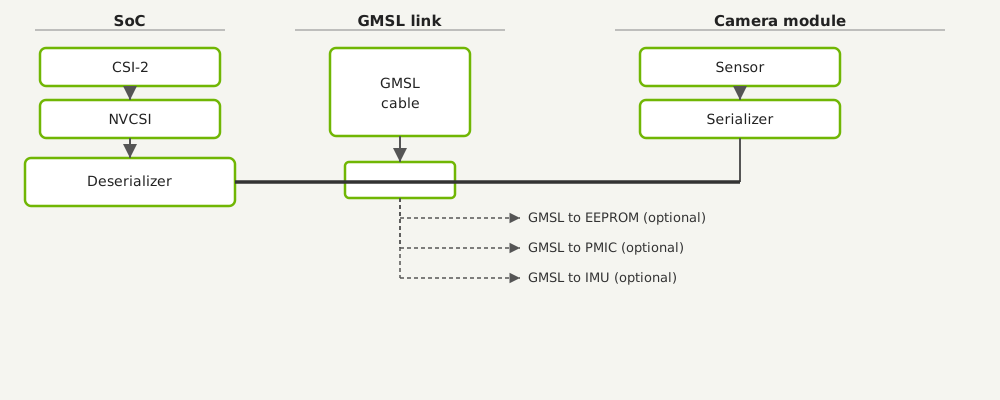
CSI-2 and NVCSI feed the deserializer; the GMSL cable connects the deserializer to the remote sensor and serializer, with optional GMSL branches to EEPROM, PMIC, and IMU.#
A single deserializer supports up to four simultaneous GMSL links (maximum of 4 links). Each link is independently controllable.
The deserializer drives video over MIPI CSI-2 to the SoC camera interface (NVCSI). CSI port
assignments (csi-ab, csi-c, csi-ef, etc.) and PHY modes (D-PHY or C-PHY) are
configured per deserializer in the platform transport settings JSON.
UDDF Driver Types#
UDDF represents the GMSL topology with five driver types. Each type maps to one C++ DDI interface that your driver implements.
Driver Type |
DDI Interface |
Role |
|---|---|---|
Deserializer |
|
Controls the deserializer chip on the SoC side. Handles link enable/disable, serdes pairing, link-lock verification, error reporting, and streaming start/stop. |
Camera module |
|
Controls all hardware on a single camera module. Delegates serializer and sensor
operations to sub-components retrieved via |
Serializer (sub-component) |
|
Exposed from the module driver via |
Deserializer power |
|
Turns the deserializer power rail on and off. Optional; omit when power is managed outside the UDDF layer. |
Module power |
|
Turns power on and off for individual camera modules attached to a deserializer. Optional; supports both index-based and bitmask-based control. |
All five interfaces follow the same driver lifecycle: ConfigureDriver() →
ProbeHardware() → Init() → streaming → Deinit(). Each entrypoint receives a
context struct (e.g., DeserializerContext, GmslModuleContext) that carries
hwAccess, driverServices, and all configuration data. Drivers do not need to cache
these handles between calls.
For the complete interface definitions, see Guide to Writing GMSL UDDF Drivers.
Link Modes#
The GMSL version and link speed are expressed as a DeserializerLinkMode enum value, set
per link in the initConfig.linkModes array of DeserializerContext. The supported values
are:
Enum Value |
Meaning |
|---|---|
|
No GMSL link required (for example, TPG mode with no physical camera). |
|
GMSL version 1. |
|
GMSL2 at 6 Gbps (full bandwidth). |
|
GMSL2 at 3 Gbps (reduced bandwidth). |
|
GMSL3. |
|
GMSL3 deserializer paired with a GMSL2 serializer. |
In the Sensor System Config JSON, the link mode is set through the linkMode field of a
cameraConfigs entry. For example:
{
    "name": "MyCameraModule",
    "type": "GMSL",
    "linkMode": "LINK_MODE_GMSL2_6GBPS",
    ...
}
The Sensor System Config JSON schema is described in JSON File Categories.
PHY Mode and CSI Rates#
Each deserializer outputs video to the SoC over MIPI CSI-2. Two PHY modes are supported:
|
Description |
|---|---|
|
D-PHY (default). Rates are specified in |
|
C-PHY. Rates are specified in |
The PHY mode is declared in the transport settings JSON ("phyMode": "dphy" or
"phyMode": "cphy") and propagated to the driver via DeserializerContext::BasicConfig.
Frame Sync#
Sensors can be synchronized across links using a frame sync signal. Two modes are
available, expressed as FsyncMode:
|
Description |
|---|---|
|
Frame sync is driven externally from the SoC (Tegra). This is the default and the most common mode for multi-camera synchronization. |
|
Internal oscillator mode. The deserializer generates its own sync signal. |
The FSYNC mode is set in both the camera config JSON ("fsyncMode": "external") and the
module context (GmslModuleContext::Config::fsyncMode).
Serdes Initialization Sequence#
After the deserializer and all camera modules are powered on and the deserializer itself is initialized, the following per-link sequence pairs each serializer with the deserializer. The SIPL camera HAL drives this sequence for each active link.
IGmslDeserializer::ControlLink(context, linkIndex, true)– enables the target link and disables all other links on the deserializer. This isolates the link so that the serializer can be addressed at its default physical I2C address without collisions.IGmslSerializer::SerInit(context)– initializes the serializer on the now-isolated link. The driver must set up virtual-to-physical I2C address translations as specified incontext.config.addressTranslationsso that subsequent commands from other drivers reach the correct device.IGmslDeserializer::InitWithSerializer(context, linkIndex)– gives the deserializer driver an opportunity to perform per-link operations such as GPIO port forwarding or diagnostic tests. The serializer driver is accessible viacontext.initConfig.serializers[linkIndex].IGmslSerializer::SerPrepareForModuleInit(context)– completes any remaining serializer setup before the rest of the camera module is initialized.IGmslModuleControl::ProbeHardware(context, alreadyInitialized)andIGmslModuleControl::Init(context)– probe and initialize the camera module (sensor, EEPROM, etc.) while the link is still isolated.IGmslDeserializer::FinalizeInitWithSerializer(context, linkIndex)– finalizes the link. Other links may also be re-enabled at this point.IGmslSerializer::SerFinalizeInit(context)– completes serializer initialization after all module elements are ready.
Any step may be implemented as a no-op for hardware that does not require it.
Multi-Camera Systems#
SIPL supports multiple deserializers on a single platform, each assigned to a different CSI
port. Each deserializer is configured independently through a separate transport settings entry.
Camera modules are assigned to a deserializer by the linkIndex field in the platform config
JSON, and to a CSI port by the csiPort field of the transport settings entry.
For heterogeneous configurations (mixing different sensor types on the same platform), separate
cameraConfigs entries are created for each sensor type. SIPL routes each camera module to
the correct deserializer based on the matching transport settings name.
PHY replication is supported for systems that require the same video stream to appear on two
CSI PHYs simultaneously. The replicationInfo array in DeserializerContext::BasicConfig
provides up to two ReplicationEntry pairs, each mapping a source PHY index to a destination
PHY index.