


UEFI Payload Encryption#
Important
UEFI Payload Encryption is not supported for the Jetson Thor series.
UEFI Payload Encryption encrypts UEFI payloads. This security measure requires the use of a specific UEFI payload encryption key, which is user-defined and stored in the encrypted key blob, then flashed onto the encrypted key store (EKS) partition.
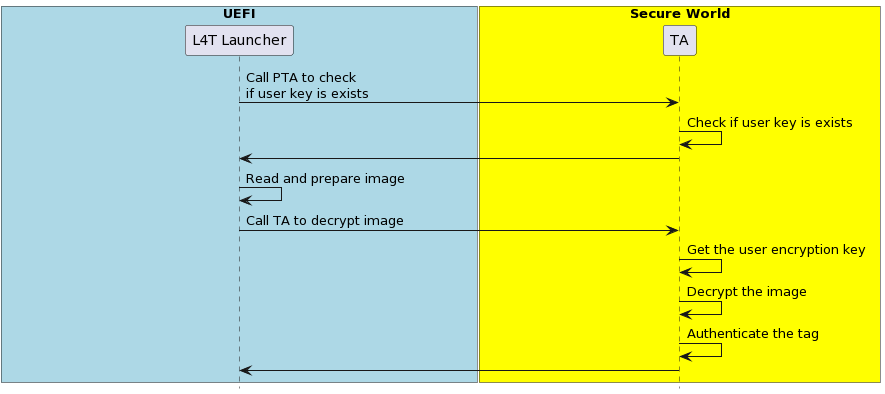
When the system boots into OP-TEE, the user key PTA extracts this key from EKB. When the system boots to UEFI, the L4tLauncher (OS Loader) calls the trusted application to decrypt and load the encrypted UEFI payloads.
Note
UEFI Payload Encryption can be enabled only when UEFI Secure Boot is enabled.
The UEFI payloads are:
initrd
kernel images in the rootfs and in the kernel and the recovery partitions.
kernel-dtb images in the rootfs and in the kernel-dtb and the recovery-dtb partitions.
The UEFI Payload Encryption implementation includes the UEFI, user key, and the TA:
UEFI: Call TA to decrypt and authenticate UEFI payloads and aborts the boot on error.
User Key: A user-defined UEFI payload encryption key that is stored in EKB.
Trusted Application (TA): Decrypt and authenticate the UEFI payloads using the UEFI payload encryption key.
To activate UEFI Payload Encryption, create a unique user key, generate customer EKB, and enable UEFI Payload Encryption during the flashing process.
The following flow chart illustrates how the encrypted payloads are decrypted and loaded:
Prepare the User Encryption Key#
Generate a random UEFI payload encryption key (256 bits long) using a random number generator.
Save the output to
user_encryption.keyin big-endian hex format.
Generate the EKB#
Generate the EKB (refer to EKB Generation for more information).
Copy the EKB to the
<Linux For Tegra>/bootloaderfolder.
Note
L4TLauncher cannot detect whether UEFI payload encryption is enabled. However, if the EKB contains the UEFI payload encryption key and UEFI secure boot is enabled, L4TLauncher will assume that UEFI payload encryption is enabled and will attempt to decrypt the UEFI payloads.
Enable UEFI Payload Encryption During the Flashing Process#
The --uefi-enc <user_encryption.key> option is used to provide the user encryption key and enable UEFI Payload Encryption.
To enable UEFI Payload Encryption, you must simultaneously enable UEFI secure boot. In this condition, the --uefi-keys and the --uefi-enc option are specified, and the flashing utility will generate the signed and encrypted UEFI payloads and flash them to board.
Using the --uefi-enc <user_encryption.key> Option to Provide the User Encryption Key and Enable UEFI Payloads Encryption#
Note
Although UEFI secure boot can be enabled separately from the low-level bootloader secure boot, we strongly recommend enabling bootloader secure boot to ensure the root-of-trust begins at the BootROM.
Issue the following command with the
--uefi-enc <user_encryption.key>option:For the Jetson AGX Orin series:
$ sudo ./flash.sh -u <pkc_keyfile> [-v <sbk_keyfile>] --uefi-keys uefi_keys/uefi_keys.conf --uefi-enc user_encryption.key <target> internal
Where
<target>is one of the following options:For the Jetson AGX Orin:
jetson-agx-orin-devkit
For the Jetson Orin NX series and the Orin Nano series:
$ sudo ./l4t_initrd_flash.sh -u <pkc_keyfile> [-v <sbk_keyfile>] --uefi-keys uefi_keys/uefi_keys.conf --uefi-enc <user_encryption.key> jetson-orin-nano-devkit external
where <user_encryption.key> is the pathname to a file that contains the user encryption key in the <Linux_for_Tegra>/ folder.
For more information about pkc_keyfile and sbk_keyfile, refer to Sign and Flash Secured Images.
After flashing is complete, your target will have UEFI Secure Boot and UEFI Payloads Encryption enabled.