


Disk Encryption Concepts#
This topic describes the host-side setup, the keys and services used to derive a per-device passphrase, the threat model, and the overall disk-unlocking sequence used by NVIDIA® Jetson™ Linux disk encryption.
Setup Preparation#
Jetson Linux uses cryptsetup, a LUKS user-space command-line utility, to
set up and unlock an encrypted disk. It uses the DMCrypt kernel module
as its backend. The utility sets up the encrypted disk as a LUKS
partition and configures it with a passphrase.
The DMCrypt kernel module is the standard device-mapper interface for
encryption functionality in the Linux kernel. It sits between the disk
driver and the file system, where it encrypts and decrypts data blocks
transparently.
For more information about cryptsetup and DMCrypt, refer to the
cryptsetup project
and the
DMCrypt documentation,
both hosted by GitLab.
Details of Operation#
Two types of keys are used for disk encryption:
The master key, also known as the Disk Encryption Key (DEK). This key is used for data encryption or decryption when data is transferred between the file system and the disk.
The master key is generated by
cryptsetup. The default and recommended source for data used to generate the key is/dev/random. The key resides in the LUKS header and is encrypted by the key derived from the passphrase.The passphrase or password is an input string or pattern supplied by the user to set up disk encryption and lock the disk. The same input is used to decrypt and unlock data stored on the disk.
The passphrase is generated with help from two applications:
luks-srv: A Trusted Application (TA) that uses the key-generating service fromjetson_user_key_pta. By using that service, the TA can derive a LUKS key, which is the root key for deriving the passphrase.The following code block shows the service interfaces provided by
luks-srv:/* * Each trusted app UUID should have a unique UUID that is * generated from a UUID generator such as * https://www.uuidgenerator.net/ * * UUID : {b83d14a8-7128-49df-9624-35f14f65ca6c} */ #define LUKS_SRV_TA_UUID \ { 0xb83d14a8, 0x7128, 0x49df, \ { 0x96, 0x24, 0x35, 0xf1, 0x4f, 0x65, 0xca, 0x6c } } #define LUKS_SRV_CONTEXT_STR_LEN 40 #define LUKS_SRV_PASSPHRASE_LEN 16 /* * LUKS_SRV_TA_CMD_GET_UNIQUE_PASS - Get unique passphrase * param[0] in (memref) context string, length * param[1] out (memref) passphrase, size * param[2] unused * param[3] unused */ #define LUKS_SRV_TA_CMD_GET_UNIQUE_PASS 0 /* * LUKS_SRV_TA_CMD_SRV_DOWN - Turn off the service * param[0] unused * param[1] unused * param[2] unused * param[3] unused */ #define LUKS_SRV_TA_CMD_SRV_DOWN 1
nvluks-srv-app: A Client Application (CA) in the normal (non-secure) world that communicates withluks-srvto retrieve the passphrase.cryptsetupuses the passphrase to unlock the encrypted disk.
The cryptographic algorithm used for disk encryption is AES-XTS, with a key length of 256 bits. This mode of operation makes the encrypted data look completely random, minimizing the potential for attack. The entire key derivation process is performed in the secure world.
The following diagram outlines the overall process:
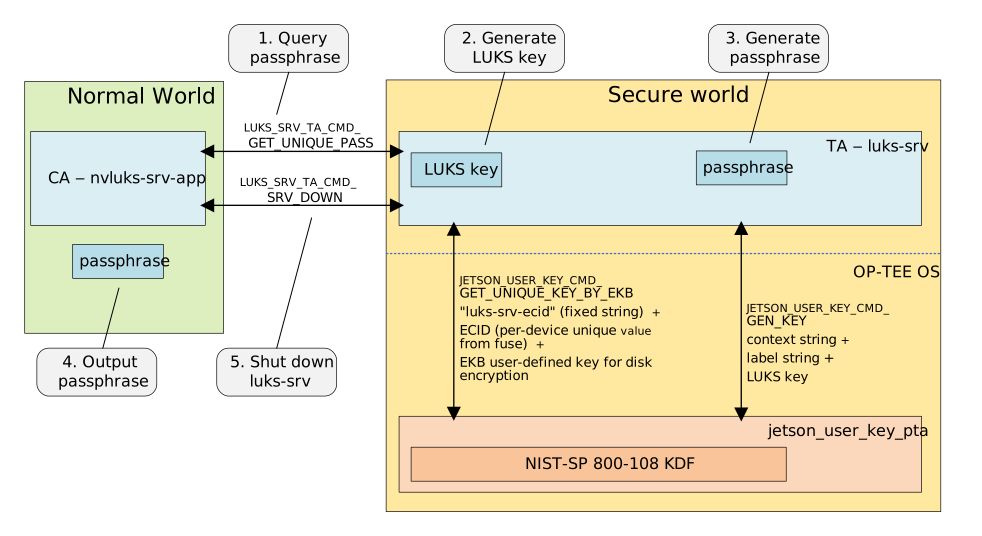
The
nvluks-srv-appCA queries the per-device unique passphrase via the command interfaceLUKS_SRV_TA_CMD_GET_UNIQUE_PASS.When the
luks-srvTA receives the command, it sends a request tojetson_user_key_ptato generate a per-device unique LUKS key.jetson_user_key_ptauses the NIST-SP 800-108 KDF to derive a new key from the EKB disk encryption key.The KDF’s input parameters are the fixed label string
"luks-srv-ecid"and the ECID as the context string.The TA uses the LUKS key to generate a passphrase. The passphrase is generated with the same KDF as the LUKS key.
The KDF’s context string parameter is the disk UUID, so no user interaction is needed to create the encrypted disk image or to unlock it at boot time. The fixed label string is
"luks-srv-passphrase-unique".The TA returns the output passphrase.
The
nvluks-srv-appCA sends theLUKS_SRV_TA_CMD_SRV_DOWNcommand to shut down the service. This ensures that passphrase generation is done only once.
The generation process uses this key derivation function (KDF) to generate a per-device unique LUKS key or a generic key:
key = NIST-SP-800-108(in-key, label-string, context-string)
NIST-SP-800-108 is a KDF recommended by the National Institute of Standards and Technology (NIST) for key derivation using pseudorandom functions.
in-key is the key source used to derive a new key.
label-string identifies the purpose of the key to be generated. In the reference implementation, label-string is a fixed value defined by the TA.
context-string is a string that contains information related to the derived key, and which the KDF uses as a parameter for key generation. In the reference implementation, the default context string is the ECID (when deriving the LUKS key) or the disk’s UUID (when deriving the passphrase), but you can change this value by modifying the TA.
To unlock the encrypted disk with nvluks-srv-app, enter these commands:
#!/bin/bash
# Using "cryptsetup" and "nvluks-srv-app" to unlock the encrypted device:
nvluks-srv-app --context-string "${DISK_UUID}" --get-unique-pass | \
     cryptsetup luksOpen <luks_device> <DM_name>
<luks_device>is the device name of the encrypted disk; for example,/dev/mmcblk1.<DM_name>is the mapping name after the encrypted disk is unlocked; for example,/dev/mapper/DM_name.
For more information, refer to Basic Flashing Script Usage in Flashing Support.
Note
To prevent any form of attack from extracting the passphrase at boot time (for example, in the initrd), use the command type LUKS_SRV_TA_CMD_SRV_DOWN. This command instructs luks-srv not to respond to a LUKS_SRV_TA_CMD_GET_UNIQUE_PASS command (to get the passphrase) until reboot. This step is crucial to ensure the security of your design.
Threat Model#
The purpose of disk encryption is to prevent an attack from stealing or tampering with data on the disk. Even if the disk is physically unmounted (or, in the case of an internal device such as an eMMC, is removed from the device), the data cannot be exposed.
Disk encryption cannot protect against the following types of threat:
A background process or daemon that has a security hole. An attacker might be able to use the hole to gain control of the process and access the disk.
Theft or leakage of the login ID and password. An attacker can use these credentials to log in to the device and access the disk.
Unlocking Process Summary#
The following diagram shows the overall flow of the encrypted disk unlocking process.
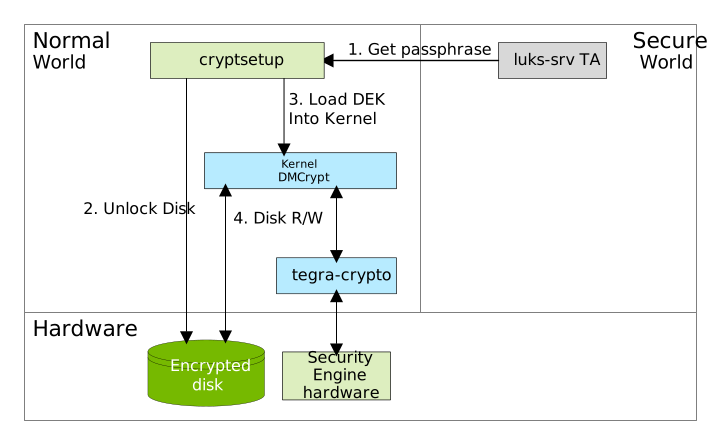
The steps of the process are as follows:
nvluks-srv-appqueries the hardware-based passphrase from theluks-srvTrusted Application (TA) and passes it to thecryptsetuputility.cryptsetupunlocks the disk and decrypts the disk encryption key (DEK) with the passphrase.cryptsetupinvokes theDMCryptkernel module and loads the key into the kernel.DMCryptuses thetegra-cryptodriver, which uses Security Engine (SE) hardware for data encryption and decryption.Subsequent disk I/O is routed through
DMCrypt, which decrypts and encrypts data as it reads and writes.