


Manufacturing#
Production flashing differs from developer flashing in two important ways: images must be generated once on a secure system and then replicated across many devices, and the generic key used to encrypt those images must be replaced with a per-device unique key on first boot.
Manufacturing Process#
The following diagram illustrates the post-development manufacturing process for a Jetson-based device.
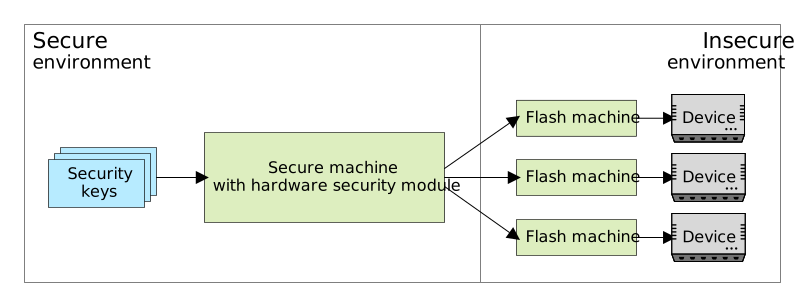
All disk images and blobs to be flashed onto production devices must be generated on a secure system. The HSM holds all the security keys needed in the manufacturing process. If more than one production device is to be flashed at a time, the security machine must be able to deploy images to other systems (flashing machines) for flashing devices.
To support mass flash, the images are generated one time on the security machine for all devices with a generic key, and the key is replaced by a per-device unique key during the first boot.
Creating Encrypted Images with a Generic Key#
To create encrypted images with a generic key, run the l4t_initrd_flash.sh script, which is also known as the initrd
flashing tool. For details, refer to Flashing with initrd
in Flashing Support.
For example:
Jetson AGX Orin 32GB target:
$ cd Linux_for_Tegra
$ sudo BOARDID=3701 BOARDSKU=0004 ROOTFS_ENC=1 ./l4t_initrd_flash.sh \
        -i ./disk_enc.key -p "--generic-passphrase" --massflash 5 --no-flash \
        jetson-agx-orin-devkit internal
Note
For AGX Orin 64GB, replace
BOARDSKU=0004withBOARDSKU=0005.Jetson Orin NX 16GB target:
$ cd Linux_for_Tegra
$ sudo BOARDID=3767 BOARDSKU=0000 ./l4t_initrd_flash.sh --no-flash \
        jetson-orin-nano-devkit internal
$ sudo BOARDID=3767 BOARDSKU=0000 ROOTFS_ENC=1 \
        ./l4t_initrd_flash.sh --no-flash -S 16GiB \
        --external-only --append -i ./disk_enc.key -p "--generic-passphrase" \
        --massflash 5 --showlogs jetson-orin-nano-devkit external
Note
For the following boards, replace
BOARDSKU=0000with one of the following options:Orin NX 8GB:
BOARDSKU=0001Orin Nano 8GB:
BOARDSKU=0003Orin Nano 4GB:
BOARDSKU=0004
Jetson AGX Thor developer kit target:
$ cd Linux_for_Tegra
$ sudo BOARDID=3834 BOARDSKU=0008 ROOTFS_ENC=1 ./l4t_initrd_flash.sh \
        -i ./disk_enc.key -p "--generic-passphrase" --massflash 5 --no-flash \
        jetson-agx-thor-devkit internal
Images encrypted by the generic key are generated and packaged in the mfi_<target-board>.tar.gz file, which sends the images to the factory floor and places connected devices in RCM mode to flash the devices with the following commands:
$ sudo tar xpfv mfi_<target-board>.tar.gz
$ cd mfi_<target-board>
$ sudo ./l4t_initrd_flash.sh --flash-only --massflash 5 <target-board> internal   # For Jetson Orin
$ sudo ./tools/kernel_flash/l4t_initrd_flash.sh --flash-only --massflash 5 <target-board> internal   # For Jetson Thor
Replacing the Generic Key with the Per-device Unique Key at First Boot#
This procedure checks whether the device is encrypted by the generic key, adds a unique key, and removes the generic key.
To replace the generic key with a per-device unique key, run the init script in the initrd:
Verify that the device name parameter specifies the same device as the device setting in
/etc/crypttab.Verify the version of cryptsetup utility.
Verify that the device is a LUKS device.
Verify that the device is encrypted by a generic key.
If yes, replace the generic key with the per-device unique key.
If no, skip the key replacement process.
Unlock the encrypted device with the per-device unique passphrase.
Mount the device.
Command the
luks-srvTA to not respond to additional passphrase requests until the reboot.
(Optional) Encrypting the Disks Again#
After replacing the generic key with a per-device unique key, the disk encryption key can also be optionally regenerated at the first boot. After the key has been regenerated, the device is protected by a new key.
Note
This process encrypts the device again with a randomly generated key, and this key is typically a device unique key. Without this step, although the key that is used to encrypt the encryption key has been replaced, the device encryption key remains unchanged.
To enable re-encryption feature for a disk, in the layout configuration file, set the encrypted and reencrypt attributes of the <disk_name> to true.
The following is an example of the UDA partition definition for an UDA on which disk encryption and re-encryption are not enabled. You can find a definition like
this one in the Jetson Linux BSP partition configuration files; for example, Linux_for_Tegra/bootloader/generic/cfg/flash_l4t_t234_qspi_sdmmc_enc_rfs.xml on Jetson Orin and Linux_for_Tegra/tools/kernel_flash/flash_l4t_t264_nvme_rootfs_enc.xml on Jetson Thor.
From:
<partition name="UDA" type="data" encrypted="false" reencrypt="false">
    <allocation_policy> sequential </allocation_policy>
    <filesystem_type> basic </filesystem_type>
    <size> 419430400 </size>
    <file_system_attribute> 0 </file_system_attribute>
    <allocation_attribute> 0x8 </allocation_attribute>
    <align_boundary> 16384 </align_boundary>
    <filename> UDA_FILE </filename>
    <description>
        **Required.** This partition may be mounted and used to store user data.
    </description>
</partition>
To:
<partition name="UDA" type="data" encrypted="true" reencrypt="true">
    <allocation_policy> sequential </allocation_policy>
    <filesystem_type> basic </filesystem_type>
    <size> 419430400 </size>
    <file_system_attribute> 0 </file_system_attribute>
    <allocation_attribute> 0x8 </allocation_attribute>
    <align_boundary> 16384 </align_boundary>
    <filename> UDA_FILE </filename>
    <description>
        **Required.** This partition may be mounted and used to store user data.
    </description>
</partition>
The init script in the initrd triggers the re-encryption flow and encrypts the disk again with a new, randomly generated key during the first boot.
Note
Re-encryption is not supported by cryptsetup 2.2.x on Ubuntu 20.04. To support disk re-encryption, you need to manually build a newer version. This process takes approximately one minute for every GB of data.
Building cryptsetup#
To enable the re-encryption function on Ubuntu 20.04, build and use a newer version of cryptsetup:
Download the cryptsetup source package.
Install the required packages:
git gcc make autoconf automake autopoint pkg-config libtool gettext
libssl-dev libdevmapper-dev libpopt-dev uuid-dev libsepol1-dev
libjson-c-dev libssh-dev libblkid-dev tar
(Optional) You can also install
libargon2-0-devandlibpwquality-dev.To configure and build the package, run the following command:
$ ./autogen.sh && ./configure && make
Place
cryptsetupandlibcryptsetup.so.12into the file system:$ cd Linux_for_Tegra $ sudo cp cryptsetup rootfs/usr/sbin/ $ sudo cp libcryptsetup.so.12 rootfs/lib/aarch64-linux-gnu/
To generate encrypted images and flash to the devices, refer to Creating Encrypted Images with a Generic Key.