

Project Generation#
Isaac Lab includes a project generator that creates a fully runnable example. In this lesson, you’ll generate the default cartpole project, and then trace how its files define and register a reinforcement learning task.
Prerequisites#
Choose a local workstation or a remote GPU host, and run this lesson’s commands on that machine. The module uses Newton and does not require a full Isaac Sim application installation.
Compute and Software
GPU: one NVIDIA GPU supported by the installed PyTorch, Warp, and Newton versions, with a CUDA 13-compatible driver. The module uses Newton GL for recording; optional RTX rendering also requires compatible ovrtx plugins.
Operating system and tools: Ubuntu 22.04 or 24.04 x86-64 for the Bash commands as written, Python 3.12, Git, and
uv. Isaac Lab also supports Windows 11, though you’ll need to adapt the shell commands. If your laptop doesn’t have a compatible GPU, you can connect to a remote GPU host.Storage: writable space for dependencies, assets, caches, checkpoints, and recordings. Use persistent storage for outputs on a temporary remote machine.
Install Git and uv, then check the tools and visible GPU on your chosen host:
git --version
uv --version
nvidia-smi
Confirm the expected GPU and available memory. A working call to nvidia-smi confirms
driver access; the lesson’s simulation and training checks will verify the
installed runtime. See Development Workflow for Isaac Lab
for remote access, editor setup, and keeping experiment outputs.
GPU Requirements#
Check the Isaac Lab installation requirements and OVRTX driver requirements for your GPU and operating system.
The short cartpole training run starts with 64 environments. The default
cartpole configuration uses 4,096 environments. If training runs out of memory,
try reducing --num_envs and repeating a short run. Keep a note of the change,
since it affects how much experience is collected per iteration.
Create the Workspace#
Use the exact responses to follow the commands as written, or substitute your own and keep track of the changes for later reference. Keep the Isaac Lab source checkout and generated external projects as siblings:
Create the workspace directory:
mkdir isaac-lab-workspaceEnter that directory:
cd isaac-lab-workspace
Clone the Isaac Lab version used in this module:
git clone --branch release/3.0.0 https://github.com/isaac-sim/IsaacLab.git
Enter the cloned repository:
cd IsaacLab
Install the standard dependencies:
uv sync
Cloning and synchronizing can take several minutes. If either command fails, use the installation guide to check your host, driver, and prerequisites before continuing.
Generate a New Project#
isaac-lab-workspace/
├── IsaacLab/      # Framework Repository
└── your_project/  # External Project (own version history)
Keep the framework checkout and the external project beside each other so that each can retain its own dependencies and Git history.
Start the project generator, and respond to the prompts as follows. Press Enter where a response says to use the displayed default.
uv run isaaclab --newPress Enter.On the first run,
uvmight spend several minutes creating a virtual environment (.venv) and resolving dependencies. Wait for[INFO] Running template generator....Task type [External/Internal]:externalAn external project is an independent, installable Python project. Use an internal task only when contributing a task directly to the Isaac Lab source repository.
Project path (...):../This places the generated project beside
IsaacLabinstead of nesting one Git repository inside another.Project name:isaac_lab_tutorialThe name becomes both the project directory and the top-level Python package. It must be a valid Python identifier, so use letters, numbers, and underscores without spaces or hyphens.
Author name(s), comma-separated:YOUR NAMEThe generator adds your name to the
pyproject.tomlmetadata.Initial project content [Cartpole/Stubbed/Blank] (Cartpole):Press Enter.The generator creates a runnable cartpole example with a default configuration. A blank project would contain only the package structure and no task code.
Task family name (balance):Press Enter.Keep the default
balancetask family. A task family holds behavior that can be shared by more than one robot configuration.Robot/config name (cartpole):Press Enter.Keep the default
cartpoleconfiguration. This lesson uses the runnable cartpole example exactly as generated.Include Isaac Sim UI extension [No/Yes] (No):Press Enter.The task does not need a custom panel in the Isaac Sim Extension Manager.
Isaac Lab workflow: Enter comma-separated numbers:1Select Manager-based | single-agent. This workflow keeps actions, observations, reset events, rewards, and terminations in separate configuration sections.
RL library: Enter comma-separated numbers:1The module uses RSL-RL for its training commands and agent configurations.
RL algorithms for rsl_rl: Enter comma-separated numbers:1Select PPO. The generator creates the agent configuration used to train a policy later; no training is required in this lesson.
After the final response, the generator validates the specification, writes the project, and initializes a Git repository:
Validating specification...
Generating external project...
  |-- Copying repo files...
  |-- Copying utility scripts...
  |-- Generating tasks...
...
The result is a new isaac-lab-workspace/isaac_lab_tutorial directory. Change
into it and synchronize its dependencies before inspecting the generated code:
cd ../isaac_lab_tutorial
uv sync
Run Your First Simulation#
Before touring the files, watch the generated cartpole move. From the generated project root, run a short check with zero actions:
uv run isaaclab zero_agent                 \
  --task IsaacLabTutorial-Balance-Cartpole \
  --num_envs 16                            \
  --max_steps 300                          \
  --visualizer newton
--task TASKselects the generated cartpole environment by its registered task ID.--num_envs 16creates sixteen cartpole environments that step in parallel.--max_steps 300limits the run to 300 simulation steps, then exits.--visualizer newtonselects the Newton OpenGL viewer so you can watch the simulation.
On a host without a display, use --visualizer none to disable visualization and
inspect the terminal output. Expect the poles to fall or swing: no policy is
balancing them yet. A clean exit and printed action and observation spaces show
that the simulation can step.
Tour the Generated Project#
The default external cartpole project follows this structure. Some supporting files are omitted so you can focus on the task package:
isaac_lab_tutorial
├── pyproject.toml
└── src
    └── isaac_lab_tutorial
        ├── assets
        │   ├── __init__.py
        │   └── data
        └── tasks
            ├── __init__.py
            └── balance
                ├── config
                │   └── cartpole
                │       ├── __init__.py
                │       ├── agents
                │       │   └── rsl_rl_ppo_cfg.py
                │       └── env_cfg.py
                └── mdp
                    ├── __init__.py
                    └── rewards.py
Note
You don’t need to understand every file yet. Start with the three main components described below. Many files contain only a small amount of code, and you can return to the rest as you work through the lessons.
The folder names come from the generator: isaac_lab_tutorial is the project,
balance is the task family, and cartpole is the robot/config name.
The main components have distinct responsibilities:
pyproject.tomldefines the installable package, dependencies, optional backends, development tools, and theisaaclab.tasksentry point used for task discovery.mdp/holds the balance task behavior (the Markov decision process, or MDP, terms such as rewards) that can be shared by more than one configuration. The generatedrewards.pycontains the cartpole pole-angle reward function.cartpole/holds the task registration, environment configuration, and agent configuration for the cartpole system.
Open pyproject.toml and give it a quick read. Its isaaclab.tasks entry point
exposes isaac_lab_tutorial.tasks to Isaac Lab (when the task package is loaded,
config/cartpole/__init__.py registers IsaacLabTutorial-Balance-Cartpole).
Gymnasium registration connects three pieces (found in env_cfg.py and
rsl_rl_ppo_cfg.py) to the task ID:
ManagerBasedRLEnv, the Isaac Lab environment implementation.BalanceEnvCfg, the task configuration.PPORunnerCfg, the default RSL-RL agent configuration.
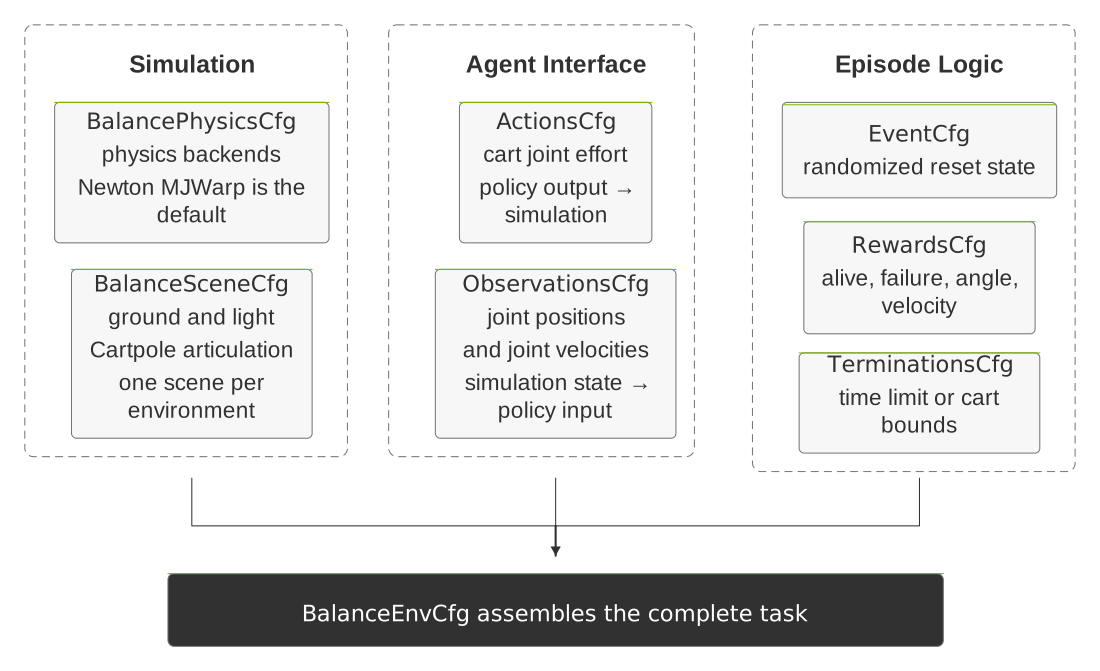
env_cfg.py keeps each part of the task in a focused configuration class, then
assembles all of them in BalanceEnvCfg.#
The env_cfg.py file defines the following configuration classes:
BalancePhysicsCfgdefines Newton MJWarp as the default physics backend.BalanceSceneCfgcreates the ground plane, light, and cartpole articulation.ActionsCfgconnects actions to the cart’sslider_to_cartjoint.ObservationsCfgdefines policy inputs from joint positions and velocities.EventCfgrandomizes the cart and pole positions and velocities at reset.RewardsCfgdefines reward-shaping components for the cartpole.TerminationsCfgends an episode after a time limit or bounds violation.BalanceEnvCfgassembles everything into an environment.
Most reward functions used in RewardsCfg come from Isaac Lab’s reusable MDP
library.
The generated project also includes one task-specific function in rewards.py,
joint_pos_target_l2, that reads a configured joint position, wraps angular
values to the interval from -pi to pi, and returns the squared distance from
a target.
Back in RewardsCfg, you can see how this function is applied to cart_to_pole
with a target of zero and a weight of -1.0. As the pole tilts farther from
upright, the penalty grows quadratically, which lowers the reward.
Finally, inspect the learning configuration in rsl_rl_ppo_cfg.py.
PPORunnerCfg is separate from the environment because the task dynamics and
the learning algorithm have different responsibilities. It defines the actor and
critic networks, rollout length, learning rate, discount factor, PPO clip
parameter, update schedule, checkpoint interval, and training budget. You can
keep a second learning configuration alongside the generated one.
Making Changes#
src/isaac_lab_tutorial/tasks/balance/
├── mdp/             # Shared task behavior; reuse across configurations.
└── config/
    └── cartpole/    # Scene, environment, registration
        └── agents/  # Learning-library settings
You are free to manage your project as you like, but the generated structure is designed to keep changes in the smallest scope that owns them. The task family holds shared behavior, while each robot configuration holds its own environment and agent settings.
When extending the template project (or creating your own project from scratch):
Add a new robot for the same task as a sibling under
config/so it can reuse the task-family logic.Add a different task as a new sibling under
tasks/so it can own its own task terms.Put behavior shared by configurations in the task family’s
mdp/package.Keep learning-library configuration in the robot/config
agents/directory.Keep task registration and the assembled environment configuration in
config/cartpole/.Update
pyproject.tomlonly for project-wide dependencies, tooling, or task discovery.
An expanded project might look like this (another_robot and another_task
are placeholder names):
src/isaac_lab_tutorial/tasks/
├── balance/
│   ├── mdp/                     # Behavior shared by balance configurations
│   └── config/
│       ├── cartpole/            # Existing robot configuration
│       │   └── agents/          # Learning-library settings
│       └── another_robot/       # New robot for the same task
│           └── agents/          # Learning-library settings for this robot
└── another_task/                # Different task family
    ├── mdp/                     # Behavior owned by this task family
    └── config/
        └── another_robot/       # Robot configuration for this task
            └── agents/          # Learning-library settings for this task
Troubleshooting#
If the generator rejects a name, use a valid Python identifier with no spaces or hyphens.
If dependency synchronization fails, confirm that you are in the generated project root and that the sibling Isaac Lab checkout completed
uv sync.
Review#
Check Your Understanding#
Does discovering a registered task ID prove the environment can step?
Answer
No. Discovery verifies that the task is registered. A simple agent can be used to check that the environment can be constructed and stepped.
Apply What You Learned#
How would you determine whether a failed cartpole run has a registration problem or an environment-configuration problem? Describe the checks you would make, the files or outputs you would inspect, and what each check establishes.
Agent Tutor Prompt
Copy this prompt and include your answer:
Review my answer to this question: How would you determine whether a failed cartpole run has a registration problem or an environment-configuration problem? Describe the checks you would make, the files or outputs you would inspect, and what each check establishes.
My answer: [paste your answer here].
Check my reasoning about task id, environment and agent entry points, relevant files, and what each diagnostic check establishes. Ask for missing context rather than assuming it. Identify what I explained well, point out one gap or misconception, and ask a follow-up question that helps me improve my answer. Let me revise it before supplying a complete answer.
Key Takeaways#
The generated external project lives beside the Isaac Lab framework checkout.
A short zero-action run checks the simulation before you study the code.
Registration connects a task ID to environment and learning configurations.
Resources#
Build Your Own Project or Task — Instructions for using the template generator to create an external project or an internal Isaac Lab task.