

Vial and Rack Scene#
Now let’s add the objects our SO-101 needs for a vial-placement task. We’ll
add a dynamic vial and rack, a static desk, and contact sensors that detect interactions between the gripper, vial, and
rack. This lesson changes the SO101SceneCfg and startup events used by that
configuration. Its actions remain empty; you’ll add those in the next lesson
so an agent can control the task. The supplied inspection task can already
run the scene.
You’ll also see how an event sets the vial’s mass to a fixed 0.02 kg. Later, we will vary that mass using the domain randomization introduced in Simulation to Reality. Here, start with one value so you can check the scene before adding variation.
Stay on learning-path with the preceding lesson’s changes in place. Replace
only the marked regions named below; imports and supporting code are supplied.
You can compare your working copy with the completed reference at any time:
git diff main -- src/
Adding Objects to the Scene#
We are adding a vial to pick up, a rack to receive it, and a supporting desk. The contact sensors report simulated contact forces for selected pairs: the moving jaw with the vial, and the vial with the rack. The fixed jaw reports unfiltered contacts, so that signal alone does not prove contact with the vial. These sensors provide training and debugging signals; they are not camera measurements.
VIAL_USD, RACK_USD, and DESK_USD are asset-path constants imported from
isaaclab_tutorial.assets. Inspect assets/__init__.py to locate the supplied
USD files before changing an asset. The positions and rotations below describe
this tutorial’s setup, not universal settings for an SO-101 installation.
history_length=4 retains four contact samples for each sensor.
The following scene configuration belongs in
env_cfg.py. The robot and
light attributes carry over from the previous lesson. The vial, rack, and
desk are added as new objects in the scene.
Replace the contents
File:
src/isaaclab_tutorial/tasks/place_vial/config/so101/env_cfg.pyMarkers:
# BEGIN lesson-03-objectsand# END lesson-03-objects
Paste the code below between the markers. Keep both marker comments.
    vial = RigidObjectCfg(
        prim_path="{ENV_REGEX_NS}/Vial",
        spawn=VialSpawnCfg(
            usd_path=str(VIAL_USD),
            rigid_props=preset(
                default=None,
                physx=PhysxRigidBodyCfg(solver_position_iteration_count=PHYSX_SOLVER_POSITION_ITERATIONS),
            ),
            activate_contact_sensors=True,
            randomize_diameters=preset(default=False, sim2real=True),
        ),
        init_state=RigidObjectCfg.InitialStateCfg(
            pos=TABLETOP_VIAL_POSITION,
            # Horizontal vial: +90 degrees about world Y (XYZW).
            rot=(0.0, 0.7071068, 0.0, 0.7071068),
        ),
    )

    rack = RigidObjectCfg(
        prim_path="{ENV_REGEX_NS}/Rack",
        spawn=sim_utils.UsdFileCfg(usd_path=str(RACK_USD), func=_spawn_usd_with_contact_material),
        init_state=RigidObjectCfg.InitialStateCfg(pos=(0.18, 0.08, 0.04)),
    )

    desk = AssetBaseCfg(
        prim_path="{ENV_REGEX_NS}/Desk",
        spawn=sim_utils.UsdFileCfg(usd_path=str(DESK_USD), func=_spawn_usd_with_contact_material),
        init_state=AssetBaseCfg.InitialStateCfg(pos=(0.22, 0.0, 0.032), rot=(0.0, 0.0, 0.7071068, 0.7071068)),
    )

    support = preset(
        default=None,
        sim2real=RigidObjectCfg(
            prim_path="{ENV_REGEX_NS}/Support",
            spawn=SupportSpawnCfg(
                size=(0.39, 0.39, 0.005),
                rigid_props=sim_utils.UsdPhysicsRigidBodyCfg(kinematic_enabled=True),
                collision_props=sim_utils.UsdPhysicsCollisionCfg(),
                mass_props=sim_utils.MassCfg(mass=1.0),
                physics_material=WORKSHOP_CONTACT_MATERIAL,
                visual_material=sim_utils.PreviewSurfaceCfg(diffuse_color=(0.07, 0.07, 0.07)),
            ),
            init_state=RigidObjectCfg.InitialStateCfg(pos=(0.22, 0.02, 0.0325)),
        ),
    )

    # Unfiltered: OV PhysX cannot build a filtered contact view for the gripper link in a cloned scene.
    fixed_jaw_contact = ContactSensorCfg(prim_path="{ENV_REGEX_NS}/Robot/gripper", history_length=4)
    moving_jaw_contact = ContactSensorCfg(
        prim_path="{ENV_REGEX_NS}/Robot/moving_jaw_so101_v1",
        filter_prim_paths_expr=["{ENV_REGEX_NS}/Vial"],
        history_length=4,
    )
    vial_rack_contact = ContactSensorCfg(
        prim_path="{ENV_REGEX_NS}/Vial",
        filter_prim_paths_expr=["{ENV_REGEX_NS}/Rack"],
        history_length=4,
    )
    fixed_jaw_support = preset(default=None, sim2real=_jaw_support_sensor("gripper"))
    moving_jaw_support = preset(default=None, sim2real=_jaw_support_sensor("moving_jaw_so101_v1"))
We add a vial and rack as RigidObjectCfg instances, and a desk as an
AssetBaseCfg. The vial and rack are dynamic (they can move around), but
not all objects need to be dynamic. The desk is a static object that the robot
can interact with, but it does not move. Using the AssetBaseCfg for the desk is
a good way to reduce the number of dynamic objects in the scene, which can
improve simulation performance. See Interacting with a rigid
object
for more information on rigid objects.
Understanding Assets and Their Configuration#
The Isaac Lab API includes two related concepts:
AssetBaseCfgdescribes how to create and place an asset. In the example,prim_pathlocates it within each environment,spawnloads its USD file, andinit_statesets its starting pose.RigidObjectCfginherits fromAssetBaseCfgand extendsInitialStateCfgwith initial linear and angular velocities (lin_velandang_vel), both of which default to zero. In this lesson, the vial and rack start at the configured poses without initial motion.
Choosing AssetBaseCfg does not by itself make an object static or give it
collisions. The desk’s USD must contain the appropriate collision geometry and
static physics setup.
This lesson loads prepared USD files through UsdFileCfg. To replace them with
your own models, follow Importing a New
Asset.
Isaac Lab provides converters for URDF, MJCF, and mesh assets. If you choose
Newton and MJWarp (as we do in this learning path) then also read through
Prepare an Asset for Newton with
MJWarp.
We also added contact sensors. The three contact sensors detect when the robot’s gripper is touching the vial and when the vial is touching the rack. In simulation we have access to this privileged information, which can be useful for training and debugging.
The sim2real alternatives in this configuration are supplied for later transfer
experiments. The nominal lessons use the desk; the optional transfer preset adds
the gray support mat and its contact sensors. Placement may succeed in any of the
four rack openings, rather than one designated opening.
Setting the Vial Mass#
The startup event (mode="startup") sets the vial’s mass to 0.02 kg. It uses
Isaac Lab’s mass event function with identical lower and upper bounds, so it
does not vary mass yet. The teacher-policy lesson widens those bounds to
introduce domain randomization.
Replace the contents
File:
src/isaaclab_tutorial/tasks/place_vial/config/so101/lesson_scaffold.pyMarkers:
# BEGIN lesson-03-vial-massand# END lesson-03-vial-mass
Paste the code below between the markers. Keep both marker comments.
    vial_mass = EventTerm(
        func=mdp.randomize_rigid_body_mass,
        mode="startup",
        params={
            "asset_cfg": SceneEntityCfg("vial"),
            "mass_distribution_params": (0.02, 0.02),
            "operation": "abs",
        },
    )
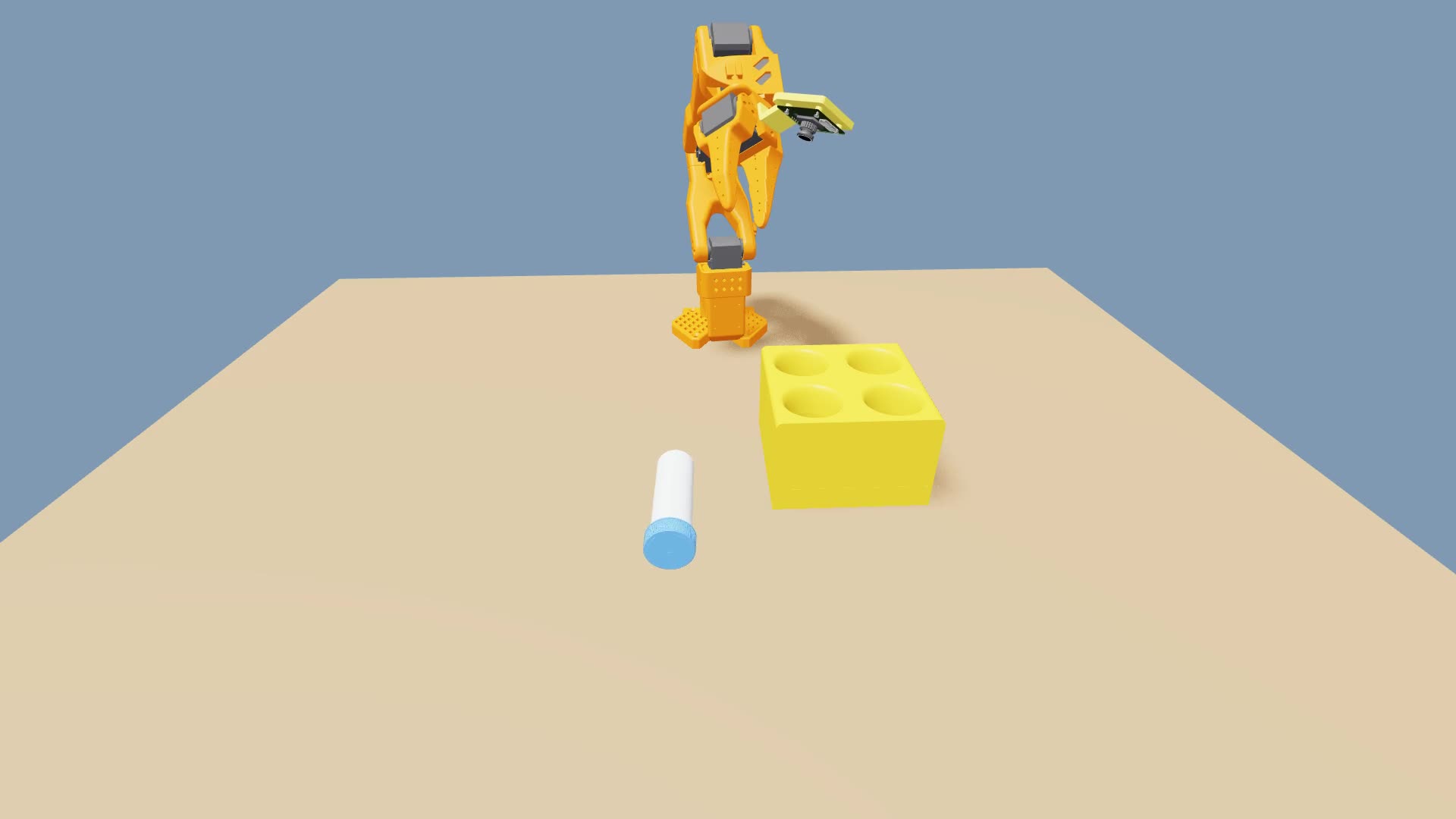
The SO-101 robot with a vial and rack in the scene.#
Inspect the Scene#
Run the same inspection task after adding the objects and startup event:
uv run --with 'moviepy<2'            \
  isaaclab zero_agent                \
  --task IsaacTutorial-Inspect-SO101 \
  --num_envs 1                       \
  --max_steps 120                    \
  --visualizer newton                \
  presets=newton_mjwarp,record_video
Inspect the newest clip in videos/inspection. The robot, vial, rack, and desk
should now appear together. The task still has empty actions and 12 joint
observations; the next lesson adds control and episode endings.
Keep --with 'moviepy<2' so you can save the video.
Review#
Check Your Understanding#
What mass is assigned by the equal bounds in the vial-mass event?
Answer
The event assigns a fixed mass of 0.02 kg at startup. Sampling between identical lower and upper bounds always returns that value.
Apply What You Learned#
How do the vial, rack, desk, and contact sensors work together in this scene? Describe their dynamic or static roles, poses, collisions, and monitored contacts, including when the mass event runs.
Agent Tutor Prompt
Copy this prompt and include your answer:
Review my answer to this question: How do the vial, rack, desk, and contact sensors work together in this scene? Describe their dynamic or static roles, poses, collisions, and monitored contacts, including when the mass event runs.
My answer: [paste your answer here].
Check my reasoning about asset roles, poses, collisions, monitored body pairs, history, and event timing. Ask for missing context rather than assuming it. Identify what I explained well, point out one gap or misconception, and ask a follow-up question that helps me improve my answer. Let me revise it before supplying a complete answer.
Key Takeaways#
The scene adds dynamic vial and rack assets and a static supporting desk.
Contact sensors provide simulated interaction measurements.
A fixed startup mass makes the first scene check easier to interpret.