

Development Workflow#
Use this optional lesson as a reference while you experiment. Start with Project Generation and its short simulation, then come back here when you want to run on a remote GPU, keep a training session running, or make an experiment easier to repeat.
Choose Where to Run#
You can follow the module on a supported local GPU workstation. If your laptop doesn’t have a compatible GPU, or an experiment needs more GPU memory, you can use a remote GPU machine instead. Your project, Python environment, and training outputs live on that machine, and you connect to it through your editor or an SSH terminal.
You can also give a coding agent access to that SSH connection so it can inspect the remote checkout, help diagnose errors, and run jobs you request. Give it the host name, project path, and the size of the job you want to run.
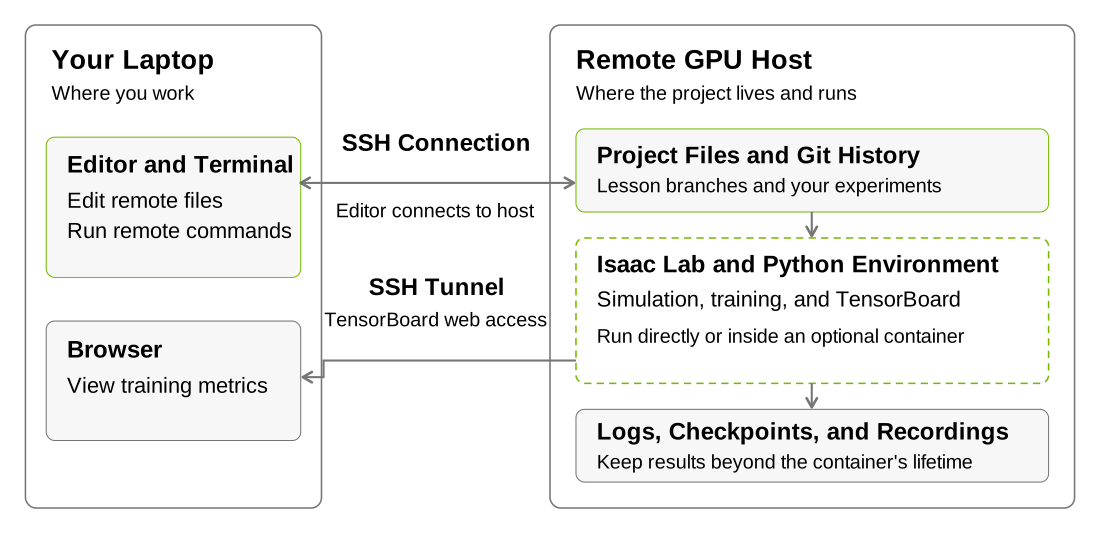
Edit and monitor from your laptop while the remote GPU host runs the simulation and training jobs.#
Follow the versioned Isaac Lab installation guide for supported hosts, dependencies, and optional container setup. For editor configuration, use the VS Code Remote SSH guide (or similar resource for your editor).
Keep a Remote Job Running#
If your connection might drop during training, a session manager such as
tmux keeps the terminal job
running after you disconnect. The GPU host still needs to stay on. If you’re
working locally, keeping your terminal open is enough.
View Training Progress Remotely#
Run TensorBoard on the GPU host from the project root:
uv run tensorboard --logdir logs/rsl_rl --host 127.0.0.1 --port 6006
Next, open a separate terminal on your laptop and forward the port so your browser can reach TensorBoard:
ssh -N -L 6006:127.0.0.1:6006 USER@REMOTE_HOST
Replace USER@REMOTE_HOST with your connection details, keep both commands
running, and open http://localhost:6006 in your local browser. You’ll see the
training metrics there. To watch the robot’s behavior, use the lesson’s
visualizer or recording commands. You can adjust the port and host in the uv run tensorboard command above to match your setup.
Keep a Run Record#
A short note saved alongside your results can help you or your agent repeat the experiment later. Include:
Task ID, command, seed, and environment count.
Source revision and any local changes.
GPU, dependency versions, and physics and rendering settings.
Checkpoint, metrics, and recording locations.
Keep checkpoints and recordings on persistent storage when using temporary compute. Continue with the commands you need for cartpole.
Review#
Check Your Understanding#
Does disconnecting from a remote host necessarily stop a running job?
Answer
No. A job may continue in a persistent terminal session after you disconnect if
you use a session manager like tmux or screen. Reconnect to the same host
and check the process or session and recent logs before starting another job.
Apply What You Learned#
How would you record a run so that you could reconnect, locate its results, and repeat it next week? Use one run as an example and include the host, project location, source revision, launch command, settings, and output paths.
Agent Tutor Prompt
Copy this prompt and include your answer:
Review my answer to this question: How would you record a run so that you could reconnect, locate its results, and repeat it next week? Use one run as an example and include the host, project location, source revision, launch command, settings, and output paths.
My answer: [paste your answer here].
Check my reasoning about host, project path, revision, command, settings, and persistent outputs. Ask for missing context rather than assuming it. Identify what I explained well, point out one gap or misconception, and ask a follow-up question that helps me improve my answer. Let me revise it before supplying a complete answer.
Key Takeaways#
Use remote compute when a job needs a GPU or memory your local machine lacks.
Remote sessions and TensorBoard forwarding support the same task workflow.
A run record and persistent outputs let you repeat or resume an experiment.