

Train a Teacher Policy#
The zero and random agents showed that the environment can run, but neither agent knows how to place the vial. Now we’ll train a teacher policy using privileged information from the simulation. The teacher can observe the robot, vial, and rack directly, then learn actions that move the vial into the rack.
Stay on learning-path with the preceding lesson’s changes in place. Replace
only the marked regions named below; imports and supporting code are supplied.
You can compare your working copy with the completed reference at any time:
git diff main -- src/
Preparing Training Resets#
A reset puts the SO-101 and its surroundings into a starting state so the robot can try the task again. The supplied reset dataset contains physics-validated states; you do not need to regenerate it for these lessons.
Think about learning this task from scratch. If every training episode starts from home, the robot has to learn the early stages before it can practice the later ones. For example, it would have to grasp, lift, turn, and insert the vial before it could practice releasing it. Starting some episodes partway through the task lets it practice each stage.
To give the teacher practice throughout the task, the tutorial includes a
reset dataset: saved simulation states from several points in the motion.
These are the phases it can start from, defined in dataset.py:
 1# src/isaaclab_tutorial/tasks/place_vial/reset/dataset.py
 2PHASE_NAMES = (
 3    "approach",
 4    "pregrasp",
 5    "grasp",
 6    "lift",
 7    "reorient",
 8    "transport",
 9    "insert",
10    "release",
11)
The phase weights live in curriculum.py. Training samples all eight phases
with equal probability (at a reset, the robot is equally likely to start
from any phase). Playback always starts at home, the robot’s initial pose
before grasping the vial, so the teacher must complete the entire task.
1# src/isaaclab_tutorial/tasks/place_vial/reset/curriculum.py
2CANONICAL_START = (1.0, 0.0, 0.0, 0.0, 0.0, 0.0, 0.0, 0.0)
3"""Evaluation and interactive play start every episode from the real robot's home pose."""
4
5ALL_PHASES = (1.0, 1.0, 1.0, 1.0, 1.0, 1.0, 1.0, 1.0)
6"""Training samples every phase uniformly, so each part of the task is practised from the first iteration."""
At each training reset, the environment is equally likely to start at any one of
the eight phases. It also varies the vial’s friction and mass slightly at
"startup", so the policy sees more than one physical setup.
For teacher training, EventsCfg uses the saved states and adds modest
physical randomization:
Replace the contents
File:
src/isaaclab_tutorial/tasks/place_vial/config/so101/env_cfg.pyMarkers:
# BEGIN lesson-05-dataset-resetsand# END lesson-05-dataset-resets
Paste the code below between the markers. Keep both marker comments.
@configclass
class EventsCfg:
    """Task-horizon resets from the physics-validated dataset plus modest vial variation."""

    vial_material = EventTerm(
        func=mdp.randomize_rigid_body_material,
        mode="startup",
        params={
            "asset_cfg": SceneEntityCfg("vial"),
            "static_friction_range": preset(default=VIAL_FRICTION_RANGE, physx=PHYSX_VIAL_FRICTION_RANGE),
            "dynamic_friction_range": preset(default=VIAL_FRICTION_RANGE, physx=PHYSX_VIAL_FRICTION_RANGE),
            "restitution_range": (0.0, 0.02),
            "num_buckets": 32,
        },
    )
    vial_mass = EventTerm(
        func=mdp.randomize_rigid_body_mass,
        mode="startup",
        params={
            "asset_cfg": SceneEntityCfg("vial"),
            # Newton cannot reliably infer mass from the detailed mesh.
            "mass_distribution_params": (0.015, 0.025),
            "operation": "abs",
        },
    )
    reset_from_dataset = EventTerm(
        func=mdp.ResetFromDataset,
        mode="reset",
        params={"dataset_path": str(RESET_DATASET), "sequential": False, "phase_weights": ALL_PHASES},
    )
The event’s mode tells Isaac Lab when to run it:
"prestartup": Once, before the simulation starts."startup": Once, after the simulation starts."reset": When an environment resets."interval": At configured time intervals during simulation.
Diagnose a Reset-Distribution Gap
Imagine that a teacher succeeds often during training but rarely places the vial
when playback starts from home. Compare the starting phases used by
ALL_PHASES and CANONICAL_START. Why can success on the training resets hide
difficulty with the full sequence from home? What playback result would you
check to confirm this diagnosis?
Giving the Teacher Feedback#
Next, let’s give the teacher feedback. The reward terms below encourage it to
approach the vial, reach physical milestones, and complete placement. Losing
the vial carries a penalty, while smaller penalties for rapid action changes
and joint motion discourage unnecessary movement. You can find the reward
functions in mdp/rewards.py. Success and termination logic lives in
mdp/terminations.py; shared task geometry lives in mdp/task.py.
Replace the contents
File:
src/isaaclab_tutorial/tasks/place_vial/config/so101/env_cfg.pyMarkers:
# BEGIN lesson-05-rewardsand# END lesson-05-rewards
Paste the code below between the markers. Keep both marker comments.
@configclass
class RewardsCfg:
    """Sparse physical milestones, a success bonus, two dense shaping terms, and light regularization."""

    # Sim2real aims the pad centre slightly above the cap, favouring a shallower pinch clear of the mat.
    approach_progress = RewTerm(
        func=mdp.approach_progress, weight=1.0, params={"height_offset": preset(default=0.0, sim2real=0.008)}
    )
    held_goal = RewTerm(func=mdp.held_goal, weight=0.1)
    milestones = RewTerm(func=mdp.milestones, weight=10.0)
    success = RewTerm(func=mdp.success, weight=200.0)
    vial_lost = RewTerm(
        func=mdp.is_terminated_term, weight=-50.0, params={"term_keys": ["vial_out_of_bounds", "vial_dropped"]}
    )
    action_rate = RewTerm(func=mdp.action_rate_l2, weight=-0.002)
    joint_velocity = RewTerm(func=mdp.joint_vel_l2, weight=-0.0002)
    joint_limits = RewTerm(func=mdp.joint_pos_limits, weight=-1.0)
    jaw_support_force = preset(
        default=None,
        sim2real=RewTerm(func=mdp.jaw_support_force, weight=-8.0, params={"free_force": 0.25, "force_span": 2.0}),
    )
The supplied mdp.approach_progress reward measures the decrease in distance
between the gripper pads and the vial cap. It pays nothing on the first step after
a reset, when no previous distance is available, or after grasping is confirmed.
Moving closer gives positive feedback; moving away gives negative feedback.
The change is divided by scale=0.01 and clamped to [-1, 1].
The held-vial shaping term considers the nearest rack opening. Success requires the vial to be upright, released, nearly still, and seated in any opening for ten consecutive control steps. The joint-limit penalty discourages pushing against the robot’s soft limits.
The teacher also needs privileged observations and task-ending conditions. Add the policy and critic groups, then connect them to the environment. These replace the simple agent’s 18-value input with 60 policy values and 63 critic values.
Replace the contents
File:
src/isaaclab_tutorial/tasks/place_vial/config/so101/env_cfg.pyMarkers:
# BEGIN lesson-05-policy-observationsand# END lesson-05-policy-observations
Paste the code below between the markers. Keep both marker comments.
@configclass
class PolicyStateGroupCfg(ObsGroup):
    """Fully observed state actor inputs."""

    joint_pos = ObsTerm(func=mdp.joint_pos, params={"asset_cfg": SceneEntityCfg("robot", joint_names=JOINTS)})
    joint_vel = ObsTerm(func=mdp.joint_vel, params={"asset_cfg": SceneEntityCfg("robot", joint_names=JOINTS)})
    joint_target = ObsTerm(func=mdp.joint_target, params={"asset_cfg": SceneEntityCfg("robot", joint_names=JOINTS)})
    previous_action = ObsTerm(func=mdp.last_action)
    end_effector = ObsTerm(
        func=mdp.body_state_b,
        params={
            "body_asset_cfg": SceneEntityCfg("robot", body_names="gripper"),
            "base_asset_cfg": SceneEntityCfg("robot"),
        },
    )
    vial = ObsTerm(
        func=mdp.body_state_b,
        params={"body_asset_cfg": SceneEntityCfg("vial"), "base_asset_cfg": SceneEntityCfg("robot")},
    )
    vial_in_rack = ObsTerm(func=mdp.vial_in_rack_frame)
    placement = ObsTerm(func=mdp.placement_features)
    # Latched milestones make the once-per-episode milestone rewards Markov.
    progress = ObsTerm(func=mdp.progress_flags)

    def __post_init__(self):
        self.enable_corruption = False
        self.concatenate_terms = True
Replace the contents
File:
src/isaaclab_tutorial/tasks/place_vial/config/so101/env_cfg.pyMarkers:
# BEGIN lesson-05-critic-observationsand# END lesson-05-critic-observations
Paste the code below between the markers. Keep both marker comments.
@configclass
class CriticStateGroupCfg(PolicyStateGroupCfg):
    """Privileged training critic inputs."""

    contact = ObsTerm(func=mdp.jaw_contact_flags)
Replace the contents
File:
src/isaaclab_tutorial/tasks/place_vial/config/so101/env_cfg.pyMarkers:
# BEGIN lesson-05-observation-groupsand# END lesson-05-observation-groups
Paste the code below between the markers. Keep both marker comments.
@configclass
class ObservationsCfg:
    policy: PolicyStateGroupCfg = PolicyStateGroupCfg()
    critic: CriticStateGroupCfg = CriticStateGroupCfg()
Replace the contents
File:
src/isaaclab_tutorial/tasks/place_vial/config/so101/env_cfg.pyMarkers:
# BEGIN lesson-05-terminationsand# END lesson-05-terminations
Paste the code below between the markers. Keep both marker comments.
@configclass
class TerminationsCfg:
    success = DoneTerm(func=mdp.placement_success)
    vial_dropped = DoneTerm(func=mdp.vial_dropped)
    # The robot base frame is yawed +90 degrees, so these bounds are 0.5 m to its sides and 0.62 m ahead/behind.
    vial_out_of_bounds = DoneTerm(
        func=mdp.out_of_bound,
        params={
            "asset_cfg": SceneEntityCfg("vial"),
            "in_bound_range": {"x": (-0.55, 0.45), "y": (-0.62, 0.62), "z": (-0.01, 1.0)},
        },
    )
    unstable_robot = DoneTerm(func=mdp.abnormal_robot_state)
    time_out = DoneTerm(func=mdp.time_out, time_out=True)
Finally, replace the lesson-environment region again, this time connecting
the teacher’s resets, rewards, observations, and playback behavior:
Replace the contents
File:
src/isaaclab_tutorial/tasks/place_vial/config/so101/env_cfg.pyMarkers:
# BEGIN lesson-environmentand# END lesson-environment
Paste the code below between the markers. Keep both marker comments.
@configclass
class SO101VialEnvCfg(ManagerBasedRLEnvCfg):
    """State task trained from physics-validated reset poses."""

    scene: SO101SceneCfg = SO101SceneCfg(num_envs=4096, env_spacing=0.9, replicate_physics=True)
    actions: ActionsCfg = ActionsCfg()
    observations: ObservationsCfg = ObservationsCfg()
    events: EventsCfg = preset(default=EventsCfg(), sim2real=Sim2RealEventsCfg())
    rewards: RewardsCfg = RewardsCfg()
    terminations: TerminationsCfg = TerminationsCfg()

    def __post_init__(self):
        self.decimation = 4
        # The measured shoulder response is slower, so sim2real attempts get more time.
        self.episode_length_s = preset(default=20.0, sim2real=30.0)
        self.is_finite_horizon = False
        self.sim.dt = 1.0 / 120.0
        self.sim.render_interval = self.decimation
        self.sim.physics = PhysicsCfg()
        self.sim.default_visualizer_cfg = VisualizerCfg(eye=(0.64, 0.0, 0.36), lookat=(0.19, 0.02, 0.075))

    def play_mode(self):
        """Play and evaluate complete episodes from the home pose, in dataset order.

        The nominal task pins the vial to its workshop material and mass; sim2real keeps its physics randomization.
        """
        from isaaclab_tutorial.utils import evaluation

        requested_num_envs = self.scene.num_envs
        super().play_mode()
        if evaluation.EXACT_EVALUATION_ACTIVE:
            self.scene.num_envs = min(requested_num_envs, evaluation.EVALUATION_EPISODES)
        else:
            self.scene.num_envs = min(self.scene.num_envs, 16)
        self.events.reset_from_dataset.params["sequential"] = True
        self.events.reset_from_dataset.params["phase_weights"] = CANONICAL_START
        if not isinstance(self.events, Sim2RealEventsCfg):
            self.events.vial_material.params.update(
                static_friction_range=(0.7, 0.7), dynamic_friction_range=(0.7, 0.7), restitution_range=(0.0, 0.0)
            )
            self.events.vial_mass.params["mass_distribution_params"] = (0.020, 0.020)
Configuring the Teacher#
With resets and rewards in place, let’s configure how the teacher learns.
Proximal Policy Optimization (PPO), the reinforcement learning algorithm used
here, is configured in rsl_rl_ppo_cfg.py. The actor chooses actions from policy
observations. The critic uses an additional observation group to estimate how
well the episode is going.
Replace the contents
File:
src/isaaclab_tutorial/tasks/place_vial/config/so101/agents/rsl_rl_ppo_cfg.pyMarkers:
# BEGIN lesson-05-ppoand# END lesson-05-ppo
Paste the code below between the markers. Keep both marker comments.
@configclass
class SO101StatePPORunnerCfg(RslRlOnPolicyRunnerCfg):
    """State teacher: fully observed actor, privileged critic."""

    seed = 42
    num_steps_per_env = 64
    max_iterations = 800
    save_interval = 50
    experiment_name = "so101_vial_state"
    run_name = ""
    obs_groups = {"actor": ["policy"], "critic": ["critic"]}
    clip_actions = 1.0
    actor = RslRlMLPModelCfg(
        hidden_dims=[256, 256, 128],
        activation="elu",
        obs_normalization=True,
        # Clamp the std: with clipped actions and an entropy bonus, PPO otherwise grows it without bound.
        distribution_cfg=RslRlMLPModelCfg.GaussianDistributionCfg(init_std=0.2, std_type="log", std_range=(0.05, 0.3)),
    )
    critic = RslRlMLPModelCfg(hidden_dims=[256, 256, 128], activation="elu", obs_normalization=True)
    algorithm = RslRlPpoAlgorithmCfg(
        value_loss_coef=1.0,
        use_clipped_value_loss=True,
        clip_param=0.2,
        entropy_coef=0.005,
        num_learning_epochs=5,
        num_mini_batches=8,
        learning_rate=3.0e-4,
        schedule="adaptive",
        gamma=0.995,
        lam=0.95,
        desired_kl=0.01,
        max_grad_norm=1.0,
    )
Both the actor and critic are multilayer perceptrons (MLPs) with three
hidden layers (see
RslRlMLPModelCfg).
The actor outputs a Gaussian distribution with bounded standard deviation; the
runner clips sampled actions to [-1, 1]. The critic
outputs a single value estimate of the expected return. The actor and critic use
different observation groups, so the critic can see additional information about
the environment that the actor cannot.
The configuration specifies 64 steps per environment before each update, saves a checkpoint every 50 iterations, and trains for up to 800 iterations. You can adjust these settings in the PPO configuration file or override them on the command line.
For example, to train for 400 iterations instead of the configured 800, override
max_iterations on the command line:
uv run isaaclab train                   \
  --rl_library rsl_rl                   \
  --task IsaacTutorial-Place-Vial-SO101 \
  --max_iterations 400                  \
  presets=newton_mjwarp
Training the Teacher#
You’re ready to train. Open a terminal in the root of your cloned project and follow the steps below.
Tip
If your SSH connection might disconnect, start a persistent terminal session before training. See the remote workflow guidance. You can also train in a terminal that stays open.
Start training the teacher policy.
uv run isaaclab train                   \
  --rl_library rsl_rl                   \
  --task IsaacTutorial-Place-Vial-SO101 \
  --num_envs 4096                       \
  --run_name state-teacher presets=newton_mjwarp
Track progress with TensorBoard. In a new terminal, run:
uv run tensorboard --logdir logs/rsl_rl
If you’re training on a remote server, open another terminal on your local machine and forward the TensorBoard port:
ssh -N -L PORT:localhost:PORT USER@REMOTE_HOST
RSL-RL logs Train/mean_reward as the mean episode return over its most
recent 100 completed episodes. Each episode return sums the rewards received
over that episode; each step combines the weighted reward terms. This window
can span multiple training iterations. Use this metric to follow learning progress, then watch and evaluate the
policy to understand its behavior. The curve alone cannot establish how well
or how safely the robot performs the task.
The following figure plots the logged mean episode return against PPO learning iteration. The darker line averages the most recent 20 iterations to make the trend easier to see. That smoothing is separate from the logger’s 100-episode window.
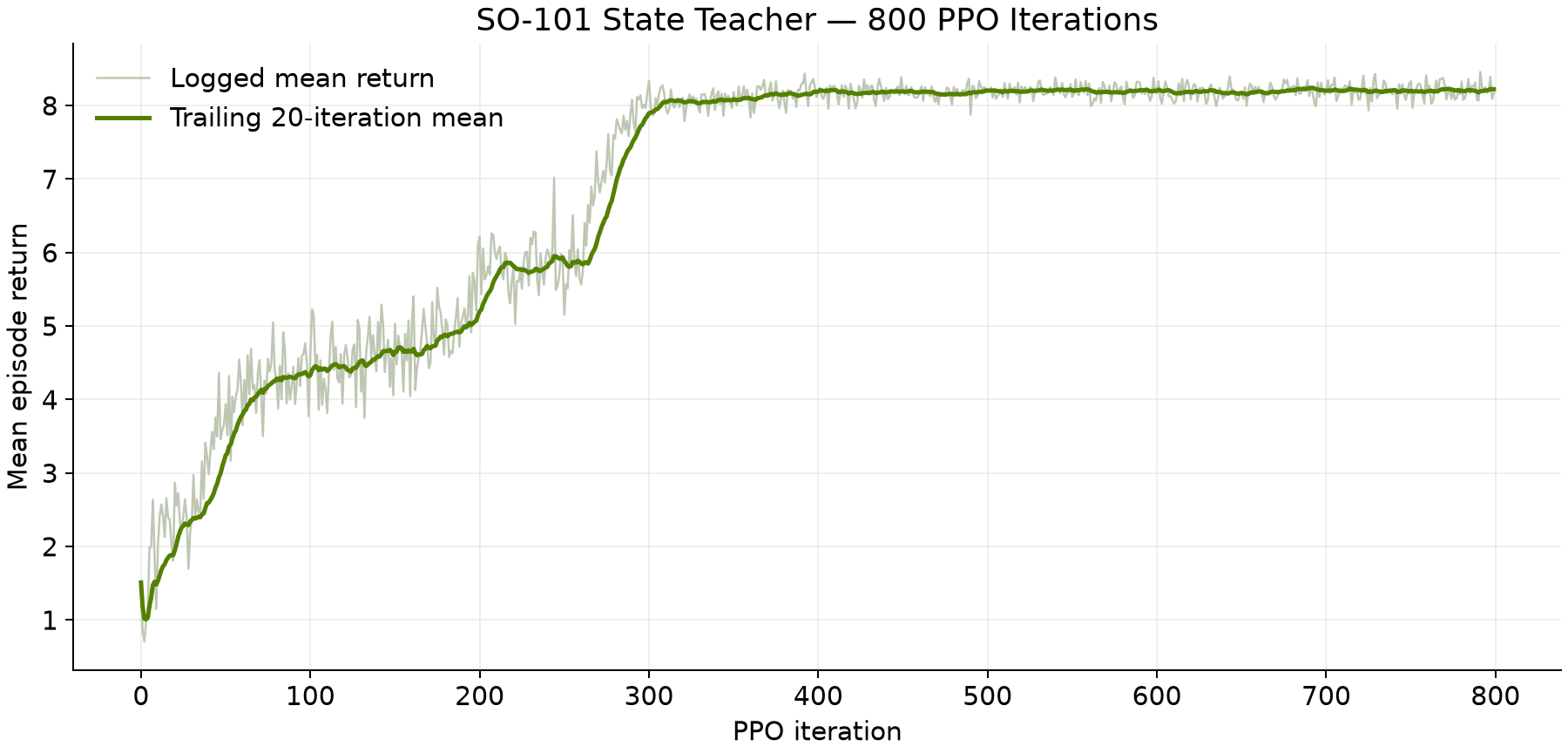
Measured teacher return: 800 iterations, seed 42, tutorial revision 9a4286b.#
Download the plotted values.
View the Teacher Policy in Action#
TensorBoard helps you track the teacher’s progress. Now let’s watch the robot to see what that progress looks like in practice. Follow these steps to play back a checkpoint of the teacher policy.
Use --checkpoint latest for a quick look at the highest-numbered checkpoint
in the newest compatible teacher run:
uv run --with 'moviepy<2'               \
  isaaclab play                         \
  --rl_library rsl_rl                   \
  --task IsaacTutorial-Place-Vial-SO101 \
  --num_envs 16                         \
  --checkpoint latest                   \
  --video --video_length 900            \
  --visualizer newton                   \
  presets=newton_mjwarp
This command uses Newton GL for the external view and MoviePy to save the video.
Optional: RTX Recording
RTX recording requires compatible ovrtx dependencies. If your environment
supports RTX, add --extra ovrtx
to uv run and replace --visualizer newton with
--visualizer newton_rtx. Keep the same checkpoint and physics preset.
Think of latest as a convenient way to find a recent checkpoint, rather
than a way to choose the best policy. It uses the run manifests written during
training. For evaluation and student training, copy the checkpoint path
printed by playback so you can keep using the same saved policy:
TEACHER_CHECKPOINT=logs/rsl_rl/so101_vial_state/.../MODEL.pt
Replace .../MODEL.pt with your run directory and checkpoint filename. For an
older run without a compatible manifest, use find logs/rsl_rl -name '*.pt'
and pass a concrete checkpoint path to --checkpoint instead.
Here’s a reference recording of the teacher checkpoint model_799.pt.
Teacher model_799.pt, recorded from home with seed 42 and nominal physics.#
Watch whether the arm grasps, lifts, turns, and releases the vial from the home pose. Note where unsuccessful attempts stop. We’ll use the teacher’s behavior as a reference when we train a camera-based student.
Evaluate the Teacher Policy#
Let’s measure how often the teacher completes the whole task from home: the robot starts in its initial pose with the vial on the desk, rather than partway through a grasp or insertion. Use the checkpoint you selected for playback above and run this command from the tutorial project’s root.
Run the evaluation.
uv run isaaclab play                                                             \
  --rl_library rsl_rl                                                            \
  --task IsaacTutorial-Place-Vial-SO101                                          \
  --num_envs 1024 --seed 42                                                      \
  --checkpoint "$TEACHER_CHECKPOINT"                                             \
  --device cuda:0 --visualizer none                                              \
  --external_callback isaaclab_tutorial.utils.evaluation.install_episode_counter \
  presets=newton_mjwarp
--external_callbackinstalls the tutorial’s completed-episode counter,install_episode_counter, from the project’sisaaclab_tutorial.utils.evaluationmodule. Normally, playback keeps going until you stop it. This function turns playback into a measured evaluation instead.It counts the first completed episode in each environment and collects the results. Once all those episodes finish, it prints a summary beginning with
SO101_EVAL_RESULT=and stops playback. Some environments may finish sooner and start another episode while they wait for the others; those extra attempts don’t go into the results.The evaluation stops after exactly 1,024 completed episodes: 128 home starts repeated eight times. Keep
--num_envs 1024; this evaluation needs the whole batch at once. Use the same preset for teacher and student evaluations, and record the exact checkpoint paths.Look for the terminal line beginning with
SO101_EVAL_RESULT=. Save it alongside your checkpoint path and evaluation settings so you can revisit the results later. The JSON summary includes episode and success counts, milestone and failure rates, contact forces, and time to success. Multiply the reported rates by 100 to read them as percentages.
Optional: Save a Full Evaluation Log
Before running the command, create an output directory with
mkdir -p evaluation-results and enable set -o pipefail in Bash. Append
2>&1 | tee evaluation-results/teacher.log to the evaluation command to display
and save both ordinary output and errors. pipefail preserves a failure status
if playback fails. Find the result later with
grep '^SO101_EVAL_RESULT=' evaluation-results/teacher.log.
Use a different filename for each repeat.
Analyzing the Teacher’s Results#
This example uses tutorial revision 9a4286b, seed 42, the nominal
newton_mjwarp preset, and 800 PPO iterations with 4,096 environments. Training
took about 20 minutes on an RTX PRO 6000 Blackwell Max-Q. Keep your exact
checkpoint and evaluation log when comparing results.
In our example evaluation, the teacher’s model_799.pt succeeded in
1,020 of 1,024 episodes, a 99.61% success rate. That’s more than 99 successful
placements in every 100 attempts from home. Here’s what else the run tells us:
Grasp: 100.00%; lift: 100.00%; insertion: 99.61%.
Timeout: 0.39% (4 episodes); vial lost: 0.00% (0 episodes).
Mean time to success: 7.86 seconds, counting successful episodes only.
Mean peak rack-contact force: 3.38 N; maximum: 17.61 N.
Unsafe rack contact: 0.00%, using a 20 N threshold.
Download the evaluation summary and provenance.
All successful placements used rack hole 0. Any of the four holes qualifies, but this run does not demonstrate equal use of all four.
In this example, the success, timeout, and vial-loss counts happen to sum to 1,024. The evaluation helper counts these flags independently: an episode can have more than one ending flag.
Most attempts reached the grasp, lift, and insertion milestones. For the remaining attempts, watch whether the robot loses the vial, becomes unstable, or keeps trying until timeout. The rates describe the reported flags; the video helps us understand the behavior behind them.
TensorBoard still helps us understand how the teacher learned. Start with the
mean reward curve, then check the task metrics. Keep in mind that the training
Metrics/success_rate describes environments confirming success at a
simulation step, averaged by the logger. The completed-episode success rate
above comes from the evaluation log, with every attempt starting from home.
In TensorBoard’s Scalars view, select your teacher run under
logs/rsl_rl/so101_vial_state/ and look for Metrics/grasp_rate,
Metrics/lift_rate, and Metrics/insertion_rate. Use those curves to follow
training, then use the saved SO101_EVAL_RESULT summary for completed-episode
results from home.
The teacher’s next role is to provide action targets for a student. Because it uses privileged simulation state that a physical robot cannot read, we still need a policy that works from sensor observations. Next, train the distilled student from wrist-camera and joint observations, following the teacher–student distinction. You’ll evaluate the student separately to see how well it performs. The teacher’s success gives us a useful reference, but the student’s performance and eventual transfer to hardware each need their own checks.
Review#
Check Your Understanding#
How is the completed-episode evaluation success rate calculated?
Answer
Divide the number of successful episodes by the 1,024 first completed episodes in this test. Multiply by 100 to express the result as a percentage.
Apply What You Learned#
How would you explain a difference between your teacher’s training success metric and completed-episode evaluation result? Explain what each metric counts, its denominator and starting conditions, and how playback supports your interpretation.
Agent Tutor Prompt
Copy this prompt and include your answer:
Review my answer to this question: How would you explain a difference between your teacher’s training success metric and completed-episode evaluation result? Explain what each metric counts, its denominator and starting conditions, and how playback supports your interpretation.
My answer: [paste your answer here].
Check my reasoning about per-step versus per-episode counting, reset distributions, denominator, checkpoint, and playback evidence. Ask for missing context rather than assuming it. Identify what I explained well, point out one gap or misconception, and ask a follow-up question that helps me improve my answer. Let me revise it before supplying a complete answer.
Key Takeaways#
PPO trains the teacher using simulation state and task feedback.
Completed-episode evaluation measures success from the defined home starting conditions.
The teacher supplies training targets for the student; it is not the final camera policy.