

Running Simple Agents#
The scene has a robot, a vial, and a rack. Before training a policy, let’s give the robot an action space and check that the environment can step and reset. We’ll use two simple agents: one that always sends zero actions and one that sends random actions. These debugging agents let us check actions and resets without a learned policy.
The important milestone for this lesson is the ability to step the environment. The following diagram shows the flow of one agent step, and you can learn more about the process in the Isaac Lab documentation for a step.
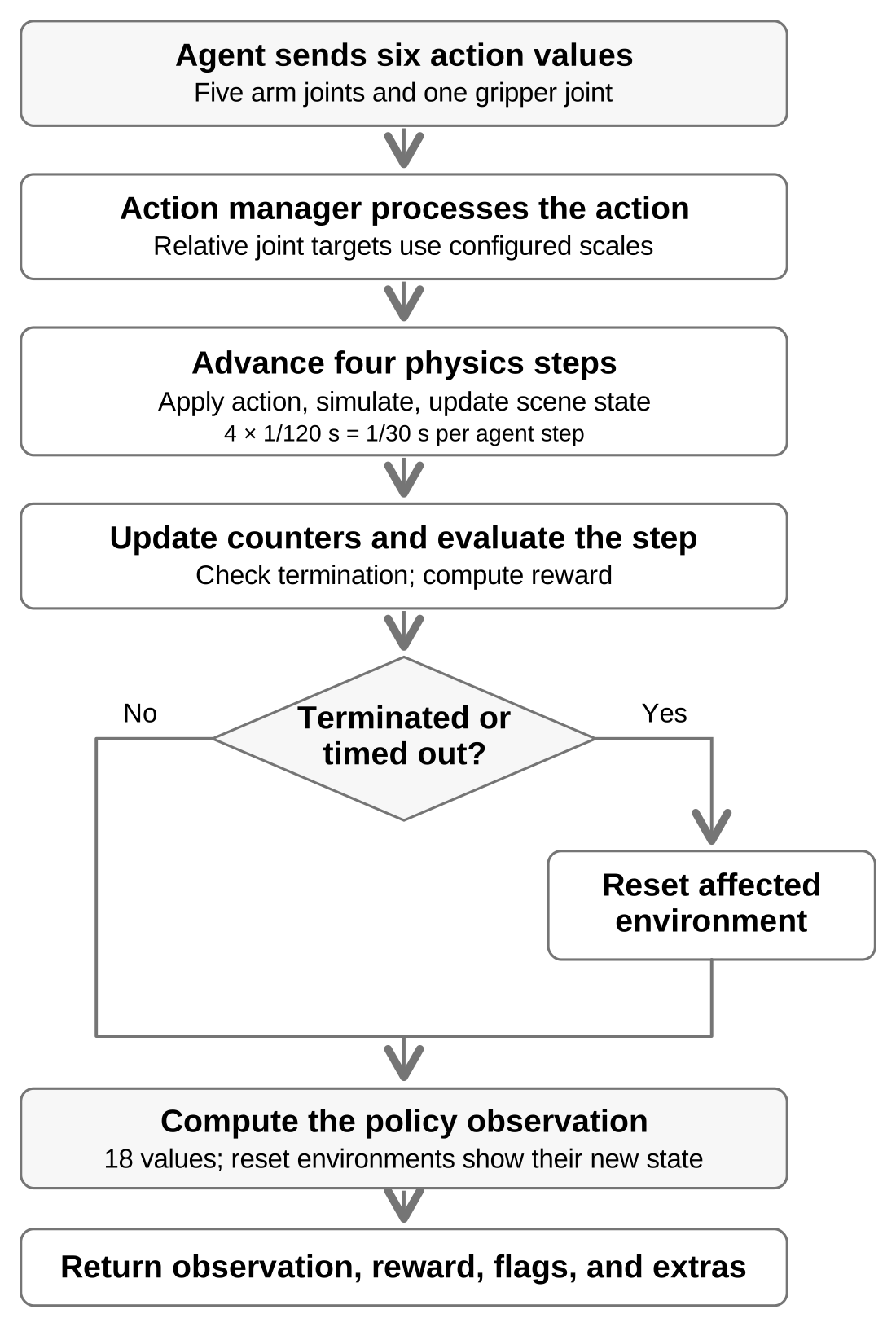
One agent step in Isaac Lab’s manager-based RL environment. Some values are
fixed by the task and robot (such as the action space) and some are configurable
(such as the number of physics steps per agent step).#
Stay on learning-path with the preceding lesson’s changes in place. Replace
only the marked regions named below; imports and supporting code are supplied.
You can compare your working copy with the completed reference at any time:
git diff main -- src/
Adding Actions#
Now we’ll give our SO-101 the ability to move under control. The following
configuration belongs in
env_cfg.py. The SO-101 has
five arm joints and one gripper joint, so each action has six values. Each value
changes a joint target relative to its current measured joint position.
Replace the contents
File:
src/isaaclab_tutorial/tasks/place_vial/config/so101/env_cfg.pyMarkers:
# BEGIN lesson-04-actionsand# END lesson-04-actions
Paste the code below between the markers. Keep both marker comments.
@configclass
class ActionsCfg:
    """Joint targets relative to the measured position, matching the real SO-101 position interface."""

    arm_action = RelativeJointPositionActionCfg(
        asset_name="robot",
        joint_names=ARM_JOINTS,
        preserve_order=True,
        # Small offsets stall the real shoulder and elbow, so sim2real gives them larger steps.
        scale=preset(
            default=0.033,
            sim2real={
                "shoulder_pan": 0.033,
                "shoulder_lift": 0.12,
                "elbow_flex": 0.07,
                "wrist_flex": 0.033,
                "wrist_roll": 0.033,
            },
        ),
        use_zero_offset=True,
    )
    gripper_action = RelativeJointPositionActionCfg(
        asset_name="robot",
        joint_names=["gripper"],
        # Avoid opening a grasp rapidly from a small policy bias.
        scale=0.02,
        use_zero_offset=True,
    )
The arm and gripper actions are defined separately (though they could be
combined into one action). RelativeJointPositionActionCfg is built into
Isaac Lab and is a convenient way to control the robot’s arm.
The gripper also uses RelativeJointPositionActionCfg, with its own scale.
Both targets are relative to measured positions at each physics step.
Predict the Action-Scale Effect
Suppose you change only the arm action’s scale from 0.033 to 0.066.
For the same nonzero action value, how would the change in each arm joint target
compare? Would the gripper target change? Predict one benefit and one risk of
using the larger arm scale when the agent moves near the vial.
Updating Environment Configuration#
We already have joint-position and joint-velocity observations from previous lessons. Here we add the previous action to the policy’s observation. This makes the policy observation 18 values: six positions, six velocities, and six previous actions.
Replace the contents
File:
src/isaaclab_tutorial/tasks/place_vial/config/so101/lesson_scaffold.pyMarkers:
# BEGIN lesson-04-AgentObservationsCfgand# END lesson-04-AgentObservationsCfg
Paste the code below between the markers. Keep both marker comments.
@configclass
class AgentObservationsCfg(JointObservationsCfg):
    previous_action = ObsTerm(func=mdp.last_action)
An episode ends after a configurable number of seconds or once the robot’s joint
motion becomes unstable. The
mdp.time_out
function is built into Isaac Lab and checks the episode length.
Replace the contents
File:
src/isaaclab_tutorial/tasks/place_vial/config/so101/lesson_scaffold.pyMarkers:
# BEGIN lesson-04-LessonTerminationsCfgand# END lesson-04-LessonTerminationsCfg
Paste the code below between the markers. Keep both marker comments.
@configclass
class LessonTerminationsCfg:
    time_out = DoneTerm(func=mdp.time_out, time_out=True)
    unstable_robot = DoneTerm(func=mdp.abnormal_robot_state)
Ending an unstable episode keeps invalid simulation states out of the training
experience. The stability checks you use depend on the robot and task.
mdp.abnormal_robot_state is supplied by Isaac Lab’s lift-task utilities and
re-exported by this tutorial.
You’ll start to notice a common pattern for shared robot behaviors and checks.
We place them in the mdp module (named for the Markov decision process that
underlies reinforcement learning), which is a collection of functions that can
be used in multiple tasks or for multiple robots. Each one takes the environment
as an argument. The env argument provides access to the scene, the robot, and
other useful information.
Now update the existing SO101VialEnvCfg with the new actions, observations,
and termination rules. There is no reward yet: this lesson checks that agents
can interact with the scene before we define what counts as good vial
placement.
Replace the contents
File:
src/isaaclab_tutorial/tasks/place_vial/config/so101/env_cfg.pyMarkers:
# BEGIN lesson-environmentand# END lesson-environment
Paste the code below between the markers. Keep both marker comments.
@configclass
class SO101VialEnvCfg(ManagerBasedRLEnvCfg):
    """Step and reset the scene before adding teacher rewards."""

    scene: SO101SceneCfg = SO101SceneCfg(num_envs=8, env_spacing=0.9, replicate_physics=True)
    actions: ActionsCfg = ActionsCfg()
    observations: AgentObservationGroupsCfg = AgentObservationGroupsCfg()
    events: LessonEventsCfg = LessonEventsCfg()
    rewards = None
    terminations: LessonTerminationsCfg = LessonTerminationsCfg()

    def __post_init__(self):
        self.decimation = 4
        self.episode_length_s = 20.0
        self.is_finite_horizon = False
        self.sim.dt = 1.0 / 120.0
        self.sim.render_interval = self.decimation
        self.sim.physics = PhysicsCfg()
        self.sim.default_visualizer_cfg = VisualizerCfg(eye=(0.64, 0.0, 0.36), lookat=(0.19, 0.02, 0.075))
        self.video_recorders = preset(
            default=[],
            record_video=[VideoRecorderCfg(
                source="visualizer:newton", output_dir="videos/simple_agents", video_length=700, fps=30,
            )],
        )
With decimation = 4 (physics steps per agent step) and sim.dt = 1.0 / 120.0
seconds, the agent sends an action every 1/30 second. A 20-second episode therefore lasts 600 agent
steps before it times out.
A quality-of-life addition is the record_video preset. Isaac Lab’s
zero_agent and random_agent accept --video; this preset
records 700 frames (23.33 seconds at 30 fps), covering the first
600-step timeout and the start of the next episode.
We’ll use Newton GL to watch the agents move. Keep --visualizer newton to select
that view and --with 'moviepy<2' to save it as a video.
Zero and Random Agents#
Use the task ID registered in the robot lesson. Run these commands from the root
of your cloned project. The record_video preset records through the first
timeout so you can inspect the robot’s motion and reset.
Zero Agent#
We’ll start with a simple agent that always sends zero actions. This is a useful baseline check: since the command is zero movement relative to the current joint angles, each target follows the measured joint position. Gravity and contact can still move the robot, so zero actions do not guarantee a fixed pose. The vial and rack should remain in place, and the robot should reset after 600 steps.
Run the
zero_agent.uv run --with 'moviepy<2' \ isaaclab zero_agent \ --task IsaacTutorial-Place-Vial-SO101 \ --num_envs 1 \ --max_steps 700 \ --visualizer newton \ presets=newton_mjwarp,record_video
In the output, you should see a six-value action space and an 18-value policy observation for each environment:
[INFO]: Gym observation space: Dict('policy': Box(-inf, inf, (1, 18), float32))
[INFO]: Gym action space: Box(-inf, inf, (1, 6), float32)
Analyze the behavior.
If you cannot see the robot (because you are running on a headless server), you can inspect the recorded video in
videos/simple_agents. The recorder increments filenames for each recording. After this command, identify the newest clip as the zero-agent recording; it shows one environment.
Here is a sample video of the zero agent running in one environment.
Zero actions request the currently measured joint positions. The scene runs and resets at about 20 seconds; gravity and contact can still cause motion.#
Random Agent#
Now we’ll run the random agent.
uv run --with 'moviepy<2'                            \
  isaaclab random_agent                              \
  --task IsaacTutorial-Place-Vial-SO101              \
  --num_envs 8                                       \
  --max_steps 700                                    \
  --visualizer newton                                \
  presets=newton_mjwarp,record_video                 \
  env.sim.default_visualizer_cfg.eye='[2.4,2.4,2.0]' \
  env.sim.default_visualizer_cfg.lookat='[0.2,0.0,0.05]'
This time, we run eight copies of the scene at once (
--num_envs 8). Running multiple environments is a common technique to speed up training, so here we use the random agent to check that the scene properly handles replicated environments. The camera overrides widen the external view so all eight environments appear in the recording.Analyze the behavior.
Inspect the newest clip in
videos/simple_agentsas the random-agent recording; it shows eight environments. Keep it separate from the earlier zero-agent clip when comparing motion and resets around 20 seconds.The random agent samples different actions for each copy, so expect varied arm and gripper motion. It does not know how to place the vial. Look instead for jittery joint motion, contacts, and resets across the scenes.
Random actions move the robots in different ways across eight environments, with resets around 20 seconds.#
Once both agents run through a reset with finite observations, we have a useful starting point for training: a registered task with working actions and observations.
Review#
Check Your Understanding#
Do zero actions necessarily produce zero motion?
Answer
No. Gravity, contacts, initial velocities, and existing actuator targets can still cause motion. Interpret zero actions using the task’s action configuration.
Apply What You Learned#
How would you explain the robot and vial behavior around one reset in the zero-agent and random-agent recordings? Describe what happens before and after the reset and connect your observations to the action interpretation, contacts, and reset terms.
Agent Tutor Prompt
Copy this prompt and include your answer:
Review my answer to this question: How would you explain the robot and vial behavior around one reset in the zero-agent and random-agent recordings? Describe what happens before and after the reset and connect your observations to the action interpretation, contacts, and reset terms.
My answer: [paste your answer here].
Check my reasoning about action interpretation, reset terms, contacts, and timestamped observations. Ask for missing context rather than assuming it. Identify what I explained well, point out one gap or misconception, and ask a follow-up question that helps me improve my answer. Let me revise it before supplying a complete answer.
Key Takeaways#
Action configuration connects policy values to robot joint commands.
Zero and random agents reveal scene, control, and reset behavior.
A working simple-agent run is a prerequisite check, not a trained policy.