

The Cartpole Example#
The project you generated in Isaac Lab Project Generation contains a complete cartpole task. Before training a policy, we’ll verify that the registered task can run, check task discovery, observe the simulation with zero actions, and then apply random actions to trace the action path. This is a common workflow for setting up a new task and establishing a baseline before training.
Note
Run every command from the isaac-lab-workspace/isaac_lab_tutorial root. For a
headless system, use --visualizer none. The terminal output still reports the
observation space, action space, and running status before each command exits.
Cartpole#
Cartpole is a balancing task: a cart moves left and right along a track, with a pole attached by a freely rotating hinge. The goal is to keep the pole upright while keeping the cart within the track limits. The controller applies left/right forces to the cart; it cannot rotate the pole directly. Moving the cart changes the motion of the pole, so balancing requires repeated corrections.
The policy observes the cart’s position and velocity and the pole’s angle and angular velocity. It uses those observations to choose a leftward or rightward cart force.
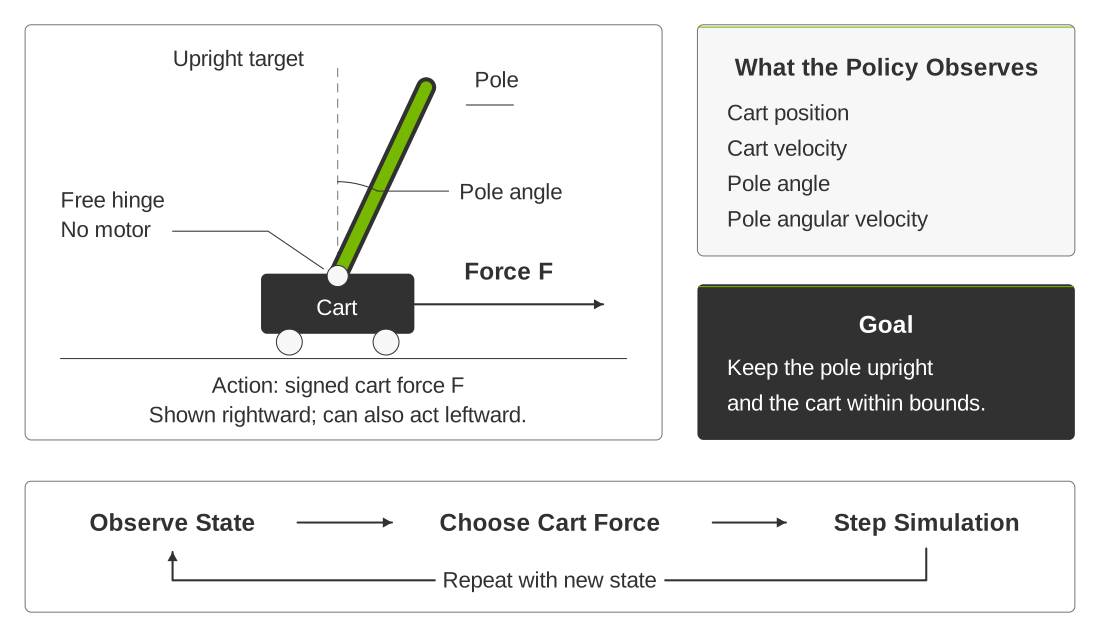
The policy controls the cart’s force to balance the pole. The dashed line marks the upright target; the solid pole shows a tilted state that needs correction.#
Verify Task Registration#
Start by running a helper utility to confirm that the task is registered and discoverable by Isaac Lab.
uv run python scripts/list_envs.py --show_presets
Confirm that the output includes:
IsaacLabTutorial-Balance-Cartpole
Then run the generated registration test:
uv run pytest tests/test_registration.py
The test imports the task package, asks Gymnasium for the generated task, and checks its environment and agent entry points. A passing test confirms task discovery, but it does not step the simulation.
Testing With the Zero Agent#
Hint
Predict the differences between zero-action and random-action behavior before running them with the following commands. Compare your predictions with the recordings and note one surprise.
Before training or testing with a policy, we’ll check that the task can run with
zero actions. The zero_agent CLI constructs the task, steps it with zero
actions (the zero vector), and prints the observation and action spaces.
uv run isaaclab zero_agent                 \
  --task IsaacLabTutorial-Balance-Cartpole \
  --num_envs 16                            \
  --max_steps 300                          \
  --visualizer newton
You can look back at previous lessons or run the command with --help to see
descriptions of the options.
Look for the printed observation and action spaces followed by the message that
the zero agent is running and then exiting. If you are running this command with
an attached monitor (or using a virtual desktop), compare the initial states of
the 16 environments. EventCfg gives them different, random cart positions,
pole angles, and velocities when they reset.
Because the agent always applies zero force to the cart, gravity and the initial
motion cause the poles to fall. Each environment resets independently when its
time limit expires or its cart crosses a position limit. See
Recording a Video to record this baseline with --video.
Zero actions for 900 control steps (15 seconds).#
Watch the poles fall, then compare that behavior with the reset timing (hover over the video to see the timestamp). The template does not terminate an episode when the pole falls. Its only ending conditions are a five-second timeout and cart position outside ±3 m.
Testing With the Random Agent#
This agent is similar to the zero agent, but it generates random actions independently for each environment.
uv run isaaclab random_agent               \
  --task IsaacLabTutorial-Balance-Cartpole \
  --num_envs 16                            \
  --max_steps 300                          \
  --visualizer newton
See Recording a Video to record this baseline.
Random actions for 900 control steps (15 seconds).#
You should see the same irregular cart motion and frequent failures as shown in the video. The random agent confirms that actions reach the simulation, but the observations and rewards are ignored.
Consider one simulation step through the configuration:
The random agent produces actions (a single value proportional to the force to apply in this case) for each environment.
ActionsCfgscales that value into cart-joint effort.The physics backend advances the cartpole simulation twice because the control decimation is two.
ObservationsCfgreads the new joint positions and velocities.RewardsCfgevaluates survival, failure, pole angle, and velocity terms.TerminationsCfgdecides whether the episode continues orEventCfgresets it.
Recording a Video#
The zero_agent and random_agent commands accept --video, just like
train and play. Record both baselines with the built-in recorder; no
additional Python script is needed.
These commands use Newton GL and the same external camera position as the
policy recordings in the next lesson. env.seed=123 sets the environment seed.
uv run --with 'moviepy<2'                                \
  isaaclab zero_agent                                    \
  --task IsaacLabTutorial-Balance-Cartpole               \
  --num_envs 16                                          \
  --max_steps 900                                        \
  --visualizer newton                                    \
  --video --video_length 900                             \
  env.seed=123                                           \
  env.sim.default_visualizer_cfg.eye='[14.0,-18.0,13.0]' \
  env.sim.default_visualizer_cfg.lookat='[0.0,0.0,0.8]'  \
  env.sim.default_visualizer_cfg.focal_length=24.0

uv run --with 'moviepy<2'                                \
  isaaclab random_agent                                  \
  --task IsaacLabTutorial-Balance-Cartpole               \
  --num_envs 16                                          \
  --max_steps 900                                        \
  --visualizer newton                                    \
  --video --video_length 900                             \
  env.seed=123                                           \
  env.sim.default_visualizer_cfg.eye='[14.0,-18.0,13.0]' \
  env.sim.default_visualizer_cfg.lookat='[0.0,0.0,0.8]'  \
  env.sim.default_visualizer_cfg.focal_length=24.0
Each command records 900 control steps. Videos are saved under
logs/zero_agent/IsaacLabTutorial-Balance-Cartpole/videos/play/ and
logs/random_agent/IsaacLabTutorial-Balance-Cartpole/videos/play/, respectively.
Video encoding uses moviepy.editor, so the recording commands use
--with 'moviepy<2' to supply the compatible optional dependency for that
invocation. Keep the recordings for comparison with the trained policies in
the next lesson.
Review#
Check Your Understanding#
Does a random-agent run train a policy?
Answer
No. A random agent applies random actions without updating policy weights. Its run checks execution and provides a behavior baseline.
Apply What You Learned#
What do your zero-action and random-action baselines establish about the cartpole task? Use the commands, output, or recordings to explain stepping and reset behavior, and identify what evidence of learning is still missing.
Agent Tutor Prompt
Copy this prompt and include your answer:
Review my answer to this question: What do your zero-action and random-action baselines establish about the cartpole task? Use the commands, output, or recordings to explain stepping and reset behavior, and identify what evidence of learning is still missing.
My answer: [paste your answer here].
Check my reasoning about discovery, construction, action and observation spaces, stepping, reset rules, and the distinction between execution and learning. Ask for missing context rather than assuming it. Identify what I explained well, point out one gap or misconception, and ask a follow-up question that helps me improve my answer. Let me revise it before supplying a complete answer.
Key Takeaways#
Registration confirms the task can be found, while stepping checks execution.
Zero and random actions provide behavior baselines without learning.
A fallen pole does not end this task unless a configured ending condition is met.
Resources#
Isaac Lab Reinforcement Learning — Documentation on supported reinforcement learning libraries and workflows for training and evaluating policies.