

KVBM Guide
Enable KV offloading using KV Block Manager (KVBM) for Dynamo deployments
The Dynamo KV Block Manager (KVBM) is a scalable runtime component designed to handle memory allocation, management, and remote sharing of Key-Value (KV) blocks for inference tasks across heterogeneous and distributed environments. It acts as a unified memory layer and write-through cache for frameworks like vLLM and TensorRT-LLM.
KVBM is modular and can be used standalone via pip install kvbm or as the memory management component in the full Dynamo stack. This guide covers installation, configuration, and deployment of the Dynamo KV Block Manager (KVBM) and other KV cache management systems.
Quick start with the pre-built NGC container
The fastest path is the published Dynamo container, which includes KVBM:
For installation from source or custom builds, see Local Installation and Release Artifacts.
Run KVBM Standalone
KVBM can be used independently without using the rest of the Dynamo stack:
See the support matrix for version compatibility.
Build from Source
To build KVBM from source, see the detailed instructions in the KVBM bindings README.
Run KVBM in Dynamo with vLLM
Docker Setup
Pick one of the following to get a Dynamo vLLM container with KVBM built in. The subsequent serving commands are the same either way.
Option A: Pre-built NGC container (recommended for quick start)
See the Local Installation Guide for full setup instructions and Release Artifacts for available versions.
Option B: Build from source
Aggregated Serving
Verify Deployment
Alternative: Using Direct vllm serve
You can also use vllm serve directly with KVBM:
Run KVBM in Dynamo with TensorRT-LLM
Prerequisites:
- Ensure
etcdandnatsare running before starting - KVBM only supports TensorRT-LLM’s PyTorch backend
- Disable partial reuse (
enable_partial_reuse: false) to increase offloading cache hits - KVBM requires TensorRT-LLM v1.2.0rc2 or newer
Docker Setup
Pick one of the following to get a Dynamo TensorRT-LLM container with KVBM built in. The subsequent serving commands are the same either way.
Option A: Pre-built NGC container (recommended for quick start)
See the Local Installation Guide for full setup instructions and Release Artifacts for available versions.
Option B: Build from source
Aggregated Serving
Verify Deployment
Alternative: Using trtllm-serve
Run Dynamo with SGLang HiCache
SGLang’s Hierarchical Cache (HiCache) extends KV cache storage beyond GPU memory to include host CPU memory. When using NIXL as the storage backend, HiCache integrates with Dynamo’s memory infrastructure.
Quick Start
Learn more: See the SGLang HiCache Integration Guide for detailed configuration, deployment examples, and troubleshooting.
Disaggregated Serving with KVBM
KVBM supports disaggregated serving where prefill and decode operations run on separate workers. KVBM is enabled on the prefill worker to offload KV cache.
Disaggregated Serving with vLLM
Disaggregated Serving with TRT-LLM
Configuration
Cache Tier Configuration
Configure KVBM cache tiers using environment variables:
You can also specify exact block counts instead of GB:
DYN_KVBM_CPU_CACHE_OVERRIDE_NUM_BLOCKSDYN_KVBM_DISK_CACHE_OVERRIDE_NUM_BLOCKS
[!NOTE] KVBM is a write-through cache and it is possible to misconfigure. Each of the capacities should increase as you enable more tiers. As an example, if you configure your GPU device to have 100GB of memory dedicated for KV cache storage, then configure
DYN_KVBM_CPU_CACHE_GB >= 100. The same goes for configuring the disk cache;DYN_KVBM_DISK_CACHE_GB >= DYN_KVBM_CPU_CACHE_GB. If the cpu cache is configured to be less than the device cache, then there will be no benefit from KVBM. In many cases you will see performance degradation as KVBM will churn by offloading blocks from the GPU to CPU after every forward pass. To know what your minimum value forDYN_KVBM_CPU_CACHE_GBshould be for your setup, consult your llm engine’s kv cache configuration.
SSD Lifespan Protection
When disk offloading is enabled, disk offload filtering is enabled by default to extend SSD lifespan. The current policy only offloads KV blocks from CPU to disk if the blocks have frequency ≥ 2. Frequency doubles on cache hit (initialized at 1) and decrements by 1 on each time decay step.
To disable disk offload filtering:
NCCL Replicated Mode for MLA Models
For MLA (Multi-Layer Attention) models such as DeepSeek, KVBM can use NCCL replicated mode so that only rank 0 loads KV blocks from G2/G3 storage and then broadcasts them to all GPUs via NCCL. This avoids redundant loads and can improve performance when multiple GPUs share the same replicated KV cache.
Enable NCCL MLA mode:
Requirements:
- MPI must be initialized (e.g., when launching with
mpirunor equivalent) so that rank and world size are available for NCCL. - For optimal broadcast-based replication, build KVBM with the NCCL feature:
cargo build -p kvbm --features nccl. Without it, the connector falls back to worker-level replication (each GPU loads independently).
When disabled (default), each GPU loads KV blocks independently. Set DYN_KVBM_NCCL_MLA_MODE=true when running MLA models with KVBM to use the NCCL broadcast optimization.
Enable and View KVBM Metrics
Setup Monitoring Stack
Enable Metrics for vLLM
Enable Metrics for TensorRT-LLM
Firewall Configuration (Optional)
View Metrics
Access Grafana at http://localhost:3000 (default login: dynamo/dynamo) and look for the KVBM Dashboard.
Available Metrics
Benchmarking KVBM
Use LMBenchmark to evaluate KVBM performance.
Setup
Run Benchmark
Average TTFT and other performance numbers will be in the output.
TIP: If metrics are enabled, observe KV offloading and onboarding in the Grafana dashboard.
Baseline Comparison
vLLM Baseline (without KVBM)
TensorRT-LLM Baseline (without KVBM)
Troubleshooting
No TTFT Performance Gain
Symptom: Enabling KVBM does not show TTFT improvement or causes performance degradation.
Cause: Not enough prefix cache hits on KVBM to reuse offloaded KV blocks.
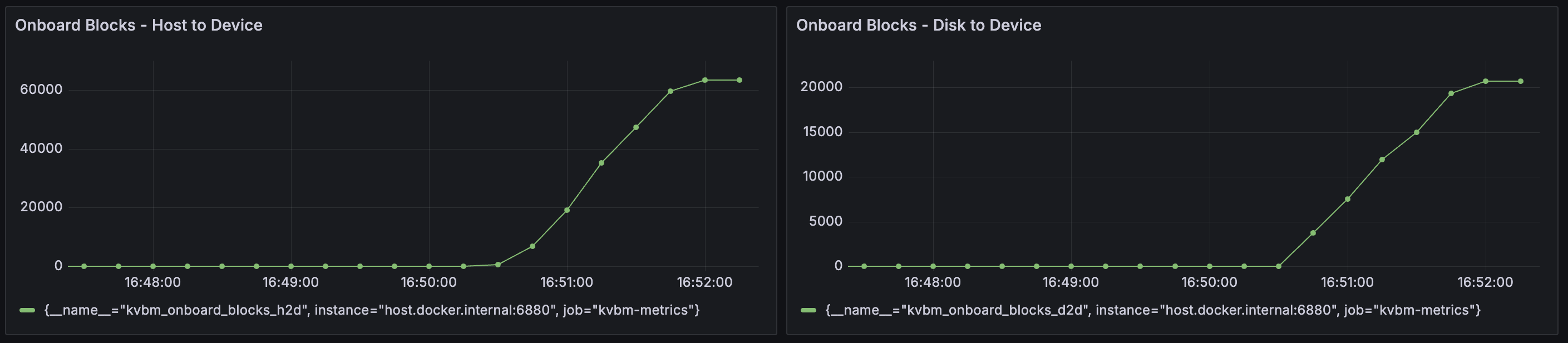
Solution: Enable KVBM metrics and check the Grafana dashboard for Onboard Blocks - Host to Device and Onboard Blocks - Disk to Device. Large numbers of onboarded KV blocks indicate good cache reuse:
KVBM Worker Initialization Timeout
Symptom: KVBM fails to start when allocating large memory or disk storage.
Solution: Increase the leader-worker initialization timeout (default: 1800 seconds):
Disk Offload Fails to Start
Symptom: KVBM fails to start when disk offloading is enabled.
Cause: fallocate() is not supported on the filesystem (e.g., Lustre, certain network filesystems),
or the storage backend requires a different method for setting O_DIRECT.
Solution:
- If
fallocate()is not supported, enable the zerofill fallback:
- If your filesystem ignores
fcntl(F_SETFL, O_DIRECT)(e.g., IBM Storage Scale), set the disk allocator type to passO_DIRECTat file open time instead:
Supported values for DYN_KVBM_DISK_ALLOCATOR_TYPE:
default: ApplyO_DIRECTviafcntlafter file creation. Works on most POSIX filesystems (ext4, XFS, Lustre, etc.).open-direct: PassO_DIRECTtomkostempat file open time. Required on filesystems wherefcntl(F_SETFL, O_DIRECT)is ignored (e.g., IBM Storage Scale).
- If you encounter “write all error” or EINVAL (errno 22), or need to debug without
O_DIRECT:
Developing Locally
Inside the Dynamo container, after changing KVBM-related code (Rust and/or Python):
To use Nsight Systems for perf analysis, please follow below steps (using vLLM as example). KVBM has NVTX annotation on top level KV Connector APIs (search for @nvtx_annotate). If more is needed, please add then rebuild.
See Also
- KVBM Overview for a quick overview of KV Caching, KVBM and its architecture
- KVBM Design for a deep dive into KVBM architecture
- LMCache Integration
- FlexKV Integration
- SGLang HiCache