# Copyright (c) 2022-2026, The Isaac Lab Project Developers (https://github.com/isaac-sim/IsaacLab/blob/main/CONTRIBUTORS.md).
# All rights reserved.
#
# SPDX-License-Identifier: BSD-3-Clause
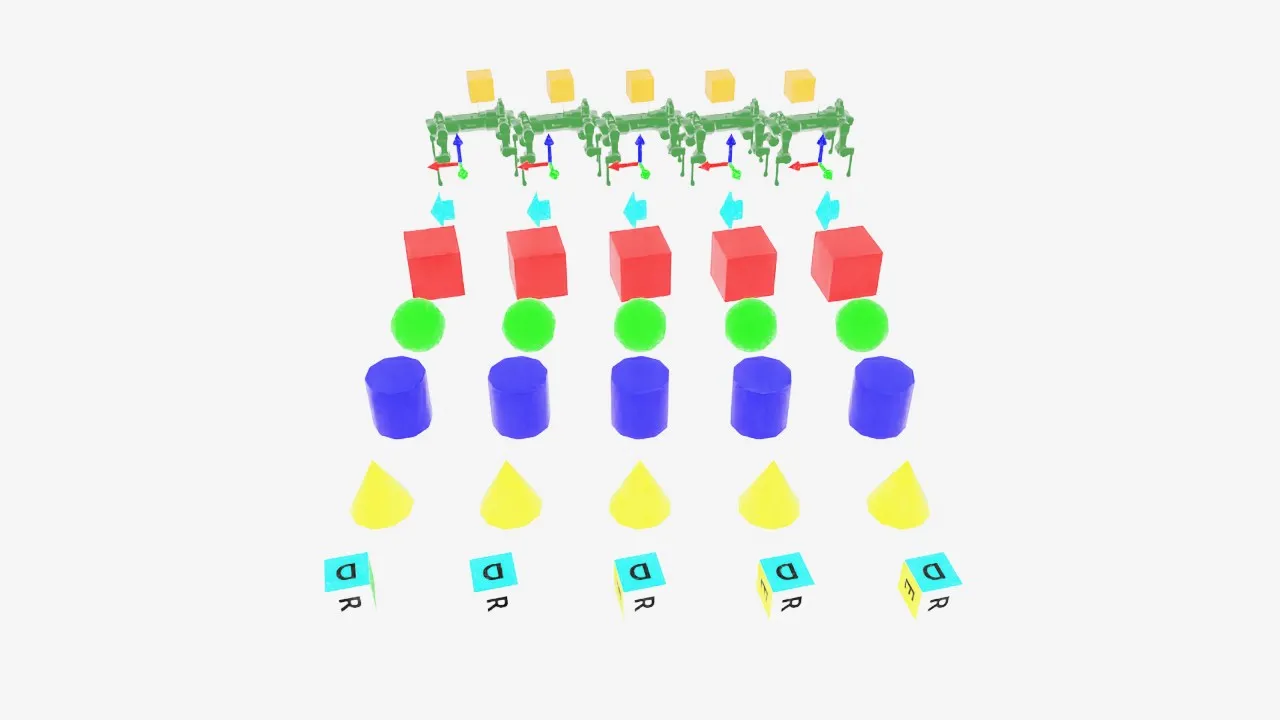
"""This script demonstrates different types of markers.
.. code-block:: bash
# Usage with default PhysX physics and default kit visualizer.
uvx --from 'isaaclab[isaacsim]' isaaclab example markers
"""
import argparse
from typing import TYPE_CHECKING
from isaaclab.app import add_launcher_args, launch_simulation
from isaaclab.utils import instantiate
parser = argparse.ArgumentParser(
description="This script demonstrates different types of markers.",
conflict_handler="resolve",
)
parser.add_argument("--physics", default="isaacsim_physx", choices=["isaacsim_physx"], help="Physics backend.")
parser.add_argument("--max_steps", type=int, default=-1, help="Stop after this many steps; negative runs forever.")
add_launcher_args(parser)
parser.set_defaults(visualizer=["kit"])
args_cli = parser.parse_args()
if args_cli.max_steps == 0 or args_cli.max_steps < -1:
parser.error("--max_steps must be positive or -1.")
import torch
import isaaclab.sim as sim_utils
from isaaclab.markers.visualization_markers_cfg import VisualizationMarkersCfg
from isaaclab.physics import PhysicsCfg
from isaaclab.utils.assets import ISAAC_NUCLEUS_DIR, ISAACLAB_NUCLEUS_DIR
from isaaclab.utils.math import quat_from_angle_axis
if TYPE_CHECKING:
from isaaclab.markers import VisualizationMarkers
def define_markers() -> "VisualizationMarkers":
"""Define markers with various different shapes."""
marker_cfg = VisualizationMarkersCfg(
prim_path="/Visuals/myMarkers",
markers={
"frame": sim_utils.UsdFileCfg(
usd_path=f"{ISAAC_NUCLEUS_DIR}/Props/UIElements/frame_prim.usd",
scale=(0.5, 0.5, 0.5),
),
"arrow_x": sim_utils.UsdFileCfg(
usd_path=f"{ISAAC_NUCLEUS_DIR}/Props/UIElements/arrow_x.usd",
scale=(1.0, 0.5, 0.5),
visual_material=sim_utils.PreviewSurfaceCfg(diffuse_color=(0.0, 1.0, 1.0)),
),
"cube": sim_utils.CuboidCfg(
size=(1.0, 1.0, 1.0),
visual_material=sim_utils.PreviewSurfaceCfg(diffuse_color=(1.0, 0.0, 0.0)),
),
"sphere": sim_utils.SphereCfg(
radius=0.5,
visual_material=sim_utils.PreviewSurfaceCfg(diffuse_color=(0.0, 1.0, 0.0)),
),
"cylinder": sim_utils.CylinderCfg(
radius=0.5,
height=1.0,
visual_material=sim_utils.PreviewSurfaceCfg(diffuse_color=(0.0, 0.0, 1.0)),
),
"cone": sim_utils.ConeCfg(
radius=0.5,
height=1.0,
visual_material=sim_utils.PreviewSurfaceCfg(diffuse_color=(1.0, 1.0, 0.0)),
),
"mesh": sim_utils.UsdFileCfg(
usd_path=f"{ISAAC_NUCLEUS_DIR}/Props/Blocks/DexCube/dex_cube_instanceable.usd",
scale=(10.0, 10.0, 10.0),
),
"mesh_recolored": sim_utils.UsdFileCfg(
usd_path=f"{ISAAC_NUCLEUS_DIR}/Props/Blocks/DexCube/dex_cube_instanceable.usd",
scale=(10.0, 10.0, 10.0),
visual_material=sim_utils.PreviewSurfaceCfg(diffuse_color=(1.0, 0.25, 0.0)),
),
"robot_mesh": sim_utils.UsdFileCfg(
usd_path=f"{ISAACLAB_NUCLEUS_DIR}/Robots/ANYbotics/ANYmal-C/anymal_c.usd",
scale=(2.0, 2.0, 2.0),
visual_material=sim_utils.GlassMdlCfg(glass_color=(0.0, 0.1, 0.0)),
),
},
)
return instantiate(marker_cfg)
def main():
"""Main function."""
with launch_simulation(cfg=PhysicsCfg(), launcher_args=args_cli) as physics_cfg:
sim_cfg = sim_utils.SimulationCfg(dt=0.01, device=args_cli.device, physics=physics_cfg)
sim = sim_utils.SimulationContext(sim_cfg)
# Set main camera
sim.set_camera_view([0.0, 18.0, 12.0], [0.0, 3.0, 0.0])
# Spawn things into stage
# Lights
cfg = sim_utils.DomeLightCfg(intensity=3000.0, color=(0.75, 0.75, 0.75))
cfg.func("/World/Light", cfg)
# create markers
my_visualizer = define_markers()
# define a grid of positions where the markers should be placed
num_markers_per_type = 5
grid_spacing = 2.0
# Calculate the half-width and half-height
half_width = (num_markers_per_type - 1) / 2.0
half_height = (my_visualizer.num_prototypes - 1) / 2.0
# Create the x and y ranges centered around the origin
x_range = torch.arange(-half_width * grid_spacing, (half_width + 1) * grid_spacing, grid_spacing)
y_range = torch.arange(-half_height * grid_spacing, (half_height + 1) * grid_spacing, grid_spacing)
# Create the grid
x_grid, y_grid = torch.meshgrid(x_range, y_range, indexing="ij")
x_grid = x_grid.reshape(-1)
y_grid = y_grid.reshape(-1)
z_grid = torch.zeros_like(x_grid)
# marker locations
marker_locations = torch.stack([x_grid, y_grid, z_grid], dim=1)
marker_indices = torch.arange(my_visualizer.num_prototypes).repeat(num_markers_per_type)
sim.reset()
print("[INFO]: Setup complete...")
# Yaw angle
yaw = torch.zeros_like(marker_locations[:, 0])
step_count = 0
# Step while a visualizer window is still open (or none exist, e.g. headless); works for kit and newton.
while sim.is_running() and (args_cli.max_steps < 0 or step_count < args_cli.max_steps):
# rotate the markers around the z-axis for visualization
marker_orientations = quat_from_angle_axis(yaw, torch.tensor([0.0, 0.0, 1.0]))
# visualize
my_visualizer.visualize(marker_locations, marker_orientations, marker_indices=marker_indices)
# roll corresponding indices to show how marker prototype can be changed
if yaw[0].item() % (0.5 * torch.pi) < 0.01:
marker_indices = torch.roll(marker_indices, 1)
# perform step
sim.step()
step_count += 1
# increment yaw
yaw += 0.01
if __name__ == "__main__":
main()