

Training a Reach Policy for Real Robot Deployment
This tutorial walks you through training an end-effector pose tracking (reach) reinforcement learning (RL) policy that transfers from simulation to a real robot. By the end of this guide, you will have a trained policy capable of controlling a robot arm to reach arbitrary target end-effector poses within its workspace.
Supported Robots:
- Universal Robots UR10e: 6-DOF industrial robot arm
- Flexiv Rizon 4s: 7-DOF collaborative robot arm
Scope of This Tutorial:
This tutorial focuses on the training portion of the sim-to-real workflow. For deployment on real hardware, including robot interface setup and ROS inference node configuration, refer to the Isaac ROS Documentation.
Prerequisites:
Before starting this tutorial, ensure you have Isaac Lab installed and configured. Follow the installation guide if you haven’t already set up your environment.
Task Overview
The reach task trains a policy to track randomly sampled end-effector poses within the robot’s workspace.
How It Works:
- A target pose (position and orientation) is randomly sampled within a defined workspace
- The policy receives the current joint states and the target pose as observations
- The policy outputs incremental joint position commands to move the end-effector toward the target
- The target is resampled periodically during training to ensure the policy generalizes across the workspace
Key Concepts for Sim-to-Real Transfer
Successful sim-to-real transfer requires consistency across three areas:
- Input Consistency: Observations available in simulation must match those available on the real robot
- System Response Consistency: The simulated robot must respond to actions similarly to the real robot
- Output Consistency: Any post-processing on policy outputs must be replicated during deployment
When these are properly addressed, policies trained purely in simulation can transfer to real hardware without any real-world training data.
Observation Space
The policy receives only proprioceptive observations, which are reliably available from the robot controller:
Total observation dimension: 19 (UR10e) or 21 (Rizon 4s)
Implementation:
uv run isaaclab play —rl_library rsl_rl
—task IsaacContrib-Deploy-Reach-UR10e \
self.enable_corruption = True self.concatenate_terms = True
The noise terms are set to zero by default (Unoise(n_min=-0.0, n_max=0.0)), meaning no observation noise is applied. This can be adjusted if noise modeling is desired for additional robustness. Modern robot controllers provide sufficiently accurate joint state feedback that adding noise during training is not required for sim-to-real transfer of this task.
Action Space
The policy outputs incremental joint position commands. Each action specifies a delta (change) to apply to the current joint positions:
UR10e
Flexiv Rizon 4s
The action scale of 0.0625 radians (~3.6 degrees) per step provides a balance between responsiveness and smooth motion. The UR10e uses [".*"] to match all joints, while the Rizon 4s explicitly specifies ["joint[1-7]"] to match its 7 arm joints.
Action dimension: 6 (UR10e) or 7 (Rizon 4s)
Robot Configurations
Each robot has specific actuator configurations and workspace definitions.
UR10e
Flexiv Rizon 4s
The UR10e is a 6-DOF industrial robot with the following actuator configuration:
End-Effector:
- Link:
wrist_3_link - Default orientation: End-effector facing down (roll = pi, yaw = -pi/2)
Target Workspace:
Customizing the Workspace
You may need to modify the target workspace to match your deployment scenario. Key parameters you can adjust:
Target Position Range
Modify target_pos_centre and target_pos_range in the robot-specific config file (e.g., joint_pos_env_cfg.py):
Effects:
- Larger ranges increase task difficulty but improve generalization
- Ensure all target positions are reachable by the robot (within kinematic limits)
- Targets outside reachable workspace will cause the policy to fail
Target Orientation Range
Modify target_rot_centre and target_rot_range:
Effects:
- Wider orientation ranges train more versatile policies but may slow convergence
- Very wide ranges (e.g., full rotation) significantly increase training difficulty
Action Scale
Modify the scale parameter in the action configuration:
Effects:
- Smaller scale: Finer control, smoother motion, but slower reaching
- Larger scale: Faster motion, but potentially jerky or overshooting targets
- The same scale must be used during deployment on the real robot
Target Resampling Interval
Modify resampling_time_range in the commands configuration:
Effects:
- Shorter intervals: More diverse targets per episode, but less time to converge to each target
- Longer intervals: More time to refine tracking, but fewer targets seen during training
Domain Randomization
Domain randomization helps the policy generalize across variations in real robot behavior.
Actuator Gain Randomization:
The min_step_count_between_reset=200 ensures that actuator gains are not re-randomized too frequently, giving the policy time to adapt to each set of parameters before they change.
Joint Friction Randomization:
Initial Joint Position Randomization:
Reward Structure
The policy is trained using a keypoint-based reward that captures both position and orientation accuracy:
The keypoint-based reward places virtual markers on the end-effector frame and measures the distance to corresponding markers on the target frame. This provides a robust metric that naturally captures both position and orientation errors.
Training the Policy
Step 1: Verify the Environment
Before starting full training, launch a quick visualization run to verify the environment is set up correctly:
UR10e
Flexiv Rizon 4s
uv (Recommended)
isaaclab.sh / isaaclab.bat
This opens the Isaac Sim viewer where you can observe the training in real-time.
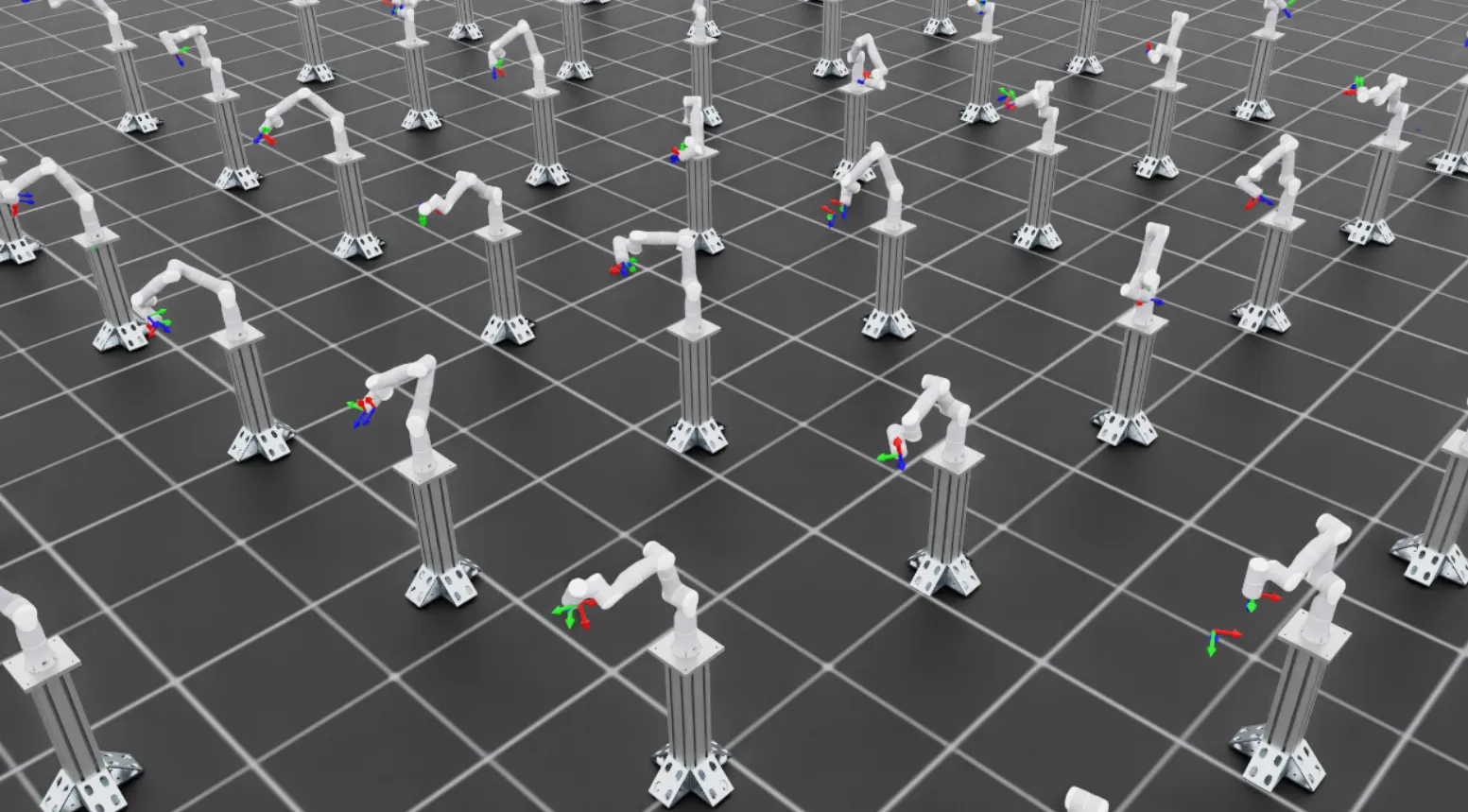
What to look for:
- The robot should be moving its arm attempting to reach different poses
- Early on, motion will be erratic as the policy explores; this is expected
- For Rizon 4s: Target pose markers appear as coordinate frames in the scene
- For UR10e: Target visualization is disabled (
debug_vis = False) because commands are generated in thebaseframe, which is 180 degrees offset from thebase_linkframe used for rendering. The robot will still track targets, but markers won’t be visible.
Once you confirm the environment looks correct, stop training with Ctrl+C and proceed to full-scale training.
Step 2: Full-Scale Training
Launch full training with many parallel environments in headless mode:
UR10e
Flexiv Rizon 4s
uv (Recommended)
isaaclab.sh / isaaclab.bat
Command breakdown:
--num_envs 4096: Runs 4096 parallel environments for efficient data collection--video: Records videos to monitor training progress--video_length 720: Each video captures exactly one full episode (episode_length_s / (sim.dt * decimation)=12.0 / (1/120 * 2)= 720 steps)--video_interval 72000: Records a video every 72000 environment steps (~every 100 training iterations).
Training Configuration:
The training hyperparameters are the same for both robots:
The experiment_name is "reach_ur10e" for UR10e and "reach_rizon4s" for Rizon 4s. Training typically takes 1-3 hours depending on your GPU.
Step 3: Monitor Training Progress
Use TensorBoard to monitor training metrics:
UR10e
Flexiv Rizon 4s
uv (Recommended)
isaaclab.sh / isaaclab.bat
Replace the log directory path with your actual training log location if different.
Key metrics to watch:
-
Mean reward: Should increase steadily and plateau once the policy converges
-
Reward terms: Monitor individual reward components to understand policy behavior:
end_effector_keypoint_tracking: Linear keypoint tracking penalty — should become less negative as the policy improvesend_effector_keypoint_tracking_exp: Exponential precision reward — should increase as the policy achieves finer trackingaction_rateandaction: Motion smoothness penalties — these are small in magnitude but should increase (become less negative) over training, indicating the policy is converging toward smoother motion
-
Position error: Tracks the Euclidean distance (in meters) between the end-effector and target position — should decrease over training
-
Orientation error: Tracks the angular difference between the end-effector and target orientation — should decrease over training
Step 4: Evaluate the Trained Policy
Once training completes, evaluate the policy with the play command. The play command
automatically applies the task’s play-mode overrides (play_mode), which disable
observation corruption for cleaner evaluation and cap the number of environments for
better visualization:
UR10e
Flexiv Rizon 4s
uv (Recommended)
isaaclab.sh / isaaclab.bat
Checkpoint Loading:
By default, the play command automatically loads the most recent checkpoint from the most recent training run.
It searches in logs/rsl_rl/<experiment_name>/ and selects the latest run folder and checkpoint file
(sorted alphabetically).
To load a specific checkpoint, use these arguments:
uv (Recommended)
isaaclab.sh / isaaclab.bat
Step 5: Deploy on Real Robot
Once satisfied with the trained policy, deploy it on real hardware using the Isaac ROS deployment pipeline. The pipeline uses:
- The trained model checkpoint (
.ptfile) - The
agent.yamlandenv.yamlconfiguration files generated during training
No additional export step is required.
For detailed deployment instructions, see the Isaac ROS Documentation.
Troubleshooting
CUDA Out of Memory
Error:
Solutions:
- Reduce parallel environments:
-
Disable video recording:
Remove the
--videoflags to free GPU memory.
Policy Does Not Converge
If rewards do not improve after many iterations:
- Check target workspace ranges: Ensure all target poses are reachable by the robot
- Verify joint names: Confirm joint ordering matches between simulation and configuration
- Reduce domain randomization: Temporarily disable randomization to verify the base task works
Jerky Motion on Real Robot
If the deployed policy produces jerky or unstable motion:
- Reduce action scale: Lower the
scaleparameter inRelativeJointPositionActionCfg - Verify control frequency: Ensure the real robot runs at the same frequency as simulation (60 Hz by default)
- Check joint ordering: Verify joint names and ordering match between simulation and real robot
Further Resources
- IndustReal: Transferring Contact-Rich Assembly Tasks from Simulation to Reality
- FORGE: Force-Guided Exploration for Robust Contact-Rich Manipulation under Uncertainty
- Isaac ROS Manipulation Documentation
- Gear Assembly Sim-to-Real Tutorial: Training a Gear Insertion Policy and ROS Deployment
- RL Training Tutorial: Training with an RL Agent