Skip to navigation

Robot and articulation configuration

View as Markdown

A jointed robot is represented as an articulation in Isaac Lab. This guide covers reusing an existing robot configuration and authoring a new ~assets.ArticulationCfg. The ~assets.ArticulationCfg is a configuration object that defines the properties of an ~assets.Articulation in Isaac Lab.

While we only cover the creation of an ~assets.ArticulationCfg in this guide, the process is similar for creating any other asset configuration object.

Reusing a robot configuration

Maintained robot configurations live in source/isaaclab_assets/isaaclab_assets/robots. Import a configuration from isaaclab_assets and copy it before changing its spawn properties, initial state, or actuators. Keep project-specific configurations in a Python module in your own project; they do not need to be added to Isaac Lab.

Import clone and replace from isaaclab.utils. For example, robot_cfg = clone(CARTPOLE_CFG) creates an independent configuration. Use replace(robot_cfg, prim_path="{ENV_REGEX_NS}/Robot") when adding it to an ~scene.InteractiveSceneCfg. The physics backend is selected separately from this robot configuration, as explained below.

We will use the Cartpole example to demonstrate how to create an ~assets.ArticulationCfg. The Cartpole is a simple robot that consists of a cart with a pole attached to it. The cart is free to move along a rail, and the pole is free to rotate about the cart. The file for this configuration example is source/isaaclab_assets/isaaclab_assets/robots/cartpole.py.

# Copyright (c) 2022-2026, The Isaac Lab Project Developers (https://github.com/isaac-sim/IsaacLab/blob/main/CONTRIBUTORS.md).
# All rights reserved.
#
# SPDX-License-Identifier: BSD-3-Clause
"""Configuration for a simple Cartpole robot."""
from isaaclab_newton.sim.schemas import NewtonArticulationCfg
from isaaclab_physx.sim.schemas import PhysxArticulationCfg, PhysxRigidBodyCfg
import isaaclab.sim as sim_utils
from isaaclab.actuators import ImplicitActuatorCfg
from isaaclab.assets import ArticulationCfg
from isaaclab.utils.assets import ISAACLAB_NUCLEUS_DIR
##
# Configuration
##
CARTPOLE_CFG = ArticulationCfg(
spawn=sim_utils.UsdFileCfg(
usd_path=f"{ISAACLAB_NUCLEUS_DIR}/Robots/Classic/Cartpole/cartpole.usd",
rigid_props=[
sim_utils.UsdPhysicsRigidBodyCfg(rigid_body_enabled=True),
PhysxRigidBodyCfg(
max_linear_velocity=1000.0,
max_angular_velocity=1000.0,
max_depenetration_velocity=100.0,
enable_gyroscopic_forces=True,
),
],
articulation_props=[
PhysxArticulationCfg(
enabled_self_collisions=False,
solver_position_iteration_count=4,
solver_velocity_iteration_count=0,
sleep_threshold=0.005,
stabilization_threshold=0.001,
),
NewtonArticulationCfg(self_collision_enabled=False),
],
),
init_state=ArticulationCfg.InitialStateCfg(
pos=(0.0, 0.0, 2.0), joint_pos={"slider_to_cart": 0.0, "cart_to_pole": 0.0}
),
actuators={
"cart_actuator": ImplicitActuatorCfg(
joint_names_expr=["slider_to_cart"],
joint_effort_limit=400.0,
stiffness=0.0,
damping=10.0,
),
"pole_actuator": ImplicitActuatorCfg(
joint_names_expr=["cart_to_pole"], joint_effort_limit=400.0, stiffness=0.0, damping=0.0
),
},
)
"""Configuration for a simple Cartpole robot."""

Choosing shared and backend-specific settings

Use the shared ~assets.ArticulationCfg for the robot’s initial state and actuators. The simulation selects the physics backend separately.

For common USD properties, use classes from isaaclab.sim.schemas, such as ~sim.schemas.RigidBodyBaseCfg and ~sim.schemas.ArticulationRootBaseCfg. Use isaaclab_physx.sim.schemas.Physx*Cfg for PhysX tuning and isaaclab_newton.sim.schemas.Newton*Cfg / Mujoco*Cfg for Newton and MJWarp-specific settings. The Schema Configuration Classes guide explains the available classes and their USD namespaces; ../concepts/schema_fragments shows how to author both backends’ attributes in one spawn configuration.

The Cartpole below uses the compatibility names RigidBodyPropertiesCfg and ArticulationRootPropertiesCfg. Its PhysX solver iterations and sleep thresholds do not configure Newton’s solver. When adapting it to Newton, retain the shared initial-state and actuator configuration and configure the Newton solver separately. For example, to override Newton’s self-collision setting:

from isaaclab_assets import CARTPOLE_CFG
from isaaclab_newton.sim.schemas import NewtonArticulationRootPropertiesCfg
from isaaclab.utils import clone
robot_cfg = clone(CARTPOLE_CFG)
robot_cfg.spawn.articulation_props = NewtonArticulationRootPropertiesCfg(self_collision_enabled=False)

See solver_tuning_mjwarp for solver settings, prepare_asset_for_newton for asset tuning, and Multi-backend assets for converted USD variants.

Defining the spawn configuration

As explained in Spawning prims into the scene tutorials, the spawn configuration defines the properties of the assets to be spawned. This spawning may happen procedurally, or through an existing asset file (e.g. USD or URDF). In this example, we will spawn the Cartpole from a USD file.

When spawning an asset from a USD file, we define its ~sim.spawners.from_files.UsdFileCfg. This configuration object takes in the following parameters:

  • ~sim.spawners.from_files.UsdFileCfg.usd_path: The USD file path to spawn from
  • ~sim.spawners.from_files.UsdFileCfg.rigid_props: The properties of the articulation’s rigid-body links
  • ~sim.spawners.from_files.UsdFileCfg.articulation_props: The properties of the articulation root

The last two parameters are optional. If not specified, they are kept at their default values in the USD file.

spawn=sim_utils.UsdFileCfg(
usd_path=f"{ISAACLAB_NUCLEUS_DIR}/Robots/Classic/Cartpole/cartpole.usd",
rigid_props=[
sim_utils.UsdPhysicsRigidBodyCfg(rigid_body_enabled=True),
PhysxRigidBodyCfg(
max_linear_velocity=1000.0,
max_angular_velocity=1000.0,
max_depenetration_velocity=100.0,
enable_gyroscopic_forces=True,
),
],
articulation_props=[
PhysxArticulationCfg(
enabled_self_collisions=False,
solver_position_iteration_count=4,
solver_velocity_iteration_count=0,
sleep_threshold=0.005,
stabilization_threshold=0.001,
),
NewtonArticulationCfg(self_collision_enabled=False),
],
),

To import articulation from a URDF file instead of a USD file, you can replace the ~sim.spawners.from_files.UsdFileCfg with a ~sim.spawners.from_files.UrdfFileCfg. For more details, please check the API documentation.

Defining the initial state

Every asset requires defining their initial or default state in the simulation through its configuration. This configuration is stored into the asset’s default state buffers that can be accessed when the asset’s state needs to be reset.

The initial state of an asset is defined w.r.t. its local environment frame. This then needs to be transformed into the global simulation frame when resetting the asset’s state. For more details, please check the Interacting with an articulation tutorial.

For an articulation, the ~assets.ArticulationCfg.InitialStateCfg object defines the initial state of the root of the articulation and the initial state of all its joints. In this example, we will spawn the Cartpole at the origin of the XY plane at a Z height of 2.0 meters. Meanwhile, the joint positions and velocities are set to 0.0.

init_state=ArticulationCfg.InitialStateCfg(
pos=(0.0, 0.0, 2.0), joint_pos={"slider_to_cart": 0.0, "cart_to_pole": 0.0}
),

Defining the actuator configuration

Actuators are a crucial component of an articulation. Through this configuration, it is possible to define the type of actuator model to use. We can use the internal actuator model provided by the physics engine (i.e. the implicit actuator model), or use a custom actuator model which is governed by a user-defined system of equations (i.e. the explicit actuator model). For more details on actuators, see Actuators.

The cartpole’s articulation has two actuators, one corresponding to its each joint: cart_to_pole and slider_to_cart. We use two different actuator models for these actuators as an example. However, since they are both using the same actuator model, it is possible to combine them into a single actuator model.

actuators={
"cart_actuator": ImplicitActuatorCfg(
joint_names_expr=["slider_to_cart"],
joint_effort_limit=400.0,
stiffness=0.0,
damping=10.0,
),
"pole_actuator": ImplicitActuatorCfg(
joint_names_expr=["cart_to_pole"], joint_effort_limit=400.0, stiffness=0.0, damping=0.0
),
},
actuators={
"all_joints": ImplicitActuatorCfg(
joint_names_expr=[".*"],
joint_effort_limit=400.0,
joint_velocity_limit=100.0,
stiffness={"slider_to_cart": 0.0, "cart_to_pole": 0.0},
damping={"slider_to_cart": 10.0, "cart_to_pole": 0.0},
),
},

Newton resolves the target mode of joints configured with ~isaaclab.actuators.ImplicitActuatorCfg before solver construction: stiffness-only selects position mode, damping-only velocity mode, both gains combined position/velocity mode, and zero gains effort mode. A gain of None retains the imported USD value; explicit actuator configurations use effort mode. Zero-gain USD drives therefore need no placeholder solely for a configured actuator. See Importing a New Asset for when isaaclab.sim.schemas.JointDrivePropertiesCfg.ensure_drives_exist remains useful.

ActuatorCfg velocity/effort limits considerations

Use the following fields in an actuator configuration. They select joints and are resolved when the articulation is constructed; the canonical runtime values live on ~isaaclab.assets.ArticulationData. See Joint and actuator property ownership for the ownership model and runtime mutation paths.

FieldImplicit actuatorExplicit actuator
joint_effort_limitWrites the solver drive effort limit.Writes the solver effort limit; defaults high to avoid a second model clip.
actuator_effort_limitNot supported.Clips actuator-model output.
joint_velocity_limitRequests a solver velocity constraint.Requests a solver velocity constraint.
actuator_velocity_limitCreates the soft velocity-limit snapshot; it is not a solver request.Describes the actuator rated speed; speed-dependent models use it in their torque curve.
effort_limitDeprecated alias for joint_effort_limit.Deprecated alias for actuator_effort_limit.
velocity_limitDeprecated alias for actuator_velocity_limit.Deprecated alias for actuator_velocity_limit.

Solver velocity enforcement is backend-dependent. joint_velocity_limit records the requested joint state but is not a backend-independent safety clamp; see Validate actuators and limits.

USD vs. ActuatorCfg discrepancy resolution

USD having default value and the fact that ActuatorCfg can be specified with None, or a overriding value can sometime be confusing what exactly gets written into simulation. The resolution follows these simple rules,per joint and per property:

ConditionActuatorCfg ValueApplied
No override providedNot SpecifiedUSD Value
Override providedUser’s ActuatorCfgSame as ActuatorCfg

Digging into USD can sometime be unconvinent, to help clarify what exact value is written, we designed a flag isaaclab.assets.ArticulationCfg.actuator_value_resolution_debug_print, to help user figure out what exact value gets used in simulation.

Whenever an actuator parameter is overridden in the user’s ActuatorCfg (or left unspecified), we compare it to the value read from the USD definition and record any differences. For each joint and each property, if unmatching value is found, we log the resolution:

  1. USD Value The default limit or gain parsed from the USD asset.

  2. ActuatorCfg Value The user-provided override (or “Not Specified” if none was given).

  3. Applied The final value actually used for simulation: if the user didn’t override it, this matches the USD value; otherwise it reflects the user’s setting.

This resolution info is emitted as a warning table only when discrepancies exist. Here’s an example of what you’ll see:

GroupPropertyNameIDUSD ValueActuatorCfg ValueApplied
panda_shoulder panda_forearm panda_handjoint_velocity_limit stiffness damping armature joint_velocity_limit stiffness damping armature friction joint_velocity_limit stiffness armature frictionpanda_joint1 panda_joint2 panda_joint3 panda_joint4 panda_joint1 panda_joint2 panda_joint3 panda_joint4 panda_joint1 panda_joint2 panda_joint3 panda_joint4 panda_joint1 panda_joint2 panda_joint3 panda_joint4 panda_joint5 panda_joint6 panda_joint7 panda_joint5 panda_joint6 panda_joint7 panda_joint5 panda_joint6 panda_joint7 panda_joint5 panda_joint6 panda_joint7 panda_joint5 panda_joint6 panda_joint7 panda_finger_joint1 panda_finger_joint2 panda_finger_joint1 panda_finger_joint2 panda_finger_joint1 panda_finger_joint2 panda_finger_joint1 panda_finger_joint20 1 2 3 0 1 2 3 0 1 2 3 0 1 2 3 4 5 6 4 5 6 4 5 6 4 5 6 4 5 6 7 8 7 8 7 8 7 82.17e+00 2.17e+00 2.17e+00 2.17e+00 2.29e+04 2.29e+04 2.29e+04 2.29e+04 4.58e+03 4.58e+03 4.58e+03 4.58e+03 0.00e+00 0.00e+00 0.00e+00 0.00e+00 2.61e+00 2.61e+00 2.61e+00 2.29e+04 2.29e+04 2.29e+04 4.58e+03 4.58e+03 4.58e+03 0.00e+00 0.00e+00 0.00e+00 0.00e+00 0.00e+00 0.00e+00 2.00e-01 2.00e-01 1.00e+06 1.00e+06 0.00e+00 0.00e+00 0.00e+00 0.00e+00Not Specified Not Specified Not Specified Not Specified 8.00e+01 8.00e+01 8.00e+01 8.00e+01 4.00e+00 4.00e+00 4.00e+00 4.00e+00 Not Specified Not Specified Not Specified Not Specified Not Specified Not Specified Not Specified 8.00e+01 8.00e+01 8.00e+01 4.00e+00 4.00e+00 4.00e+00 Not Specified Not Specified Not Specified Not Specified Not Specified Not Specified Not Specified Not Specified 2.00e+03 2.00e+03 Not Specified Not Specified Not Specified Not Specified2.17e+00 2.17e+00 2.17e+00 2.17e+00 8.00e+01 8.00e+01 8.00e+01 8.00e+01 4.00e+00 4.00e+00 4.00e+00 4.00e+00 0.00e+00 0.00e+00 0.00e+00 0.00e+00 2.61e+00 2.61e+00 2.61e+00 8.00e+01 8.00e+01 8.00e+01 4.00e+00 4.00e+00 4.00e+00 0.00e+00 0.00e+00 0.00e+00 0.00e+00 0.00e+00 0.00e+00 2.00e-01 2.00e-01 2.00e+03 2.00e+03 0.00e+00 0.00e+00 0.00e+00 0.00e+00

To keep the cleaniness of logging, isaaclab.assets.ArticulationCfg.actuator_value_resolution_debug_print default to False, remember to turn it on when wishes.

Example: configure and run two robots

The runnable example scripts/tutorials/01_assets/add_new_robot.py contrasts a minimal Jetbot configuration with a more detailed Dofbot configuration. Start with an imported USD asset (see import_new_asset) and define its spawn properties and actuators. Jetbot retains the joint gains authored in the USD by setting stiffness and damping to None. Both fields must be specified, even when using these USD defaults:

JETBOT_CONFIG = ArticulationCfg(
spawn=sim_utils.UsdFileCfg(usd_path=f"{ISAAC_NUCLEUS_DIR}/Robots/NVIDIA/Jetbot/jetbot.usd"),
actuators={"wheel_acts": ImplicitActuatorCfg(joint_names_expr=[".*"], damping=None, stiffness=None)},
)

Dofbot additionally sets initial joint positions, groups joints by name, and specifies actuator gains and limits. Its solver iterations and maximum depenetration velocity are PhysX-specific; use Choosing shared and backend-specific settings when adapting these properties to Newton. The keys in init_state.joint_pos identify USD joints, not actuator groups. Joint names can be matched with regular expressions; for example, .* selects all joints.

DOFBOT_CONFIG = ArticulationCfg(
spawn=sim_utils.UsdFileCfg(
usd_path=f"{ISAAC_NUCLEUS_DIR}/Robots/Yahboom/Dofbot/dofbot.usd",
rigid_props=PhysxRigidBodyCfg(
disable_gravity=False,
max_depenetration_velocity=5.0,
),
articulation_props=[
PhysxArticulationCfg(
enabled_self_collisions=True, solver_position_iteration_count=8, solver_velocity_iteration_count=0
),
NewtonArticulationCfg(self_collision_enabled=True),
],
),
init_state=ArticulationCfg.InitialStateCfg(
joint_pos={
"joint1": 0.0,
"joint2": 0.0,
"joint3": 0.0,
"joint4": 0.0,
},
pos=(0.25, -0.25, 0.0),
),
actuators={
"front_joints": ImplicitActuatorCfg(
joint_names_expr=["joint[1-2]"],
joint_effort_limit=100.0,
joint_velocity_limit=100.0,
stiffness=10000.0,
damping=100.0,
),
"joint3_act": ImplicitActuatorCfg(
joint_names_expr=["joint3"],
joint_effort_limit=100.0,
joint_velocity_limit=100.0,
stiffness=10000.0,
damping=100.0,
),
"joint4_act": ImplicitActuatorCfg(
joint_names_expr=["joint4"],
joint_effort_limit=100.0,
joint_velocity_limit=100.0,
stiffness=10000.0,
damping=100.0,
),
},
)

The example adds both configurations to an InteractiveSceneCfg, assigns each robot a path under every environment, and constructs the scene. Its loop resets root and joint states, sets joint targets, writes commands, steps physics, and updates the scene buffers. See Using the Interactive Scene for scene construction and Interacting with an articulation for the reset and control loop.

# Copyright (c) 2022-2026, The Isaac Lab Project Developers (https://github.com/isaac-sim/IsaacLab/blob/main/CONTRIBUTORS.md).
# All rights reserved.
#
# SPDX-License-Identifier: BSD-3-Clause
import argparse
from typing import TYPE_CHECKING
from isaaclab.app import add_launcher_args, launch_simulation
from isaaclab.utils import instantiate, replace
# add argparse arguments
parser = argparse.ArgumentParser(
description="This script demonstrates adding a custom robot to an Isaac Lab environment."
)
parser.add_argument("--num_envs", type=int, default=1, help="Number of environments to spawn.")
# append simulation launcher cli args
add_launcher_args(parser)
# parse the arguments
args_cli = parser.parse_args()
import numpy as np
import torch
from isaaclab_newton.sim.schemas import NewtonArticulationCfg
from isaaclab_physx.sim.schemas import PhysxArticulationCfg, PhysxRigidBodyCfg
import isaaclab.sim as sim_utils
from isaaclab.actuators import ImplicitActuatorCfg
from isaaclab.assets import AssetBaseCfg
from isaaclab.assets.articulation import ArticulationCfg
from isaaclab.scene import InteractiveSceneCfg
from isaaclab.utils.assets import ISAAC_NUCLEUS_DIR
if TYPE_CHECKING:
from isaaclab.scene import InteractiveScene
JETBOT_CONFIG = ArticulationCfg(
spawn=sim_utils.UsdFileCfg(usd_path=f"{ISAAC_NUCLEUS_DIR}/Robots/NVIDIA/Jetbot/jetbot.usd"),
actuators={"wheel_acts": ImplicitActuatorCfg(joint_names_expr=[".*"], damping=None, stiffness=None)},
)
DOFBOT_CONFIG = ArticulationCfg(
spawn=sim_utils.UsdFileCfg(
usd_path=f"{ISAAC_NUCLEUS_DIR}/Robots/Yahboom/Dofbot/dofbot.usd",
rigid_props=PhysxRigidBodyCfg(
disable_gravity=False,
max_depenetration_velocity=5.0,
),
articulation_props=[
PhysxArticulationCfg(
enabled_self_collisions=True, solver_position_iteration_count=8, solver_velocity_iteration_count=0
),
NewtonArticulationCfg(self_collision_enabled=True),
],
),
init_state=ArticulationCfg.InitialStateCfg(
joint_pos={
"joint1": 0.0,
"joint2": 0.0,
"joint3": 0.0,
"joint4": 0.0,
},
pos=(0.25, -0.25, 0.0),
),
actuators={
"front_joints": ImplicitActuatorCfg(
joint_names_expr=["joint[1-2]"],
joint_effort_limit=100.0,
joint_velocity_limit=100.0,
stiffness=10000.0,
damping=100.0,
),
"joint3_act": ImplicitActuatorCfg(
joint_names_expr=["joint3"],
joint_effort_limit=100.0,
joint_velocity_limit=100.0,
stiffness=10000.0,
damping=100.0,
),
"joint4_act": ImplicitActuatorCfg(
joint_names_expr=["joint4"],
joint_effort_limit=100.0,
joint_velocity_limit=100.0,
stiffness=10000.0,
damping=100.0,
),
},
)
class NewRobotsSceneCfg(InteractiveSceneCfg):
"""Designs the scene."""
# Ground-plane
ground = AssetBaseCfg(prim_path="/World/defaultGroundPlane", spawn=sim_utils.GroundPlaneCfg())
# lights
dome_light = AssetBaseCfg(
prim_path="/World/Light", spawn=sim_utils.DomeLightCfg(intensity=3000.0, color=(0.75, 0.75, 0.75))
)
# robot
Jetbot = replace(JETBOT_CONFIG, prim_path="{ENV_REGEX_NS}/Jetbot")
Dofbot = replace(DOFBOT_CONFIG, prim_path="{ENV_REGEX_NS}/Dofbot")
def run_simulator(sim: sim_utils.SimulationContext, scene: "InteractiveScene"):
sim_dt = sim.get_physics_dt()
sim_time = 0.0
count = 0
# wheel-velocity templates allocated once on the simulation device; the joint
# target setters dispatch to GPU Warp kernels and reject CPU tensors.
straight_action = torch.tensor([[10.0, 10.0]], device=sim.device).repeat(scene.num_envs, 1)
turn_action = torch.tensor([[5.0, -5.0]], device=sim.device).repeat(scene.num_envs, 1)
while sim.is_running():
# reset
if count % 500 == 0:
# reset counters
count = 0
# reset the scene entities to their initial positions offset by the environment origins
root_jetbot_pose = scene["Jetbot"].data.default_root_pose.torch.clone()
root_jetbot_pose[:, :3] += scene.env_origins
root_dofbot_pose = scene["Dofbot"].data.default_root_pose.torch.clone()
root_dofbot_pose[:, :3] += scene.env_origins
# copy the default root state to the sim for the jetbot's orientation and velocity
scene["Jetbot"].write_root_pose_to_sim_index(root_pose=root_jetbot_pose)
root_jetbot_vel = scene["Jetbot"].data.default_root_vel.torch.clone()
scene["Jetbot"].write_root_velocity_to_sim_index(root_velocity=root_jetbot_vel)
scene["Dofbot"].write_root_pose_to_sim_index(root_pose=root_dofbot_pose)
root_dofbot_vel = scene["Dofbot"].data.default_root_vel.torch.clone()
scene["Dofbot"].write_root_velocity_to_sim_index(root_velocity=root_dofbot_vel)
# copy the default joint states to the sim
joint_pos, joint_vel = (
scene["Jetbot"].data.default_joint_pos.torch.clone(),
scene["Jetbot"].data.default_joint_vel.torch.clone(),
)
scene["Jetbot"].write_joint_position_to_sim_index(position=joint_pos)
scene["Jetbot"].write_joint_velocity_to_sim_index(velocity=joint_vel)
joint_pos, joint_vel = (
scene["Dofbot"].data.default_joint_pos.torch.clone(),
scene["Dofbot"].data.default_joint_vel.torch.clone(),
)
scene["Dofbot"].write_joint_position_to_sim_index(position=joint_pos)
scene["Dofbot"].write_joint_velocity_to_sim_index(velocity=joint_vel)
# clear internal buffers
scene.reset()
print("[INFO]: Resetting Jetbot and Dofbot state...")
# drive around
if count % 100 < 75:
# Drive straight by setting equal wheel velocities
action = straight_action
else:
# Turn by applying different velocities
action = turn_action
scene["Jetbot"].set_joint_velocity_target_index(target=action)
# wave
wave_action = scene["Dofbot"].data.default_joint_pos.torch.clone()
wave_action[:, 0:4] = 0.25 * np.sin(2 * np.pi * 0.5 * sim_time)
scene["Dofbot"].set_joint_position_target_index(target=wave_action)
scene.write_data_to_sim()
sim.step()
sim_time += sim_dt
count += 1
scene.update(sim_dt)
def main():
"""Main function."""
# Configure the simulation
sim_cfg = sim_utils.SimulationCfg(device=args_cli.device)
# Launch the simulator runtime that the configuration needs
with launch_simulation(sim_cfg, args_cli):
# Initialize the simulation context
sim = sim_utils.SimulationContext(sim_cfg)
sim.set_camera_view([3.5, 0.0, 3.2], [0.0, 0.0, 0.5])
# Design scene
scene_cfg = NewRobotsSceneCfg(num_envs=args_cli.num_envs, env_spacing=2.0)
scene = instantiate(scene_cfg)
# Play the simulator
sim.reset()
# Now we are ready!
print("[INFO]: Setup complete...")
# Run the simulator
run_simulator(sim, scene)
if __name__ == "__main__":
main()

Run the example in the Isaac Sim viewport:

uv run isaaclab -p scripts/tutorials/01_assets/add_new_robot.py --viz kit

This example uses PhysX physics and requires Isaac Sim. The Dofbot gripper is not actuated in this example, so a warning about unconfigured joints is expected. Stop the example with Ctrl+C.
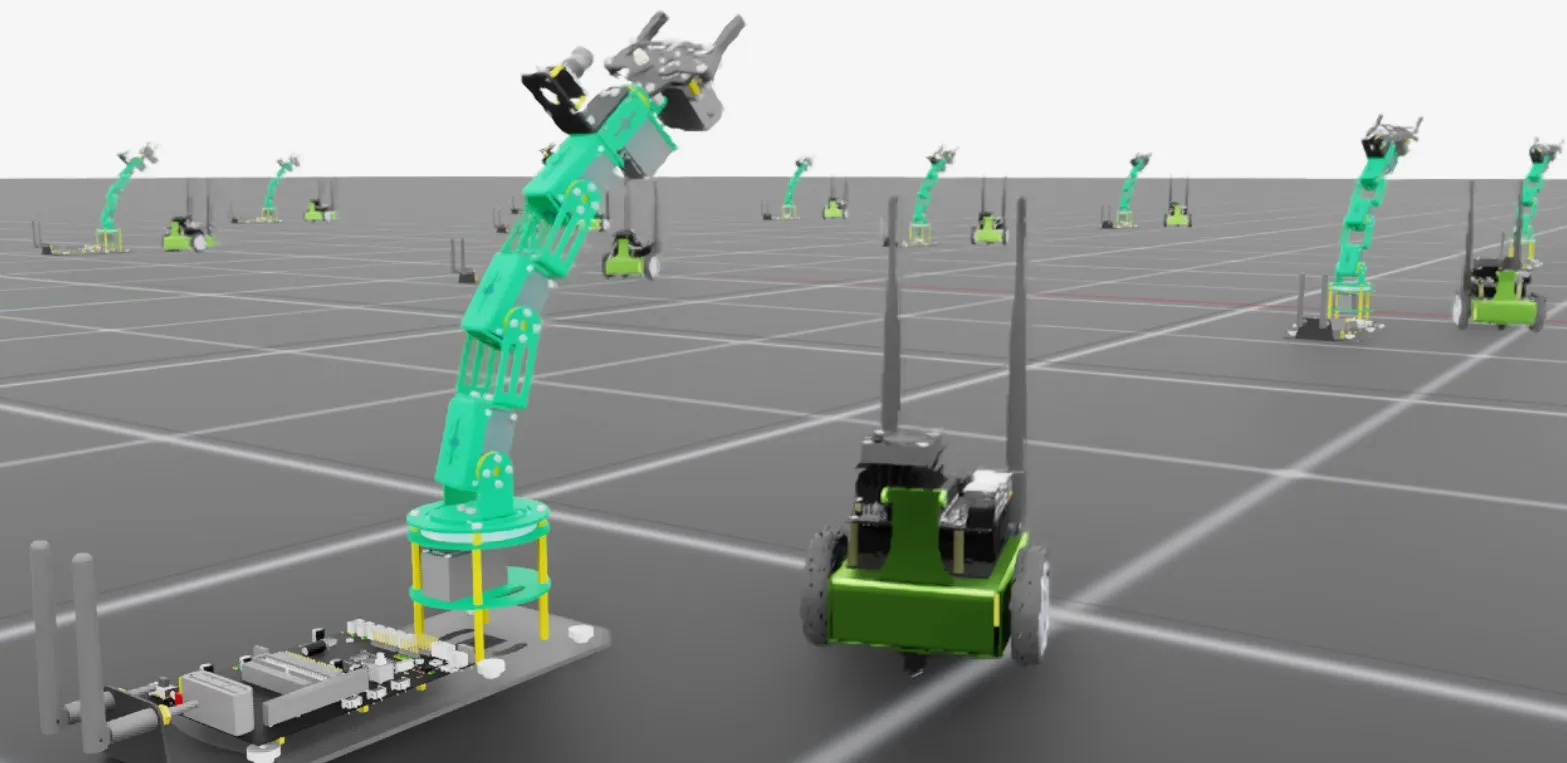
Jetbot and Dofbot running in the example scene.