

Training a Gear Insertion Policy and ROS Deployment
This tutorial walks you through how to train a gear insertion reinforcement learning (RL) policy that transfers from simulation to a real robot. The workflow consists of two main stages:
- Simulation Training in Isaac Lab: Train the policy in a high-fidelity physics simulation with domain randomization
- Real Robot Deployment with Isaac ROS: Deploy the trained policy on real hardware using Isaac ROS and a custom ROS inference node
This walkthrough covers the key principles and best practices for sim-to-real transfer using Isaac Lab.
Supported Robots:
- Universal Robots UR10e: 6-DOF industrial robot arm with Robotiq 2F-140 or 2F-85 gripper
- Flexiv Rizon 4s: 7-DOF collaborative robot arm with Grav parallel gripper
Task Details:
The gear assembly policy operates as follows:
- Initial State: The policy assumes the gear is already grasped by the gripper at the start of the episode
- Input Observations: The policy receives the pose of the gear shaft (position and orientation) in which the gear should be inserted, obtained from a separate perception pipeline
- Policy Output: The policy outputs delta joint positions (incremental changes to joint angles) to control the robot arm and perform the insertion
- Generalization: The trained policy generalizes across 3 different gear sizes without requiring retraining for each size
This environment has been successfully deployed on real UR10e and Flexiv Rizon 4s robots without an IsaacLab dependency.
Scope of This Tutorial:
This tutorial focuses exclusively on the training part of the sim-to-real transfer workflow in Isaac Lab. For the complete deployment workflow on the real robot, including the exact steps to set up the vision pipeline, robot interface and the ROS inference node to run your trained policy on real hardware, please refer to the Isaac ROS Documentation.
Overview
Successful sim-to-real transfer requires addressing three fundamental aspects:
- Input Consistency: Ensuring the observations your policy receives in simulation match those available on the real robot
- System Response Consistency: Ensuring the robot and environment respond to actions in simulation the same way they do in reality
- Output Consistency: Ensuring any post-processing applied to policy outputs in Isaac Lab is also applied during real-world inference
When all three aspects are properly addressed, policies trained purely in simulation can achieve robust performance on real hardware without any real-world training data.
Debugging Tip: When your policy fails on the real robot, the best approach to debug is to set up the real robot with the same initial observations as in simulation, then compare how the controller/system respond. This isolates whether the problem is from observation mismatch (Input Consistency) or physics/controller mismatch (System Response Consistency).
Part 1: Input Consistency
The observations your policy receives must be consistent between simulation and reality. This means:
- The observation space should only include information available from real sensors
- Sensor noise and delays should be modeled appropriately
Using Real-Robot-Available Observations
Your simulation environment should only use observations that are available on the real robot and not use “privileged” information that wouldn’t be available in deployment.
Observation Specification
The Gear Assembly environment uses both proprioceptive and exteroceptive (vision) observations:
Total observation dimension: 19 (UR10e) or 21 (Rizon 4s)
The Rizon 4s uses higher observation noise than the UR10e. The position noise is doubled (±10mm vs ±5mm) and quaternion noise (±2° per axis via quaternion multiplication) is added to the gear shaft orientation. These noise levels are set in the Rizon4s-specific config (joint_pos_env_cfg.py) rather than the shared base class, so they do not affect UR10e environments. The higher noise trains a more robust policy for the Rizon 4s perception pipeline.
Implementation (base class, shared by all robots):
Rizon 4s overrides (in joint_pos_env_cfg.py):
Why No Noise for Proprioceptive Observations?
Empirically, we found that policies trained without noise on proprioceptive observations (joint positions and velocities) transfer well to real hardware. The UR10e controller provides sufficiently accurate joint state feedback that modeling sensor noise doesn’t improve sim-to-real transfer for these tasks.
Part 2: System Response Consistency
Once your observations are consistent, you need to ensure the simulated robot and environment respond to actions the same way the real system does. In this use case, this involves three main aspects:
- Physics simulation parameters (friction, contact properties)
- Actuator modeling (PD controller gains, effort limits)
- Domain randomization
Physics Parameter Tuning
Accurate physics simulation is critical for contact-rich tasks. Key parameters include:
- Friction coefficients (static and dynamic)
- Contact solver parameters
- Material properties
- Rigid body properties
Example: Gear Assembly Physics Configuration
The Gear Assembly task requires accurate contact modeling for insertion. Here’s how friction is configured:
UR10e
Flexiv Rizon 4s
These friction values were determined through iterative visual comparison:
- Record videos of the gear being grasped and manipulated on real hardware
- Start training in simulation and observe the live simulation viewer
- Look for physics issues (penetration, unrealistic slipping, poor contact)
- Adjust friction coefficients and solver parameters and retry
- Compare the gear’s behavior in the gripper visually between sim and real
- Repeat adjustments until behavior matches (no need to wait for full policy training)
- Once physics looks good, train in headless mode with video recording:
UR10e
Flexiv Rizon 4s
uv (Recommended)
isaaclab.sh / isaaclab.bat
- Review the recorded videos and compare with real hardware videos to verify physics behavior
Contact Solver Configuration
Contact-rich manipulation requires careful solver tuning. These parameters were calibrated through the same iterative visual comparison process as the friction coefficients:
Important: The solver_position_iteration_count is a critical parameter for contact-rich tasks. Increasing this value improves collision simulation stability and reduces penetration issues, but it also increases simulation and training time. For the gear assembly task, we use solver_position_iteration_count=4 as a balance between physics accuracy and computational performance. If you observe penetration or unstable contacts, try increasing to 8 or 16, but expect slower training.
Actuator Modeling
Accurate actuator modeling ensures the simulated robot moves like the real one. This includes:
- PD controller gains (stiffness and damping)
- Effort and velocity limits
- Joint friction
Controller Choice: Impedance Control
For the UR10e and Flexiv Rizon 4s deployments, we use an impedance controller interface. Using a simpler controller like impedance control reduces the chances of variation between simulation and reality compared to more complex controllers (e.g., operational space control, hybrid force-position control). Simpler controllers:
- Have fewer parameters that can mismatch between sim and real
- Are easier to model accurately in simulation
- Have more predictable behavior that’s easier to replicate
- Reduce the controller complexity as a source of sim-real gap
Actuator Configurations:
UR10e
Flexiv Rizon 4s + Grav Gripper
Domain Randomization of Actuator Parameters (UR10e only)
To account for variations in real robot behavior, the UR10e configuration randomizes actuator gains during training:
Joint Friction Randomization (UR10e only)
Real robots have friction in their joints that varies with position, velocity, and temperature. For the UR10e with impedance controller interface, we observed significant stiction (static friction) causing the controller to not reach target joint positions.
Characterizing Real Robot Behavior:
To quantify this behavior, we plotted the step response of the impedance controller on the real robot and observed contact offsets of approximately 0.25 degrees from the commanded setpoint. This steady-state error is caused by joint friction opposing the controller’s commanded motion. Based on these measurements, we added joint friction modeling in simulation to replicate this behavior:
Why Joint Friction Matters: Without modeling joint friction in simulation, the policy learns to expect that commanded joint positions are always reached. On the real robot, stiction prevents small movements and causes steady-state errors. By adding friction during training, the policy learns to account for these effects and commands appropriately larger motions to overcome friction.
Flexiv Rizon 4s: Domain randomization for actuator gains and joint friction is not included in the Rizon 4s EventCfg (config/rizon_4s/joint_pos_env_cfg.py). We found the Rizon 4s real-world controller is more stable and precise than the UR10e’s, with negligible stiction and steady-state error. As a result, the simulation policy transfers well to the real robot without needing these additional randomizations.
Compensating for Stiction with Action Scaling:
To help the policy overcome stiction on the real robot, we also increased the output action scaling. The Isaac ROS documentation notes that a higher action scale (0.0325 vs 0.025) is needed to overcome the higher static friction (stiction) compared to the 2F-85 gripper. This increased scaling ensures the policy commands are large enough to overcome the friction forces observed in the step response analysis.
Action Space Design
Your action space should match what the real robot controller can execute. For this task we found that incremental joint position control is the most reliable approach.
Action Configuration:
UR10e
Flexiv Rizon 4s
Action dimension: 6
The action scale is a critical hyperparameter that should be tuned based on:
- Task precision requirements (smaller for contact-rich tasks)
- Control frequency (higher frequency allows larger steps)
Domain Randomization Strategy
Domain randomization should cover the range of conditions in which you want the real robot to perform. Increasing randomization ranges makes it harder for the policy to learn, but allows for larger variations in inputs and system parameters. The key is to balance training difficulty with robustness: randomize enough to cover real-world variations, but not so much that the policy cannot learn effectively.
Pose Randomization
For manipulation tasks, randomize object poses to ensure the policy works across the workspace. Both robots use the same gear and base pose randomization:
Initial State Randomization
Randomizing the robot’s initial configuration helps the policy handle different starting conditions:
UR10e
Flexiv Rizon 4s
Reward Shaping
The gear assembly environment uses keypoint-based rewards that measure the distance between keypoints on the gear and corresponding keypoints on the gear shaft. Both robots share a base set of reward terms defined in gear_assembly_env_cfg.py:
- Keypoint tracking (
keypoint_entity_error): Penalizes the L2 distance between gear and shaft keypoints, encouraging the gear to approach the shaft. - Exponential keypoint tracking (
keypoint_entity_error_exp): Provides a dense exponential reward that grows sharply as keypoints align, helping the policy refine fine-grained insertion. - Action rate (
action_rate_l2): Penalizes large changes in actions between timesteps, promoting smooth motions.
Rizon 4s additional reward terms:
The Rizon 4s configuration adds two reward terms that measure the distance between the robot’s end effector and the grasp-corrected pose computed from the active gear. For each gear, the code applies grasp_rot_offset and per-gear-size gear_offsets_grasp to compute where the EE should be if properly grasping that gear, then measures keypoint distance between the actual EE pose and that target. This acts as a grasp quality metric. These terms are defined only in the Rizon4s config (joint_pos_env_cfg.py) so they do not affect UR10e training:
These terms encourage the Rizon 4s policy to keep the gripper properly aligned with the gear during insertion. The distance is ~0 when the EE is correctly grasping the gear, and increases when the gripper drifts away. The weight_ramp_steps parameter linearly ramps the reward weight from zero over the first 512k environment steps, allowing the policy to first learn coarse approach/insertion behavior before the grasp quality reward becomes active.
Part 3: Training the Policy in Isaac Lab
Now that we’ve covered the key principles for sim-to-real transfer, let’s train the gear assembly policy in Isaac Lab.
Step 1: Visualize the Environment
First, launch the training with a small number of environments and visualization enabled to verify that the environment is set up correctly:
UR10e (2F-140)
UR10e (2F-85)
Flexiv Rizon 4s + Grav
uv (Recommended)
isaaclab.sh / isaaclab.bat
This will open the Isaac Sim viewer where you can observe the training process in real-time.
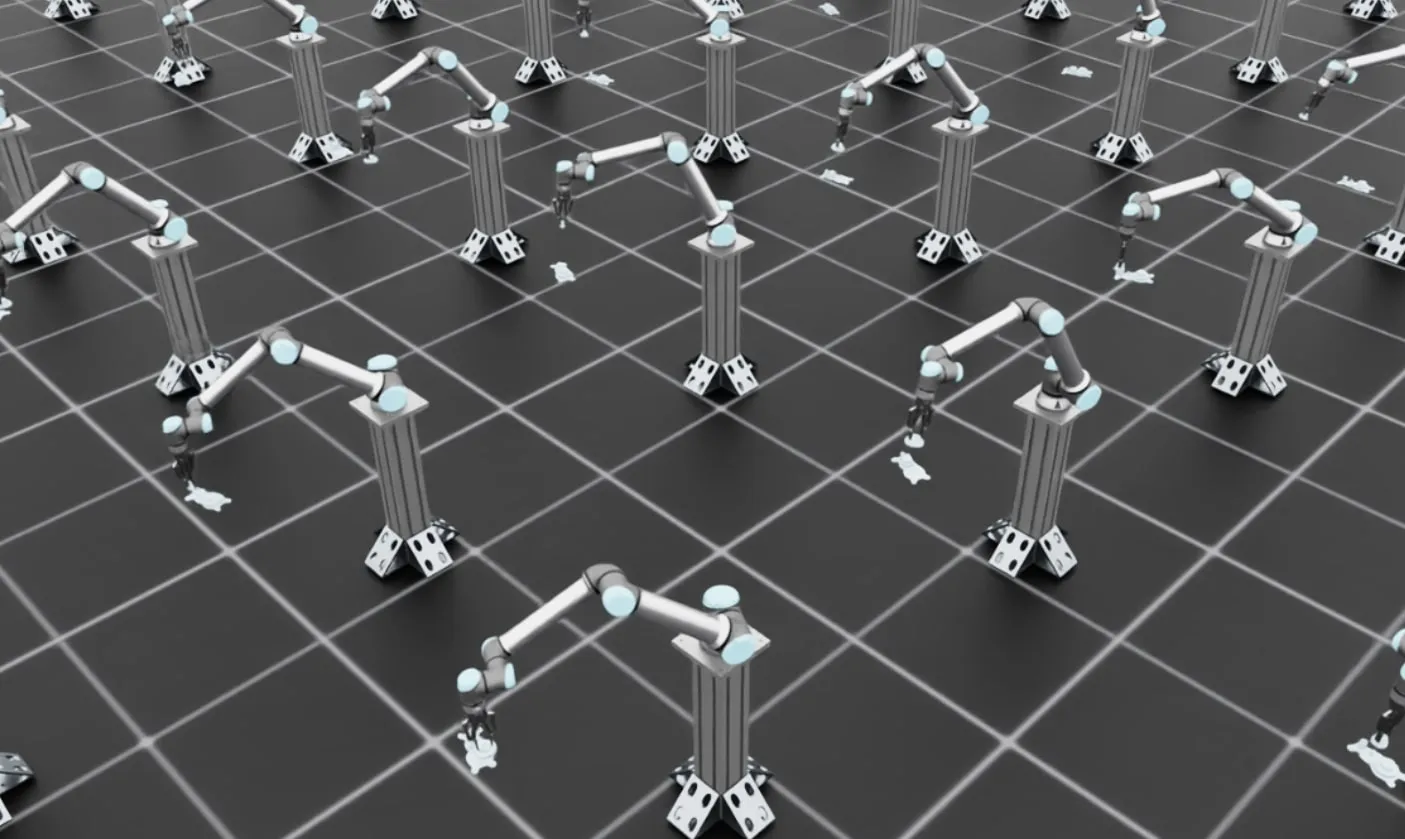
What to Expect:
In the early stages of training, you should see the robots moving around with the gears grasped by the grippers, but they won’t be successfully inserting the gears yet. This is expected behavior as the policy is still learning. The robots will move the grasped gear in various directions. Once you’ve verified the environment looks correct, stop the training (Ctrl+C) and proceed to full-scale training.
Step 2: Full-Scale Training with Video Recording
Now launch the full training run with more parallel environments in headless mode for faster training. We’ll also enable video recording to monitor progress:
UR10e (2F-140)
UR10e (2F-85)
Flexiv Rizon 4s + Grav
uv (Recommended)
isaaclab.sh / isaaclab.bat
Command breakdown:
--num_envs 256: Runs 256 parallel environments for efficient training--video_length 200: Each video captures approximately one full episode (episode_length_s / (sim.dt * decimation)=6.66 / (1/1000 * 33)≈ 200 steps)--video_interval 76800: Records a video every 76,800 environment steps (~every 150 iterations), producing ~10 videos over full training
Training typically takes ~12-24 hours for a robust insertion policy. The videos will be saved in the logs directory and can be reviewed to assess policy performance during training.
GPU Memory Considerations: The default configuration uses 256 parallel environments, which should work on most modern GPUs (e.g., RTX 3090, RTX 4090, A100). For better sim-to-real transfer performance, you can increase solver_position_iteration_count from 4 to 196 in gear_assembly_env_cfg.py and joint_pos_env_cfg.py for more realistic contact simulation, but this requires a larger GPU (e.g., RTX PRO 6000 with 40GB+ VRAM). Higher solver iteration counts reduce penetration and improve contact stability but significantly increase GPU memory usage.
Monitoring Training Progress with TensorBoard:
You can monitor training metrics in real-time using TensorBoard. Open a new terminal and run:
UR10e
Flexiv Rizon 4s
uv (Recommended)
isaaclab.sh / isaaclab.bat
Replace the log directory path with your actual training log location if different. TensorBoard will display plots showing rewards, episode lengths, and other metrics. Verify that the rewards are increasing over iterations to ensure the policy is learning successfully.
Step 3: Deploy on Real Robot
Once training is complete, follow the Isaac ROS inference documentation to deploy your policy.
The Isaac ROS deployment pipeline directly uses the trained model checkpoint (.pt file) along with the agent.yaml and env.yaml configuration files generated during training. No additional export step is required.
The deployment pipeline uses Isaac ROS and a custom ROS inference node to run the policy on real hardware. The pipeline includes:
- Perception: Camera-based pose estimation (FoundationPose, Segment Anything)
- Motion Planning: cuMotion for collision-free trajectories
- Policy Inference: Your trained policy running at control frequency in a custom ROS inference node
- Robot Control: Low-level controller executing commands
Troubleshooting
This section covers common errors you may encounter during training and their solutions.
PhysX Collision Stack Overflow
Error Message:
Cause: This error occurs when the GPU collision detection buffer is too small for the number of contacts being simulated. This is common in contact-rich environments like gear assembly.
Solution: Increase the gpu_collision_stack_size parameter in gear_assembly_env_cfg.py:
The error message will suggest a minimum size. Set gpu_collision_stack_size to at least the recommended value (e.g., if the error says “at least 269452544”, set it to 2**28 or 2**29). Note that increasing this value increases GPU memory usage.
CUDA Out of Memory
Error Message:
Cause: The GPU does not have enough memory to run the requested number of parallel environments with the current simulation parameters.
Solutions (in order of preference):
- Reduce the number of parallel environments:
uv (Recommended)
isaaclab.sh / isaaclab.bat
Trade-off: Using fewer environments will reduce sample diversity per training iteration and may slow down training convergence. You may need to train for more iterations to achieve the same performance. However, the final policy quality should be similar.
-
If using increased solver iteration counts (values higher than the default 4):
In both
gear_assembly_env_cfg.pyandjoint_pos_env_cfg.py, reducesolver_position_iteration_countback to the default value of 4, or use intermediate values like 8 or 16:
Trade-off: Lower solver iteration counts may result in less realistic contact dynamics and more penetration issues. The default value of 4 provides a good balance for most use cases.
-
Disable video recording during training:
Remove the
--videoflags to save GPU memory:
uv (Recommended)
isaaclab.sh / isaaclab.bat
You can always evaluate the trained policy later with visualization.
Deterministic Debugging (Play Environment)
Playing the IsaacContrib-Deploy-GearAssembly-Rizon4s-Grav-ROS-Inference environment
provides a fully deterministic setup for debugging policy behavior against a specific
real-world scenario. The play_mode method of
Rizon4sGearAssemblyROSInferenceEnvCfg is applied automatically by the play command:
all randomization is disabled and observation noise is turned off, so the simulation is
identical on every reset.
To use it, run the standard play command:
uv (Recommended)
isaaclab.sh / isaaclab.bat
To match a specific real-world setup, edit the play-mode constants at the top of the
Rizon4sGearAssemblyROSInferenceEnvCfg class in
isaaclab_tasks/.../gear_assembly/config/rizon_4s/ros_inference_env_cfg.py:
When OBS_SHAFT_POS or OBS_SHAFT_QUAT are set (not None), the
play command automatically overwrites the corresponding portions of the
policy’s observation tensor every step, regardless of simulation state. This
lets you test what the policy does when given a specific observation (e.g. a
pose captured from the real robot).
This environment is particularly useful for:
- Comparing simulated and real-world policy behavior at a known pose
- Injecting real-world observations to verify policy actions match expectations
- Debugging insertion failures at a specific gear base position/orientation