

Backends and Presets
This page is the source of truth for the isaaclab-selecting-backends and
isaaclab-using-presets agent skills
(skills/user/select-backends/,
skills/user/use-presets/).
When you change this page, update those skills so agent guidance stays in sync. See
/source/developer-tools/agent_skills.
An Isaac Lab environment describes the robot, scene, sensors, and task. A backend supplies the physics or rendering implementation that brings that description to life. A preset is a named, tested configuration choice that lets you switch implementations or task modes without editing Python.
In practice, the same environment can run with a different physics engine, renderer, or observation mode by adding a short selector:
The task stays Isaac-Cartpole-Direct. The preset changes the configuration
used to launch it.
The mental model
Think of an environment as the experiment and presets as the knobs that select tested versions of its larger building blocks:
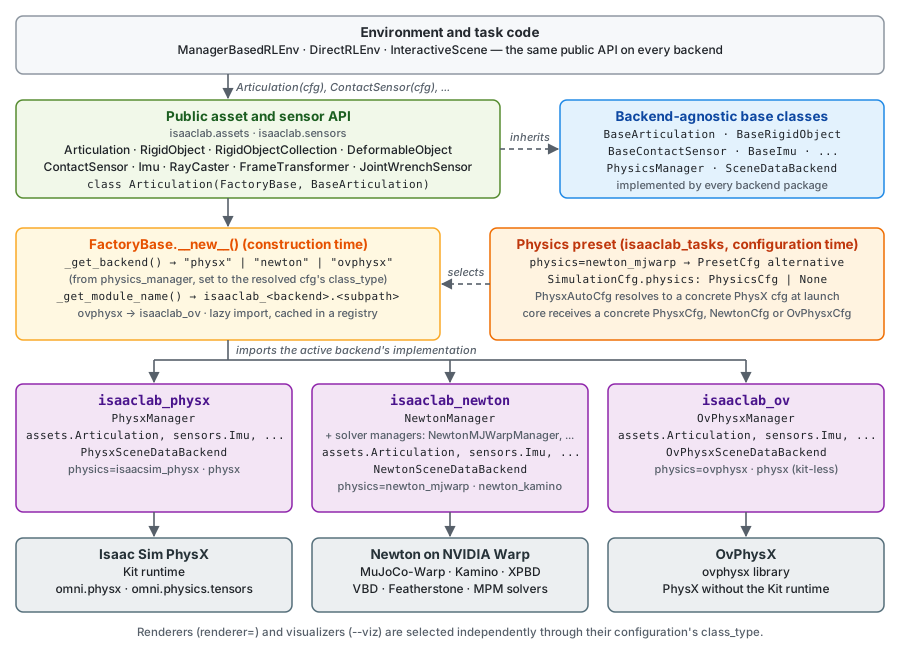
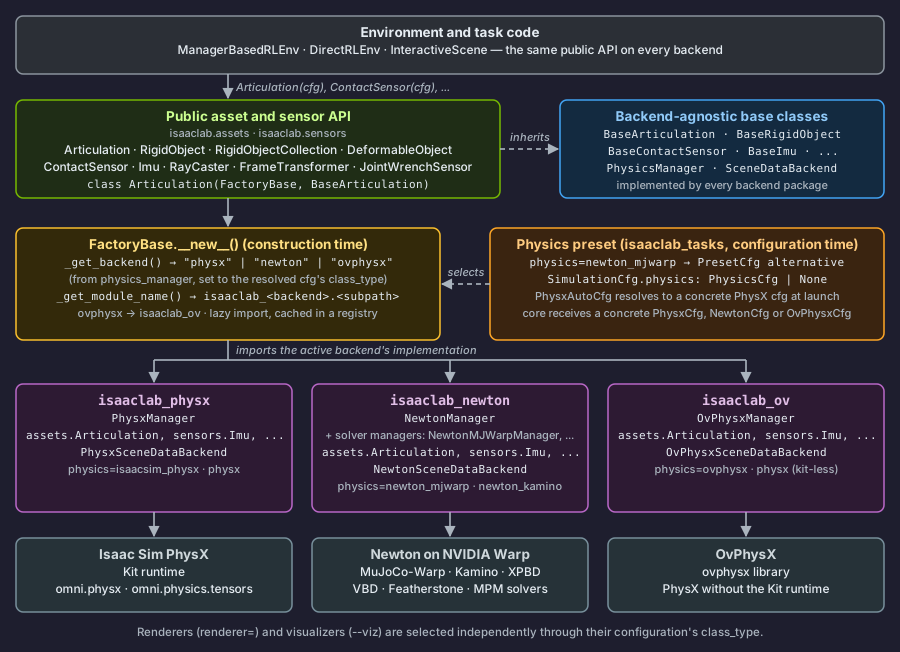
After configuration is resolved, Isaac Lab’s common asset, sensor, and scene APIs dispatch to the selected backend implementation. Environment code can use the same public API across PhysX, Newton, and OvPhysX instead of branching on the active engine throughout the task.
Physics, rendering, and visualization are separate choices. For example, a
camera environment can use Newton physics with the Newton Warp renderer, while
the visualizer is selected independently with --viz.
Backend architecture
Factories dispatch an object to the active backend implementation at construction time, so code can use the same public API without importing backend-specific modules directly.
Factory dispatch
All factories inherit from ~isaaclab.utils.backend_utils.FactoryBase.
They locate supported backend implementations through a core backend-key
selector followed by package and module-path conventions:
- The name of
SimulationContext.physics_manageris mapped to one of the backend keys recognized byFactoryBase._get_backend(). Adding another physics backend requires extending this core selector. - The factory module path determines the backend module path. For example,
isaaclab.assets.articulationmaps toisaaclab_physx.assets.articulation,isaaclab_newton.assets.articulation, orisaaclab_ov.assets.articulation. The OvPhysX backend key uses the sharedisaaclab_ovintegration package. - The factory lazily imports the backend module and caches the implementation class in a registry.
Renderers and visualizers instead select their implementations through their
configuration’s class_type. Their selection is independent of physics;
renderer instances are shared through the simulation registry described below.
Physics manager lifecycle
Each backend implements ~isaaclab.physics.PhysicsManager, the abstract
base class that owns its simulation lifecycle. Implementations initialize their
engine from a ~isaaclab.sim.SimulationContext, update kinematics with
forward(), advance simulation with step(), reset state with reset(),
and release resources with close().
The manager exposes ~isaaclab.physics.PhysicsEvent callbacks for
cross-backend lifecycle work. MODEL_INIT occurs during scene construction,
PHYSICS_READY after physics initialization, and STOP before native resources are replaced
or shut down.
The concrete close() implementation dispatches the STOP event.
SimulationContext owns native resources and renderer instances in one registry.
get_or_create_backend(backend_cfg)
reuses one resource for equal configurations of the same concrete type; a cache miss
constructs instantiate(backend_cfg).
~isaaclab.sim.BackendCfg describes resource settings and identity, and
~isaaclab.renderers.RendererCfg extends it for renderer instances.
PhysicsCfg selects a physics manager. Finalize configurations before
registration and treat them, including nested values, as read-only afterward.
Use a new configuration for different settings. close_backend(backend) closes
the exact registered object after all consumers have released their bindings;
it does not compare or hash configurations. Resources declared through BackendCfg must
implement close(). Plain construction cfgs share Python-owned data without a teardown
operation; removing the registry entry releases its reference. A failed close retains
the entry for retry. After physics shutdown invalidates camera
render data, simulation teardown closes material writers, renderer instances, visualizers,
and remaining native resources, in that order, before closing the stage.
Managers and native renderers expose their borrowed resource through backend.
For example, NewtonManager.backend.model accesses the finalized native model.
Closing a renderer releases its bindings, not the shared native resource.
Exposing native handles does not replace SDP transport.
Clone contexts are registered separately as sim.clone_contexts[Context] = Context(...)
before plan dispatch. They apply the plan but do not own native runtime resources.
Newton has two resources with different lifetimes, not two interchangeable backends:
ModelBuilderholds mutable construction data. Cloning populates it and sensors declare requirements before finalization. It remains available for hard reset.NewtonBuilderCfgis a plain construction cfg, not aBackendCfg; the builder needs no nativeclose().NewtonBackendowns the finalized model and native buffers. Physics and render consumers borrow those handles. Closing it releases runtime allocations without closing the builder.
Both resources use the same registry:
Both configurations use the selected physics cfg; non-Newton physics selects a render-only
representation. SimulationContext has no backend-specific cfg fields, and consumers do not
access clone contexts. Consumers request body transforms and visual points directly through SDP.
Queries share the native resource’s BVHs but keep each consumer’s captured work separate.
Portable asset and sensor interfaces
Assets and sensors use the same layering as the factories:
- A base class in
isaaclabdefines the public contract, such asBaseArticulationorBaseContactSensor. - A factory class inherits from both
FactoryBase <isaaclab.utils.backend_utils.FactoryBase>and that base class. - Backend packages provide the supported implementations.
Sensor data classes use the same pattern, for example
ContactSensorData(FactoryBase, BaseContactSensorData). Implementations expose
~isaaclab.utils.warp.ProxyArray values through public asset and sensor
data properties. Each proxy wraps the underlying wp.array and provides
explicit .warp access to that array and cached, zero-copy .torch access
to a torch.Tensor view. Use those accessors when an API specifically
requires one representation. Passing a ProxyArray to wp.to_torch() is
supported only by a deprecated compatibility shim; new code should use
proxy_array.torch. Backend-native and internal storage may still use raw
Warp arrays. See /source/how-to/proxy_array for usage and buffer lifetime
guidance.
Portable renderer and scene-data interfaces
Rendering is selected independently from physics. Acquire implementations of the
~isaaclab.renderers.BaseRenderer contract through
sim.get_or_create_backend(renderer_cfg). The
~isaaclab.renderers.RenderContext coordinates their rendering lifecycle
through a filtered view of that registry, without a separate renderer cache or
renderer ownership. It validates global settings and registration timing, initializes
renderers after physics is ready, and coordinates stage preparation, scene updates,
and material writers. See
Renderers for renderer choices and usage.
Physics managers expose live simulation data through
~isaaclab.scene_data.SceneDataBackend. The
~isaaclab.scene_data.SceneDataProvider owned by the simulation context
converts and remaps that data for backend-independent consumers:
This boundary lets renderers and visualizers consume a common Warp-native data path without knowing which physics engine owns the state. See /source/concepts/native-physics-api/scene_data_providers for the complete data-flow model.
Native engine access boundary
The portable interfaces define the stable API boundary. Advanced code can use each engine’s native low-level data API, but those APIs intentionally keep their own ownership and synchronization semantics. See /source/concepts/native-physics-api/index for PhysX typed views, Newton live model/state arrays and generic selections, and OvPhysX tensor bindings.
Design principles
- Lazy loading: Backend modules are imported only when first instantiated, keeping startup fast and avoiding dependencies on unused backends.
- Recognized keys plus convention: Once the core selector recognizes a
backend key, module paths mirror the
isaaclab.X.Ystructure. OvPhysX maps toisaaclab_ov.X.Y; other recognized backends useisaaclab_<backend>.X.Yby default. - Independent selection: Physics backend, renderer, and visualizer are selected independently.
- Explicit data interop: Public asset and sensor data properties return
~isaaclab.utils.warp.ProxyArray; its.warpand.torchaccessors expose the required array representation without copying. - Zero runtime overhead: Selection occurs at instantiation time; it does not add dispatch logic to the simulation hot path.
Find what a task supports
Preset support is task-specific. Before choosing a name, ask the task what it offers:
The help output groups names by physics=, renderer=, and presets=.
To list the combinations each registered environment can launch, run:
Each line is one combination that resolves, passes the task’s own configuration
checks, and can launch headless; [default] marks the one the task uses when
no names are passed. Not every pairing of declared names can run together:
OvPhysX and OVRTX cannot share a process with Isaac Sim / Kit, and a task can
reject a combination in its own configuration checks. Checking every
combination takes a few seconds per task, so narrow the list with
--keyword.
A task listed only with (defaults) uses its registered default
configuration and does not expose alternatives. Passing a name that a task does
not list is unsupported and fails during configuration validation.
Choose a selector
These are Hydra tokens, so append them without leading dashes. They work with training, playback, and environment scripts that use Isaac Lab’s task configuration launcher.
Selectors can be combined. This command chooses Newton with the MuJoCo-Warp solver, the Newton Warp renderer, and RGB observations:
Only combine values listed for the task. Some physics, renderer, sensor, and observation configurations are incompatible, and the task may reject an invalid combination with a focused error message.
Common backend choices
The exact list depends on the environment, but these names follow shared conventions:
Automatic selectors such as physics=physx and renderer=rtx are opt-in.
Defaults are concrete so that running a task without selectors is predictable.
A solver is not a separate backend: newton_mjwarp and newton_kamino
both use Newton but configure different solvers.
Defaults, presets, and fine-tuning
A preset replaces the complete configuration section at its location; it does not merge fields from two alternatives. Isaac Lab resolves configuration in this order:
- Apply each preset config’s
defaultchoice. - Apply global choices from
presets=.... - Apply a preset targeted at a specific path, such as
env.sim.physics=newton_mjwarp. - Apply scalar Hydra overrides, such as
env.sim.dt=0.002.
The last step makes it easy to start from a maintained preset and tune one value:
Prefer physics= and renderer= for backend choices because they state
intent clearly. Use presets= for task-specific modes or when one name must
update several matching sections together. Use a path selector only when you
intend to replace one particular section.
Keep behavior-changing presets the same when loading a checkpoint. An observation preset can change tensor shapes, and a policy trained with one observation mode may not load with another.
How task authors expose choices
Task authors define alternatives with
~isaaclab_tasks.utils.hydra.PresetCfg and choose one as the default.
For a multi-backend task, the preset wrapper belongs in
~isaaclab.sim.SimulationCfg:
Keep backend-specific values inside named configurations whenever possible. This keeps task logic shared and makes every supported choice visible from the command line.
When backend selection must also change simulation-wide settings such as the
time step, a physics preset may instead contain complete SimulationCfg
alternatives. The physics= selector recognizes these bundles from their
physics field and applies the complete matching simulation configuration.
Where to go next
- https://isaac-sim.github.io/IsaacLab/release/3.0.0/source/setup/environments.html lists environments and their supported presets.
- /source/features/hydra covers scalar overrides, preset authoring, conflict handling, and advanced configuration behavior.
- Physics Backends compares physics backend runtime requirements, maturity, solver families, and intended uses.
- /source/concepts/renderers explains renderer selection and implementation details.