


PyHSL Programmer Guide#
Introduction#
PyHSL is a high-level language for constructing HSL sequences. PyHSL is Python with a set of support classes and functions, and the “compilation” of a PyHSL program is simply execution of the main() function provided in the source file. That execution produces one or more HSL bytecode sequences, packaged into a single output file in HSLC format.
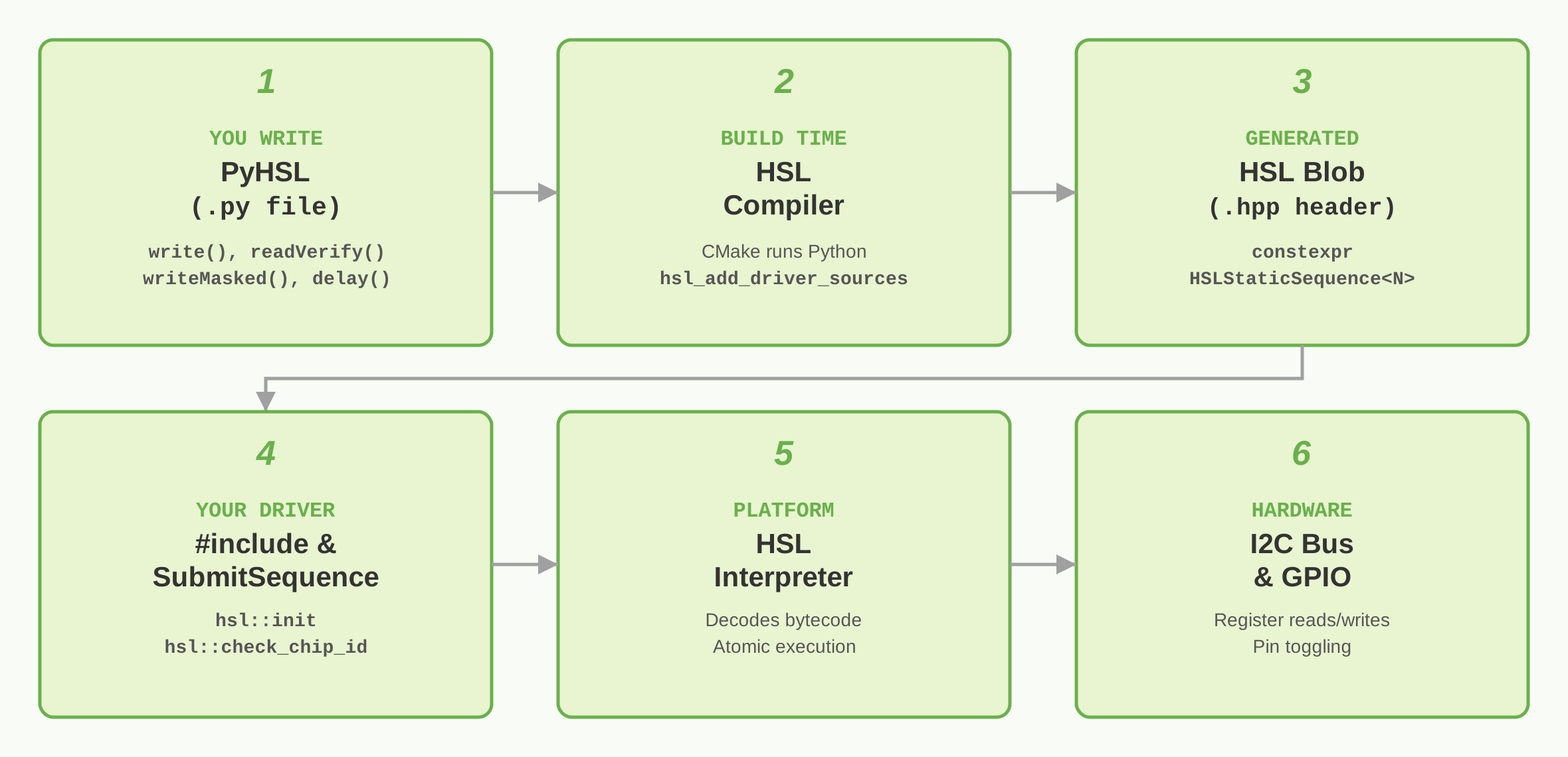
Static HSL (HSL blob compiled and available at build time).#
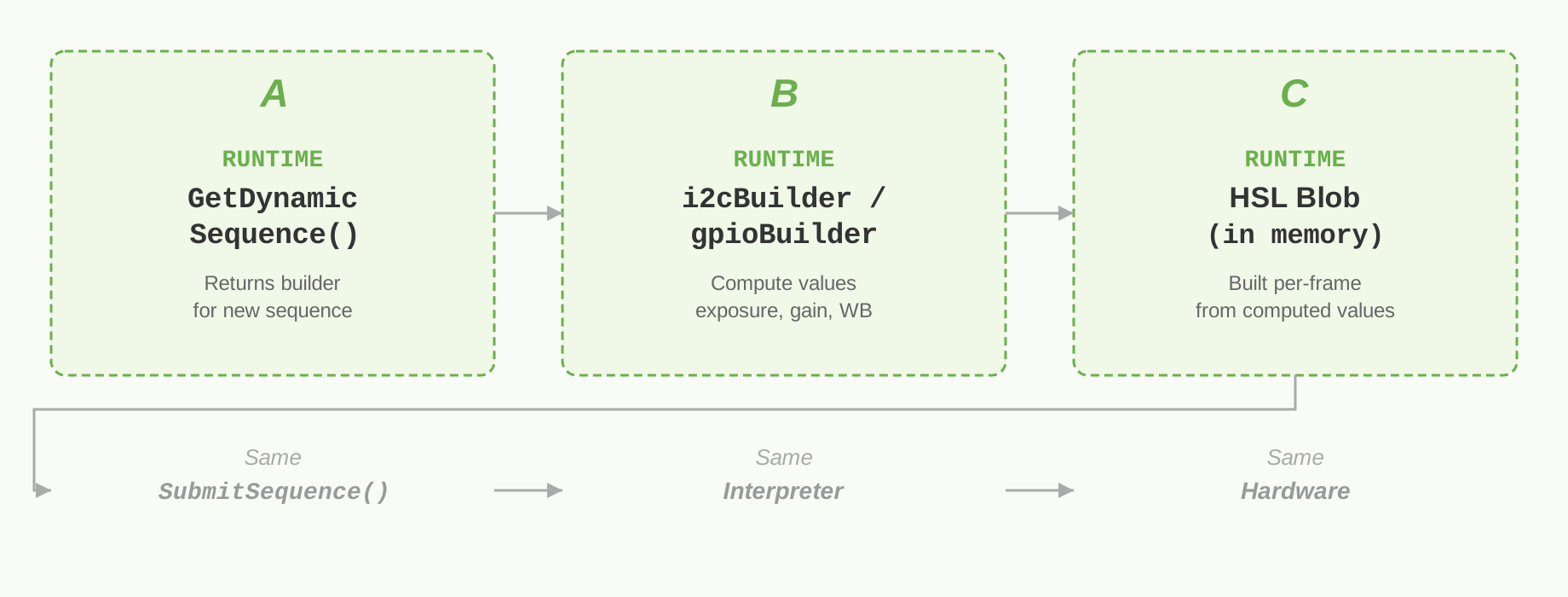
Dynamic HSL (HSL blob compiled and available only at runtime).#
Usage#
The PyHSL compiler is named hslcompile.py. The options are as follows:
usage: hslcompile.py [-h] [-i source-file] [-o output-file] [-H output-directory] [-D parameter=value]
                     [-M metadata-file] [-l {debug,info,warning,error,critical}]

options:
  -h, --help            show this help message and exit
  -i source-file, --input source-file
                        source file to compile
  -o output-file, --output output-file
                        .hslc output file
  -H output-directory, --hslb_directory output-directory
                        output directory for .hslb files
  -D parameter=value, --define parameter=value
                        define a configuration parameter
  -M, --memory_layout_metadata metadata-file
                        memory layout metadata output file
  -l {debug,info,warning,error,critical}, --loglevel {debug,info,warning,error,critical}
                        logging level
Command-Line Parameters#
--input source-file (also -i)#
This required parameter specifies the source file, which by convention has the extension .hsl. Only one source file can be specified, although that python module is free to import functions and other definitions from other files.
--output output-file (also -o)#
This optional parameter specifies the output file, which should have the extension .hslc. This file uses HSLC format, which contains multiple HSL bytecode sequences, each of which is labeled with the sequence name provided in the source file.
The default output filename is out.hslc.
--hslb_directory output-directory (also -H)#
This optional parameter specifies an output directory for files in HSLB format. An HSLB file consists of a small header followed by the bytecode for a single sequence. Each file will be named based on the sequence name in the source; for example, a sequence named ‘Init’ would produce a file called ‘Init.hslb’. These files are intended to be used only for development, since they are easy to work with but lack many features of the HSLC format.
If this option is not specified, no HSLB files will be produced.
--define parameter=value (also -D)#
This optional parameter can be provided multiple times. Each invocation adds a configuration parameter that can be used by the PyHSL source file. The ph_params() utility function returns the configuration parameters as a python dictionary. Refer to the example in the “Utility Functions” section below.
--loglevel level (also -l)#
This optional parameter specifies the PyHSL log level. The default is warning.
--memory_layout_metadata metadata-file (also -M)#
This optional parameter specifies the name of the generated JSON metadata file containing information on the MemoryLayout objects defined in the source. (This file is for future use by developer tools.)
Program Structure#
Every PyHSL source file defines a function called main() which will be called to generate the HSL sequences. This function is typically divided into three sections:
Constant definitions. For example, symbolic names for register offsets, or lists of
(offset, data)pairs to be written to an I2C device. These can also be defined beforemain().Creation of PyHSL objects representing I2C devices, GPIO pins, and so on. Refer to the next section for information on these objects.
Definition of sequences. Each sequence contains method invocations on PyHSL objects to produce specific hardware operations.
The following sample program illustrates this structure:
def main():

    # Section 1: constant definitions

    ph_define_constant('SENSOR_I2C_ADDRESS', 0x42)
    ph_define_constant('POWER_REG', 0x1234)
    ph_define_constant('STATUS_REG_0', 0x6000)

    # Section 2: creation of PyHSL objects

    sensor = I2CDevice(SENSOR_I2C_ADDRESS, 16, 8, 'cam123')  # device at address 0x42 with 16-bit offsets and 8-bit registers

    # Section 3: definition of sequences

    with Sequence('Init') as seq:
        sensor.write(POWER_REG, 0xAA)                        # write 0xAA to reg[0x1234]
        seq.delay(100)                                       # pause 100 usec before proceeding
        seq.annotate('Begin poll')                           # (no effect except for possibly being logged)
        sensor.poll(STATUS_REG_0, 0xABBA, 0xFFFF, 10000, 5)  # 5 retries with 10000 usec in between each
        sensor.readVerify(0x6002, 0xB0B0, 0xF0F0)            # fail if (reg[0x6002] & 0xF0F0) != 0xB0B0

    with Sequence('Deinit') as seq:
        sensor.write(POWER_REG, 0x00)
One essential feature of HSL is its error handling. If an HSL sequence encounters an error, it terminates execution immediately and returns error information. This applies to both explicit error detection (for example, if the poll() operation times out in the above code) and unexpected execution errors (for example, if an I2C bus transaction fails).
PyHSL Objects#
All HSL operations are generated by method calls on various PyHSL objects.
I2CDevice#
An I2CDevice object represents a single device on an I2C bus. Example object creation:
sensor = I2CDevice(0x42, 16, 8, 'xyzSensor')
0x42 is the device’s I2C address.
16 is the number of bits used to specify an offset for this device. Currently, this must be either 8 or 16.
8 is the number of bits in a register for this device. Currently, this must be either 8 or 16.
'xyzSensor'is the name of this device (used primarily for logging and error reporting).
Call PyHSL methods on an I2CDevice object to generate HSL operations. Examples:
sensor.write(0x1234, 0xAA)                    # write 0xAA to reg[0x1234]
sensor.poll(0x480, 0xABBA, 0xFFFF, 10000, 5)  # wait for reg[0x480] to become 0xABBA; 5 retries with 10000 usec in between
sensor.readVerify(0x6002, 0xB0B0, 0xF0F0)     # fail if (reg[0x6002] & 0xF0F0) != 0xB0B0
The valid range for many parameters is determined by the offset_width and data_width parameters used when constructing the I2CDevice object. For example, the sensor object shown above has an offset_width of 16 (2 bytes) and a data_width of 8 (1 byte). This means that all offset parameters to I2CDevice methods must be in the range [0, 0xFFFF], and all parameters containing register data must be in [0, 0xFF]. Furthermore, commands that write or read I2C registers will write or read a single byte on the I2C bus for this device. (There are “stream” forms of several commands that ignore the data width and read or write a specified number of consecutive bytes.)
I2C devices encode multibyte register values in big-endian form. HSL takes care of this; if you are specifying a write to a register on a device with data_width == 16, simply use the native 16-bit value you want to write, instead of manually swapping bytes because your CPU is little-endian. (This does not apply to the stream command forms; bytes are written to or read from the bus exactly as specified.)
Sequence#
A Sequence object defines an entire HSL sequence. To define a new sequence, use a with block like this:
with Sequence(name) as seq:
    # operations on other PyHSL objects
nameis the name of this sequence, which must be unique with respect to all other sequences in the source file.seqis a variable containing the new Sequence object.
PyHSL operations inside the with block add HSL operations to the current sequence. When the with block terminates successfully, the sequence is finalized and added to the list of sequences that will be written to the output file.
The PyHSL methods defined on Sequence objects generate HSL operations that are not tied to a particular device. The most commonly-used are delay(), which pauses execution for a specified interval, and annotate(), which inserts a comment into the stream. For details, refer to PyHSL Reference.
Sequence objects have the following constraints:
HSL-generating methods on other objects fail if not done in the context of a Sequence (that is, inside a
with Sequenceblock).Sequences cannot be nested.
Sequence names must be unique across the entire module.
GPIOPin#
A GPIOPin object represents a single GPIO pin. Example object creation:
aPin = GPIOPin(address, name, readable=True, writable=True)
addressis an index into the device tree array of GPIO pins used by the camera stack.nameis a name for this pin (used primarily for logging and error reporting).readablespecifies whether this pin can be read by Tegra.writablespecifies whether this pin can be written by Tegra.
Methods defined on GPIOPin objects:
write(value)drives the pin high (ifvalueis True or any other “true” value) or low (ifvalueis False, None, or 0). If thewritableflag for the object is False, this method fails.poll(expectedValue, intervalInUsec, retries)polls the pin until its value (high or low) matchesexpectedValue, or the operation times out. If the operation times out, the sequence execution terminates with a failure. If thereadableflag for the object is False, this method fails.readVerify(expectedValue)reads the pin and terminates the sequence with a failure if its value does not matchexpectedValue. This operation is equivalent to callingpoll()withretries==0. If thereadableflag for the object is False, this method fails.
Fence (Not Currently Supported)#
A Fence object represents a system fence, which is represented by an address and a value. Fences support two operations: wait() and signal(). To wait on a fence is to wait for the value at the specified address to become greater than or equal to the specified value. Signaling a fence simply means to increment the value at the specified address.
Example object creation:
sofFence = Fence(address, goalValue, name)
addressis the memory address of the fence.goalValueis the target value of the fence.nameis a name for this fence (used primarily for logging and error reporting).
Methods defined on Fence objects:
wait(timeoutInUsec)waits for the value at the fence’s address to become greater than or equal to itsgoalValue. If this does not happen withintimeoutInUsecmicroseconds, the sequence terminates with a failure.signal()increments the value at the fence’s address.
InternalSemaphore (Not Currently Supported)#
An InternalSemaphore object represents a semaphore that is internal to the HSL interpreter. An interpreter can support one or more of these semaphores, and use them to coordinate an HSL sequence with other processing—typically other HSL sequences executing in parallel.
Example object creation:
sem = InternalSemaphore(index, name)
indexis the internal index of the semaphore.nameis a name for this semaphore (used primarily for logging and error reporting).
Methods defined on InternalSemaphore objects:
wait(timeoutInUsec)acquires the semaphore (waits for its value to become positive and then decrements it). If the initial wait does not complete withintimeoutInUsecmicroseconds, the sequence terminates with a failure.signal()signals the semaphore (increments its value).
MemoryBlock#
A MemoryBlock object represents a chunk of memory (separate from bytecode) that provides values to or receives values from I2C devices.
Example object creation:
theBlock = MemoryBlock(Layout, name)
layoutis a partitioning of the block into fields. (Refer to the next section, MemoryLayout).nameis a name for this block (used primarily for logging and error reporting).
Methods defined on MemoryBlock objects:
None. Refer to
writeFromMemory()and similar methods onI2CDeviceandSequence.
MemoryLayout#
A MemoryLayout object defines fields within a single block of memory. Example object creation:
myLayout = MemoryLayout('initLayout')
'initLayout'is the name of this layout. This name must be unique across all memory layouts defined in this source file.
Only one PyHSL method is defined on a MemoryLayout object:
addItem(name, size)defines a new field in the layout with the givennameandsize(in bytes).namemust be unique within this layout. Each new field is added onto the end of the existing layout; thus, the first field’s offset will be zero, the second field’s offset will be the size of the first field, and so on. No padding or alignment is implicitly added or enforced.
When a MemoryBlock is created, the fields in the provided layout are dynamically added as attributes to the MemoryBlock object, and are used directly in the writeFromMemory() and readToMemory() methods on I2CDevice. For example:
sensor = I2CDevice(0x44, 8, 8, 'sensor')

layout = MemoryLayout()
layout.addItem('firstDword', 4)   # 4 bytes at offset 0
layout.addItem('secondDword', 4)  # 4 bytes at offset 4
layout.addItem('finalWord', 2)    # 2 bytes at offset 8

block = MemoryBlock(layout, 'some block')

with Sequence('DoSomething'):
    # Write the two bytes at offset 8 in the memory block to I2C starting at offset 0x88
    sensor.writeFromMemory(0x88, block.finalWord)
Conveniences#
For long sequences it can be tedious to invoke every operation as a method on an object. Consider this section of a sequence:
sensor.write(0x1010, 0x38)
sensor.write(0x1012, 0xD0)
sensor.write(0x1014, 0x08)
sensor.write(0x1040, 0xF0)
sensor.write(0x1042, 0x18)
sensor.write(0x1050, 0x00)
There are several ways to remove the repetitive appearance of sensor in every command.
Overloaded write() Commands#
The write() command has a form that allows writing of multiple register values with a single command:
sensor.write((0x1010, 0x38), (0x1012, 0xD0), (0x1014, 0x08), (0x1040, 0xF0), (0x1042, 0x18), (0x1050, 0x00))
This works well for long sequences of writes to a single device, but does not help with other commands such as writeMasked() or poll().
Chained Commands#
The various HSL operation methods all return self, allowing this sort of pattern:
sensor.write(0x1010, 0x38)
      .write(0x1012, 0xD0)
      .write(0x1014, 0x08)
      .write(0x1040, 0xF0)
      .write(0x1042, 0x18)
      .write(0x1050, 0x00)
This approach allows usage of multiple different operations on the same device.
Convenience Functions#
If you want to invoke operations as global functions instead of object methods, PyHSL has a set of convenience functions that pair with the various methods. They use the with construct to provide the context of which object is the target of the operations.
with sensor:
  write(0x1010, 0x38)
  write(0x1012, 0xD0)
  write(0x1014, 0x08)
  write(0x1040, 0xF0)
  write(0x1042, 0x18)
  write(0x1050, 0x00)
While such a with statement can (obviously) be nested inside a with Sequence construct, it cannot be nested within another convenience function with block.
Utility Functions#
ph_params()#
This function returns a dictionary of configuration parameters as specified by the --define parameter=value command-line option.
For example, if the compiler had been invoked like this:
hslcompile.py --define module_version=c2 --define use_broadcast=true (other options....)
then ph_params() would return the python dictionary { 'module_version' : 'c2', 'use_broadcast' : 'true' }
Note that all keys and values in the dictionary are strings; there is no interpretation of values formatted as integers, booleans, and so on. --define the_answer=42 results in { 'the_answer' : '42' }.
ph_logger()#
This function returns the default logger for PyHSL. Its log level is initialized to the level specified by the --loglevel parameter to hslcompile.py.
ph_set_sequence_hooks()#
This function allows the author to specify hook functions that are called at the beginning and end of every sequence definition:
ph_set_sequence_hooks(before_hook, after_hook)
After this call is made, the before_hook function is called immediately after the new Sequence is created, before the instructions in the with block are executed, and the after_hook function is called after the last instruction in the with block, but before the final bytecode is generated for the Sequence. This allows common processing (including generation of HSL operations) to be done at the beginning or end of every sequence.
Either or both of the before_hook and after_hook parameters can be None, resulting in no call to that hook function.
ph_define_constant()#
This function defines a Python constant value and also makes it available in the generated C++ header file. The constant can be either an unsigned integer or a string.
For example, these lines:
ph_define_constant('SENSOR_REG_EXPOSURE', 0x100)
ph_define_constant('DEVICE_NAME', 'CAM123')
will define Python variables:
SENSOR_REG_EXPOSURE = 0x100
DEVICE_NAME = 'CAM123'
and also add these lines to the generated C++ header file:
inline constexpr uint32_t SENSOR_REG_EXPOSURE { 0x0100U };
inline constexpr const char* DEVICE_NAME { "CAM123" };
Best Practices#
This section discusses best practices for using PyHSL.
Maximize Sequence Length#
There is constant overhead associated with submitting an HSL sequence to hardware. The magnitude varies, but on some platforms it may be significant—for example, it may require one or more system calls. Therefore, instead of splitting up HSL operations into multiple sequences that are called in order with no intervening logic, build them all into a single sequence.
If you want to split up operations in the PyHSL source, you can do that without placing them into separate sequences. PyHSL is built on top of Python, so you have all the power of that language at your disposal. For example, if initialization of a device has two steps—applying power and resetting the device by writing a control register—you can separate those in PyHSL while building a single sequence:
def apply_power(pin, device):
  pin.write(True)
  # Wait for the device to become available on I2C
  device.poll(0x100, 0x80, 0x80, 1000, 10)

def reset(device):
  # Set the upper nibble of the reset control register to 0xF
  device.write(0x80, 0xF0)

with Sequence('init'):
  # This sequence will contain instructions from both apply_power() and reset()
  apply_power(power_pin, my_device)
  reset(my_device)
If you want to split up sequences to get better debugging information, be aware that existing HSL interpreters provide very good context when reporting any HSL error:
The name of the sequence that was executing.
The location of the operation in that sequence.
The operation that failed and details of that operation. For example, details of a failed I2C
readVerify()operation would include the I2C device address, the register offset being read, and both the expected and actual values.The contents of the most recent
annotate()operation in the sequence.
Build Alternate Sequences Efficiently#
PyHSL can create similar (but not identical) sequences for similar devices—for example, for different revisions of a particular device, or for different devices in a family. The differences required for a single sequence can be easily managed with a bit of Python programming.
The following is a simple example of a reset sequence generated for three different hardware revisions (A, B, and C):
cam123 = I2CDevice(0x42, 16, 8, 'cam123')

def create_reset_sequence(sensor:I2CDevice, hardware_rev:str):
  if hardware_rev not in ('A', 'B', 'C'):
    raise PyHslException(f'Bad hardware rev: {hardware_rev}')
  with Sequence(f'reset_rev_{hardware_rev}') as seq:
    sensor.write(RESET_0_REG, 0xFF)
    # Revs A and B require a delay; rev C added a status bit for ready
    if hardware_rev == 'C':
      sensor.poll(STATUS_1_REG, 0x80, 0x80, 1000, 10)
    else:
      seq.delay(10000)
    # Rev A requires an additional write to finish the sequence
    if hardware_rev == 'A':
      sensor.write(RESET_1_REG, 0x0)

def main():
  for rev in ('A', 'B', 'C'):
    create_reset_sequence(cam123, rev)
This example creates sequences for all three revisions, named reset_rev_A, reset_rev_B, and reset_rev_C. If you instead want to create only one of these for a particular driver, you can instead use a configuration variable. For example, you could invoke hslcompile.py with the option -D SENSOR_REV=A and replace the above code with:
def create_reset_sequence(sensor:I2CDevice, hardware_rev:str):
  # (same as example code above)

def main():
  create_reset_sequence(ph_params()["SENSOR_REV"])
This would create the single sequence reset_rev_A.
Centralize Hardware Definitions in PyHSL#
For ease of maintenance and understanding, drivers often define symbolic constants for various values, such as:
I2C addresses
Register offsets
Register values/fields
Best practice is to put all those definitions into a separate PyHSL file and use ph_define_constant() to create them. This provides:
Definitions that are visible to both PyHSL and the UDDF drivers that use the resulting sequences.
Centralization of all definitions for a specific device.
Reusability of those definitions - for example, you could write an alternative version of a driver that reuses the same definitions.
For example, you could create a file called cam123.py with these contents:
from pyhsl import ph_define_constant

ph_define_constant("CAM123_I2C_ADDRESS", 0x42)

ph_define_constant("RESET_0_REG",  0x100)
ph_define_constant("STATUS_1_REG", 0x200)
ph_define_constant("RESET_1_REG",  0x104)
And use it in your main PyHSL source file:
from pyhsl import *
from cam123 import *

cam123 = I2CDevice(CAM123_I2C_ADDRESS, 16, 8, 'cam123')

def main():
  # define sequences, etc.
  # can use constants like RESET_0_REG defined in cam123.py
Examples#
MemoryBlocks and MemoryLayouts#
HSL’s memory I/O operations support several use cases. In every case, the HSL sequence defines one or more MemoryBlocks that will be read and/or written by operations in the sequence. Each MemoryBlock is also associated with a MemoryLayout, which defines fields within the block.
Writing Dynamic Values#
Sensor programming is a good example of this use case. When using autocontrol, sensor values such as exposure and gain need to be programmed every frame. The sequence of registers written is the same for every frame, but the specific values written to the registers change. The HSL to handle this might look like this:
def main():
    ph_define_constant('SENSOR_REG_EXPOSURE', 0x100)
    ph_define_constant('SENSOR_REG_GAIN', 0x102)

    sensor = I2CDevice(0x42, 16, 16, 'cam123')

    sensor_param_layout = MemoryLayout()
    sensor_param_layout.addItem('exposure', 2)
    sensor_param_layout.addItem('gain', 2)

    sensor_params = MemoryBlock(sensor_param_layout, 'cam123 params')

    with Sequence('ProgramSensor'):
        sensor.writeFromMemory(SENSOR_REG_EXPOSURE, sensor_params.exposure)
        sensor.writeFromMemory(SENSOR_REG_GAIN, sensor_params.gain)
To use this sequence, the caller provides a 4-byte memory block, with the desired exposure in the first two bytes and the desired gain in the next two bytes. Both of those values are formatted/scaled based on the definition of the sensor’s EXPOSURE and GAIN registers.
Reading Values to Be Monitored#
Some devices require regular monitoring of certain physical values, such as temperature and voltage, to ensure that the values remain within a safe operating range. HSL can collect those values into a single memory block:
def main():
    PSWITCH_REG_INPUT_VOLTAGE  = 0x08
    PSWITCH_REG_OUTPUT_VOLTAGE = 0x0C
    PSWITCH_REG_OUTPUT_CURRENT = 0x14

    power_switch = I2CDevice(0x20, 8, 16, 'max1234')

    pswitch_param_layout = MemoryLayout()
    pswitch_param_layout.addItem('timestamp', 8)
    pswitch_param_layout.addItem('input_voltage', 2)
    pswitch_param_layout.addItem('output_voltage', 2)
    pswitch_param_layout.addItem('output_current', 2)

    pswitch_params = MemoryBlock(pswitch_param_layout, 'max1234 params')

    with Sequence('MonitorSwitch'):
        power_switch.writeTimestampToMemory(pswitch_params.timestamp)
        power_switch.readToMemory(PSWITCH_REG_INPUT_VOLTAGE, pswitch_params.input_voltage)
        power_switch.readToMemory(PSWITCH_REG_OUTPUT_VOLTAGE, pswitch_params.output_voltage)
        power_switch.readToMemory(PSWITCH_REG_OUTPUT_CURRENT, pswitch_params.output_current)
The caller provides a 14-byte memory block as a parameter to execution of this sequence. When the sequence returns, that block is filled with useful data: a timestamp specifying when data collection began, and three 2-byte fields containing input voltage, output voltage, and output current (in whatever formats are provided by the power switch registers).
Configuration Parameters#
A single HSL source file can generate multiple variants of its sequences by using conditional logic. PyHSL allows the compiler invocation to provide configuration parameters to select these variations. The following is a simple example using a single configuration parameter:
def main():
    SENSOR_REG_STREAM_CTL = 0x100
    SENSOR_REG_STATUS_0   = 0x280

    sensor = I2CDevice(0x42, 16, 16, 'cam123')

    # Obtain the sensor revision from the 'rev' configuration parameter
    config_params = ph_params()  # get the dictionary of configuration parameters
    sensor_rev = config_params['rev']

    with Sequence('StartStreaming'):
        # The C2 revision of this sensor needs to wait on bit 2 of the status register before starting streaming
        if sensor_rev == 'c2':
            sensor.poll(SENSOR_REG_STATUS_0, expectedValue=0x4, mask=0x4, intervalInUsec=100, retries=10)
        sensor.write(SENSOR_REG_STREAM_CTL, 0x80)
If this code is compiled with --define rev=c2 on the command line, the resulting StartStreaming sequence performs a poll operation before writing SENSOR_REG_STREAM_CTL. Be aware that these conditionals are evaluated at compile time, not at runtime. Depending on the value of the 'rev' configuration parameter, this code generates different sequences. If this were C or C++, these conditional operations would be like #if or #ifdef—evaluated at compile time—rather than if statements. HSL does not have runtime conditionals, branching, or looping.
Sequence Hooks#
As described earlier in the ph_set_sequence_hooks() section, sequence hooks allow execution of common code at the start or finish of every sequence. The following is an example of using the before_hook function to poll a status register for a ready bit at the beginning of every sequence:
def main():
    ph_define_constant('SENSOR_REG_STATUS_0', 0x280)

    sensor = I2CDevice(0x42, 16, 16, 'cam123')

    # Define operations to happen at the beginning of every sequence
    def before_hook():
        sensor.poll(SENSOR_REG_STATUS_0, expectedValue=0x8, mask=0x8, intervalInUsec=50, retries=10)

    # Install the hook function
    ph_set_sequence_hooks(before_hook, None)

    with Sequence('Init'):
        # This sequence will begin with the poll operation specified in before_hook()
        # (other operations go here)