

Learn to Walk#
The balance task asked Microduck to stand still with its head level. Now ask it to walk and turn while keeping its balance. You’ll add rewards for walking, then check whether the robot follows commands and each foot takes a turn in front.
Watch the duck’s feet during a 0.2 m/s forward command. Which foot leads at the start, and when does the other pass it?
Define the Goal Before the Reward#
The CommandsCfg you built earlier defines three base_velocity values:
forward/backward velocity, left/right velocity, and yaw rate (turning speed).
Their ranges are ±0.4 m/s, ±0.3 m/s, and ±1 rad/s. The sampler also draws
standing, forward-only, and turn-in-place commands. Commands change every 3–8
seconds. The balance task overrides them with zeros; the walking task keeps the
sampled ranges.
The closer Microduck moves to the requested velocity, the more reward it earns. You’ll reuse the tracking functions from the balance task. This time, the targets can change and tracking earns more weight in the reward. Horizontal velocity uses the heading frame, a coordinate frame that turns with the robot, so forward and sideways follow its heading. Yaw rate uses the world frame, a fixed reference, and measures rotation about the world’s vertical axis. The tolerances remain 0.15 m/s and 0.35 rad/s.
For forward and backward walking, also ask the feet to take turns leading: each foot should swing past the other. Write that requirement beside your speed target. A duck can follow the requested speed with a persistent leading foot, so we’ll measure foot ordering as well as velocity.
Extend Your Balance Rewards#
Add two foot rewards:
lift a foot for a useful interval (
air_time)grip the floor while planted (
foot_slip)
Air time is how long a foot has been off the ground. The slip term penalizes squared horizontal speed, measured at each foot’s ankle frame during detected contact. Both terms apply when the command requests movement. Too much emphasis on air time can encourage unnecessary lifts, and too much slip cost can resist travel.
Work in the same Microduck configuration directory as in lesson 5.
Add to the imports in env_cfg.py:
from .walking import CurriculumCfg, RewardsCfg, WalkingSceneCfg, _schedule
Append to env_cfg.py:
@configclass
class TrackingRewardsCfg(BalanceHeadRewardsCfg):
    still_xy = None
    still_yaw = None

    # Move the bull's-eye: these terms now track sampled velocity commands.
    track_lin_vel = Reward(
        func=rewards.track_linear_velocity_heading, weight=4.0, params={"command_name": "base_velocity", "std": 0.15}
    )
    track_ang_vel = Reward(
        func=rewards.track_angular_velocity_world, weight=4.0, params={"command_name": "base_velocity", "std": 0.35}
    )
    # Give each moving foot a useful interval in the air.
    air_time = Reward(
        func=rewards.feet_air_time_windowed,
        weight=3.0,
        params={
            "sensor_cfg": SceneEntityCfg(
                "contact_forces", body_names=["ankle_left", "ankle_right"], preserve_order=True
            ),
            "command_name": "base_velocity",
            "threshold_min": 0.125,
            "threshold_max": 0.3,
            "command_threshold": 0.01,
        },
    )
    # A planted shoe: ankle-frame speed during contact is a proxy for sliding.
    foot_slip = Reward(
        func=rewards.foot_slip,
        weight=-0.1,
        params={
            "sensor_cfg": SceneEntityCfg(
                "contact_forces", body_names=["ankle_left", "ankle_right"], preserve_order=True
            ),
            "asset_cfg": SceneEntityCfg("robot", body_names=["ankle_left", "ankle_right"], preserve_order=True),
            "command_name": "base_velocity",
            "command_threshold": 0.01,
        },
    )
Build One Curriculum#
A curriculum changes conditions over time. Build a schedule that moves the action-change penalty weight from −0.1 toward −1.0. Early on, the policy has more freedom to explore. Later, abrupt action changes cost more.
Give _schedule each milestone as a PPO iteration number and its new penalty
weight. The helper converts iterations to control steps using 24 rollout steps
per iteration. It scales the milestones by the number of training processes
using the same rule as the runner, so the penalty changes at the same points
relative to the run length.
Append the schedule and a tracking environment. Calling configure_simulation
keeps the sampled commands instead of applying the balance task’s zero-command
overrides. The environment uses the scene and control configuration you built.
Append to env_cfg.py:
@configclass
class TrackingCurriculumCfg:
    # Increase the price of abrupt target changes as practice progresses.
    action_rate_weight = _schedule(
        "rewards.action_rate.weight", (3000, -0.2), (4000, -0.4), (5000, -0.6), (6000, -0.8), (7000, -1.0)
    )


@configclass
class TrackingEnvCfg(BaseEnvCfg):
    rewards = TrackingRewardsCfg()
    curriculum = TrackingCurriculumCfg()

    def __post_init__(self):
        # Keep sampled commands; BaseEnvCfg.__post_init__ makes them all zero.
        self.configure_simulation()
Register this intermediate task:
Add to the imports in agents/rsl_rl_ppo_cfg.py:
from isaaclab_rl.rsl_rl import RslRlSymmetryCfg
from isaaclab_tasks.utils import preset

from isaaclab_tutorial.tasks.velocity.mdp.symmetry import compute_symmetric_states
Append to agents/rsl_rl_ppo_cfg.py:
@configclass
class WalkPPORunnerCfg(BalancePPORunnerCfg):
    experiment_name = preset(default="course_microduck_walk", backlash="course_microduck_walk_backlash")
    max_iterations = "${microduck_scale:50000,${env.ngpus},${env.nnodes}}"
    save_interval = "${microduck_scale:250,${env.ngpus},${env.nnodes}}"
The training schedule adjusts the number of iterations and how often the runner saves checkpoints based on how many GPUs you use. Enable the schedule resolver before registering the tracking task.
Add to the imports in microduck/__init__.py:
from .schedules import install_config_resolution
Append to microduck/__init__.py:
install_config_resolution()
register_task("Track", "TrackingEnvCfg", "WalkPPORunnerCfg")
Run two training iterations to check the assembled task and save a checkpoint:
uv run isaaclab train --task Course-Microduck-Track-v0 \
    --rl_library rsl_rl --num_envs 64 --max_iterations 2 --seed 42
Now load the saved policy and watch how the duck moves.
uv run --extra viser isaaclab play --task Course-Microduck-Track-v0 \
    --rl_library rsl_rl --num_envs 1 --checkpoint latest --viz viser --real-time
Open Viser using the viewer instructions. Press Ctrl+C when you finish.
Use the Included Walking Recipe#
Your intermediate task combines tracking rewards, contact feedback, and one
curriculum term. Use the complete Microduck walking recipe supplied in walking.py. Keep the control loop and observations from
TrackingEnvCfg and select the walking scene, reward terms, and curriculum:
Append to env_cfg.py:
@configclass
class WalkEnvCfg(TrackingEnvCfg):
    scene = WalkingSceneCfg(num_envs=4096, env_spacing=2.0)
    rewards = RewardsCfg()
    curriculum = CurriculumCfg()
Practice on Both Sides#
Use the provided left/right symmetry augmentation for the course’s walking experiments. Each training batch includes mirrored experience: left and right servos swap, and sideways and turning signals change sign. In effect, every example is practiced on both sides. The reference implementation handles the mirrored joint axes and observation layout:
Original sample |
Mirrored sample |
|---|---|
|
|
Forward request +0.2 m/s |
The same forward request |
Sideways request +0.15 m/s; yaw request +0.5 rad/s |
Sideways −0.15 m/s; yaw −0.5 rad/s |
Mirroring encourages equivalent responses on either side. An alternating gait still has to emerge from the rewards and experience; the foot-order check below measures whether it does.
Add its runner before registering the task:
Append to agents/rsl_rl_ppo_cfg.py:
@configclass
class SymmetricWalkPPORunnerCfg(WalkPPORunnerCfg):
    experiment_name = preset(default="course_microduck_walk_symmetry", backlash="course_microduck_walk_backlash_symmetry")

    def __post_init__(self):
        self.algorithm.symmetry_cfg = RslRlSymmetryCfg(
            use_data_augmentation=True,
            use_mirror_loss=False,
            mirror_loss_coeff=0.0,
            data_augmentation_func=compute_symmetric_states,
        )
Give the walking task two runner choices. In the registration helper from
lesson 3, agent_cfg selects the default runner. The new keyword-only
argument symmetry_agent_cfg lets you choose a runner that trains on
mirrored samples. Earlier tasks can keep their three-argument calls.
Replace the register_task definition in microduck/__init__.py:
def register_task(name, env_cfg, agent_cfg, *, symmetry_agent_cfg=None):
    runners = f"{__name__}.agents.rsl_rl_ppo_cfg"
    kwargs = {
        "default_agent": "rsl_rl",
        "env_cfg_entry_point": f"{__name__}.env_cfg:{env_cfg}",
        "rsl_rl_cfg_entry_point": f"{runners}:{agent_cfg}",
    }
    if symmetry_agent_cfg is not None:
        kwargs["rsl_rl_with_symmetry_cfg_entry_point"] = f"{runners}:{symmetry_agent_cfg}"

    gym.register(
        id=f"Course-Microduck-{name}-v0",
        entry_point="isaaclab.envs:ManagerBasedRLEnv",
        disable_env_checker=True,
        kwargs=kwargs,
    )
Register the walking task with both runners:
Append to microduck/__init__.py:
register_task(
    "Walk",
    "WalkEnvCfg",
    "WalkPPORunnerCfg",
    symmetry_agent_cfg="SymmetricWalkPPORunnerCfg",
)
Compare your definitions with
flat_env_cfg.py:
Your building block |
Included recipe |
|---|---|
|
Same functions, weights, and tolerances |
|
Same foot signals and parameters |
|
Named |
|
Named |
Upright and joint-limit terms |
Included alongside standing posture, trunk motion, swing height, self-contact, and head-pose terms |
One curriculum term |
Six terms also vary standing commands, head poses, center of mass, and head-pose bias cost; milestone scaling supports multiple GPUs |
Your Track task remains available for inspecting the smaller recipe. Walk
shares its control loop, actions, and observations with Track. Its walking scene
uses the robot from robot.py and adds the optional backlash preset. Its full
reward and curriculum configurations come from walking.py. The supplied
walk.pt checkpoint was trained for this complete task.
During training, Track adds random pushes every 3–6 seconds by changing
velocity along the world’s X and Y axes by up to ±0.3 m/s. It also samples
new head and body poses every 2–5 seconds. Walk starts with those settings
and widens some ranges as training progresses. Playback turns off the pushes.
Fixed-command evaluation also holds the head and body requests at neutral. Record these conditions when comparing results.
Read the Practice Schedule#
Think of the command sampler as a practice schedule. Initially,
rel_standing_envs=0.02 draws standing candidates, rel_forward_envs=0.20
draws forward-only candidates, and rel_turn_in_place_envs=0.15 draws turning
candidates. These draws can overlap. A later turn draw replaces translation
and clears any standing flag; an earlier standing flag otherwise keeps the
command at zero. So these proportions are sampling rules, not the final mix
of commands.
The flat curriculum eventually raises the standing-candidate probability to 0.25. Does that guarantee one quarter of measured commands are standing? How would you measure whether the policy succeeds at standing?
Check Your Reasoning
Turning can override a standing candidate. With a 0.15 independent turn
probability, the expected surviving standing share is 0.25 × 0.85 = 0.2125,
before finite-sample variation. Measure success separately using the fixed
standing trials in Compare Policies.
Curriculum changes affect both practice conditions and reward scale. Save the resolved settings, then evaluate checkpoints under the same conditions to measure changes in behavior.
What Does the Runner Flag Change?
--agent rsl_rl_with_symmetry_cfg_entry_point selects the reference runner’s
mirrored training-data option. Its separate mirror-loss penalty stays disabled.
All 15 reward terms, their schedules, and the task’s physics remain the same.
The task’s default runner is also available by omitting this flag.
If you train a policy with symmetry augmentation, start from a fresh policy. Evaluate foot ordering and command tracking at saved checkpoints, including after the curriculum reaches its final stage at iteration 7,000.
Train and Inspect#
Choose how you want to start. Once you have a policy to play, watch how the duck moves when you give it a command.
This quick check should take less than 1 minute.
Check that the complete task starts training and saves a checkpoint:
uv run isaaclab train --task Course-Microduck-Walk-v0 \
    --rl_library rsl_rl --agent rsl_rl_with_symmetry_cfg_entry_point \
    --num_envs 64 --max_iterations 2 --seed 42
Once the check finishes, load the saved policy and watch how the duck moves.
uv run --extra viser isaaclab play --task Course-Microduck-Walk-v0 \
    --rl_library rsl_rl --agent rsl_rl_with_symmetry_cfg_entry_point \
    --num_envs 1 --checkpoint latest --viz viser --real-time
Open Viser using the viewer instructions. Press Ctrl+C when you finish.
For a trained walking comparison, use the Use a Pretrained Checkpoint tab. This two-iteration run checks the setup.
Training the full policy will take several hours to complete.
For full training, use the reference batch size. Its default budget is 50,000 iterations. Use the same fixed-command evaluation to assess a shorter run:
uv run isaaclab train --task Course-Microduck-Walk-v0 \
    --rl_library rsl_rl --agent rsl_rl_with_symmetry_cfg_entry_point \
    --num_envs 4096 --max_iterations 50000 --seed 42
After training finishes, play the saved policy:
uv run --extra viser isaaclab play --task Course-Microduck-Walk-v0 \
    --rl_library rsl_rl --agent rsl_rl_with_symmetry_cfg_entry_point \
    --num_envs 1 --checkpoint latest --viz viser --real-time
Open Viser using the viewer instructions. Press Ctrl+C when you finish.
The supplied checkpoints/microduck/walk.pt policy trained for 8,000 updates
with symmetry augmentation and 4,096 environments.
uv run --extra viser isaaclab play --task Course-Microduck-Walk-v0 \
    --rl_library rsl_rl --num_envs 4 \
    --checkpoint checkpoints/microduck/walk.pt --viz viser --real-time
Press Ctrl+C in the terminal when you finish inspecting playback.
Check How the Feet Move#
Watch several steps from the side. Does each foot pass the other, or does one foot remain ahead while both feet lift and land? Alternating contacts can occur in both patterns.
Optional Exercise: Can You Tell Which Foot Leads From Contact Alone?
Picture two feet swinging back and forth twice per second. Now shift the left foot’s entire path forward by 12 cm, far enough that it stays ahead throughout each swing. Keep the contact timing exactly the same. Predict how the shift affects the fraction of time the left foot touches the ground and the number of times per second the lead changes.
From the IsaacLabTutorial root, run the test on these two synthetic gaits. It uses no checkpoint.
uv run pytest -q tests/test_microduck_evaluation.py \
    -k test_contacts_can_alternate_while_the_same_foot_always_leads
Open that test in tests/test_microduck_evaluation.py. Find the line that
adds 0.12 to the left foot’s position, then read the assertions at the end.
Both gaits have the same left-foot contact fraction. In the original gait the
lead changes about four times per second, twice per cycle. In the shifted gait
it changes zero times.
Run the gait check alongside the command-tracking measurements:
Run from the IsaacLabTutorial repository root. List the saved policies from symmetry-augmented walking runs:
find logs/rsl_rl/course_microduck_walk_symmetry -type f -name 'model_*.pt' | sort
Each timestamped directory is a separate run. Choose your fresh training run,
then its highest numbered saved checkpoint. Compare the numbers numerically,
not by position in the alphabetical listing. Use model_*.pt files, not
exported/policy.pt files. If you trained without symmetry augmentation, search
logs/rsl_rl/course_microduck_walk/ instead.
Replace <run-directory> below with the full directory path from your listing,
including logs/rsl_rl/course_microduck_walk_symmetry/ and the run’s timestamp.
Replace <iteration> with the checkpoint number you selected.
RUN_DIR='<run-directory>'
MODEL_FILE='model_49999.pt'
WALK_CHECKPOINT="$RUN_DIR/$MODEL_FILE"

uv run python scripts/evaluate.py \
    --task Course-Microduck-Walk-v0 --case all --trials 16 --seed 123 \
    --checkpoint "$WALK_CHECKPOINT" \
    --check-gait --output results/walk-gait.json
Use the supplied checkpoints/microduck/walk.pt file.
WALK_CHECKPOINT='checkpoints/microduck/walk.pt'

uv run python scripts/evaluate.py \
    --task Course-Microduck-Walk-v0 --case all --trials 16 --seed 123 \
    --checkpoint "$WALK_CHECKPOINT" \
    --check-gait --output results/walk-gait.json
What Does the Gait Check Require?
--check-gait checks forward and backward walking at ±0.2 m/s over 20 seconds.
After two seconds for the motion to settle, every trial must change the leading foot at least
once per second, and each foot must lead for at least 20% of the measured time.
A foot counts as ahead when its ankle frame is more than 1 cm ahead of the
other in the robot’s heading frame. That margin avoids counting tiny shifts
near zero as steps.
Every trial must also finish. For each command, mean horizontal tracking
error must stay at or below 0.07 m/s and mean yaw-rate error at or below
0.25 rad/s. The command saves the report and returns a failure status if these
checks fail. Inspect gait in each per_trial row to locate the failure, then
watch the motion. Repeat with --seed 456 to test another set of initial
conditions. These thresholds define this course’s forward/backward gait check;
sideways motion and turning need their own motion criteria.
Add --gait-trace results/feet.json to save time, left/right ankle X positions,
and contact flags for the first trial of each command.
Compare With the Original Gait#
The original course run used all 15 rewards and 8,000 PPO updates with symmetry augmentation disabled. It learned to follow commands while keeping the right foot ahead during forward and backward travel. Both feet made contact, so a contact-only check missed the persistent lead. Watch the ankles pass one another when judging an alternating gait.
Think of the air-time reward as a separate stopwatch for each foot. A foot earns credit while its time in the air is inside the target window. A skipping gait can earn that credit while the same foot stays ahead.
Left: the original run, 8,000 updates without symmetry augmentation. Right: a fresh run, 8,000 updates with symmetry augmentation. The recordings use the same forward request of 0.2 m/s, reset seed, camera, and simulation speed.
Across both evaluation sets, the 8,000-update checkpoint completed all 224 trials. All 64 forward/backward trials passed the foot-order check. These two training runs show the observed difference; repeat training with additional seeds to assess how reliably it appears.
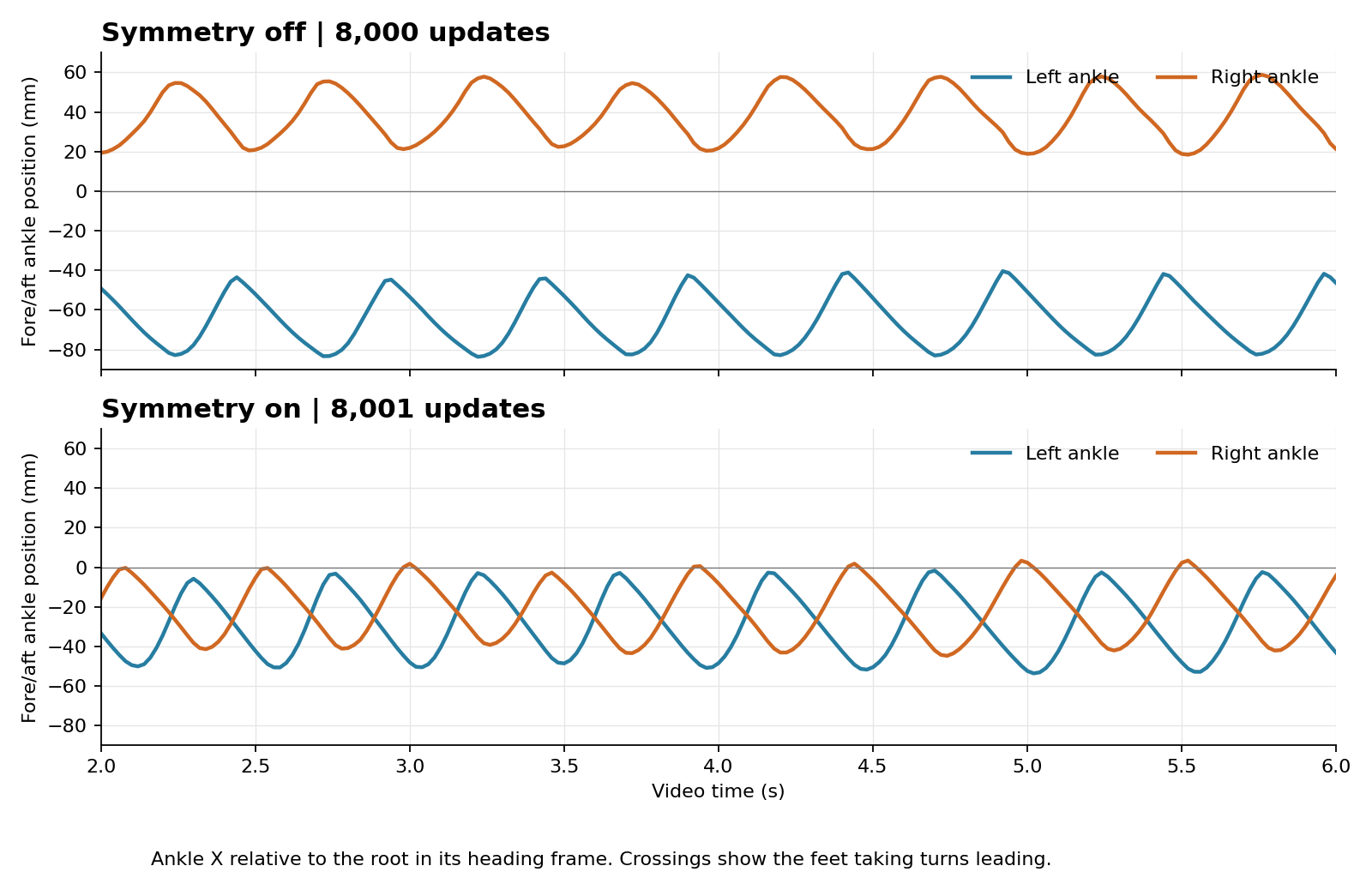
Each line is one ankle’s fore/aft position relative to the trunk, using the robot’s heading frame. When the lines cross, the feet exchange which is ahead. Use the shared time scale to connect those crossings to steps in the video.#
Watch the Original Run Without Symmetry
Watch the policy without symmetry augmentation follow seven commands at simulation speed. Inspect the forward and backward segments for the fixed leading foot.
Watch Each Command#
The video runs at simulation speed. Each eight-second segment starts a fresh rollout: stand, forward, backward, left, right, turn left, and turn right. All seven clips finish without automatic resets.
The labels show requested velocities. Translation is relative to the robot’s heading, so forward travel can move in a different screen direction after the robot turns. The camera follows position without rotating. Fixed starting position and heading make these illustrations easier to compare; use the randomized evaluation above to judge performance across trials.
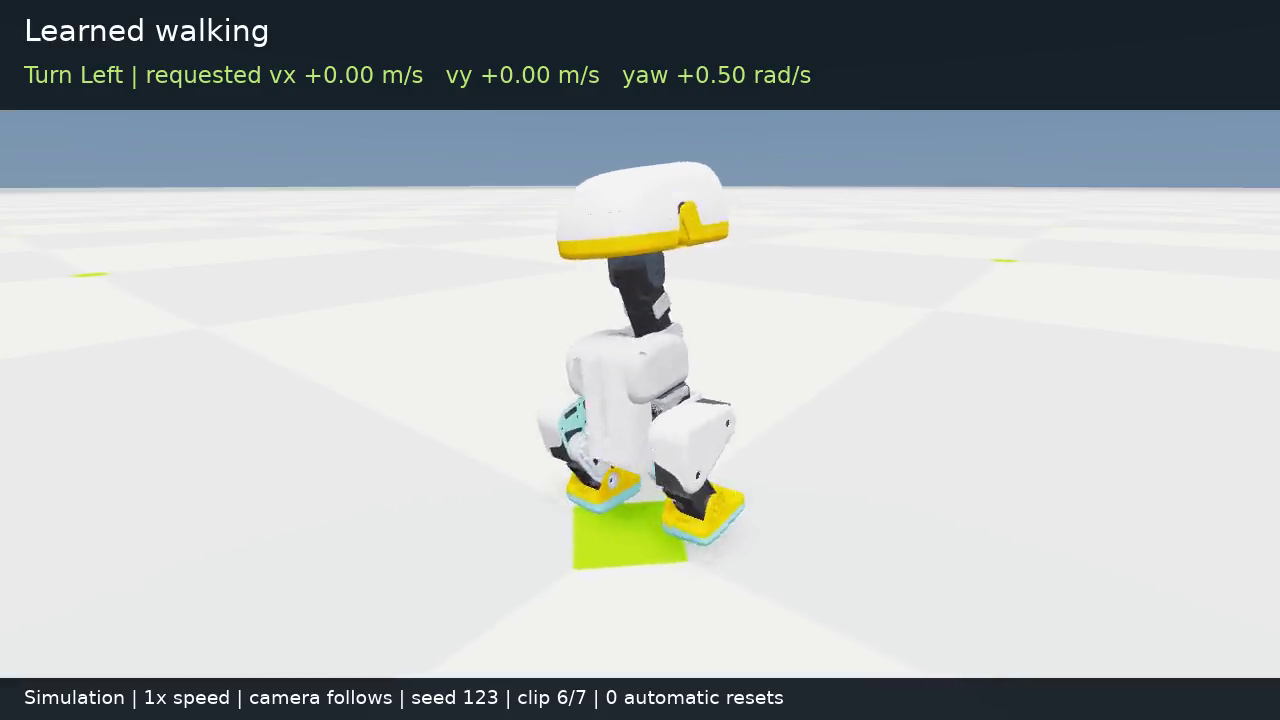
Pause a turn and compare the feet with the trunk. Zero requested translation still requires coordinated joint motion to turn the body.#
To inspect a fixed command with the WALK_CHECKPOINT you evaluated above, run:
uv run --extra viser python scripts/evaluate.py \
    --task Course-Microduck-Walk-v0 --case forward --trials 1 \
    --checkpoint "$WALK_CHECKPOINT" \
    --start-delay 15 --real-time --viz viser --output results/forward.json
Open Viser using the
viewer instructions during the
15-second delay. This trial runs
for up to 20 simulated seconds, then saves its measurements. Change --case
to stand, backward, left, right, turn_left, or turn_right to inspect
another request. The fixed-command results earlier in this lesson use
16 trials per case.
Connect Each Motor’s Actions to the Motion#
Compare two eight-second rollouts at the same forward command of 0.2 m/s. Each row shows one motor’s requested offset from its nominal pose in radians. Select a motor to read its value, or click its trace to see the corresponding video frame. Use Show to focus on one leg or the head.
The video replays the left panel of the gait comparison. Follow the cursor on the ankle-position plot from 2 to 6 seconds. The right foot stays ahead even as the left knee bends and straightens, as in the left panel of Compare With the Original Gait.
Watch the same interval. Here the feet take turns leading.
Slow playback to 0.25×, select left_knee, and pause during a
step. Compare it with left_ankle, then right_knee. Describe how their requests
change while the feet lift and land. Select head_yaw to compare head motion
with the legs. Select left_ankle in each viewer. From 2 to 6 seconds its
requested offset stays negative in the original walker and crosses zero in
the symmetry-trained walker. Repeat with the other joints. How does the timing of the knee
requests line up with the changes in which foot leads?
The plot records requests before encoder-bias correction and motor delay. The servo model and contact determine how the joints move in response. Use Actions and Commands to connect the requested offsets to the control loop.
Keep the Export With the Policy#
The RSL-RL play command also writes exported/policy.pt (TorchScript)
and exported/policy.onnx beside the checkpoint. If the exporter creates a
separate policy.onnx.data file, keep it with the ONNX file. When you play the
supplied checkpoints/microduck/walk.pt, these exports go in
checkpoints/microduck/exported/.
For your own trained checkpoint, look beside its file in the training log directory.
The actor takes 61 observations and emits 14 joint-position offsets. The export includes the observation normalization learned during training. Preserve the input order, units, servo order, nominal pose, and 50 Hz control timing when using it elsewhere. The simulation task adds actuator behavior and physics around those offsets; hardware validation belongs to Simulation to Reality.
Check the Exported Actor Loads
After running playback, load its TorchScript export and check the input/output dimensions with a synthetic input:
uv run python - "$WALK_CHECKPOINT" <<'PY'
from pathlib import Path
import sys

import torch

export = Path(sys.argv[1]).parent / "exported" / "policy.pt"
policy = torch.jit.load(str(export), map_location="cpu")
with torch.inference_mode():
    action = policy(torch.zeros(1, 61))
assert action.shape == (1, 14) and torch.isfinite(action).all()
print("Loaded actor: 61 inputs -> 14 finite action offsets")
PY
This checks the exported file and tensor interface. Use the simulation evaluations to measure the behavior produced from real observations.
A policy can track commands well and still keep one foot in front, so measure both. Next, in Investigate Reward Ablations, compare recorded policies trained with individual reward terms removed. Use their tradeoffs to plan your own slip-weight experiment in the following lessons. Rough terrain is an optional extension.